什么是滚动吸附?
想象一下翻阅实体相册的体验------每一页都会自然地停留在完整的位置,不会卡在两页之间。CSS 滚动吸附正是为数字界面带来这种流畅体验的现代 CSS 机制。
核心概念:滚动吸附允许开发者在用户滚动容器时,将滚动位置"吸附"到预设的特定锚点。这消除了传统滚动中内容停留在尴尬位置的问题,提供了更精准、更愉悦的用户体验。
实际应用场景
-
📱 移动端图片轮播
-
🖥️ 横向产品展示画廊
-
📊 数据仪表板的面板导航
-
📄 全屏幻灯片演示
-
🎮 水平导航菜单
核心技术解析
scroll-snap-type 属性详解
css
.container {
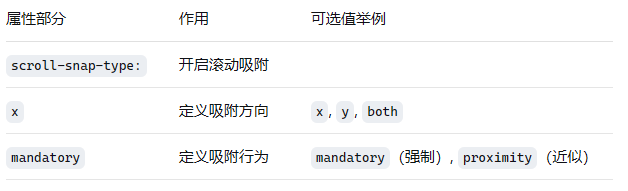
  scroll-snap-type: x mandatory;
}
看似简单的声明包含三个关键部分:
滚动轴方向详解
css
/* 水平滚动吸附 */
scroll-snap-type: x mandatory;

/* 垂直滚动吸附 */
scroll-snap-type: y mandatory;

/* 双向滚动吸附 */
scroll-snap-type: both mandatory;
css
/* 单轴吸附 */
.container-horizontal {
  scroll-snap-type: x mandatory;  /* 水平轴 */
}

.container-vertical {
  scroll-snap-type: y mandatory;  /* 垂直轴 */
}

/* 双轴吸附 - 较少使用但功能强大 */
.container-both {
  scroll-snap-type: both mandatory;  /* 双向吸附 */
}

/* 块级和内联方向 */
.container-block {
  scroll-snap-type: block mandatory;  /* 块级方向 */
}

.container-inline {
  scroll-snap-type: inline mandatory;  /* 内联方向 */
}方向选择指南:
x:适用于横向轮播、水平时间轴
y:适用于垂直文档阅读、全屏滚动页面
both:适用于二维平面导航(较少使用)
方向选择策略:
| 方向 | 适用场景 | 示例 | 注意事项 |
|---|---|---|---|
x |
水平内容流 | 图片轮播、时间轴 | 确保容器有明确宽度 |
y |
垂直内容流 | 全屏滚动、文档阅读 | 适合长内容分段 |
both |
二维导航 | 地图网格、产品矩阵 | 性能要求较高 |
block |
书写模式相关 | 多语言布局 | 根据书写方向变化 |
inline |
内联方向 | 从右到左布局 | 适应不同文本方向 |
吸附严格程度
| 值 | 行为特征 | 适用场景 | 用户体验 |
|---|---|---|---|
mandatory |
强制吸附到最近点,即使轻微滚动也会触发 | 图片轮播、幻灯片演示、需要精准定位的界面 | 确定性高,操作精准 |
proximity |
智能判断,仅在接近吸附点时触发 | 长内容列表、文档阅读器、灵活布局 | 更自然,容错性更好 |
严格程度对比分析:
| 特性 | mandatory |
proximity |
混合策略 |
|---|---|---|---|
| 触发条件 | 任何滚动距离 | 接近吸附点时 | 可编程控制 |
| 用户体验 | 精准确定 | 灵活自然 | 平衡两者 |
| 性能影响 | 较低 | 需要计算距离 | 中等 |
| 适用场景 | 精确导航 | 自由浏览 | 复杂交互 |
| 无障碍性 | 键盘友好 | 可能需要额外处理 | 需要测试 |
css
/* 强制吸附 - 适合精确控制的场景 */
.carousel {
  scroll-snap-type: x mandatory;
}

/* 智能吸附 - 适合自由浏览的场景 */
.document-reader {
  scroll-snap-type: y proximity;
}
css
/* 强制吸附模式 */
.mandatory-example {
  scroll-snap-type: x mandatory;
  /* 立即吸附,无中间状态 */
}

/* 邻近吸附模式 */
.proximity-example {
  scroll-snap-type: x proximity;
  /* 智能判断,更自然的体验 */
}

/* 自定义阈值 */
.custom-proximity {
  scroll-snap-type: x mandatory;
  /* 通过JavaScript控制精确行为 */
}
scroll-snap-align 对齐方式大全
css
.item {
  /* 基本对齐方式 */
  scroll-snap-align: start;    /* 吸附到起始位置 */
  scroll-snap-align: center;   /* 吸附到中心位置 */
  scroll-snap-align: end;      /* 吸附到结束位置 */

  /* 双值语法 - 分别控制两个轴 */
  scroll-snap-align: start center;  /* x: start, y: center */
  scroll-snap-align: end start;     /* x: end, y: start */

  /* 无吸附 */
  scroll-snap-align: none;     /* 不参与吸附 */
}
对齐策略选择指南
css
/* 卡片轮播 - 起始对齐 */
.carousel-item {
  scroll-snap-align: start;
}

/* 图片画廊 - 中心对齐 */
.gallery-item {
  scroll-snap-align: center;
}

/* 时间轴 - 结束对齐 */
.timeline-item {
  scroll-snap-align: end;
}

/* 仪表板 - 双轴控制 */
.dashboard-panel {
  scroll-snap-align: start center;
}
高级属性详解
scroll-snap-stop
css
.item {
  scroll-snap-stop: normal;    /* 默认:可以跳过吸附点 */
  scroll-snap-stop: always;    /* 必须在每个吸附点停止 */
}使用场景:
-
normal:长内容快速滚动时适用 -
always:重要内容确保不会被错过
scroll-padding 和 scroll-margin
css
.container {
  /* 为容器添加内边距,避免内容被遮挡 */
  scroll-padding: 20px;
  scroll-padding-top: 50px;     /* 固定头部情况下 */
  scroll-padding-inline: 10px;  /* 逻辑属性 */
}

.item {
  /* 为吸附项添加外边距,创建视觉间隔 */
  scroll-margin: 10px;
  scroll-margin-block: 20px;    /* 逻辑属性 */
}
实战:构建现代化图片轮播
结构设计
html
<!-- 主轮播容器 -->
<section class="carousel-container" aria-label="产品展示轮播">

  <!-- 滚动吸附容器 -->
  <div class="carousel" role="region" aria-live="polite">

    <!-- 轮播项 1 -->
    <article class="carousel__item" aria-label="第1张图片,共3张">
      <div class="image-wrapper">
        <img
          src="https://images.unsplash.com/photo-1682687220742-aba13b6e50ba?w=800&h=600&fit=crop"
          alt="美丽的自然风景:山峦与湖泊"
          loading="lazy"
        >
      </div>
      <div class="caption">
        <h3>自然风光</h3>
        <p>探索世界上最壮丽的自然景观,感受大自然的鬼斧神工。</p>
      </div>
    </article>

    <!-- 轮播项 2 -->
    <article class="carousel__item" aria-label="第2张图片,共3张">
      <div class="image-wrapper">
        <img
          src="https://images.unsplash.com/photo-1682687221363-72518513620e?w=800&h=600&fit=crop"
          alt="现代城市建筑:高楼大厦与蓝天"
          loading="lazy"
        >
      </div>
      <div class="caption">
        <h3>城市建筑</h3>
        <p>现代都市的钢铁森林,展现人类文明的智慧与创造力。</p>
      </div>
    </article>

    <!-- 轮播项 3 -->
    <article class="carousel__item" aria-label="第3张图片,共3张">
      <div class="image-wrapper">
        <img
          src="https://images.unsplash.com/photo-1682695797873-aa4cb6ea613b?w=800&h=600&fit=crop"
          alt="海滩日落:金色阳光洒在海面上"
          loading="lazy"
        >
      </div>
      <div class="caption">
        <h3>海滩日落</h3>
        <p>感受海风的轻抚,欣赏日落时分的金色海洋。</p>
      </div>
    </article>

  </div>

  <!-- 导航指示器 -->
  <nav class="carousel-indicators" aria-label="轮播导航">
    <button class="indicator active" data-slide="0" aria-current="true">
      <span class="sr-only">转到第一张图片</span>
    </button>
    <button class="indicator" data-slide="1">
      <span class="sr-only">转到第二张图片</span>
    </button>
    <button class="indicator" data-slide="2">
      <span class="sr-only">转到第三张图片</span>
    </button>
  </nav>

  <!-- 导航按钮 -->
  <div class="carousel-controls">
    <button class="carousel-btn prev" aria-label="上一张">
      <svg width="24" height="24" viewBox="0 0 24 24" fill="currentColor">
        <path d="M15.41 7.41L14 6l-6 6 6 6 1.41-1.41L10.83 12z"/>
      </svg>
    </button>
    <button class="carousel-btn next" aria-label="下一张">
      <svg width="24" height="24" viewBox="0 0 24 24" fill="currentColor">
        <path d="M10 6L8.59 7.41 13.17 12l-4.58 4.59L10 18l6-6z"/>
      </svg>
    </button>
  </div>

</section>
样式实现
css
/* 基础重置与容器样式 */
.carousel-container {
  position: relative;
  max-width: 1200px;
  margin: 2rem auto;
  padding: 0 20px;
}

/* 滚动吸附核心容器 */
.carousel {
  width: 100%;
  height: 500px;
  overflow-x: auto;
  display: flex;
  scroll-snap-type: x mandatory;
  scroll-behavior: smooth;
  -webkit-overflow-scrolling: touch; /* iOS 平滑滚动 */

  /* 视觉样式 */
  background: linear-gradient(135deg, #667eea 0%, #764ba2 100%);
  border-radius: 16px;
  box-shadow:
    0 20px 40px rgba(0, 0, 0, 0.1),
    0 0 0 1px rgba(255, 255, 255, 0.1) inset;

  /* 隐藏滚动条 - 跨浏览器方案 */
  scrollbar-width: none; /* Firefox */
  -ms-overflow-style: none; /* IE/Edge */
}

.carousel::-webkit-scrollbar {
  display: none; /* Chrome/Safari/Edge */
}

/* 轮播项样式 */
.carousel__item {
  /* 滚动吸附关键属性 */
  scroll-snap-align: start;
  scroll-snap-stop: always;

  /* 布局属性 */
  flex: 0 0 100%;
  position: relative;
  display: flex;
  flex-direction: column;
  align-items: center;
  justify-content: center;
  padding: 40px;
  box-sizing: border-box;

  /* 动画过渡 */
  transition: transform 0.3s ease, opacity 0.3s ease;
}

/* 图片容器 */
.image-wrapper {
  width: 100%;
  max-width: 600px;
  height: 300px;
  border-radius: 12px;
  overflow: hidden;
  box-shadow: 0 8px 32px rgba(0, 0, 0, 0.3);
  transition: transform 0.3s ease;
}

.carousel__item:hover .image-wrapper {
  transform: scale(1.02);
}

.image-wrapper img {
  width: 100%;
  height: 100%;
  object-fit: cover;
  object-position: center;
  transition: transform 0.5s ease;
}

.carousel__item:hover img {
  transform: scale(1.05);
}

/* 标题和描述 */
.caption {
  margin-top: 30px;
  text-align: center;
  max-width: 500px;
}

.caption h3 {
  font-size: 2rem;
  font-weight: 700;
  color: white;
  margin: 0 0 12px 0;
  text-shadow: 0 2px 4px rgba(0, 0, 0, 0.3);
}

.caption p {
  font-size: 1.1rem;
  line-height: 1.6;
  color: rgba(255, 255, 255, 0.9);
  margin: 0;
}

/* 指示器样式 */
.carousel-indicators {
  display: flex;
  justify-content: center;
  gap: 12px;
  margin-top: 30px;
}

.indicator {
  width: 16px;
  height: 16px;
  border-radius: 50%;
  border: 2px solid #667eea;
  background: transparent;
  cursor: pointer;
  transition: all 0.3s ease;
  position: relative;
}

.indicator::before {
  content: '';
  position: absolute;
  top: 50%;
  left: 50%;
  transform: translate(-50%, -50%) scale(0);
  width: 8px;
  height: 8px;
  border-radius: 50%;
  background: #667eea;
  transition: transform 0.3s ease;
}

.indicator.active {
  border-color: #4a6ee0;
  transform: scale(1.2);
}

.indicator.active::before {
  transform: translate(-50%, -50%) scale(1);
}

.indicator:hover {
  border-color: #4a6ee0;
  transform: scale(1.1);
}

/* 导航按钮 */
.carousel-controls {
  position: absolute;
  top: 50%;
  left: 0;
  right: 0;
  transform: translateY(-50%);
  display: flex;
  justify-content: space-between;
  padding: 0 20px;
  pointer-events: none;
}

.carousel-btn {
  width: 56px;
  height: 56px;
  border: none;
  border-radius: 50%;
  background: rgba(255, 255, 255, 0.9);
  color: #333;
  cursor: pointer;
  display: flex;
  align-items: center;
  justify-content: center;
  transition: all 0.3s ease;
  pointer-events: all;
  box-shadow: 0 4px 16px rgba(0, 0, 0, 0.2);
  backdrop-filter: blur(10px);
}

.carousel-btn:hover {
  background: white;
  transform: scale(1.1);
  box-shadow: 0 6px 20px rgba(0, 0, 0, 0.3);
}

.carousel-btn:active {
  transform: scale(0.95);
}

/* 隐藏文本(无障碍访问) */
.sr-only {
  position: absolute;
  width: 1px;
  height: 1px;
  padding: 0;
  margin: -1px;
  overflow: hidden;
  clip: rect(0, 0, 0, 0);
  white-space: nowrap;
  border: 0;
}
JavaScript 交互增强
javascript
class Carousel {
  constructor(container) {
    this.container = container;
    this.carousel = container.querySelector('.carousel');
    this.indicators = container.querySelectorAll('.indicator');
    this.prevBtn = container.querySelector('.carousel-btn.prev');
    this.nextBtn = container.querySelector('.carousel-btn.next');
    this.items = container.querySelectorAll('.carousel__item');

    this.currentIndex = 0;
    this.isScrolling = false;

    this.init();
  }

  init() {
    // 绑定事件监听器
    this.carousel.addEventListener('scroll', this.handleScroll.bind(this));
    this.prevBtn.addEventListener('click', this.prev.bind(this));
    this.nextBtn.addEventListener('click', this.next.bind(this));

    // 绑定指示器点击事件
    this.indicators.forEach((indicator, index) => {
      indicator.addEventListener('click', () => this.goToSlide(index));
    });

    // 添加键盘导航
    this.container.addEventListener('keydown', this.handleKeydown.bind(this));

    // 初始更新
    this.updateIndicators();
  }

  handleScroll() {
    if (this.isScrolling) return;

    requestAnimationFrame(() => {
      const scrollLeft = this.carousel.scrollLeft;
      const itemWidth = this.items[0].offsetWidth;
      const newIndex = Math.round(scrollLeft / itemWidth);

      if (newIndex !== this.currentIndex) {
        this.currentIndex = newIndex;
        this.updateIndicators();
      }
    });
  }

  updateIndicators() {
    this.indicators.forEach((indicator, index) => {
      const isActive = index === this.currentIndex;
      indicator.classList.toggle('active', isActive);
      indicator.setAttribute('aria-current', isActive);

      // 更新隐藏文本
      const srText = indicator.querySelector('.sr-only');
      srText.textContent = isActive ?
        `当前显示第${index + 1}张图片` :
        `转到第${index + 1}张图片`;
    });

    // 更新按钮状态
    this.prevBtn.disabled = this.currentIndex === 0;
    this.nextBtn.disabled = this.currentIndex === this.items.length - 1;
  }

  prev() {
    if (this.currentIndex > 0) {
      this.goToSlide(this.currentIndex - 1);
    }
  }

  next() {
    if (this.currentIndex < this.items.length - 1) {
      this.goToSlide(this.currentIndex + 1);
    }
  }

  goToSlide(index) {
    if (index < 0 || index >= this.items.length) return;

    this.isScrolling = true;
    this.currentIndex = index;

    const itemWidth = this.items[0].offsetWidth;
    this.carousel.scrollTo({
      left: index * itemWidth,
      behavior: 'smooth'
    });

    this.updateIndicators();

    // 防止滚动事件干扰
    setTimeout(() => {
      this.isScrolling = false;
    }, 300);
  }

  handleKeydown(event) {
    switch(event.key) {
      case 'ArrowLeft':
        event.preventDefault();
        this.prev();
        break;
      case 'ArrowRight':
        event.preventDefault();
        this.next();
        break;
      case 'Home':
        event.preventDefault();
        this.goToSlide(0);
        break;
      case 'End':
        event.preventDefault();
        this.goToSlide(this.items.length - 1);
        break;
    }
  }
}

// 初始化轮播
document.addEventListener('DOMContentLoaded', () => {
  const carouselContainer = document.querySelector('.carousel-container');
  if (carouselContainer) {
    new Carousel(carouselContainer);
  }
});
进阶技巧
响应式适配
css
/* 平板设备优化 */
@media (max-width: 1024px) {
  .carousel {
    height: 400px;
  }

  .carousel__item {
    padding: 30px;
  }

  .caption h3 {
    font-size: 1.75rem;
  }
}

/* 移动设备优化 */
@media (max-width: 768px) {
  .carousel-container {
    padding: 0 16px;
  }

  .carousel {
    height: 350px;
    border-radius: 12px;
  }

  .carousel__item {
    padding: 20px;
  }

  .image-wrapper {
    height: 200px;
  }

  .caption h3 {
    font-size: 1.5rem;
  }

  .caption p {
    font-size: 1rem;
  }

  .carousel-controls {
    padding: 0 10px;
  }

  .carousel-btn {
    width: 48px;
    height: 48px;
  }
}

/* 大屏幕显示多个项目 */
@media (min-width: 1440px) {
  .carousel__item {
    flex: 0 0 50%; /* 显示两个项目 */
  }

  .carousel {
    scroll-snap-type: x mandatory;
  }
}
性能优化
css
/* 优化渲染性能 */
.carousel {
  /* 触发GPU加速 */
  transform: translateZ(0);
  /* 减少重绘 */
  will-change: scroll-position;
}

.carousel__item {
  /* 优化图片渲染 */
  contain: layout style paint;
}

/* 减少布局抖动 */
.image-wrapper {
  /* 预留图片空间,防止布局偏移 */
  aspect-ratio: 16 / 9;
  background: #f0f0f0;
}

.image-wrapper img {
  /* 平滑图片加载 */
  transition: opacity 0.3s ease;
}

.image-wrapper img[loading="lazy"] {
  /* 懒加载时的占位样式 */
  opacity: 0;
}

.image-wrapper img.loaded {
  opacity: 1;
}
无障碍访问
css
/* 焦点样式 */
.carousel-btn:focus,
.indicator:focus {
  outline: 3px solid #4a6ee0;
  outline-offset: 2px;
}

/* 减少动画偏好 */
@media (prefers-reduced-motion: reduce) {
  .carousel {
    scroll-behavior: auto;
  }

  .carousel__item,
  .image-wrapper,
  .carousel-btn {
    transition: none;
  }
}

/* 高对比度模式支持 */
@media (prefers-contrast: high) {
  .carousel-btn {
    background: white;
    color: black;
    border: 2px solid black;
  }

  .indicator {
    border-color: currentColor;
  }
}
浏览器兼容性与降级
javascript
// 检测滚动吸附支持
function supportsScrollSnap() {
  return 'scrollSnapType' in document.documentElement.style ||
         'webkitScrollSnapType' in document.documentElement.style;
}

// 不支持时的降级处理
if (!supportsScrollSnap()) {
  document.querySelectorAll('.carousel').forEach(carousel => {
    carousel.classList.add('no-scroll-snap');

    // 使用 JavaScript 实现类似效果
    implementScrollSnapFallback(carousel);
  });
}


/* 降级样式 */
.carousel.no-scroll-snap {
  scroll-snap-type: none;
}

.carousel.no-scroll-snap .carousel__item {
  scroll-snap-align: none;
}
实际应用场景
全屏滚动页面
css
.fullpage-container {
  height: 100vh;
  overflow-y: auto;
  scroll-snap-type: y mandatory;
}

.section {
  height: 100vh;
  scroll-snap-align: start;
  scroll-snap-stop: always;
}
横向产品画廊
css
.product-gallery {
  display: flex;
  overflow-x: auto;
  scroll-snap-type: x proximity;
  gap: 20px;
  padding: 20px 0;
}

.product-card {
  flex: 0 0 300px;
  scroll-snap-align: start;
}
时间轴组件
css
.timeline {
  display: flex;
  overflow-x: auto;
  scroll-snap-type: x mandatory;
  padding: 40px 0;
}

.timeline-event {
  flex: 0 0 400px;
  scroll-snap-align: center;
  margin: 0 20px;
}
企业级轮播组件
架构设计思路
html
<!-- 组件化架构 -->
<section class="carousel-system" data-carousel="advanced">

  <!-- 状态指示区 -->
  <header class="carousel-header">
    <h2 class="carousel-title">产品展示</h2>
    <div class="carousel-meta">
      <span class="current-slide">1</span>
      <span class="slide-separator">/</span>
      <span class="total-slides">5</span>
    </div>
  </header>

  <!-- 主内容区 -->
  <div class="carousel-wrapper">

    <!-- 滚动吸附容器 -->
    <div class="carousel-track" role="region" aria-live="polite">

      <!-- 动态生成的轮播项 -->
      <article class="carousel-slide" data-slide-index="0">
        <div class="slide-content">
          <figure class="slide-media">
            <img src="product-1.jpg" alt="智能手表 Pro X" loading="lazy">
            <figcaption class="media-caption">全新一代智能穿戴设备</figcaption>
          </figure>
          <div class="slide-info">
            <h3>智能手表 Pro X</h3>
            <p>革命性的健康监测技术,续航长达 7 天</p>
            <div class="slide-features">
              <span class="feature-tag">心率监测</span>
              <span class="feature-tag">GPS 定位</span>
              <span class="feature-tag">防水 IP68</span>
            </div>
            <button class="cta-button">了解更多</button>
          </div>
        </div>
      </article>

      <!-- 更多轮播项... -->

    </div>

    <!-- 导航控制系统 -->
    <nav class="carousel-navigation">
      <button class="nav-btn prev" aria-label="上一项">
        <svg><!-- 图标 --></svg>
      </button>

      <!-- 进度指示器 -->
      <div class="progress-indicator">
        <div class="progress-bar" role="progressbar"></div>
      </div>

      <button class="nav-btn next" aria-label="下一项">
        <svg><!-- 图标 --></svg>
      </button>
    </nav>

  </div>

  <!-- 缩略图导航 -->
  <aside class="thumbnail-nav" aria-label="快速导航">
    <button class="thumbnail active" data-target="0">
      <img src="thumb-1.jpg" alt="产品缩略图 1">
    </button>
    <!-- 更多缩略图... -->
  </aside>

</section>
css
/* === 设计系统变量 === */
:root {
  /* 颜色系统 */
  --carousel-primary: #2563eb;
  --carousel-secondary: #64748b;
  --carousel-background: #ffffff;
  --carousel-surface: #f8fafc;
  --carousel-border: #e2e8f0;

  /* 间距系统 */
  --carousel-space-xs: 0.5rem;
  --carousel-space-sm: 1rem;
  --carousel-space-md: 1.5rem;
  --carousel-space-lg: 2rem;
  --carousel-space-xl: 3rem;

  /* 阴影系统 */
  --carousel-shadow-sm: 0 1px 2px 0 rgb(0 0 0 / 0.05);
  --carousel-shadow-md: 0 4px 6px -1px rgb(0 0 0 / 0.1);
  --carousel-shadow-lg: 0 10px 15px -3px rgb(0 0 0 / 0.1);

  /* 动画曲线 */
  --carousel-ease: cubic-bezier(0.4, 0, 0.2, 1);
  --carousel-bounce: cubic-bezier(0.34, 1.56, 0.64, 1);
}

/* === 核心滚动吸附样式 === */
.carousel-track {
  /* 滚动吸附核心 */
  scroll-snap-type: x mandatory;
  scroll-behavior: smooth;
  scroll-padding: var(--carousel-space-md);

  /* 布局系统 */
  display: flex;
  overflow-x: auto;
  gap: var(--carousel-space-lg);

  /* 视觉设计 */
  background: var(--carousel-surface);
  border-radius: 16px;
  box-shadow: var(--carousel-shadow-lg);

  /* 性能优化 */
  transform: translateZ(0);
  will-change: scroll-position;

  /* 隐藏滚动条 - 多浏览器方案 */
  scrollbar-width: none;
  -ms-overflow-style: none;
}

.carousel-track::-webkit-scrollbar {
  display: none;
}

/* === 轮播项高级样式 === */
.carousel-slide {
  /* 滚动吸附配置 */
  scroll-snap-align: start;
  scroll-snap-stop: always;
  scroll-margin: var(--carousel-space-md);

  /* 布局系统 */
  flex: 0 0 calc(100% - 2 * var(--carousel-space-md));
  min-width: 0;
  position: relative;

  /* 视觉设计 */
  background: var(--carousel-background);
  border-radius: 12px;
  border: 1px solid var(--carousel-border);
  overflow: hidden;

  /* 动画系统 */
  transition: all 0.3s var(--carousel-ease);
  transform-origin: center left;
}

/* 悬停和焦点状态 */
.carousel-slide:hover,
.carousel-slide:focus-within {
  transform: translateY(-4px);
  box-shadow:
    var(--carousel-shadow-lg),
    0 20px 25px -5px rgb(0 0 0 / 0.1);
}

/* 内容布局 */
.slide-content {
  display: grid;
  grid-template-columns: 1fr 1fr;
  gap: var(--carousel-space-lg);
  height: 400px;
  padding: var(--carousel-space-lg);
}

.slide-media {
  position: relative;
  border-radius: 8px;
  overflow: hidden;
  background: linear-gradient(135deg, #f1f5f9, #e2e8f0);
}

.slide-media img {
  width: 100%;
  height: 100%;
  object-fit: cover;
  transition: transform 0.5s var(--carousel-ease);
}

.carousel-slide:hover .slide-media img {
  transform: scale(1.05);
}

.media-caption {
  position: absolute;
  bottom: 0;
  left: 0;
  right: 0;
  background: linear-gradient(transparent, rgba(0,0,0,0.8));
  color: white;
  padding: var(--carousel-space-md);
  font-size: 0.875rem;
  transform: translateY(100%);
  transition: transform 0.3s var(--carousel-ease);
}

.carousel-slide:hover .media-caption {
  transform: translateY(0);
}

/* 信息面板 */
.slide-info {
  display: flex;
  flex-direction: column;
  justify-content: space-between;
}

.slide-info h3 {
  font-size: 1.5rem;
  font-weight: 700;
  color: #1e293b;
  margin: 0 0 var(--carousel-space-sm) 0;
  line-height: 1.2;
}

.slide-info p {
  color: #64748b;
  line-height: 1.6;
  margin: 0 0 var(--carousel-space-md) 0;
}

.slide-features {
  display: flex;
  flex-wrap: wrap;
  gap: var(--carousel-space-xs);
  margin-bottom: var(--carousel-space-lg);
}

.feature-tag {
  background: #f1f5f9;
  color: #475569;
  padding: 4px 8px;
  border-radius: 20px;
  font-size: 0.75rem;
  font-weight: 500;
}

.cta-button {
  align-self: flex-start;
  background: var(--carousel-primary);
  color: white;
  border: none;
  padding: 12px 24px;
  border-radius: 8px;
  font-weight: 600;
  cursor: pointer;
  transition: all 0.3s var(--carousel-ease);
}

.cta-button:hover {
  background: #1d4ed8;
  transform: translateY(-2px);
  box-shadow: var(--carousel-shadow-md);
}
javascript
class AdvancedCarousel {
  constructor(container) {
    // 核心元素引用
    this.container = container;
    this.track = container.querySelector('.carousel-track');
    this.slides = container.querySelectorAll('.carousel-slide');

    // 状态管理
    this.state = {
      currentIndex: 0,
      totalSlides: this.slides.length,
      isScrolling: false,
      autoPlay: true,
      autoPlayInterval: 5000,
      touchStartX: 0,
      touchEndX: 0
    };

    // 控制器引用
    this.controls = {
      prevBtn: container.querySelector('.nav-btn.prev'),
      nextBtn: container.querySelector('.nav-btn.next'),
      indicators: container.querySelectorAll('.thumbnail'),
      progressBar: container.querySelector('.progress-bar'),
      currentSlide: container.querySelector('.current-slide'),
      totalSlides: container.querySelector('.total-slides')
    };

    this.init();
  }

  init() {
    this.setupEventListeners();
    this.setupAccessibility();
    this.startAutoPlay();
    this.updateUI();

    // 初始化性能监控
    this.setupPerformanceMonitoring();
  }

  setupEventListeners() {
    // 按钮控制
    this.controls.prevBtn?.addEventListener('click', () => this.prev());
    this.controls.nextBtn?.addEventListener('click', () => this.next());

    // 指示器控制
    this.controls.indicators.forEach((indicator, index) => {
      indicator.addEventListener('click', () => this.goToSlide(index));
    });

    // 键盘导航
    this.container.addEventListener('keydown', (e) => this.handleKeydown(e));

    // 触摸事件
    this.track.addEventListener('touchstart', (e) => this.handleTouchStart(e));
    this.track.addEventListener('touchend', (e) => this.handleTouchEnd(e));

    // 滚动事件(防抖)
    this.track.addEventListener('scroll',
      this.debounce(() => this.handleScroll(), 100)
    );

    // 可见性变化(处理自动播放)
    document.addEventListener('visibilitychange', () =>
      this.handleVisibilityChange()
    );

    // 鼠标进入/离开控制自动播放
    this.container.addEventListener('mouseenter', () => this.pauseAutoPlay());
    this.container.addEventListener('mouseleave', () => this.resumeAutoPlay());
  }

  setupAccessibility() {
    // ARIA 属性设置
    this.track.setAttribute('aria-role', 'region');
    this.track.setAttribute('aria-label', '产品轮播');
    this.track.setAttribute('aria-live', 'polite');

    // 为每个幻灯片设置标签
    this.slides.forEach((slide, index) => {
      slide.setAttribute('aria-label', `第 ${index + 1} 项,共 ${this.state.totalSlides} 项`);
      slide.setAttribute('aria-hidden', index !== 0);
    });

    // 按钮标签
    this.controls.prevBtn?.setAttribute('aria-label', '上一项');
    this.controls.nextBtn?.setAttribute('aria-label', '下一项');
  }

  handleScroll() {
    if (this.state.isScrolling) return;

    const scrollLeft = this.track.scrollLeft;
    const slideWidth = this.slides[0].offsetWidth +
      parseInt(getComputedStyle(this.track).gap);
    const newIndex = Math.round(scrollLeft / slideWidth);

    if (newIndex !== this.state.currentIndex) {
      this.state.currentIndex = newIndex;
      this.updateUI();
      this.dispatchCustomEvent('slideChange', { index: newIndex });
    }
  }

  goToSlide(index, behavior = 'smooth') {
    if (index < 0 || index >= this.state.totalSlides) return;

    this.state.isScrolling = true;
    this.state.currentIndex = index;

    const slideWidth = this.slides[0].offsetWidth +
      parseInt(getComputedStyle(this.track).gap);

    this.track.scrollTo({
      left: index * slideWidth,
      behavior: behavior
    });

    this.updateUI();

    // 重置滚动状态
    setTimeout(() => {
      this.state.isScrolling = false;
    }, 300);
  }

  prev() {
    const newIndex = this.state.currentIndex > 0 ?
      this.state.currentIndex - 1 : this.state.totalSlides - 1;
    this.goToSlide(newIndex);
  }

  next() {
    const newIndex = this.state.currentIndex < this.state.totalSlides - 1 ?
      this.state.currentIndex + 1 : 0;
    this.goToSlide(newIndex);
  }

  updateUI() {
    // 更新活动状态
    this.slides.forEach((slide, index) => {
      const isActive = index === this.state.currentIndex;
      slide.setAttribute('aria-hidden', !isActive);
      slide.classList.toggle('active', isActive);
    });

    // 更新指示器
    this.controls.indicators.forEach((indicator, index) => {
      indicator.classList.toggle('active', index === this.state.currentIndex);
      indicator.setAttribute('aria-current',
        index === this.state.currentIndex ? 'true' : 'false'
      );
    });

    // 更新进度
    if (this.controls.progressBar) {
      const progress = ((this.state.currentIndex + 1) / this.state.totalSlides) * 100;
      this.controls.progressBar.style.width = `${progress}%`;
    }

    // 更新计数器
    if (this.controls.currentSlide) {
      this.controls.currentSlide.textContent = this.state.currentIndex + 1;
    }

    // 更新按钮状态
    this.updateButtonStates();
  }

  updateButtonStates() {
    // 可以根据需要禁用边界按钮
    this.controls.prevBtn?.toggleAttribute(
      'disabled', this.state.currentIndex === 0
    );
    this.controls.nextBtn?.toggleAttribute(
      'disabled', this.state.currentIndex === this.state.totalSlides - 1
    );
  }

  // 自动播放控制
  startAutoPlay() {
    if (!this.state.autoPlay) return;

    this.autoPlayTimer = setInterval(() => {
      if (!document.hidden) {
        this.next();
      }
    }, this.state.autoPlayInterval);
  }

  pauseAutoPlay() {
    if (this.autoPlayTimer) {
      clearInterval(this.autoPlayTimer);
      this.autoPlayTimer = null;
    }
  }

  resumeAutoPlay() {
    if (this.state.autoPlay && !this.autoPlayTimer) {
      this.startAutoPlay();
    }
  }

  // 触摸事件处理
  handleTouchStart(e) {
    this.state.touchStartX = e.changedTouches[0].screenX;
    this.pauseAutoPlay();
  }

  handleTouchEnd(e) {
    this.state.touchEndX = e.changedTouches[0].screenX;
    this.handleSwipe();
    this.resumeAutoPlay();
  }

  handleSwipe() {
    const swipeThreshold = 50;
    const diff = this.state.touchStartX - this.state.touchEndX;

    if (Math.abs(diff) > swipeThreshold) {
      if (diff > 0) {
        this.next(); // 向左滑动
      } else {
        this.prev(); // 向右滑动
      }
    }
  }

  // 键盘导航
  handleKeydown(e) {
    switch(e.key) {
      case 'ArrowLeft':
        e.preventDefault();
        this.prev();
        break;
      case 'ArrowRight':
        e.preventDefault();
        this.next();
        break;
      case 'Home':
        e.preventDefault();
        this.goToSlide(0);
        break;
      case 'End':
        e.preventDefault();
        this.goToSlide(this.state.totalSlides - 1);
        break;
      case ' ':
      case 'Enter':
        e.preventDefault();
        // 触发当前活动幻灯片的操作
        this.activateCurrentSlide();
        break;
    }
  }

  activateCurrentSlide() {
    const currentSlide = this.slides[this.state.currentIndex];
    const ctaButton = currentSlide.querySelector('.cta-button');
    if (ctaButton) {
      ctaButton.click();
    }
  }

  // 性能监控
  setupPerformanceMonitoring() {
    const observer = new PerformanceObserver((list) => {
      list.getEntries().forEach((entry) => {
        if (entry.entryType === 'layout-shift') {
          this.reportPerformanceIssue('layout_shift', entry);
        }
      });
    });

    observer.observe({ entryTypes: ['layout-shift'] });
  }

  reportPerformanceIssue(type, data) {
    // 可以发送到监控服务
    console.warn(`Carousel performance issue: ${type}`, data);
  }

  // 工具函数
  debounce(func, wait) {
    let timeout;
    return function executedFunction(...args) {
      const later = () => {
        clearTimeout(timeout);
        func(...args);
      };
      clearTimeout(timeout);
      timeout = setTimeout(later, wait);
    };
  }

  dispatchCustomEvent(eventName, detail) {
    const event = new CustomEvent(`carousel:${eventName}`, {
      bubbles: true,
      detail
    });
    this.container.dispatchEvent(event);
  }

  handleVisibilityChange() {
    if (document.hidden) {
      this.pauseAutoPlay();
    } else {
      this.resumeAutoPlay();
    }
  }

  // 公共 API
  destroy() {
    this.pauseAutoPlay();
    // 清理事件监听器
    // 移除自定义属性
  }
}

// 初始化所有轮播
document.addEventListener('DOMContentLoaded', () => {
  const carousels = document.querySelectorAll('[data-carousel="advanced"]');
  carousels.forEach(container => new AdvancedCarousel(container));
});
高级应用场景
全屏视差滚动页面
css
.parallax-scroller {
  height: 100vh;
  overflow-y: auto;
  scroll-snap-type: y mandatory;
  scroll-behavior: smooth;
}

.parallax-section {
  height: 100vh;
  scroll-snap-align: start;
  position: relative;
  display: flex;
  align-items: center;
  justify-content: center;
}

/* 视差背景效果 */
.parallax-bg {
  position: absolute;
  top: 0;
  left: 0;
  width: 100%;
  height: 120%;
  background-size: cover;
  background-position: center;
  transform: translateZ(0);
  will-change: transform;
}
响应式卡片网格
css
.responsive-grid {
  display: grid;
  grid-auto-flow: column;
  gap: 1rem;
  overflow-x: auto;
  scroll-snap-type: x mandatory;
  padding: 1rem 0;
}

.grid-item {
  scroll-snap-align: start;
  min-width: min(300px, 80vw);
}

/* 响应式断点 */
@media (min-width: 768px) {
  .grid-item {
    min-width: 400px;
  }
}

@media (min-width: 1024px) {
  .responsive-grid {
    grid-template-columns: repeat(auto-fit, minmax(300px, 1fr));
    grid-auto-flow: row;
    overflow-x: visible;
    scroll-snap-type: none;
  }

  .grid-item {
    min-width: auto;
    scroll-snap-align: none;
  }
}
时间轴组件
css
.timeline {
  display: flex;
  overflow-x: auto;
  scroll-snap-type: x mandatory;
  gap: 2rem;
  padding: 2rem 0;
  position: relative;
}

.timeline::before {
  content: '';
  position: absolute;
  top: 50%;
  left: 0;
  right: 0;
  height: 2px;
  background: #e2e8f0;
  transform: translateY(-50%);
}

.timeline-event {
  scroll-snap-align: center;
  flex: 0 0 300px;
  position: relative;
  background: white;
  padding: 1.5rem;
  border-radius: 8px;
  box-shadow: 0 4px 6px -1px rgb(0 0 0 / 0.1);
}

.timeline-event::before {
  content: '';
  position: absolute;
  top: 50%;
  left: -1rem;
  width: 12px;
  height: 12px;
  background: #3b82f6;
  border-radius: 50%;
  transform: translateY(-50%);
}
性能优化
渲染性能优化
css
.carousel-optimized {
  /* 触发 GPU 加速 */
  transform: translate3d(0, 0, 0);
  backface-visibility: hidden;
  perspective: 1000px;

  /* 减少重绘 */
  contain: layout style paint;
  content-visibility: auto;

  /* 优化滚动 */
  scroll-behavior: smooth;
  -webkit-overflow-scrolling: touch;
}

.carousel-slide {
  /* 图片优化 */
  image-rendering: -webkit-optimize-contrast;
  image-rendering: crisp-edges;

  /* 减少布局抖动 */
  aspect-ratio: 16 / 9;
}
内存管理
javascript
class MemoryOptimizedCarousel extends AdvancedCarousel {
  constructor(container) {
    super(container);
    this.intersectionObserver = this.setupLazyLoading();
  }

  setupLazyLoading() {
    const observer = new IntersectionObserver((entries) => {
      entries.forEach(entry => {
        if (entry.isIntersecting) {
          this.loadSlideContent(entry.target);
          observer.unobserve(entry.target);
        }
      });
    }, {
      rootMargin: '50px 0px',
      threshold: 0.1
    });

    this.slides.forEach(slide => observer.observe(slide));
    return observer;
  }

  loadSlideContent(slide) {
    const lazyImages = slide.querySelectorAll('img[data-src]');
    lazyImages.forEach(img => {
      img.src = img.dataset.src;
      img.removeAttribute('data-src');
    });
  }

  destroy() {
    super.destroy();
    this.intersectionObserver?.disconnect();
  }
}
无障碍访问
屏幕阅读器优化
html
<div class="carousel"
     role="region"
     aria-roledescription="carousel"
     aria-label="产品展示轮播">

  <div class="carousel-track"
       role="group"
       aria-label="幻灯片"
       aria-live="polite">

    <div class="carousel-slide"
         role="group"
         aria-roledescription="slide"
         aria-label="第 1 张,共 5 张"
         aria-hidden="false">
      <!-- 幻灯片内容 -->
    </div>

  </div>

  <!-- 导航控制 -->
  <div class="carousel-controls">
    <button class="carousel-prev"
            aria-label="上一张幻灯片">
      上一张
    </button>

    <div class="carousel-pagination"
         aria-label="幻灯片导航">
      <button aria-current="true"
              aria-label="幻灯片 1">
        •</button>
    </div>

    <button class="carousel-next"
            aria-label="下一张幻灯片">
      下一张
    </button>
  </div>

</div>
键盘导航增强
css
/* 焦点样式 */
.carousel-control:focus {
  outline: 3px solid #3b82f6;
  outline-offset: 2px;
  border-radius: 4px;
}

/* 减少动画支持 */
@media (prefers-reduced-motion: reduce) {
  .carousel-track {
    scroll-behavior: auto;
  }

  .carousel-slide {
    transition: none;
  }
}

/* 高对比度支持 */
@media (prefers-contrast: high) {
  .carousel-control {
    border: 2px solid currentColor;
  }
}
测试与调试
1. 跨浏览器测试清单
javascript
// 特性检测
const supportsScrollSnap = () => {
  const styles = [
    'scrollSnapType',
    'webkitScrollSnapType',
    'msScrollSnapType'
  ];
  return styles.some(style => style in document.documentElement.style);
};

// 降级方案
if (!supportsScrollSnap()) {
  document.documentElement.classList.add('no-scroll-snap');
  // 启用 JavaScript 回退方案
  implementScrollSnapPolyfill();
}
2. 性能测试工具
javascript
class CarouselBenchmark {
  static measureScrollPerformance(carousel) {
    const metrics = {
      scrollLatency: 0,
      frameRate: 0,
      memoryUsage: 0
    };

    // 测量滚动延迟
    const startTime = performance.now();
    carousel.next();
    const endTime = performance.now();
    metrics.scrollLatency = endTime - startTime;

    // 测量帧率
    this.measureFPS((fps) => {
      metrics.frameRate = fps;
    });

    return metrics;
  }

  static measureFPS(callback) {
    let frames = 0;
    const startTime = performance.now();

    function countFrames() {
      frames++;
      if (performance.now() - startTime < 1000) {
        requestAnimationFrame(countFrames);
      } else {
        callback(frames);
      }
    }

    countFrames();
  }
}
总结与最佳实践
核心原则
-
渐进增强:始终提供基本的滚动体验
-
性能优先:监控和优化渲染性能
-
无障碍访问:确保所有用户都能使用
-
响应式设计:适配各种设备和屏幕尺寸
技术要点
-
合理选择
scroll-snap-type的严格程度 -
使用
scroll-padding避免内容被遮挡 -
实现触摸和键盘导航支持
-
监控性能并实现懒加载
未来展望
随着 CSS 标准的发展,滚动吸附技术将继续进化并带来更多创新功能:
Scroll Snap Level 2 规范
下一代滚动吸附规范将提供更精细的控制选项:
- 支持更复杂的吸附点定位算法
- 增加对对角线滚动的吸附支持
- 提供动态调整吸附强度的能力
- 引入基于滚动速度的智能吸附策略
容器查询集成
未来滚动吸附将与容器查询(CQ)深度整合:
- 实现基于容器实际尺寸的自适应吸附策略
- 允许在不同容器尺寸下定义不同的吸附行为
- 支持响应式布局中的智能吸附点调整
- 示例:在小容器中吸附到每个项目,在大容器中吸附到每组项目
动画系统整合
滚动吸附将与现代Web动画技术深度融合:
- 与Web Animations API的无缝协作
- 支持吸附过程中的过渡动画效果
- 实现吸附完成后的微交互反馈
- 示例:吸附到目标时触发缩放或淡入效果
- 支持与CSS Scroll-Driven Animations的联动
这些发展将使滚动吸附从简单的定位工具进化为完整的交互体验系统,为开发者提供更强大的布局控制能力,同时为用户带来更流畅自然的滚动体验。