vxe-gantt 甘特图使用右键菜单,支持表头菜单、内容菜单、表尾菜单,自定义样式,配置项 menu-config={header,body,footer},实现对按钮的控制,通过 visibleMethod 和 visible | disabled 属性来控制菜单选项的操作权限,可以精确到每一列每一行的显示隐藏与禁用控制

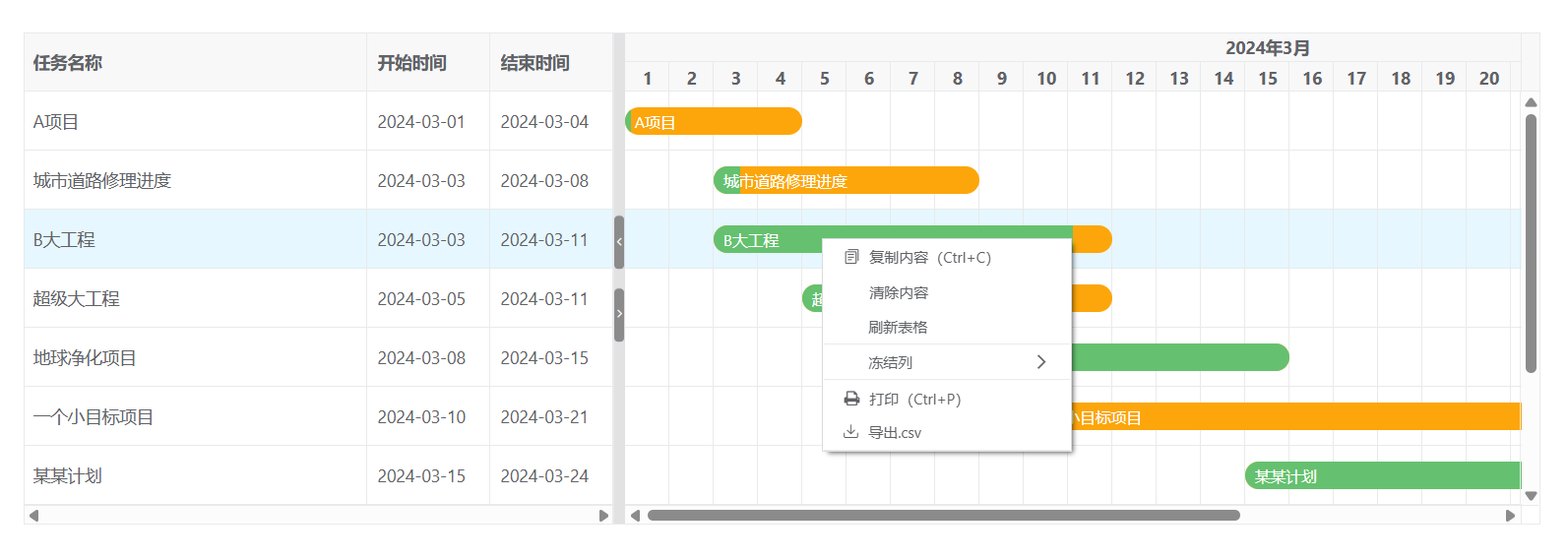
菜单点击后会触发 menu-click 事件,可以对事件进行处理
html
<template>
  <div>
    <vxe-gantt v-bind="ganttOptions" v-on="ganttEvents"></vxe-gantt>
  </div>
</template>

<script setup>
import { reactive } from 'vue'
import { VxeUI } from 'vxe-pc-ui'

const ganttOptions = reactive({
  border: true,
  height: 400,
  rowConfig: {
    isCurrent: true
  },
  columnConfig: {
    resizable: true
  },
  taskBarConfig: {
    showProgress: true,
    showContent: true,
    barStyle: {
      round: true,
      bgColor: '#fca60b',
      completedBgColor: '#65c16f'
    }
  },
  taskViewConfig: {
    tableStyle: {
      width: 480
    }
  },
  columns: [
    { field: 'title', title: '任务名称' },
    { field: 'start', title: '开始时间', width: 100 },
    { field: 'end', title: '结束时间', width: 100 }
  ],
  data: [
    { id: 10001, title: 'A项目', start: '2024-03-01', end: '2024-03-04', progress: 3 },
    { id: 10002, title: '城市道路修理进度', start: '2024-03-03', end: '2024-03-08', progress: 10 },
    { id: 10003, title: 'B大工程', start: '2024-03-03', end: '2024-03-11', progress: 90 },
    { id: 10004, title: '超级大工程', start: '2024-03-05', end: '2024-03-11', progress: 15 },
    { id: 10005, title: '地球净化项目', start: '2024-03-08', end: '2024-03-15', progress: 100 },
    { id: 10006, title: '一个小目标项目', start: '2024-03-10', end: '2024-03-21', progress: 5 },
    { id: 10007, title: '某某计划', start: '2024-03-15', end: '2024-03-24', progress: 70 },
    { id: 10008, title: '某某科技项目', start: '2024-03-20', end: '2024-03-29', progress: 50 },
    { id: 10009, title: '地铁建设工程', start: '2024-03-19', end: '2024-03-20', progress: 5 },
    { id: 10010, title: '铁路修建计划', start: '2024-03-12', end: '2024-03-20', progress: 10 }
  ],
  menuConfig: {
    header: {
    body: {
      options: [
        [
          { code: 'copy', name: '复制内容(Ctrl+C)', prefixConfig: { icon: 'vxe-icon-copy' }, visible: true, disabled: false },
          { code: 'clear', name: '清除内容', visible: true, disabled: false },
          { code: 'reload', name: '刷新表格', visible: true, disabled: false }
        ],
        [
          {
            code: 'fixed',
            name: '冻结列',
            children: [
              { code: 'cancelFixed', name: '取消冻结' },
              { code: 'fixedLeft', name: '冻结在左侧', prefixConfig: { icon: 'vxe-icon-fixed-left' } },
              { code: 'fixedRight', name: '冻结在右侧', prefixConfig: { icon: 'vxe-icon-fixed-right' } }
            ]
          }
        ],
        [
          { code: 'myPrint', name: '打印(Ctrl+P)', prefixConfig: { icon: 'vxe-icon-print' }, visible: true, disabled: false },
          { code: 'myExport', name: '导出.csv', prefixConfig: { icon: 'vxe-icon-download' }, visible: true, disabled: false }
        ]
      ]
    }
  }
})

const ganttEvents = {
  menuClick ({ menu }) {
    VxeUI.modal.message({ content: `点击了 ${menu.code}`, status: 'success' })
  }
}
</script>