1. 环境
因为curl-impersonate库的指纹直接被检测了,不得已自己生成指纹,试了sslcontext只能生成套件,不能自定义很多东西,所以java+bc生成指纹请求
- jdk1.8+
- bouncycastle依赖
- jetty依赖(解析h2)
bash
<dependency>
            <groupId>org.bouncycastle</groupId>
            <artifactId>bcprov-jdk18on</artifactId>
            <!-- 请查看最新版本 -->
            <version>1.83</version>
        </dependency>
        <dependency>
            <groupId>org.bouncycastle</groupId>
            <artifactId>bctls-jdk18on</artifactId>
            <version>1.83</version> <!-- 替换为最新版本 -->
        </dependency>

        <dependency>
            <groupId>org.eclipse.jetty.http2</groupId>
            <artifactId>http2-common</artifactId>
            <version>11.0.21</version>
        </dependency>

        <dependency>
            <groupId>org.eclipse.jetty.http2</groupId>
            <artifactId>http2-hpack</artifactId>
            <version>11.0.21</version>
        </dependency>
        <dependency>
            <groupId>org.eclipse.jetty</groupId>
            <artifactId>jetty-util</artifactId>
            <version>11.0.21</version>
        </dependency>
        <dependency>
            <groupId>org.eclipse.jetty</groupId>
            <artifactId>jetty-http</artifactId>
            <version>11.0.21</version>
        </dependency>
2. 代码(只贴出关键代码)
1. 注册bc,且创建自定义tls客户端(tls拓展和签名算法自己去找,我用的我chrome相同的的扩展和签名算法)
bash
import org.bouncycastle.jce.provider.BouncyCastleProvider;
import org.bouncycastle.tls.*;
import org.bouncycastle.tls.crypto.TlsCrypto;

import java.io.ByteArrayOutputStream;
import java.io.IOException;
import java.security.Security;
import java.util.Hashtable;
import java.util.Iterator;
import java.util.Vector;

public class BcTlsClient extends DefaultTlsClient {
    String host;


    static {
        // 检查是否已经注册,避免重复注册
        if (Security.getProvider(BouncyCastleProvider.PROVIDER_NAME) == null) {
            Security.addProvider(new BouncyCastleProvider());
        }
    }
    public BcTlsClient(TlsCrypto crypto,String host) {
        super(crypto);
        this.host = host;
    }

    @Override
    /**
     * tls拓展
     * todo 顺序问题还未解决,linkedHashMap已经替换源码
     */
    public Hashtable<Integer, byte[]> getClientExtensions() throws IOException {
        Hashtable ext = TlsExtensionsUtils.ensureExtensionsInitialised(super.getClientExtensions());
        ext.clear();
         // ---------- 15) ALPN (16) ----------
        // ALPN 要用 Vector<ProtocolName> 并用 asUtf8 创建
        Vector<ProtocolName> alpn = new Vector<>();
        alpn.add(ProtocolName.asUtf8Encoding("h2"));         // 推荐写法
        alpn.add(ProtocolName.asUtf8Encoding("http/1.1"));   // 推荐写法

        TlsExtensionsUtils.addALPNExtensionClient(ext, alpn);


        Vector<ServerName> serverNames = new Vector<>();
        serverNames.add(new ServerName(NameType.host_name, host.getBytes()));
        TlsExtensionsUtils.addServerNameExtensionClient(ext, serverNames);

}
    @Override
    public boolean isFallback() {
        return false;
    }


//    @Override
//    public void notifyAlertReceived(short alertLevel, short alertDescription) {
//        // 忽略非致命 close_notify;
//        System.out.println("alertLevel=" + alertLevel + ", alertDescription=" + alertDescription);
//    }

    @Override
    public void notifyAlertRaised(short level, short description, String message, Throwable cause) {
        System.out.println("Alert raised: " + description + " msg=" + message);
    }


    @Override
    public ProtocolVersion[] getSupportedVersions() {
        return new ProtocolVersion[] { ProtocolVersion.TLSv13, ProtocolVersion.TLSv12 };
    }
    @Override
    public boolean allowLegacyResumption() {
        return false;
    }

    @Override
    public TlsAuthentication getAuthentication() throws IOException {
        return new TlsAuthentication() {

            // 1. 处理服务端证书
            @Override
            public void notifyServerCertificate(TlsServerCertificate serverCertificate) throws IOException {
                // ❗❗这里你必须自己处理证书验证,否则就算成功也可能被拦
                // 简化:直接信任所有证书(仅用于测试)
//                System.out.println("收到服务端证书,共 " +
//                        serverCertificate.getCertificate().getLength() + " 张");
            }

            // 2. 客户端证书认证(一般不用,返回 null 即可)
            @Override
            public TlsCredentialedSigner getClientCredentials(CertificateRequest certificateRequest)
                    throws IOException {
                return null;
            }

        };

    }


    @Override
    public Vector<SignatureAndHashAlgorithm> getSupportedSignatureAlgorithms() {
        return buildMySigList();
    }

    @Override
    public Vector<SignatureAndHashAlgorithm> getSupportedSignatureAlgorithmsCert() {
        return buildMySigList();
    }

    private Vector<SignatureAndHashAlgorithm> buildMySigList() {
        Vector<SignatureAndHashAlgorithm> v = new Vector<>();
		//签名算法
        return v;
    }


    @Override
    public int[] getSupportedCipherSuites() {
        //chrome 证书套件
        return new int[]{
                47802, //GREASE
                CipherSuite.TLS_AES_128_GCM_SHA256,
                CipherSuite.TLS_AES_256_GCM_SHA384,
                CipherSuite.TLS_CHACHA20_POLY1305_SHA256,
                CipherSuite.TLS_ECDHE_ECDSA_WITH_AES_128_GCM_SHA256,
                CipherSuite.TLS_ECDHE_RSA_WITH_AES_128_GCM_SHA256,
                CipherSuite.TLS_ECDHE_ECDSA_WITH_AES_256_GCM_SHA384,
                CipherSuite.TLS_ECDHE_RSA_WITH_AES_256_GCM_SHA384,
                CipherSuite.TLS_ECDHE_ECDSA_WITH_CHACHA20_POLY1305_SHA256,
                CipherSuite.TLS_ECDHE_RSA_WITH_CHACHA20_POLY1305_SHA256,
                CipherSuite.TLS_ECDHE_RSA_WITH_AES_128_CBC_SHA,
                CipherSuite.TLS_ECDHE_RSA_WITH_AES_256_CBC_SHA,
                CipherSuite.TLS_RSA_WITH_AES_128_GCM_SHA256,
                CipherSuite.TLS_RSA_WITH_AES_256_GCM_SHA384,
                CipherSuite.TLS_RSA_WITH_AES_128_CBC_SHA,
                CipherSuite.TLS_RSA_WITH_AES_256_CBC_SHA,
        };
    }
}
2. h2请求解析
http2请求和http1的解析不一样,这里直接用jetty的代码解析了
bash
public void parseHTTP2(InputStream in) throws Exception {
        ByteBufferPool pool = new ArrayByteBufferPool();
        Parser parser = new Parser(pool, 16 * 1024);
        parser.init(new Parser.Listener.Adapter() {


            @Override
            public void onSettings(SettingsFrame frame) {
                System.out.println("== SETTINGS Frame ==");
                System.out.println(frame.getSettings());
            }

            @Override
            public void onHeaders(HeadersFrame frame) {
                try {
                    MetaData meta = frame.getMetaData();
                    System.out.println("== HEADERS Frame ==");
                    System.out.println(meta);
                } catch (Exception e) {
                    e.printStackTrace();
                }
            }

            @Override
            public void onData(DataFrame frame) {
                ByteBuffer data = frame.getData();
                String s = BufferUtil.toString(data);
                System.out.println("== DATA Frame ==");
                System.out.println(s);
            }

        });

        byte[] tmp = new byte[8192];
        int len = 0;
        try {
            while (true) {
                try {
                    len = in.read(tmp);
                } catch (TlsNoCloseNotifyException e) {
                    // 对端直接关闭连接但未发送 close_notify ------ 把它视为 EOF
                    System.out.println("Warning: peer closed TLS without close_notify. Treating as EOF.");
                    break;
                }

                if (len == -1) {
                    // 正常 EOF
                    break;
                }
                ByteBuffer buf = ByteBuffer.wrap(tmp, 0, len);
                parser.parse(buf); // 你的 Jetty Parser
            }
        } finally {
            // 确保本端发送 close_notify 并释放资源
            try {
                if (protocol != null) {
                    protocol.close(); // TlsClientProtocol/TlsProtocol 的 close() 会尝试发送 close_notify
                }
            } catch (Exception ex) {
                // 忽略或记录
            }
            try { in.close(); } catch (Exception ignore) {}
        }
    }
notice
1.note1 附上结果
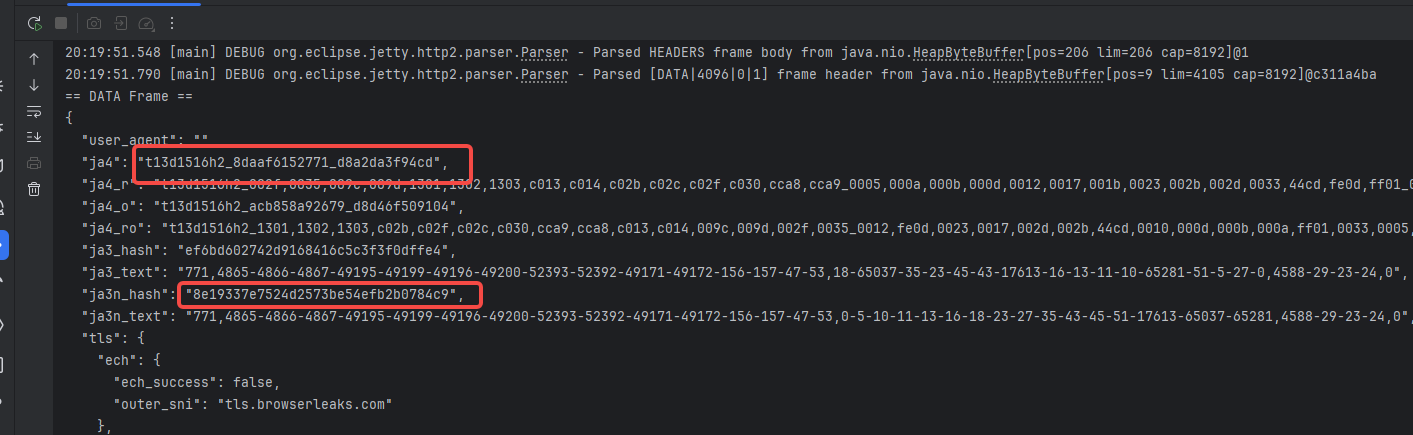
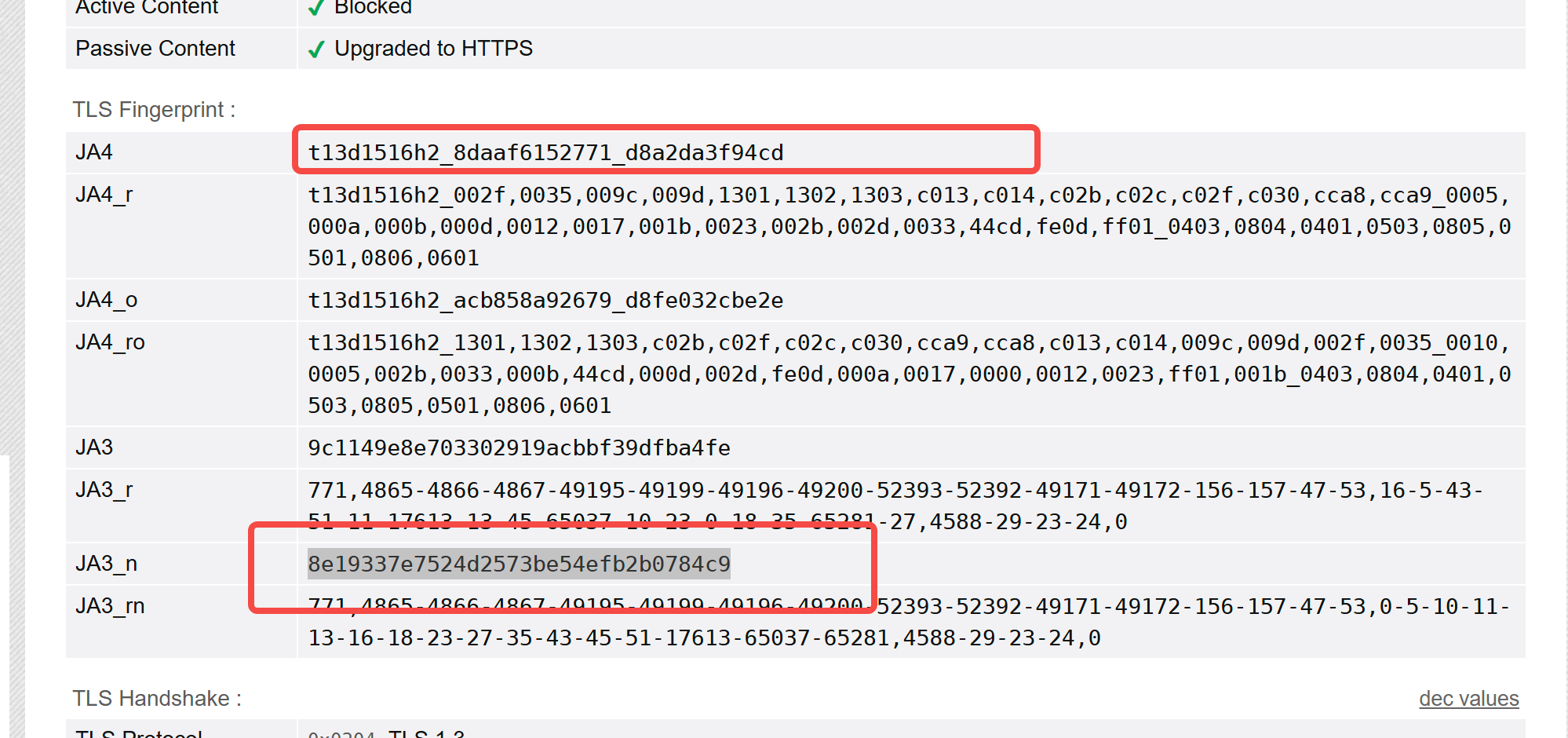
代码非常粗糙,但是基本是这样的,因为tls extension的顺序问题还没搞定,所以拿到的指纹其他值还是有一定区别,要完全模拟得解决这个问题,后面再看吧,搞了三天,眼睛快炸了。
2.鸣谢
感谢 chatgpt,确实好用,特别是国外开源的结果搜索和分析。bc的大部分分析都是靠和chatgpt对,还有很多代码都是chatgpt直接生成的。
太辛苦了,本来想着要不要收费的,想想算了。路过的哥姐拿的时候点个赞吧