目录
[1. K8S前置条件准备](#1. K8S前置条件准备)
[2. 下载安装脚本kubekey](#2. 下载安装脚本kubekey)
[3. 创建配置](#3. 创建配置)
[4. 部署k8s集群和KubeSphere](#4. 部署k8s集群和KubeSphere)
[5. 部署后验证](#5. 部署后验证)
[5.1 KubeSphere登录验证](#5.1 KubeSphere登录验证)
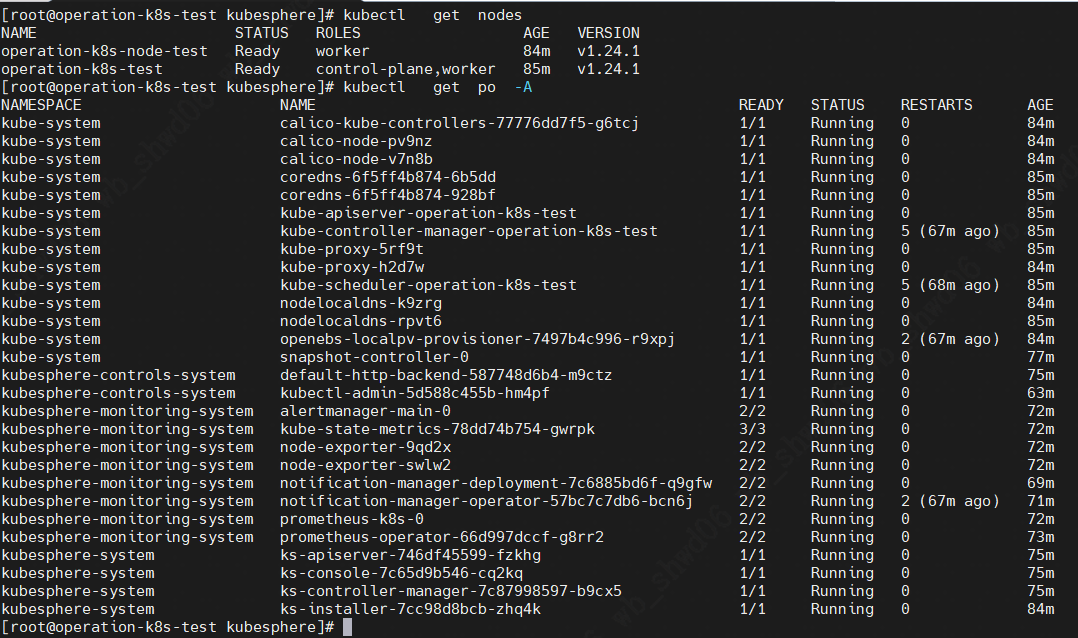
[5.2 K8S验证](#5.2 K8S验证)
1. K8S前置条件准备
参考链接:
https://blog.csdn.net/lmzf2011/article/details/149253441?spm=1001.2014.3001.5501
2. 下载安装脚本kubekey
[root@operation-k8s-test kubesphere]# wget https://github.com/kubesphere/kubekey/releases/download/v3.1.11/kubekey-v3.1.11-linux-amd64.tar.gz下载完,解压压缩包
[root@operation-k8s-test kubesphere]# ll
-rwxr-xr-x  1 root root 84046978 Aug 19 01:06 kk
-rw-r--r--  1 root root 38518611 Dec  3 17:33 kubekey-v3.1.11-linux-amd64.tar.gz
3. 创建配置
./kk create config --with-kubernetes v1.24.1 --with-kubesphere v3.4.1自动生成配置文件config-sample.yaml,修改配置文件,修改后完整文件如下:
apiVersion: kubekey.kubesphere.io/v1alpha2
kind: Cluster
metadata:
  name: sample
spec:
  hosts:
  - {name: operation-k8s-test, address: 10.10.14.222, internalAddress: 10.10.14.222, user: root, password: "Admin@123"}
  - {name: operation-k8s-node-test, address: 10.10.14.226, internalAddress: 10.10.14.226, user: root, password: "Admin@123"}
  roleGroups:
    etcd:
    - operation-k8s-test
    control-plane:
    - operation-k8s-test
    worker:
    - operation-k8s-test
    - operation-k8s-node-test
  controlPlaneEndpoint:
    ## Internal loadbalancer for apiservers
    # internalLoadbalancer: haproxy

    domain: lb.kubesphere.local
    address: ""
    port: 6443
  kubernetes:
    version: v1.24.1
    clusterName: cluster.local
    autoRenewCerts: true
    containerManager: containerd
  etcd:
    type: kubekey
  network:
    plugin: calico
    kubePodsCIDR: 10.233.64.0/18
    kubeServiceCIDR: 10.233.0.0/18
    ## multus support. https://github.com/k8snetworkplumbingwg/multus-cni
    multusCNI:
      enabled: false
  registry:
    privateRegistry: ""
    namespaceOverride: ""
    registryMirrors: []
    insecureRegistries: []
  addons: []


---
apiVersion: installer.kubesphere.io/v1alpha1
kind: ClusterConfiguration
metadata:
  name: ks-installer
  namespace: kubesphere-system
  labels:
    version: v3.4.1
spec:
  persistence:
    storageClass: ""
  authentication:
    jwtSecret: ""
  local_registry: ""
  # dev_tag: ""
  etcd:
    monitoring: false
    endpointIps: localhost
    port: 2379
    tlsEnable: true
  common:
    core:
      console:
        enableMultiLogin: true
        port: 30880
        type: NodePort
    # apiserver:
    #  resources: {}
    # controllerManager:
    #  resources: {}
    redis:
      enabled: false
      enableHA: false
      volumeSize: 2Gi
    openldap:
      enabled: false
      volumeSize: 2Gi
    minio:
      volumeSize: 20Gi
    monitoring:
      # type: external
      endpoint: http://prometheus-operated.kubesphere-monitoring-system.svc:9090
      GPUMonitoring:
        enabled: false
    gpu:
      kinds:
      - resourceName: "nvidia.com/gpu"
        resourceType: "GPU"
        default: true
    es:
      # master:
      #   volumeSize: 4Gi
      #   replicas: 1
      #   resources: {}
      # data:
      #   volumeSize: 20Gi
      #   replicas: 1
      #   resources: {}
      enabled: false
      logMaxAge: 7
      elkPrefix: logstash
      basicAuth:
        enabled: false
        username: ""
        password: ""
      externalElasticsearchHost: ""
      externalElasticsearchPort: ""
    opensearch:
      # master:
      #   volumeSize: 4Gi
      #   replicas: 1
      #   resources: {}
      # data:
      #   volumeSize: 20Gi
      #   replicas: 1
      #   resources: {}
      enabled: true
      logMaxAge: 7
      opensearchPrefix: whizard
      basicAuth:
        enabled: true
        username: "admin"
        password: "admin"
      externalOpensearchHost: ""
      externalOpensearchPort: ""
      dashboard:
        enabled: false
  alerting:
    enabled: false
    # thanosruler:
    #   replicas: 1
    #   resources: {}
  auditing:
    enabled: false
    # operator:
    #   resources: {}
    # webhook:
    #   resources: {}
  devops:
    enabled: false
    jenkinsCpuReq: 0.5
    jenkinsCpuLim: 1
    jenkinsMemoryReq: 4Gi
    jenkinsMemoryLim: 4Gi
    jenkinsVolumeSize: 16Gi
  events:
    enabled: false
    # operator:
    #   resources: {}
    # exporter:
    #   resources: {}
    ruler:
      enabled: true
      replicas: 2
    #   resources: {}
  logging:
    enabled: false
    logsidecar:
      enabled: true
      replicas: 2
      # resources: {}
  metrics_server:
    enabled: false
  monitoring:
    storageClass: ""
    node_exporter:
      port: 9100
      # resources: {}
    # kube_rbac_proxy:
    #   resources: {}
    # kube_state_metrics:
    #   resources: {}
    # prometheus:
    #   replicas: 1
    #   volumeSize: 20Gi
    #   resources: {}
    #   operator:
    #     resources: {}
    # alertmanager:
    #   replicas: 1
    #   resources: {}
    # notification_manager:
    #   resources: {}
    #   operator:
    #     resources: {}
    #   proxy:
    #     resources: {}
    gpu:
      nvidia_dcgm_exporter:
        enabled: false
        # resources: {}
  multicluster:
    clusterRole: none
  network:
    networkpolicy:
      enabled: false
    ippool:
      type: none
    topology:
      type: none
  openpitrix:
    store:
      enabled: false
  servicemesh:
    enabled: false
    istio:
      components:
        ingressGateways:
        - name: istio-ingressgateway
          enabled: false
        cni:
          enabled: false
  edgeruntime:
    enabled: false
    kubeedge:
      enabled: false
      cloudCore:
        cloudHub:
          advertiseAddress:
            - ""
        service:
          cloudhubNodePort: "30000"
          cloudhubQuicNodePort: "30001"
          cloudhubHttpsNodePort: "30002"
          cloudstreamNodePort: "30003"
          tunnelNodePort: "30004"
        # resources: {}
        # hostNetWork: false
      iptables-manager:
        enabled: true
        mode: "external"
        # resources: {}
      # edgeService:
      #   resources: {}
  gatekeeper:
    enabled: false
    # controller_manager:
    #   resources: {}
    # audit:
    #   resources: {}
  terminal:
    timeout: 600
  zone: ""
4. 部署k8s集群和KubeSphere
[root@operation-k8s-test kubesphere]# export KKZONE=cn
[root@operation-k8s-test kubesphere]# ./kk create cluster  -f  config-sample.yaml  --with-kubernetes v1.24.1   --with-kubesphere v3.4.1
5. 部署后验证
5.1 KubeSphere登录验证
NOTES:
Thank you for choosing KubeSphere Helm Chart.

Please be patient and wait for several seconds for the KubeSphere deployment to complete.

1. Wait for Deployment Completion

    Confirm that all KubeSphere components are running by executing the following command:

    kubectl get pods -n kubesphere-system
2. Access the KubeSphere Console

    Once the deployment is complete, you can access the KubeSphere console using the following URL:

    http://10.10.14.222:30880

3. Login to KubeSphere Console

    Use the following credentials to log in:

    Account: admin
    Password: P@88w0rd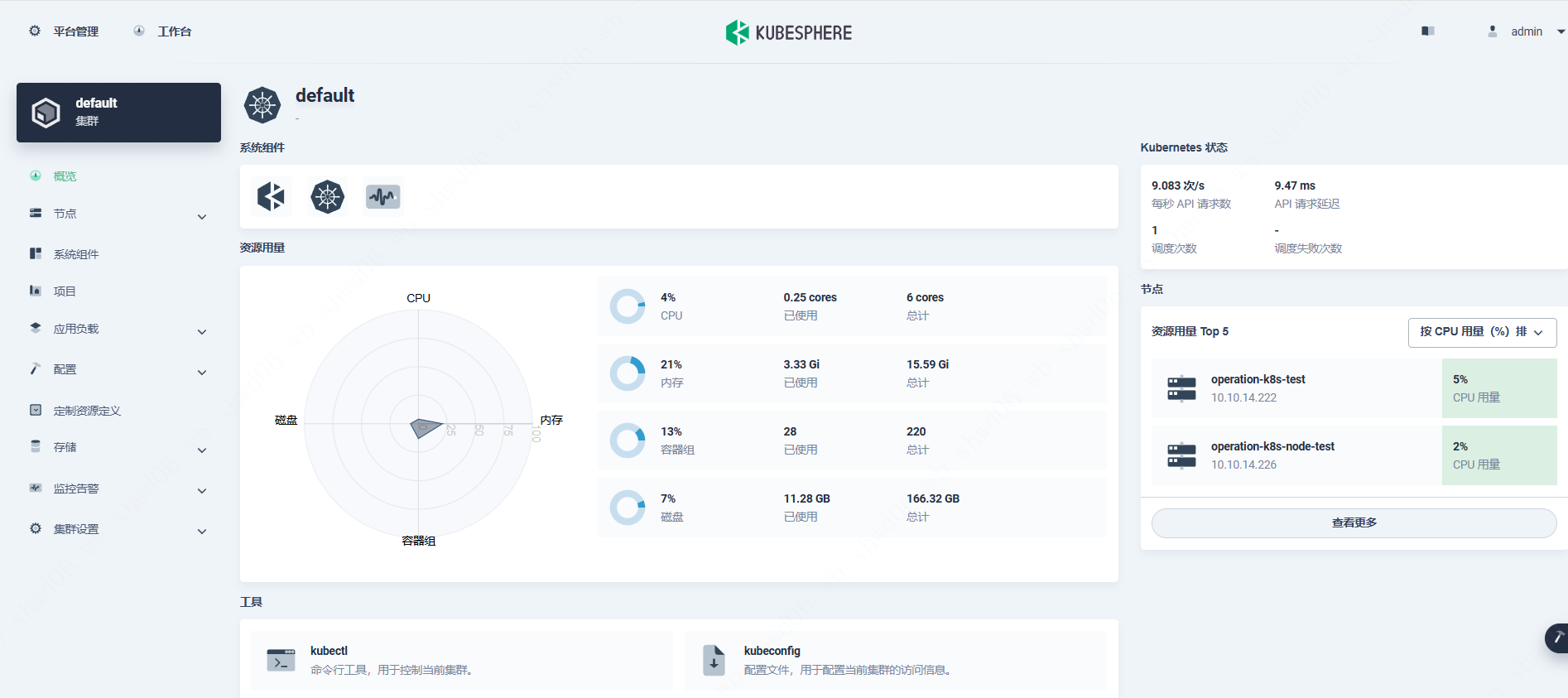
5.2 K8S验证