一、引言
在现代 Web 应用中,文件上传是一个非常常见但又充满挑战的功能。开发者经常会遇到以下痛点:

- 大文件上传容易超时或失败
- 网络不稳定导致上传中断后需要重新上传
- 缺乏良好的用户体验反馈(进度、速度等)
- 难以控制并发上传数量
- 不同场景需要不同的 UI 展示
vue2-niubility-uploader 正是为了解决这些痛点而诞生的一个轻量级、功能强大的 Vue2 上传组件。它不仅提供了完整的上传功能,还具备分片上传、断点续传、拖拽上传等高级特性,让文件上传变得简单而可靠。
希望这篇文章能够帮助你更好地理解和使用 vue2-niubility-uploader 组件,打造出色的文件上传功能!
二、核心特性概览
2.1 基础功能
单文件/多文件上传
组件支持两种上传模式:单文件上传和多文件批量上传。通过简单的 multiple 属性即可切换:
vue
<!-- 单文件上传 -->
<Vue2NiubilityUploader :request-handler="requestHandler" />

<!-- 多文件上传 -->
<Vue2NiubilityUploader :request-handler="requestHandler" multiple />
文件类型和大小限制
通过 accept、limit 和 maxSize 属性,可以轻松控制上传文件的类型、数量和大小:
vue
<Vue2NiubilityUploader
  :request-handler="requestHandler"
  accept="image/*,.pdf,.doc"
  :limit="10"
  :max-size="50*1024*1024"
/>
2.2 高级功能

大文件分片上传
对于大文件上传,组件支持自动分片,将大文件切分成多个小块并行上传,大大提高了上传的可靠性和速度:
vue
<template>
  <Vue2NiubilityUploader
    ref="fileUploader"
    :request-handler="uploadChunk"
    :before-upload="initChunkUpload"
    :chunk-upload-completed="mergeChunks"
    use-chunked-upload
    :chunk-size="10*1024*1024"
    :max-concurrent-uploads="3"
    @file-upload-progress="onProgress"
  />
</template>

<script>
export default {
  methods: {
    async initChunkUpload(fileData) {
      if (!fileData.useChunked) return;

      // 初始化分片上传,获取 uploadId
      const response = await this.$http.post('/api/upload/init', {
        fileName: fileData.file.name,
        fileSize: fileData.file.size,
        totalChunks: fileData.chunks
      });

      // 将 uploadId 保存到扩展数据中
      fileData.extendData.uploadId = response.data.uploadId;

      // 设置已上传的分片索引,组件在上传分片时会跳过这些已上传的分片
      // fileData.setUploadedChunks(fileData.id, response.data.uploadedChunks || []);
      // 如果支持断点续传,返回已上传的分片列表
      return response.data;
    },

    uploadChunk({ chunk, chunkIndex, fileData: chunkFileData }) {
      const formData = new FormData();
      formData.append('file', chunk);
      formData.append('uploadId', chunkFileData.extendData.uploadId);
      formData.append('chunkIndex', chunkIndex);
      formData.append('totalChunks', chunkFileData.chunks);

      return {
        url: '/api/upload/chunk',
        method: 'POST',
        data: formData
      };
    },

    async mergeChunks(fileData) {
      // 所有分片上传完成,合并分片
      const response = await this.$http.post('/api/upload/merge', {
        uploadId: fileData.extendData.uploadId,
        fileName: fileData.file.name,
        totalChunks: fileData.chunks
      });

      return response.data;
    },

    onProgress(fileData) {
      console.log(`${fileData.name} 上传进度: ${fileData.progress}%`);
      console.log(`上传速度: ${fileData.speed}`);
      console.log(`剩余时间: ${fileData.remainingTime}`);
    }
  }
}
</script>
2.3 UI 展示
多种展示模式
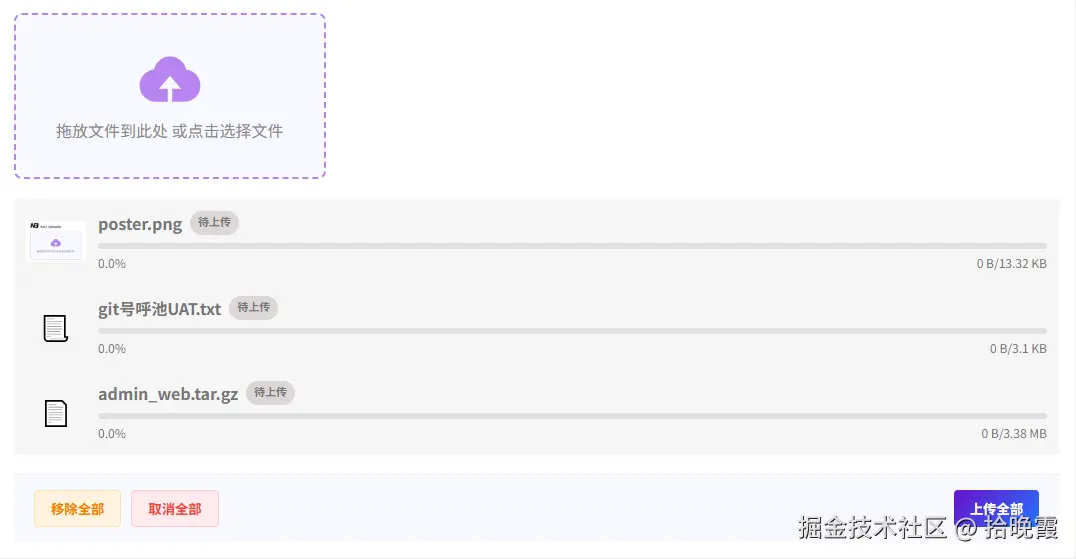
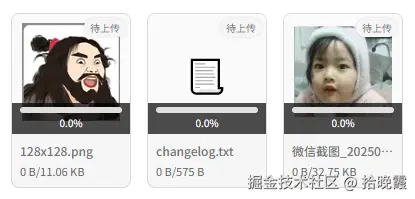
组件提供了两种主要的展示模式:
- 列表模式(default):适合文档、视频等各类文件的展示
- 图片卡片模式(picture-card):专为图片上传优化,支持缩略图预览
vue
<!-- 图片卡片模式 -->
<Vue2NiubilityUploader
  :request-handler="requestHandler"
  list-type="picture-card"
  accept="image/*"
/>
实时进度反馈
每个上传文件都会显示:
- 上传进度百分比
- 实时上传速度
- 预计剩余时间
这些信息通过 FileData 对象实时更新,让用户清楚了解上传状态。
三、技术实现原理
3.1 分片上传机制
分片上传是 vue2-niubility-uploader 的核心技术之一。其工作流程如下:
- 文件切片 :将大文件按照指定的
chunkSize切分成多个小块 - 并发上传 :根据
maxConcurrentUploads设置,并发上传多个分片 - 进度追踪:为每个分片维护独立的上传进度,并汇总计算总体进度
- 分片合并:所有分片上传完成后,调用服务端接口合并分片
核心数据结构 FileData 包含了分片上传所需的所有信息:
typescript
interface FileData {
  id: string;
  file: File;
  useChunked: boolean;           // 是否使用分片上传
  chunks: number;                // 总分片数
  currentChunk: number;          // 当前上传的分片索引
  uploadedChunks: number;        // 已上传的分片数量
  chunkQueue: number[];          // 分片上传队列
  activeChunks: number;          // 当前活跃的分片上传数
  uploadedChunkSet: Set<number>; // 已上传分片的集合(用于断点续传)
  chunkProgressMap: Map;         // 每个分片的上传进度
  // ... 其他属性
}
3.2 断点续传实现
断点续传的关键在于记录和恢复上传状态:
- 状态记录 :使用
uploadedChunkSet记录已成功上传的分片索引 - 进度恢复:暂停后再次上传时,跳过已上传的分片
- 分片验证:可选择在服务端验证已上传分片的完整性
实现断点续传的关键代码逻辑:
javascript
// 上传前检查已上传的分片
async onBeforeUpload(fileData) {
  if (fileData.useChunked) {
    // 初始化分片上传,获取已上传的分片列表
    const response = await fetch('/api/upload/init', {
      method: 'POST',
      body: JSON.stringify({
        fileName: fileData.file.name,
        fileSize: fileData.file.size
      })
    });

    const data = await response.json();
    // 将已上传的分片从队列中移除
    fileData.uploadedChunkSet = new Set(data.uploadedChunks || []);
  }
}
3.3 并发控制
为了避免过多并发请求导致浏览器或服务器压力过大,组件实现了智能的并发控制:
- 全局并发限制 :
maxConcurrentUploads控制同时上传的文件数量 - 分片并发控制:对于单个大文件的多个分片,也有并发限制
- 队列管理:超出并发数的上传任务会进入队列等待
3.4 进度计算与速度预测
进度计算
组件通过监听 XMLHttpRequest 的 progress 事件,实时更新上传进度:
javascript
xhr.upload.addEventListener('progress', (event) => {
  if (event.lengthComputable) {
    const progress = (event.loaded / event.total) * 100;
    // 更新 FileData 的 progress 属性
  }
});
对于分片上传,总进度是所有分片进度的加权平均值。
速度计算
上传速度通过采样计算得出:
- 定期记录已上传的字节数和时间戳
- 计算时间间隔内的字节增量
- 使用移动平均算法平滑速度波动
javascript
// 速度计算示例
const currentBytes = fileData.loaded;
const currentTime = Date.now();
const deltaBytes = currentBytes - fileData.lastUploadedBytes;
const deltaTime = currentTime - fileData.lastUpdateTime;
const speed = deltaBytes / (deltaTime / 1000); // bytes/s

// 使用样本数组平滑速度
fileData.speedSamples.push(speed);
if (fileData.speedSamples.length > 5) {
  fileData.speedSamples.shift();
}
const avgSpeed = fileData.speedSamples.reduce((a, b) => a + b) / fileData.speedSamples.length;
剩余时间预测
基于当前速度和剩余字节数,预测剩余时间:
javascript
const remainingBytes = fileData.size - fileData.loaded;
const remainingTime = remainingBytes / avgSpeed; // seconds
四、 自定义 UI 展示
通过插槽完全自定义文件列表的展示:
vue
<template>
  <Vue2NiubilityUploader
    :request-handler="requestHandler"
    multiple
  >
    <!-- 自定义文件项 -->
    <template #file-item="{ fileData }">
      <div class="custom-file-item">
        <div class="file-info">
          <img :src="getFileIcon(fileData.file)" class="file-icon" />
          <div class="file-details">
            <div class="file-name">{{ fileData.name }}</div>
            <div class="file-size">{{ formatSize(fileData.size) }}</div>
          </div>
        </div>

        <div class="file-progress" v-if="fileData.status === 'uploading'">
          <div class="progress-bar">
            <div
              class="progress-fill"
              :style="{ width: fileData.progress + '%' }"
            ></div>
          </div>
          <div class="progress-info">
            <span>{{ fileData.speed }}</span>
            <span>{{ fileData.remainingTime }}</span>
          </div>
        </div>

        <div class="file-actions">
          <button
            v-if="fileData.status === 'uploading'"
            @click="pauseUpload(fileData)"
          >
            暂停
          </button>
          <button
            v-if="fileData.status === 'paused'"
            @click="resumeUpload(fileData)"
          >
            继续
          </button>
          <button @click="removeFile(fileData)">删除</button>
        </div>
      </div>
    </template>
  </Vue2NiubilityUploader>
</template>

<script>
export default {
  methods: {
    getFileIcon(file) {
      const ext = file.name.split('.').pop().toLowerCase();
      const iconMap = {
        pdf: '/icons/pdf.png',
        doc: '/icons/word.png',
        docx: '/icons/word.png',
        xls: '/icons/excel.png',
        xlsx: '/icons/excel.png',
      };
      return iconMap[ext] || '/icons/file.png';
    },

    formatSize(bytes) {
      if (bytes < 1024) return bytes + ' B';
      if (bytes < 1024 * 1024) return (bytes / 1024).toFixed(2) + ' KB';
      return (bytes / 1024 / 1024).toFixed(2) + ' MB';
    }
  }
}
</script>
五、高级配置与优化
5.1 并发控制优化
在实际应用中,合理设置并发数可以显著提升上传效率:
vue
<Vue2NiubilityUploader
  :request-handler="requestHandler"
  :max-concurrent-uploads="5"
  use-chunked-upload
  :chunk-size="5*1024*1024"
/>
建议配置:
- 小文件(< 10MB):并发数 5-10
- 大文件分片上传:并发数 3-5
- 移动端网络:并发数 2-3
5.2 请求定制
requestHandler 提供了完全的请求定制能力:
javascript
requestHandler(fileData) {
  const { file, isUploadChunk, chunkIndex, chunk, fileData: chunkFileData } = fileData;

  // 根据不同条件返回不同的请求配置
  if (isUploadChunk) {
    // 分片上传
    return {
      url: '/api/upload/chunk',
      method: 'POST',
      data: this.buildChunkFormData(chunk, chunkFileData, chunkIndex),
      headers: {
        'Authorization': `Bearer ${this.token}`,
        'X-Upload-Id': chunkFileData.extendData.uploadId
      },
      // 自定义超时时间
      timeout: 60000,
      // 自定义请求拦截器
      onUploadProgress: (progressEvent) => {
        // 可以在这里做额外的进度处理
      }
    };
  } else {
    // 普通上传
    return {
      url: '/api/upload',
      method: 'POST',
      data: { file, name: file.name }
    };
  }
}
5.3 错误处理与重试
组件内置了完善的错误处理机制,开发者可以通过事件监听自定义错误处理:
vue
<template>
  <Vue2NiubilityUploader
    :request-handler="requestHandler"
    @file-upload-error="onUploadError"
    @file-error="onFileError"
  />
</template>

<script>
export default {
  data() {
    return {
      retryCount: 0,
      maxRetries: 3
    }
  },

  methods: {
    async onUploadError({ fileData, error }) {
      console.error('上传失败:', error);

      // 自动重试逻辑
      if (this.retryCount < this.maxRetries) {
        this.retryCount++;
        this.$message.warning(`上传失败,正在重试 (${this.retryCount}/${this.maxRetries})`);

        // 延迟 2 秒后重试
        await new Promise(resolve => setTimeout(resolve, 2000));
        this.$refs.uploader.retryUpload(fileData);
      } else {
        this.$message.error('上传失败,请检查网络后重试');
        this.retryCount = 0;
      }
    },

    onFileError(errorInfo) {
      // 文件验证错误
      const errorMessages = {
        'exceed-limit': '文件数量超出限制',
        'exceed-size': '文件大小超出限制',
        'invalid-type': '文件类型不符合要求'
      };

      this.$message.error(errorMessages[errorInfo.type] || errorInfo.message);
    }
  }
}
</script>
六、 Node.js 示例实现
javascript
const express = require('express');
const multer = require('multer');
const path = require('path');
const fs = require('fs');
const cors = require('cors');
const { formidable } = require('formidable');

// Create Express app
const app = express();
const PORT = process.env.PORT || 3001;

// Enable CORS
app.use(cors());

// Middleware to parse JSON
app.use(express.json({ limit: '50mb' }));
app.use(express.urlencoded({ extended: true, limit: '50mb' }));

// Create upload directory if it doesn't exist
const uploadDir = path.join(__dirname, 'temp');
if (!fs.existsSync(uploadDir)) {
  fs.mkdirSync(uploadDir, { recursive: true });
}

// Temporary directory for chunked uploads
const tempDir = path.join(__dirname, 'chunk-temp');
if (!fs.existsSync(tempDir)) {
  fs.mkdirSync(tempDir, { recursive: true });
}

// Configure multer for regular file uploads
const storage = multer.diskStorage({
  destination: (req, file, cb) => {
    cb(null, uploadDir);
  },
  filename: (req, file, cb) => {
    // Use original filename with timestamp to avoid conflicts
    const mimeType = file.mimetype;
    const fileName = 'img.' + mimeType.split('/').pop().toLowerCase();
    console.log('multer.diskStorage, filename', fileName, file);
    const ext = path.extname(file.originalname || fileName);
    const name = path.basename(file.originalname || fileName, ext);
    const filename = `${name}_${Date.now()}${ext}`;
    cb(null, filename);
  }
});

const upload = multer({
  storage: storage,
  limits: {
    fileSize: 10 * 1024 * 1024 * 1024 // 10GB max file size
  }
});

// In-memory storage for upload sessions (in production, use Redis or database)
const uploadSessions = new Map();


/**
 * GET /health - Health check endpoint
 */
app.get('/health', (req, res) => {
  res.json({ status: 'OK', timestamp: new Date().toISOString() });
});

/**
 * POST /upload - Single file upload endpoint
 */
app.post('/upload', upload.single('file'), (req, res) => {
  try {
    if (!req.file) {
      return res.status(400).json({ error: 'No file uploaded' });
    }

    let name = req.name;
    // Return success response with file info
    res.json({
      success: true,
      message: 'File uploaded successfully',
      file: {
        filename: req.file.filename || name,
        originalName: req.file.originalname || name,
        size: req.file.size,
        path: req.file.path
      }
    });
  } catch (error) {
    console.error('Upload error:', error);
    res.status(500).json({ error: 'Failed to upload file' });
  }
});

/**
 * POST /upload/init - Initialize a chunked upload session
 */
app.post('/upload/init', async (req, res) => {
  try {
    const { fileName, fileSize, fileType, uploadId } = req.body;
    console.log('/upload/init', req.body);

    if (!fileName || !fileSize) {
      return res.status(400).json({ error: 'Missing required fields: fileName, fileSize' });
    }

    // Create session data
    const session = {
      uploadId,
      fileName,
      fileSize: parseInt(fileSize),
      fileType: fileType || '',
      uploadedSize: 0,
      totalChunks: 0,
      uploadedChunks: new Set(),
      createdAt: new Date().toISOString(),
      expiresAt: new Date(Date.now() + 60 * 60 * 1000).toISOString(), // 1 hours
      tempFilePath: path.join(tempDir, uploadId)
    };

    const tempFilePath = path.resolve(__dirname, `./chunk-temp/${uploadId}`)
    console.log('/upload/init, tempFilePath', fs.existsSync(session.tempFilePath), session.tempFilePath, tempFilePath);
    // Create temporary directory for this upload
    if (!fs.existsSync(tempFilePath)) {
      try {
        fs.mkdirSync(tempFilePath, { recursive: true });
      } catch (err) {
        console.error('创建文件夹失败', err);
      }

    }

    // Store session
    uploadSessions.set(uploadId, session);

    // Clean up expired sessions periodically
    if (uploadSessions.size > 100) { // Clean up if we have too many sessions
      console.log('/upload/init 清空session')
      const now = Date.now();
      for (const [id, session] of uploadSessions) {
        if (new Date(session.expiresAt).getTime() < now) {
          cleanupUploadSession(id);
        }
      }
    }

    // Return session info
    res.json({
      success: true,
      uploadId,
      message: 'Upload session initialized successfully'
    });

  } catch (error) {
    console.error('Init upload error:', error);
    res.status(500).json({ error: 'Failed to initialize upload session' });
  }
});

/**
 * 跨分区移动文件
 * @param sourcePath 源文件地址
 * @param targetPath 目标文件地址
 * @returns {Promise<void>}
 */
async function moveFileAcrossPartitions(sourcePath, targetPath) {
  try {
    // 确保目标目录存在
    const targetDir = path.dirname(targetPath);
    fs.mkdirSync(targetDir, { recursive: true });

    // 创建可读流和可写流
    const readStream = fs.createReadStream(sourcePath);
    const writeStream = fs.createWriteStream(targetPath);

    // 管道传输数据
    await new Promise((resolve, reject) => {
      readStream.pipe(writeStream)
        .on('finish', resolve)
        .on('error', reject);
    });

    // 删除源文件
    fs.unlinkSync(sourcePath);

    console.log(`文件移动成功(跨分区),源文件:${sourcePath},目标文件:${targetPath}`);
  } catch (err) {
    console.error('移动文件失败:', err);
  }
}

app.post('/upload/chunk', async (req, res) => {
  try {

    const form = formidable({
      multiples: false,
      // maxFileSize: 100 * 1024 * 1024 // 100MB
    });

    form.parse(req, async (err, fields, files) => {
      if (err) {
        return res.status(500).json({
          success: false,
          message: '解析表单失败: ' + err.message
        });
      }

      try {
        // console.log('fields', fields);
        const { uploadId, chunkIndex, filename, chunk, totalChunks } = fields;
        const chunkFiles = files.file || [];

        const chunkIndexInt = parseInt(chunkIndex[0]);
        const totalChunksInt = parseInt(totalChunks[0]);
        // console.log('chunkFiles', chunkFiles);
        if (chunkFiles.length == 0) {
          return res.status(400).json({
            success: false,
            message: '未收到分片文件'
          });
        }


        if (!uploadId[0] || isNaN(chunkIndexInt) || isNaN(totalChunks)) {
          return res.status(400).json({ error: 'Missing required fields: uploadId, chunkIndex, totalChunks' });
        }

        // Check if upload session exists
        const session = uploadSessions.get(uploadId[0]);
        if (!session) {
          return res.status(404).json({ error: 'Upload session not found' });
        }

        // Check if chunk was already uploaded
        if (session.uploadedChunks.has(chunkIndexInt)) {
          return res.json({
            success: true,
            message: 'Chunk already uploaded',
            chunkIndex: chunkIndexInt,
            status: 'duplicate'
          });
        }

        // 移动临时文件到目标位置
        const chunkPath = path.join(session.tempFilePath, `chunk_${chunkIndexInt}.tmp`);
        // fs.renameSync(chunkFiles[0].filepath, chunkPath);
        await moveFileAcrossPartitions(chunkFiles[0].filepath, chunkPath);


        // Update session with chunk info
        session.uploadedChunks.add(chunkIndexInt);
        // session.uploadedSize += req.file.size;
        session.uploadedSize += chunkFiles[0].length || 0;
        session.totalChunks = totalChunksInt;

        // Update expiration time
        session.expiresAt = new Date(Date.now() + 60 * 60 * 1000).toISOString();

        // Return success response
        res.json({
          success: true,
          message: 'Chunk uploaded successfully',
          chunkIndex: chunkIndexInt,
          totalChunks: totalChunksInt,
          uploadedSize: session.uploadedSize,
          progress: Math.round((session.uploadedSize / session.fileSize) * 100)
        });

      } catch (error) {
        console.error(error);
        res.status(500).json({
          success: false,
          message: '分片上传失败: ' + error.message
        });
      }
    });

  } catch (error) {
    console.error('Chunk upload error:', error);
    res.status(500).json({ error: 'Failed to upload chunk' });
  }
});

/**
 * POST /upload/finalize - Finalize a chunked upload
 */
app.post('/upload/finalize', async (req, res) => {
  try {
    const { uploadId, fileName, fileSize } = req.body;

    if (!uploadId) {
      return res.status(400).json({ error: 'Missing required field: uploadId' });
    }

    // Check if upload session exists
    const session = uploadSessions.get(uploadId);
    // console.log('/upload/finalize, session', uploadId, session, uploadSessions);
    if (!session) {
      return res.status(404).json({ error: 'Upload session not found' });
    }

    // Verify all chunks were uploaded
    if (session.uploadedChunks.size !== session.totalChunks) {
      const missingChunks = [];
      for (let i = 0; i < session.totalChunks; i++) {
        if (!session.uploadedChunks.has(i)) {
          missingChunks.push(i);
        }
      }

      return res.status(400).json({
        error: 'Not all chunks have been uploaded',
        missingChunks,
        uploadedChunks: Array.from(session.uploadedChunks),
        totalChunks: session.totalChunks
      });
    }

    // Verify file size matches
    if (fileSize && parseInt(fileSize) !== session.fileSize) {
      return res.status(400).json({
        error: 'File size mismatch',
        expected: session.fileSize,
        actual: fileSize
      });
    }

    // Reassemble the file from chunks
    const finalFilePath = path.join(tempDir, session.fileName);
    const writeStream = fs.createWriteStream(finalFilePath);

    // Sort chunks by index and pipe them in order
    const chunkFiles = fs.readdirSync(session.tempFilePath);
    const sortedChunks = chunkFiles
      .filter(f => f.startsWith('chunk_'))
      .sort((a, b) => {
        const indexA = parseInt(a.split('_')[1]);
        const indexB = parseInt(b.split('_')[1]);
        return indexA - indexB;
      });

    let chunksProcessed = 0;

    // console.log('/upload/finalize, sortedChunks', sortedChunks);
    // Process each chunk in sequence
    for (const chunkFile of sortedChunks) {
      const chunkPath = path.join(session.tempFilePath, chunkFile);
      const chunkData = fs.readFileSync(chunkPath);

      if (!writeStream.write(chunkData)) {
        // If the stream wants us to wait, wait until it's ready
        await new Promise(resolve => writeStream.once('drain', resolve));
      }

      chunksProcessed++;
    }

    // Close the write stream
    writeStream.end();

    // Wait for the stream to finish writing
    await new Promise((resolve, reject) => {
      writeStream.on('finish', resolve);
      writeStream.on('error', reject);
    });

    // Verify the final file size
    const finalStats = fs.statSync(finalFilePath);
    if (finalStats.size !== session.fileSize) {
      // Clean up and return error
      fs.unlinkSync(finalFilePath);
      cleanupUploadSession(uploadId);
      return res.status(500).json({
        error: 'Final file size does not match expected size',
        expected: session.fileSize,
        actual: finalStats.size,
        finalFilePath
      });
    }

    // Clean up temporary files
    cleanupUploadSession(uploadId);

    // Return success response
    res.json({
      success: true,
      message: 'File uploaded successfully',
      file: {
        filename: session.fileName,
        size: finalStats.size,
        path: finalFilePath
      }
    });

  } catch (error) {
    console.error('Finalize upload error:', error);
    res.status(500).json({ error: 'Failed to finalize upload' });
  }
});

/**
 * Clean up upload session and temporary files
 * @param {string} uploadId - The upload session ID
 */
function cleanupUploadSession(uploadId) {
  const session = uploadSessions.get(uploadId);
  // console.log('cleanupUploadSession', uploadId, session);
  if (session) {
    // Remove temporary directory
    if (fs.existsSync(session.tempFilePath)) {
      console.log('cleanupUploadSession删除临时目录', session.tempFilePath);
      try {
        fs.rmSync(session.tempFilePath, { recursive: true });
      } catch (error) {
        console.error(`Failed to remove temp directory for ${uploadId}:`, error);
      }
    }

    // Remove session from map
    uploadSessions.delete(uploadId);
  }
}

// Periodic cleanup of expired sessions (every hour)
setInterval(() => {
  const now = Date.now();
  for (const [id, session] of uploadSessions) {
    if (new Date(session.expiresAt).getTime() < now) {
      console.log(`Cleaning up expired upload session: ${id}`);
      cleanupUploadSession(id);
    }
  }
}, 60 * 60 * 1000); // Every hour

// Start server
app.listen(PORT, () => {
  console.log(`服务器运行在端口 ${PORT}`)
  console.log(`文件上传服务器运行在端口 ${PORT}`)
  console.log(`服务地址: http://localhost:${PORT}`)
  console.log(`Upload directory: ${uploadDir}`);
  console.log(`Temp directory: ${tempDir}`);
  if (!fs.existsSync(tempDir)) {
    fs.mkdirSync(tempDir, { recursive: true });
  }
  if (!fs.existsSync(uploadDir)) {
    fs.mkdirSync(uploadDir, { recursive: true });
  }
});

module.exports = app;