Jetpack Compose Brush API 详解 ------ 新手指南
本文详细介绍了如何在 Jetpack Compose 中实现文本渐变效果的方法,利用 Brush API提供的更符合 Compose 习惯用法的新方法,在 TextStyle 和 SpanStyle 中使用 Brush等,这使得为文本添加复杂的颜色变化变得前所未有的简单。
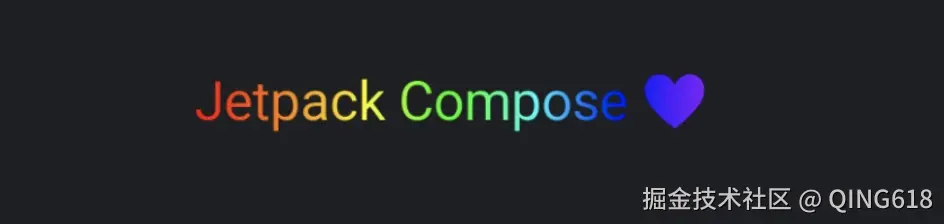
1. Brush 使用 drawWithCache 修饰符 "emoji" 表情也会被绘制
kotlin
Text(
    text = "Jetpack Compose ❤",
    fontSize = 18.sp,
    modifier = Modifier.padding(start = 16.dp, top = 24.dp, end = 16.dp)
        .graphicsLayer(alpha = 0.99f).drawWithCache {
                val brush = Brush.horizontalGradient(rainbowColors)
                onDrawWithContent {
                    drawContent()
                    drawRect(brush, blendMode = BlendMode.SrcAtop)
            }
        }
)
2. Brush 简单使用
kotlin
Text(
    modifier = Modifier.padding(start = 16.dp, top = 24.dp, end = 16.dp),
    text = "Jetpack Compose ❤",
    fontSize = 18.sp,
    style = TextStyle(
        brush = Brush.linearGradient(
            colors = rainbowColors
        )
    )
)
3. Brush 简单使用2(横向、竖向、径向渐变、扇形)
kotlin
// 横向笔刷
Text(
    modifier = Modifier.padding(start = 16.dp, top = 24.dp, end = 16.dp),
    text = "Jetpack Compose" +
            "\nWhere Design Meets Dev in Real-Time" +
            "\n Smart IDE," +
            "\n bringing AI into" +
            "\n your workflow",
    fontSize = 18.sp,
    style = TextStyle(
        brush = Brush.horizontalGradient(
            colors = rainbowColors2
        )
    )
)

// 竖向笔刷
Text(
    modifier = Modifier.padding(start = 16.dp, top = 24.dp, end = 16.dp),
    text = "Jetpack Compose" +
            "\nWhere Design Meets Dev in Real-Time" +
            "\n Smart IDE," +
            "\n bringing AI into" +
            "\n your workflow",
    fontSize = 18.sp,
    style = TextStyle(
        brush = Brush.verticalGradient(
            colors = rainbowColors2
        )
    )
)

// 放射笔刷
Text(
    modifier = Modifier.padding(start = 16.dp, top = 24.dp, end = 16.dp),
    text = "Jetpack Compose" +
            "\nWhere Design Meets Dev in Real-Time" +
            "\n Smart IDE," +
            "\n bringing AI into" +
            "\n your workflow",
    fontSize = 18.sp,
    style = TextStyle(
        brush = Brush.radialGradient(
            colors = rainbowColors2
        )
    )
)

// 扫掠笔刷
Text(
    modifier = Modifier.padding(start = 16.dp, top = 24.dp, end = 16.dp),
    text = "Jetpack Compose" +
            "\nWhere Design Meets Dev in Real-Time" +
            "\n Smart IDE," +
            "\n bringing AI into" +
            "\n your workflow",
    fontSize = 18.sp,
    style = TextStyle(
        brush = Brush.sweepGradient(
            colors = rainbowColors2
        )
    )
)
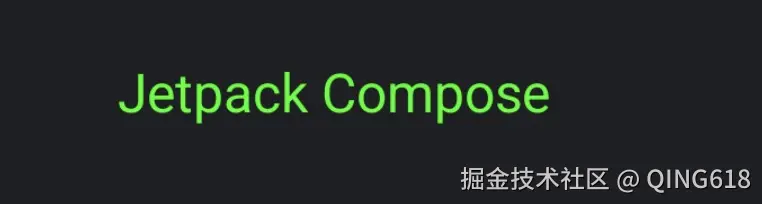
4. Brush 单色
kotlin
// 单色笔刷
Text(
    modifier = Modifier.padding(start = 16.dp, top = 24.dp, end = 16.dp),
    text = "Jetpack Compose" +
            "\nWhere Design Meets Dev in Real-Time" +
            "\n Smart IDE," +
            "\n bringing AI into" +
            "\n your workflow",
    fontSize = 18.sp,
    style = TextStyle(
        brush = SolidColor(Color.Green)
    )
)
5. Brush自定义
kotlin
Text(
    modifier = Modifier.padding(start = 16.dp, top = 24.dp, end = 16.dp),
    text = "Jetpack Compose" +
            "\nWhere Design Meets Dev in Real-Time" +
            "\n Smart IDE," +
            "\n bringing AI into" +
            "\n your workflow",
    fontSize = 18.sp,
    style = TextStyle(
        brush = ScaledRepetitionBrush(Brush.linearGradient(
            colors = rainbowColors,
            tileMode = TileMode.Repeated
        ) as ShaderBrush)
    )
)


//自定义笔刷
class ScaledRepetitionBrush(val shaderBrush: ShaderBrush): ShaderBrush() {
    override fun createShader(size: Size): Shader {
        return shaderBrush.createShader(size / 4f)
    }
}
色值集
kotlin
val rainbowColors = listOf(
    Color(0xFFFF0000),// Red
    Color(0xFFFF7F00),// Orange
    Color(0xFFFFFF00),// Yellow
    Color(0xFF00FF00),// Green
    Color(0xFF00FFFF),// Cyan
    Color(0xFF0000FF),// Blue
    Color(0xFF8B00FF)// Purple (or Violet)
)