什么是 InfluxDB?
InfluxDB 是一个开源的时序数据库(Time Series Database, TSDB),专为高效处理时间序列数据而设计。它适用于实时数据摄取、监控系统、物联网(IoT)传感器数据存储与分析等场景。
主要特性
- 🚀 高性能写入:支持高吞吐数据写入
- 🔍 灵活查询:支持 SQL 和 InfluxQL
- ⚙️ 可扩展架构:支持插件机制,可自定义数据处理逻辑
- 🧩 易于集成:提供多种客户端库(Python、Go、JS 等)
💡 典型应用场景:工业物联网传感器监控、服务器性能监控(CPU/内存)、环境监测(温湿度、CO₂)等。
快速安装
- 拉取镜像
bash
docker pull influxdb:3-core - 创建目录并配置权限
bash
mkdir -p /opt/influxdb3/data
mkdir -p /opt/influxdb3/plugins
chown -R 1500:1500 /opt/influxdb3 # 容器内用户 UID:GID 为 1500:1500- 启动容器
bash
docker run -d -p 8181:8181 \
    --privileged=true \
    -v /opt/influxdb3/data:/var/lib/influxdb3/data \
    -v /opt/influxdb3/plugins:/var/lib/influxdb3/plugins \
    --name influxdb3 \
    influxdb:3-core influxdb3 serve \
        --node-id=influxdb3-master \
        --object-store=file \
        --data-dir=/var/lib/influxdb3/data \
        --plugin-dir=/var/lib/influxdb3/plugins
4.验证容器运行状态
bash
 docker exec -it influxdb3 /bin/bash # 进入容器
 influxdb3 --version # 检查是否正常运行
生成token
- 创建token
bash
influxdb3 create token --admin- 将token设置成环境变量
bash
export TOKEN=[YOUR_TOKEN] # 替换为实际生成的Token- 验证token有效性
bash
influxdb3 show databases --token $TOKEN # 查询数据库列表InfluxDB 行协议详解
InfluxDB 3 为高写入吞吐量设计了行协议,这是一种高效且易读的写入语法,首次写入数据时会自动创建数据库、表及对应 Schema。
行协议结构
一行完整的行协议数据包含 4 个核心部分,格式如下:
plaintext
<table>,<tag-set> <field-set> <timestamp>各部分说明:
- table :表名,如示例中的
myTable; - tag set :标签键值对(键和值均为字符串),多个标签用逗号分隔,如
tag1=val1,tag2=val2; - field set :字段键值对,支持的字段类型有
string(需加引号)、float、integer(后缀i)、unsigned integer、boolean,多个字段用逗号分隔,如field1="v1",field2=1i; - timestamp:Unix 时间戳,需指定精度(如秒、毫秒)。
示例: 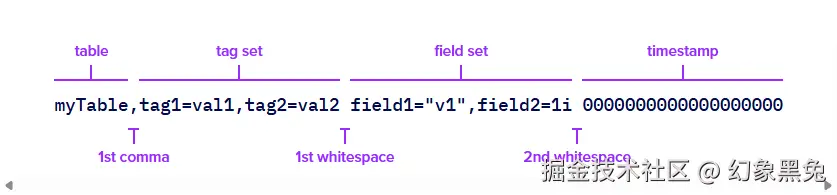
数据写入操作
使用 CLI 写入数据
以家庭环境监控数据为例,写入home_environment数据库:
bash
influxdb3 write \
    --database home_environment\
    --token $TOKEN\
    --precision s \ # 时间戳精度为秒
'home,room=Living\ Room temp=21.1,hum=35.9,co=0i 1641024000
home,room=Kitchen temp=21.0,hum=35.9,co=0i 1641024000
home,room=Living\ Room temp=21.4,hum=35.9,co=0i 1641027600
home,room=Kitchen temp=23.0,hum=36.2,co=0i 1641027600
home,room=Living\ Room temp=21.8,hum=36.0,co=0i 1641031200
home,room=Kitchen temp=22.7,hum=36.1,co=0i 1641031200
home,room=Living\ Room temp=22.2,hum=36.0,co=0i 1641034800
home,room=Kitchen temp=22.4,hum=36.0,co=0i 1641034800
home,room=Living\ Room temp=22.2,hum=35.9,co=0i 1641038400
home,room=Kitchen temp=22.5,hum=36.0,co=0i 1641038400
home,room=Living\ Room temp=22.4,hum=36.0,co=0i 1641042000
home,room=Kitchen temp=22.8,hum=36.5,co=1i 1641042000
home,room=Living\ Room temp=22.3,hum=36.1,co=0i 1641045600
home,room=Kitchen temp=22.8,hum=36.3,co=1i 1641045600
home,room=Living\ Room temp=22.3,hum=36.1,co=1i 1641049200
home,room=Kitchen temp=22.7,hum=36.2,co=3i 1641049200
home,room=Living\ Room temp=22.4,hum=36.0,co=4i 1641052800
home,room=Kitchen temp=22.4,hum=36.0,co=7i 1641052800
home,room=Living\ Room temp=22.6,hum=35.9,co=5i 1641056400
home,room=Kitchen temp=22.7,hum=36.0,co=9i 1641056400
home,room=Living\ Room temp=22.8,hum=36.2,co=9i 1641060000
home,room=Kitchen temp=23.3,hum=36.9,co=18i 1641060000
home,room=Living\ Room temp=22.5,hum=36.3,co=14i 1641063600
home,room=Kitchen temp=23.1,hum=36.6,co=22i 1641063600
home,room=Living\ Room temp=22.2,hum=36.4,co=17i 1641067200
home,room=Kitchen temp=22.7,hum=36.5,co=26i 1641067200'
使用Python客户端写入
安装依赖
bash
uv pip install influxdb3-python编写代码
创建influxdb_write.py文件
python
import os
from influxdb_client_3 import (
  Point,
  InfluxDBError,
  WriteOptions,
  write_client_options,
  InfluxDBClient3
)


points = [
  Point('home')
    .tag('room', 'Bathroom')
    .field('temp', 25.5)
    .field('hum', 50.0)
    .field('co', 9),
  Point('home')
    .tag('room', 'Bedroom')
    .field('temp', 20.0)
    .field('hum', 60.0)
    .field('co', 10)
]

def success(self, data: str):
    print(f"Successfully wrote batch: data: {data}")

def error(self, data: str, exception: InfluxDBError):
    print(f"Failed writing batch: config: {self}, data: {data} due: {exception}")

def retry(self, data: str, exception: InfluxDBError):
    print(f"Failed retry writing batch: config: {self}, data: {data} retry: {exception}")


write_options = WriteOptions(
  batch_size=500,
  flush_interval=10_000,
  jitter_interval=2_000,
  retry_interval=5_000,
  max_retries=3,
  max_retry_delay=30_000,
  exponential_base=2,
)

wco = write_client_options(
  success_callback=success,
  error_callback=error,
  retry_callback=retry,
  write_options=write_options,
)

with InfluxDBClient3(
  host='http://localhost:8181/',
  token=os.getenv("INFLUXDB_TOKEN"),
  database='home_environment',
  write_client_options=wco
) as client:
  client.write(points, write_precision='s')
3.执行写入
bash
export INFLUXDB_TOKEN=[YOUR_INFLUXDB_TOKEN] # 替换为实际Token
python influxdb_write.py
数据库查询操作
InfluxDB 3 支持SQL (推荐,基于 Apache Arrow DataFusion 引擎)和InfluxQL查询,以下以 SQL 为例演示查询操作。
使用 CLI 查询
bash
influxdb3 query \
  --database home_environment \
  --token $TOKEN \
  "SELECT * FROM home ORDER BY time"
使用Python客户端查询
创建influxdb_query.py文件:
python
import os
from pyarrow import Table
from influxdb_client_3 import (
  InfluxDBClient3
)


with InfluxDBClient3(
  host='http://localhost:8181/',
  token=os.getenv("INFLUXDB_TOKEN"),
  database='home_environment'
) as client:
  query = """
    SELECT * FROM home WHERE room = 'Bathroom'
  """
  reader: Table = client.query(query=query, language='sql')
  rows = reader.to_pylist()
  for row in rows:
    print(row) # 打印一行数据
常用SQL查询示例
Schema 查询
sql
-- 查询tables
show tables;

-- 查询table字段
show columns in home;
基础数据查询
sql
-- 查询表中所有数据
SELECT * FROM home;

-- 按时间过滤查询(近1天数据)
SELECT temp, hum, room, time FROM home
WHERE time >= now() - INTERVAL '1 day' AND time <= now();

-- 按标签或字段过滤
SELECT * FROM home WHERE room = 'Bathroom' AND temp >= 22.5;

-- 字段别名
SELECT temp 'temperature', hum 'humidity' FROM home;
聚合查询
sql
-- 计算平均温度和湿度
SELECT AVG(temp) AS temperature, AVG(hum) AS humidity FROM home;

-- 按房间分组,获取每个房间的第一条温度数据
-- 返回示例:[{'time': Timestamp('2022-01-01 08:00:00'), 'temp': 21.0, 'room': 'Kitchen'}]
SELECT
	selector_first(temp, time)['time'] AS time,
	selector_first(temp, time)['value'] AS temp,
	room
FROM home GROUP BY room;
类型转换
sql
SELECT CAST(1234.5 AS BIGINT) AS temp; -- {'temp': 1234}

SELECT 1234.5::BIGINT AS temp; -- {'temp': 1234}

-- 转换表中字段类型
SELECT CAST(time AS time) AS time, CAST(temp AS integer) AS temp, room FROM home;
高级数据分析
sql
-- 计算同房间相邻数据的温差
-- LAG(temp, 1) 表示获取上一条数据的temp值(第一行数据temp_diff为空)
-- LAG(temp, 1, 0) 如果是第一条数据则返回0
-- PARTITION BY room 表示根据房间分割数据。不会跨房间计算
-- ORDER BY time 按时间顺序排序
SELECT
  time,
  room,
  temp,
  temp - LAG(temp, 1) OVER (PARTITION BY room ORDER BY time) AS temp_diff
FROM home
ORDER BY room, time;

-- 计算温度的百分比变化(保留2位小数)
SELECT
  time,
  room,
  temp,
  ROUND(
    (temp - LAG(temp, 1) OVER (PARTITION BY room ORDER BY time)) /
      LAG(temp, 1) OVER (PARTITION BY room ORDER BY time) * 100,
    2
  ) AS precent_change
FROM
  home
ORDER BY
  room,
  time;
自定义插件扩展功能
InfluxDB 3 支持 Python 编写的插件实现功能扩展(如数据转换、定时任务),以下演示统计home表写入行数的插件开发流程。
编写插件代码
在/opt/influxdb3/plugins(插件挂载目录)目录下创建test_plugin.py,内容如下:
python
# 该插件记录每次写入home的数据的行数
def process_writes(influxdb3_local, table_batches, args=None):
    # Process data as it's written to the database
    for table_batch in table_batches:
        table_name = table_batch["table_name"]
        rows = table_batch["rows"]

        # Log information about the write
        influxdb3_local.info(f"Processing {len(rows)} rows from {table_name}")

        # Write derived data back to the database
        line = LineBuilder("test_plugin")
        line.tag("source_table", table_name)
        line.int64_field("row_count", len(rows))
        influxdb3_local.write(line)
创建插件触发器
bash
influxdb3 create trigger\
  --trigger-spec "table:home"\
  --plugin-filename "test_plugin.py"\
  --database home_environment\
  --token $TOKEN \
  test_trigger
验证插件有效性
- 再次向
home表写入数据; - 查询
test_plugin表,验证统计数据是否生成:
sql
SELECT row_count, source_table FROM test_plugin;
-- 预期结果:{'row_count': 2, 'source_table': 'home'}