本文探讨一个很小的问题,很容易被忽略的一个小问题,那就是ORACLE_PDB_SID和ORACLE_SID这两个环境变量;ORACLE_SID这个大家很熟悉了,ORACLE_PDB_SID是CDB模式下的一种连接到某个PDB的方式;当然也可以使用 alter session set container=pdb的方式。来我们看看实例:
[oracle@hostname /home/oracle]$ export ORACLE_SID=CDB[oracle@hostname /home/oracle]$ sqlplus / as sysdbaSQL*Plus: Release 19.0.0.0.0 - Production on Thu Dec 4 15:11:13 2025Version 19.11.0.0.0Copyright (c) 1982, 2020, Oracle. All rights reserved.Connected to:Oracle Database 19c Enterprise Edition Release 19.0.0.0.0 - ProductionVersion 19.11.0.0.0SQL> show con_nameCON_NAME------------------------------CDB$ROOTSQL> show pdbs; CON_ID CON_NAME OPEN MODE RESTRICTED---------- ------------------------------ ---------- ----------- 2 PDB$SEED READ ONLY NO 3 PDB1 READ WRITE NOSQL> exitDisconnected from Oracle Database 19c Enterprise Edition Release 19.0.0.0.0 - ProductionVersion 19.11.0.0.0[oracle@hostname /home/oracle]$ export ORACLE_PDB_SID=PDB1[oracle@hostname /home/oracle]$ sqlplus / as sysdbaSQL*Plus: Release 19.0.0.0.0 - Production on Thu Dec 4 15:12:58 2025Version 19.11.0.0.0Copyright (c) 1982, 2020, Oracle. All rights reserved.Connected to:Oracle Database 19c Enterprise Edition Release 19.0.0.0.0 - ProductionVersion 19.11.0.0.0SQL> show con_name;CON_NAME------------------------------PDB1SQL> exitDisconnected from Oracle Database 19c Enterprise Edition Release 19.0.0.0.0 - ProductionVersion 19.11.0.0.0这一段很简单就是连接到19.11的CDB环境,CDB下有一个PDB1,设置完ORACLE_PDB_SID后可以切换至PDB下。
[oracle@hostname /home/oracle]$ export ORACLE_SID=CDB[oracle@hostname /home/oracle]$ sqlplus / as sysdba紧接上文,如果再执行export ORACLE_SID之后再次sqlplus 请问当前是连接到哪个库?
------分割线------

你会发现连接的还是PDB,除非你执行unset ORACLE_PDB_SID
[oracle@hostname /home/oracle]$ export ORACLE_SID=CDB[oracle@hostname /home/oracle]$ sqlplus / as sysdbaSQL*Plus: Release 19.0.0.0.0 - Production on Thu Dec 4 15:11:13 2025Version 19.11.0.0.0Copyright (c) 1982, 2020, Oracle. All rights reserved.Connected to:Oracle Database 19c Enterprise Edition Release 19.0.0.0.0 - ProductionVersion 19.11.0.0.0SQL> show con_nameCON_NAME------------------------------PDB1[oracle@hostname /home/oracle]$ unset ORACLE_PDB_SID[oracle@hostname /home/oracle]$ sqlplus / as sysdbaSQL*Plus: Release 19.0.0.0.0 - Production on Thu Dec 4 15:14:11 2025Version 19.11.0.0.0Copyright (c) 1982, 2020, Oracle. All rights reserved.Connected to:Oracle Database 19c Enterprise Edition Release 19.0.0.0.0 - ProductionVersion 19.11.0.0.0SQL> show con_name;CON_NAME------------------------------CDB$ROOTSQL> show pdbs; CON_ID CON_NAME OPEN MODE RESTRICTED---------- ------------------------------ ---------- ----------- 2 PDB$SEED READ ONLY NO 3 PDB1 READ WRITE NOSQL> exitDisconnected from Oracle Database 19c Enterprise Edition Release 19.0.0.0.0 - ProductionVersion 19.11.0.0.0why?
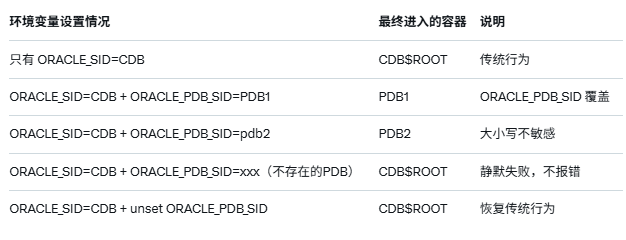
这个其实很容易理解在 Oracle 18c/19c/21c 的多租户环境下做本地 bequeath 连接(sqlplus / as sysdba)时:ORACLE_SID 只负责"先找到哪个 CDB 实例",而 ORACLE_PDB_SID 负责"最终把我扔进哪个 PDB"。
只要 ORACLE_PDB_SID 存在且指向一个真实打开的 PDB,它就会完全覆盖 ORACLE_SID 的默认行为,把你直接带进那个 PDB。最终验证结果如下:
-
从 18c 开始(包括所有 19c 版本)开始,Oracle 在数据库内部默认创建了一个隐藏的系统触发器:
SYS.DBMS_SET_PDB(after logon on database) -
该触发器只对 SYS 和 SYSTEM 用户生效,核心代码如下:
DBMS_SYSTEM.get_env('ORACLE_PDB_SID', pdb_name);if(pdb_name is not null) then EXECUTE IMMEDIATE 'alter session set container = ' || pdb_name;end if; -
关于这两个环境变量官方文档明确写了一句关键话:
"The environment variable ORACLE_SID's value must be declared as well for this direct PDB bequeath connection attempt to successfully work (after all, we initially are still connecting to the database root container)."翻译白话:
ORACLE_SID 必须先设置(用来找到 CDB 实例),但真正决定你最终落在哪个容器里的,是 ORACLE_PDB_SID。 -
参考文档
Performing bequeath direct connections to PDB as SYS and SYSTEM (Doc ID 2728684.1)