1、介绍
本片文章主要是构建一个可以查询数据库的Agent,只需要输入问题,就可以自动查询数据库,并且获得执行SQL的结果。主要实现的功能:
- 生成SQL: 根据用户输入的问题,生成查询SQL的query语句
- 执行SQL : 负责执行SQL获取结果
- 验证SQL: 以防有操作数据的SQL,保证只能查询
- 修正SQL: 如果SQL有错误,尝试修正SQL
2、准备
2.1 环境
请安装一下依赖的第三方库:
python
pip install -U langchain langchain-ollama, langchain-community langchain-core如果遇到错误,可以升级一下pydantic:
python
pip install --upgrade pydantic2.2 数据
从https://www.sqlitetutorial.net/wp-content/uploads/2018/03/chinook.zip 下载一个SQLLite的数据库,数据库的表和表之间的关系,可以参考:https://www.sqlitetutorial.net/wp-content/uploads/2018/03/sqlite-sample-database-diagram.pdf。
3、实现
3.1 导入依赖
python
import re
from langchain_ollama import ChatOllama
from langchain_community.utilities import SQLDatabase
from langchain.agents import create_agent
from langchain_core.tools import tool
from langchain_core.messages import SystemMessage
3.2 构建数据库,并且测试是否可以连接成功
python
print("Setting up database...")

db = SQLDatabase.from_uri("sqlite:///db/Chinook.db")

# check connetion and get basic info

try:
    # testing connection by getting table name
    tables = db.get_table_names()
    print(f"Connected to db successfully!")
    print(f"found {len(tables)} Tables: [{','.join(tables)}]")
except Exception as e:
    print(f"Failed to connect to db")

# get schema of tables
SCHEMA = db.get_table_info()
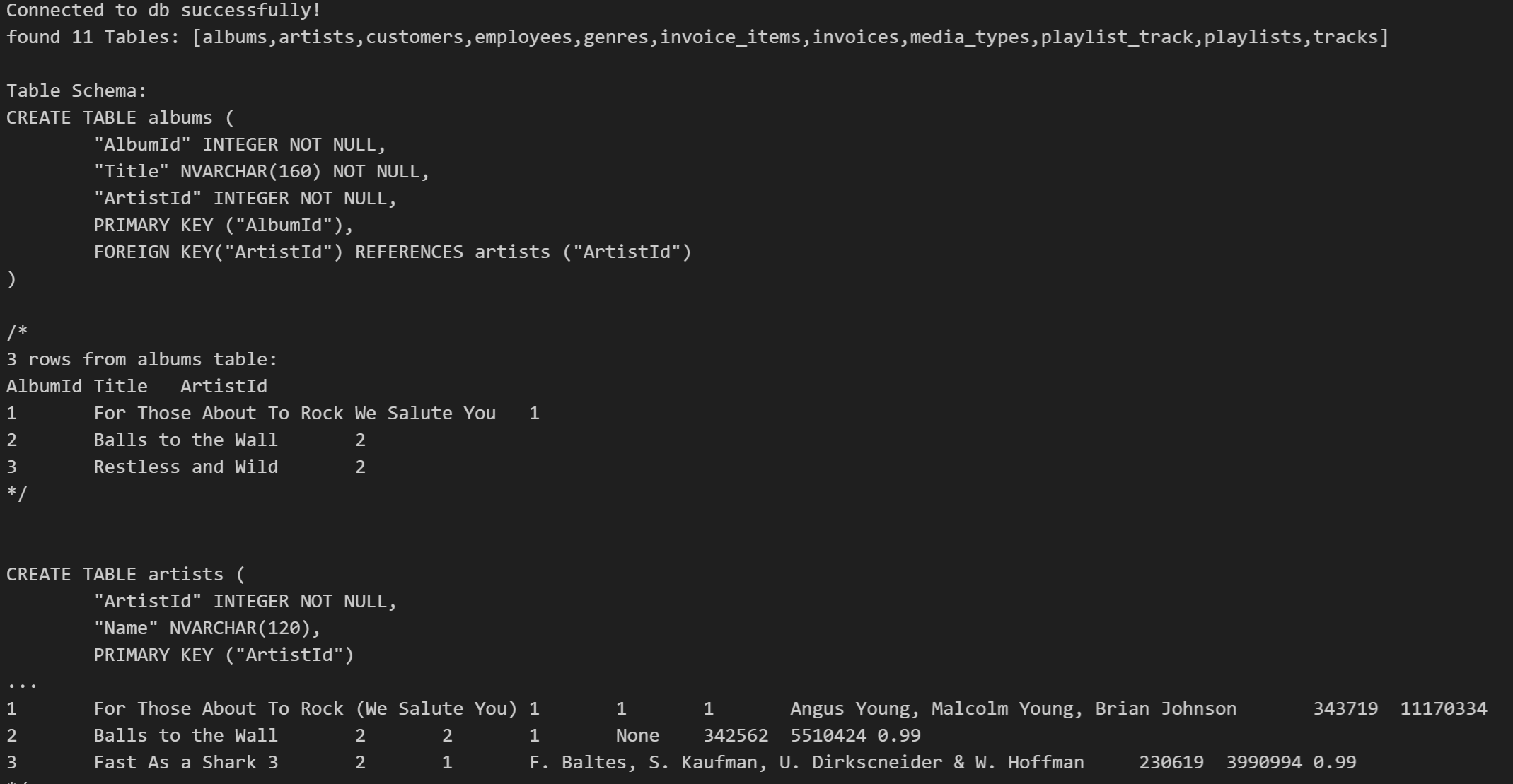
print("\nTable Schema:", SCHEMA)在Jupyter Notebook/VS Code 中**,** 执行结果如下,则说明构建成功**。**
可以通过以下SQL,查看所有的数据库里的表:
python
db.run("select name from sqlite_master where type='table'") 3.3 构建LLM
python
######## Setting Up Ollama
base_url = "http://localhost:11434"
llm = ChatOllama(model="qwen2.5", base_url=base_url) # , temperature=0

response = llm.invoke(input="Hello, how are you?")
response.pretty_print()
print("Initialized Ollama")
3.4 实现操作数据库的tools
3.4.1 获取数据库的Schema
python
##### Step 3: SQL Tools

@tool
def get_database_schema(table_name: str = None) -> str:
    """Get the schema of a database for SQL query generation.
    Use this first to understand table structure before creating SQL queries."""

    print(f"Getting schema for {table_name if table_name else 'all tables'}")

    if table_name:
        try:
            #get specific table
            tables = db.get_table_names()
            if table_name.lower() in [t.lower() for t in tables]:
                result = db.get_table_info([table_name])
                print(f"Retrieeved schema for {table_name}")
                return result
            else:
                return f"Error 404: Table {table_name} not found. Available tables: {','.join(tables)}"
        except Exception as e:
            return f"Error retrieving schema for {table_name}: {e}"
    else:
        print("Retrieving schema for all tables")
        return SCHEMA
在Jupyter Notebook/VS Code中,测试输入如下,说明工具可以正常工作:

3.4.2 根据query生成SQL
python
@tool
def generate_sql_query(question:str, schema_info:str = None) -> str:
    """Generate a SOL SELECT query from a natural language question using database schema.
        Always use this after getting schema information."""
    print(f"Generating SQL for: {question[:100]}...")

    # Use provided schema or get full schema
    schema_to_use = schema_info if schema_info else SCHEMA
    prompt = f"""
        Based on this database schema:
            {schema_to_use}
        Generate a SQL query to answer this question: {question}
        Rules :
         - Use only SELECT statements
         - Include only existing columns and tables
         - Add appropriate WHERE, GROUP BY, ORDER BY clauses as needed
         - Limit results to 10 rows unless specified otherwise
         - Use proper SQL syntax for SQLite

            Return only the soL query, nothing else
        """

    try:
        response = llm.invoke(prompt)
        query = response.content.strip()
        return query
    except Exception as e:
        print(f"Error: {e}")
        return None
generate_sql_query的测试如下:

3.4.3 验证生成SQL
python
@tool
def validate_sql_query(query: str)-> str:
    """Validate SOL query for safety and syntax before execution.
    Returns 'Valid:<query>'if safe or 'Error: <message>' if unsafe."""
    print(f"® Validating SQL: {query[:100]}...")
    # Clean up the query
    clean_query = query.strip()
    # Remove SOL code block markers if present
    clean_query = re.sub(r'```sql\s*','',clean_query,flags=re.IGNORECASE)
    clean_query = re.sub(r'```\s*','', clean_query)
    clean_query= clean_query.strip().rstrip(";")

    # Check 1: Must be a SELECT statement
    if not clean_query.lower().startswith("select"):
        return "Error: Only SELECT statements are allowed"
    # Check 2: Block dangerous SQL keywords
    dangerous_keywords =['UPDATE', 'DELETE', 'ALTER', 'DROP','CREATE', 'TRUNCATE']
    query_upper = clean_query.upper()
    for keyword in dangerous_keywords :
        if keyword in query_upper:
            return f"Error:{keyword} operations are not allowed"
    print("√ Query validation passed")
    return f"Valid:{clean_query}"
validate_sql_query的测试如下:

3.4.4 执行生成SQL
python
@tool
def execute_sql_query(query: str) -> str:
    """Execute an SQL query and return the result results.
        Only use this after verifying the query for safety.
    """
    print(f"® Executing SQL: {query[:100]}...")
    try:
        clean_query = query.strip()
        if clean_query.startswith("Valid:"):
           clean_query = clean_query[6:]    # remove "Valid:"

        clean_query = re.sub(r'```sql\s*','',clean_query,flags=re.IGNORECASE)
        clean_query = re.sub(r'```\s*','', clean_query)
        clean_query= clean_query.strip().rstrip(";")

        #execute query
        result = db.run(clean_query)
        print(f"® Query executed successfully.")
        if result:
            return f"Query result:\n{result}"
        else:
            return "query successfully but No results found."
    except Exception as e:
        result = f"Error: {e}"
        return result
execute_sql_query的测试如下:

3.4.5 修正错误的SQL
python
@tool
def fix_sql_error(original_query: str, error_message: str, question: str)->str:
    """Fix a failed SOL query by analyzing the error and generating a corrected version.
     Use this when validation or execution fails."""

    print(f"' Fixing SOL error: {error_message[:100]}...")
    fix_prompt = f"""
            The following soL queryfailed:
            Query: {original_query}
            Error: {error_message}Original Question: {question}
            DatabaseSchema:
            {SCHEMA}
            Analyze the error and provide a corrected SOL query that:
            1. Fixes the specific error mentioned
            2. Still answers the original question
            3. Uses only valid table and column names from the schema
            4. Follows SLite syntax rules
            Return only the corrected soL query, nothing else.
            """
    try:
        response = llm.invoke(fix_prompt)
        fixed_query = response.content.strip()
        print(f"' Fixed query: {fixed_query[:100]}...")
        return fixed_query
    except Exception as e:
        print(f"' Failed to fix query: {e}")
fix_sql_error的测试如下:

3.5 定义一个统一的Prompt模板
python
###### System Prompt
SOL_SYSTEM_PROMPT = f"""You are an expert sOl analyst working with an employees database.
        DatabaseSchema :
        {SCHEMA}

        Your workflow for answering questions:
        1. Use `get_database_schema` first to understand available tables and columns (if needed)
        2. Use `generate_sql_query` to create SOL based on the question
        3. Use`validate_sql_query`to check the query for safety and syntax
        4. Use `execute_sql_query`to run the validated query
        5. If there's an error, use fix_sql_error to correct it and try again (up to 3 times)
        6. Provide a clear answer based on the query results
        Rules:
         - Always follow the workflow step by step
         - If a query fails, use the fix ool and try again
         - Provide clear,informative answers
         - Be precise with table and column names
         - Handle errors gracefully and try to fix them
         - If you fail after 3 attempts, explain what went wrong

        Available tools for each step:
        get_database_schema: Get table structure info
        generate_sql_query:Create SOL from question
        validate_sql_query: check query safety/syntax
        execute_sql_query: Run the queify
       fix_sql_error: Fix failed queries
Remember: Always validate queries before executing them for safety.
"""
3.6 创建一个可以执行SQL的Agent
python
### Create a Agent

tools = [
    get_database_schema,
    generate_sql_query,
    validate_sql_query,
    execute_sql_query,
    fix_sql_error
]

sql_agent = create_agent(
    llm,
    tools,
    system_prompt=SOL_SYSTEM_PROMPT
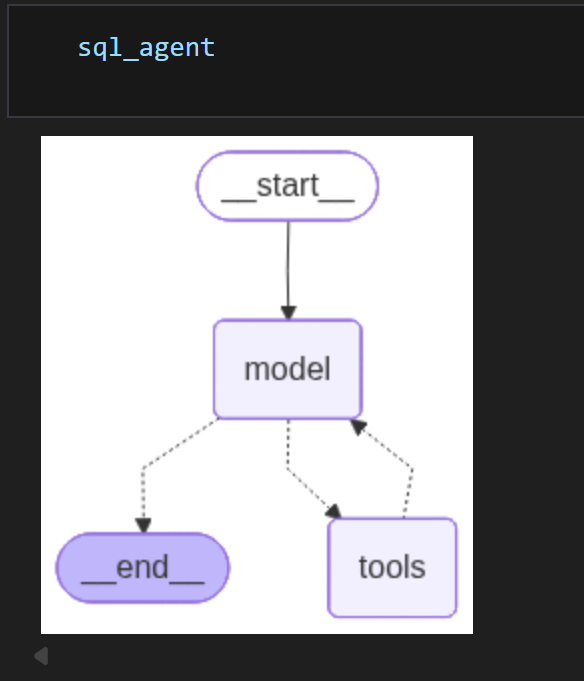
)在Jupyter Notebook/VS Code中,查看sql_agent,可以看到Agent的结构:
3.7 封装一个统一的接口
python
###### Query Functinos ###############

def ask_question(question):
    """Ask the SQL agent a question using the full workflow."""
    print(f"\n{'#'*60}")
    print(f"SQL AGENT - Question: {question}")
    print('#'*60)
    for event in sql_agent.stream({"messages": question}, stream_mode="values" ):
        msg= event["messages"][-1]

    # Show tool usage
    if hasattr(msg,'tool calls') and msg.tool_calls:
        for tc in msg.tool_calls:
            print(f"\n' using Tool: {tc['name']}")
            print(f"Args:{str(tc['args'])[:200]}")
    # Show final answer
    elif hasattr(msg,'content') and msg.content:
        print(f"\nAnswer is:\n{msg.content}")
在Jupyter Notebook/VS Code中,尝试测试一个问题如下:
python
ask_question("What is the average UnitPrice in invoice_items")执行结果:
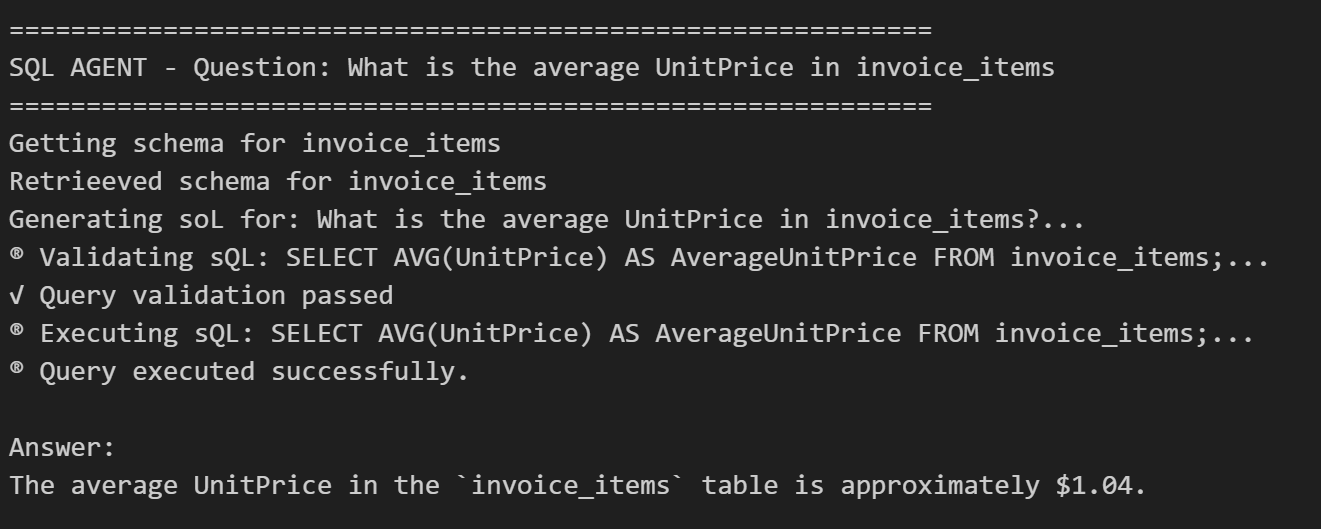
可以看到SQL被执行成功,而且返回了最终发票的UnitPrice的平均值。
执行"SELECT AVG(UnitPrice) FROM invoice_items",验证结果是否正确:
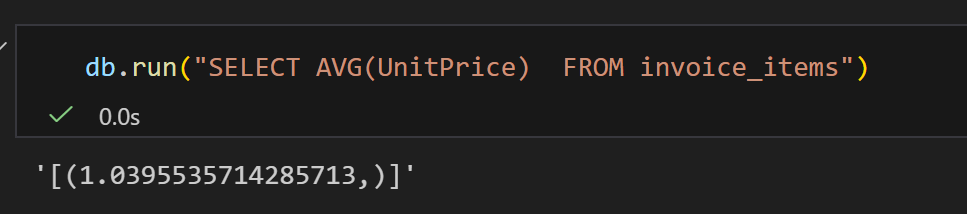
可以看到结果和实际的值是一致的。