前言
进入javaIO流。在程序运行的时候,所有的变量,数组或者集合等等都是保存在内存中。随着程序的结束或者断电,数据就没有了!
那么,如何永久的存储呢?采用磁盘文件存储。文件在电脑磁盘中保存,即便断电,或者程序终止,文件中的数据也不会丢失。所以我们引入IO流将一些要保存的数据保存到硬盘中。
认识IO流
IO流主要用于连接程序和磁盘文件,传输以字节/字符为单位的数据
IO流的分类
由此可以先将IO流按输入数据的单位分为字节流和字符流
再按照输入输出分先为四类。分别为:
- 字节输入流 InputStream(读字节数据的)
- 字节输出流 OutputStream(写字节数据出去的)
- 字符输入流 Reader(读字符数据的)
- 字符输出流 Writer(写字符数据出去的)
而后为了增强字符输入输出流的效率,引入了
- 缓冲字节输入流 BufferedInputstream
- 缓冲字节输出流 BufferedOutputstream
- 缓冲字符输入流BufferedReader
- 缓冲字符输出流BufferedWriter
字节流
多用于读写而不操作数据的地方
字节输入流 InputStream
作用:以内存为基准,可以把磁盘文件中的数据以字节的形式读入到内存中去。
基本方法:
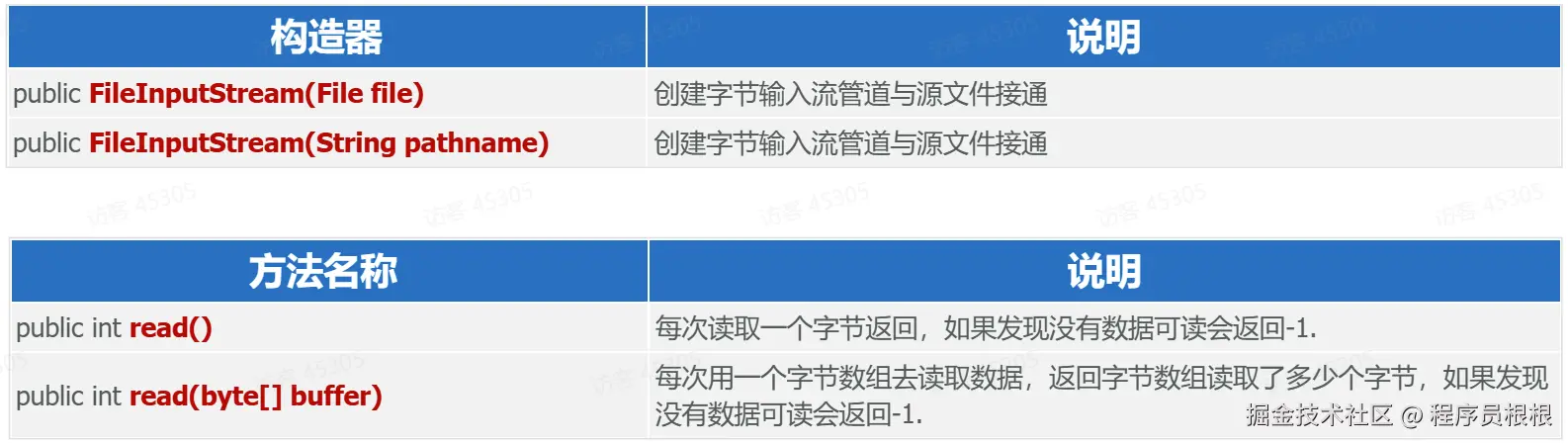
注意事项:
- 使用FileInputStream每次读取一个字节,读取性能较差,并且读取汉字输出会乱码。
- 使用FileInputStream每次读取多个字节,读取性能得到了提升,但读取汉字输出还是会乱码。
- 读取文本适合用字符流;字节流适合做数据的转移,比如:文件复制
代码实现:
Java
//目标:使用字节输入流读取文件的数据
//1.创建字节输入流对象
FileInputStream input = new FileInputStream("day03-StreamIO/a.txt");

//2.读取字节数据
//2.1 一个字节一个字节读取
int b = input.read();
System.out.println((char) b);//a
b = input.read();
System.out.println((char) b);//b
b = input.read();
System.out.println((char) b);//c
//b = input.read();
//System.out.println((char) b);//乱码

//2.2 读取一个字节数组
byte[] bytes = new byte[3];
input.read(bytes);
System.out.println(new String(bytes));//将字节数组 bytes 转换为字符串表示

//3.关闭流
input.close();
//注意:字节流不适合读取文本内容进行解析展现,因为如果字节断开会乱码。
读取文件为
abc编程字节输出流 OutputStream
作用:以内存为基准,把内存中的数据以字节的形式写出到文件中去。
基本方法:
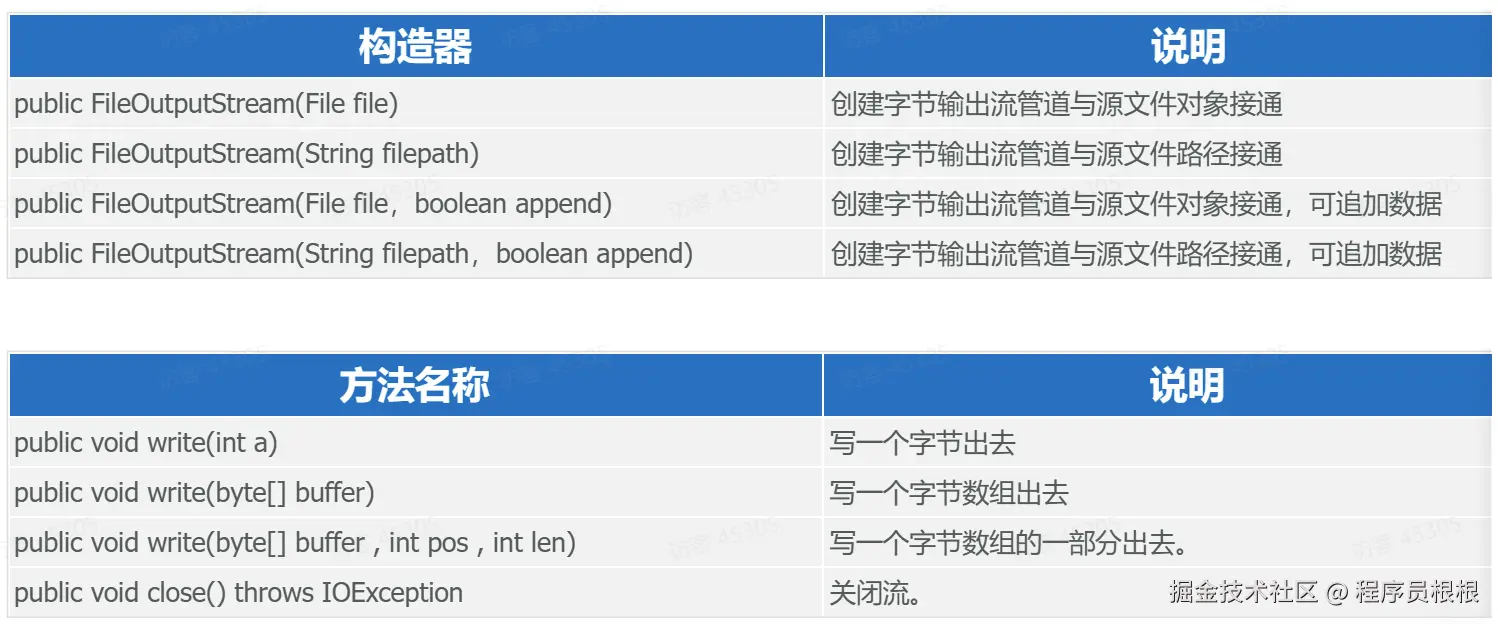
代码:
Java
//目标:使用字节输出流输出数据到目标文件 demo2.txt
//1.创建文件输出流对象
//FileOutputStream output = new FileOutputStream("day03-StreamIO/b.txt");//覆盖方式
FileOutputStream output = new FileOutputStream("day03-StreamIO/b.txt",true);//追加方式

//2.输出数据
//输出一个字节
output.write(97);//a

//输出一个换行
output.write("\n".getBytes());

//输出字节数组全部数据
byte[] bytes = "唐根泰".getBytes();
output.write(bytes);

//输出一个换行
output.write("\n".getBytes());

//输出字节数组一部分数据
output.write(bytes,3,6);//bytes:要传入的数组,3:开始,6:需要传入的长度       这里的意思是从索引3开始往后传6个字节

//输出一个换行
output.write("\n".getBytes());

//3.关闭资源
output.close();
资源释放方案
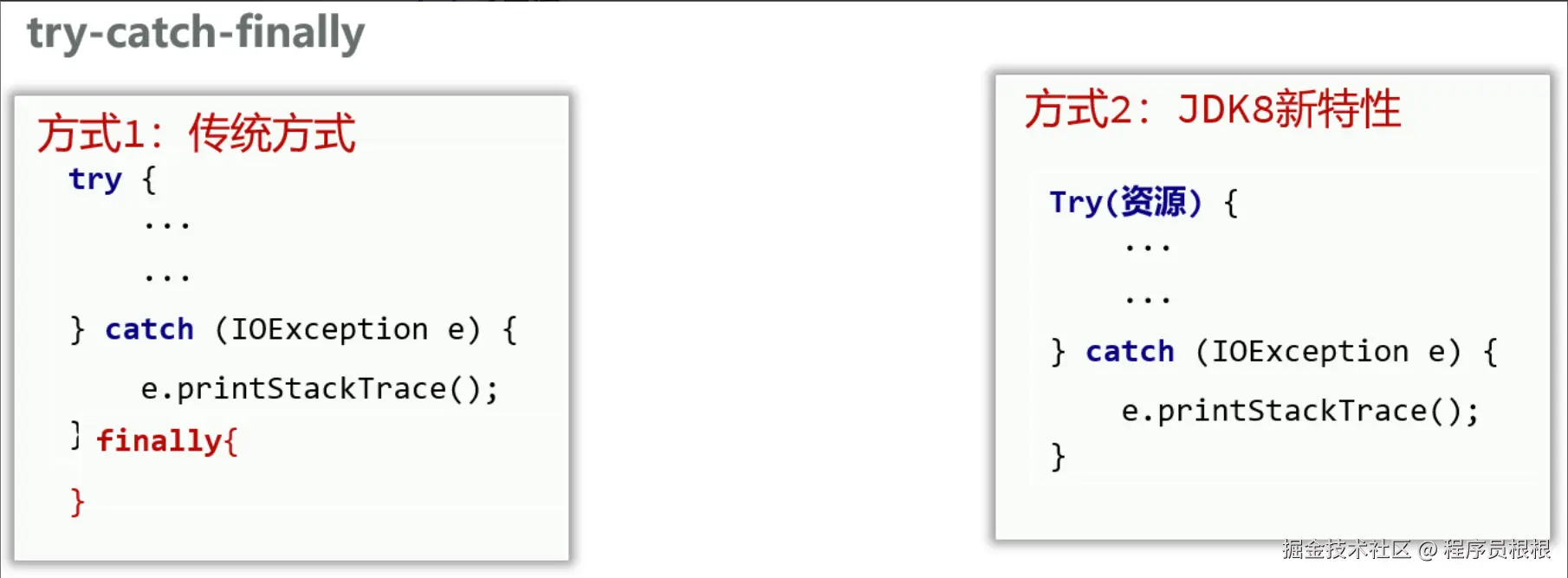
代码:
Java
//目标:使用finally释放资源(传统做法)
//语法:try{
//     }catch(Exception e){
//     }finally{
//           释放资源
//    }
//finally的作用:无论try里面的代码是否发生异常都会执行finally里面的代码,确保有效资源可以释放
FileInputStream in = null;
FileOutputStream out = null;

try {
    //1.创建输入流对象读取1.png
    in = new FileInputStream("day03-StreamIO/1.png");

    //2.创建输出流对象输出到2.png
    out = new FileOutputStream("day03-StreamIO/2.png");

    //3.读取数据并输出
    //3.1 创建1kb字节数组
    byte[] bytes = new byte[1024];

    //3.2 循环读取并写出
    // int length = in.read(bytes); 从输入流中读取1024个字节,如果读取成功会返回读取字节的个数,
    //      返回-1代表没有读取到任何数据
    int length = -1;
    while ((length = in.read(bytes)) != -1) {
        // out.write(bytes);//将字节数组所有数据输出,这个读到最后可能有遗留上一次读取的数据,也会再次输出
        out.write(bytes, 0, length);//推荐方式,读多少输出多少,不会有遗留数据输出
    }
    System.out.println("文件复制成功!");
} catch (IOException e) {
    throw new RuntimeException(e);
} finally {
    try {
        //4.关闭流,推荐从下往上关闭
        if (out != null)
            out.close();
        if (out != null)
            in.close();
        System.out.println("资源关闭成功!");
    } catch (IOException e) {
        throw new RuntimeException(e);
    }
}
Java
//目标:使用jdk8提供最新释放资源方式
//语法:try(资源){
//         逻辑处理
//     }catch(Exception ex){}
//     上面运行后会自动调用资源的close方法,前提资源实现AutoCloseable接口才可以
try (//1.创建输入流对象读取1.png
     FileInputStream in = new FileInputStream("day03-StreamIO/1.png");

     //2.创建输出流对象输出到2.png
     FileOutputStream out = new FileOutputStream("day03-StreamIO/2.png");)
{
    //3.读取数据并输出
    //3.1 创建1kb字节数组
    byte[] bytes = new byte[1024];

    //3.2 循环读取并写出
    // int length = in.read(bytes); 从输入流中读取1024个字节,如果读取成功会返回读取字节的个数,
    //      返回-1代表没有读取到任何数据
    int length = -1;
    while ((length = in.read(bytes)) != -1) {
        // out.write(bytes);//将字节数组所有数据输出,这个读到最后可能有遗留上一次读取的数据,也会再次输出
        out.write(bytes, 0, length);//推荐方式,读多少输出多少,不会有遗留数据输出
    }
    System.out.println("文件复制成功!");
} catch (IOException e) {
    throw new RuntimeException(e);
}
字符流
可以对数据进行操作
字符输入流 Reader
作用:以内存为基准,可以把文件中的数据以字符的形式读入到内存中去。
基本语法:


代码:
Java
// 目标:掌握字符输入流的操作
try (
        //1.创建输入流资源
        FileReader reader = new FileReader("day04-IOThread/a.txt")
) {
    //2.读取一个字符
    int c = reader.read();
    System.out.println((char) c);//a
    c = reader.read();
    System.out.println((char) c);//b
    c = reader.read();
    System.out.println((char) c);//c
    c = reader.read();
    System.out.println((char) c);//唐

    //3.读取一个字符数组
    char[] chars = new char[1024];
    int length = reader.read(chars);
    System.out.println(new String(chars,0,length));
} catch (Exception e) {
    throw new RuntimeException(e);
}
字符输出流 Writer
作用:以内存为基准,把内存中的数据以字符的形式写出到文件中去。
基本方法:



字符输出流写出数据后,必须刷新流,或者关闭流,写出去的数据才能生效
代码:
Java
//目标:掌握字符输出流的操作

try (
    //1.创建字符串输出流对象
    FileWriter writer = new FileWriter("day04-IOThread/a.txt")
){
    //2.写一个字符
    writer.write(97);

    //3.写一个字符串
    String str = "hello world";
    writer.write("\n" + str);

    //4.写一个字符串的一部分
    writer.write("\n" + str,0,6);

    //5.写一个字符数组
    char[] chars = {'a','b','c','唐'};
    writer.write("\n");
    writer.write(chars);

    //6.写一个字符数组的一部分
    writer.write("\n");
    writer.write(chars,0 ,3);
} catch (Exception e) {
    throw new RuntimeException(e);
}
缓冲流
缓冲字节输入流 BufferedInputstream
缓冲字节输出流 BufferedOutputstream
作用:可以提高字节流读写数据的性能 原理:缓冲字节输入流自带了8KB缓冲池;缓冲字节输出流也自带了8KB缓冲池。

代码:
Java
//目标:使用高级缓冲字节流实现复制文件
//注意:如果缓存的桶没有满不会立即输出,如果想立即输出flush()或close()方法

try (
        InputStream in = new FileInputStream("day04-IOThread/1.png");
        OutputStream out = new FileOutputStream("day04-IOThread/2.png");

        //创建高级缓冲流
        BufferedInputStream bis = new BufferedInputStream(in,1024*16);//将默认8Kb缓存修改为16KB
        BufferedOutputStream bos = new BufferedOutputStream(out,1024*16);
        ){

    byte[] bytes = new byte[1024];

    //3.2 循环读取并写出
    int length = -1;
    while ((length = bis.read(bytes)) != -1){
        bos.write(bytes,0,length);
        //bos.flush();//不需要,因为流使用完  会自动调用close()方法
    }
    System.out.println("文件复制成功!");
} catch (Exception e) {
    throw new RuntimeException(e);
}
缓冲字符输入流BufferedReader
缓冲字符输出流BufferedWriter
基本语法:


代码:
Java
//目标:使用高级缓冲字符流实现复制文件
//注意:如果缓存的桶没有满不会立即输出,如果想立即输出flush()或close()方法

try (
        FileReader in = new FileReader("day04-IOThread/1.txt");
        FileWriter out = new FileWriter("day04-IOThread/2.txt");

        //创建高级缓冲流
        BufferedReader bis = new BufferedReader(in,1024*16);//将默认8Kb缓存修改为16KB
        BufferedWriter bos = new BufferedWriter(out,1024*16);
){

    /*byte[] bytes = new byte[1024];

    //3.2 循环读取并写出
    int length = -1;
    while ((length = bis.read(bytes)) != -1){
        bos.write(bytes,0,length);
        //bos.flush();//不需要,因为流使用完  会自动调用close()方法
    }*/

    //按照行读写
    String result = null;
    while ((result = bis.readLine()) != null){
        bos.write(result);
        //注意:需要手动换行
        bos.newLine();
    }
    System.out.println("文件复制成功!");
} catch (Exception e) {
    throw new RuntimeException(e);
}