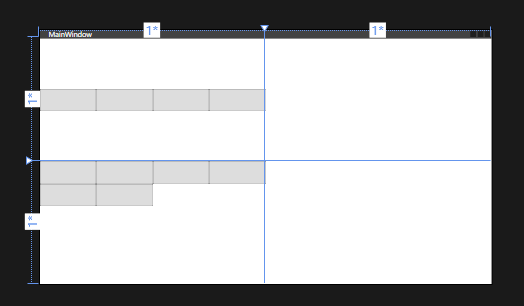
WrapPanel一般用于修饰部分空间的元素排布,默认水平排布,可通过属性Orientation,修改排列方式,这种布局能够自动换行适应排布,放下所有控件,不像StackPanel排布,放不下了会被遮盖住
cs
<Window x:Class="Wpf_LayoutGrid.MainWindow"
        xmlns="http://schemas.microsoft.com/winfx/2006/xaml/presentation"
        xmlns:x="http://schemas.microsoft.com/winfx/2006/xaml"
        xmlns:d="http://schemas.microsoft.com/expression/blend/2008"
        xmlns:mc="http://schemas.openxmlformats.org/markup-compatibility/2006"
        xmlns:local="clr-namespace:Wpf_LayoutGrid"
        mc:Ignorable="d"
        Title="MainWindow" Height="450" Width="800">
    <Grid>
        <!--设置行列数量和宽度高度,高度可以设置成比例、绝对值和auto自适应-->
        <Grid.RowDefinitions>
            <RowDefinition Height="1*"/>
            <RowDefinition Height="1*"/>
        </Grid.RowDefinitions>

        <Grid.ColumnDefinitions>
            <ColumnDefinition Width="1*"/>
            <ColumnDefinition Width="1*"/>
        </Grid.ColumnDefinitions>
         <!--默认垂直排序,通过属性Orientation修改排列方式,放不下了就被遮挡住了-->
        <StackPanel Orientation="Horizontal">
            <Button Width="100" Height="40"/>
            <Button Width="100" Height="40"/>
            <Button Width="100" Height="40"/>
            <Button Width="100" Height="40"/>
            <Button Width="100" Height="40"/>
            <Button Width="100" Height="40"/>
        </StackPanel>

        <!--默认水平排序,通过属性Orientation修改排列方式,放不下了会自动换行-->
        <WrapPanel Grid.Row="1">
            <Button Width="100" Height="40"/>
            <Button Width="100" Height="40"/>
            <Button Width="100" Height="40"/>
            <Button Width="100" Height="40"/>
            <Button Width="100" Height="40"/>
            <Button Width="100" Height="40"/>
        </WrapPanel>

    </Grid>
</Window>