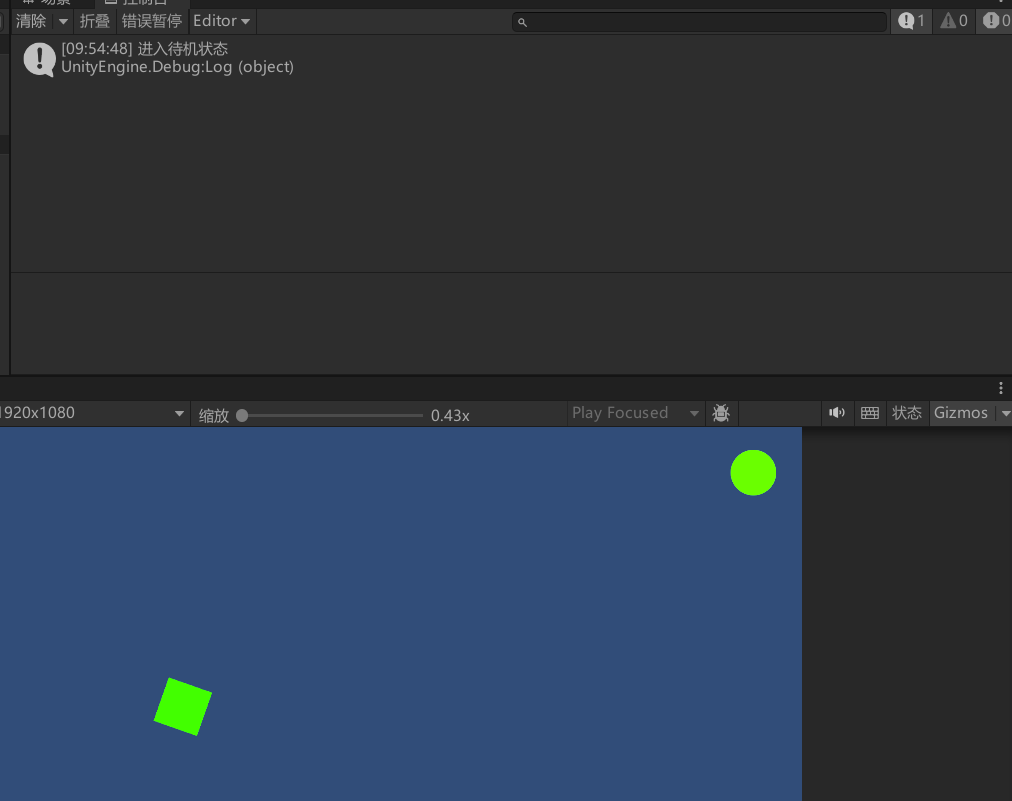
首先定义一个状态基类,里面有三个抽象方法,分别表示进入状态,退出状态,更新状态时需要执行的方法。
cs
using System.Collections;
using System.Collections.Generic;
using UnityEngine;

public abstract class PlayerState
{
    public abstract void Enter();
    public abstract void Exit();
    public abstract void Update();
}
新建状态管理类,负责所有状态的切换和添加状态,当切换状态的时候判断有没有正在执行的状态,如果有的话就先退出正在执行的状态并切换成目标状态,这样就算后面有成百上千个状态都不会出现状态混乱的情况,玩家同一时刻只会执行一种状态。
cs
using System.Collections;
using System.Collections.Generic;
using UnityEngine;

// 状态管理器
public class PlayerStateManager : MonoBehaviour
{
    private Dictionary< System.Type, PlayerState> states;
    public  PlayerState currentState;
    public  PlayerStateManager Instance { get; private set; }

    public Player  currentPlayer;//获取角色引用

    void Awake()
    {
        if (Instance == null)
        {
            Instance = this;
            DontDestroyOnLoad(gameObject);
            InitializeStates();
        }
        else
        {
            Destroy(gameObject);
        }
    }
    //添加状态
    void InitializeStates()
    {
        states = new Dictionary<System.Type, PlayerState>
        {
            { typeof(IdleState), new IdleState(currentPlayer) },
            { typeof(PatrolState), new PatrolState(currentPlayer) },
            { typeof(FromworkState), new FromworkState(currentPlayer) }
         };
    }
    //切换状态
    public void ChangeState<T>() where T : PlayerState
    {
        var newStateType = typeof(T);

        if (states.ContainsKey(newStateType))
        {
            currentState?.Exit();
            currentState = states[newStateType];
            currentState.Enter();
        }
    }
    public T GetState<T>() where T : PlayerState
    {
        var stateType = typeof(T);
        if (states.ContainsKey(stateType))
            return (T)states[stateType];
        return null;
    }
}
定义玩家类,玩家身上定义了所有玩家的状态,待机,巡逻,下班。但是玩家不负责直接切换他们,而是通知状态机来切换状态。
cs
using System.Collections;
using System.Collections.Generic;
using UnityEngine;
public class Player : MonoBehaviour
{
    public GameObject Point1;
    public GameObject Point2;

    Vector3 _targetPos;
    bool _hasTarget = false;

    [SerializeField]private PlayerStateManager _playerStateManager;
    void Update()
    {
        //如果状态不为空刷新状态
        if (_playerStateManager.currentState != null)
        {
            _playerStateManager.currentState.Update();
        }
        //控制状态切换
        if (Input.GetKeyDown(KeyCode.A))
        {
            _playerStateManager.ChangeState<IdleState>();
        }
        if (Input.GetKeyDown(KeyCode.S))
        {
            _playerStateManager.ChangeState<PatrolState>();
        }
        if (Input.GetKeyDown(KeyCode.D))
        {
            _playerStateManager.ChangeState<FromworkState>();
        }
    }
    //走到点位1
    public IEnumerator MoveToPoint1(float speed)
    {
        // 避免空引用
        if (Point1 == null)
            yield break;

        Vector3 targetPos = Point1.transform.position;

        while (Vector3.Distance(transform.position, targetPos) > 0.01f)
        {
            transform.position = Vector3.MoveTowards(
                transform.position,
                targetPos,
                speed * Time.deltaTime
            );
            yield return null; // 等下一帧
        }

        // 确保精确落点
        transform.position = targetPos;
    }
    //待机
    public void Idle()
    {
        // 绕Point1转圈
        transform.RotateAround(Point1.transform.position, Vector3.forward, 30 * Time.deltaTime);
    }
    //巡逻
    public void Patrol()
    {
        //随机点目标缓存
        if (!_hasTarget)
        {
            _targetPos = new Vector3(
                Random.Range(-5f, 5f),
                Random.Range(-5f, 5f),
                transform.position.z
            );
            _hasTarget = true;
        }

        transform.position = Vector3.MoveTowards(
            transform.position,
           _targetPos,
           3f * Time.deltaTime
       );

        //走到了就刷新目标
        if (Vector3.Distance(transform.position, _targetPos) < 0.2f)
            _hasTarget = false;
    }
    //下班
    public void Fromwork()
    {
        transform.position = Vector3.MoveTowards(
            transform.position,
            Point2.transform.position,
           3f * Time.deltaTime
       );
    }
}
定义具体的状态,待机,巡逻,下班。(待机的时候就在点1转圈,巡逻的时候就在场景中随机移动,下班的时候走到点2)(进入每个状态前都要先回到点1)。
cs
using System.Collections;
using System.Collections.Generic;
using UnityEngine;

public class IdleState : PlayerState
{
    Player player;
    public IdleState(Player targetplayer)
    {
        player = targetplayer;
    }
    private Coroutine moveRoutine;
    public override void Enter()
    {
        Debug.Log("进入待机状态");
        moveRoutine = player.StartCoroutine(IdleProcess());
    }
    public override void Exit()
    {
        Debug.Log("退出待机状态");
        if (moveRoutine!= null)
        {
            player.StopCoroutine(moveRoutine);
        }
    }
    public override void Update()
    {

    }
    private IEnumerator IdleProcess()
    {
        // 1. 先移动到 Point1
        yield return player.MoveToPoint1(3f);

        // 2. 到达后开始持续执行 Idle 动作
        while (true)
        {
            player.Idle();
            yield return null;
        }
    }
}
cs
using System.Collections;
using System.Collections.Generic;
using UnityEngine;

public class PatrolState : PlayerState
{
    Player player;
    private Coroutine patrolRoutine;

    public PatrolState(Player targetplayer)
    {
        player = targetplayer;
    }

    public override void Enter()
    {
        Debug.Log("进入巡逻状态");
        patrolRoutine = player.StartCoroutine(PatrolProcess());
    }

    public override void Exit()
    {
        Debug.Log("退出巡逻状态");
        if (patrolRoutine != null)
        {
            player.StopCoroutine(patrolRoutine);
        }
    }

    public override void Update()
    {

    }

    private IEnumerator PatrolProcess()
    {
        // 1. 先移动到 Point1
        yield return player.MoveToPoint1(3f);

        // 2. 循环执行巡逻动作
        while (true)
        {
            player.Patrol();
            yield return null;
        }
    }
}
cs
using System.Collections;
using System.Collections.Generic;
using UnityEngine;

public class FromworkState : PlayerState
{
    Player player;
    private Coroutine fromworkRoutine;

    public FromworkState(Player targetplayer)
    {
        player = targetplayer;
    }

    public override void Enter()
    {
        Debug.Log("进入下班状态");
        fromworkRoutine = player.StartCoroutine(FromworkProcess());
    }

    public override void Exit()
    {
        Debug.Log("退出下班状态");
        if (fromworkRoutine != null)
        {
            player.StopCoroutine(fromworkRoutine);
        }
    }

    public override void Update()
    {

    }

    private IEnumerator FromworkProcess()
    {
        // 1. 先移动到 Point1
        yield return player.MoveToPoint1(3f);

        // 2. 到达后执行下班动作循环
        while (true)
        {
            player.Fromwork();
            yield return null;
        }
    }
}
场景引用,创建一个方块当做玩家,然后创建两个圆红色表示上班的位置,绿色表示下班的位置。将玩家脚本和状态机控制脚本添加到玩家身上,将对应的脚本和物体进行拖拽到对应位置。
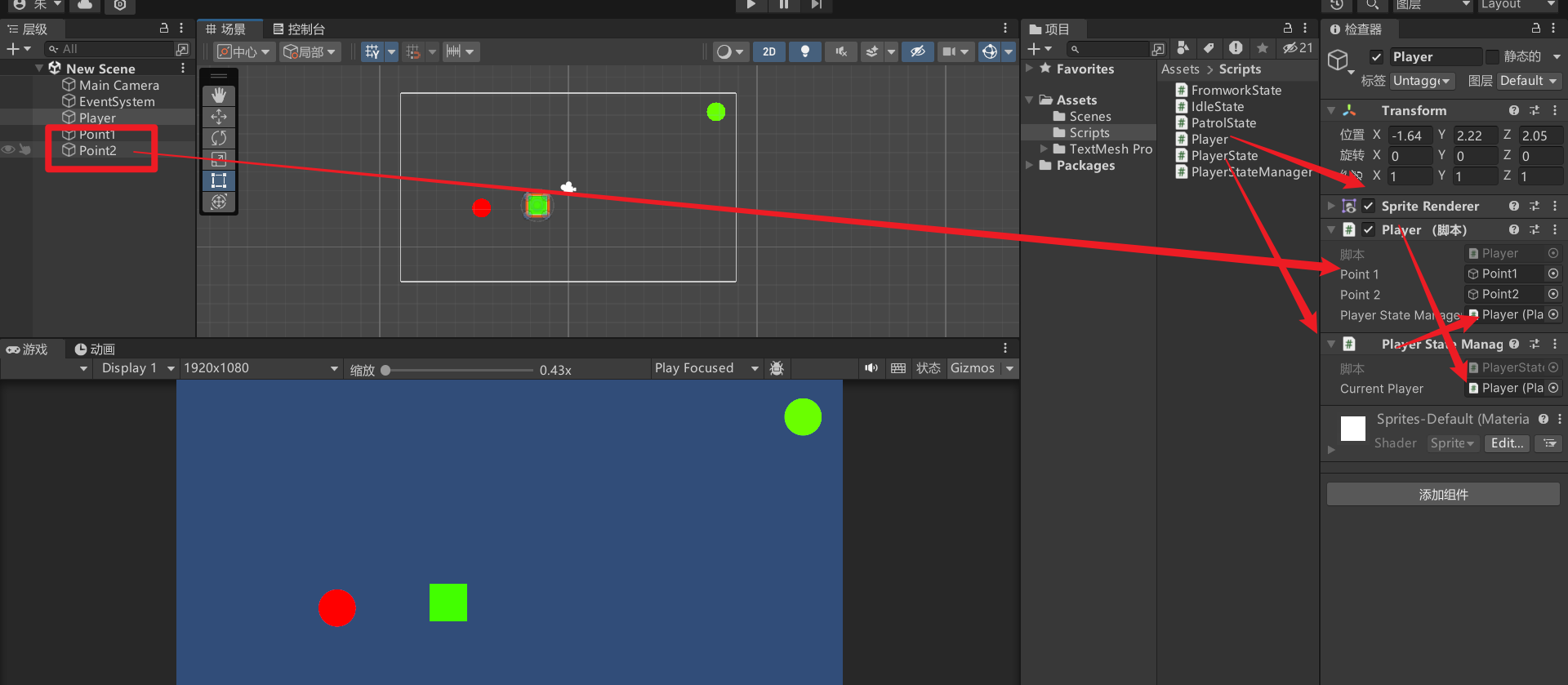
巡行项目然后按下A就会发现玩家移动到了红色的点并开始旋转。(按下S进入巡逻,按下D进入下班转态)。