主时钟100MHz,在 按钮 上升沿 收到第一个按钮信号上升沿输出一个10ms的脉冲,第二个按钮信号上升沿输出 20ms的脉冲,直到输出到100ms的脉冲,重新 从10ms的脉冲开始输出,如此循环,使用FPGA实现
matlab
`timescale 1ns / 1ps

//100MHzclk,1/100MHz = 10ns 1/50Mhz = 20ns
module button (
    input clk100MHz,
    input rst_n,
    input buttonA,
    output reg pulse_active

);

reg buttonA_d1;
reg buttonA_d2;
reg bt;

//按钮上升沿
always@(posedge clk100MHz or negedge rst_n)begin
    if(~rst_n)begin
        buttonA_d1<=0;
        buttonA_d2<=0;
    end
    else begin
        buttonA_d1<=buttonA;
        buttonA_d2<=buttonA_d1;
        bt <= buttonA_d1&&(~buttonA_d2);
    end
end


//10ms = 10*10^6ns //1kHz 1/1kHz=1ms 1=1*10^3MHz*ns 1=1*MHz*μs=1*kHz*ms
// 使用case语句实现查找表
function [23:0] get_pulse_width;
    input [3:0] index;
    begin
        case(index)
            4'd0: get_pulse_width = 24'd1_000_000;  // 10ms
            4'd1: get_pulse_width = 24'd2_000_000;  // 20ms
            4'd2: get_pulse_width = 24'd3_000_000;
            4'd3: get_pulse_width = 24'd4_000_000;
            4'd4: get_pulse_width = 24'd5_000_000;
            4'd5: get_pulse_width = 24'd6_000_000;
            4'd6: get_pulse_width = 24'd7_000_000;
            4'd7: get_pulse_width = 24'd8_000_000;
            4'd8: get_pulse_width = 24'd9_000_000;
            4'd9: get_pulse_width = 24'd10_000_000; // 100ms
            default: get_pulse_width = 24'd1_000_000;
        endcase
    end
endfunction


//数组下标
reg [3:0]pulse_index;
//数组计数
reg [23:0] pulse_cnt;
//脉冲状态
// reg pulse_active;

//维护pulse_cnt
always @(posedge clk100MHz or negedge rst_n ) begin
    if(~rst_n)begin
        pulse_cnt <= 0;
    end
    else if(bt&&!pulse_active) pulse_cnt<=1;
    else if(pulse_active&&pulse_cnt < get_pulse_width(pulse_index)) pulse_cnt <= pulse_cnt + 1;
    else pulse_cnt <= 0;
end
 //维护下标
 always @(posedge clk100MHz or negedge rst_n ) begin
    if(~rst_n)begin
        pulse_index <= 0;
    end
    else if((pulse_active&&pulse_cnt >= get_pulse_width(pulse_index))&&(pulse_index<9)) pulse_index <= pulse_index + 1;
    else if((pulse_active&&pulse_cnt >= get_pulse_width(pulse_index))&&(pulse_index>=9))pulse_index <= 0;
end
//维护脉冲状态
always @(posedge clk100MHz or negedge rst_n ) begin
    if(~rst_n)begin
        pulse_active <= 0;
    end
    else if(bt&&!pulse_active) pulse_active<=1;
    else if(pulse_cnt >= get_pulse_width(pulse_index)) pulse_active <= 0;
end


endmodule
测试用例
matlab
`timescale 1ns / 1ps

module pulse_generator_tb;

// 测试平台参数
reg clk_100m;
reg rst_n;
reg btn;
wire pulse_out;

// 实例化被测模块
button dut (
    .clk100MHz(clk_100m),
    .rst_n(rst_n),
    .buttonA(btn),
    .pulse_active(pulse_out)
);

// 时钟生成:100MHz,周期10ns
initial begin
    clk_100m = 0;
    forever #5 clk_100m = ~clk_100m; // 半周期5ns
end

// 测试序列
initial begin
    // 初始化
    rst_n = 0;
    btn = 0;

    // 复位
    #100;
    rst_n = 1;

    // 等待稳定
    #100;

    // 第一次按钮按下:生成10ms脉冲
    btn = 1;
    #100000;  // 100us按钮保持时间
    btn = 0;

    // 等待脉冲结束
    #20000000; // 20ms等待时间

    // 第二次按钮按下:生成20ms脉冲
    btn = 1;
    #100000;
    btn = 0;

    #40000000; // 40ms等待时间

    // 第三次按钮按下:生成30ms脉冲
    btn = 1;
    #100000;
    btn = 0;

    #60000000; // 60ms等待时间

    // 继续测试更多按钮按下...

    // 测试循环功能:模拟10次按钮按下
    repeat(10) begin
        btn = 1;
        #100000;
        btn = 0;
        #200000000; // 200ms间隔
    end

    #1000000;
    $finish;
end

// 监视输出
initial begin
    $monitor("Time=%t, btn=%b, pulse_out=%b, pulse_index=%d",
             $time, btn, pulse_out, dut.pulse_index);
end

// 波形文件生成
initial begin
    $dumpfile("pulse_generator.vcd");
    $dumpvars(0, pulse_generator_tb);
end

endmodule
测试结果:

输出脉冲开始:
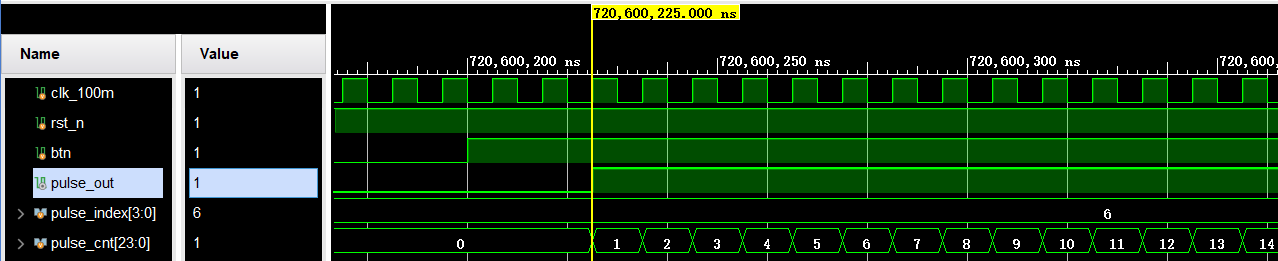
输出脉冲结束:

不足之处敬请指正,谢谢!