前言
上篇文章Paimon源码解读 -- Compaction-1.MergeTreeCompactTask解析了Paimon-Compaction阶段的大概流程,而最后发现,真正去将文件采用特点算法合并的类是KeyValueFileWriterFactory中createRollingMergeTreeFileWriter()和createRollingChangelogFileWriter()创建的---RollingFileWriter
一.KeyValueFileWriterFactory中的两个核心调用方法
1.createRollingMergeTreeFileWriter()和createRollingChangelogFileWriter()
(1) 俩方法代码
java
public RollingFileWriter<KeyValue, DataFileMeta> createRollingMergeTreeFileWriter(
    int level, FileSource fileSource) {
// 创建RollingFileWriter,后续由其进行写入合并操作
return new RollingFileWriter<>(
        () ->
                createDataFileWriter(
                        formatContext.pathFactory(level).newPath(),
                        level,
                        fileSource), // 创建SingleFileWriter写入器,这里的参数是懒加载Supplier包装的
        suggestedFileSize // 这里suggestedFileSize其实就是配置的target-file-size大小
    );
}

public RollingFileWriter<KeyValue, DataFileMeta> createRollingChangelogFileWriter(int level) {
return new RollingFileWriter<>(
        () ->
                createDataFileWriter(
                        formatContext.pathFactory(level).newChangelogPath(), // 和上面的createRollingMergeTreeFileWriter()的参数不同
                        level,
                        FileSource.APPEND),
        suggestedFileSize);
}
(2) 调用的createDataFileWriter()
作用:开启瘦模式(配置'data-file.thin-mode'绑定,默认是false),采用KeyValueThinDataFileWriterImpl;否则,都是普通模式,采用KeyValueDataFileWriterImpl
java
private KeyValueDataFileWriter createDataFileWriter(
    Path path, int level, FileSource fileSource) {
return formatContext.thinModeEnabled() // 是否开启瘦模式,通过配置'data-file.thin-mode'绑定,默认是false
        ? new KeyValueThinDataFileWriterImpl( // 瘦模式:仅存储增量变更更数据
                fileIO,
                formatContext.writerFactory(level),
                path,
                new KeyValueThinSerializer(keyType, valueType)::toRow,
                keyType,
                valueType,
                formatContext.extractor(level),
                schemaId,
                level,
                formatContext.compression(level),
                options,
                fileSource,
                fileIndexOptions)
        : new KeyValueDataFileWriterImpl( // 普通模式:存储完整数据,全量写入/覆盖
                fileIO,
                formatContext.writerFactory(level),
                path,
                new KeyValueSerializer(keyType, valueType)::toRow,
                keyType,
                valueType,
                formatContext.extractor(level),
                schemaId,
                level,
                formatContext.compression(level),
                options,
                fileSource,
                fileIndexOptions);
}2.涉及的SingleFileWriter类
整体的情况如下 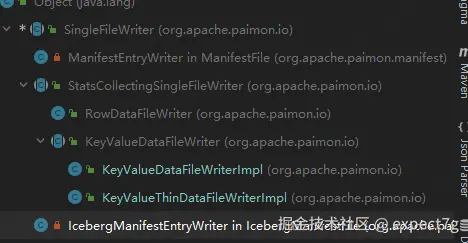
(1) SingleFileWriter类 -- 核心1
<1> 属性和构造函数
java
private static final Logger LOG = LoggerFactory.getLogger(SingleFileWriter.class);

protected final FileIO fileIO; // 抽象文件IO接口
protected final Path path; // 路径
private final Function<T, InternalRow> converter; // 类型转换器,将原始kv记录转为Paimon内部行的InternalRow类型

private FormatWriter writer; // 写入器
private PositionOutputStream out; // 文件输出流

private long recordCount; // 写入的记录数
protected boolean closed; // 是否关闭写入器

public SingleFileWriter(
        FileIO fileIO,
        FormatWriterFactory factory,
        Path path,
        Function<T, InternalRow> converter,
        String compression,
        boolean asyncWrite) {
    this.fileIO = fileIO;
    this.path = path;
    this.converter = converter;

    try {
        // 1.创建文件输出流,异步或者同步
        out = fileIO.newOutputStream(path, false); // false说明不是overwrite覆盖操作,而是into操作
        if (asyncWrite) {
            out = new AsyncPositionOutputStream(out);
        }
        // 步骤2:创建具体格式的写入器(如ParquetWriter)
        writer = factory.create(out, compression);
    } catch (IOException e) {
        LOG.warn(
                "Failed to open the bulk writer, closing the output stream and throw the error.",
                e);
        if (out != null) {
            abort();
        }
        throw new UncheckedIOException(e);
    }
    // 3.初始化记录数和closed
    this.recordCount = 0;
    this.closed = false;
}
<2> write()和writeBundle()
写入的核心逻辑如下
- 将record转为Paimon内部行类型
InternalRow - 调用写入器去将转后的数据写入
- 记录写入数据量
- 流式返回转换后的数据供子类统计收集;批式什么也不返回
java
// 流式写入
@Override
public void write(T record) throws IOException {
    // 调writeImpl去写入数据
    writeImpl(record);
}

// 批量写入
public void writeBundle(BundleRecords bundle) throws IOException {
    if (closed) {
        throw new RuntimeException("Writer has already closed!");
    }

    try {
        // CASE-1: 写入器 instanceof BundleFormatWriter
        if (writer instanceof BundleFormatWriter) {
            ((BundleFormatWriter) writer).writeBundle(bundle); // 调批量写入器的writeBundle()方法去写入
        }
        // CASE-2: 写入器不是BundleFormatWriter实现类
        else {
            // 遍历批,进行一条一条write
            for (InternalRow row : bundle) {
                writer.addElement(row);
            }
        }
        // 记录批量写入数据
        recordCount += bundle.rowCount();
    } catch (Throwable e) {
        LOG.warn("Exception occurs when writing file " + path + ". Cleaning up.", e);
        abort();
        throw e;
    }
}

// 核心写入逻辑
protected InternalRow writeImpl(T record) throws IOException {
    if (closed) {
        throw new RuntimeException("Writer has already closed!");
    }

    try {
        // 1.将record转为Paimon内部行类型InternalRow
        InternalRow rowData = converter.apply(record);
        // 2.调用写入器(如ParquetWriter)去将rowData写入
        writer.addElement(rowData);
        // 3.写入记录数++
        recordCount++;
        // 4.返回转换后的行数据(供子类统计收集使用)
        return rowData;
    } catch (Throwable e) {
        LOG.warn("Exception occurs when writing file " + path + ". Cleaning up.", e);
        abort();
        throw e;
    }
}
<3> recordCount()和reachTargetSize()
java
// 返回已记录的写入总数
@Override
public long recordCount() {
    return recordCount;
}

// 文件滚动的标记,后续由RollingFileWriter去调用
public boolean reachTargetSize(boolean suggestedCheck, long targetSize) throws IOException {
    // 检查已写入的文件是否达到了目标文件大小target-file-size
    return writer.reachTargetSize(suggestedCheck, targetSize);
}
<4> abort()
java
// 中止写入,并清理资源和文件
@Override
public void abort() {
    // 关闭写入器
    if (writer != null) {
        IOUtils.closeQuietly(writer);
        writer = null;
    }
    // 关闭输出流
    if (out != null) {
        IOUtils.closeQuietly(out);
        out = null;
    }
    // 删除该path路径下写入的文件
    fileIO.deleteQuietly(path);
}
(2) StatsCollectingSingleFileWriter类
<1> 属性和构造函数
java
@Nullable private final SimpleStatsExtractor simpleStatsExtractor; // 批量写入场景下,从文件中提取的字段统计信息
@Nullable private SimpleStatsCollector simpleStatsCollector = null; // 流式写入场景下,实时收集的字段统计信息
@Nullable private SimpleColStats[] noneStats = null; // 禁用统计时的默认值,数组中每个元素都是SimpleColStats.NONE
private final boolean isStatsDisabled; // 是否禁用统计收集,若所有字段的统计收集器都是NoneSimpleColStatsCollector,则为 true

public StatsCollectingSingleFileWriter(
        FileIO fileIO,
        FormatWriterFactory factory,
        Path path,
        Function<T, InternalRow> converter,
        RowType writeSchema,
        @Nullable SimpleStatsExtractor simpleStatsExtractor,
        String compression,
        SimpleColStatsCollector.Factory[] statsCollectors,
        boolean asyncWrite) {
    // 1.调用父类SingleFileWriter的构造函数
    super(fileIO, factory, path, converter, compression, asyncWrite);
    // 2.初始化
    this.simpleStatsExtractor = simpleStatsExtractor;
    if (this.simpleStatsExtractor == null) {
        this.simpleStatsCollector = new SimpleStatsCollector(writeSchema, statsCollectors);
    }
    Preconditions.checkArgument(
            statsCollectors.length == writeSchema.getFieldCount(),
            "The stats collector is not aligned to write schema.");
    this.isStatsDisabled =
            Arrays.stream(SimpleColStatsCollector.create(statsCollectors))
                    .allMatch(p -> p instanceof NoneSimpleColStatsCollector);
    if (isStatsDisabled) {
        this.noneStats =
                IntStream.range(0, statsCollectors.length)
                        .mapToObj(i -> SimpleColStats.NONE)
                        .toArray(SimpleColStats[]::new);
    }
}
<2> write()和writeBundle()
java
@Override
public void write(T record) throws IOException {
    // 步1.调用父类SingleFileWriter.writeImpl(),将记录序列化并写入文件中,返回序列化后的InternalRow
    InternalRow rowData = writeImpl(record);
    // 步2.若开启实时统计,则调用SimpleStatsCollector.collect()收集当前记录的字段统计
    if (simpleStatsCollector != null && !simpleStatsCollector.isDisabled()) {
        simpleStatsCollector.collect(rowData);
    }
}

@Override
public void writeBundle(BundleRecords bundle) throws IOException {
    Preconditions.checkState(
            simpleStatsExtractor != null,
            "Can't write bundle without simpleStatsExtractor, we may lose all the statistical information");
    // 调用父类SingleFileWriter批量写入逻辑(不实时收集统计,后续从文件提取)
    super.writeBundle(bundle);
}
<3> fieldStats()
java
// 提取最终的字段统计信息
public SimpleColStats[] fieldStats() throws IOException {
    Preconditions.checkState(closed, "Cannot access metric unless the writer is closed.");
    // CASE-1: 批量写入场景,从文件中提取
    if (simpleStatsExtractor != null) {
        if (isStatsDisabled) {
            return noneStats;
        } else {
            return simpleStatsExtractor.extract(fileIO, path);
        }
    }
    // CASE-2: 单条写入场景,从SimpleStatsCollector实时收集器中提取
    else {
        return simpleStatsCollector.extract();
    }
}
(3) KeyValueDataFileWriter类 -- 核心2
<1> 相关属性
java
private static final Logger LOG = LoggerFactory.getLogger(KeyValueDataFileWriter.class);
// 公共状态属性
protected final RowType keyType;
protected final RowType valueType;
private final long schemaId; // Schema版本ID
private final int level; // 文件所属level层级

// 统计信息相关
private final SimpleStatsConverter keyStatsConverter; // Key统计信息转换器(将 SimpleColStats 转为二进制存储的 SimpleStats)
private final SimpleStatsConverter valueStatsConverter; // Value统计信息转换器(将 SimpleColStats 转为二进制存储的 SimpleStats)
private final InternalRowSerializer keySerializer;
private final FileSource fileSource;
@Nullable private final DataFileIndexWriter dataFileIndexWriter; // 文件索引写入器(生成布隆过滤器 / 区间索引,优化查询性能)

// 用于查询时,快速过滤
private BinaryRow minKey = null; // 写入文件的最小主键
private InternalRow maxKey = null; // 写入文件的最大主
private long minSeqNumber = Long.MAX_VALUE; // 写入文件最小sequenceNumber
private long maxSeqNumber = Long.MIN_VALUE; // 写入文件最大sequenceNumber
private long deleteRecordCount = 0; // 写入文件删除记录数
<2> 构造函数
java
public KeyValueDataFileWriter(
        FileIO fileIO,
        FormatWriterFactory factory,
        Path path,
        Function<KeyValue, InternalRow> converter,
        RowType keyType,
        RowType valueType,
        RowType writeRowType,
        @Nullable SimpleStatsExtractor simpleStatsExtractor,
        long schemaId,
        int level,
        String compression,
        CoreOptions options,
        FileSource fileSource,
        FileIndexOptions fileIndexOptions) {
    // 1.调用父类StatsCollectingSingleFileWriter的构造函数
    super(
            fileIO,
            factory,
            path,
            converter,
            writeRowType,
            simpleStatsExtractor,
            compression,
            StatsCollectorFactories.createStatsFactories(
                    options, writeRowType.getFieldNames(), keyType.getFieldNames()),
            options.asyncFileWrite());
    // 2.初始化公共状态属性
    this.keyType = keyType;
    this.valueType = valueType;
    this.schemaId = schemaId;
    this.level = level;
    // 3.初始化统计信息相关属性
    this.keyStatsConverter = new SimpleStatsConverter(keyType);
    this.valueStatsConverter = new SimpleStatsConverter(valueType, options.statsDenseStore());
    this.keySerializer = new InternalRowSerializer(keyType);
    this.fileSource = fileSource;
    this.dataFileIndexWriter =
            DataFileIndexWriter.create(
                    fileIO, dataFileToFileIndexPath(path), valueType, fileIndexOptions);
}
<3> write()
java
@Override
public void write(KeyValue kv) throws IOException {
    // 步骤1.调父类StatsCollectingSingleFileWriter.write(),将kv数据序列化写入Data File中
    super.write(kv);
    // 步骤2:写入文件索引(如布隆过滤器,优化点查性能)
    if (dataFileIndexWriter != null) {
        dataFileIndexWriter.write(kv.value());
    }
    // 步骤3:更新min/max key(要求写入记录已排序,否则minKey仅取第一条,maxKey取最后一条)
    updateMinKey(kv);
    updateMaxKey(kv);
    // 步骤4:更新最小/最大序列号(处理乱序更新)
    updateMinSeqNumber(kv);
    updateMaxSeqNumber(kv);
    // 步骤5:统计删除记录数(Retract类型为删除)
    if (kv.valueKind().isRetract()) {
        deleteRecordCount++;
    }

    if (LOG.isDebugEnabled()) {
        LOG.debug("Write to Path " + path + " key value " + kv.toString(keyType, valueType));
    }
}

private void updateMinKey(KeyValue kv) {
    if (minKey == null) {
        minKey = keySerializer.toBinaryRow(kv.key()).copy();
    }
}

private void updateMaxKey(KeyValue kv) {
    maxKey = kv.key();
}

private void updateMinSeqNumber(KeyValue kv) {
    minSeqNumber = Math.min(minSeqNumber, kv.sequenceNumber());
}

private void updateMaxSeqNumber(KeyValue kv) {
    maxSeqNumber = Math.max(maxSeqNumber, kv.sequenceNumber());
}
<4> result()
java
// 生成文件元数据
@Override
@Nullable
public DataFileMeta result() throws IOException {
    if (recordCount() == 0) {
        return null;
    }
    // 1.调用子类实现的fetchKeyValueStats,获取key和value的全部统计信息
    Pair<SimpleColStats[], SimpleColStats[]> keyValueStats = fetchKeyValueStats(fieldStats());
    // 2.将key和value的统计信息转换成二进制存储的SimpleStats
    SimpleStats keyStats = keyStatsConverter.toBinaryAllMode(keyValueStats.getKey());
    Pair<List<String>, SimpleStats> valueStatsPair =
            valueStatsConverter.toBinary(keyValueStats.getValue());
    // 3.生成文件索引结构
    DataFileIndexWriter.FileIndexResult indexResult =
            dataFileIndexWriter == null
                    ? DataFileIndexWriter.EMPTY_RESULT
                    : dataFileIndexWriter.result();
    // 4.构造DataFileMeta元数据信息
    return new DataFileMeta(
            path.getName(),
            fileIO.getFileSize(path),
            recordCount(),
            minKey,
            keySerializer.toBinaryRow(maxKey).copy(),
            keyStats,
            valueStatsPair.getValue(),
            minSeqNumber,
            maxSeqNumber,
            schemaId,
            level,
            indexResult.independentIndexFile() == null
                    ? Collections.emptyList()
                    : Collections.singletonList(indexResult.independentIndexFile()),
            deleteRecordCount,
            indexResult.embeddedIndexBytes(),
            fileSource,
            valueStatsPair.getKey(),
            null);
}
(4) KeyValueThinDataFileWriterImpl类 -- 瘦模式DF写入器
采用瘦模式(配置'data-file.thin-mode'绑定,默认是false),Data File只包含_SEQUENCE_NUMBER_和_ROW_KIND_和value字段,不存储key字段
<1> 构造函数
步骤如下:
- 父类构造调用
- 构建所有字段ID->字段索引的映射,放入idToIndexs的Map中,结构为:
[字段1->索引3, 字段2->索引7, ...] - 获取key字段索引在idToIndex中对应的字段索引,放入keyStatMapping数组中,结构为:
[key字段1:索引1, key字段2:索引3, ...]
注意:主键字段ID = 主键key的映射ID - SpecialFields.KEY_FIELD_ID_START,其实就是主键key的映射ID - Integer.MAX_VALUE / 2,why?因为底层Key的映射id为ID = 1073741823 + (field-id),因此,需要减去1073741823(也就是Integer.MAX_VALUE / 2)
java
public KeyValueThinDataFileWriterImpl(
    FileIO fileIO,
    FormatWriterFactory factory,
    Path path,
    Function<KeyValue, InternalRow> converter,
    RowType keyType,
    RowType valueType,
    @Nullable SimpleStatsExtractor simpleStatsExtractor,
    long schemaId,
    int level,
    String compression,
    CoreOptions options,
    FileSource fileSource,
    FileIndexOptions fileIndexOptions) {
        super(
                fileIO,
                factory,
                path,
                converter,
                keyType,
                valueType,
                KeyValue.schema(RowType.of(), valueType), // 不传入key的schema,只传入value的schema
                simpleStatsExtractor,
                schemaId,
                level,
                compression,
                options,
                fileSource,
                fileIndexOptions); // 父类构造调用
        // 步1.构建所有字段ID->字段索引的映射,放入idToIndex
        Map<Integer, Integer> idToIndex = new HashMap<>(valueType.getFieldCount());
        for (int i = 0; i < valueType.getFieldCount(); i++) {
            idToIndex.put(valueType.getFields().get(i).id(), i);
        }
        // 步2.获取key字段索引在idToIndex中对应的字段索引,放入keyStatMapping数组中
        this.keyStatMapping = new int[keyType.getFieldCount()];
        for (int i = 0; i < keyType.getFieldCount(); i++) {
            keyStatMapping[i] =
                    idToIndex.get(
                            // 注意:主键字段ID = 主键key的映射ID - SpecialFields.KEY_FIELD_ID_START,其实就是主键key的映射ID - Integer.MAX_VALUE / 2,why?
                            // 因为底层Key的映射id为ID = 1073741823 + (field-id),因此需要减去1073741823(也就是Integer.MAX_VALUE / 2)
                            keyType.getFields().get(i).id() - SpecialFields.KEY_FIELD_ID_START);
        }
}
<2> fetchKeyValueStats() -- 提取key和value的统计信息
瘦模式下rowStats结构:[0:_SEQUENCE_NUMBER_, 1:_ROW_KIND_, 2:value字段1, 3:value字段2, ...]
因此,数组需要从第3个位置开始截断,最后的结构:[0:value字段1, 1:value字段2, ...] 然后根据构造函数获取的keyStatMapping中存储的key字段对应的索引位置,去获取key的值,形成keyStats,最后包装成Pair.of(keyStats, valFieldStats)返回
java
/**
 * 获取key和value的统计信息
 * @param rowStats
 * @return
 */
@Override
Pair<SimpleColStats[], SimpleColStats[]> fetchKeyValueStats(SimpleColStats[] rowStats) {
    int numKeyFields = keyType.getFieldCount();

    // 步骤1:截取value字段的统计信息(跳过前2个:_SEQUENCE_NUMBER_、_ROW_KIND_)
    // 瘦模式下rowStats结构:[0:_SEQUENCE_NUMBER_, 1:_ROW_KIND_, 2:value字段1, 3:value字段2, ...]
    SimpleColStats[] valFieldStats = Arrays.copyOfRange(rowStats, 2, rowStats.length);
    // 最后valFieldStats的结构:[0:value字段1, 1:value字段2, ...]

    // 步骤2:从value统计中映射出key统计(核心:使用keyStatMapping)
    SimpleColStats[] keyStats = new SimpleColStats[numKeyFields];
    for (int i = 0; i < keyStatMapping.length; i++) {
        // keyStatMapping[i]是构造函数阶段构造好的key字段对应的索引位置,从valFieldStats中取对应统计
        // 比如keyStatMapping中存的索引是[1,3,4,2],那么就去valFieldStats数据中,取[1,3,4,2]这几个位置的值,然后合成keyStats
        keyStats[i] = valFieldStats[keyStatMapping[i]];
    }

    return Pair.of(keyStats, valFieldStats); // 返回key统计和value统计,对于瘦模式来说,全部都是value,因此valFieldStats原封不动,不需要把key的移除
}
(5) KeyValueDataFileWriterImpl类 -- 普通模式DF写入器
java
public class KeyValueDataFileWriterImpl extends KeyValueDataFileWriter {

public KeyValueDataFileWriterImpl(
        FileIO fileIO,
        FormatWriterFactory factory,
        Path path,
        Function<KeyValue, InternalRow> converter,
        RowType keyType,
        RowType valueType,
        @Nullable SimpleStatsExtractor simpleStatsExtractor,
        long schemaId,
        int level,
        String compression,
        CoreOptions options,
        FileSource fileSource,
        FileIndexOptions fileIndexOptions) {
    super(
            fileIO,
            factory,
            path,
            converter,
            keyType,
            valueType,
            KeyValue.schema(keyType, valueType), // 传入完整的schema(key+value)
            simpleStatsExtractor,
            schemaId,
            level,
            compression,
            options,
            fileSource,
            fileIndexOptions);
}

@Override
Pair<SimpleColStats[], SimpleColStats[]> fetchKeyValueStats(SimpleColStats[] rowStats) {
    // 步骤1:获取主键字段数量
    int numKeyFields = keyType.getFieldCount();
    // 步骤2:拆分统计信息并返回
    return Pair.of(
            // 主键统计:截取rowStats前numKeyFields个(0 ~ numKeyFields-1)
            Arrays.copyOfRange(rowStats, 0, numKeyFields),
            // 值统计:跳过主键+2个系统字段(_SEQUENCE_NUMBER_、_ROW_KIND_),截取剩余部分
            Arrays.copyOfRange(rowStats, numKeyFields + 2, rowStats.length ));
}
二.总结
-
数据写入流程: 类
SingleFileWriter的write()实现的- 将record数据转为Paimon内部识别的行类型
InternalRow - 调用写入器(如
ParquetWriter)将转化后的数据写入 - 记录写入数
- 流式写入,返回
InternalRow的数据;批式写入,不返回这些
批量写入注意:
- 若写入器不是批量写入器,则遍历批,去一个一个写入
- 若写入器是批量写入器,则直接调其
writeBundle()去批量写入
- 子类
KeyValueDataFileWriter会继续记录写入的文件索引、更新min和max的主键、更新min和max的sequnceNumber、统计回撤数
- 将record数据转为Paimon内部识别的行类型
-
生成
DataFileMeta:类KeyValueDataFileWriter及其子类实现的- 调用子类实现的
fetchKeyValueStats():获取Key和Value的统计信息 - 将Key和Value的统计信息转为二进制存储
SimpleStats - 生成文件索引结构
- 构造
DataFileMeta元数据信息
- 调用子类实现的
-
瘦模式补充:
配置'data-file.thin-mode'绑定,默认是false,该模式下Data File只包含_SEQUENCE_NUMBER_和_ROW_KIND_和value字段,不存储key字段- 构造函数阶段:
- 调父类构造函数
- 构建所有字段的ID和索引映射map,放入idToIndexs 中,结构为:
[字段1->索引2, 字段2->索引1, 字段3->索引3, ...] - 获取Key字段索引,放入数组keyStatMapping 中,结构为:
[key字段1:索引1, key字段2:索引3, ...]
fetchKeyValueStats():瘦模式下rowStats结构为:[0:_SEQUENCE_NUMBER_, 1:_ROW_KIND_, 2:value字段1, 3:value字段2, ...]- 将rowStats从第三个位置开始阶段,最终结构为:
[0:value字段1, 1:value字段2, ...] - 根据keyStatMapping中存储的key字段对应的索引位置,去获取key的值给keyStats
- 最后包装成
Pair.of(keyStats, valFieldStats)返回
- 将rowStats从第三个位置开始阶段,最终结构为:
- 构造函数阶段: