文章目录
- [一、添加 Maven 依赖](#一、添加 Maven 依赖)
- 二、配置数据库文件路径与版本
- [三、创建 IP 查询服务](#三、创建 IP 查询服务)
- [四、创建控制器提供查询 API](#四、创建控制器提供查询 API)
- 五、测试
- 六、优化:使用缓存来加速查询
- 七、总结
IP2Region 是一个高效的 IP 地址地理位置查询库,能够快速根据 IP 地址获取其地理位置信息。它支持 IPv4 和 IPv6 地址的查询,并提供多种缓存方式来优化查询性能。在这篇博客中,我们将介绍如何将 IP2Region 集成到 Spring Boot 项目中,实现 IP 地址的地理位置查询服务。
一、添加 Maven 依赖
首先,在 Spring Boot 项目中使用 IP2Region,你需要在 pom.xml 文件中添加 IP2Region 的 Maven 依赖。
xml
<dependency>
    <groupId>org.lionsoul</groupId>
    <artifactId>ip2region</artifactId>
    <version>3.1.1</version>
</dependency>
该依赖包含了 IP2Region 查询库,使得你能够在 Spring Boot 项目中使用 Searcher 类进行高效的 IP 地址查询。
二、配置数据库文件路径与版本
在 Spring Boot 的 application.properties 或 application.yml 中配置 IP2Region 数据库文件的路径和 IP 版本(IPv4 或 IPv6)。
application.properties
properties
# IP2Region 数据库文件路径
ip2region.db-path=ip2region_v4.xdb  # 可根据需要替换为 IPv6 文件路径
# 版本选择 IPv4 或 IPv6
ip2region.version=IPv4
application.yml
yaml
ip2region:
  db-path: ip2region_v4.xdb  # 可根据需要替换为 IPv6 文件路径
  version: IPv4
ip2region_v4.xdb 是 IP2Region 的数据库文件,你需要下载并将其放置在 src/main/resources 目录下,确保 Spring Boot 能够通过 classpath 读取。
三、创建 IP 查询服务
接下来,我们将 IP2Region 封装为一个 Spring Bean,通过 @Service 注解让 Spring 管理这个服务类。在 IpService 类中,我们会初始化 Searcher 实例,并提供查询 IP 地址的功能。
IpService.java
java
package com.donglin.service;

import jakarta.annotation.PostConstruct;
import org.lionsoul.ip2region.xdb.Searcher;
import org.lionsoul.ip2region.xdb.Version;
import org.springframework.beans.factory.annotation.Value;
import org.springframework.core.io.ClassPathResource;
import org.springframework.core.io.Resource;
import org.springframework.stereotype.Service;

import java.io.FileOutputStream;
import java.io.IOException;
import java.io.InputStream;
import java.io.OutputStream;
import java.nio.file.Files;
import java.nio.file.Path;
import java.util.concurrent.TimeUnit;

@Service
public class IpService {

    private Searcher searcher;

    // 从配置文件中加载数据库路径和版本
    @Value("${ip2region.db-path}")
    private String dbPath;

    @Value("${ip2region.version}")
    private String version;

    // 服务启动时初始化 Searcher
    @PostConstruct
    public void init() throws IOException {
        // 根据配置选择 IP 版本
        Version ipVersion = version.equalsIgnoreCase("IPv4") ? Version.IPv4 : Version.IPv6;

        try {
            // 使用 ClassPathResource 加载类路径中的数据库文件
            Resource resource = new ClassPathResource(dbPath);
            if (!resource.exists()) {
                throw new IOException("Unable to find " + dbPath + " in classpath");
            }

            // 获取文件的输入流
            InputStream inputStream = resource.getInputStream();

            // 将 InputStream 保存到临时文件
            Path tempFile = Files.createTempFile("ip2region", ".xdb");
            try (OutputStream out = new FileOutputStream(tempFile.toFile())) {
                byte[] buffer = new byte[1024];
                int bytesRead;
                while ((bytesRead = inputStream.read(buffer)) != -1) {
                    out.write(buffer, 0, bytesRead);
                }
            }

            // 使用临时文件创建 Searcher 对象
            searcher = Searcher.newWithFileOnly(ipVersion, tempFile.toString());

        } catch (IOException e) {
            System.out.printf("failed to create searcher with `%s`: %s\n", dbPath, e);
            throw new IOException("Failed to initialize IP2Region searcher", e);
        }
    }

    // 查询 IP 地理位置
    public String getCityInfo(String ip) {
        try {
            long sTime = System.nanoTime();
            String region = searcher.search(ip);  // 查询 IP 地址
            long cost = TimeUnit.NANOSECONDS.toMicros(System.nanoTime() - sTime);
            System.out.printf("{region: %s, ioCount: %d, took: %d μs}\n", region, searcher.getIOCount(), cost);
            return region;
        } catch (Exception e) {
            System.out.printf("failed to search(%s): %s\n", ip, e);
            return null;
        }
    }

    // 在 Spring Boot 中使用 @PreDestroy 优雅地关闭 searcher
    public void close() throws IOException {
        if (searcher != null) {
            searcher.close();
        }
    }
}
解析:
@PostConstruct:这是 Spring 提供的生命周期注解,表示方法将在 Bean 初始化完成后执行。我们在这里初始化Searcher实例,基于配置的数据库文件路径和 IP 版本。getCityInfo:此方法用于查询 IP 地址的地理位置信息。它会返回一个字符串,包含 IP 地址的地理位置(如国家、省份、城市等)。
四、创建控制器提供查询 API
为了让外部可以查询 IP 地址,我们创建一个 REST 控制器类 IpController,通过 HTTP GET 请求提供查询接口。
IpController.java
java
package com.example.ip2region.controller;

import com.example.ip2region.service.IpService;
import org.springframework.beans.factory.annotation.Autowired;
import org.springframework.web.bind.annotation.GetMapping;
import org.springframework.web.bind.annotation.RequestParam;
import org.springframework.web.bind.annotation.RestController;

@RestController
public class IpController {

    private final IpService ipService;

    @Autowired
    public IpController(IpService ipService) {
        this.ipService = ipService;
    }

    // 查询 IP 地址的地理信息
    @GetMapping("/get-ip-location")
    public String getIpLocation(@RequestParam String ip) {
        return ipService.getCityInfo(ip);
    }
}
解析:
@GetMapping("/get-ip-location"):此注解将 HTTP GET 请求映射到getIpLocation方法。通过@RequestParam获取 IP 地址参数,并查询该 IP 的地理位置。- 该控制器提供了一个查询接口,可以通过
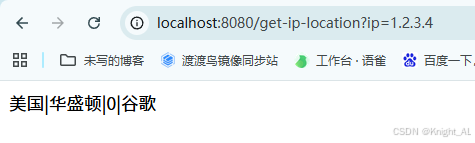
http://localhost:8080/get-ip-location?ip=1.2.3.4查询 IP 地址1.2.3.4的地理位置。
五、测试
启动 Spring Boot 应用后,可以通过浏览器或 Postman 发起查询请求:
bash
GET http://localhost:8080/get-ip-location?ip=1.2.3.4查询结果将是 IP 地址 1.2.3.4 的地理位置信息,例如:
json
{
  "region": "美国|华盛顿|0|谷歌"
}
六、优化:使用缓存来加速查询
IP2Region 支持使用缓存来优化查询性能。你可以通过预加载 VectorIndex 或整个 XDB 文件的内容,将其存储在内存中,从而减少文件 IO 操作,提升查询速度。
使用 VectorIndex 缓存
java
package com.donglin.service;

import jakarta.annotation.PostConstruct;
import org.lionsoul.ip2region.xdb.Searcher;
import org.lionsoul.ip2region.xdb.Version;
import org.springframework.beans.factory.annotation.Value;
import org.springframework.core.io.ClassPathResource;
import org.springframework.core.io.Resource;
import org.springframework.stereotype.Service;

import java.io.IOException;
import java.io.InputStream;
import java.nio.file.Files;
import java.nio.file.Path;
import java.util.concurrent.TimeUnit;

@Service
public class IpService {

    private Searcher searcher;

    @Value("${ip2region.db-path}")
    private String dbPath;

    @Value("${ip2region.version}")
    private String version;

    @PostConstruct
    public void init() throws IOException {
        Version ipVersion = version.equalsIgnoreCase("IPv4") ? Version.IPv4 : Version.IPv6;

        try {
            // ✅ 1. 从 classpath 读取 XDB 文件(无论打包与否都兼容)
            Resource resource = new ClassPathResource(dbPath);
            if (!resource.exists()) {
                throw new IOException("无法在 classpath 中找到文件:" + dbPath);
            }

            // ✅ 2. 先把 XDB 文件写入临时文件(VectorIndex 只能基于文件加载)
            Path tempFile = Files.createTempFile("ip2region", ".xdb");
            try (InputStream is = resource.getInputStream()) {
                Files.copy(is, tempFile, java.nio.file.StandardCopyOption.REPLACE_EXISTING);
            }

            // ✅ 3. 预加载 VectorIndex(大幅减少 I/O)
            byte[] vIndex;
            try {
                vIndex = Searcher.loadVectorIndexFromFile(tempFile.toString());
                System.out.println("VectorIndex loaded, length = " + vIndex.length);
            } catch (Exception e) {
                throw new IOException("加载 VectorIndex 失败: " + e.getMessage(), e);
            }

            // ✅ 4. 创建使用 VectorIndex 缓存的 Searcher
            searcher = Searcher.newWithVectorIndex(ipVersion, tempFile.toString(), vIndex);
            System.out.println("IP2Region searcher initialized with vector index cache.");

        } catch (IOException e) {
            System.err.printf("failed to create searcher with `%s`: %s%n", dbPath, e);
            throw new IOException("Failed to initialize IP2Region searcher", e);
        }
    }

    // 查询 IP 地理位置
    public String getCityInfo(String ip) {
        try {
            long start = System.nanoTime();
            String region = searcher.search(ip);
            long cost = TimeUnit.NANOSECONDS.toMicros(System.nanoTime() - start);
            System.out.printf("{region: %s, ioCount: %d, took: %d μs}%n",
                    region, searcher.getIOCount(), cost);
            return region;
        } catch (Exception e) {
            System.err.printf("failed to search(%s): %s%n", ip, e);
            return null;
        }
    }

    public void close() throws IOException {
        if (searcher != null) {
            searcher.close();
        }
    }
}
七、总结
通过将 ip2region 集成到 Spring Boot 中,我们可以非常高效地查询 IP 地址的地理位置信息。通过预加载缓存(如 VectorIndex 或整个 XDB 文件),我们可以进一步提高查询性能,减少 IO 压力,尤其是在高并发场景下。