import cv2 #opencv读取的格式是BGR
import numpy as np
import matplotlib.pyplot as plt#Matplotlib是RGB
%matplotlib inline
def cv_show(img,name):
cv2.imshow(name,img)
cv2.waitKey()
cv2.destroyAllWindows()
直方图
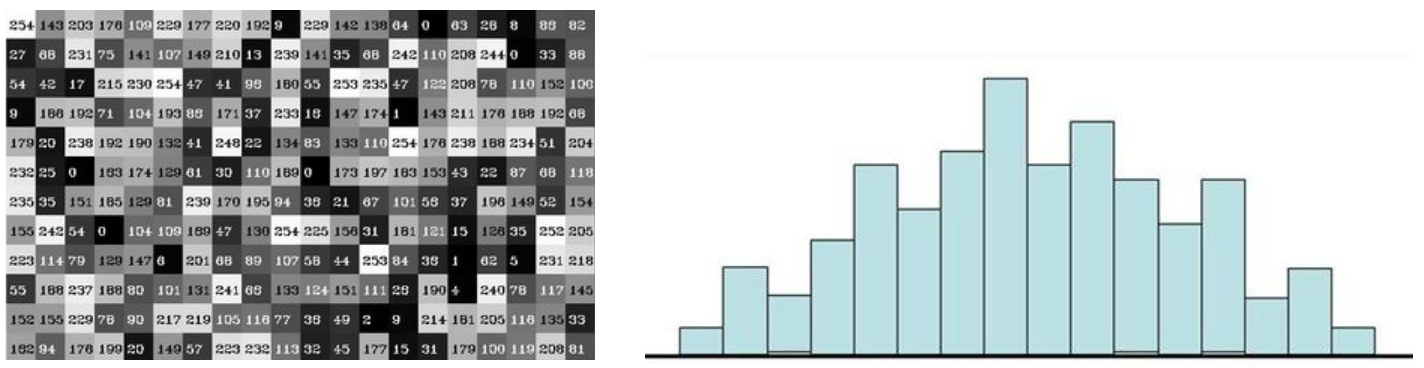
cv2.calcHist(images,channels,mask,histSize,ranges)
- images: 原图像图像格式为 uint8 或 float32。当传入函数时应 用中括号 \[\] 括来例如img
- channels: 同样用中括号括来它会告函数我们统幅图 像的直方图。如果入图像是灰度图它的值就是 0如果是彩色图像 的传入的参数可以是 012 它们分别对应着 BGR。
- mask: 掩模图像。统整幅图像的直方图就把它为 None。但是如 果你想统图像某一分的直方图的你就制作一个掩模图像并 使用它。
- histSize:BIN 的数目。也应用中括号括来
- ranges: 像素值范围常为 0256
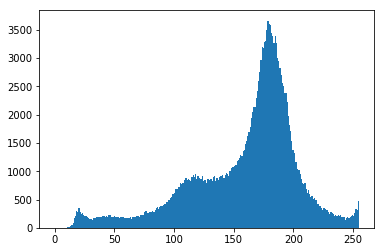
img = cv2.imread('cat.jpg',0) #0表示灰度图
hist = cv2.calcHist(img,0,None,256,0,256)
hist.shape
输出:(256, 1)
plt.hist(img.ravel(),256);
plt.show()
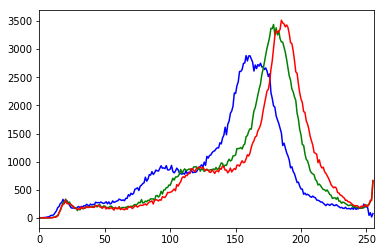
img = cv2.imread('cat.jpg')
color = ('b','g','r')
for i,col in enumerate(color):
histr = cv2.calcHist(img,i,None,256,0,256)
plt.plot(histr,color = col)
plt.xlim(0,256)
mask操作
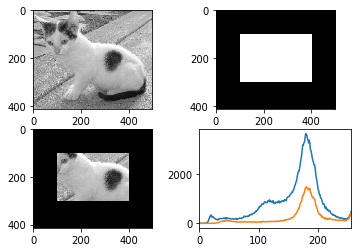
#创建mast
mask = np.zeros(img.shape:2, np.uint8)
print (mask.shape)
mask100:300, 100:400 = 255
cv_show(mask,'mask')
输出:(414, 500)
img = cv2.imread('cat.jpg', 0)
cv_show(img,'img')
masked_img = cv2.bitwise_and(img, img, mask=mask)#与操作
cv_show(masked_img,'masked_img')
hist_full = cv2.calcHist(img, 0, None, 256, 0, 256)
hist_mask = cv2.calcHist(img, 0, mask, 256, 0, 256)
plt.subplot(221), plt.imshow(img, 'gray')
plt.subplot(222), plt.imshow(mask, 'gray')
plt.subplot(223), plt.imshow(masked_img, 'gray')
plt.subplot(224), plt.plot(hist_full), plt.plot(hist_mask)
plt.xlim(0, 256)
plt.show()
直方图均衡化
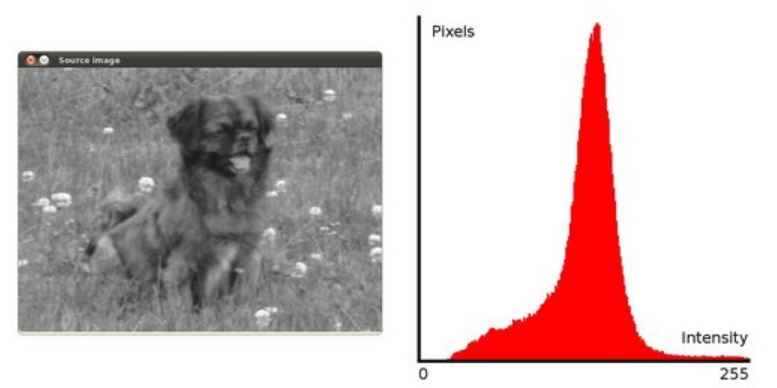
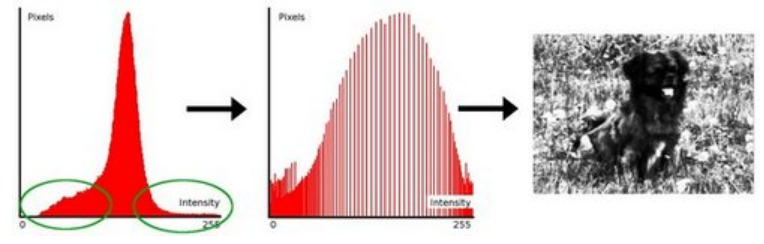
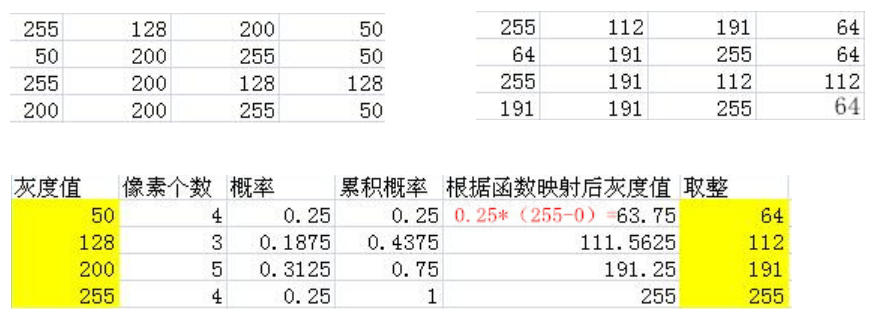
img = cv2.imread('clahe.jpg',0) #0表示灰度图 #clahe
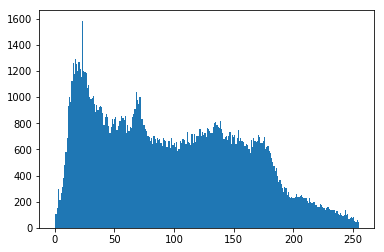
plt.hist(img.ravel(),256);
plt.show()
equ = cv2.equalizeHist(img)
plt.hist(equ.ravel(),256)
plt.show()
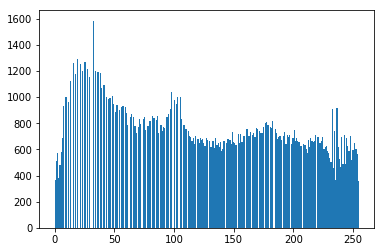
res = np.hstack((img,equ))
cv_show(res,'res')
自适应直方图均衡化
clahe = cv2.createCLAHE(clipLimit=2.0, tileGridSize=(8,8))
res_clahe = clahe.apply(img)
res = np.hstack((img,equ,res_clahe))
cv_show(res,'res')
模板匹配
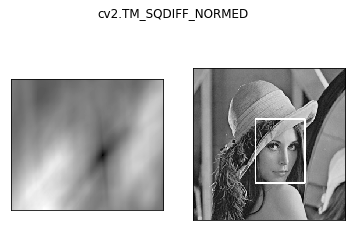
模板匹配和卷积原理很像,模板在原图像上从原点开始滑动,计算模板与(图像被模板覆盖的地方)的差别程度,这个差别程度的计算方法在opencv里有6种,然后将每次计算的结果放入一个矩阵里,作为结果输出。假如原图形是AxB大小,而模板是axb大小,则输出结果的矩阵是(A-a+1)x(B-b+1)
#模板匹配
img = cv2.imread('lena.jpg', 0)
template = cv2.imread('face.jpg', 0)
h, w = template.shape:2
img.shape
输出:(263, 263)
template.shape
输出:(110, 85)
- TM_SQDIFF:计算平方不同,计算出来的值越小,越相关
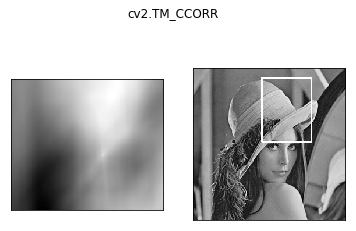
- TM_CCORR:计算相关性,计算出来的值越大,越相关
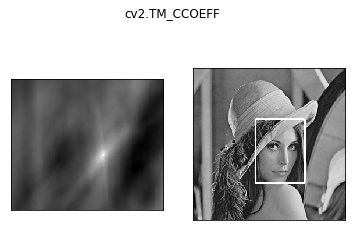
- TM_CCOEFF:计算相关系数,计算出来的值越大,越相关
- TM_SQDIFF_NORMED:计算归一化平方不同,计算出来的值越接近0,越相关
- TM_CCORR_NORMED:计算归一化相关性,计算出来的值越接近1,越相关
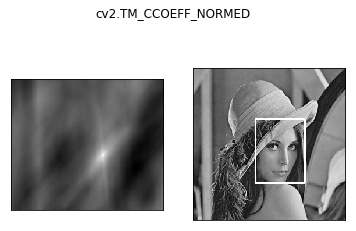
- TM_CCOEFF_NORMED:计算归一化相关系数,计算出来的值越接近1,越相关
公式:https://docs.opencv.org/3.3.1/df/dfb/group__imgproc__object.html#ga3a7850640f1fe1f58fe91a2d7583695d
methods = ['cv2.TM_CCOEFF', 'cv2.TM_CCOEFF_NORMED', 'cv2.TM_CCORR',
'cv2.TM_CCORR_NORMED', 'cv2.TM_SQDIFF', 'cv2.TM_SQDIFF_NORMED']
res = cv2.matchTemplate(img, template, cv2.TM_SQDIFF)
res.shape
输出:(154, 179)
min_val, max_val, min_loc, max_loc = cv2.minMaxLoc(res)
min_val
输出:39168.0
max_val
输出:74403584.0
min_loc
输出:(107, 89)
max_loc
输出:(159, 62)
for meth in methods:
img2 = img.copy()
#匹配方法的真值
method = eval(meth)
print (method)
res = cv2.matchTemplate(img, template, method)
min_val, max_val, min_loc, max_loc = cv2.minMaxLoc(res)

#如果是平方差匹配TM_SQDIFF或归一化平方差匹配TM_SQDIFF_NORMED,取最小值
if method in [cv2.TM_SQDIFF, cv2.TM_SQDIFF_NORMED]:
    top_left = min_loc
else:
    top_left = max_loc
bottom_right = (top_left[0] + w, top_left[1] + h)

#画矩形
cv2.rectangle(img2, top_left, bottom_right, 255, 2)

plt.subplot(121), plt.imshow(res, cmap='gray')
plt.xticks([]), plt.yticks([])  # 隐藏坐标轴
plt.subplot(122), plt.imshow(img2, cmap='gray')
plt.xticks([]), plt.yticks([])
plt.suptitle(meth)
plt.show()
输出:4
5
2
3
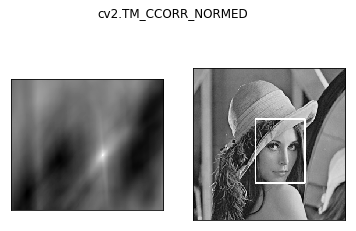
0
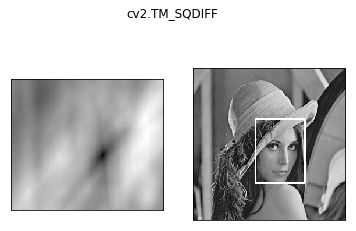
1
匹配多个对象
img_rgb = cv2.imread('mario.jpg')
img_gray = cv2.cvtColor(img_rgb, cv2.COLOR_BGR2GRAY)
template = cv2.imread('mario_coin.jpg', 0)
h, w = template.shape:2
res = cv2.matchTemplate(img_gray, template, cv2.TM_CCOEFF_NORMED)
threshold = 0.8
#取匹配程度大于%80的坐标
loc = np.where(res >= threshold)
for pt in zip(*loc::-1): #*号表示可选参数
bottom_right = (pt0 + w, pt1 + h)
cv2.rectangle(img_rgb, pt, bottom_right, (0, 0, 255), 2)
cv2.imshow('img_rgb', img_rgb)
cv2.waitKey(0)
输出:-1