我用夸克网盘给你分享了「圣诞树代码」,点击链接或复制整段内容,打开「夸克APP」即可获取。
圣诞树
我需要总结dynamic_christmas_tree.html的代码内容,首先分析文件结构和主要功能,然后整理成清晰的总结。# dynamic_christmas_tree.html 代码总结
1. 圣诞树代码概述
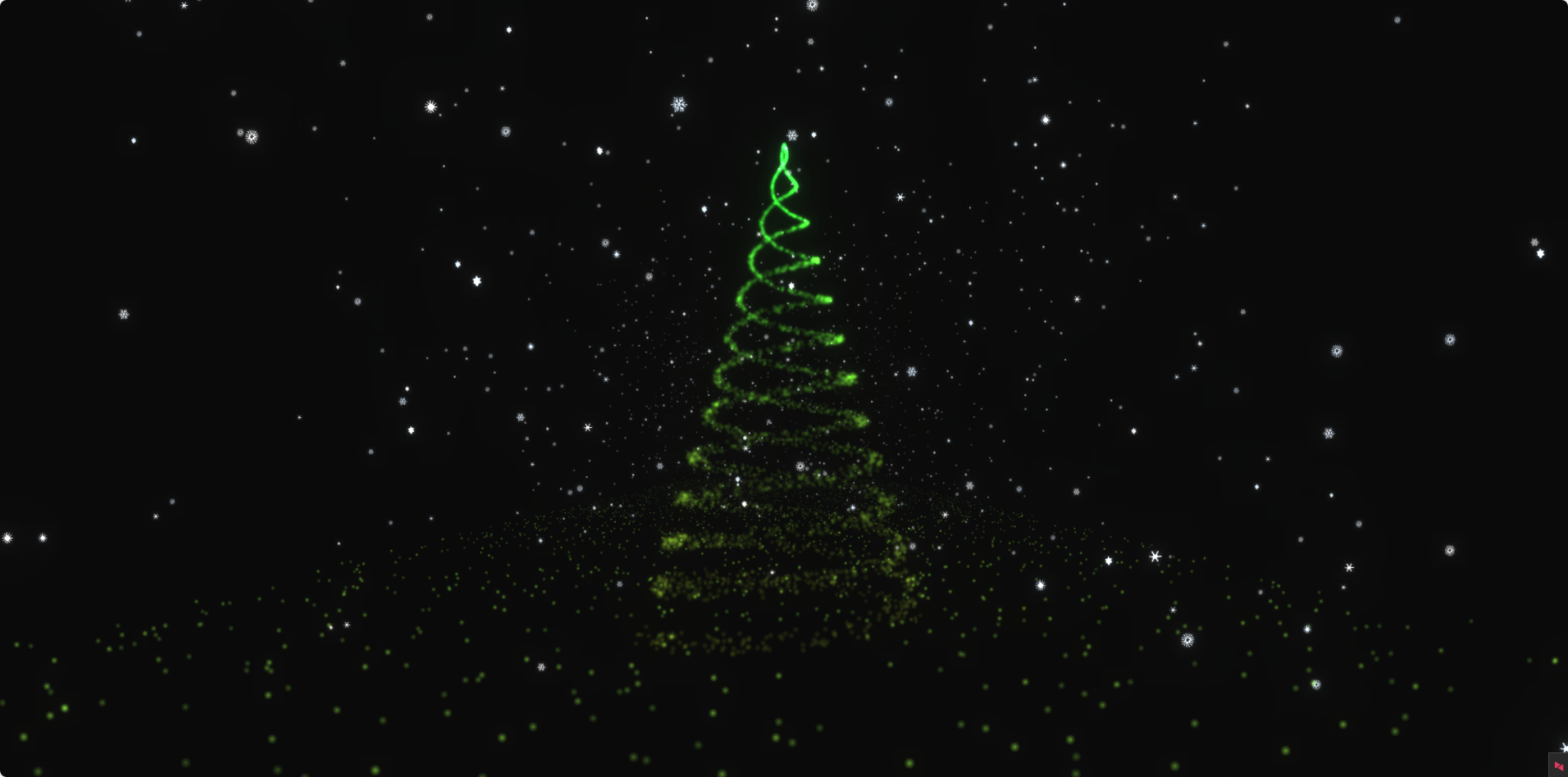
这是一个基于Three.js实现的3D动态圣诞树可视化网页,具有节日氛围的视觉效果。
2. 核心功能
2.1 3D圣诞树粒子系统
- 使用4000个粒子组成圣诞树形状
- 绿色渐变色彩(HSL 0.2-0.35色调,0.7饱和度,0.1亮度)
- 粒子大小固定为3.0,根据距离自动调整视觉大小
- 主树绕Y轴缓慢旋转(0.005弧度/帧)
2.2 雪花飘落效果
- 5种不同形状的雪花纹理
- 共1500个雪花粒子(5组×300个)
- 模拟飘落动画,包含左右摇摆效果
- 雪花大小随机(2-4像素)
2.3 地面粒子效果
- 3000个地面粒子组成雪地效果
- 深绿色调(#2d5016, #3a621a等)
- 增强场景深度感
2.4 视觉增强
- 后期处理效果:辉光(Bloom)
- 曝光度:0.6
- 辉光强度:0.4
- 辉光阈值:0.2
- 辉光半径:0.2
3. 技术实现
3.1 渲染技术
- 使用WebGLRenderer进行3D渲染
- EffectComposer实现后期处理
- ShaderMaterial自定义着色器效果
3.2 核心组件
- 场景(Scene):包含所有3D对象,设置雾化效果
- 相机(PerspectiveCamera):透视相机,位置(0,-2,25)
- 渲染器(WebGLRenderer):抗锯齿,自适应像素比
3.3 着色器实现
- 顶点着色器:处理粒子位置、大小和透明度
- 片段着色器:处理粒子颜色和纹理
3.4 动画系统
- requestAnimationFrame实现动画循环
- 时间和步骤变量控制动画进度
- 粒子相位属性实现同步动画效果
4. 响应式设计
- 监听窗口大小变化
- 自动调整相机宽高比
- 更新渲染器和后期处理器大小
5. 代码结构
5.1 工具函数
- map:值映射
- range:数组生成
- rand:随机数生成
- polar:极坐标转换
5.2 主流程
- DOM加载完成后初始化
- 创建场景、相机、渲染器
- 添加地面、雪花、圣诞树
- 配置后期处理
- 启动动画循环
5.3 组件函数
- addChristmasTree:添加圣诞树
- addSnow:添加雪花效果
- addGround:添加地面
- addEventListeners:添加事件监听
html
<!DOCTYPE html>
<html lang="zh-CN">
<head>
<meta charset="UTF-8">
<meta name="viewport" content="width=device-width, initial-scale=1.0">
<title>3D圣诞树</title>
<style>
* {
box-sizing: border-box;
}
body {
margin: 0;
height: 100vh;
overflow: hidden;
display: flex;
align-items: center;
justify-content: center;
background: #161616;
color: #c5a880;
font-family: sans-serif;
}
</style>
</head>
<body>
<script src="https://cdn.jsdelivr.net/npm/three@0.115.0/build/three.min.js"></script>
<script src="https://cdn.jsdelivr.net/npm/three@0.115.0/examples/js/postprocessing/EffectComposer.js"></script>
<script src="https://cdn.jsdelivr.net/npm/three@0.115.0/examples/js/postprocessing/RenderPass.js"></script>
<script src="https://cdn.jsdelivr.net/npm/three@0.115.0/examples/js/postprocessing/ShaderPass.js"></script>
<script src="https://cdn.jsdelivr.net/npm/three@0.115.0/examples/js/shaders/CopyShader.js"></script>
<script src="https://cdn.jsdelivr.net/npm/three@0.115.0/examples/js/shaders/LuminosityHighPassShader.js"></script>
<script src="https://cdn.jsdelivr.net/npm/three@0.115.0/examples/js/postprocessing/UnrealBloomPass.js"></script>
<script>
const { PI, sin, cos } = Math;
const TAU = 2 * PI;
// 工具函数
const map = (value, sMin, sMax, dMin, dMax) => {
return dMin + ((value - sMin) / (sMax - sMin)) * (dMax - dMin);
};
const range = (n, m = 0) =>
Array(n)
.fill(m)
.map((i, j) => i + j);
const rand = (max, min = 0) => min + Math.random() * (max - min);
const randInt = (max, min = 0) => Math.floor(min + Math.random() * (max - min));
const randChoise = (arr) => arr[randInt(arr.length)];
const polar = (ang, r = 1) => [r * cos(ang), r * sin(ang)];
// 全局变量
let scene, camera, renderer;
let step = 0;
const uniforms = {
time: { type: "f", value: 0.0 },
step: { type: "f", value: 0.0 },
};
const params = {
exposure: 0.6,
bloomStrength: 0.4,
bloomThreshold: 0.2,
bloomRadius: 0.2,
};
let composer;
const totalPoints = 4000;
// 页面加载完成后直接初始化
window.addEventListener('DOMContentLoaded', () => {
init();
});
// 初始化函数
function init() {
// 创建场景
scene = new THREE.Scene();
scene.fog = new THREE.Fog(0x0a0a0a, 20, 100);
// 创建渲染器
renderer = new THREE.WebGLRenderer({ antialias: true });
renderer.setPixelRatio(window.devicePixelRatio);
renderer.setSize(window.innerWidth, window.innerHeight);
renderer.setClearColor(0x0a0a0a);
document.body.appendChild(renderer.domElement);
// 创建相机
camera = new THREE.PerspectiveCamera(
60,
window.innerWidth / window.innerHeight,
1,
1000
);
camera.position.set(0, -2, 25);
camera.rotation.set(0.1, 0, 0);
// 移除音频相关代码,只保留基本功能
// 添加场景元素
addGround(scene, uniforms);
addSnow(scene, uniforms);
addChristmasTree(scene, uniforms, totalPoints, [0, 0, 0]);
// 后期处理
const renderScene = new THREE.RenderPass(scene, camera);
const bloomPass = new THREE.UnrealBloomPass(
new THREE.Vector2(window.innerWidth, window.innerHeight),
1.5,
0.4,
0.85
);
bloomPass.threshold = params.bloomThreshold;
bloomPass.strength = params.bloomStrength;
bloomPass.radius = params.bloomRadius;
composer = new THREE.EffectComposer(renderer);
composer.addPass(renderScene);
composer.addPass(bloomPass);
// 添加事件监听器
addEventListeners();
animate();
}
// 动画循环
function animate(time) {
step = (step + 1) % 1000;
uniforms.time.value = time;
uniforms.step.value = step;
// 旋转主圣诞树
const tree = scene.children.find(child => child.name === 'mainTree');
if (tree) {
tree.rotation.y += 0.005;
}
composer.render();
requestAnimationFrame(animate);
}
// 添加圣诞树
function addChristmasTree(scene, uniforms, totalPoints, treePosition, scale = 1) {
// 顶点着色器
const vertexShader = `
attribute float mIndex;
varying vec3 vColor;
varying float opacity;
float norm(float value, float min, float max ){
return (value - min) / (max - min);
}
float lerp(float norm, float min, float max){
return (max - min) * norm + min;
}
float map(float value, float sourceMin, float sourceMax, float destMin, float destMax){
return lerp(norm(value, sourceMin, sourceMax), destMin, destMax);
}
void main() {
vColor = color;
vec3 p = position;
// 移除音频可视化效果,使用固定点大小
vec4 mvPosition = modelViewMatrix * vec4(p, 1.0);
float sizeMapped = 3.0; // 进一步减小点大小以降低亮度
// 根据距离设置透明度
opacity = map(mvPosition.z, -200.0, 15.0, 0.0, 1.0);
// 设置点大小
gl_PointSize = sizeMapped * (100.0 / -mvPosition.z);
gl_Position = projectionMatrix * mvPosition;
}
`;
// 片段着色器
const fragmentShader = `
varying vec3 vColor;
varying float opacity;
uniform sampler2D pointTexture;
void main() {
gl_FragColor = vec4(vColor, opacity);
gl_FragColor = gl_FragColor * texture2D(pointTexture, gl_PointCoord);
}
`;
// 创建材质
const shaderMaterial = new THREE.ShaderMaterial({
uniforms: {
...uniforms,
pointTexture: {
value: new THREE.TextureLoader().load(`https://assets.codepen.io/3685267/spark1.png`),
},
},
vertexShader,
fragmentShader,
blending: THREE.AdditiveBlending,
depthTest: false,
transparent: true,
vertexColors: true,
});
// 创建几何体
const geometry = new THREE.BufferGeometry();
const positions = [];
const colors = [];
const sizes = [];
const phases = [];
const mIndexs = [];
const color = new THREE.Color();
// 生成圣诞树形状的粒子
for (let i = 0; i < totalPoints; i++) {
const t = Math.random();
const y = map(t, 0, 1, -8, 10) * scale;
const ang = map(t, 0, 1, 0, 6 * TAU) + (TAU / 2) * (i % 2);
const radius = map(t, 0, 1, 5, 0) * scale;
const [z, x] = polar(ang, radius);
const modifier = map(t, 0, 1, 1, 0);
positions.push(x + rand(-0.3 * modifier, 0.3 * modifier) * scale);
positions.push(y + rand(-0.3 * modifier, 0.3 * modifier) * scale);
positions.push(z + rand(-0.3 * modifier, 0.3 * modifier) * scale);
// 圣诞树颜色:绿色系(进一步降低亮度)
const hue = map(t, 0, 1, 0.2, 0.35); // 绿色到深绿色
color.setHSL(hue, 0.7, 0.1); // 进一步降低饱和度和亮度
colors.push(color.r, color.g, color.b);
phases.push(rand(1000));
sizes.push(1);
const mIndex = map(i, 0, totalPoints, 1.0, 0.0);
mIndexs.push(mIndex);
}
// 设置几何体属性
geometry.setAttribute(
"position",
new THREE.Float32BufferAttribute(positions, 3).setUsage(
THREE.DynamicDrawUsage
)
);
geometry.setAttribute("color", new THREE.Float32BufferAttribute(colors, 3));
geometry.setAttribute("size", new THREE.Float32BufferAttribute(sizes, 1));
geometry.setAttribute("phase", new THREE.Float32BufferAttribute(phases, 1));
geometry.setAttribute("mIndex", new THREE.Float32BufferAttribute(mIndexs, 1));
// 创建粒子系统
const tree = new THREE.Points(geometry, shaderMaterial);
tree.name = treePosition[0] === 0 && treePosition[2] === 0 ? 'mainTree' : 'tree';
// 设置位置
const [px, py, pz] = treePosition;
tree.position.set(px, py, pz);
// 添加到场景
scene.add(tree);
}
// 添加雪花效果
function addSnow(scene, uniforms) {
// 顶点着色器
const vertexShader = `
attribute float size;
attribute float phase;
attribute float phaseSecondary;
varying vec3 vColor;
varying float opacity;
uniform float time;
uniform float step;
float norm(float value, float min, float max ){
return (value - min) / (max - min);
}
float lerp(float norm, float min, float max){
return (max - min) * norm + min;
}
float map(float value, float sourceMin, float sourceMax, float destMin, float destMax){
return lerp(norm(value, sourceMin, sourceMax), destMin, destMax);
}
void main() {
float t = time * 0.0006;
vColor = color;
vec3 p = position;
// 雪花飘落动画
p.y = map(mod(phase + step, 1000.0), 0.0, 1000.0, 25.0, -8.0);
p.x += sin(t + phase) * 0.1;
p.z += sin(t + phaseSecondary) * 0.1;
// 根据距离设置透明度
opacity = map(p.z, -150.0, 15.0, 0.0, 1.0);
vec4 mvPosition = modelViewMatrix * vec4(p, 1.0);
gl_PointSize = size * (100.0 / -mvPosition.z);
gl_Position = projectionMatrix * mvPosition;
}
`;
// 片段着色器
const fragmentShader = `
uniform sampler2D pointTexture;
varying vec3 vColor;
varying float opacity;
void main() {
gl_FragColor = vec4(vColor, opacity);
gl_FragColor = gl_FragColor * texture2D(pointTexture, gl_PointCoord);
}
`;
// 创建雪花粒子集
function createSnowSet(sprite) {
const totalPoints = 300;
const shaderMaterial = new THREE.ShaderMaterial({
uniforms: {
...uniforms,
pointTexture: {
value: new THREE.TextureLoader().load(sprite),
},
},
vertexShader,
fragmentShader,
blending: THREE.AdditiveBlending,
depthTest: false,
transparent: true,
vertexColors: true,
});
const geometry = new THREE.BufferGeometry();
const positions = [];
const colors = [];
const sizes = [];
const phases = [];
const phaseSecondaries = [];
const color = new THREE.Color();
// 生成雪花粒子
for (let i = 0; i < totalPoints; i++) {
const [x, y, z] = [rand(25, -25), 0, rand(15, -150)];
positions.push(x);
positions.push(y);
positions.push(z);
// 雪花颜色
color.set(randChoise(["#ffffff", "#f0f8ff", "#e6f3ff", "#d9ecff"]));
colors.push(color.r, color.g, color.b);
phases.push(rand(1000));
phaseSecondaries.push(rand(1000));
sizes.push(rand(4, 2));
}
// 设置几何体属性
geometry.setAttribute(
"position",
new THREE.Float32BufferAttribute(positions, 3)
);
geometry.setAttribute("color", new THREE.Float32BufferAttribute(colors, 3));
geometry.setAttribute("size", new THREE.Float32BufferAttribute(sizes, 1));
geometry.setAttribute("phase", new THREE.Float32BufferAttribute(phases, 1));
geometry.setAttribute(
"phaseSecondary",
new THREE.Float32BufferAttribute(phaseSecondaries, 1)
);
// 创建粒子系统
const mesh = new THREE.Points(geometry, shaderMaterial);
scene.add(mesh);
}
// 不同形状的雪花纹理
const sprites = [
"https://assets.codepen.io/3685267/snowflake1.png",
"https://assets.codepen.io/3685267/snowflake2.png",
"https://assets.codepen.io/3685267/snowflake3.png",
"https://assets.codepen.io/3685267/snowflake4.png",
"https://assets.codepen.io/3685267/snowflake5.png",
];
// 创建多个雪花粒子集
sprites.forEach((sprite) => {
createSnowSet(sprite);
});
}
// 添加地面
function addGround(scene, uniforms) {
// 顶点着色器
const vertexShader = `
attribute float size;
attribute vec3 customColor;
varying vec3 vColor;
void main() {
vColor = customColor;
vec4 mvPosition = modelViewMatrix * vec4(position, 1.0);
gl_PointSize = size * (300.0 / -mvPosition.z);
gl_Position = projectionMatrix * mvPosition;
}
`;
// 片段着色器
const fragmentShader = `
uniform sampler2D pointTexture;
varying vec3 vColor;
void main() {
gl_FragColor = vec4(vColor, 1.0);
gl_FragColor = gl_FragColor * texture2D(pointTexture, gl_PointCoord);
}
`;
// 创建材质
const shaderMaterial = new THREE.ShaderMaterial({
uniforms: {
...uniforms,
pointTexture: {
value: new THREE.TextureLoader().load(`https://assets.codepen.io/3685267/spark1.png`),
},
},
vertexShader,
fragmentShader,
blending: THREE.AdditiveBlending,
depthTest: false,
transparent: true,
vertexColors: true,
});
// 创建几何体
const geometry = new THREE.BufferGeometry();
const positions = [];
const colors = [];
const sizes = [];
const color = new THREE.Color();
// 生成地面粒子
for (let i = 0; i < 3000; i++) {
const [x, y, z] = [rand(-25, 25), 0, rand(-150, 15)];
positions.push(x);
positions.push(y - 8); // 地面位置
positions.push(z);
// 地面颜色
color.set(randChoise(["#2d5016", "#3a621a", "#4a7c1f", "#5b9925"]));
colors.push(color.r, color.g, color.b);
sizes.push(1);
}
// 设置几何体属性
geometry.setAttribute(
"position",
new THREE.Float32BufferAttribute(positions, 3).setUsage(
THREE.DynamicDrawUsage
)
);
geometry.setAttribute(
"customColor",
new THREE.Float32BufferAttribute(colors, 3)
);
geometry.setAttribute("size", new THREE.Float32BufferAttribute(sizes, 1));
// 创建粒子系统
const plane = new THREE.Points(geometry, shaderMaterial);
scene.add(plane);
}
// 添加事件监听器
function addEventListeners() {
// 键盘事件
document.addEventListener("keydown", (e) => {
const { x, y, z } = camera.position;
console.log(`camera.position.set(${x},${y},${z})`);
const { x: a, y: b, z: c } = camera.rotation;
console.log(`camera.rotation.set(${a},${b},${c})`);
});
// 窗口大小调整
window.addEventListener(
"resize",
() => {
const width = window.innerWidth;
const height = window.innerHeight;
camera.aspect = width / height;
camera.updateProjectionMatrix();
renderer.setSize(width, height);
composer.setSize(width, height);
},
false
);
}
</script>
</body>
</html>