1.下拉多选1
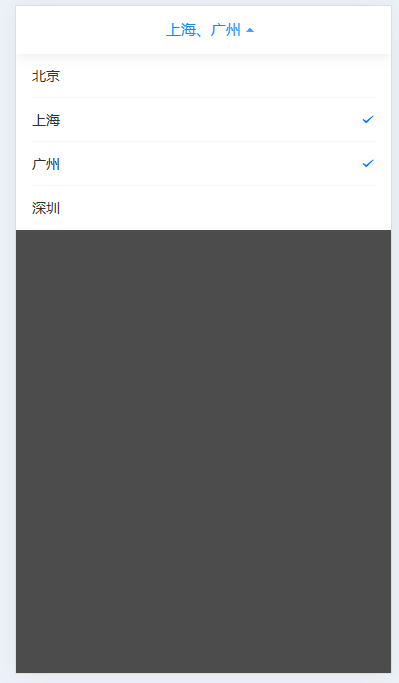
html
<MultipleSelect v-model="selected" placeholder="请选择" :options="options" />MultipleSelect.vue
html
<template>
  <van-dropdown-menu ref="menuRef">
    <van-dropdown-item :title="displayTitle" ref="itemRef">
      <van-cell v-for="item in options" :key="item.value" :title="item.label" center @click="handleClick(item)">
        <template #right-icon>
          <van-icon v-show="modelValue.includes(item.value)" name="success" color="rgb(0, 122, 255)" />
        </template>
      </van-cell>
    </van-dropdown-item>
  </van-dropdown-menu>
</template>

<script setup>
import { computed } from 'vue'

const props = defineProps({
  modelValue: {
    type: Array,
    default: () => []
  },
  placeholder: {
    type: String,
    default: '请选择'
  },
  options: {
    type: Array,
    default: () => []
  }
})

const emit = defineEmits(['update:modelValue'])

// 使用计算属性动态计算显示标题
const displayTitle = computed(() => {
  if (props.modelValue.length === 0) {
    return props.placeholder
  }
  const selectedLabels = props.options
    .filter(item => props.modelValue.includes(item.value))
    .map(item => item.label)
  return selectedLabels.join('、')
})

const handleClick = (val) => {
  const selected = [...props.modelValue]
  if (selected.includes(val.value)) {
    selected.splice(selected.indexOf(val.value), 1)
  } else {
    selected.push(val.value)
  }
  emit('update:modelValue', selected)
}


</script>
2.下拉多选二
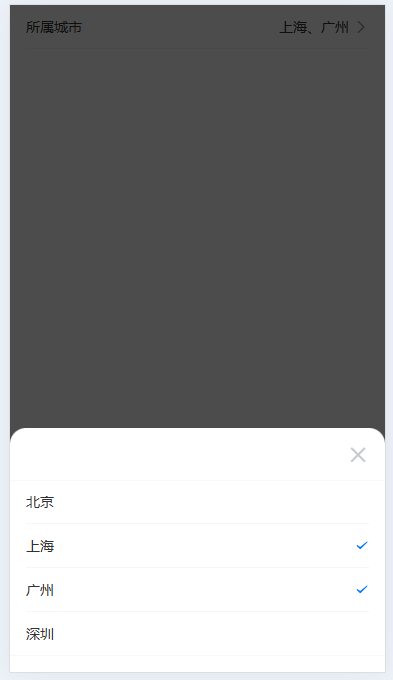
html
<MultipleSelect2 v-model="selected" placeholder="请选择" :options="options" label="所属城市" />MultipleSelect2.vue
html
<template>
  <van-field readonly clickable name="picker" v-model="fieldValue" :label="label" :placeholder="placeholder"
    input-align="right" is-link @click="popupVisible = true" />

  <van-popup v-model:show="popupVisible" round position="bottom" closeable class="custom-popup">
    <van-cell-group class="list">
      <van-cell v-for="item in options" :key="item.value" :title="item.label" center @click="handleClick(item)">
        <template #right-icon>
          <van-icon v-show="modelValue.includes(item.value)" name="success" color="rgb(0, 122, 255)" />
        </template>
      </van-cell>
    </van-cell-group>
  </van-popup>
</template>
<script setup>
import { ref } from 'vue'
const props = defineProps({
  modelValue: {
    type: Array,
    default: () => []
  },
  label: {
    type: String,
    default: ''
  },
  placeholder: {
    type: String,
    default: '请选择'
  },
  options: {
    type: Array,
    default: () => []
  }
})

const emit = defineEmits(['update:modelValue'])

const fieldValue = ref('')
const popupVisible = ref(false)

const handleClick = (val) => {
  const selected = [...props.modelValue]
  if (selected.includes(val.value)) {
    selected.splice(selected.indexOf(val.value), 1)
  } else {
    selected.push(val.value)
  }
  emit('update:modelValue', selected)
  let selectedText = []
  props.options.forEach((item) => {
    if (selected.includes(item.value)) {
      selectedText.push(item.label)
    }
  })
  fieldValue.value = selectedText.join('、')

  console.log(selected)
}
</script>

<style>
.custom-popup {
  padding: 52px 0 16px 0;

  .list {
    max-height: 70vh;
    overflow-y: auto;
    -webkit-overflow-scrolling: touch;
  }
}
</style>
3.带快捷选项的日期范围选择器
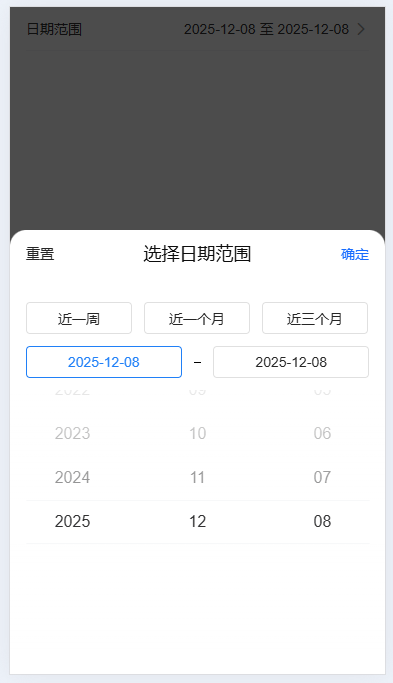
html
<CustomDatePicker v-model="dateArr" :shortcuts="shortcuts" />

// 快捷选项
const shortcuts = ref([
  {
    text: '近一周',
    start: ['2025', '12', '02'],
    end: ['2025', '12', '08']
  },
  {
    text: '近一个月',
    start: ['2025', '11', '09'],
    end: ['2025', '12', '08']
  },
  {
    text: '近三个月',
    start: ['2025', '10', '09'],
    end: ['2025', '12', '08']
  },
])

const dateArr = ref([])
CustomDatePicker.vue
html
<template>
  <van-field readonly clickable name="picker" v-model="fieldValue" label="日期范围" placeholder="请选择日期范围"
    input-align="right" is-link @click="showDatePicker = true" />

  <van-popup v-model:show="showDatePicker" round position="bottom" class="date-popup">
    <div class="popup-header">
      <span class="btn-cancel" @click="handleReset">重置</span>
      <span class="title">选择日期范围</span>
      <span class="btn-confirm" @click="handleConfirm">确定</span>
    </div>
    <div v-if="shortcuts?.length" class="tab-list">
      <div v-for="(item, index) in shortcuts" :key="index" class="tab-item" :class="{ active: activeTab === index }"
        @click="activeTanChange(index, item)">
        {{ item.text }}
      </div>
    </div>
    <div class="tab-list tab-list2">
      <div class="tab-item" :class="{ active: activeTab === 'start' }" @click="activeTanChange('start')">
        {{ startDateLabel }}
      </div>
      <div class="line"></div>
      <div class="tab-item" :class="{ active: activeTab === 'end' }" @click="activeTanChange('end')">
        {{ endDateLabel }}
      </div>
    </div>
    <van-date-picker v-show="activeTab === 'start'" v-model="startDate" title="选择日期" :min-date="minDate"
      :max-date="maxDate" :show-toolbar="false" />
    <van-date-picker v-show="activeTab === 'end'" v-model="endDate" title="选择日期" :min-date="minDate" :max-date="maxDate"
      :show-toolbar="false" />
  </van-popup>
</template>

<script setup>
import { ref, computed } from 'vue'
const props = defineProps({
  modelValue: {
    type: Array,
    default: () => []
  },
  shortcuts: {
    type: Array,
    default: () => [],
  }
})

const emit = defineEmits(['update:modelValue'])

const showDatePicker = ref(false) // 是否显示日期筛选弹窗

const activeTab = ref(null) // 当前激活的日期筛选标签
// 开始日期标签
const startDateLabel = computed(() => {
  if (activeTab.value !== null) {
    return startDate.value.join('-')
  } else {
    return '开始日期'
  }
})
// 结束日期标签
const endDateLabel = computed(() => {
  if (activeTab.value !== null) {
    return endDate.value.join('-')
  } else {
    return '结束日期'
  }
})

const fieldValue = computed(() => {
  if (activeTab.value !== null) {
    return `${startDateLabel.value} 至 ${endDateLabel.value}`
  } else {
    return ''
  }
})

const startDate = ref(['2025', '12', '08']) // 开始日期
const endDate = ref(['2025', '12', '08']) // 结束日期
const minDate = ref(new Date(2020, 0, 1)) // 最小日期
const maxDate = ref(new Date()) // 最大日期

const activeTanChange = (index, item) => {
  activeTab.value = index
  if (index === 'start') {

  } else if (index === 'end') {

  } else {
    const { start, end } = item
    startDate.value = start
    endDate.value = end
  }
}


// 切换日期
const handleConfirm = () => {
  console.log(fieldValue.value)
  if (activeTab.value !== null) {
    emit('update:modelValue', fieldValue.value.split(' 至 '))
  } else {
    emit('update:modelValue', ['', ''])
  }
  showDatePicker.value = false
}

// 重置
const handleReset = () => {
  activeTab.value = null
  startDate.value = ['2025', '12', '08']
  endDate.value = ['2025', '12', '08']
}
</script>

<style lang="scss" scoped>
.date-popup {
  padding-bottom: 20px;

  .popup-header {
    height: 48px;
    padding: 12px 16px;
    display: flex;
    justify-content: space-between;
    align-items: center;
    margin-bottom: 24px;

    .btn-cancel,
    .btn-confirm {
      color: rgba(0, 0, 0, 0.85);
      font-size: 14px;
      font-weight: 400;
      line-height: 20px;
    }

    .btn-confirm {
      color: rgba(23, 108, 255, 1);
    }

    .title {
      color: rgba(0, 0, 0, 0.95);
      font-size: 18px;
      font-weight: 500;
      line-height: 24px;
    }
  }

  .tab-list,
  .tab-list2 {
    padding: 0 16px;
    display: grid;
    grid-template-columns: repeat(auto-fill, 106px);
    gap: 12px;
    margin-bottom: 12px;

    .tab-item {
      width: 106px;
      height: 32px;
      display: flex;
      justify-content: center;
      align-items: center;
      border: 1px solid rgba(0, 0, 0, 0.12);
      border-radius: 4px;
      font-size: 14px;
      font-weight: 400;
      color: rgba(0, 0, 0, 0.85);

      &.active {
        border: 1px solid rgba(32, 128, 247, 1);
        color: rgba(32, 128, 247, 1);
      }
    }


  }

  .tab-list2 {
    display: flex;
    justify-content: space-between;
    align-items: center;

    .tab-item {
      width: 156px;
    }

    .line {
      width: 8px;
      height: 1px;
      background: rgba(0, 0, 0, 1);
    }
  }
}
</style>