Spring Ai Alibaba-1.1.0.0-M5-SequentialAgent
在顺序执行模式中,多个Agent按预定义的顺序依次执行。每个Agent的输出成为下一个Agent的输入。
流程:
- Agent A处理初始输入
- Agent A 的输出传递给Agent B
- Agent B 处理并传递给Agent C
- 最后一个Agent返回最终结果
一、🏗️ 架构概览
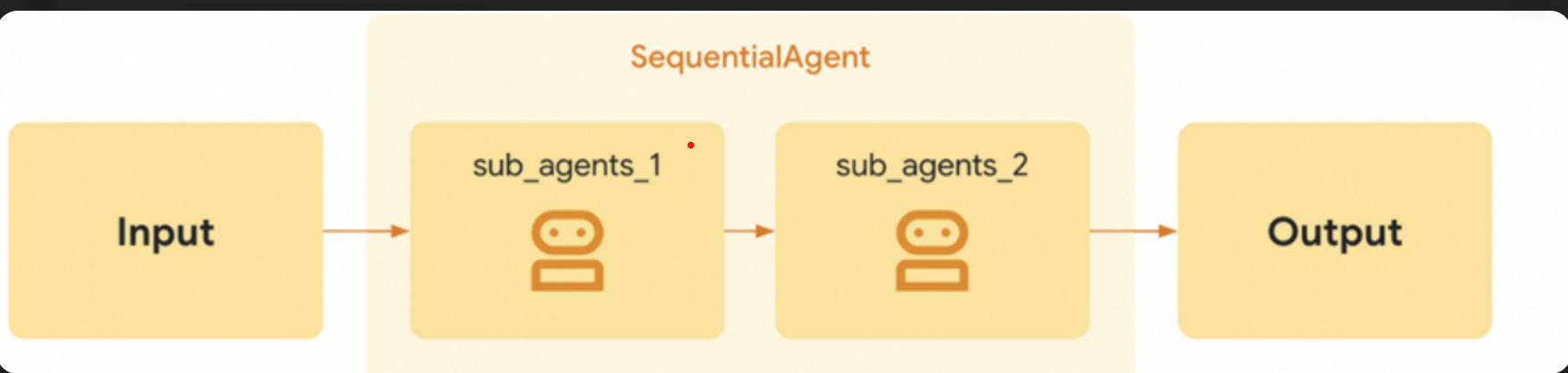
二、✨ 项目概述
这是一个基于 Spring AI Alibaba 的多 Agent 协作系统示例项目。该项目演示了如何构建和运行多个 AI Agent 之间的协作流程,特别展示了顺序执行的 Agent 工作流。项目还包含了完善的监控和性能跟踪功能。
三、🛠️ 技术栈
- Spring Boot 3.4.x
- Spring AI Alibaba
- Alibaba Cloud DashScope (通义千问 API)
- micrometer 1.16.0
- Java 17+
四、📁 项目结构
SpringAiAlibabaMultiAgent/
├── src/
│   ├── main/
│   │   ├── java/
│   │   │   └── com/alibaba/springaialibabamultiagent/
│   │   │       ├── SpringAiAlibabaMultiAgentApplication.java  # 应用启动类
│   │   │       ├── config/                                    # 配置类目录
│   │   │       │   ├── AgentConfig.java                       # Agent 配置类
│   │   │       │   ├── MonitoringConfig.java                  # 监控配置类
│   │   │       │   └── StorageConfig.java                     # 存储配置类
│   │   │       ├── controller/                                # 控制器目录
│   │   │       │   └── SequentialAgentController.java         # 顺序 Agent 控制器
│   │   └── resources/
│   │       └── application.properties                         # 应用配置文件
├── pom.xml                                                    # Maven 配置文件
└── README.md                                                  # 项目说明文件
五、⚙️ 配置pom.xml
项目集成了 Micrometer 和 Prometheus 监控,可以通过以下端点访问监控信息:
-
http://localhost:8020/actuator/health: 健康检查 -
http://localhost:8020/actuator/metrics: 指标信息 -
http://localhost:8020/actuator/prometheus: Prometheus 格式的监控数据dependency>
org.springframework.boot
spring-boot-starter-web
3.4.12
org.springframework.boot
spring-boot-starter-actuator
3.4.12
io.micrometer
micrometer-registry-prometheus
1.16.0
com.alibaba.cloud.ai
spring-ai-alibaba-agent-framework
1.1.0.0-M5
com.alibaba.cloud.ai spring-ai-alibaba-starter-dashscope 1.1.0.0-M5
六、📝 配置application.properties
server.port=8020
spring.application.name=SpringAiAlibabaMultiAgent
# ====SpringAIAlibaba Config=============
spring.ai.dashscope.api-key=${qwen-api}
spring.ai.dashscope.model=qwen-turbo
# 配置温度参数
spring.ai.dashscope.chat.options.temperature=0.5
# 配置最大token数
spring.ai.dashscope.chat.options.max-tokens=1048
# 启用字符编码过滤器
server.servlet.encoding.enabled=true
# 强制对所有请求和响应使用指定的字符编码
server.servlet.encoding.force=true
# 设置字符编码
server.servlet.encoding.charset=UTF-8
# Micrometer 监控配置
management.endpoints.web.exposure.include=health,info,metrics,prometheus
management.prometheus.metrics.export.enabled=true
七、🧰 配置类
🔗存储配置类
@Configuration
public class StorageConfig {
    @Bean
    public MemoryStore memoryStore() {
        return new MemoryStore();
    }
    @Bean
    public MemorySaver memorySaver() {
        return new MemorySaver();
    }
}
🔗注册表配置类
@Configuration
public class MonitoringConfig {
    /**
     * 创建ObservationRegistry Bean
     * 用于配置和初始化ObservationRegistry实例
     * @return ObservationRegistry实例
     */
    @Bean
    public ObservationRegistry observationRegistry() {
        return ObservationRegistry.create();
    }
}
🔗agent 配置类
@Configuration
public class AgentConfig {

    /**
     * 创建写作Agent Bean
     * @param dashScopeChatModel DashScope聊天模型
     * @return ReactAgent实例
     */
    @Bean
    public ReactAgent writerAgent(DashScopeChatModel dashScopeChatModel, MemorySaver memorySaver) {
        return ReactAgent.builder()
                .name("writer_agent")
                .model(dashScopeChatModel)
                .description("专业写作Agent")
                .instruction("你是一个知名的作家,擅长写作和创作。请根据用户的提问进行回答。")
                .outputKey("article")
                .saver(memorySaver)
                .build();
    }

    /**
     * 创建评审Agent Bean
     * @param dashScopeChatModel DashScope聊天模型
     * @return ReactAgent实例
     */
    @Bean
    public ReactAgent reviewerAgent(DashScopeChatModel dashScopeChatModel, MemorySaver memorySaver) {
        return ReactAgent.builder()
                .name("reviewer_agent")
                .model(dashScopeChatModel)
                .description("专业评审Agent")
                .instruction("你是一个知名的评论家,擅长对文章进行评论和修改。" +
                        "对于散文类文章,请确保文章中必须包含对于西湖风景的描述。" +
                        "最终只返回修改后的文章,不要包含任何评论信息。")
                .outputKey("reviewed_article")
                .saver(memorySaver)
                .build();
    }
}
八、🎯 控制器
package com.alibaba.springaialibabamultiagent.controller;

import com.alibaba.cloud.ai.graph.CompileConfig;
import com.alibaba.cloud.ai.graph.OverAllState;
import com.alibaba.cloud.ai.graph.RunnableConfig;
import com.alibaba.cloud.ai.graph.agent.ReactAgent;
import com.alibaba.cloud.ai.graph.agent.flow.agent.SequentialAgent;
import com.alibaba.cloud.ai.graph.checkpoint.config.SaverConfig;
import com.alibaba.cloud.ai.graph.checkpoint.savers.MemorySaver;
import com.alibaba.cloud.ai.graph.store.stores.MemoryStore;
import com.alibaba.springaialibabamultiagent.listener.ComprehensiveGraphListener;
import io.micrometer.observation.ObservationRegistry;
import jakarta.annotation.Resource;
import org.springframework.ai.chat.messages.AssistantMessage;
import org.springframework.web.bind.annotation.GetMapping;
import org.springframework.web.bind.annotation.RequestParam;
import org.springframework.web.bind.annotation.RestController;

import java.util.List;
import java.util.Optional;

@RestController
public class SequentialAgentController {

    @Resource
    private ReactAgent writerAgent;

    @Resource
    private ReactAgent reviewerAgent;

    @Resource
    private ObservationRegistry observationRegistry;

    @Resource
    private MemoryStore memoryStore;

    /**
     * 创建一个顺序执行的博客撰写和评审Agent
     *
     * @param topic 博客主题
     * @return 执行结果字符串
     */
    @GetMapping("/ai/blog")
    public String generateBlog(@RequestParam(name = "topic", defaultValue = "西湖风景") String topic,
                               @RequestParam(name = "user_id", defaultValue = "西湖风景") String user_id) {
        try {
            // 使用基于用户ID的稳定threadId,确保同一用户的对话可以保持记忆
            String threadId = "user_" + user_id;

            SequentialAgent blogAgent = SequentialAgent.builder()
                    .name("blog_agent")
                    .subAgents(List.of(writerAgent, reviewerAgent))
                    .description("一个顺序执行的博客撰写和评审Agent")
                    .compileConfig(CompileConfig.builder()
                            .recursionLimit(20) // 限制最多递归20次
                            //http://localhost:8020/actuator/prometheus
                            .observationRegistry(observationRegistry)
                            //.withLifecycleListener(new ComprehensiveGraphListener())
                            .store(memoryStore)
                            .build())
                    .build();

            RunnableConfig runnableConfig = RunnableConfig.builder()
                    .threadId(threadId)
                    .addMetadata("user_id", user_id)
                    .store(memoryStore)
                    .build();

            Optional<OverAllState> result = blogAgent.invoke("请写一篇关于'" + topic + "'的300字左右的散文",runnableConfig);

            StringBuilder response = new StringBuilder();
            if (result.isPresent()) {
                OverAllState state = result.get();

                // 获取第一个Agent(writer_agent)的输出
                Optional<Object> articleObj = state.value("article");
                if (articleObj.isPresent() && articleObj.get() instanceof AssistantMessage) {
                    AssistantMessage article = (AssistantMessage) articleObj.get();
                    response.append("===原始文章===: ").append(article.getText()).append("\n\n");
                }

                // 获取第二个Agent(reviewer_agent)的输出
                Optional<Object> reviewedArticleObj = state.value("reviewed_article");
                if (reviewedArticleObj.isPresent() && reviewedArticleObj.get() instanceof AssistantMessage) {
                    AssistantMessage reviewedArticle = (AssistantMessage) reviewedArticleObj.get();
                    response.append("===评审后文章===: ").append(reviewedArticle.getText());
                }
            }
            return response.toString();
        } catch (Exception e) {
            // 更好的错误处理,记录详细错误信息
            return "发生错误: " + e.getMessage() + "\n请稍后重试或检查网络连接";
        }
    }
}
九、🌐 测试场景
http://localhost:8020/ai/blog?topic=天降祥瑞&user_id=1十、🚀 扩展能力
-
统一监控与治理:耗时统计、成功率分析等。
-
prometheus 实时监控
-
引入redisStore实现存储