RS-02 信息封包
前言
|--------------------|
| 完成表单结构内容改造后加密传输信息包 |
背景介绍
OA系统相关流程归档后触发接口,发送流程信息至档案系统。 相关流程信息附件,审批表单统一压缩
一、 资源
|---------------------------------|-------------------------------------|-----------------------|
| |-------------| | 依据 业务系统接口方案 | | |---------------| | 截止时间 25.10.30 | | |--------| | 责任人 窦硕 | |
当前实现功能
获取用户流程附件,流程审批表单 并存储固定路径
测试接口(接口标识:TsetAattachment)
请求数据:
|--------------------------------------------------------------------------------|
| SQL { "request": { "requestId": "80258835", "deptCode": "", "deptName": "" } } |
返回:
|----------------------------------------------------------------------------------------------------------------------------------------------------------------------------------------------------------------------------------------------------------------------------------------------------------------------------------------------------------------------------------------------------------------------------|
| JSON { "code": "200", "message": { "requestId": "80397321", "originPath": "/app/weaver/ecology/ArchivesFiles/1765258897516 originSubcompanyName安徽江淮汽车集团股份有限公司/乘用车制造事业部/安庆分公司/综合管理部 subcompanyname安徽江淮汽车集团股份有限公司/乘用车制造事业部/安庆分公司/综合管理部", "ZipSourcePath": "/app/weaver/ecology/ArchivesFiles/80397321.zip", "sysPackageDigest": "f1c5e25ea4e47439e999ba77c30cc74c8db50b2b2a8e07512e3002300e640f29", "fondsUnit": "安庆分公司" } } |
二、 计划
|----------------|---------|---------|---------------------------------------------------------------|
| 是否完成 | 版本号 | 责任人 | 内容概述 |
| Y(10.16前) | 已实现内容总结 | 窦硕 | 前台表单改造实现++++机构名称++++获取,正则校验,附件类型检验测试。 后台 接口捞取文档附件,获取审批表单并进行存储 |
| Y(10.16-10.21) | 接口方案解析 | 窦硕,张田 | 说明文件(txt)/目录文件(xml)/ 元数据(xml) 文件中相关字段解析 |
| Y(10.18-10.26) | OA接口联调 | 窦硕 | 已实现内容接口输出参数为封包接口输入参数,需调试 |
| Y 10.24-10.26 | 编码与测试 | 窦硕 | 相关文件生成,文件压缩,加密 |
三、 实施进展
0. 进度
- OA接口联调测试 11.14
- 接口方案解析 11.10
- 编码与测试 11.14
- 业务,技术解耦 11.18
- OA接口联调 (10.18)
接口标识 :ArchivalInformationPackage (接口名称 集成信息封包V2)
要实现生成信息包,需现有接口(deptCodeFetcher-获取主数据部门编码)出参作为新接口入参进行联调
现有接口(deptCodeFetcher)出参提供流程 表单id,流程创建人所在部门主数据编码与部门名
集成信息封包 接口(接口标识 IntegratedInformationPacket)请求参数:
|---------------------------------------------------------------------------------|
| JSON { "request": { "requestId": "80258835", "deptCode": "", "deptName": "" } } |
- 接口方案解析(10.18)
需求目标:按业务系统接口方案 生成指定格式文件包(档案文件+说明文件)
归档信息包结构(来源:《业务系统接口方案》):
| 信息架构外侧2(说明文件.txt;目录文件.xml),内侧1(元数据.xml)
- 信息包生成过程
|-------------------------------------------------------------------------------------------------------------------------------------------------------------------------------------------------------------------------------------------------------------------------------------------------------------------------------------------------------------------------------------------------------------------------------------------|
| /** * 1. GET Information from mode table by requestid * 2. get files about appendixfiles,workflow file;others files(底稿+红文) and storage to originPath,requestidPath * 3.touch new simple txt,xml files(说明文件.txt 目录文件.xml) including files information (name,varity) * 4. touch new metaData xml file (元数据.xml), including SM3 * 5. compress by unicode convert with memory to refuse linux Chinese charactor * */ |
四、编码与测试
0. class_20251024071544主方法
主方法统一入口为 Map execute(Map<String,Object> params)
校验参数是否为空,deptName,deptCode为主数据http接口获取,后期考虑优化未获取处理方式
|---------------------------------------------------------------------------------------------------------------------------------------------------------------------------------------------------------------------------------------------------------------------------------------------------------------------------------------------------------------------------------------------------------------------------------------------------------------------------------------------------------------------------------------------------------------------------------------------------------------------------------------------------------------------------------------------------------------------------------------------------------------------------------------------------------------------------------------------------------------------------------------------------------------------------------------------------------------------------------------------------------------------------------------------------|
| TypeScript public Map execute(Map<String,Object> params) { Map<String,Object> ret = new HashMap<>(); Map<String, Object> dataMap = new HashMap<>(); try { // 参数校验 if (params == null || params.isEmpty()) { ret.put("code", "400"); ret.put("message", "class_20251024071544 params can not be null"); } }catch (Exception e){ ret.put("code", "500"); ret.put("message", "esb_20251024071544 exception : " + e.getMessage()); e.printStackTrace(); } String requestid = Utils.null2String (params.get("requestId")); String deptCode = Utils.null2String (params.get("deptCode")); String deptName = Utils.null2String (params.get("deptName")); String tableName = "uf_archiveAccept"; String rootPath = GCONST.getRootPath (); if (rootPath == null || rootPath.isEmpty()) { ret.put("code", "500"); ret.put("message", "esb_20251024-44 can not be get root path"); return ret; } if (deptCode == null || deptCode.isEmpty()|| deptName== null || deptName.isEmpty()) { deptCode = "-1"; deptName = "-1"; } ... |
信息包存储位置:
realtivePath:文件夹存储路径 : /app/weaver/ecology/ArchivesFiles/ + 文件夹名 ;
|------------------------------------------------------------------------------------------------------------------------------------------------------------------------------------------------------------------------------------------------------------------------|
| Java Path realtivePath = Paths.get (rootPath, "ArchivesFiles", String.valueOf (System.currentTimeMillis ())); String originPath = createDirectoryIfNotExists (realtivePath.toString()); createDirectoryIfNotExists ( originPath+File.separator+requestid); |
信息包生成过程:
|-----------------------------------------------------------------------------------------------------------------------------------------------------------------------------------------------------------------------------------------------------------------------------------------------------------------------------------------------------------------------------------------------------------------------------------------------|
| SQL /** * 1. GET Information from mode table by requestid * 2. get files about appendixfiles,workflow file;others files(底稿+红文) and storage to originPath,requestidPath * 3.touch new simple txt,xml files(说明文件.txt 目录文件.xml) including files information (name,varity) * 4. touch new metaData xml file (元数据.xml), including SM3 * 5. compress by unicode convert with memory to refuse linux Chinese charactor * */ |
- 获取流程信息
GET Information from mode table by requestid :通过requestid获取流程信息
流程已统一归集到建模表uf_archiveAccept汇总,表存有流程requestid等信息
|------------------------------------------------------------------------------------------------------------------------------------------------------------------------------------------------------------------------------------------------------------------------------------------------------------------------------------------------------------------------------------------------------------------------------------------------------------|
| Java String tableName = "uf_archiveAccept"; .... // select * from uf_archiveAccept where requestid='79990511' Map<String,String> modeData = getArchiveData(requestid,tableName); //deptCode 主数据查询部门编码; fwb=责任者, textNumber=文号, fondsNumber=全宗号, processName=005 发文审批流程, secretClass=密级, tieleName=题名, nd=4, secretPeriod=3, subcompanyName=机构名称, issueDate=20251023 modeData.put("deptCode",deptCode); modeData.put("deptName",deptName); ... |
getArchiveData 方法获取流程相关信息存入map,(包含附件信息,相关流程,全宗信息等) 如下:
|---------------------------------------------------------------------------------------------------------------------------------------------------------------------------------------------------------------------------------------------------------------------------------------------------------------------------------------------------------------------------------------------------------------------------------------------------------------------------------------------------------------------------------------------------------------------------------------------------------------------------------------------------------------------------------------------------------------------------------------------------------------------------------------------------------------------------------------------------------------------------------------------------------------------------------------------------------------------------------------------------------------------------------------------------------------------------------------------------------------------------------------------------------------------------------------------------------------------------------------------------------------------------------------------------------------------------------------------------------------------------------------------------------------------------------------------------------------------------------------------------------------------------------------------------------------------------------------------------------------------------------------------------------------------------------------------------------------------------------------------------------------------------------------------------------------------------------------------------------------------------------------------------------------------------------------------------------------------------------------------------------------------------------------------------------------------------------------------------------------------------------------------------------------------------------------------------------------------------------------------------------------------------------------------------------------------------------------------------------------------------------------------------------------------------------------------------------------------------------------------------------------------------------------------------------------------------------------------------------------------------------------------------------------------------------------------------------------------------------------------------------------------------------------------------------------------------------------------------------------------------------------------------------------------------------------------------------------------------------------------------------------------------------------------------------------------------------------------------------------------------------------------------------------------------------------------------------------------------------------------------------------------------------------------------------------------------------------------------------------------------------------------------------------------------------------------------------------------------------------------------------------------------------------------------------------------------------------------------------------------------------------------------------------------------------------------------------------------------------------------------------------------------------------------------------------------------------------------------------------------------------------------------------------------------------------------------------------------------------------------------------------------------------------------------------------------------------------------------------------------------------------------------------------------------------------------------------------------------------------------------------------------------------------------------------------------------------------------------------------------------------------------------------------------------------------------------------------------------------------------------------------------------------------------------------------------------------------------------------------------------------------------------------------------------------------------------------------------------------------------------------------------------------------------------------------------------------------------------------------------------------------------------------------------------------------------------------------------------------------------------------------------------------------------------------------------------------------------------------------------------------------------------------------------------------------------------------------------------------------------------------------------------------------------------------------------------------------------------------------------------------------------------------------------------------------------------------------------------------------------------------------------------------------------------------------------------------------------------------------------------------------------------------------------------------------------------------------------------------------------------------------------------------------------------------------------------------------------------------------------------------------------------------------------------------------------------------------------------------------------------------------------------------------------------------------------------------------------------------------------------------------------------------------------------------------------------------------------------------------------------------------------------------------------------------------------------------------------------------------------------------------------------------------------------------------------------------------------------------------------------------------------------------------------------------------------------------------------------------------------------------------------------------------------------------------------------------------------------------------------------------------------------------------------------------------------------------------------------------------------------------------------------------------------------------------------------|
| Java // 附件 annex 正文 mainText 发文稿纸 fwgz input parameter :requestid,get mode data and convert some data public static Map<String, String> getArchiveData(String requestid,String tablename) { String sql = "select * from "+ tablename+" where processID='" + requestid + "'"; RecordSet rs = new RecordSet(); rs.executeQuery(sql); Map<String, String> map = new HashMap<>(); if (rs.next()) { map.put("fondsNumber", Util.null2String (rs.getString("fondsNumber"))); map.put("fondsUnit", Util.null2String (rs.getString("fondsUnit"))); map.put("processName", Util.null2String (rs.getString("processName")));// 流程名称 map.put("tableName", Util.null2String (rs.getString("tableName"))); // 表单名称 // map.put("subcompanyName", Util.null2String(rs.getString("subcompanyName")));//机构名称 map.put("textNumber", Util.null2String (rs.getString("textNumber"))); map.put("tieleName", Util.null2String (rs.getString("tieleName"))); map.put("fwb", Util.null2String (rs.getString("fwb")));// 责任者 map.put("issueDate", Util.null2String (rs.getString("issueDate").replaceAll("-", ""))); map.put("secretClass", Util.null2String (rs.getString("secretClass"))); map.put("secretPeriod", Util.null2String (rs.getString("secretPeriod"))); map.put("nd",Util.null2String (rs.getString("nd"))); //年度 map.put("annex",Util.null2String (rs.getString("annex"))); map.put("mainText",Util.null2String (rs.getString("mainText"))); map.put("fwgz",Util.null2String (rs.getString("fwgz")));//发文稿纸 map.put("draft",Util.null2String (rs.getString("draft")));//底稿 map.put("drafter",Util.null2String (rs.getString("drafter")));//拟稿人 map.put("xglc",Util.null2String (rs.getString("xglc")));//相关流程 map.put("modedatacreatedate",Util.null2String ( rs.getString("modedatacreatedate").replaceAll("-", "") ) );//建模接收日期 } String originRelatedRequestids = map.get("xglc"); String originFondsNumber = map.get("fondsNumber"); String originFondsUnit = map.get("fondsUnit"); // esb generate subcompanyName(机构名称),fondsNumber(全宗号);fondsUnit(全宗单位);--->fwb(责任者); RecordSet fetchDataRs = new RecordSet(); String getSubcompanyNameSql ="select get_subcompany_path(subcompanyid1)||get_department_path(departmentid) as name from hrmresource where id=?" ; fetchDataRs.executeQuery(getSubcompanyNameSql,map.get("drafter")) ; if(fetchDataRs.next()){ map.put("subcompanyName", Util.null2String (fetchDataRs.getString("name")) ); map.put("originSubcompanyName", Util.null2String (fetchDataRs.getString("name")) ); } String\[\] subcompanyNamesArray = map.get("subcompanyName").split("/"); // 机构名称数组 //机构名称数组存储人员所在部门全路径,全宗映射list存储所有全宗对应分部名; String allFondsMapping = "select subcompanyname from hrmsubcompany where id in (select OAMapping from uf_FondsInformation )"; RecordSet FondsMappingDataRs = new RecordSet(); FondsMappingDataRs.executeQuery(allFondsMapping); List<String> fondsMappingNamesList = new ArrayList<>(); Map<String,String> fondsContent = new HashMap<>() ; while(FondsMappingDataRs.next()){ String subcompanyName = FondsMappingDataRs.getString("subcompanyname"); // 将值添加到 List 中 fondsMappingNamesList.add(subcompanyName); } // 机构名称数组从后向前遍历与全宗映射list匹配,否则返回空值-->全宗名对应映射分部名 String fondsMappingName = matchFondsFromPath (subcompanyNamesArray, fondsMappingNamesList); // 从全宗映射表按全宗映射分部名查找全宗号,按全宗号查询全宗单位 String fondsNumberMatchSql="select fondsNumber from uf_FondsInformation where OAMapping = (select id from hrmsubcompany where subcompanyname like ?)"; if (!fondsMappingName.isEmpty()) { RecordSet FondsNumberDataRs = new RecordSet(); FondsNumberDataRs.executeQuery(fondsNumberMatchSql,fondsMappingName); String fondsNumber = "origin fondsNumber"; String fondsUnit = "origin fondsUnit" ; if(FondsNumberDataRs.next()){ fondsNumber =Util.null2String (FondsNumberDataRs.getString("fondsNumber")); fondsUnit =lookupFondsNameByNumber ( fondsNumber) ; map.put("fondsNumber",fondsNumber ); map.put("fondsUnit", (fondsUnit) ); } } else{ map.put("fondsNumber", "-1"); map.put("fondsUnit", "人员所在机构不存在全宗名; 机构名称: "+String.join ("/", subcompanyNamesArray)+" OA全宗信息:"+fondsMappingNamesList.toString()); } // 获取当前行的 subcompanyname 列的值,并 机构名称字符正则处理, String subcompanyname = pickAllChineseNamesJoined (map.get("originSubcompanyName")); map.put("subcompanyName",subcompanyname); // 此处进行策略模式改造 // 005 发文审批流程 ;004 集团公司外部文件呈批流程: 全宗名,责任者 保留流程原始表单值 if(map.get("tableName").equals("formtable_main_3981")||map.get("tableName").equals("formtable_main_4041")){ map.put("fondsUnit", Util.null2String (originFondsUnit)); map.put("fondsNumber", Util.null2String (originFondsNumber)); map.put("fwb", Util.null2String (rs.getString("fwb")));// 责任者 保留原值 } else{ // 通用流程 变更全宗单位为 按全宗号从表uf_FondsInformation 筛分出的全宗名 map.put("fwb", Util.null2String (map.get("fondsUnit") ));// 责任者 } /** * nd->年度 ; issueDate -> 成文日期 processName->005 发文审批流程 签发日期文本(YYYYMMDD)写入建模成文日期与年度;其他通用流程需要进行归档日期赋值给成文日期,同时计算年度(均为数字,不含"-") * The common process ,the field issueDate is come from process process end time(YYYYMMDD); * Judge process (common or 005 发文审批流程),if field issueDate is "",change issueDate ,nd value by modedatacreatedate * issueDate.trim().length<1; -> map.put("issueDate",map.get("modedatacreatedate") ); map.put("nd",map.get("modedatacreatedate").); */ // issueDate 成文日期是否为空 boolean isIssueDateEmpty = Optional.ofNullable (map.get("issueDate")) .map(String::isEmpty) .orElse(true); String computeValue ="成文日期,年度 非 空值 均为归档日期计算获取"; if( isIssueDateEmpty ) { //!map.get("processName").equals("005 发文审批流程") // the workflow is not 005 ,nd,issudate value recover by modedatacreatedate String createdate = map.get("modedatacreatedate"); if(createdate.length()>4){ map.put("nd", createdate.substring(0,4) ); //年度 map.put("issueDate",createdate ); computeValue = createdate+"****"+createdate.substring(0,4); } } map.put("computeValue",computeValue); // workflowForm : get workflow docid from docdetail by requestid(docdetail.fromworkflow) String workflowSql = "select id from docdetail where fromworkflow='" + requestid + "'"; rs.executeQuery(workflowSql); if (rs.next()) { map.put("workflowForm", Util.null2String (rs.getString("ID"))); } // 相关流程 字段通过 requestid数组获取对应 docid数组字符串(后期使用split转换) String xglc = map.get("xglc"); String relatedSql = "select id from docdetail where fromworkflow in(" + xglc + ")"; if (xglc == null || xglc.trim().isEmpty()){ map.put("xglc", ""); }else{ map.put("xglc", ""); StringBuilder result = new StringBuilder(); rs.executeQuery(relatedSql); while (rs.next()) { if (result.length() > 0) { result.append(","); } result.append(rs.getString("id")); } map.put("xglc", result.toString()); } return map; } |
005 发文审批流程 ;004 集团公司外部文件呈批流程: 全宗名,责任者 保留流程原始表单值,其他流程通过计算获取 全宗名/全宗号,责任者,成文日期,
- 获取非结构文件信息
获取非结构化文件信息: 附件 annex 正文 mainText 发文稿纸 fwgz;005发文流程包含 字段 底稿,正文与红文;最后需要将这些文件与审批流程表单,相关流程表单一同存储到originPath路径下requestid文件夹中(e.g. /app/weaver/ecology/ArchivesFiles/1765258897516/80397321) ; get files about appendixfiles,others files(底稿+红文),workflow file(docdetail); and storage to originPath,requestidPath
|------------------------------------------------------------------------------------------------------------------------------------------------------------------------------------------------------------------------------------------------------------------------------------------------------------------------------------------------------------------------------------------------------------------------------------------------------------------------------------------------------------------------------------------------------------------------------------------------------------------------------------------------------------------------------------------------------------------------------------------------------------------------------------------------------------------------------------------------------------------------------------------------------------------------------------------------------------------------------------------------------------------------------------------------------------------------------------------------------------------------------------------------------------------------------------------------------------------------------------------------------------------------------------------------------------------------------------------------------------------------------------------------------------------------------------------------------------------------------------------------------------------------------------------------------------------------------------|
| Java // 附件 annex 正文 mainText 发文稿纸 fwgz String annex = modeData.get("annex") ; String mainText = modeData.get("mainText") ; String workflowForm = modeData.get("workflowForm") ; String fwgz = modeData.get("fwgz") ; String draft = modeData.get("draft") ; String xglc = modeData.get("xglc") ; //相关流程 String originSubcompanyName = modeData.get("originSubcompanyName") ; String subcompanyname = modeData.get("subcompanyName") ; String fondsUnit = modeData.get("fondsUnit") ; //文档封包信息 传入fj为文档ID 文档名称(同时拆分出文档名与格式),位置,大小,文档主从声明(审批表单,附件,底稿), Map<String ,String> nodeAppendixMap = new HashMap<>() ; //单个附件文档信息 single appendix file info Map<String, Map<String,String>> multiNodeAppendixMap = new HashMap<>(); //总附件文档信息 all files info String imagefilenameDestination =originPath ; List<String> docNodesList = new ArrayList<>() ; // 流程审批表单 workflowForm 附件 annex 正文 mainText 发文稿纸 fwgz -- storage 底稿:draft // 审批表单 workflowForm docNodesList = storageAppendixFiles (workflowForm,"workflowForm", imagefilenameDestination, requestid, docNodesList, ret ) ; docNodesList = storageAppendixFiles (annex,"annex", imagefilenameDestination, requestid, docNodesList, ret ) ; //相关流程 docNodesList = storageAppendixFiles (xglc, "xglc",imagefilenameDestination, requestid, docNodesList, ret ) ; docNodesList = storageAppendixFiles (fwgz, "fwgz",imagefilenameDestination, requestid, docNodesList, ret ) ; docNodesList = storageAppendixFiles (draft, "draft",imagefilenameDestination, requestid, docNodesList, ret ) ; |
使用 storageAppendixFiles方法,输入底稿,发文稿纸,相关流程,附件,呈批流程 内容返回list存储该非结构化数据相关描述信息(文件名(服务器不支持中文字符集,需转译),大小,格式,SM3签名,生成位置等)。
|---------------------------------------------------------------------------------------------------------------------------------------------------------------------------------------------------------------------------------------------------------------------------------------------------------------------------------------------------------------------------------------------------------------------------------------------------------------------------------------------------------------------------------------------------------------------------------------------------------------------------------------------------------------------------------------------------------------------------------------------------------------------------------------------------------------------------------------------------------------------------------------------------------------------------------------------------------------------------------------------------------------------------------------------------------------------------------------------------------------------------------------------------------------------------------------------------------------------------------------------------------------------------------------------------------------------------------------------------------------------------------------------------------------------------------------------------------------------------------------------------------------------------------------------------------------------------------------------------------------------------------------------------------------------------------------------------------------------------------------------------------------------------------------------------------------------------------------------------------------------------------------------------------------------------------------------------------------------------------------------------------------------------------------------------------------------------------------------------------------------------------------------------------------------------------------------------------------------------------------------------------------------------------------------------------------------------------------------------------------------------------------|
| TypeScript public static List<String> storageAppendixFiles(String fieldValue, String fieldName, String imagefilenameDestination, String requestid, List<String> docList, Map<String,Object> ret ){ if (fieldValue == null || fieldValue.trim().isEmpty()) { return docList; } // 附件类型中文映射,draft 底稿 需要进行二次解密 Map<String, String> docMasterSlaveMap = new HashMap<>(); docMasterSlaveMap.put("annex", "附件"); docMasterSlaveMap.put("mainText", "正文"); docMasterSlaveMap.put("workflowForm","呈批流程"); docMasterSlaveMap.put("draft", "底稿"); docMasterSlaveMap.put("fwgz", "发文稿纸"); docMasterSlaveMap.put("xglc", "相关流程"); String\[\] docidArr = fieldValue.split(","); for (String docid : docidArr) { // === 添加null检查 === if (docid == null || docid.trim().isEmpty()) { continue; // 跳过空的docid } // 取附件信息 Map<String, String> fileMap = getImageFileidByDocid (docid); String imagefileid = fileMap.get("imagefileid"); // === 关键修复:添加null检查 === if (imagefileid == null || imagefileid.trim().isEmpty()) { ret.put("message", "imagefileid为空,跳过docid: " + docid); continue; } // 1. 原始长文件名(未被转义) String originalFileName = docMasterSlaveMap.get(fieldName) + "-" + unicodeToString (fileMap.get("imagefilename")); // 2. 生成短文件名(可逆) String safeFileName = makeSafeFileName (originalFileName).replace(" ",""); // 3. 落盘路径(短文件名,无转义) String annexfilenameDestination = imagefilenameDestination + "/" + requestid + "/" + safeFileName; String destnationFilePath = getImageFiles (imagefileid, annexfilenameDestination, ret); // 4. 组装节点信息 Map<String, String> nodeAppendixMap = new HashMap<>(); nodeAppendixMap.put("docIdentifier", docid); nodeAppendixMap.put("docMasterSlave", docMasterSlaveMap.get(fieldName)); nodeAppendixMap.put("docLocation", annexfilenameDestination); // 短文件名,无需反转义 nodeAppendixMap.put("fileSize", getFileSizeInKB (annexfilenameDestination) + ""); nodeAppendixMap.put("fileSM3", calculateFileSM3 (annexfilenameDestination, ret)); nodeAppendixMap.put("format", parseFileName (safeFileName)1); // ✅ 文档标题 = 计算机文件名去掉后缀 String computerFileNameOnly = parseFileName (safeFileName)0; // nodeAppendixMap.put("docName", computerFileNameOnly); nodeAppendixMap.put("docName", safeFileName); // 原始长文件名,人类可读 docList.add(nodeAppendixMap.toString()); } return docList; } |
这个方法参考了AI进行了部分代码生成,后续需追踪
- 生成外层描述文件
touch new simple txt,xml files(说明文件.txt 目录文件.xml) including files information (name,varity)
生成 requestid命名文件夹外层的描述性文件: 说明文件.txt 与 目录文件.xml ,代码如下:
|-------------------------------------------------------------------------------------------------------------------------------------------------------------------------------------------------------------------------------------------------------------------------------------------------------------------------------------------------------------------------------------------------------------------------------------------------------------------------------------------------------------------------------------------------------------------------------------------------------------------------------------------------------------------------------------------------------------------------------------------------------------------------------------------------------------------------------------------------------------------------------------------------------------------------------------------------------------------------------------------------------------------------------------------------------------------------------------------------------------------------------------------------------------------------------------------------------------------------------------------------------------------------------------------------------------------------------------------------------------------------------------------------------------------------------------------------------------------------------------------------------------------------------------------------------------------------------------------------------------------------------------------------------------------------------------------------------------------------------------------------------------------------------------------------------------------------------------------------------------------------------------------------------------------------------------------------------------------------------------------------------------------------------------------------------------------------------------------------------------------------------------------------|
| Java //3.1获取当前文件夹下文件数目与文件容量 File directory = new File(imagefilenameDestination +"/"+requestid); Map<String,String> fileStatus = new HashMap<>() ; fileStatus = calculateFileStats (directory,ret); StringBuilder instructionContentStringBuilder = new StringBuilder() ; instructionContentStringBuilder.append("移交接收事项:\n"); instructionContentStringBuilder.append("内容描述:\n"); instructionContentStringBuilder.append("移交电子档案卷数:0卷\n"); instructionContentStringBuilder.append("移交电子档案件数:").append("1件").append("\n"); instructionContentStringBuilder.append("移交数据量(字节):").append(fileStatus.get("totalSizeInB")).append("\n"); instructionContentStringBuilder.append("信息系统名称:OA\n"); instructionContentStringBuilder.append("载体起止顺序号:\n"); instructionContentStringBuilder.append("交换类型:移交\n"); instructionContentStringBuilder.append("移交载体类型、规格、数量:在线\n"); instructionContentStringBuilder.append("移交单位:江淮汽车"); String instructionContent =instructionContentStringBuilder.toString() ; /* "移交接收事项:\n" + "内容描述:\n" + "移交电子档案卷数:0卷\n" + "移交电子档案件数:" +fileStatus.get("fileCount")+"\n"+ "移交数据量(字节):" +fileStatus.get("totalSizeInB")+"\n"+ "信息系统名称:OA\n" + "载体起止顺序号:\n" + "交换类型:移交\n" + "移交载体类型、规格、数量:在线\n" + "移交单位:江淮汽车";*/ String filePath = ""; filePath = createInstructionTxt(imagefilenameDestination ,instructionContent,ret) ; //fwb=责任者, textNumber=文号, fondsNumber=全宗号, processName=005 发文审批流程, secretClass=密级, tieleName=题名, nd=4, secretPeriod=3, subcompanyName=机构名称, issueDate=20251023 //3.2 directory file create by xml type 目录文件.xml String directoryXmlFile = originPath+File.separator +stringToUnicode ("目录文件.xml") ; generateDirectoryXml (directoryXmlFile,ret); Map dataDescFile = new HashMap(); dataDescFile.put("路径", "/"+requestid+"/"); dataDescFile.put("责任者", modeData.get("fwb")); dataDescFile.put("题名", modeData.get("tieleName")); dataDescFile.put("年度", modeData.get("nd")); dataDescFile.put("保管期限", modeData.get("secretPeriod")); dataDescFile.put("密级", modeData.get("secretClass")); fillXmlData(directoryXmlFile,dataDescFile,ret); |
- 文件元数据.xml 生成
touch new metaData xml file (文件元数据.xml), including SM3 -《文件元数据.xml》
对于 2. 中生成的非结构化文件,将其描述信息写入 文件元数据.xml 中
|--------------------------------------------------------------------------------------------------------------------------------------------------------------------------------------------------------------------------------------------------------------------------------------------------------------------------------------------------------------|
| Java String metadataXmlFile = originPath+File.separator +requestid+File.separator +stringToUnicode ("文件元数据.xml") ; generateMetadataXml (requestid,metadataXmlFile, docNodesList,modeData,ret); String sm3 = hutoolSM3 (XMLContent (metadataXmlFile, ret)) ; //calculateFileSM3(metadataXmlFile, ret) addSignatureToXml(metadataXmlFile,sm3); |
addSignatureToXml 方法实现将 文件元数据.xml 上半部分所有内容作为字符串对应的sm3签名写入文件特定位置中
generateMetadataXml 方法实现生成除addSignatureToXml外其他位置xml内容。该方法输入的list为第二步生成
文件元数据.xml格式如下
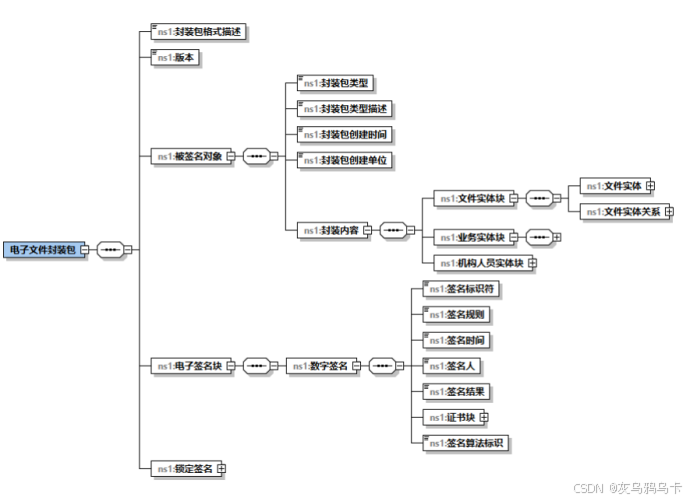
- 压缩文件
compress by unicode convert with memory to refuse linux Chinese charactor erro
压缩以上生成的文件生成以requestid命名的压缩包,同时生成压缩包对应的sm3签名(sysPackageDigest )。
|-----------------------------------------------------------------------------------------------------------------------------------------------------------------------------------------------------------------------------------------------------------------------------------------------------------------------------------------------------|
| Java String sourceFolder =originPath; String zipSourcePath =originPath; try { zipSourcePath = zipFolderWithDecodedNames (sourceFolder, requestid,ret); } catch (IOException e) { e.printStackTrace(); ret.put("code","500"); ret.put("message","zip compress is erro: "+e); } String sysPackageDigest = calculateFileSM3((zipSourcePath), ret); |
补充
|-----------------------------------------------|
| 当前服务器不支持中文字符集,获取到的文件含有中文会直接变为乱码,需要先转译为Unicode |
|---------------------------------------------------------------------------------------------------------------------------|
| �� UNICODE 编码字符集不能包含 一些特殊类型字符(非U+007F U+0000到U+001F 平面的BMP),不能包含特殊字符+,.\[\]!"#$%&'()*:;<=>?@\^`{}|~/ 中文字符、标点 |
|-----------------------------|
| Unicode超过一定长度会报错,包含特定字符也会报错 |
在生成文件的过程中要把文件名转译,截取后 生成 安全的短文件名:
|-------------------------------------------------------------------------------------------------------------------------------------------------------------------------------------------------------------------------------------------------------------------------------------------------------------------------------------------------------------------------------------------------------------------------------------------------------------------|
| Java // 1. 原始长文件名(未被转义) String originalFileName = docMasterSlaveMap.get(fieldName) + "-" + unicodeToString (fileMap.get("imagefilename")); // 2. 生成短文件名(可逆) String safeFileName = makeSafeFileName (originalFileName).replace(" ",""); // 3. 落盘路径(短文件名,无转义) String annexfilenameDestination = imagefilenameDestination + "/" + requestid + "/" + safeFileName; String destnationFilePath = getImageFiles(imagefileid, annexfilenameDestination, ret); |
其中相关方法实现将特殊字符串替换为下划线,同时截取短的文件名。 代码如下:
|------------------------------------------------------------------------------------------------------------------------------------------------------------------------------------------------------------------------------------------------------------------------------------------------------------------------------------------------------------------------------------------------------------------------------------------------------------------------------------------------------------------------------------------------------------------------------------------------------------------------------------------------------------------------------------------------------------------------------------------------------------------------------------------------------------------------------------------------------------------------------------------------------------------------------------------------------------------------------------------------------------------------------------------------------------------------------------------------------------------------------------------------------------------------------------------------------------------------------------------------------------------------------------------------------------------------------------------------------------------------------------------------------------------|
| Java /** * 把文件名中所有路径分隔符、控制字符、以及不能出现在文件名中的字符替换为下划线 */ private static String sanitizeFileName(String name) { if (name == null) return ""; // 替换常见的目录分隔符和控制字符为下划线 // 包含: / \ : * ? " < > | 以及 Unicode 控制字符 和 NUL String sanitized = name.replaceAll("/\\\\\\\\:\\\\\*\\\\?\\"\<\>\\\\\|\\\\p{Cntrl}\\u0000", ""); // 另外把可能导致路径编码异常的不可映射字符替换为 _(保守处理) // 这里用一个简单策略:将非 BMP 或不可见类字符替换 sanitized = sanitized.replaceAll("\\\\p{C}\&\&\[\^\\n\\r\\t]", ""); // 去掉连续下划线 sanitized = sanitized.replaceAll("+", ""); return sanitized; } /** * 生成短文件名:8位hash + 下划线 + 后30个Unicode字符 + 后缀 * 同时把原始文件名存入内存映射表(NAME_MAP) */ /** * 生成短文件名:8位hash + 下划线 + 前30个Unicode字符 + 后缀 * 同时把原始文件名存入内存映射表(生产环境可换数据库) */ public static String makeSafeFileName(String original) { String\[\] parts = parseFileName (original); // 你已有的方法 String base = parts0; String ext = parts1; // 前30字符 // String shortBase = base.length() > 30 ? base.substring(0, 30) : base; // ✅ 后30字符(关键改动) String shortBase = base.length() > 30 ? base.substring(base.length() - 30) : base; // 8位hash String hash = Integer.toHexString (original.hashCode()); if (hash.length() > 8) hash = hash.substring(0, 8); String shortName = hash + "_" + shortBase + "." + ext; // 记录映射 NAME_MAP .put(shortName.substring(9), original); return shortName.substring(9); } |
在第二步获取非结构文件信息的过程中,相关附件等文件就已经被捞取出来,根据docid->imagefileid 捞取文件:
|-------------------------------------------------------------------------------------------------------------------------------------------------------------------------------------------------------------------------------------------------------------------------------------------------------------------------------------------------------------------------------------------------------------------------------------------------------------------------------------------------------------------------------------------------------------------------------------------------------------------------------------------------------------------------------------------------------------------------------------------------------------------------------------------------------------------------------------------------------------------------------------------------------------------------------------------------------------------------------------------------------------------------------------------------------------------------------------------------------------------------------------------------------------------------------------------------------------------------------------------------------------------------------------------------------------------------------------------------------------------------------------------------------------------------------------------------------------------------------------------------------------------------------------------------------------------------------------------------------------------------------------------------------------------------------------------------------------------------------------------------------------------------------------------------------------------------------------------------------------------------------------------------------------------------------------------------------------------------------------------------------------------------------------------------------------------------------------------------------------------------------------------------------------------------------------------------------------------------------------------------------------------------------------------------------------------------------------------------------------------------------------------------------------------------------------------------------------------------------------------------------------------------------------------------------------------------------------------------------------------------------------------------------------------------------------------------------------------------------------------------------|
| TypeScript public static String getImageFiles(String imagefileid,String imagefilenameDestination,Map ret){ String destnationFilePath = ""; try { String decodeimagefileid = Util.null2String (DecodeUtil.decodeByImageFileIdByTianyu (Integer.parseInt (imagefileid))); InputStream inputStream = ImageFileManager.getInputStreamById (Integer.parseInt (decodeimagefileid)); if (inputStream == null) { ret.put("code", "504"); ret.put("fileMessageErro", "inputStream is null for imagefileid: " + imagefileid); return ""; } // 确保使用文件系统安全路径(调用方传入的 imagefilenameDestination 应该包含 requestid 目录及 safe 文件名) // 这里尽量不要直接 trust 传入路径,先替换不可映射字符 String safePathStr; try { // 如果路径能够被 Paths.get 正常解析,直接使用 Paths.get (imagefilenameDestination); safePathStr = imagefilenameDestination; } catch (InvalidPathException ipe) { // 降级:把路径中的非法字符替换为下划线 safePathStr = sanitizeFileName (imagefilenameDestination); } Path destPath; try { destPath = Paths.get (safePathStr); } catch (InvalidPathException ipe) { // 再次降级:把所有非 ASCII 替换为下划线,作为最后兜底 String fallback = safePathStr.replaceAll("\^\\\\x20-\\\\x7E", ""); fallback = fallback.replaceAll("/\\\\\\\\:\\\\\*\\\\?\\"\<\>\\\\\|\\\\p{Cntrl}", ""); destPath = Paths.get (fallback); ret.put("fileMessageErro", "Invalid path, used fallback: " + destPath.toString()); } // 确保父目录存在 Path parent = destPath.getParent(); if (parent != null) { try { Files.createDirectories (parent); } catch (IOException e) { ret.put("code", "500"); ret.put("fileMessageErro", "create parent dir fail: " + parent.toString()); throw new RuntimeException("cannot create parent dir: " + parent.toString(), e); } } try (OutputStream outputStream = Files.newOutputStream (destPath, StandardOpenOption.CREATE , StandardOpenOption.TRUNCATE_EXISTING )) { // 创建缓冲区提高复制效率 byte\[\] buffer = new byte8192; // 8KB缓冲区 int bytesRead; // 读取输入流并写入输出流 while ((bytesRead = inputStream.read(buffer)) != -1) { outputStream.write(buffer, 0, bytesRead); } destnationFilePath = destPath.toString() ; ret.put("fileMessage", "file success write: " + destPath.toString()); } catch (IOException e) { ret.put("code", "500"); ret.put("fileMessageErro", "write file fail: " + e.getMessage()); e.printStackTrace(); throw new RuntimeException("cannot write file: " + destPath.toString(), e); } finally { // 确保输入流关闭 try { inputStream.close(); } catch (IOException e) { ret.put("code", "500"); ret.put("fileMessageErro", "fail close inputstream: " + e.getMessage()); } } } catch (NumberFormatException e) { ret.put("code", "503"); ret.put("message", " :FILE GET ERRO: "+e); throw new RuntimeException(e); } return destnationFilePath; } |
五、合同类流程技术储备
|-----------------------------------------------------------|
| 前期通过使用流程存为文档的方式,将流程requestid转为docid后查询对应imagefileid获取流程表单 |
|---------------------------------------------------------------------------------------------------------------------------------------------------------|
| �� 可以根据网上一些参考内容直接通过requestid获取流程审批表单;流程包含有相关流程类似字段,相关流程仍包含相关流程与附件形成树或者图类似的数据结构,以上旧有的方法已不能满足当前需求,需要 参照泛微一些源码方法进行改造后实现通过输入requestid获取该流程相关资源(相关流程,文档,附件 ) |
5.1 直接通过requestid获取流程
mu注意:代码中第97行 需要将流程申请人(或者节点中的人)id作为参数传入
userManager.getUserByUserIdAndLoginType(29623, "1");
|--------------------------------------------------------------------------------------------------------------------------------------------------------------------------------------------------------------------------------------------------------------------------------------------------------------------------------------------------------------------------------------------------------------------------------------------------------------------------------------------------------------------------------------------------------------------------------------------------------------------------------------------------------------------------------------------------------------------------------------------------------------------------------------------------------------------------------------------------------------------------------------------------------------------------------------------------------------------------------------------------------------------------------------------------------------------------------------------------------------------------------------------------------------------------------------------------------------------------------------------------------------------------------------------------------------------------------------------------------------------------------------------------------------------------------------------------------------------------------------------------------------------------------------------------------------------------------------------------------------------------------------------------------------------------------------------------------------------------------------------------------------------------------------------------------------------------------------------------------------------------------------------------------------------------------------------------------------------------------------------------------------------------------------------------------------------------------------------------------------------------------------------------------------------------------------------------------------------------------------------------------------------------------------------------------------------------------------------------------------------------------------------------------------------------------------------------------------------------------------------------------------------------------------------------------------------------------------------------------------------------------------------------------------------------------------------------------------------------------------------------------------------------------------------------------------------------------------------------------------------------------------------------------------------------------------------------------------------------------------------------------------------------------------------------------------------------------------------------------------------------------------------------------------------------------------------------------------------------------------------------------------------------------------------------------------------------------------------------------------------------------------------------------------------------------------------------------------------------------------------------------------------------------------------------------------------------------------------------------------------------------------------------------------------------------------------------------------------------------------------------------------------------------------------------------------------------------------------------------------------------------------------------------------------------------------------------------------------------------------------------------------------------------------------------------------------------------------------------------------------------------------------------------------------------------------------------------------------------------------------------------------------------------------------------------------------------------------------------------------------------------------------------------------------------------------------------------------------------------------------------------------------------------------------------------------------------------------------------------------------------------------------------------------------------------------------------------------------------------------------------------------------------------------------------------------------------------------------------------------------------------------------------------------------------------------------------------------------------------------------------------------------------------------------------------------------------------------------------------------------------------------------------------------------------------------------------------------------------------------------------------------------------------------------------------------------------------------------------------------------------------------------------------------------------------------------------------------------------------------------------------------------------------------------------------------------------------------------------------------------------------------------------------------------------------------------------------------------------------------------------------------------------------------------------------------------------------------------------------------------------------------------------------------------------------------------------------------------------------------------------------------------------------------------------------------------------------------------------------------------------------------------------------------------------------------------------------------------------------------------------------------------------------------------------------------------------------------------------------------------------------------------------------------------------------------------------------------------------------------------------------------------------------------------------------------------------------------------------------------------------------------------------------------------------------------------------------------------------------------------------------------------------------------------------------------------------------------------------------------------------------------------------------------------------------------------------------------------------------------------------------------------------------------------------------------------------------------------------------------------------------------------------------------------------------------------------------------------------------------------------------------------------------------------------------------------------------------------------------------------------------------------------------------------------------------------------------------------------------------------------------------------------------------------------------------------------------------------------------------------------------------------------------------------------------------------------------------------------------------------------------------------------------------------------------------------------------------------------------------------------------------------------------------------------------------------------------------------------------------------------------------------------------------------------------------------------------------------------------------------------------------------------------------------------------------------------------------------------------------------------------------------------------------------------------------------|
| Java package com.weaver.esb.package_20250916083918; import com.api.doc.detail.util.DecodeUtil; import com.api.doc.detail.util.PdfConvertUtil; import com.cloudstore.dev.util.FileUtils; import com.github.junrar.Archive; import com.github.junrar.exception.RarException; import com.github.junrar.rarfile.FileHeader; import com.lowagie.text.Document; import com.lowagie.text.pdf.PdfCopy; import com.lowagie.text.pdf.PdfImportedPage; import com.lowagie.text.pdf.PdfReader; import com.weaver.general.BaseBean; import net.sf.json.JSONArray; import net.sf.json.JSONObject; import weaver.conn.RecordSet; import weaver.docs.docs.DocImageManager; import weaver.docs.docs.DocManager; import weaver.docs.docs.DocViewer; import weaver.docs.webservices.DocInfo; import weaver.docs.webservices.DocServiceImpl; import weaver.file.FileSecurityUtil; import weaver.file.ImageFileManager; import weaver.general.GCONST; import weaver.general.StaticObj; import weaver.general.Util; import weaver.hrm.User; import weaver.system.SystemComInfo; import com.engine.common.util.ServiceUtil; import com.engine.workflow.service.HtmlToPdfService; import com.engine.workflow.service.impl.HtmlToPdfServiceImpl; import weaver.file.FileUpload; import weaver.hrm.UserManager; import weaver.integration.logging.Logger; import weaver.integration.logging.LoggerFactory; import weaver.wechat.util.Utils; import weaver.workflow.workflow.WorkflowConfigComInfo; import java.io.*; import java.nio.charset.StandardCharsets; import java.nio.file.*; import java.text.SimpleDateFormat; import java.util.*; import java.util.zip.ZipEntry; import java.util.zip.ZipInputStream; public class class_20250916083918 { BaseBean baseBean = new BaseBean(); /** * @param: param(Map collections) * 参数名称不能包含特殊字符+,.\[\]!"#$%&'()*:;<=>?@\^`{}|~/ 中文字符、标点 U+007F U+0000到U+001F */ public Map execute(Map<String, Object> params) { Map<String, String> ret = new HashMap<>(); try { // 2. 参数校验 if (params == null || params.isEmpty()) { ret.put("code", "400"); ret.put("message", "esb_20250916083918 params can not be null"); baseBean.writeLog(ret.toString()); return ret; } } catch (Exception e) { ret.put("code", "500"); ret.put("message", "esb_20250916083918 exception : " + e.getMessage()); e.printStackTrace(); } String requestid = Utils.null2String(params.get("requestid")); String filePath = Utils.null2String(params.get("filePath")); String pdfImageFileid = getwfPDF(requestid, true, "0").get("pdf").toString(); String message = getwfPDF(requestid, true, "0").toString(); getImageFiles(pdfImageFileid,filePath,ret); ret.put("code", "200"); ret.put("message", message); return ret; } /** * @param requestid * @param isKeepsign 是否需要签字意见 * @param onlyHtml : 0 只转pdf ; 1只转html ; 2 都转 * @return */ public Map getwfPDF(String requestid, boolean isKeepsign, String onlyHtml) { String keepsign = "1"; if (isKeepsign) { keepsign = "1"; } UserManager userManager = new UserManager(); User user = userManager.getUserByUserIdAndLoginType(29623, "1"); HashMap hashMap = new HashMap(); hashMap.put("requestid", requestid); hashMap.put("limitauth", "0"); //0 只转pdf 1只转html 2 都转 hashMap.put("onlyHtml", onlyHtml); hashMap.put("keepsign", keepsign); Map<String,String> filemap = null; try { baseBean.writeLog( "表单转PDF参数:" + JSONObject.fromObject(hashMap).toString()); filemap = this.getFileId(hashMap, user); baseBean.writeLog( "表单转PDF结果:" + JSONObject.fromObject(filemap).toString()); } catch (Exception e) { baseBean.writeLog("表单转PDF异常:" + e.getMessage().toString()); } return filemap; } public String getFileSavePath() { SystemComInfo systemComInfo = new SystemComInfo(); String createDir = FileUpload.getCreateDir(systemComInfo.getFilesystem()); createDir = createDir.replace("\\", "/"); if (createDir.endsWith("/")) { createDir = createDir.substring(0, createDir.length() - 1); } return createDir; } public Map<String, String> getFileId(Map<String, Object> hashMap, User user) { HashMap returnMap = new HashMap(); hashMap.put("path", this.getFileSavePath()); hashMap.put("isTest", "1"); this.injectuseWk(hashMap); HtmlToPdfService htmlToPdfService = (HtmlToPdfService) ServiceUtil.getService(HtmlToPdfServiceImpl.class, user); Object o = htmlToPdfService != null ? htmlToPdfService.getFormDatas(hashMap) : new HashMap(); String path = Util.null2String(((Map) o).get("path")); String onlyHtml = Util.null2String(hashMap.get("onlyHtml")); String filename; String filePath; String fileid; //只转为pdf if (onlyHtml.equals("0")) { filename = Util.null2String(((Map) o).get("filename")); filePath = path + File.separator + filename; fileid = this.saveAsFile(filePath, filename); if (!"".equals(fileid)) { returnMap.put("pdf", fileid); } } //转为html else if (onlyHtml.equals("1")) { filename = Util.null2String(((Map) o).get("filename")); filePath = path + File.separator + filename; fileid = this.saveAsFile(filePath, filename); if (!"".equals(fileid)) { returnMap.put("html", fileid); } } //既要转pdf又要转html else if (onlyHtml.equals("2")) { filename = Util.null2String(((Map) o).get("pdffilename")); filePath = Util.null2String(((Map) o).get("htmlfilename")); fileid = path + File.separator + filename; String htmlFullPath = path + File.separator + filePath; String pdf_id = this.saveAsFile(fileid, filename); String htmlfileid = this.saveAsFile(htmlFullPath, filePath); if (!"".equals(pdf_id)) { returnMap.put("pdf", pdf_id); } if (!"".equals(htmlfileid)) { returnMap.put("html", htmlfileid); } } return returnMap; } public String saveAsFile(String filepath, String filename) { FileInputStream fileInputStream = null; byte\[\] bytes = null; File file = new File(filepath); if (file.exists()) { try { fileInputStream = new FileInputStream(file); bytes = new byte(int) file.length(); fileInputStream.read(bytes); fileInputStream.close(); } catch (Exception e) { e.printStackTrace(); } } ImageFileManager imageFileManager = new ImageFileManager(); imageFileManager.setComefrom("WorkflowToDoc"); imageFileManager.setData(bytes); imageFileManager.setImagFileName(filename); int imageFileid = imageFileManager.saveImageFile(); if (imageFileid <= 0) { baseBean.writeLog( "保存离线HTML/PDF文件失败"); return ""; } else { FileSecurityUtil.deleteFile(file); return imageFileid + ""; } } private void injectuseWk(Map<String, Object> map) { if (!map.containsKey("useWk")) { WorkflowConfigComInfo workflowConfigComInfo = new WorkflowConfigComInfo(); String usewk = workflowConfigComInfo.getValue("htmltopdf_usewk"); map.put("useWk", usewk); } } // getImageFiles: get files by imagefileid,and storage to imagefilenameDestination public static void getImageFiles(String imagefileid,String imagefilenameDestination,Map ret){ try { String decodeimagefileid = Util.null2String(DecodeUtil.decodeByImageFileIdByTianyu(Integer.parseInt(imagefileid))); InputStream inputStream = ImageFileManager.getInputStreamById(Integer.parseInt(decodeimagefileid)); try (OutputStream outputStream = Files.newOutputStream(Paths.get(imagefilenameDestination), StandardOpenOption.CREATE, StandardOpenOption.TRUNCATE_EXISTING)) { // 创建缓冲区提高复制效率 byte\[\] buffer = new byte8192; // 8KB缓冲区 int bytesRead; // 读取输入流并写入输出流 while ((bytesRead = inputStream.read(buffer)) != -1) { outputStream.write(buffer, 0, bytesRead); } ret.put("fileMessage", "file success write: " + imagefilenameDestination); } catch (IOException e) { ret.put("code", "500"); ret.put("fileMessageErro", "write file fail: " + e.getMessage()); // baseBean.writeLog(ret.toString()) ; e.printStackTrace(); throw new RuntimeException("cannot write file: " + imagefilenameDestination, e); } finally { // 确保输入流关闭 try { if (inputStream != null) { inputStream.close(); } } catch (IOException e) { ret.put("code", "500"); ret.put("fileMessageErro", "fail close inputstream: " + e.getMessage()); // baseBean.writeLog(ret.toString()) ; } } } catch (NumberFormatException e) { ret.put("code", "503"); ret.put("message", " :FILE GET ERRO: "+e); // baseBean.writeLog(ret.toString()) ; throw new RuntimeException(e); } } } |
5.2 流程相关资源获取
获取流程相关资源方式获取流程附件,相关流程审批表单;输入流程requestid与人员userid
|-----------------------------------------------------------------------------------------------------------------------------------------------------------------------------------------------------------------------------------------------------------------------------------------------------------------------------------------------------------------------------------------------------------------------------------------------------------------------------------------------------------------------------------------------------------------------------------------------------------------------------------------------------------------------------------------------------------------------------------------------------------------------------------------------------------------------------------------------------------------------------------------------------------------------------------------------------------------------------------------------------------------------------------------------------------------------------------------------------------------------------------------------------------------------------------------------------------------------------------------------------------------------------------------------------------------------------------------------------------------------------------------------------------------------------------------------------------------------------------------------------------------------------------------------------------------------------------------------------------------------------------------------------------------------------------------------------------------------------------------------------------------------------------------------------------------------------------------------------------------------------------------------------------------------------------------------------------------------------------------------------------------------------------------------------------------------------------------------------------------------------------------------------------------------------------------------------------------------------------------------------------------------------------------------------------------------------------------------------------------------------------------------------------------------------------------------------------------------------------------------------------------------------------------------------------------------------------------------------------------------------------------------------------------------------------------------------------------------------------------------------------------------------------------------------------------------------------------------------------------------------------------------------------------------------------------------------------------------------------------------------------------------------------------------------------------------------------------------------------------------------------------------------------------------------------------------------------------------------------------------------------------------------------------------------------------------------------------------------------------------------------------------------------------------------------------------------------------------------------------------------------------------------------------------------------------------------------------------------------------------------------------------------------------------------------------------------------------------------------------------------------------------------------------------------------------------------------------------------------------------------------------------------------------------------------------------------------------------------------------------------------------------------------------------------------------------------------------------------------------------------------------------------------------------------------------------------------------------------------------------------------------------------------------------------------------------------------------------------------------------------------------------------------------------------------------------------------------------------------------------------------------------------------------------------------------------------------------------------------------------------------------------------------------------------------------------------------------------------------------------------------------------------------------------------------------------------------------------------------------------------------------------------------------------------------------------------------------------------------------------------------------------------------------------------------------------------------------------------------------------------------------------------------------------------------------------------------------------------------------------------------------------------------------------------------------------------------------------------------------------------------------------------------------------------------------------------------------------------------------------------------------------------------------------------------------------------------------------------------------------------------------------------------------|
| Java package com.weaver.esb.package_20251201054704; import com.engine.common.biz.AbstractCommonCommand; import com.engine.common.entity.BizLogContext; import com.engine.core.interceptor.CommandContext; import com.engine.workflow.biz.publicApi.RequestOperateBiz; import com.engine.workflow.biz.workflowCore.RequestBaseBiz; import com.engine.workflow.constant.PAResponseCode; import com.engine.workflow.entity.core.RequestInfoEntity; import com.engine.workflow.entity.publicApi.PAResponseEntity; import com.engine.workflow.entity.publicApi.RequestResourcesEntity; import weaver.conn.RecordSet; import weaver.general.Util; import weaver.hrm.User; import weaver.hrm.resource.ResourceComInfo; import weaver.wechat.util.Utils; import weaver.workflow.request.RequestResources; import weaver.workflow.workflow.WorkflowComInfo; import java.util.ArrayList; import java.util.HashMap; import java.util.List; import java.util.Map; import weaver.docs.docs.util.DesUtils; import com.engine.workflow.cmd.publicApi.reqInfo.*; public class ObtainRelatedResource { /** * @param: param(Map collections) * 参数名称不能包含特殊字符+,.\[\]!"#$%&'()*:;<=>?@\^`{}|~/ 中文字符、标点 U+007F U+0000到U+001F */ public Map execute(Map<String,Object> params) { Map<String,Object> ret = new HashMap<>(); String requestid = Utils.null2String(params.get("requestid")).replace(" ",""); String userid = Utils.null2String(params.get("userid")).replace(" ",""); int requestidInt=-1; int useridInt=-1; try { requestidInt = Integer.parseInt(requestid); useridInt = Integer.parseInt(userid); } catch (NumberFormatException e) { ret.put("code","500") ; ret.put("message","无法将字符串转换为整数: " + e.getMessage()); } Map resMap = new HashMap<>() ; resMap = contextInformation(requestidInt,useridInt); ret.put("code",200); ret.put("message","obtain related resource: " +resMap.toString()); return ret; } public Map<String,Object> contextInformation(int requestidInt ,int useridInt){ int requestid = requestidInt; User user = new User(useridInt) ; Map<String,Object> relatedResourceMap = new HashMap<>() ; Map<String,String> userProcessInforMap = new HashMap<>() ; List<String> imagefileidList = new ArrayList<>() ; List<RequestResourcesEntity> resources = new ArrayList<>(); String information = "" ; try { RequestInfoEntity infoEntity = RequestBaseBiz.loadRequestInfo(requestid); int workflowid = infoEntity.getWorkflowId(); WorkflowComInfo comInfo = new WorkflowComInfo(); int isbill = Util.getIntValue(comInfo.getIsBill(Util.null2String(workflowid))); int formid = Util.getIntValue(comInfo.getFormId(Util.null2String(workflowid))); RequestResources reqResources = new RequestResources(user, infoEntity.getWorkflowId(), requestid, isbill, formid, "", "", "", "0", 0, 0); // "type":资源类型 1:相关流程 2:相关文档 3:相关附件 String fromSql = reqResources.getReqResSqlByType(3); String querySQL = "select id, resname, restype, creator, creatortype, createdate, docid from " + fromSql + " order by id asc"; RecordSet rs = new RecordSet(); rs.executeQuery(querySQL); information = querySQL; ResourceComInfo resComInfo = new ResourceComInfo(); while (rs.next()) { int id = rs.getInt("id"); Util.getIntValue(rs.getString("creator")); rs.getString("creator"); //文档类型的附件,查出来的是docid,还要根据docid去查询docImageFileId String docid = Util.null2String(rs.getInt("docid")); String imagefileid = getDocImageFileIdByDocid(docid).get("imagefileid").toString(); imagefileidList.add( imagefileid); } // "type":资源类型 1:相关流程 2:相关文档 3:相关附件 fromSql = reqResources.getReqResSqlByType(2); String querydocSQL = "select id, resname, restype, creator, creatortype, createdate, docid from " + fromSql + " order by id asc"; rs.executeQuery(querydocSQL); information = querydocSQL; while (rs.next()) { int id = rs.getInt("id"); Util.getIntValue(rs.getString("creator")); rs.getString("creator"); //文档类型的附件,查出来的是docid,还要根据docid去查询docImageFileId String docid = Util.null2String(rs.getInt("docid")); String imagefileid = getDocImageFileIdByDocid(docid).get("imagefileid").toString(); imagefileidList.add( imagefileid); } // "type":资源类型 1:相关流程 2:相关文档 3:相关附件 fromSql = reqResources.getReqResSqlByType(1); String queryRequestidSQL = "select id, resname, restype, creator, creatortype, createdate, docid from " + fromSql + " order by id asc"; rs.executeQuery(queryRequestidSQL); // information = querySQL; while (rs.next()) { String relatedWorkflowRequestid = Util.null2String(rs.getInt("id")); String relatedWorkflowCreaterid = Util.null2String(rs.getInt("creator")); userProcessInforMap.put(relatedWorkflowCreaterid,relatedWorkflowRequestid); } }catch (Exception e) { // writeLog(e.getMessage(), e); } relatedResourceMap.put("userProcessInforMap",userProcessInforMap) ; relatedResourceMap.put("imagefileidList",imagefileidList) ; relatedResourceMap.put("information",information) ; return relatedResourceMap ; } /** * 根据docid获取最新一次的DocImageFileId * @param docid * @return */ public Map<String,Object> getDocImageFileIdByDocid(String docid){ Map<String,Object> map = new HashMap<>(); String zwflag="1"; int imagefileid=0; RecordSet rs = new RecordSet(); String sql="select * from docdetail where id="+docid; rs.executeSql(sql); sql="select * from DocImageFile where docid ="+docid; sql+=" order by id desc "; rs.executeSql(sql); if(rs.next()){ imagefileid= Util.getIntValue(rs.getString("imagefileid"),0); map.put("imagefilename",rs.getString("imagefilename")); } map.put("imagefileid",imagefileid); return map; } } |
文档标识符 文档的ID;文档主从声明(从requestID获取);计算机文件名;计算机文件大小;签名时间;签名结果(SM3计算)
|----------|------------------------|---------------------------|-----------|
| | 主要信息 | 关键结论 | 截图或视频 |
| 竞品1 | <锁定签名> | 先不传,后期联系契约锁集成人员处理 | |
| 来源 | <全宗名称> | 数据映射 | |
| | <电子文件号> | SourceID | |
| | <年度>归档年度-范围文件</年度> | | |
| | <题名>-范围文件</题名> | | |
| | 内容描述 | 表单字段填,新增流程名称字段;sourceid字段 | |
| <形式特征> | <载体类型>电子</载体类型> | 其他同级字段空置 | |
| | <文档主从声明>正文 | 见 范围文件 产生文件材料字段(附件1) | |
| | <信息系统描述>OA | | |
| | <业务实体>??? | </业务实体块> <机构人员实体块> | |
| | | | |
| | | | |
| | | | |
| | | | |
| | | | |
六、 合同封包改造
- 接口交互
|--------|
| 接口数据交互 |
流程审批表附件文件与信息从前一个接口(ArchiveStorageAddress)获取 ;
其他附件(底稿,套红,其他附件)文件 从建模表单获取(IntegratedInformationPacket) ;
- 接口1 ArchiveStorageAddress 档案存储地址
输入:(流程id 与 接收流程数据建模表名)
|----------------------------------------------------------------------------------|
| Java { "request": { "requestid": "79990511", "tableName": "uf_archiveAccept" } } |
响应:(流程id,生成服务器路径 与 接收流程数据建模表名)
|------------------------------------------------------------------------------------------------------------------------------------------------------------------|
| JSON { "code": "200", "message": { "requestId": "79990511", "originPath": "/app/weaver/ecology/ArchivesFiles/1762131884504", "tableName": "uf_archiveAccept" } } |
- 接口2 集成信息封包V2
ArchivalInformationPackage
输入
|---------------------------------------------------------------------------------------------------------------------------------------------------------|
| JavaScript { "request": { "requestId": "79990511", "originPath": "/app/weaver/ecology/ArchivesFiles/1761635297804", "tableName": "uf_archiveAccept" } } |
输出:
|----------------------------------------------------------------------------------------------------------------------------------------------------------------------------------------------------------------------------------------|
| JSON { "code": "200", "message": { "requestId": "79990511", "originPath": "/app/weaver/ecology/ArchivesFiles/1761635297804", "ZipSourcePath": "/app/weaver/ecology/ArchivesFiles/79990511.zip", "inteKeyResult": "Encrypt success" } } |
七、 数据交互
|---------|
| 接口间数据依赖 |
workflowInfo: requestId:tempPath:
nodeMap :-> nodeWorkflowMap(流程审批表单)
|-----------------------------|-----------------------------------------------------|
| 接口名 | 参数说明 |
| TsetAattachment | 输入param :requestid,fj 输出param:code, message->JSON: |
| IntegratedInformationPacket | TsetAattachment 输出参数获取 ; |
| | |
八、 待完成点
|-------------------|----------------------|---------------------|
| 名 | 说明 | 备注 |
| Unicode转码-Y | 泛微厂商确认无问题,待测试 | 已完成 |
| 天喻加密压缩包 -Y | 完成 | OA侧完成天喻加密功能,后期启用OBS |
| 文件名获取使用split分割 -Y | 泛微建议使用indexof(".")获取 | 已变更 |
| 附件为空如何处理 -Y | 已处理 | |
|---|
| |
- 重构接口1,接口入参/出参确认 ;
- 附件/审批流捞取/正文/底稿
- 附件空值问题
- 简单文件生成(说明文件.txt 目录文件.xml)
- 循环生成文档dom(元数据.xml)
- SM3 加密字符串/文档
- 标准字符串转Map等?
- 内存压缩规避外存不支持中文字符集
- 接口1 实现输入requestid,生成指定位置文件夹路径,将路径,requestID传输到接口2
接口2 实现 通过requestID
获取 fj dg zw(附件,正文,底稿) 字段内容和 流程审批 文件PDF
按相关文件内容,生成xml
待改进
|--------------------------------|
| 递归/BSF 获取流程中相关流程信息,包含流程审批表单,附件 |
|-----------------------------------------------|--------------------------------------------------------------|-----------------------------------------------------------------|
| |----------| | 获取流程审批表单 | * 直接通过requestid获取流程 | |----------| | 获取流程相关资源 | * 相关流程 * 文档 * 附件 | |----------| | 数据库SQL分析 | * 机构名称 获取函数执行 * 后期切换达梦函数失效风险 |