一、关系型数据库介绍
关系型数据库基于SQLite组件,适用于存储包含复杂关系数据的场景,例如对于一个班级的学生信息,需要包括学生的姓名、学号、各科成绩等;对于公司的员工信息,需要包括姓名、工号、职位等,由于数据之间有较强的对应关系,复杂程度比键值型数据更高,此时需要使用关系型数据库来持久化保存数据。
二、场景介绍
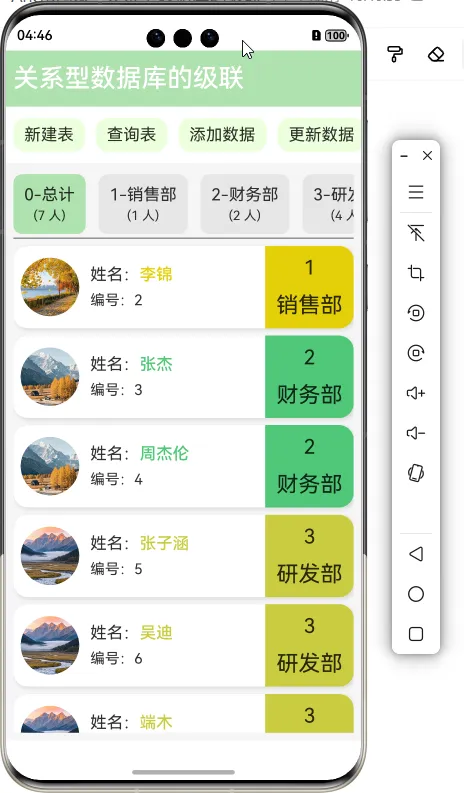
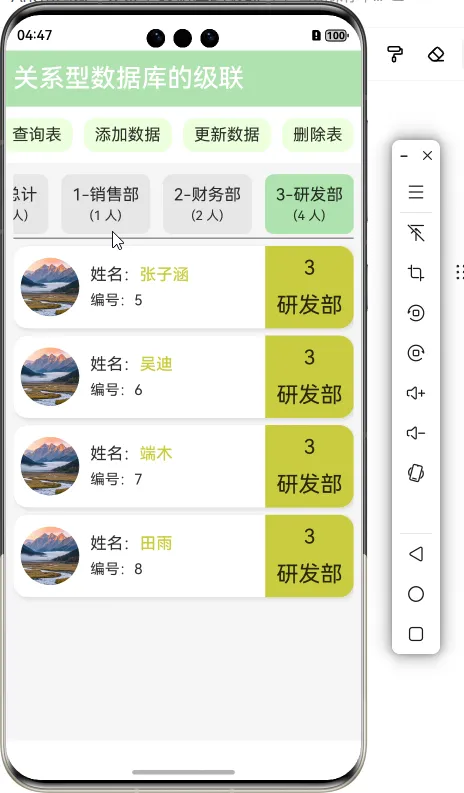
下面将实现一个案例,来实现关系型数据库的级联操作。在一个公司的场景中,将会创建两张表:部门表、员工表。部门表里面存储的信息有部门编号(did)、部门名称(dname)、部门人数(count),员工表里面存储的信息有员工编号(eid)、员工姓名(ename)、员工所在的部门编号(did),这两张表会通过部门编号相关联,可以通过查询部门的编号,来找到里面所属的员工信息以及该部门所包含的员工数。
三、工程目录
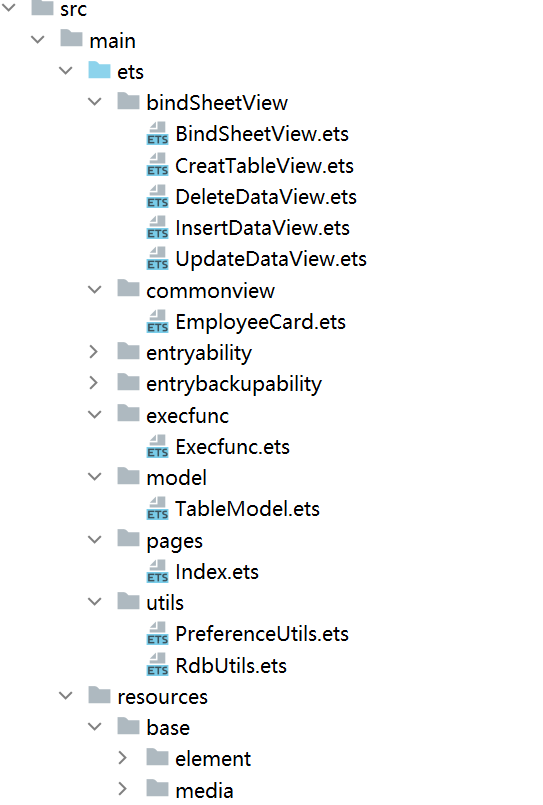
四、工程代码
1、Index页面视图代码
// 创建新实例并使用给定对象初始化
let para: Record<string, string> = { 'tableName': 't_dept' };
let storage: LocalStorage = new LocalStorage(para);


@Entry(storage)
@Component
struct Index {
  //部门表的表名
  @LocalStorageLink('tableName') tableName: string = 't_dept';
  //页面标题
  @State titleText: string = '关系型数据库的级联'
  //控制半模态窗口是否打开的状态变量
  @Provide('isBindSheetShow') isBindSheetShow: boolean = false
  //半模态窗口的显示内容
  @Provide('contentId') contentId: number = 1
  //查询信息的分类
  @State departmentList: Array<DepartmentModel> = [
    { depId: 0, depName: '总计', count: 0 }
  ]
  //部门选中时的状态数组
  @State isSelectList: Array<boolean> = []
  //数组:存储员工的信息
  @State employeeList: Array<EmployeeListModel> = []
  //人数数组
  @State personList: Array<number> = [0]

  aboutToAppear(): void {
    //读取用户首选项中的table字段
    this.tableName = PreferenceUtils.getData(getContext(), 'table') as string
    console.log('aboutToAppear中读取到的tableName的值为:' + this.tableName)
  }

  build() {
    Column() {
      //======顶部标题======//
      Text(this.titleText)
        .width('100%')
        .height('8%')
        .fontSize(28)
        .fontWeight(FontWeight.Medium)
        .backgroundColor('#AFE1AF')
        .fontColor('#FFFFFF')
        .textAlign(TextAlign.Start)
        .padding(8)

      //======按钮布局:新建表、查询表、删除表======//
      Scroll() {
        Row() {
          //===>点击按钮:利用半模态窗口:收集新建表的相关信息
          Text('新建表')
            .padding({
              left: 12,
              right: 12,
              top: 8,
              bottom: 8
            })
            .fontSize(18)
            .borderRadius(14)
            .backgroundColor('#ECFFDC')
            .margin({ right: 12 })
            .onClick(() => {
              //创建部门表和员工表的选择
              this.contentId = 1
              this.isBindSheetShow = true
            })
          //===>点击按钮:利用半模态窗口:收集需要查询表的相关信息
          Text('查询表')
            .padding({
              left: 12,
              right: 12,
              top: 8,
              bottom: 8
            })
            .fontSize(18)
            .borderRadius(14)
            .backgroundColor('#ECFFDC')
            .margin({ right: 12 })
            .onClick(async () => {
              //===>直接查询部门表和员工表
              console.log('查询的部门表的表名为:' + this.tableName)
              let selectDepTable: string = `select * from ${this.tableName}`
              let selectEmpTable: string = "select * from t_emp"
              console.log('selectDepTable:' + selectDepTable)
              //将departmentList数组恢复至默认状态
              this.departmentList = [{ depId: 0, depName: '总计', count: 0 }]
              //各个分类的人数数组
              this.personList = [0]
              //将employeeList数组恢复至默认状态
              this.employeeList = []
              //执行sql语句==>查询部门表
              let resultSet = await RdbUtils.executeQuerySql(selectDepTable)
              if (resultSet.goToFirstRow()) {
                do {
                  const departmentData: DepartmentModel = {
                    depId: resultSet.getLong(resultSet.getColumnIndex('did')), //获取部门编号
                    depName: resultSet.getString(resultSet.getColumnIndex('dname')), //获取部门名称
                    count: resultSet.getLong(resultSet.getColumnIndex('count')), //获取部门人数
                  }
                  this.departmentList.push(departmentData)
                  this.personList.push(0)
                } while (resultSet.goToNextRow())
              }
              resultSet.close()
              //将选中状态恢复至默认状态
              this.isSelectList = []
              //将isSelectList数组重新赋值
              for (let index = 0; index < this.departmentList.length; index++) {
                this.isSelectList.push(false)
              }
              //将isSelectList的第一个元素(总计)的选中状态改为true
              this.isSelectList[0] = true
              console.log('department is select:' + this.isSelectList)
              //执行sql语句==>查询员工表
              let resultSetEmp = await RdbUtils.executeQuerySql(selectEmpTable)
              if (resultSetEmp.goToFirstRow()) {
                do {
                  const employee: EmployeeModel = {
                    empId: resultSetEmp.getLong(resultSetEmp.getColumnIndex('eid')), //获取员工编号
                    empName: resultSetEmp.getString(resultSetEmp.getColumnIndex('ename')), //获取员工姓名
                    depId: resultSetEmp.getLong(resultSetEmp.getColumnIndex('did')), //获取部门编号
                  }
                  //查询员工编号所对应的部门名称
                  let selectDepInfo: string = `select * from ${this.tableName} where did = ${employee.depId}`
                  //根据部门ID值添加人数
                  this.personList[employee.depId]++
                  let result = await RdbUtils.executeQuerySql(selectDepInfo)
                  if (result.goToFirstRow()) {
                    do {
                      const dName: string = result.getString(result.getColumnIndex('dname')) //获取对应部门名称
                      const employeeListModel: EmployeeListModel = {
                        employee: employee,
                        dname: dName
                      }
                      //将数据放进employeeList数组中
                      this.employeeList.push(employeeListModel)
                      //查询到一个员工,那么数组departmentList第0项的count值++,总人数的值
                      this.departmentList[0].count++
                    } while (result.goToNextRow())
                  }
                } while (resultSetEmp.goToNextRow())

                this.personList[0] = this.departmentList[0].count
              }

              //显示提示框--表格查询成功
              promptAction.showToast({ message: "表格查询成功" })
            })
          //===>点击按钮:利用半模态窗口:收集需要添加数据的相关信息
          Text('添加数据')
            .padding({
              left: 12,
              right: 12,
              top: 8,
              bottom: 8
            })
            .fontSize(18)
            .borderRadius(14)
            .backgroundColor('#ECFFDC')
            .margin({ right: 12 })
            .onClick(() => {
              //选择添加的数据是在部门表还是员工表中
              this.contentId = 2
              this.isBindSheetShow = true
            })
          //===>点击按钮:利用半模态窗口:收集需要更新数据的相关信息
          Text('更新数据')
            .padding({
              left: 12,
              right: 12,
              top: 8,
              bottom: 8
            })
            .fontSize(18)
            .borderRadius(14)
            .backgroundColor('#ECFFDC')
            .margin({ right: 12 })
            .onClick(() => {
              //选择更新的数据是在部门表还是员工表中
              this.contentId = 3
              this.isBindSheetShow = true
            })
          //===>点击按钮:利用半模态窗口:收集需要删除表的相关信息
          Text('删除表')
            .padding({
              left: 12,
              right: 12,
              top: 8,
              bottom: 8
            })
            .fontSize(18)
            .borderRadius(14)
            .backgroundColor('#ECFFDC')
            .onClick(() => {
              //选择删除的是哪张表
              this.contentId = 4
              this.isBindSheetShow = true
            })
        }
        .height('100%')
        .padding(8)
        .justifyContent(FlexAlign.SpaceBetween)
      }
      .width('100%')
      .height('8%')
      .scrollBar(BarState.Off)
      .scrollable(ScrollDirection.Horizontal)

      //======显示表格的查询内容======//
      Column() {
        //查询部门表,获取部门信息
        Scroll() {
          Row({ space: 14 }) {
            ForEach(this.departmentList, (item: DepartmentModel, index: number) => {
              Column({ space: 4 }) {
                //显示部门名称
                Text(item.depId + '-' + item.depName).fontSize(18)
                //显示部门人数
                Text(`(${this.personList[index]} 人)`).fontSize(14)
              }
              .padding(12)
              .borderRadius(10)
              .backgroundColor(this.isSelectList[index] ? '#AFE1AF' : '#E6E6E6')
              .onClick(async () => {
                //重置isSelectList里面的值
                for (let index = 0; index < this.isSelectList.length; index++) {
                  this.isSelectList[index] = false
                }
                this.isSelectList[index] = true

                //分类查询每个部门的员工信息
                this.employeeList = await querySpecificalInfo(index, this.tableName)

              })

            })
          }
          .height('100%')

        }
        .width('100%')
        .height('12%')
        .scrollable(ScrollDirection.Horizontal)
        .scrollBar(BarState.Off)
        .align(Alignment.Start)

        Scroll() {
          Column({ space: 8 }) {
            if (this.employeeList.length == 0) {
              Text('暂无员工').fontSize(20).fontWeight(FontWeight.Bold)
            } else {
              ForEach(this.employeeList, (item: EmployeeListModel, index: number) => {
                EmployeeCard(item.employee, item.dname)
              })
            }
          }
          .width('100%')
        }
        .border({ width: { top: 1 }, color: { top: '#333333' } })
        .width('100%')
        .height('88%')
        .padding({ top: 8 })
        .align(Alignment.Top)

      }
      .width('100%')
      .height('82%')
      .padding(8)
      .backgroundColor('#F5F5F5')
    }
    .width('100%')
    .height('100%')
    .bindSheet($$this.isBindSheetShow, bindSheetViewBuilder(), { height: '50%' })
  }
}
2、自定义组件--半模态视图
@Component
struct BindSheetView {
  @Consume('contentId') contentId: number

  build() {
    Column() {
      if (this.contentId == 1) {
        //====创建表视图====//
        CreatTable()
      }
      if (this.contentId == 2) {
        //====添加数据视图====//
        InsertDataView()
      }
      if (this.contentId == 3) {
        //====更新数据视图====//
        UpdateDataView()
      }
      if (this.contentId == 4) {
        //====删除表视图====//
        DeleteDataView()
      }

    }
    .width('100%')
    .height('100%')
  }
}

@Builder
export function bindSheetViewBuilder() {
  BindSheetView()
}
3、半模态视图--创建表视图
//创建部门表的自定义组件
@Component
export struct CreatTable {
  @Consume('isBindSheetShow') isBindSheetShow: boolean //半模态窗口是否打开
  @State depOrEmp: boolean = false

  build() {
    Column() {
      if (!this.depOrEmp) {
        //创建部门表
        Text('创建部门表')
          .fontSize(20)
          .fontWeight(FontWeight.Medium)
          .padding({ top: 30, bottom: 40 })

        Text('确定')
          .fontSize(20)
          .padding({
            left: 20,
            right: 20,
            top: 8,
            bottom: 8
          })
          .backgroundColor('#89CFF0')
          .borderRadius(14)
          .onClick(() => {
            //创建一张表
            let creatTable: string =
              "create table  if not  exists  t_dept(did  integer primary key  autoincrement,dname text  not  null,count integer not null)"
            RdbUtils.executeSql(creatTable)
            //关闭半模态窗口
            this.isBindSheetShow = false
            promptAction.showToast({ message: '部门表创建成功' })
          })

        //切换至员工表
        Text('切换至员工表')
          .fontSize(20)
          .padding({
            left: 20,
            right: 20,
            top: 8,
            bottom: 8
          })
          .backgroundColor('#AFE1AF')
          .borderRadius(14)
          .margin({ top: 60 })
          .onClick(() => {
            this.depOrEmp = true
          })
      } else {

        //创建员工表
        Text('创建员工表')
          .fontSize(20)
          .fontWeight(FontWeight.Medium)
          .padding({ top: 30, bottom: 40 })

        Text('确定')
          .fontSize(20)
          .padding({
            left: 20,
            right: 20,
            top: 8,
            bottom: 8
          })
          .backgroundColor('#89CFF0')
          .borderRadius(14)
          .onClick(() => {
            //创建一张表
            let creatTable: string =
              "create table  if not  exists t_emp(eid  integer primary key  autoincrement,ename text  not  null, did  integer)"
            RdbUtils.executeSql(creatTable)
            //关闭半模态窗口
            this.isBindSheetShow = false
            promptAction.showToast({ message: '员工表创建成功' })
          })

        //切换至部门表
        Text('切换至部门表')
          .fontSize(20)
          .padding({
            left: 20,
            right: 20,
            top: 8,
            bottom: 8
          })
          .backgroundColor('#89CFF0')
          .borderRadius(14)
          .margin({ top: 60 })
          .onClick(() => {
            this.depOrEmp = false
          })

      }

    }
    .width('100%')
    .height('100%')
  }
}
4、半模态视图--添加数据视图
@Component
export struct InsertDataView {
  //部门表的表名===双向绑定的
  @LocalStorageLink('tableName') tableName: string = 't_dept';
  @Consume('isBindSheetShow') isBindSheetShow: boolean //半模态窗口是否打开
  @State depOrEmp: boolean = false
  @State dname: string = '' //部门名称
  @State ename: string = '' //员工名称
  @State did: number = 0 //部门编号

  build() {
    Column() {
      if (!this.depOrEmp) {
        //===>向部门表中添加数据
        Text('部门表添加数据')
          .fontSize(20)
          .fontWeight(FontWeight.Medium)
          .padding({ top: 30, bottom: 40 })
        //添加的部门名称
        Row({ space: 12 }) {
          Text('部门名称').fontSize(16)
          TextInput({ placeholder: '请输入添加的部门名称', text: $$this.dname })
            .width('80%')
            .fontSize(16)
            .placeholderFont({ size: 16 })
        }.width('100%').padding({ left: 8, right: 8 })

        Text('确定')
          .fontSize(20)
          .padding({
            left: 20,
            right: 20,
            top: 8,
            bottom: 8
          })
          .backgroundColor('#89CFF0')
          .borderRadius(14)
          .margin({ top: 60 })
          .onClick(() => {
            let insertSql: string = `insert into ${this.tableName} (dname,count) values ('${this.dname}',0)`
            console.log('insertSql:' + insertSql)
            //执行sql语句
            RdbUtils.executeSql(insertSql)
            //关闭半模态窗口
            this.isBindSheetShow = false
            promptAction.showToast({ message: '数据已成功添加到部门表中' })
          })

        Text('切换至员工表')
          .fontSize(20)
          .padding({
            left: 20,
            right: 20,
            top: 8,
            bottom: 8
          })
          .backgroundColor('#AFE1AF')
          .borderRadius(14)
          .margin({ top: 60 })
          .onClick(() => {
            this.depOrEmp = true
          })
      } else {
        //===>向员工表中添加数据
        Text('员工表添加数据')
          .fontSize(20)
          .fontWeight(FontWeight.Medium)
          .padding({ top: 30, bottom: 40 })
        //添加的员工名称
        Row({ space: 12 }) {
          Text('员工名称').fontSize(16)
          TextInput({ placeholder: '请输入新员工的名称', text: $$this.ename })
            .width('80%')
            .fontSize(16)
            .placeholderFont({ size: 16 })
        }
        .width('100%')
        .padding({ left: 8, right: 8 })
        .margin({ bottom: 20 })

        //添加的员工所属的部门编号
        Row({ space: 12 }) {
          Text('部门编号').fontSize(16)
          TextInput({ placeholder: '请输入新员工的所属部门编号', text: $$this.did })
            .width('80%')
            .fontSize(16)
            .placeholderFont({ size: 16 })
        }.width('100%').padding({ left: 8, right: 8 })

        Text('确定')
          .fontSize(20)
          .padding({
            left: 20,
            right: 20,
            top: 8,
            bottom: 8
          })
          .backgroundColor('#89CFF0')
          .borderRadius(14)
          .margin({ top: 60 })
          .onClick(() => {
            let insertSql: string = `insert into t_emp (ename,did) values ('${this.ename}',${this.did})`
            console.log('insertSql:' + insertSql)
            //执行sql语句
            RdbUtils.executeSql(insertSql)
            //关闭半模态窗口
            this.isBindSheetShow = false
            promptAction.showToast({ message: '数据已成功添加到员工表中' })
          })

        Text('切换至部门表')
          .fontSize(20)
          .padding({
            left: 20,
            right: 20,
            top: 8,
            bottom: 8
          })
          .backgroundColor('#89CFF0')
          .borderRadius(14)
          .margin({ top: 36 })
          .onClick(() => {
            this.depOrEmp = false
          })

      }
    }
    .width('100%')
    .height('100%')
  }
}
5、半模态视图--更新数据的视图
@Component
export struct UpdateDataView {
  //部门表的表名===双向绑定的
  @LocalStorageLink('tableName') tableName: string = 't_dept';
  @Consume('isBindSheetShow') isBindSheetShow: boolean //半模态窗口是否打开
  @State depOrEmp: boolean = false //判断更新的是哪一张表的内容
  @State dname: string = '' //旧的部门名称
  @State newDName: string = '' //新的部门名称
  @State eid: number = 0 //员工编号
  @State did: number = 0 //更新的部门编号

  build() {
    Column() {
      if (!this.depOrEmp) {
        //更新部门表中的数据
        Text('部门表更新数据')
          .fontSize(20)
          .fontWeight(FontWeight.Medium)
          .padding({ top: 30, bottom: 40 })
        //旧部门名称
        Row({ space: 12 }) {
          Text('旧部门名称').fontSize(16)
          TextInput({ placeholder: '请输入旧的部门名称', text: $$this.dname })
            .width('75%')
            .fontSize(16)
            .placeholderFont({ size: 16 })
        }
        .width('100%')
        .padding({ left: 8, right: 8 })
        .margin({ bottom: 20 })

        //输入新的部门名称
        Row({ space: 12 }) {
          Text('新部门名称').fontSize(16)
          TextInput({ placeholder: '请输入新的部门名称', text: $$this.newDName })
            .width('75%')
            .fontSize(16)
            .placeholderFont({ size: 16 })
        }
        .width('100%')
        .padding({ left: 8, right: 8 })


        Text('确定')
          .fontSize(20)
          .padding({
            left: 20,
            right: 20,
            top: 8,
            bottom: 8
          })
          .backgroundColor('#89CFF0')
          .borderRadius(14)
          .margin({ top: 60 })
          .onClick(() => {
            let updateSql: string =
              `update ${this.tableName} set dname = '${this.newDName}' where dname = '${this.dname}' `
            console.log('updateSql:' + updateSql)
            //执行sql语句
            RdbUtils.executeSql(updateSql)
            //关闭半模态窗口
            this.isBindSheetShow = false
            promptAction.showToast({ message: '部门表的数据更新成功' })
          })

        Text('切换至员工表')
          .fontSize(20)
          .padding({
            left: 20,
            right: 20,
            top: 8,
            bottom: 8
          })
          .backgroundColor('#AFE1AF')
          .borderRadius(14)
          .margin({ top: 36 })
          .onClick(() => {
            this.depOrEmp = true
          })
      } else {
        //更新员工表中的数据
        Text('员工表更新数据')
          .fontSize(20)
          .fontWeight(FontWeight.Medium)
          .padding({ top: 30, bottom: 40 })
        //需要更新的员工编号
        Row({ space: 12 }) {
          Text('员工编号').fontSize(16)
          TextInput({ placeholder: '请输入需要更新的员工编号', text: $$this.eid })
            .width('75%')
            .fontSize(16)
            .placeholderFont({ size: 16 })
        }
        .width('100%')
        .padding({ left: 8, right: 8 })
        .margin({ bottom: 20 })

        //输入新的部门编号
        Row({ space: 12 }) {
          Text('新部门编号').fontSize(16)
          TextInput({ placeholder: '请输入新的部门编号', text: $$this.did })
            .width('75%')
            .fontSize(16)
            .placeholderFont({ size: 16 })
        }
        .width('100%')
        .padding({ left: 8, right: 8 })

        Text('确定')
          .fontSize(20)
          .padding({
            left: 20,
            right: 20,
            top: 8,
            bottom: 8
          })
          .backgroundColor('#89CFF0')
          .borderRadius(14)
          .margin({ top: 60 })
          .onClick(() => {
            let updateSql: string = `update t_emp set did = ${this.did} where eid = ${this.eid} `
            console.log('updateSql:' + updateSql)
            //执行sql语句
            RdbUtils.executeSql(updateSql)
            //关闭半模态窗口
            this.isBindSheetShow = false
            promptAction.showToast({ message: '员工表的数据更新成功' })
          })

        Text('切换至部门表')
          .fontSize(20)
          .padding({
            left: 20,
            right: 20,
            top: 8,
            bottom: 8
          })
          .backgroundColor('#89CFF0')
          .borderRadius(14)
          .margin({ top: 36 })
          .onClick(() => {
            this.depOrEmp = false
          })
      }

    }
    .width('100%')
    .height('100%')
  }
}
6、半模态视图--删除表视图
@Component
export struct DeleteDataView {
  //部门表的表名===双向绑定的
  @LocalStorageLink('tableName') tableName: string = 't_dept';
  @Consume('isBindSheetShow') isBindSheetShow: boolean //半模态窗口是否打开
  @State depOrEmp: boolean = false
  @State dname: string = '' //删除的部门名称
  @State eid: number = 0

  build() {
    Column() {
      if (!this.depOrEmp) {
        //删除部门表中的数据
        Text('部门表删除数据')
          .fontSize(20)
          .fontWeight(FontWeight.Medium)
          .padding({ top: 30, bottom: 40 })

        //输入删除的部门名称
        Row({ space: 12 }) {
          Text('部门名称').fontSize(16)
          TextInput({ placeholder: '请输入删除的部门名称' })
            .width('75%')
            .fontSize(16)
            .placeholderFont({ size: 16 })
            .onChange((value) => {
              this.dname = value
            })
        }
        .width('100%')
        .padding({ left: 8, right: 8 })

        Text('确定')
          .fontSize(20)
          .padding({
            left: 20,
            right: 20,
            top: 8,
            bottom: 8
          })
          .backgroundColor('#89CFF0')
          .borderRadius(14)
          .margin({ top: 60 })
          .onClick(async () => {
            //========>先把员工表里面的员工删除,在删除部门表里面的部门
            //查询部门的did值
            let did: number = 0
            let selectDeleteId: string = `select * from ${this.tableName} where dname = '${this.dname}'`
            console.log('selectDeleteId:' + selectDeleteId)
            let resultSet = await RdbUtils.executeQuerySql(selectDeleteId)
            if (resultSet.goToFirstRow()) {
              do {
                did = resultSet.getLong(resultSet.getColumnIndex('did'))
                console.log('did的值为:' + did)
                break
              } while (resultSet.goToNextRow())
            }
            resultSet.close()
            //删除语句===>删除员工表中该部门的员工
            let deleteEmpSql: string = `delete from t_emp where did = ${did}`
            await RdbUtils.executeSql(deleteEmpSql)
            console.log('deleteEmpSql:' + deleteEmpSql)

            //删除语句==>删除部门表中的部门名称
            let deleteSql: string = `delete from ${this.tableName} where dname = '${this.dname}'`
            console.log('旧表中的删除部门操作deleteSql:' + deleteSql)
            //执行删除sql语句
            await RdbUtils.executeSql(deleteSql)
            //===>更新表:目的实现部门表中的部门编号的连续自增长
            //实现两张表的切换:t_dept <===> t_dept1
            let newTableName = await creatAndUpdate(this.tableName)
            //重新设置表名
            this.tableName = newTableName
            console.log('进行删除操作之后,重置的表名为:' + this.tableName)
            //刷新磁盘,更新操作的客户表的表名
            PreferenceUtils.addData(getContext(), 'table', this.tableName)
            this.isBindSheetShow = false
            promptAction.showToast({ message: '部门表数据删除成功' })
          })

        Text('切换至员工表')
          .fontSize(20)
          .padding({
            left: 20,
            right: 20,
            top: 8,
            bottom: 8
          })
          .backgroundColor('#AFE1AF')
          .borderRadius(14)
          .margin({ top: 60 })
          .onClick(() => {
            this.depOrEmp = true
          })

      } else {
        //删除员工表中的数据
        Text('员工表删除数据')
          .fontSize(20)
          .fontWeight(FontWeight.Medium)
          .padding({ top: 30, bottom: 40 })
        //输入删除的员工编号
        Row({ space: 12 }) {
          Text('员工编号').fontSize(16)
          TextInput({ placeholder: '请输入删除的员工编号', text: $$this.eid })
            .width('75%')
            .fontSize(16)
            .placeholderFont({ size: 16 })
        }
        .width('100%')
        .padding({ left: 8, right: 8 })

        Button('确定')
          .fontSize(20)
          .padding({
            left: 20,
            right: 20,
            top: 8,
            bottom: 8
          })
          .backgroundColor('#89CFF0')
          .borderRadius(14)
          .margin({ top: 60 })
          .onClick(() => {
            //删除语句
            let deleteSql: string = `delete from t_emp where eid = ${this.eid}`
            console.log('deleteSql:' + deleteSql)
            //执行删除sql语句
            RdbUtils.executeSql(deleteSql)
            this.isBindSheetShow = false
            promptAction.showToast({ message: '员工表数据删除成功' })
          })

        Button('切换至部门表')
          .fontSize(20)
          .padding({
            left: 20,
            right: 20,
            top: 8,
            bottom: 8
          })
          .backgroundColor('#89CFF0')
          .borderRadius(14)
          .margin({ top: 60 })
          .onClick(() => {
            this.depOrEmp = false
          })

      }
    }
    .width('100%')
    .height('100%')

  }
}
7、自定义构建函数--构建员工卡片
//自定义构建函数--构建员工卡片
@Builder
export function EmployeeCard(employee: EmployeeModel, dname: string) {
  Row() {
    //员工头像、员工姓名、员工编号
    Row({ space: 12 }) {
      Image(DepInfo.depHeadList[employee.depId])
        .size({ width: 64, height: 64 })
        .objectFit(ImageFit.Cover)
        .borderRadius(36)
      Column({ space: 8 }) {
        Text() {
          Span('姓名:')
          Span(employee.empName).fontWeight(FontWeight.Medium).fontColor(DepInfo.depColorList[employee.depId])
        }.fontSize(18)

        Text('编号:' + employee.empId.toString()).fontSize(16)
      }
      .alignItems(HorizontalAlign.Start)
      .height('100%')
      .justifyContent(FlexAlign.Center)
    }
    .width('74%')
    .height('100%')
    .padding(8)
    .justifyContent(FlexAlign.Start)
    .alignItems(VerticalAlign.Center)

    //部门编号、部门名称
    Column({ space: 14 }) {
      Text(employee.depId.toString()).fontSize(22)
      Text(dname).fontSize(24)
    }
    .width('26%')
    .height('100%')
    .justifyContent(FlexAlign.Center)
    .backgroundColor(DepInfo.depColorList[employee.depId])
    .borderRadius({ topRight: 16, bottomRight: 16 })

  }
  .shadow({ radius: 16, color: '#DBDBDB', offsetX: 6, offsetY: 6 })
  .width('100%')
  .height(90)
  .borderRadius(16)
  .backgroundColor('#FFFFFF')
}
8、构建方法:按照分类查询指定信息、新部门表与旧部门表之间的切换
//按照分类查询指定信息
export async function querySpecificalInfo(id: number, tableName: string): Promise<Array<EmployeeListModel>> {
  let resultList: Array<EmployeeListModel> = []
  let selectSql: string = 'select * from t_emp '
  if (id != 0) {
    //为查询语句添加条件
    selectSql += `where did = ${id}`
  }
  console.log('条件查询的sql语句为:' + selectSql)
  let resultSetEmp = await RdbUtils.executeQuerySql(selectSql)
  if (resultSetEmp.goToFirstRow()) {
    do {
      const employee: EmployeeModel = {
        empId: resultSetEmp.getLong(resultSetEmp.getColumnIndex('eid')), //获取员工编号
        empName: resultSetEmp.getString(resultSetEmp.getColumnIndex('ename')), //获取员工姓名
        depId: resultSetEmp.getLong(resultSetEmp.getColumnIndex('did')), //获取部门编号
      }
      //查询员工编号所对应的部门名称
      let selectDepInfo: string = `select * from ${tableName} where did = ${employee.depId}`
      let result = await RdbUtils.executeQuerySql(selectDepInfo)
      if (result.goToFirstRow()) {
        do {
          const dName: string = result.getString(result.getColumnIndex('dName')) //获取对应部门名称
          const employeeListModel: EmployeeListModel = {
            employee: employee,
            dname: dName
          }
          //将数据放进employeeList数组中
          resultList.push(employeeListModel)
        } while (result.goToNextRow())
      }
    } while (resultSetEmp.goToNextRow())
  }

  return resultList
}

//部门表有数据删除之后,新建一张表存储部门表中留下的数据
//将当前的表名作为参数,传入进来
export async function creatAndUpdate(lastTableName: string): Promise<string> {
  let newTableName: string = '' //新建部门表的表名
  //===>完成对新表名的赋值
  if (lastTableName == 't_dept') {
    newTableName = 't_dept1'
  } else {
    newTableName = 't_dept'
  }
  //===>创建新的部门表
  let creatSql: string =
    `create table  if not  exists  ${newTableName} (did  integer primary key  autoincrement,dname text  not  null,count integer not null)`
  console.log('creatSql:' + creatSql)
  await RdbUtils.executeSql(creatSql)
  console.log('部门表已新建成功,表名为:' + newTableName)
  //===>读取旧表里面的内容,写到新表里面
  //1、查旧表,创建数组存储内容
  let depList: LastDepTable[] = []
  let selectSql: string = `select * from ${lastTableName}` //查询旧表
  console.log('查询旧表的selectSql:' + selectSql)
  let resultSet = await RdbUtils.executeQuerySql(selectSql)
  if (resultSet.goToFirstRow()) {
    do {
      const lastDepTable: LastDepTable = {
        depName: resultSet.getString(resultSet.getColumnIndex('dname')),
        count: resultSet.getLong(resultSet.getColumnIndex('count'))
      }
      //将信息存入数组
      depList.push(lastDepTable)
    } while (resultSet.goToNextRow())
    for (let index = 0; index < depList.length; index++) {
      console.log('deplist数组中的每个元素为:' + depList[index].depName + depList[index].count)
    }
  }
  resultSet.close()
  //2、将数组里面的数据写入新表中: 添加数据操作
  for (let index = 0; index < depList.length; index++) {
    //将数组中的每一个元素写到新表中: 填写的数据有部门名称和部门人数
    let insertSql: string =
      `insert into ${newTableName} (dname,count) values ('${depList[index].depName}',${depList[index].count})`
    console.log('insertSql:' + insertSql)
    //执行sql语句:插入数据
    await RdbUtils.executeSql(insertSql)
  }

  //3、建立新表与员工表之间的联系:实质上是根据部门名称(dname)更新员工表里面的部门编号(did)这个字段
  //===>查新表和旧表
  let selectNewTable: string = `select * from ${newTableName}`
  console.log('selectNewTable:' + selectNewTable)
  let didlist: number[] = []
  let resultSetNew = await RdbUtils.executeQuerySql(selectNewTable)
  if (resultSetNew.goToFirstRow()) {
    do {
      let depName = resultSetNew.getString(resultSetNew.getColumnIndex('dname'))
      //根据depName查旧表,找到旧表里面的部门编号
      let selectLastTable: string = `select * from ${lastTableName} where dname = '${depName}'`
      console.log('3、selectLastTable:' + selectLastTable)
      let resultSetLast = await RdbUtils.executeQuerySql(selectLastTable)
      if (resultSetLast.goToFirstRow()) {
        do {
          let did = resultSetLast.getLong(resultSetLast.getColumnIndex('did')) //获取旧表的部门ID值
          didlist.push(did)
        } while (resultSetLast.goToNextRow())
        resultSetLast.close()
      }
    } while (resultSetNew.goToNextRow())
    resultSetNew.close()
  }
  console.log('didlist的长度为:' + didlist.length)
  //===> 更新员工表的部门编号
  for (let index = 0; index < didlist.length; index++) {
    let lastDepId = didlist[index] // 旧表里面的部门Id值
    let newDepId = index + 1
    let updateSql: string = `update t_emp set did = ${newDepId} where did = ${lastDepId} `
    console.log('更新员工表的updateSql:' + updateSql)
    RdbUtils.executeSql(updateSql)
  }

  //4、删除旧表
  let dropSql: string = `drop table ${lastTableName}`
  //执行删除sql语句
  RdbUtils.executeSql(dropSql)
  console.log('旧表' + lastTableName + '删除成功,' + 'dropSql:' + dropSql)

  //将新表名返回出去
  return newTableName
}
9、构建数据模型:部门、员工等。
//部门数据模型
export interface DepartmentModel {
  depId: number //部门编号
  depName: string //部门名称
  count: number //部门员工数
}

//旧表查询的数据接口
export interface LastDepTable {
  depName: string //部门名称
  count: number //部门员工数
}

//员工数据模型
export interface EmployeeModel {
  empId: number //员工编号
  empName: string //员工姓名
  depId: number //所属部门编号
}

//员工列表模型
export interface EmployeeListModel {
  employee: EmployeeModel
  dname: string
}

//部门的颜色列表
export class DepInfo {
  //员工部门分类
  static depColorList: Array<string> = [
    '#E97451', '#E4D00A', '#50C878', '#C9CC3F',
    '#C4A484', '#87CEEB', '#FDDA0D', '#E5AA70'
  ]
  //员工头像列表
  static depHeadList: Array<Resource> = [
    $r('app.media.headImg'), $r('app.media.image2'), $r('app.media.image3'),
    $r('app.media.image4'), $r('app.media.image5'), $r('app.media.image6')
  ]
}
10、封装用户首选项的工具类,持久化数据--记住当前操作的部门表的表名
//封装用户首选项工具类 ===> 持久化数据(记住当前操作的客户表的表名)
export class PreferenceUtils {
  //获取实例对象
  static creatPreference(context: Context, storeName: string) {
    const store = preferences.getPreferencesSync(context, { name: storeName })
    return store
  }

  //添加数据
  static async addData(context: Context, storeName: string, value: string) {
    //获取仓库对象
    const store = PreferenceUtils.creatPreference(context, storeName)
    //像仓库中添加数据
    await store.put('table', value)
    //刷新磁盘
    await store.flush()
  }

  //读取数据
  static getData(context: Context, storeName: string) {
    //获取仓库对象
    const store = PreferenceUtils.creatPreference(context, storeName)
    //读取数据
    const keyValue = store.getSync('table', 't_dept')
    return keyValue
  }
}
11、封装关系型数据库的工具类,方便操作关系型数据库
//关系型数据库的工具类
export class RdbUtils {
  //创建数据库对象
  private static rdbStore: relationalStore.RdbStore

  //设置RdbStore
  static setStore(store: relationalStore.RdbStore) {
    RdbUtils.rdbStore = store
  }

  //获取操作数据库的对象
  static getStore(): relationalStore.RdbStore {
    return RdbUtils.rdbStore
  }

  //执行sql语句方法
  static executeSql(sql: string): Promise<void> {
    return RdbUtils.getStore().executeSql(sql)
  }

  //查询表格信息
  static executeQuerySql(sql: string): Promise<relationalStore.ResultSet> {
    return RdbUtils.getStore().querySql(sql)
  }
}
五、最终效果