HBase实战指南:从入门到生产环境优化
目录
- [1. HBase简介](#1. HBase简介)
- [2. HBase架构详解](#2. HBase架构详解)
- [3. HBase数据模型](#3. HBase数据模型)
- [4. HBase Java API实战](#4. HBase Java API实战)
- [5. Spring Boot集成HBase](#5. Spring Boot集成HBase)
- [6. RowKey设计最佳实践](#6. RowKey设计最佳实践)
- [7. 生产环境性能优化](#7. 生产环境性能优化)
- [8. HBase监控与运维](#8. HBase监控与运维)
- [9. 总结](#9. 总结)
1. HBase简介
1.1 什么是HBase?
HBase是一个开源的、分布式的、可扩展的NoSQL数据库,构建在Hadoop之上,适用于存储海量的稀疏数据。HBase是Google BigTable的开源实现,具有以下特点:
- 海量存储:支持PB级别数据存储
- 列式存储:数据按列族存储,适合稀疏数据
- 高可靠性:数据自动分片,支持自动故障转移
- 高性能:毫秒级随机读写性能
- 强一致性:单行事务保证ACID特性
1.2 HBase应用场景
- 时序数据存储:监控数据、日志数据、IoT传感器数据
- 用户画像:存储用户标签、行为数据
- 消息系统:IM聊天记录、消息队列持久化
- 推荐系统:用户特征、物品特征存储
- 风控系统:实时风险评分、黑名单管理
2. HBase架构详解
2.1 架构组件
HBase采用Master-Slave架构,主要包含以下组件:
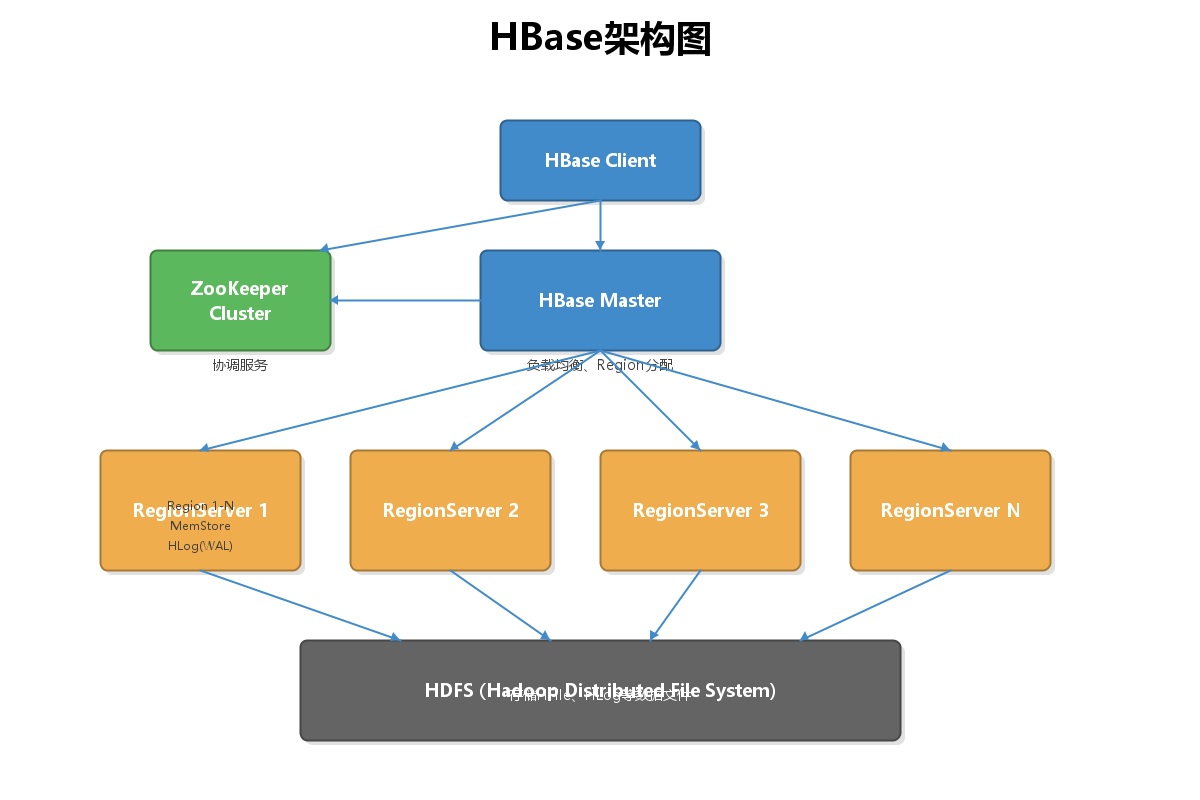
核心组件说明:
-
Client
- 提供HBase访问接口
- 维护缓存加速访问
- 直接与RegionServer通信
-
ZooKeeper
- 保证集群高可用
- 存储Meta表位置
- 监控RegionServer状态
-
HMaster
- Region分配与负载均衡
- 处理Schema变更
- 处理RegionServer故障转移
-
RegionServer
- 处理读写请求
- 管理Region
- 执行Compaction和Split
-
HDFS
- 底层存储系统
- 保证数据可靠性
- 存储HFile和HLog
2.2 HBase与Hadoop生态集成
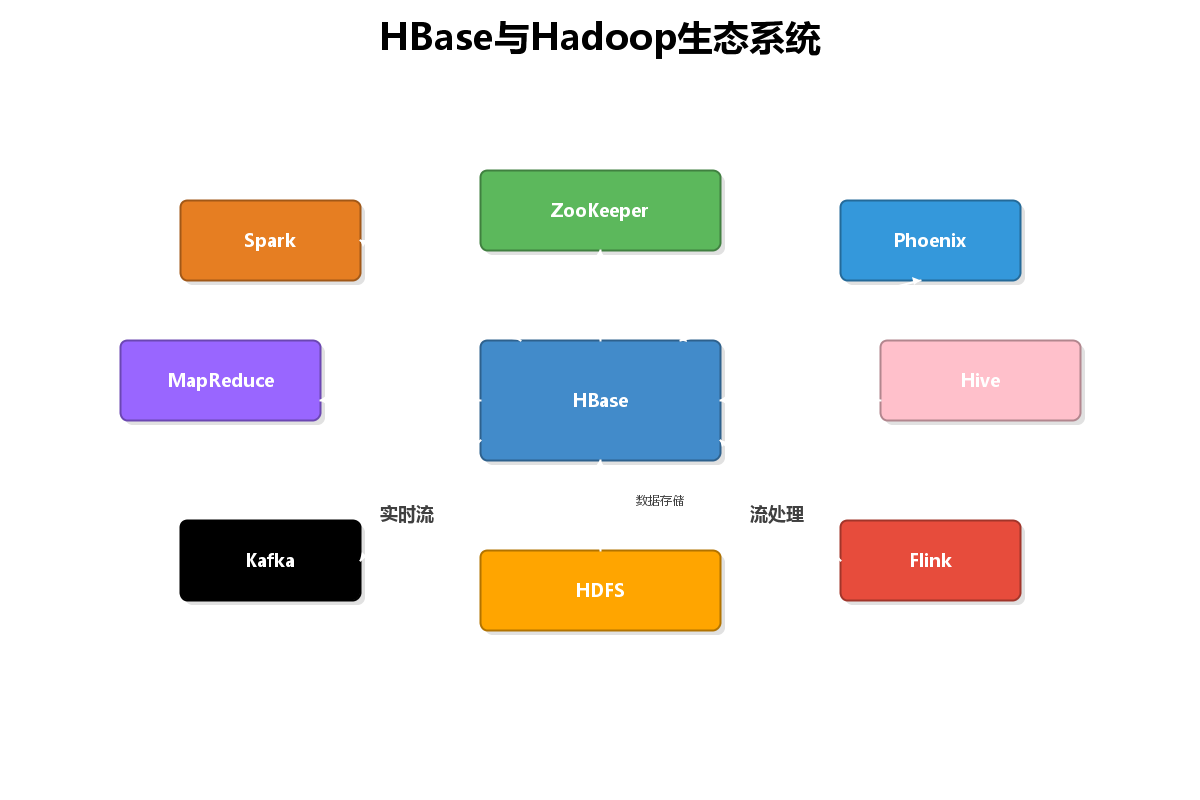
HBase可以与多种大数据组件无缝集成:
- MapReduce:批量数据处理
- Spark:快速数据分析
- Phoenix:SQL查询层
- Kafka:实时数据导入
- Flink:流式数据处理
3. HBase数据模型
3.1 数据模型核心概念
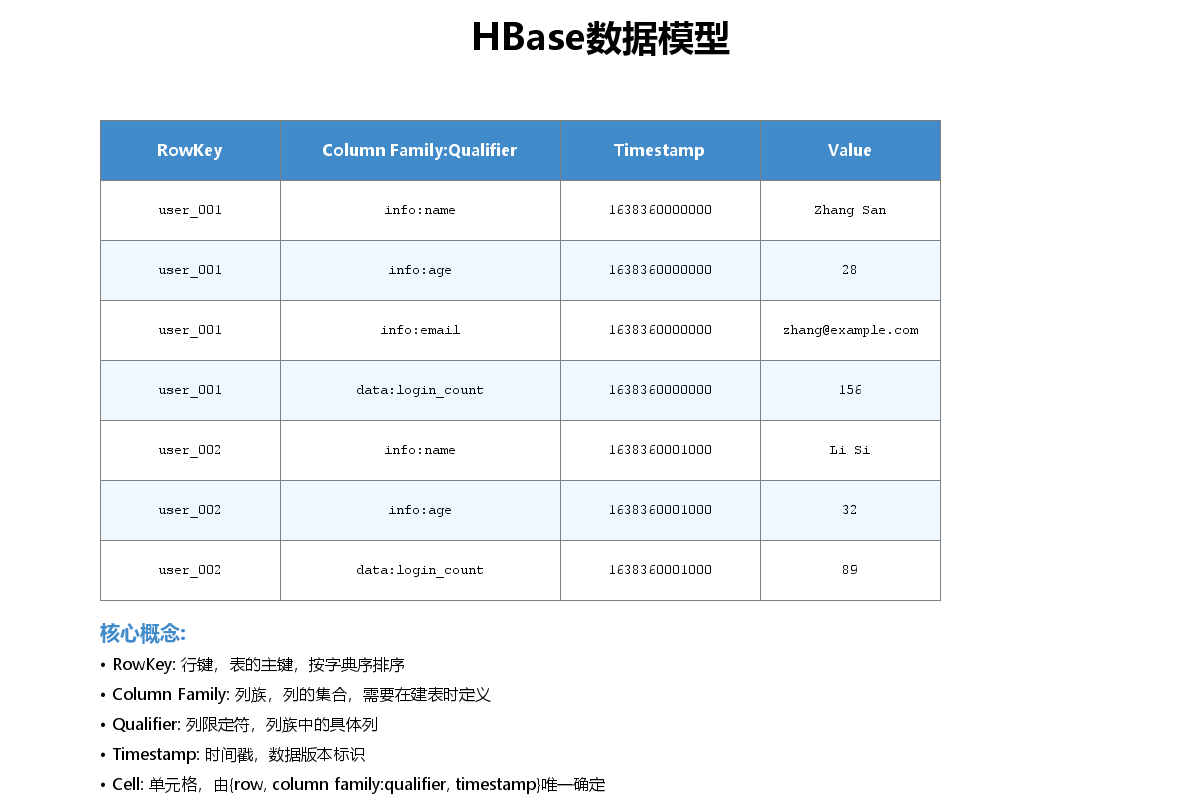
HBase的数据模型是一个稀疏的、分布式的、持久化的多维排序映射表。
核心概念:
- RowKey(行键):表的主键,按字典序排序
- Column Family(列族):列的集合,需在建表时定义
- Column Qualifier(列限定符):列族中的具体列
- Timestamp(时间戳):数据版本标识
- Cell(单元格):由{row, column, version}唯一确定的值
3.2 Java代码创建表
java
import org.apache.hadoop.conf.Configuration;
import org.apache.hadoop.hbase.HBaseConfiguration;
import org.apache.hadoop.hbase.TableName;
import org.apache.hadoop.hbase.client.*;
import org.apache.hadoop.hbase.util.Bytes;

public class HBaseTableManager {

    private Configuration conf;
    private Connection connection;
    private Admin admin;

    public HBaseTableManager() throws Exception {
        // 创建HBase配置
        conf = HBaseConfiguration.create();
        conf.set("hbase.zookeeper.quorum", "localhost");
        conf.set("hbase.zookeeper.property.clientPort", "2181");

        // 创建连接
        connection = ConnectionFactory.createConnection(conf);
        admin = connection.getAdmin();
    }

    /**
     * 创建表
     */
    public void createTable(String tableName, String... columnFamilies) throws Exception {
        TableName table = TableName.valueOf(tableName);

        if (admin.tableExists(table)) {
            System.out.println("表已存在: " + tableName);
            return;
        }

        // 创建表描述符
        TableDescriptorBuilder tableDescBuilder = TableDescriptorBuilder.newBuilder(table);

        // 添加列族
        for (String cf : columnFamilies) {
            ColumnFamilyDescriptorBuilder cfBuilder = ColumnFamilyDescriptorBuilder
                .newBuilder(Bytes.toBytes(cf))
                .setMaxVersions(3)  // 保留3个版本
                .setTimeToLive(7 * 24 * 3600);  // 数据TTL为7天

            tableDescBuilder.setColumnFamily(cfBuilder.build());
        }

        // 创建表
        admin.createTable(tableDescBuilder.build());
        System.out.println("表创建成功: " + tableName);
    }

    /**
     * 删除表
     */
    public void deleteTable(String tableName) throws Exception {
        TableName table = TableName.valueOf(tableName);

        if (!admin.tableExists(table)) {
            System.out.println("表不存在: " + tableName);
            return;
        }

        // 禁用表
        admin.disableTable(table);
        // 删除表
        admin.deleteTable(table);
        System.out.println("表删除成功: " + tableName);
    }

    public void close() throws Exception {
        if (admin != null) admin.close();
        if (connection != null) connection.close();
    }

    public static void main(String[] args) throws Exception {
        HBaseTableManager manager = new HBaseTableManager();

        // 创建用户表,包含info和data两个列族
        manager.createTable("user_profile", "info", "data");

        manager.close();
    }
}
4. HBase Java API实战
4.1 数据读写流程
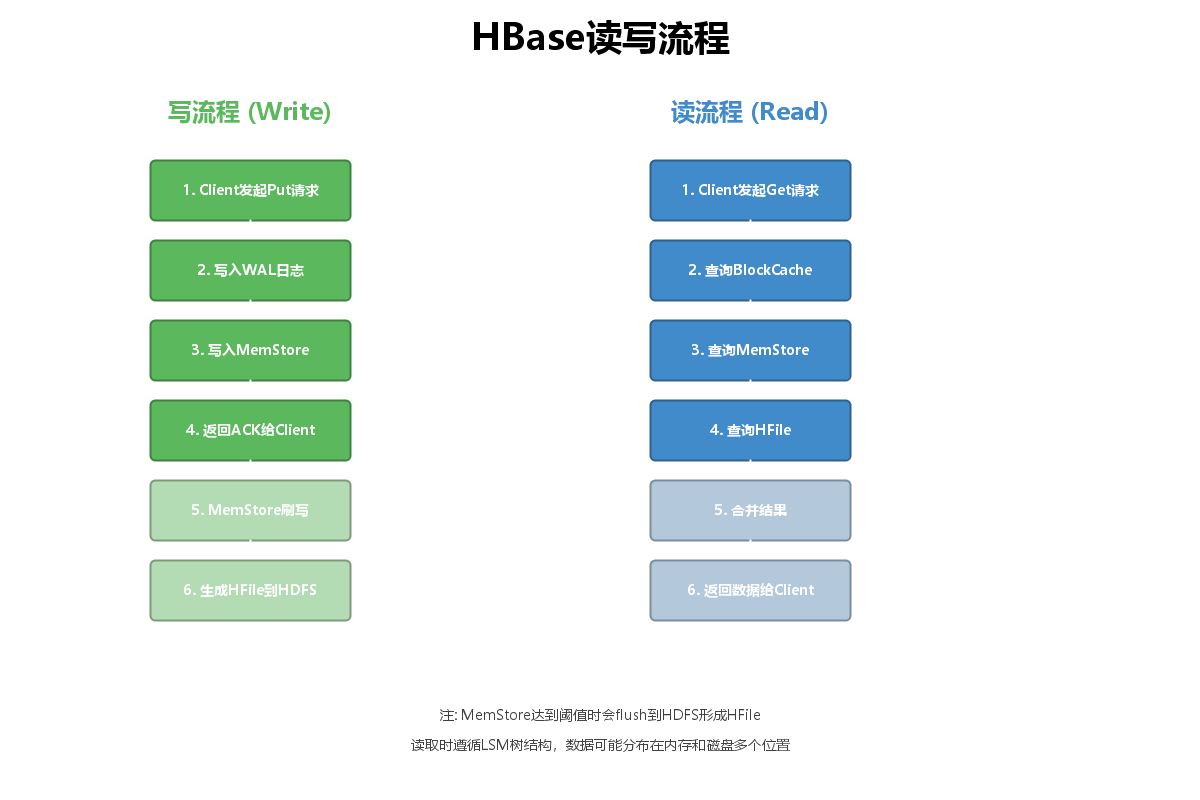
写流程说明:
- Client发起Put请求
- 数据先写入WAL日志(预写日志)
- 数据写入MemStore(内存)
- 返回ACK给Client
- MemStore达到阈值后刷写到磁盘
- 生成HFile存储在HDFS
读流程说明:
- Client发起Get请求
- 先查询BlockCache(读缓存)
- 再查询MemStore
- 最后查询HFile
- 合并结果(根据时间戳)
- 返回数据给Client
4.2 数据写入(Put操作)
java
import org.apache.hadoop.hbase.TableName;
import org.apache.hadoop.hbase.client.*;
import org.apache.hadoop.hbase.util.Bytes;

public class HBaseWriter {

    private Connection connection;

    public HBaseWriter(Connection connection) {
        this.connection = connection;
    }

    /**
     * 插入单条数据
     */
    public void putData(String tableName, String rowKey,
                       String columnFamily, String column, String value) throws Exception {
        Table table = connection.getTable(TableName.valueOf(tableName));

        Put put = new Put(Bytes.toBytes(rowKey));
        put.addColumn(
            Bytes.toBytes(columnFamily),
            Bytes.toBytes(column),
            Bytes.toBytes(value)
        );

        table.put(put);
        table.close();

        System.out.println("数据插入成功");
    }

    /**
     * 批量插入数据(推荐)
     */
    public void batchPut(String tableName, List<UserData> userList) throws Exception {
        Table table = connection.getTable(TableName.valueOf(tableName));

        List<Put> putList = new ArrayList<>();

        for (UserData user : userList) {
            String rowKey = generateRowKey(user.getUserId());
            Put put = new Put(Bytes.toBytes(rowKey));

            // info列族
            put.addColumn(Bytes.toBytes("info"), Bytes.toBytes("name"),
                         Bytes.toBytes(user.getName()));
            put.addColumn(Bytes.toBytes("info"), Bytes.toBytes("age"),
                         Bytes.toBytes(user.getAge()));
            put.addColumn(Bytes.toBytes("info"), Bytes.toBytes("email"),
                         Bytes.toBytes(user.getEmail()));

            // data列族
            put.addColumn(Bytes.toBytes("data"), Bytes.toBytes("login_count"),
                         Bytes.toBytes(user.getLoginCount()));
            put.addColumn(Bytes.toBytes("data"), Bytes.toBytes("last_login"),
                         Bytes.toBytes(user.getLastLogin()));

            putList.add(put);
        }

        // 批量提交
        table.put(putList);
        table.close();

        System.out.println("批量插入完成,共" + putList.size() + "条数据");
    }

    /**
     * 生成RowKey(加盐避免热点)
     */
    private String generateRowKey(String userId) {
        int hash = userId.hashCode();
        int salt = Math.abs(hash % 100);  // 100个分区
        return String.format("%02d_%s", salt, userId);
    }

    // UserData内部类
    static class UserData {
        private String userId;
        private String name;
        private int age;
        private String email;
        private int loginCount;
        private String lastLogin;

        // Getters and Setters
        public String getUserId() { return userId; }
        public void setUserId(String userId) { this.userId = userId; }
        public String getName() { return name; }
        public void setName(String name) { this.name = name; }
        public int getAge() { return age; }
        public void setAge(int age) { this.age = age; }
        public String getEmail() { return email; }
        public void setEmail(String email) { this.email = email; }
        public int getLoginCount() { return loginCount; }
        public void setLoginCount(int loginCount) { this.loginCount = loginCount; }
        public String getLastLogin() { return lastLogin; }
        public void setLastLogin(String lastLogin) { this.lastLogin = lastLogin; }
    }
}
4.3 数据查询(Get和Scan操作)
java
import org.apache.hadoop.hbase.Cell;
import org.apache.hadoop.hbase.CellUtil;
import org.apache.hadoop.hbase.TableName;
import org.apache.hadoop.hbase.client.*;
import org.apache.hadoop.hbase.filter.*;
import org.apache.hadoop.hbase.util.Bytes;

public class HBaseReader {

    private Connection connection;

    public HBaseReader(Connection connection) {
        this.connection = connection;
    }

    /**
     * 根据RowKey查询单条数据
     */
    public void getData(String tableName, String rowKey) throws Exception {
        Table table = connection.getTable(TableName.valueOf(tableName));

        Get get = new Get(Bytes.toBytes(rowKey));
        // 可选:只查询指定列族
        // get.addFamily(Bytes.toBytes("info"));
        // 可选:只查询指定列
        // get.addColumn(Bytes.toBytes("info"), Bytes.toBytes("name"));

        Result result = table.get(get);

        if (result.isEmpty()) {
            System.out.println("数据不存在");
            return;
        }

        // 遍历所有Cell
        for (Cell cell : result.rawCells()) {
            String family = Bytes.toString(CellUtil.cloneFamily(cell));
            String qualifier = Bytes.toString(CellUtil.cloneQualifier(cell));
            String value = Bytes.toString(CellUtil.cloneValue(cell));

            System.out.println(family + ":" + qualifier + " = " + value);
        }

        table.close();
    }

    /**
     * 扫描查询(范围查询)
     */
    public void scanData(String tableName, String startRow, String stopRow) throws Exception {
        Table table = connection.getTable(TableName.valueOf(tableName));

        Scan scan = new Scan();
        scan.withStartRow(Bytes.toBytes(startRow));
        scan.withStopRow(Bytes.toBytes(stopRow));

        // 设置缓存,提高扫描性能
        scan.setCaching(1000);
        scan.setBatch(100);

        ResultScanner scanner = table.getScanner(scan);

        int count = 0;
        for (Result result : scanner) {
            String rowKey = Bytes.toString(result.getRow());
            System.out.println("RowKey: " + rowKey);

            for (Cell cell : result.rawCells()) {
                String family = Bytes.toString(CellUtil.cloneFamily(cell));
                String qualifier = Bytes.toString(CellUtil.cloneQualifier(cell));
                String value = Bytes.toString(CellUtil.cloneValue(cell));

                System.out.println("  " + family + ":" + qualifier + " = " + value);
            }
            count++;
        }

        System.out.println("共查询到" + count + "条数据");
        scanner.close();
        table.close();
    }

    /**
     * 使用过滤器查询
     */
    public void scanWithFilter(String tableName) throws Exception {
        Table table = connection.getTable(TableName.valueOf(tableName));

        Scan scan = new Scan();

        // 创建过滤器列表
        FilterList filterList = new FilterList(FilterList.Operator.MUST_PASS_ALL);

        // 1. 单列值过滤器:age > 25
        SingleColumnValueFilter ageFilter = new SingleColumnValueFilter(
            Bytes.toBytes("info"),
            Bytes.toBytes("age"),
            CompareOperator.GREATER,
            Bytes.toBytes("25")
        );
        filterList.addFilter(ageFilter);

        // 2. 前缀过滤器:RowKey以"01_"开头
        PrefixFilter prefixFilter = new PrefixFilter(Bytes.toBytes("01_"));
        filterList.addFilter(prefixFilter);

        // 3. 列族过滤器:只返回info列族
        FamilyFilter familyFilter = new FamilyFilter(
            CompareOperator.EQUAL,
            new BinaryComparator(Bytes.toBytes("info"))
        );
        filterList.addFilter(familyFilter);

        scan.setFilter(filterList);

        ResultScanner scanner = table.getScanner(scan);

        for (Result result : scanner) {
            System.out.println("RowKey: " + Bytes.toString(result.getRow()));
            // 处理结果...
        }

        scanner.close();
        table.close();
    }
}
4.4 数据删除
java
import org.apache.hadoop.hbase.TableName;
import org.apache.hadoop.hbase.client.*;
import org.apache.hadoop.hbase.util.Bytes;

public class HBaseDeleter {

    private Connection connection;

    public HBaseDeleter(Connection connection) {
        this.connection = connection;
    }

    /**
     * 删除单行数据
     */
    public void deleteRow(String tableName, String rowKey) throws Exception {
        Table table = connection.getTable(TableName.valueOf(tableName));

        Delete delete = new Delete(Bytes.toBytes(rowKey));
        table.delete(delete);

        System.out.println("删除成功: " + rowKey);
        table.close();
    }

    /**
     * 删除指定列
     */
    public void deleteColumn(String tableName, String rowKey,
                            String columnFamily, String column) throws Exception {
        Table table = connection.getTable(TableName.valueOf(tableName));

        Delete delete = new Delete(Bytes.toBytes(rowKey));
        delete.addColumn(Bytes.toBytes(columnFamily), Bytes.toBytes(column));

        table.delete(delete);
        table.close();
    }

    /**
     * 批量删除
     */
    public void batchDelete(String tableName, List<String> rowKeys) throws Exception {
        Table table = connection.getTable(TableName.valueOf(tableName));

        List<Delete> deleteList = new ArrayList<>();
        for (String rowKey : rowKeys) {
            deleteList.add(new Delete(Bytes.toBytes(rowKey)));
        }

        table.delete(deleteList);
        System.out.println("批量删除完成,共" + deleteList.size() + "条");
        table.close();
    }
}
5. Spring Boot集成HBase
5.1 Maven依赖配置
xml
<dependencies>
    <!-- Spring Boot Starter -->
    <dependency>
        <groupId>org.springframework.boot</groupId>
        <artifactId>spring-boot-starter</artifactId>
        <version>2.7.14</version>
    </dependency>

    <!-- HBase Client -->
    <dependency>
        <groupId>org.apache.hbase</groupId>
        <artifactId>hbase-client</artifactId>
        <version>2.4.17</version>
    </dependency>

    <dependency>
        <groupId>org.apache.hbase</groupId>
        <artifactId>hbase-common</artifactId>
        <version>2.4.17</version>
    </dependency>

    <!-- Lombok(可选) -->
    <dependency>
        <groupId>org.projectlombok</groupId>
        <artifactId>lombok</artifactId>
        <version>1.18.28</version>
        <scope>provided</scope>
    </dependency>
</dependencies>
5.2 HBase配置类
java
import org.apache.hadoop.hbase.HBaseConfiguration;
import org.apache.hadoop.hbase.client.Connection;
import org.apache.hadoop.hbase.client.ConnectionFactory;
import org.springframework.beans.factory.annotation.Value;
import org.springframework.context.annotation.Bean;
import org.springframework.context.annotation.Configuration;

@Configuration
public class HBaseConfig {

    @Value("${hbase.zookeeper.quorum}")
    private String zookeeperQuorum;

    @Value("${hbase.zookeeper.port}")
    private String zookeeperPort;

    @Value("${hbase.master}")
    private String hbaseMaster;

    @Bean
    public org.apache.hadoop.conf.Configuration configuration() {
        org.apache.hadoop.conf.Configuration config = HBaseConfiguration.create();
        config.set("hbase.zookeeper.quorum", zookeeperQuorum);
        config.set("hbase.zookeeper.property.clientPort", zookeeperPort);
        config.set("hbase.master", hbaseMaster);

        // 连接超时设置
        config.set("hbase.client.operation.timeout", "30000");
        config.set("hbase.client.scanner.timeout.period", "60000");

        return config;
    }

    @Bean
    public Connection hbaseConnection(org.apache.hadoop.conf.Configuration config) throws Exception {
        return ConnectionFactory.createConnection(config);
    }
}
5.3 application.yml配置
yaml
# HBase配置
hbase:
  zookeeper:
    quorum: hadoop01,hadoop02,hadoop03
    port: 2181
  master: hadoop01:16000

# 应用配置
spring:
  application:
    name: hbase-demo
server:
  port: 8080

# 日志配置
logging:
  level:
    org.apache.hadoop: WARN
    org.apache.zookeeper: WARN
5.4 HBase Service封装
java
import org.apache.hadoop.hbase.TableName;
import org.apache.hadoop.hbase.client.*;
import org.apache.hadoop.hbase.util.Bytes;
import org.springframework.beans.factory.annotation.Autowired;
import org.springframework.stereotype.Service;

import java.util.ArrayList;
import java.util.List;
import java.util.Map;

@Service
public class HBaseService {

    @Autowired
    private Connection connection;

    /**
     * 保存数据
     */
    public void save(String tableName, String rowKey,
                     String columnFamily, Map<String, String> data) throws Exception {
        Table table = connection.getTable(TableName.valueOf(tableName));

        Put put = new Put(Bytes.toBytes(rowKey));
        for (Map.Entry<String, String> entry : data.entrySet()) {
            put.addColumn(
                Bytes.toBytes(columnFamily),
                Bytes.toBytes(entry.getKey()),
                Bytes.toBytes(entry.getValue())
            );
        }

        table.put(put);
        table.close();
    }

    /**
     * 查询数据
     */
    public Map<String, String> get(String tableName, String rowKey,
                                   String columnFamily) throws Exception {
        Table table = connection.getTable(TableName.valueOf(tableName));

        Get get = new Get(Bytes.toBytes(rowKey));
        get.addFamily(Bytes.toBytes(columnFamily));

        Result result = table.get(get);
        Map<String, String> resultMap = new java.util.HashMap<>();

        if (!result.isEmpty()) {
            result.rawCells().forEach(cell -> {
                String qualifier = Bytes.toString(
                    org.apache.hadoop.hbase.CellUtil.cloneQualifier(cell));
                String value = Bytes.toString(
                    org.apache.hadoop.hbase.CellUtil.cloneValue(cell));
                resultMap.put(qualifier, value);
            });
        }

        table.close();
        return resultMap;
    }

    /**
     * 批量保存(性能更好)
     */
    public void batchSave(String tableName, String columnFamily,
                         List<Map<String, Object>> dataList) throws Exception {
        Table table = connection.getTable(TableName.valueOf(tableName));

        List<Put> putList = new ArrayList<>();

        for (Map<String, Object> dataMap : dataList) {
            String rowKey = (String) dataMap.get("rowKey");
            Put put = new Put(Bytes.toBytes(rowKey));

            dataMap.forEach((key, value) -> {
                if (!"rowKey".equals(key)) {
                    put.addColumn(
                        Bytes.toBytes(columnFamily),
                        Bytes.toBytes(key),
                        Bytes.toBytes(String.valueOf(value))
                    );
                }
            });

            putList.add(put);
        }

        table.put(putList);
        table.close();
    }
}
5.5 REST Controller示例
java
import org.springframework.beans.factory.annotation.Autowired;
import org.springframework.web.bind.annotation.*;

import java.util.Map;

@RestController
@RequestMapping("/api/hbase")
public class HBaseController {

    @Autowired
    private HBaseService hbaseService;

    /**
     * 保存用户数据
     */
    @PostMapping("/user/{userId}")
    public String saveUser(@PathVariable String userId,
                          @RequestBody Map<String, String> userData) {
        try {
            String rowKey = generateRowKey(userId);
            hbaseService.save("user_profile", rowKey, "info", userData);
            return "保存成功";
        } catch (Exception e) {
            return "保存失败: " + e.getMessage();
        }
    }

    /**
     * 查询用户数据
     */
    @GetMapping("/user/{userId}")
    public Map<String, String> getUser(@PathVariable String userId) {
        try {
            String rowKey = generateRowKey(userId);
            return hbaseService.get("user_profile", rowKey, "info");
        } catch (Exception e) {
            return Map.of("error", e.getMessage());
        }
    }

    private String generateRowKey(String userId) {
        int hash = userId.hashCode();
        int salt = Math.abs(hash % 100);
        return String.format("%02d_%s", salt, userId);
    }
}
6. RowKey设计最佳实践
6.1 RowKey设计原则
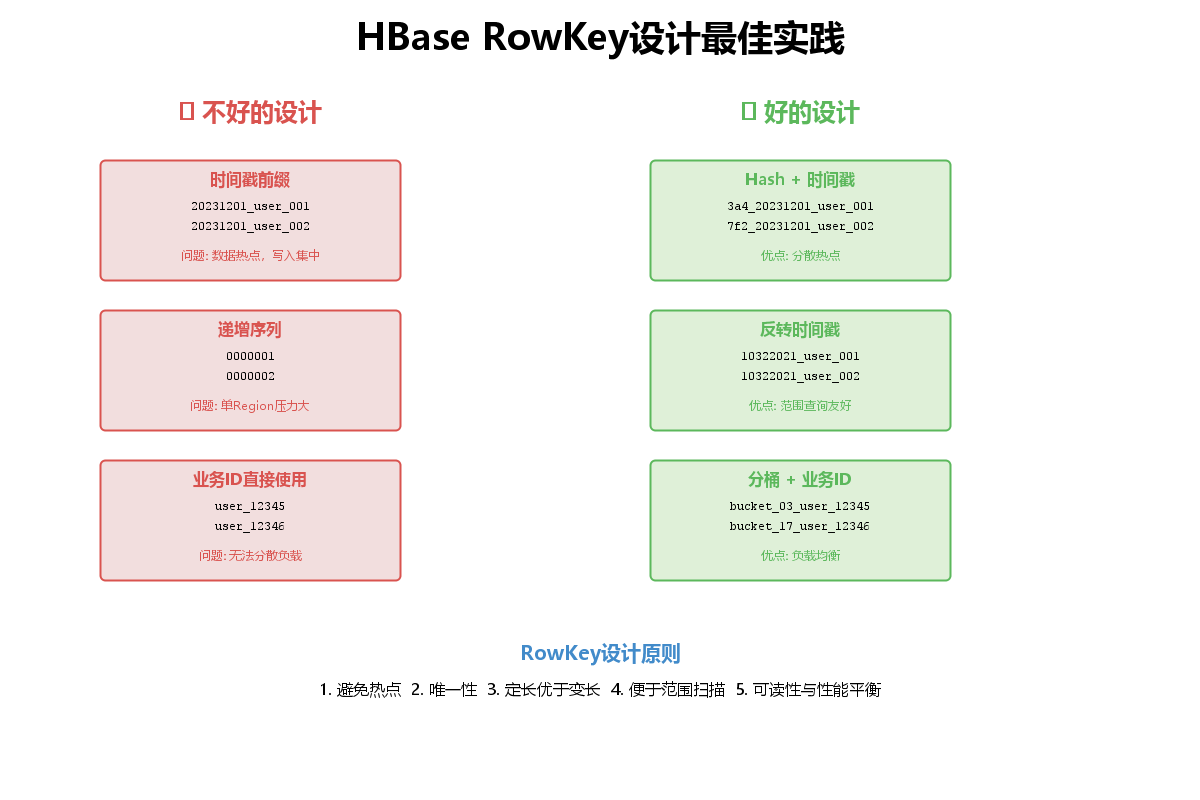
RowKey设计是HBase性能优化的核心,遵循以下原则:
1. 避免热点问题
不好的设计:
java
// ❌ 时间戳作为前缀 - 导致写入热点
String rowKey = System.currentTimeMillis() + "_" + userId;
// 结果:所有写入都集中在一个Region

// ❌ 递增序列 - 单Region压力大
String rowKey = String.format("%010d", sequenceId);好的设计:
java
// ✓ Hash散列 + 业务ID
public class RowKeyGenerator {

    private static final int BUCKET_SIZE = 100;

    /**
     * 生成散列RowKey
     */
    public static String generateHashRowKey(String userId) {
        int hash = userId.hashCode();
        int bucket = Math.abs(hash % BUCKET_SIZE);
        return String.format("%02d_%s", bucket, userId);
    }

    /**
     * 时序数据RowKey(反转时间戳)
     */
    public static String generateTimeSeriesRowKey(String deviceId, long timestamp) {
        // 反转时间戳,最近的数据在前面
        long reversedTime = Long.MAX_VALUE - timestamp;
        int bucket = Math.abs(deviceId.hashCode() % BUCKET_SIZE);
        return String.format("%02d_%s_%d", bucket, deviceId, reversedTime);
    }

    /**
     * 组合RowKey设计
     */
    public static String generateCompositeRowKey(String region, String userId, long timestamp) {
        // 地区 + 用户ID hash + 时间
        int hash = (region + userId).hashCode();
        int bucket = Math.abs(hash % BUCKET_SIZE);
        return String.format("%s_%02d_%s_%d", region, bucket, userId, timestamp);
    }
}
2. RowKey长度优化
java
public class RowKeyOptimizer {

    /**
     * 使用MD5压缩长RowKey
     */
    public static String compressRowKey(String longKey) {
        try {
            MessageDigest md = MessageDigest.getInstance("MD5");
            byte[] hashBytes = md.digest(longKey.getBytes());
            return Base64.getEncoder().encodeToString(hashBytes);
        } catch (Exception e) {
            return longKey;
        }
    }

    /**
     * 定长RowKey填充
     */
    public static String padRowKey(String key, int length) {
        return String.format("%-" + length + "s", key).replace(' ', '0');
    }
}
6.2 预分区策略
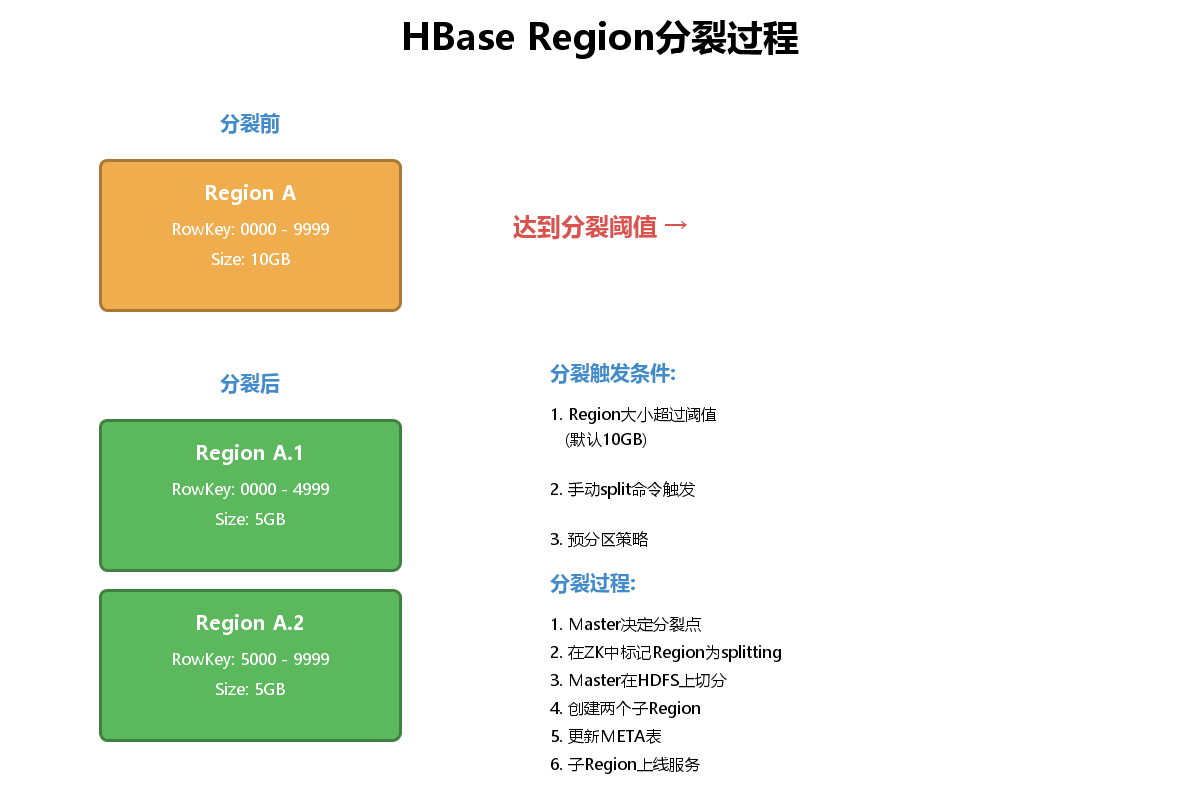
Region分裂会导致服务抖动,建表时预分区可以避免这个问题:
java
import org.apache.hadoop.hbase.util.Bytes;

public class HBasePreSplit {

    /**
     * 创建预分区表
     */
    public void createTableWithSplits(Admin admin, String tableName,
                                     String[] columnFamilies, int splitCount) throws Exception {
        TableName table = TableName.valueOf(tableName);

        if (admin.tableExists(table)) {
            System.out.println("表已存在");
            return;
        }

        // 创建表描述符
        TableDescriptorBuilder tableBuilder = TableDescriptorBuilder.newBuilder(table);

        for (String cf : columnFamilies) {
            ColumnFamilyDescriptorBuilder cfBuilder =
                ColumnFamilyDescriptorBuilder.newBuilder(Bytes.toBytes(cf));
            tableBuilder.setColumnFamily(cfBuilder.build());
        }

        // 生成分区键
        byte[][] splitKeys = generateSplitKeys(splitCount);

        // 创建表with预分区
        admin.createTable(tableBuilder.build(), splitKeys);
        System.out.println("创建预分区表成功,分区数: " + (splitKeys.length + 1));
    }

    /**
     * 生成均匀分布的分区键
     */
    private byte[][] generateSplitKeys(int splitCount) {
        byte[][] splitKeys = new byte[splitCount - 1][];

        // 假设RowKey前缀是00-99
        int step = 100 / splitCount;

        for (int i = 1; i < splitCount; i++) {
            String key = String.format("%02d", i * step);
            splitKeys[i - 1] = Bytes.toBytes(key);
        }

        return splitKeys;
    }

    /**
     * 16进制预分区(常用)
     */
    private byte[][] generateHexSplits() {
        String[] hexChars = {"0", "1", "2", "3", "4", "5", "6", "7",
                            "8", "9", "a", "b", "c", "d", "e", "f"};
        byte[][] splitKeys = new byte[hexChars.length - 1][];

        for (int i = 1; i < hexChars.length; i++) {
            splitKeys[i - 1] = Bytes.toBytes(hexChars[i]);
        }

        return splitKeys;
    }
}
7. 生产环境性能优化
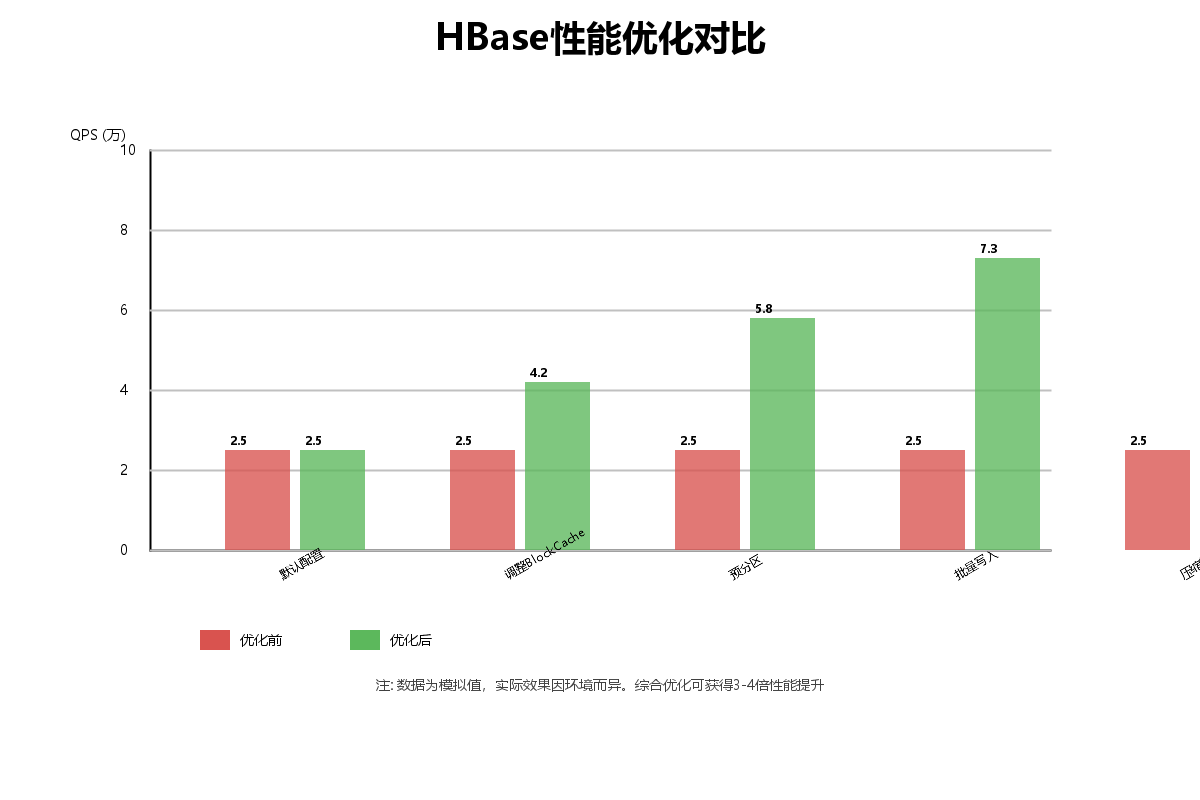
7.1 性能优化对比
7.2 批量操作优化
java
import org.apache.hadoop.hbase.client.*;

public class HBaseBatchOptimization {

    /**
     * 优化的批量写入
     */
    public void optimizedBatchWrite(Connection connection, String tableName,
                                   List<DataRecord> records) throws Exception {
        Table table = connection.getTable(TableName.valueOf(tableName));

        // 设置批量写入参数
        BufferedMutator.ExceptionListener listener = (e, mutator) -> {
            for (int i = 0; i < e.getNumExceptions(); i++) {
                System.out.println("写入失败: " + e.getRow(i));
            }
        };

        BufferedMutatorParams params = new BufferedMutatorParams(
            TableName.valueOf(tableName))
            .listener(listener)
            .writeBufferSize(5 * 1024 * 1024);  // 5MB缓冲区

        try (BufferedMutator mutator = connection.getBufferedMutator(params)) {
            for (DataRecord record : records) {
                Put put = new Put(Bytes.toBytes(record.getRowKey()));
                put.addColumn(
                    Bytes.toBytes("cf"),
                    Bytes.toBytes("data"),
                    Bytes.toBytes(record.getData())
                );
                mutator.mutate(put);
            }
            // 手动flush(可选,close时会自动flush)
            mutator.flush();
        }

        table.close();
    }

    /**
     * 批量查询优化
     */
    public List<Result> optimizedBatchGet(Connection connection, String tableName,
                                         List<String> rowKeys) throws Exception {
        Table table = connection.getTable(TableName.valueOf(tableName));

        List<Get> getList = new ArrayList<>();
        for (String rowKey : rowKeys) {
            Get get = new Get(Bytes.toBytes(rowKey));
            // 设置缓存
            get.setCacheBlocks(true);
            getList.add(get);
        }

        // 批量获取
        Result[] results = table.get(getList);

        table.close();
        return Arrays.asList(results);
    }

    static class DataRecord {
        private String rowKey;
        private String data;

        public String getRowKey() { return rowKey; }
        public String getData() { return data; }
    }
}
7.3 BlockCache和BloomFilter优化
java
import org.apache.hadoop.hbase.io.encoding.DataBlockEncoding;
import org.apache.hadoop.hbase.regionserver.BloomType;

public class HBaseCacheOptimization {

    /**
     * 创建优化的列族
     */
    public void createOptimizedColumnFamily(Admin admin, String tableName) throws Exception {
        TableName table = TableName.valueOf(tableName);
        TableDescriptor tableDesc = admin.getDescriptor(table);

        // 创建优化的列族描述符
        ColumnFamilyDescriptorBuilder cfBuilder = ColumnFamilyDescriptorBuilder
            .newBuilder(Bytes.toBytes("cf"))
            // 启用BloomFilter(提升读性能)
            .setBloomFilterType(BloomType.ROW)
            // 数据块编码(减少存储空间)
            .setDataBlockEncoding(DataBlockEncoding.FAST_DIFF)
            // BlockCache
            .setBlockCacheEnabled(true)
            // 压缩算法
            .setCompressionType(org.apache.hadoop.hbase.io.compress.Compression.Algorithm.SNAPPY)
            // 最大版本数
            .setMaxVersions(3)
            // TTL(7天)
            .setTimeToLive(7 * 24 * 3600)
            // Block大小(默认64KB,可根据场景调整)
            .setBlocksize(64 * 1024);

        // 修改列族
        admin.modifyColumnFamily(table, cfBuilder.build());
        System.out.println("列族优化完成");
    }
}
7.4 Scan优化
java
import org.apache.hadoop.hbase.client.*;
import org.apache.hadoop.hbase.filter.*;

public class HBaseScanOptimization {

    /**
     * 优化的Scan查询
     */
    public void optimizedScan(Connection connection, String tableName) throws Exception {
        Table table = connection.getTable(TableName.valueOf(tableName));

        Scan scan = new Scan();

        // 1. 设置StartRow和StopRow(最重要!)
        scan.withStartRow(Bytes.toBytes("00_user"));
        scan.withStopRow(Bytes.toBytes("10_user"));

        // 2. 设置缓存参数
        scan.setCaching(1000);  // 每次RPC返回的行数
        scan.setBatch(100);     // 每次返回的列数

        // 3. 只扫描需要的列族和列
        scan.addFamily(Bytes.toBytes("info"));
        scan.addColumn(Bytes.toBytes("info"), Bytes.toBytes("name"));

        // 4. 设置过滤器
        FilterList filters = new FilterList(FilterList.Operator.MUST_PASS_ALL);

        // 前缀过滤
        filters.addFilter(new PrefixFilter(Bytes.toBytes("00_")));

        // 分页过滤(适合WEB分页)
        PageFilter pageFilter = new PageFilter(100);
        filters.addFilter(pageFilter);

        scan.setFilter(filters);

        // 5. 设置时间范围
        long now = System.currentTimeMillis();
        long oneDayAgo = now - 24 * 3600 * 1000;
        scan.setTimeRange(oneDayAgo, now);

        // 6. 限制每个Region的扫描时间
        scan.setMaxResultSize(100 * 1024 * 1024);  // 100MB

        // 执行扫描
        ResultScanner scanner = table.getScanner(scan);

        try {
            for (Result result : scanner) {
                // 处理结果
                processResult(result);
            }
        } finally {
            scanner.close();
            table.close();
        }
    }

    /**
     * 多线程并行Scan
     */
    public void parallelScan(Connection connection, String tableName) throws Exception {
        Table table = connection.getTable(TableName.valueOf(tableName));

        // 获取Region分布
        RegionLocator locator = connection.getRegionLocator(TableName.valueOf(tableName));
        byte[][] startKeys = locator.getStartKeys();

        ExecutorService executor = Executors.newFixedThreadPool(startKeys.length);
        List<Future<?>> futures = new ArrayList<>();

        // 为每个Region创建一个Scan任务
        for (int i = 0; i < startKeys.length; i++) {
            byte[] startKey = startKeys[i];
            byte[] endKey = (i == startKeys.length - 1) ?
                           new byte[0] : startKeys[i + 1];

            Future<?> future = executor.submit(() -> {
                try {
                    scanRegion(connection, tableName, startKey, endKey);
                } catch (Exception e) {
                    e.printStackTrace();
                }
            });

            futures.add(future);
        }

        // 等待所有任务完成
        for (Future<?> future : futures) {
            future.get();
        }

        executor.shutdown();
        locator.close();
        table.close();
    }

    private void scanRegion(Connection connection, String tableName,
                           byte[] startKey, byte[] endKey) throws Exception {
        Table table = connection.getTable(TableName.valueOf(tableName));

        Scan scan = new Scan();
        scan.withStartRow(startKey);
        scan.withStopRow(endKey);
        scan.setCaching(1000);

        ResultScanner scanner = table.getScanner(scan);
        for (Result result : scanner) {
            processResult(result);
        }

        scanner.close();
        table.close();
    }

    private void processResult(Result result) {
        // 处理结果的业务逻辑
    }
}
7.5 Compaction优化
java
public class HBaseCompactionOptimization {

    /**
     * 手动触发Major Compaction(生产环境慎用)
     */
    public void triggerMajorCompaction(Admin admin, String tableName) throws Exception {
        TableName table = TableName.valueOf(tableName);

        // 在业务低峰期触发
        admin.majorCompact(table);
        System.out.println("Major Compaction已触发");
    }

    /**
     * 配置自动Compaction策略
     */
    public void configureCompaction(Admin admin, String tableName) throws Exception {
        TableName table = TableName.valueOf(tableName);

        TableDescriptorBuilder builder = TableDescriptorBuilder
            .newBuilder(admin.getDescriptor(table));

        // 设置Compaction参数
        builder.setValue("hbase.hstore.compaction.min", "3");
        builder.setValue("hbase.hstore.compaction.max", "10");
        builder.setValue("hbase.hstore.compaction.ratio", "1.2");

        admin.modifyTable(builder.build());
    }
}
8. HBase监控与运维
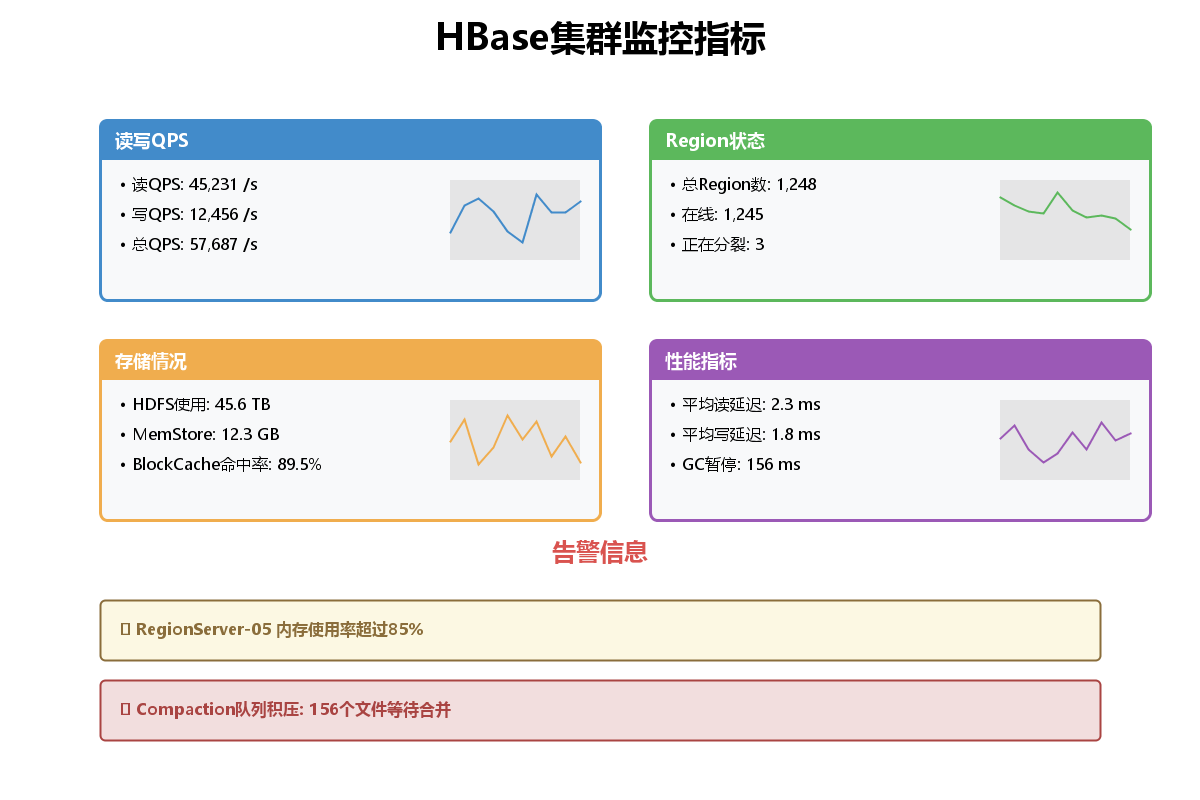
8.1 集群监控指标
8.2 关键监控指标
1. 读写性能指标
- QPS(Queries Per Second):每秒查询数
- 读写延迟:P99延迟应小于10ms
- 请求队列长度:队列堆积表示性能瓶颈
2. 存储指标
- HDFS使用率:建议不超过80%
- MemStore大小:单个Region不超过128MB
- StoreFile数量:过多会影响读性能
3. Region指标
- Region数量:单个RegionServer建议不超过500个
- Region大小:建议10-50GB
- 热点Region:需要及时split或merge
4. JVM指标
- 堆内存使用率:建议不超过70%
- GC频率和时间:Full GC应避免
- GC暂停时间:应小于1秒
8.3 使用JMX监控HBase
java
import javax.management.*;
import javax.management.remote.*;
import java.util.*;

public class HBaseJMXMonitor {

    private MBeanServerConnection mbsc;

    public HBaseJMXMonitor(String host, int port) throws Exception {
        String url = String.format("service:jmx:rmi:///jndi/rmi://%s:%d/jmxrmi", host, port);
        JMXServiceURL serviceURL = new JMXServiceURL(url);
        JMXConnector connector = JMXConnectorFactory.connect(serviceURL);
        mbsc = connector.getMBeanServerConnection();
    }

    /**
     * 获取RegionServer指标
     */
    public Map<String, Object> getRegionServerMetrics() throws Exception {
        ObjectName objectName = new ObjectName(
            "Hadoop:service=HBase,name=RegionServer,sub=Server");

        Map<String, Object> metrics = new HashMap<>();

        // 读写QPS
        metrics.put("readRequestCount",
            mbsc.getAttribute(objectName, "readRequestCount"));
        metrics.put("writeRequestCount",
            mbsc.getAttribute(objectName, "writeRequestCount"));

        // Region数量
        metrics.put("regionCount",
            mbsc.getAttribute(objectName, "regionCount"));

        // Store统计
        metrics.put("storeCount",
            mbsc.getAttribute(objectName, "storeCount"));
        metrics.put("storeFileCount",
            mbsc.getAttribute(objectName, "storeFileCount"));

        // 内存使用
        metrics.put("memStoreSize",
            mbsc.getAttribute(objectName, "memStoreSize"));

        // BlockCache
        metrics.put("blockCacheHitCount",
            mbsc.getAttribute(objectName, "blockCacheHitCount"));
        metrics.put("blockCacheMissCount",
            mbsc.getAttribute(objectName, "blockCacheMissCount"));

        return metrics;
    }

    /**
     * 计算BlockCache命中率
     */
    public double getBlockCacheHitRatio() throws Exception {
        ObjectName objectName = new ObjectName(
            "Hadoop:service=HBase,name=RegionServer,sub=Server");

        long hitCount = (Long) mbsc.getAttribute(objectName, "blockCacheHitCount");
        long missCount = (Long) mbsc.getAttribute(objectName, "blockCacheMissCount");

        if (hitCount + missCount == 0) {
            return 0;
        }

        return (double) hitCount / (hitCount + missCount) * 100;
    }

    /**
     * 打印监控报告
     */
    public void printMonitoringReport() throws Exception {
        Map<String, Object> metrics = getRegionServerMetrics();
        double hitRatio = getBlockCacheHitRatio();

        System.out.println("========== HBase监控报告 ==========");
        System.out.println("读请求数: " + metrics.get("readRequestCount"));
        System.out.println("写请求数: " + metrics.get("writeRequestCount"));
        System.out.println("Region数量: " + metrics.get("regionCount"));
        System.out.println("Store数量: " + metrics.get("storeCount"));
        System.out.println("StoreFile数量: " + metrics.get("storeFileCount"));
        System.out.println("MemStore大小: " + formatBytes((Long) metrics.get("memStoreSize")));
        System.out.println("BlockCache命中率: " + String.format("%.2f%%", hitRatio));
        System.out.println("===================================");
    }

    private String formatBytes(long bytes) {
        if (bytes < 1024) return bytes + " B";
        if (bytes < 1024 * 1024) return String.format("%.2f KB", bytes / 1024.0);
        if (bytes < 1024 * 1024 * 1024) return String.format("%.2f MB", bytes / (1024.0 * 1024));
        return String.format("%.2f GB", bytes / (1024.0 * 1024 * 1024));
    }
}
8.4 HBase Shell常用运维命令
bash
# 进入HBase Shell
hbase shell

# 查看集群状态
status
status 'detailed'

# 查看所有表
list

# 查看表详情
describe 'user_profile'

# 查看Region分布
list_regions 'user_profile'

# 手动分裂Region
split 'user_profile', 'split_key'

# 手动合并Region
merge_region 'region1', 'region2'

# 手动触发Compaction
major_compact 'user_profile'

# 平衡Region
balance_switch true
balancer

# 查看Master日志
hbase org.apache.hadoop.hbase.util.hbck -details

# 修复表(慎用)
hbase hbck -repair user_profile
8.5 告警规则配置
java
public class HBaseAlertRule {

    /**
     * 检查是否需要告警
     */
    public static class AlertChecker {

        public boolean checkMemoryAlert(long memStoreSize, long threshold) {
            return memStoreSize > threshold;
        }

        public boolean checkBlockCacheHitRateAlert(double hitRate, double threshold) {
            return hitRate < threshold;
        }

        public boolean checkRegionCountAlert(int regionCount, int maxRegions) {
            return regionCount > maxRegions;
        }

        public boolean checkStoreFileAlert(int storeFileCount, int maxFiles) {
            // StoreFile过多会影响读性能
            return storeFileCount > maxFiles;
        }

        public boolean checkCompactionQueueAlert(int queueSize, int threshold) {
            // Compaction队列积压
            return queueSize > threshold;
        }
    }

    /**
     * 告警配置
     */
    public static class AlertConfig {
        public static final long MEM_STORE_THRESHOLD = 128 * 1024 * 1024; // 128MB
        public static final double BLOCK_CACHE_HIT_RATE_THRESHOLD = 0.8;  // 80%
        public static final int MAX_REGION_PER_SERVER = 500;
        public static final int MAX_STORE_FILES = 100;
        public static final int COMPACTION_QUEUE_THRESHOLD = 50;
    }
}
9. 总结
9.1 HBase核心要点
-
架构理解
- Master负责元数据管理和负载均衡
- RegionServer负责数据读写
- ZooKeeper提供协调服务
- HDFS提供底层存储
-
数据模型
- RowKey是唯一索引,设计至关重要
- 列族需要提前规划
- 支持多版本和TTL
-
性能优化
- RowKey设计避免热点
- 使用批量操作
- 合理配置BlockCache和BloomFilter
- Scan查询要设置范围和缓存
-
运维监控
- 关注QPS、延迟、命中率
- 监控MemStore和StoreFile
- 定期检查Region分布
- 合理安排Compaction时间