任务一:基本访问控制列表的配置
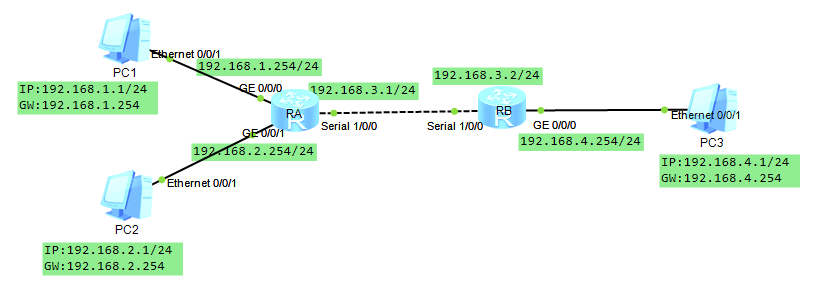
一、基础配置
RA:
<Huawei>sys
Enter system view, return user view with Ctrl+Z.
Huaweiundo info-center ena
Info: Information center is disabled.
Huaweisysn RA
RAint g0/0/0
RA-GigabitEthernet0/0/0ip add 192.168.1.254 24
RA-GigabitEthernet0/0/0int g0/0/1
RA-GigabitEthernet0/0/1ip add 192.168.2.254 24
RA-GigabitEthernet0/0/1int s1/0/0
RA-Serial1/0/0ip add 192.168.3.1 24
RA-Serial1/0/0qu
RAip route-static 192.168.4.0 24 192.168.3.2
RAqu
RB:
<Huawei>sys
Enter system view, return user view with Ctrl+Z.
Huaweiundo info-center ena
Info: Information center is disabled.
Huaweisysn RB
RBint g0/0/0
RB-GigabitEthernet0/0/0ip add 192.168.4.254 24
RB-GigabitEthernet0/0/0int s1/0/0
RB-Serial1/0/0ip add 192.168.3.2 24
RB-Serial1/0/0qu
RBip route-static 192.168.1.0 24 192.168.3.1
RBip route-static 192.168.2.0 24 192.168.3.1
RBqu
配置完成后,PC1、PC2都可以访问PC3。
二、基本访问控制列表配置
RB:
RBacl 2000 //基本访问控制列表编号为2000---2999
RB-acl-basic-2000rule deny source 192.168.2.0 0.0.0.255
RB-acl-basic-2000qu
RBint g0/0/0
RB-GigabitEthernet0/0/0traffic-filter outbound acl 2000
RB-GigabitEthernet0/0/0qu
配置完成后,只有PC1可以访问PC3,PC2不能访问PC3。
任务二:高级访问控制列表的配置
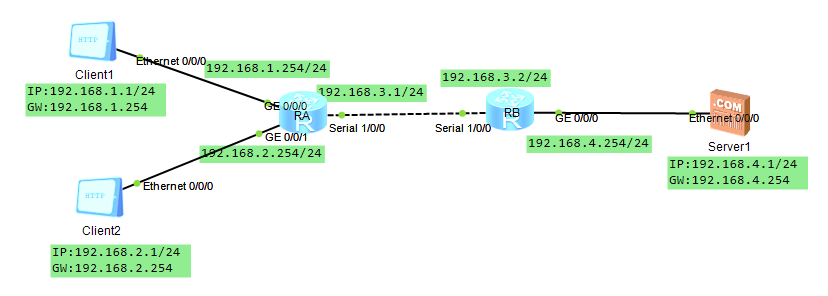
一、基本配置
RA:
<Huawei>sys
Enter system view, return user view with Ctrl+Z.
Huaweiundo info-center ena
Info: Information center is disabled.
Huaweisysn RA
RAint g0/0/0
RA-GigabitEthernet0/0/0ip add 192.168.1.254 24
RA-GigabitEthernet0/0/0int g0/0/1
RA-GigabitEthernet0/0/1ip add 192.168.2.254 24
RA-GigabitEthernet0/0/1int s1/0/0
RA-Serial1/0/0ip add 192.168.3.1 24
RA-Serial1/0/0qu
RAip route-static 192.168.4.0 24 192.168.3.2
RAqu
RB:
<Huawei>sys
Enter system view, return user view with Ctrl+Z.
Huaweiundo info-center ena
Info: Information center is disabled.
Huaweisysn RB
RBint g0/0/0
RB-GigabitEthernet0/0/0ip add 192.168.4.254 24
RB-GigabitEthernet0/0/0int s1/0/0
RB-Serial1/0/0ip add 192.168.3.2 24
RB-Serial1/0/0qu
RBip route-static 192.168.1.0 24 192.168.3.1
RBip route-static 192.168.2.0 24 192.168.3.1
RBqu
配置完成后,PC1、PC2都可以访问PC3。
二、高级访问控制列表的配置
RAacl 3000 //高级访问控制列表的编号为3000---3999
RA-acl-adv-3000rule deny tcp source 192.168.1.0 0.0.0.255 destination 192.168.
4.0 0.0.0.255 destination-port range 20 21 //拒绝FTP服务
RA-acl-adv-3000rule permit tcp source 192.168.1.0 0.0.0.255 destination 192.16
8.4.0 0.0.0.255 destination-port eq 80 //允许WEb服务
RA-acl-adv-3000rule deny ip
RA-acl-adv-3000qu
RAint g0/0/0
RA-GigabitEthernet0/0/0traffic-filter inbound acl 3000
RA-GigabitEthernet0/0/0qu
配置完成后PC1可以访问PC3的WEB服务,但不能访问FTP服务。PC2可以访问PC3的WEB和FTP服务。