代码
<template>
	<view class="container">
		<picker-view class="sleepPage-time-picker" :indicator-style="indicatorStyle" :value="timeValue"
			@change="handleTimeChange">
			<picker-view-column>
				<view v-for="(val, index) in subsections" :key="index"
					:class="['sleepPage-time-picker_item',{ selected: timeValue[0] === index }]">
					{{ val }}
				</view>
			</picker-view-column>
			<!-- 小时选择 -->
			<picker-view-column>
				<view v-for="(hour, index) in hours" :key="index"
					:class="['sleepPage-time-picker_item',{ selected: timeValue[1] === index }]">
					{{ hour }}
				</view>
			</picker-view-column>
			<!-- 分钟选择 -->
			<picker-view-column>
				<view v-for="(minute, index) in minutes" :key="index"
					:class="['sleepPage-time-picker_item',{ selected: timeValue[2] === index }]">
					{{ minute }}
				</view>
			</picker-view-column>
		</picker-view>
	</view>
</template>

<script>
	export default {
		data() {
			return {
				timeValue: [0, 0, 0], // 默认选中的时间值,[小时索引, 分钟索引]
				indicatorStyle: "height: 50px;background: #fff;z-index: 0;",
				hours: [...Array(12).keys()].map((n) => (n + 1).toString().padStart(2, "0")), // 生成小时选项数组
				minutes: [...Array(60).keys()].map((n) => n.toString().padStart(2, "0")), // 生成分钟选项数组
				subsections: ["上午", "下午"], // 生成分钟选项数组
			};
		},
		onLoad() {
			let date = new Date();
			let hours = date.getHours();
			let minutes = date.getMinutes();
			console.log("hours--", hours);
			console.log("minutes--", minutes);
			let subsections = hours < 12 ? 0 : 1
			if (hours == 0) {
				hours = 12
			} else if (hours < 12) {
				hours = hours - 1
			} else if (hours > 12) {
				hours = hours - 13
			}
			this.timeValue = [subsections, hours, minutes]
		},
		methods: {
			handleTimeChange(e) {
				console.log("e.detail---", e.detail);
				this.timeValue = e.detail.value; // 更新选择的时间值
				// 处理选择后的逻辑,例如更新界面显示的时间
				console.log(
					"Selected Time:",
					this.hours[this.timeValue[0]],
					":",
					this.minutes[this.timeValue[1]]
				);
			},
		}

	}
</script>

<style>
	.container {}

	.sleepPage-time-picker-box {
		display: flex;
		margin-bottom: 10px;
	}

	.sleepPage-time-picker {
		height: 380rpx;
		width: 500rpx;
		margin: 0 auto;
	}

	.selected {
		color: #29c9d0;
	}

	.sleepPage-time-picker_item {
		text-align: center;
		height: 50px;
		line-height: 50px;
		position: relative;
		font-size: 40rpx;
	}
</style>
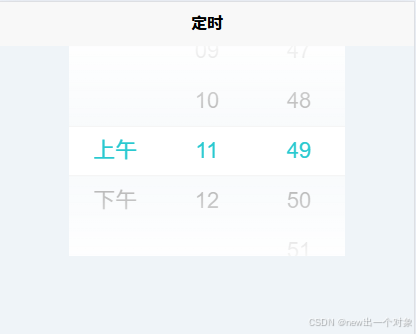
效果图