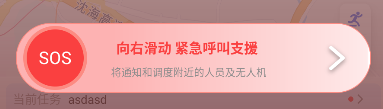
import android.animation.Animator
import android.animation.AnimatorListenerAdapter
import android.animation.ValueAnimator
import android.content.Context
import android.graphics.Canvas
import android.graphics.Color
import android.graphics.Paint
import android.graphics.PaintFlagsDrawFilter
import android.graphics.Rect
import android.graphics.RectF
import android.util.AttributeSet
import android.util.TypedValue
import android.view.MotionEvent
import android.view.View
import com.czisoft.frontlinework.utils.dp
import android.graphics.Path


/**
 * 自定义解锁UI
 * @Author: guanlinlin
 * @Date: 2025/10/30 17:40
 */
class SosSliderView @JvmOverloads constructor(
    context: Context, attrs: AttributeSet? = null, defStyleAttr: Int = 0
) : View(context, attrs, defStyleAttr) {

    // 滑块相关参数
    private val THUMB_RADIUS_DP = 35f
    private val TRACK_HEIGHT_DP = 80f
    private val HORIZONTAL_PADDING_DP = 0f  // 保持10dp间隔
    private var thumbRadiusPx = 0f
    private var trackHeightPx = 0f
    private var horizontalPaddingPx = 0f

    // 需要添加的变量定义
    private var progress = 0f
    private val max = 100f
    private var isSliding = false
    private var currentThumbX = 0f
    private val trackRect = RectF()  // 确保在类中正确定义
    private val animator = ValueAnimator()
    private var isSlideComplete = false
    var slideCompleteListener: (() -> Unit)? = null
    // 文字区域变量,用于检测滑块是否覆盖文字
    private var titleTextBounds = Rect()
    private var subtitleTextBounds = Rect()
    private val titleText = "向右滑动 紧急呼叫支援"
    private val subtitleText = "将通知和调度附近的人员及无人机"
    private val thumbText = "SOS"

    // 在类的成员变量区域添加以下变量
    private val gradientPaint = Paint(Paint.ANTI_ALIAS_FLAG)
    private var gradientShader: android.graphics.LinearGradient? = null
    private var gradientOffset = 0f
    private val gradientAnimator = ValueAnimator()
    private val GRADIENT_SEGMENTS = 200 // 渐变分割为200份
    private val START_COLOR = 0x33FDB2B2.toInt()    // #FA4040 红色
    private val END_COLOR =  0xFFFFFFFF.toInt()  // #FFFFFF 白色

    // 修改滑块画笔
    private val thumbPaint = Paint(Paint.ANTI_ALIAS_FLAG).apply {
        color = Color.parseColor("#FA4040") // 滑块背景色
        style = Paint.Style.FILL
    }

    // 滑块文字画笔
    private val thumbTextPaint = Paint(Paint.ANTI_ALIAS_FLAG).apply {
        color = Color.WHITE
        textSize = TypedValue.applyDimension(
            TypedValue.COMPLEX_UNIT_SP, 20f, resources.displayMetrics
        )
        textAlign = Paint.Align.CENTER
//        typeface = android.graphics.Typeface.DEFAULT_BOLD // 可选:加粗字体
    }

    // 滑块边框色
    private val borderPaint = Paint(Paint.ANTI_ALIAS_FLAG).apply {
        color = Color.parseColor("#FC8B82")
        style = Paint.Style.STROKE
        strokeWidth = TypedValue.applyDimension(
            TypedValue.COMPLEX_UNIT_DIP, 4f, resources.displayMetrics
        ) // 边框宽度4dp
    }

    // 进度画笔
    private val progressPaint = Paint(Paint.ANTI_ALIAS_FLAG).apply {
        color = Color.parseColor("#A3151E") // 进度值颜色为红色
        style = Paint.Style.FILL
    }

    // 箭头画笔
    private val arrowPaint = Paint(Paint.ANTI_ALIAS_FLAG).apply {
        color = Color.parseColor("#FFFFFF")
        strokeWidth = TypedValue.applyDimension(
            TypedValue.COMPLEX_UNIT_DIP, 4f, resources.displayMetrics
        )
        style = Paint.Style.STROKE
        strokeCap = Paint.Cap.ROUND
        setShadowLayer(// 添加阴影效果
            8f,   // 阴影半径
            0f,   // X轴偏移
            4f,   // Y轴偏移
            Color.parseColor("#66000000") // 阴影颜色(20%透明度的黑色)
        )
    }

    // 背景边框画笔
    private val bgBorderPaint = Paint(Paint.ANTI_ALIAS_FLAG).apply {
        color = Color.parseColor("#FC8B82") // 边框颜色,可根据需要调整
        style = Paint.Style.STROKE
        strokeWidth = TypedValue.applyDimension(
            TypedValue.COMPLEX_UNIT_DIP, 1f, resources.displayMetrics
        ) // 1dp边框宽度
    }

    // 标题文字画笔
    private val titlePaint = Paint(Paint.ANTI_ALIAS_FLAG).apply {
        color = Color.parseColor("#FA4040")
        textSize = TypedValue.applyDimension(
            TypedValue.COMPLEX_UNIT_SP, 16f, resources.displayMetrics
        )
        textAlign = Paint.Align.CENTER
        typeface = android.graphics.Typeface.DEFAULT_BOLD // 可选:加粗字体
    }

    // 子标题文字画笔
    private val subtitlePaint = Paint(Paint.ANTI_ALIAS_FLAG).apply {
        color = Color.parseColor("#8C8C8C")
        textSize = TypedValue.applyDimension(
            TypedValue.COMPLEX_UNIT_SP, 12f, resources.displayMetrics
        )
        textAlign = Paint.Align.CENTER
    }

    // 文字间距
    private val textSpacing = TypedValue.applyDimension(
        TypedValue.COMPLEX_UNIT_DIP, 8f, resources.displayMetrics
    )

    init {
        // 重新计算尺寸
        thumbRadiusPx = TypedValue.applyDimension(
            TypedValue.COMPLEX_UNIT_DIP, THUMB_RADIUS_DP, resources.displayMetrics
        )

        trackHeightPx = TypedValue.applyDimension(
            TypedValue.COMPLEX_UNIT_DIP, TRACK_HEIGHT_DP, resources.displayMetrics
        )

        horizontalPaddingPx = TypedValue.applyDimension(
            TypedValue.COMPLEX_UNIT_DIP, HORIZONTAL_PADDING_DP, resources.displayMetrics
        )

        // 初始化渐变动画
        createGradientAnimation()
    }

    private fun createGradientAnimation() {
        gradientAnimator.apply {
            setFloatValues(0f, 1f)
            duration = 3000 // 300毫秒完成渐变递进
            addUpdateListener { animation ->
                gradientOffset = animation.animatedFraction
                invalidate()
            }
            addListener(object : AnimatorListenerAdapter() {
                override fun onAnimationEnd(animation: Animator) {
                    // 等待2秒后重新开始动画
                    postDelayed({
                        start()
                    }, 1000)
                }
            })
        }
        gradientAnimator.start()
    }

    override fun onTouchEvent(event: MotionEvent): Boolean {
        when (event.action) {
            MotionEvent.ACTION_DOWN -> {
                val thumbX = if (isSliding) currentThumbX else
                    thumbRadiusPx + context.dp(10) +  // 左侧10dp边距
                            (progress / max) * (width - 2 * thumbRadiusPx - context.dp(20))
                val thumbY = (trackRect.top + trackRect.bottom) / 2

                // 检查点击位置是否在滑块范围内
                val distance = Math.sqrt(
                    Math.pow((event.x - thumbX).toDouble(), 2.0) +
                            Math.pow((event.y - thumbY).toDouble(), 2.0)
                )

                if (distance <= thumbRadiusPx) {
                    isSliding = true
                    currentThumbX = thumbX
                    parent.requestDisallowInterceptTouchEvent(true)
                    return true
                }
            }

            MotionEvent.ACTION_MOVE -> {
                if (isSliding) {
                    val minX = thumbRadiusPx + context.dp(10)  // 左侧边界:滑块半径+10dp边距
                    val maxX = width - thumbRadiusPx - context.dp(10)  // 右侧边界:总宽度-滑块半径-10dp边距
                    var newX = event.x

                    // 限制滑块移动范围
                    newX = newX.coerceIn(minX, maxX)

                    currentThumbX = newX
                    progress = ((newX - minX) / (maxX - minX)) * max  // 根据实际可移动范围计算进度
                    invalidate()
                    return true
                }
            }

            MotionEvent.ACTION_UP, MotionEvent.ACTION_CANCEL -> {
                if (isSliding) {
                    isSliding = false
                    handleRelease(event.x)
                    parent.requestDisallowInterceptTouchEvent(false)
                    return true
                }
            }
        }

        return super.onTouchEvent(event)
    }

    override fun onDraw(canvas: Canvas) {
        super.onDraw(canvas)
        canvas.setDrawFilter(
            PaintFlagsDrawFilter(
                0, Paint.ANTI_ALIAS_FLAG or Paint.FILTER_BITMAP_FLAG
            )
        )

        // 1. 绘制背景轨道,使用水平内边距确保10dp间隔
        val trackTop = (height - trackHeightPx) / 2
        val trackBottom = trackTop + trackHeightPx

        trackRect.set(
            0f,  // 左侧10dp间隔
            trackTop,
            width.toFloat(),  // 右侧10dp间隔
            trackBottom
        )

        // 绘制半圆角背景(黑色)
        // 创建动态渐变背景
        // 创建200份渐变色数组
        val colors = IntArray(GRADIENT_SEGMENTS)
        val positions = FloatArray(GRADIENT_SEGMENTS)

        for (i in 0 until GRADIENT_SEGMENTS) {
            // 计算每个片段的颜色值,从#FFFFFF到#FA4040
            val ratio = i.toFloat() / (GRADIENT_SEGMENTS - 1)

            // 插值计算颜色
            val startRed = (START_COLOR shr 16) and 0xFF
            val startGreen = (START_COLOR shr 8) and 0xFF
            val startBlue = START_COLOR and 0xFF

            val endRed = (END_COLOR shr 16) and 0xFF
            val endGreen = (END_COLOR shr 8) and 0xFF
            val endBlue = END_COLOR and 0xFF

            val red = (startRed + (endRed - startRed) * ratio).toInt()
            val green = (startGreen + (endGreen - startGreen) * ratio).toInt()
            val blue = (startBlue + (endBlue - startBlue) * ratio).toInt()

            colors[i] = Color.rgb(red, green, blue)
            positions[i] = i.toFloat() / GRADIENT_SEGMENTS
        }

// 应用动态偏移
        val offsetRatio = gradientOffset
        val adjustedPositions = FloatArray(GRADIENT_SEGMENTS)
        for (i in 0 until GRADIENT_SEGMENTS) {
            adjustedPositions[i] = (positions[i] + offsetRatio) % 1.0f
        }

// 创建线性渐变
        gradientShader = android.graphics.LinearGradient(
            trackRect.left, trackRect.top, trackRect.right, trackRect.top,
            colors, adjustedPositions, android.graphics.Shader.TileMode.REPEAT
        )

        gradientPaint.shader = gradientShader
        gradientPaint.style = Paint.Style.FILL

// 绘制渐变背景
        canvas.drawRoundRect(trackRect, trackHeightPx / 2, trackHeightPx / 2, gradientPaint)

// 绘制背景边框(保留原有边框绘制)
        canvas.drawRoundRect(trackRect, trackHeightPx / 2, trackHeightPx / 2, bgBorderPaint)
//        canvas.drawRoundRect(trackRect, trackHeightPx / 2, trackHeightPx / 2, bgBorderPaint)

        // 2. 绘制进度(红色半圆角)
        val thumbX = if (isSliding) currentThumbX else
            thumbRadiusPx + context.dp(10) +
                    (progress / max) * (width - 2 * thumbRadiusPx - context.dp(20))

        // 进度条从最左侧开始
        val progressEndX_ = thumbX + thumbRadiusPx
        val progressRect = RectF(
            0f, trackTop, progressEndX_ + context.dp(10),  // 进度条左右各留10dp边距
            trackBottom
        )
        // 绘制半圆角进度值(红色)
        if (progress > 0) {
            canvas.drawRoundRect(progressRect, trackHeightPx / 2, trackHeightPx / 2, progressPaint)
        }

        //绘制右侧箭头
        val arrowX = width - context.dp(32)  // 距离右侧32dp
        val arrowY = trackTop + (trackHeightPx / 2)  // 垂直居中
        // 绘制箭头路径
        val path = Path()
        path.moveTo(arrowX - context.dp(14).toFloat(), arrowY - context.dp(12))
        path.lineTo(arrowX.toFloat(), arrowY)
        path.moveTo(arrowX.toFloat(), arrowY)
        path.lineTo(arrowX - context.dp(14).toFloat(), arrowY + context.dp(12))
        path.moveTo(arrowX - context.dp(14).toFloat(), arrowY + context.dp(12))
        path.close()
        canvas.drawPath(path, arrowPaint)

// 4. 绘制标题和子标题
        val titleFontMetrics = titlePaint.fontMetrics
        val subtitleFontMetrics = subtitlePaint.fontMetrics

// 计算文字在轨道内的垂直居中位置
        val totalTextHeight =
            (titleFontMetrics.descent - titleFontMetrics.ascent) + textSpacing + (subtitleFontMetrics.descent - subtitleFontMetrics.ascent)

        val textAreaTop = trackTop + (trackHeightPx - totalTextHeight) / 2

// 计算标题和子标题的基线位置
        val titleBaseline = textAreaTop - titleFontMetrics.ascent
        val subtitleBaseline =
            titleBaseline + (titleFontMetrics.descent - titleFontMetrics.ascent) + textSpacing

// 获取文字边界用于碰撞检测
        titlePaint.getTextBounds(titleText, 0, titleText.length, titleTextBounds)
        subtitlePaint.getTextBounds(subtitleText, 0, subtitleText.length, subtitleTextBounds)

// 调整文字边界位置
        titleTextBounds.offset(width / 2 - titleTextBounds.width() / 2, titleBaseline.toInt())
        subtitleTextBounds.offset(width / 2 - subtitleTextBounds.width() / 2, subtitleBaseline.toInt())

// 计算进度条右边界位置(用于文字颜色切换)
        val progressEndX = if (progress > 0) {
            val thumbX = if (isSliding) currentThumbX else
                thumbRadiusPx + context.dp(10) +
                        (progress / max) * (width - 2 * thumbRadiusPx - context.dp(20))
            thumbX + thumbRadiusPx + context.dp(10).toFloat()
        } else {
            context.dp(10).toFloat()
        }

// 为标题文字设置不同颜色(根据是否被进度条覆盖)
//        titlePaint.textSize = originalTitleSize
        val titleChars = titleText.toCharArray()
        val charWidths = FloatArray(titleChars.size)
        titlePaint.getTextWidths(titleText, charWidths)

        val titleStartX = width / 2f - titleTextBounds.width() / 2f
        for (i in titleChars.indices) {
            val charX = titleStartX + charWidths.take(i).sum()
            val charRightX = charX + charWidths[i] - context.dp(10).toFloat()

            if (charX < progressEndX) {
                // 字符被覆盖,设置为白色并放大
                titlePaint.color = if (charRightX <= progressEndX) {
                    Color.WHITE
                } else {
                    Color.parseColor("#FA4040")
                }

                canvas.drawText(titleChars, i, 1, charX, titleBaseline, titlePaint)
            } else {
                // 字符未被覆盖,保持原色和原大小
                titlePaint.color = Color.parseColor("#FA4040")
                canvas.drawText(titleChars, i, 1, charX, titleBaseline, titlePaint)
            }
        }

// 为子标题文字设置不同颜色(根据是否被进度条覆盖)
//        subtitlePaint.textSize = originalSubtitleSize
        val subtitleChars = subtitleText.toCharArray()
        val subtitleCharWidths = FloatArray(subtitleChars.size)
        subtitlePaint.getTextWidths(subtitleText, subtitleCharWidths)

        val subtitleStartX = width / 2f - subtitleTextBounds.width() / 2f
        for (i in subtitleChars.indices) {
            val charX = subtitleStartX + subtitleCharWidths.take(i).sum()
            val charRightX = charX + subtitleCharWidths[i] - context.dp(10).toFloat()

            if (charX < progressEndX) {
                // 字符被覆盖,设置为白色并放大
                subtitlePaint.color = if (charRightX <= progressEndX) {
                    Color.WHITE
                } else {
                    Color.parseColor("#8C8C8C")
                }

                canvas.drawText(subtitleChars, i, 1, charX, subtitleBaseline, subtitlePaint)
            } else {
                // 字符未被覆盖,保持原色和原大小
                subtitlePaint.color = Color.parseColor("#8C8C8C")
                canvas.drawText(subtitleChars, i, 1, charX, subtitleBaseline, subtitlePaint)
            }
        }

        // 3. 绘制滑块
        val thumbY = (trackTop + trackBottom) / 2
// 绘制滑块背景和边框
        canvas.drawCircle(thumbX, thumbY, thumbRadiusPx, thumbPaint)
        canvas.drawCircle(thumbX, thumbY, thumbRadiusPx, borderPaint)

// 绘制滑块文字"SOS"
        val textY = thumbY - (thumbTextPaint.fontMetrics.ascent + thumbTextPaint.fontMetrics.descent) / 2
        canvas.drawText(thumbText, thumbX, textY, thumbTextPaint)
    }

    private fun handleRelease(x: Float) {
        val minX = thumbRadiusPx + context.dp(10)
        val maxX = width - thumbRadiusPx - context.dp(10)
        val threshold = maxX - thumbRadiusPx * 0.5f // 判断是否接近最右侧的阈值

        if (x >= threshold) {
            // 滑动到最右侧,触发完成回调
            animateToPosition(maxX, true)
        } else {
            // 回弹到最左侧
            animateToPosition(minX, false)
        }
    }

    private fun animateToPosition(targetX: Float, isComplete: Boolean) {
        val startX = currentThumbX
        animator.cancel()
        animator.setFloatValues(startX, targetX)
        animator.duration = 500 // 0.5秒动画
        animator.addUpdateListener { animation ->
            currentThumbX = animation.animatedValue as Float
            val minX = thumbRadiusPx + context.dp(10)
            val maxX = width - thumbRadiusPx - context.dp(10)
            progress = ((currentThumbX - minX) / (maxX - minX)) * max
            invalidate()
        }
        animator.addListener(object : AnimatorListenerAdapter() {
            override fun onAnimationEnd(animation: Animator) {
                progress = if (isComplete) max else 0f
                currentThumbX = targetX
                invalidate()

                if (isComplete) {
                    isSlideComplete = true
                    slideCompleteListener?.invoke()
                } else {
                    isSlideComplete = false
                }
            }
        })
        animator.start()
    }

    // 添加到类中,用于释放资源
    override fun onDetachedFromWindow() {
        super.onDetachedFromWindow()
        gradientAnimator.cancel()
    }
}