实验室里有一块吃灰的kunpengpro开发板(16G 8tops),最近有时间尝试一下在昇腾NPU下部署自己的模型
1.Unet模型训练
虽然可以通过使用华为的Minspore框架直接在香橙派上训练,但是训练的还是太慢了,而且资料比较少,我们这里选择在电脑上训练好模型,之后转换为.om文件部署在香橙派上
我们这里选择github上比较有名的Unet仓库来进行训练:https://github.com/milesial/Pytorch-UNet

由于我们的重点不在模型训练上,所以这里我们就不讲解如何使用了
但是这个项目训练完成后的.pth文件无法直接转换,我们需要先转换为onnx文件后,才能转化为Ascend平台上的om文件进行推理,这里我们编写一个pth转onnx文件的代码
python
import torch
from unet import UNet

def export_to_onnx(model_path, output_path, input_shape=(3, 369, 369), device='cpu'):
    #由于.pth文件只包含权重,不包含模型结构,所以需要重新定义模型结构
    model = UNet(n_channels=3, n_classes=2, bilinear=False)  # 根据你的训练参数修改
    model.to(device)
    checkpoint = torch.load(model_path, map_location=device)
    if 'mask_values' in checkpoint:
        del checkpoint['mask_values']
    model.load_state_dict(checkpoint)
    model.eval()  # 切换到评估模式
    dummy_input = torch.randn(1, *input_shape, device=device)  # 1是batch_size
    torch.onnx.export(
        model,  # 模型实例
        dummy_input,  # 示例输入
        output_path,  # 输出文件路径
        opset_version=11,  # ONNX版本(建议11+,兼容性较好)
        do_constant_folding=True,  # 是否折叠常量
        input_names=['input'],  # 输入节点名称
        output_names=['output'],  # 输出节点名称
        dynamic_axes=None    #维度固定,减少精度算是
    )
    print(f"ONNX模型已导出至: {output_path}")
if __name__ == '__main__':
    # 配置路径和参数(根据你的实际情况修改)
    model_path = './checkpoints/checkpoint_epoch50.pth'  # 你的.pth文件路径
    output_path = 'unet_model.onnx'                    # 导出的ONNX路径
    input_shape = (3, 184, 184)                        # 输入图像尺寸(需与训练时一致,如369x369,我这里369的图片训练时缩放为184)
    device = 'cuda' if torch.cuda.is_available() else 'cpu'

    export_to_onnx(model_path, output_path, input_shape, device)
这样,电脑端的准备工作就做完了,接下来就可以将这个onnx模型部署到香橙派上
2.镜像选择
为什么我在这里会提一嘴镜像选择,是因为我刚开始使用香橙派kunkengpro的时候,使用的时官方的openEuler镜像,但是里面并没有AI相关的工具链,查找之后发现可以使用alpro的镜像,这个镜像包含了一系列相关的Ai工具链,所以我这里直接给我的kunpeng pro开发板烧录了alpro的镜像

我一般ubuntu用的多,所以我这里选择的时ubuntu镜像
3.模型转换
在HiHwAiUser用户下,选择mxvision-samples目录并在这里创建一个Unet_test文件夹,通过samba或者ftp将我们的onnx上传到这个目录下(我这里时创建了个pre_model目录来专门存放)

(我这里三个onnx文件是之前测试的时候上传的)
上传好模型后我们就可以使用atc指令来进行模型转换
模型转换前,我们需要查看一下NPU的型号,我这里的型号是Ascend310B4
npu-smi info
模型转换前记得输入su切换为root用户
atc --model=./pre_model/unet_model.onnx --framework=5 --output=./unet184 --input_format=NCHW --input_shape="input:1,3,184,184" --soc_version=Ascend310B4 参数解释:
model:输入模型地址
framework:输出模型类型(5代表onnx)
output: om模型输出目录
input_format:输入形状(一般固定为NCHW)
input_shape:input是转onnx时定义的输入,1,3,184,184是训练是的图像输入形状
soc-version:当前NPU型号
执行这段代码一段时间后,就可以得到om文件了
4.推理代码编写
图片的预处理和后处理与使用可以参考pytorch中相关的代码,我这里使用华为的MindSDK来简化推理
导入相应的包
python
import numpy as np
import matplotlib
from PIL import Image
from mindx.sdk import base
from mindx.sdk.base import Tensor
from scipy.special import expit
import time
图像预处理
python
def preprocess(pil_img,scale):
    w,h=pil_img.size
    newW,newH=int(scale * w), int(scale * h)
    #图片大小转换为om要求的输出大小
    pil_img = pil_img.resize((newW,newH),resample = Image.BICUBIC)
    img = np.asarray(pil_img,dtype = np.float32)
    img = img.transpose([2,0,1])#转换为NCHW
    if (img>1).any():#归一化
        img = img/255.0
    img = np.expand_dims(img, axis=0)  # 扩展第一维度,适应模型输入
    img = np.ascontiguousarray(img) #将数组转换为内存中连续存储的形式
    return img
这里预处理主要是讲图片转换为模型要求的输入大小并转换为numpy数组,之后转换为NCHW形式,这部分和在pytorch上类似
需要注意的是img = np.ascontiguousarray(img)这行代码,我之前忽略了这句导致模型推理不正常,需要重点关注
模型推理和后处理
由于我编写的时候为测试性质,直接固定了模型和图片的位置,这部分可根据自己的需要进行修改
由于我在训练的时候设置为2分类问题(n_classes=2),所以这里使用argmax函数
python
def process():
    pic_path = 'test/1.png'
    model_path = "model/unet184.om"
    img = Image.open(pic_path)
    img = img.convert('RGB')
    img = preprocess(pil_img=img,scale=0.5)
    img = Tensor(img) #将numpy转为Tensor,方便NPU推理
    model = base.model(modelPath = model_path,deviceId = 0)#选择模型和设备
    predict_start=time.time()#记录时间
    output = model.infer([img])[0]#获取推理结果
    predict_end = time.time()
    output.to_host()#将推理结果送回CPU
    print("infer over")
    output_numpy = np.array(output)#转换为numpy数组,进行后处理
    prediction = np.argmax(output_numpy[0], axis=0)#激活处理
    if prediction.max() <= 1:
        prediction = (prediction * 255).astype(np.uint8) #图片可视化
    total_time = time.time()
    result_pic = Image.fromarray(prediction) #保存为图片
    result_pic.save('test/1_out.png')
    print(f'predict:{(predict_end-predict_start)*1000:.2f}ms')
    print(f'total:{(total_time-predict_start)*1000:.2f}ms')
主函数定义
python
if __name__=="__main__":
    base.mx_init() #固定使用方法
    process()
    base.mx_deinit()
5.函数使用
由于使用mindsdk的ascend需要定义一系列变量,所以在mxvision-samples的Resnet50文件夹下有一个run.sh,我们直接复制到Unet目录下稍作改动使用
path_cur=$(dirname $0)

cd $path_cur

# Set environment PATH (Please confirm that the install_path is correct).
export TE_PARALLEL_COMPILER=1
export install_path=/usr/local/Ascend/ascend-toolkit/latest
export PATH=/usr/local/python3.9.2/bin:${install_path}/atc/ccec_compiler/bin:${install_path}/atc/bin:$PATH
export PYTHONPATH=${install_path}/atc/python/site-packages:${install_path}/atc/python/site-packages/auto_tune.egg/auto_tune:${install_path}/atc/python/site-packages/schedule_search.egg
export LD_LIBRARY_PATH=${install_path}/atc/lib64:$LD_LIBRARY_PATH
export ASCEND_OPP_PATH=${install_path}/opp

soc="Ascend"
chip_version=$(npu-smi info | awk '{print $3}' | grep -m 1 310)

# Execute, transform model.
# cd model
# atc --model=resnet50.prototxt --weight=resnet50.caffemodel --framework=0 --output=resnet50 --soc_version="$soc$chip_version"
# cd ..

# Infer
python3 predict.py
exit 0
由于我们不需要重复执行模型转换部分 这部分代码我直接注释掉了
在使用这个sh文件前,我们还需要执行几个环境配置,所有步骤如下
#记得切换为root用户!!!
source /usr/local/Ascend/ascend-toolkit/set_env.sh
source /usr/local/Ascend/mxVision-6.0.0.SPC2/set_env.sh
bash run.sh
这样代码就能正常运行了,我们在test文件夹下查看推理结果

推理成功
6.时间对比
由于我对npu的性能有一些好奇,所以我添加了一些时间记录函数来记录推理时间
fp16精度(默认精度)
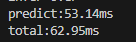
fp32精度
想使用fp32精度推理,om转换是需要加上强制fp32推理选项
atc --model=./pre_model/unet_model.onnx --framework=5 --output=./unet184_fp32 --input_format=NCHW --input_shape="input:1,3,184,184" --soc_version=Ascend310B4 --precision_mode=force_fp32
时间长了一些
香橙派CPU推理
由于om模型只能运行在NPU上,我们这里是用onnx模型在CPU上进行推理(需要提前安装onnxruntime)
python
import onnxruntime as ort
from PIL import Image
import numpy as np
import time


def process_img(scale=0.5):
    img = Image.open('test/1.png')
    img = img.convert('RGB')
    w, h = img.size
    newW, newH = int(scale * w), int(scale * h)
    img = img.resize((newW, newH), resample=Image.BICUBIC)
    img = np.asarray(img,dtype=np.float32)
    img = img.transpose((2, 0, 1))
    if (img > 1).any():
        img = img / 255.0
    img = np.expand_dims(img,axis=0)
    return img

def predict_by_onnx(onnx_path):
    ort_session = ort.InferenceSession(onnx_path)
    input_name = ort_session.get_inputs()[0].name
    output_name = ort_session.get_outputs()[0].name
    input_data =process_img()
    predict_start=time.time()
    outputs = ort_session.run([output_name],{input_name:input_data})
    predict_end=time.time()
    output_array=outputs[0]
    print(output_array.shape)
    prediction = np.argmax(outputs[0][0], axis=0)
    if prediction.max() <= 1:
        prediction = (prediction * 255).astype(np.uint8)
    total_time=time.time()
    print(f'predict:{(predict_end-predict_start)*1000:.2f}ms')
    print(f'total:{(total_time-predict_start)*1000:.2f}ms')
    return prediction

if __name__ == "__main__":
    onnx_path = 'model/unet_model.onnx'
    result = predict_by_onnx(onnx_path)
    result_pic = Image.fromarray(result)
    result_pic.save('test/onnx_ouput.png')
可以看出来NPU加速效果还是很明显的