打造个性化 GitHub 主页(Profile README)是展示个人技术风格、项目亮点的核心方式,以下是从基础搭建到高级定制的完整指南 ,结合你之前用到的技术徽章、排版技巧,手把手实现高颜值、有辨识度的主页:
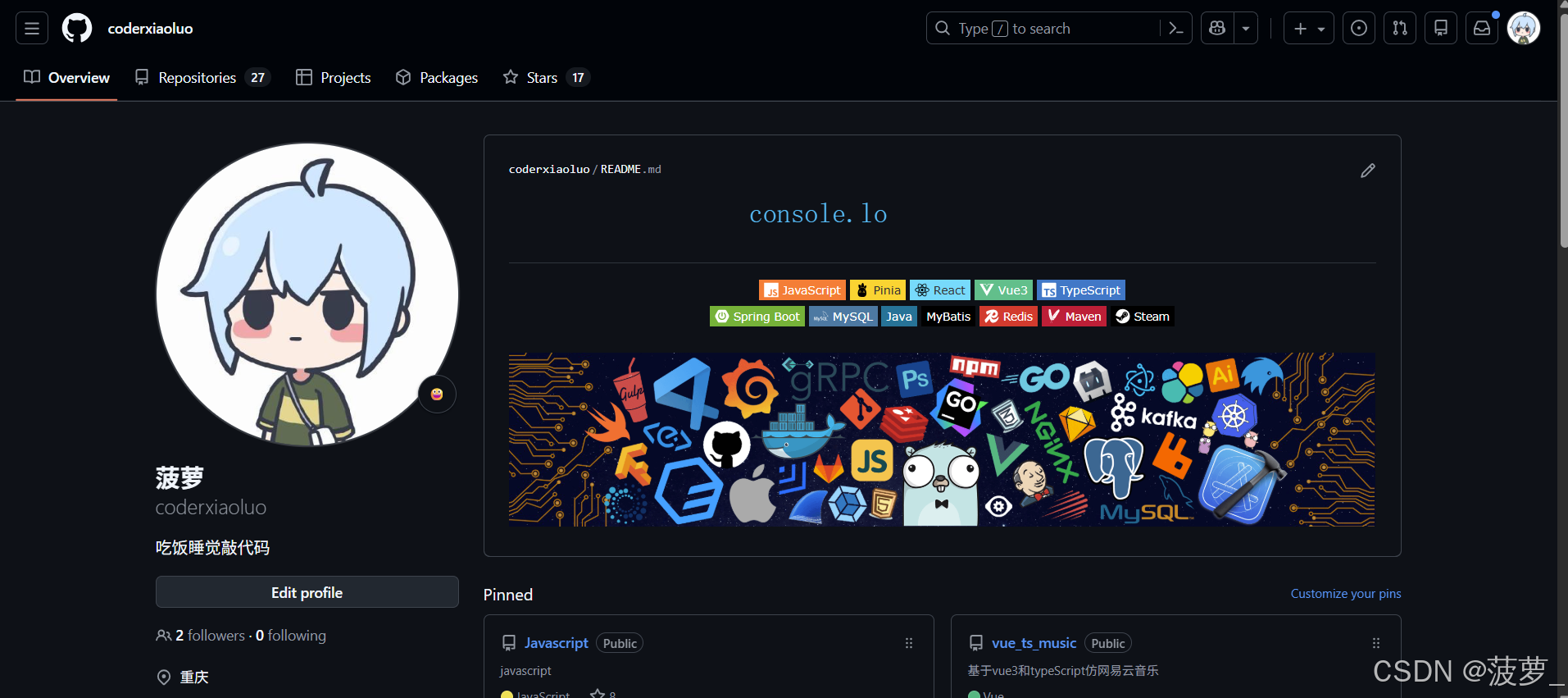
本人主页: https://github.com/coderxiaoluo
一、核心前提:创建专属 Profile README 仓库
GitHub 允许你创建一个和用户名同名 的仓库,其根目录的 README.md 会自动成为你的个人主页,这是定制的基础:
- 新建仓库:仓库名必须和你的 GitHub 用户名完全一致(比如你用户名是
xxx,仓库名就叫xxx); - 勾选「Add a README file」,初始化仓库;
- 克隆到本地(或直接网页编辑),开始定制。
二、基础框架:结构化布局
一个优质的 GitHub 主页需有清晰的结构,推荐模板如下(可直接复制修改):
markdown
# 👋 Hi, I'm [你的名字]
<!-- 个性化签名,比如「全栈开发者 | 热爱前端/后端」 -->
💻 Full Stack Developer | 🚀 Vue/React/SpringBoot 实践者 | 🎮 游戏爱好者

<!-- 技术栈徽章(复用你之前的居中代码) -->
<div align="center" style="letter-spacing: 2px; margin: 20px 0;">
  <!-- 前端 -->
  <img src="https://img.shields.io/badge/-Vue3-4FC08D?style=flat-square&logo=vue.js&logoColor=white" />
  <img src="https://img.shields.io/badge/-React-61DAFB?style=flat-square&logo=react&logoColor=black" />
  <img src="https://img.shields.io/badge/-TypeScript-3178C6?style=flat-square&logo=typescript&logoColor=white" />
  <img src="https://img.shields.io/badge/-JavaScript-orange?style=flat-square&logo=javascript&logoColor=white" />
  <img src="https://img.shields.io/badge/-Pinia-FFD43B?style=flat-square&logo=pinia&logoColor=black" />
  <!-- 后端 -->
  <br/>
  <img src="https://img.shields.io/badge/-Spring%20Boot-6DB33F?style=flat-square&logo=spring-boot&logoColor=white" />
  <img src="https://img.shields.io/badge/-Java-007396?style=flat-square&logo=java&logoColor=white" />
  <img src="https://img.shields.io/badge/-MySQL-4479A1?style=flat-square&logo=mysql&logoColor=white" />
  <img src="https://img.shields.io/badge/-Redis-DC382D?style=flat-square&logo=redis&logoColor=white" />
  <!-- 趣味标签 -->
  <img src="https://img.shields.io/badge/-Steam-000000?style=flat-square&logo=steam&logoColor=white" />
</div>

## 📌 关于我
- 🔭 目前专注于:[你的技术方向,如「Vue3 + SpringBoot 全栈开发」]
- 🌱 学习中:[正在学的技术,如「React 生态、Java Stream 编程」]
- 💬 擅长:[技术领域,如「前端工程化、后端接口设计」]
- 📫 联系我:[邮箱/博客/公众号,如 `xxx@xxx.com` | [个人博客](https://xxx.com)]
- ⚡ 趣味:[个性化标签,如「Steam 游戏爱好者、摄影、徒步」]

## 📊 我的 GitHub 数据
<!-- 自动生成的 GitHub 统计卡片 -->
<div align="center">
  <img src="https://github-readme-stats.vercel.app/api?username=你的用户名&show_icons=true&theme=radical&count_private=true" alt="GitHub 统计" style="width: 48%;"/>
  <img src="https://github-readme-stats.vercel.app/api/top-langs/?username=你的用户名&layout=compact&theme=radical" alt="常用语言" style="width: 48%;"/>
</div>

## 🌟 重点项目
| 项目名称 | 技术栈 | 简介 |
|---------|--------|------|
| [项目1](项目链接) | Vue3 + TS + Pinia | 「xxx 管理系统」:实现了 xxx 功能,适配移动端/PC 端 |
| [项目2](项目链接) | SpringBoot + MySQL + Redis | 「xxx 接口服务」:提供 xxx 接口,支持高并发 |

## 🎨 趣味数据
<!-- GitHub 贡献图 -->
<div align="center">
  <img src="https://github-readme-activity-graph.vercel.app/graph?username=你的用户名&theme=react-dark&hide_border=true" alt="贡献图" style="width: 100%;"/>
</div>
三、核心定制技巧(提升个性化)
1. 视觉增强:动态/静态组件
- GitHub 统计卡片 :替换
你的用户名,自动生成提交统计、常用语言,支持切换主题(theme可选:radical/tokyonight/gruvbox等); - 贡献活动图:展示你的提交记录,视觉更生动;
- 个性化徽章 :复用你之前的技术栈徽章,也可添加「博客」「公众号」「LeetCode」等徽章(推荐 Shields.io 自定义)。
2. 风格统一:配色与排版
- 技术徽章保持
flat-square风格,用<div align="center">统一居中; - 选择统一的主题色(如深色系
radical主题),让统计卡片和徽章视觉协调; - 用
<br/>分隔不同模块,用margin调整间距(如margin: 20px 0),避免内容拥挤。
3. 内容个性化:突出亮点
- 项目展示:用表格列出 2-3 个核心项目,标注技术栈和核心功能,优先放有 Star/实用的项目;
- 个人标签:用 emoji 增强趣味性(如 👨💻/🚀/🎮),避免纯文字枯燥;
- 联系方式:添加邮箱、博客、掘金/CSDN 链接,方便他人联系。
四、高级玩法(可选)
- 添加动态效果 :
- 用 GitHub Readme Streak Stats 展示连续提交天数;
- 用 Metrics 生成更详细的个人数据(如 Star 数、Issue 统计)。
- 自定义 Logo/头像 :
- 在主页顶部添加个人头像:
<img src="你的头像链接" style="width: 100px; border-radius: 50%;" />(圆形头像更美观);
- 在主页顶部添加个人头像:
- 添加代码片段/趣味彩蛋 :
-
插入一行你擅长的语言代码(如 Java/JS),注释说明含义:
java// 我的编程信条:简洁即优雅 public class HelloWorld { public static void main(String[] args) { System.out.println("Code changes the world 🌍"); } }
-
五、避坑指南
- 仓库名必须和用户名一致,否则无法触发 Profile README;
- 图片链接优先用 GitHub 自身的 CDN(如仓库内的图片),避免外部链接失效;
- 统计卡片加载慢:可更换
vercel.app为国内镜像(如ghproxy.com代理); - 移动端适配:避免宽度固定,用百分比(如
width: 100%)适配不同屏幕。