python用openpyxl操作excel的单元格样式操作
python
import logging
import com.pro001.log.pro_log_config as pro_log_config
from openpyxl import Workbook, load_workbook
from openpyxl.styles import  Font, Alignment, Side, PatternFill, Border
import os
import datetime
import random
import pandas as pd


def create_sn2(prefix, output_len=4):
    '''生成含有前缀带日期和尾长度格式的序列号,
    格式:prefix_YYYYMMDD_HHMMSS_0{output_len}d'''
    if output_len < 1:
        output_len = 1
    if not prefix:
        prefix = ''
    sn = 0
    while True:
        sn += 1
        if len(str(sn)) > output_len:
            sn = 0
        dt = datetime.datetime.now().strftime('%Y%m%d_%H%M%S')
        tmp = f'{prefix}{dt}'
        tmp = tmp + '{:0{}}'.format(sn, output_len)
        yield tmp


def create_sn(prefix, output_len=4):
    '''生成含有前缀并至少带指定长度格式的序列号,
    格式:prefix_d0{output_len}1'''
    if output_len < 1:
        output_len = 1
    sn = 0
    while True:
        sn += 1
        if len(str(sn)) > output_len:
            # 当大于指定位数时直接加上位数
            yield f'{prefix}' + str(sn)
        else:
            yield f'{prefix}' + '{:0{}}'.format(sn, output_len)


def sheet_cell_style_operate(base_file_path):
    """ 工作表单元格样式操作 """
    if not base_file_path:
        os.path.makedirs(base_file_path)
        logger.error(f'已创建文件路径:{base_file_path}')

    try:
        # 创建 Workbook 对象并指定第一个sheet为活动sheet
        wb = Workbook()
        ws = wb.worksheets[0]
        wb.active = ws
        sh_name = create_sn3('',4)
        # 指定sheet名称
        ws.title = next(sh_name)

        # 创建表头样式
        header_style_font = Font(name='Arial', size=10, bold=True, color='060606')
        body_style_font = Font(name='Arial', size=9, bold=False, color='006600')
        cell_alignment = Alignment(horizontal='center', vertical='center')

        # 添加列名,即表头
        header_list = ['报案号','姓名', '年龄', '邮箱','报案时间',
                       '受理时间','受理状态','受理人','是否结案','结案时间']
        # 序号从1开始,枚举 header_list列表,建立表头
        for i, header in enumerate(header_list, start=1):
            ws.cell(row=1, column=i, value=header)

        # 获取表头的各个单元格对象
        head_cell = ws[1]
        # 设置表头样式
        for head_cell in head_cell:
            head_cell.font = header_style_font
            head_cell.alignment = cell_alignment

        # 设置表头的行高
        ws.row_dimensions[1].height = 18
        # 动态设置各列的宽度
        max_cell_num = ws.max_column
        for i in range(1, max_cell_num+1):
            # 动态获取每列的坐标字母
            col_letter = ws.cell(row=1, column=i).column_letter
            # 根据列的字母坐标设定每列的宽度
            ws.column_dimensions[col_letter].width = 16

        # 添加表体数据
        claim_no = create_sn2('CN', 5)
        claim_status = ['未受理','已受理']
        case_status = ['理赔中', '已结案','已撤案']
        '''['报案号','姓名','年龄','邮箱','报案时间','受理时间','受理状态','受理人','是否结案','结案时间']'''
        for i in range(1, 31):
            new_max_num = ws.max_row + 1
            ws.cell(row=new_max_num, column=1, value=next(claim_no))
            ws.cell(row=new_max_num, column=2, value=f'姓名{random.randint(10, 200)}')
            ws.cell(row=new_max_num, column=3, value=random.randint(18, 100))
            ws.cell(row=new_max_num, column=4, value=f'email{random.randint(100, 300)}@xxx.com')
            dt = datetime.datetime.now()
            dt = dt - datetime.timedelta(days=random.randint(3, 180))
            dt_str = dt.strftime('%Y-%m-%d %H:%M:%S')
            ws.cell(row=new_max_num, column=5, value=f'{dt_str}')
            dt = dt + datetime.timedelta(days=random.randint(2, 7))
            dt_str = dt.strftime('%Y-%m-%d %H:%M:%S')
            ws.cell(row=new_max_num, column=6, value=f'{dt_str}')
            ws.cell(row=new_max_num, column=7, value=f'{random.sample(claim_status, 1)[0]}')
            ws.cell(row=new_max_num, column=8, value=f'受理人{random.randint(10, 40)}')
            ws.cell(row=new_max_num, column=9, value=f'{random.sample(case_status, 1)[0]}')
            dt = dt + datetime.timedelta(days=random.randint(7, 30))
            dt_str = dt.strftime('%Y-%m-%d %H:%M:%S')
            ws.cell(row=new_max_num, column=10, value=f'{dt_str}')

        # 遍历表体(表头除外)所有单元格并应用样式
        max_cell_num = ws.max_column
        max_row_num = ws.max_row
        next5 = 1
        next5_row_fill = PatternFill(start_color='09E1F2', end_color='09E1F2', fill_type='solid')
        calim_done_fill = PatternFill(start_color='278b06', end_color='278b06', fill_type='solid')
        calim_done_font = Font(name='Arial', size=8, bold=True, color='faea37')
        calim_ing_fill = PatternFill(start_color='FDE9D9', end_color='FDE9D9', fill_type='solid')
        calim_ing_side = Side(border_style='medium', color='e46c0a') # 定义颜色边框
        claim_ing_border = Border(top=calim_ing_side, right=calim_ing_side,
                                  bottom=calim_ing_side, left=calim_ing_side)
        blue_side = Side(border_style='medium', color='e46c0a')  # 定义蓝色边框
        top_border = Border(top=blue_side)
        for row in ws.iter_rows(min_row=2, max_row=max_row_num, min_col=1, max_col=max_cell_num):
            next5 = next5 + 1
            if next5 % 5 == 0:
                ws.row_dimensions[next5].height = 18
            for cell in row:
                cell.alignment = cell_alignment
                # 每隔5行设置单元格样式浅蓝色上边框深蓝色
                if next5 % 5 == 0:
                    cell.fill = next5_row_fill
                    cell.border = top_border
                val = cell.value
                # 特定单元格应用不一样的样式
                if val == '未受理':
                    cell.fill = calim_ing_fill
                    cell.border = claim_ing_border
                if val == '已结案':
                    cell.font = calim_done_font
                    cell.fill = calim_done_fill
                else:
                    cell.font = body_style_font

        # 保存wb对象
        suffix = '.xlsx'
        file_path_name = ''
        if not base_file_path.lower().endswith(suffix):
            file_path_name = 'ELX' + datetime.datetime.now().strftime('%Y%m%d_%H%M%S') + suffix
            file_path_name = os.path.join(base_file_path, file_path_name)
        else:
            file_path_name = base_file_path
        logger.info(f'参加文件:{file_path_name}')
        wb.save(file_path_name)
    except Exception as e:
        logger.error(f'文件{base_file_path}操作失败,info:\n{e}')
        return None


def main():
    """主函数"""
    sheet_cell_style_operate(r'F:\appData')


if __name__ == '__main__':
    print('-' * 60)
    main()
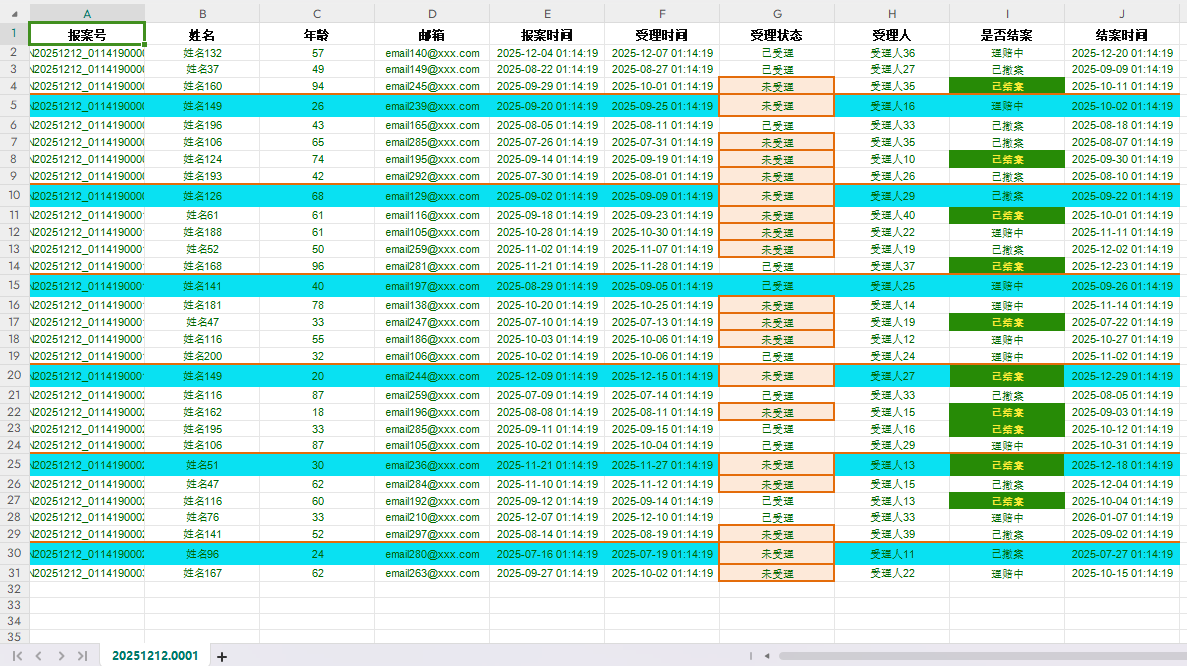
运行后效果如下: