1. scoped作用及原理
1)scoped作用
- 如果不加scoped,写在组件中的样式会默认全局生效,容易造成多个组件间样式冲突的问题。
- 全局样式:默认组件中的样式会作用到全局,任何一个组件中都会受到此样式的影响。
- 局部样式:给组件加上scoped属性,可以让样式只作用于当前组件的标签。
如果不加scoped:
MyLeft.vue
html
<script lang="ts" setup></script>

<template>
  <div
    class="my-left"
    style="
      flex: 1;
      align-items: center;
      height: 100px;
      background: paleturquoise;
      text-align: center;
    "
  >
    <h3>每天起床第⼀句</h3>
  </div>
</template>

<style>
h3 {
  color: red;
}
</style>
MyRight.vue
html
<script lang="ts" setup></script>

<template>
  <div
    class="my-right"
    style="flex: 1; align-items: center; height: 100px; background: plum; text-align: center"
  >
    <h3>先给⾃⼰打个⽓</h3>
  </div>
</template>

<style></style>
App.vue
html
<script setup lang="ts">
import MyLeft from './components/MyLeft.vue'
import MyRight from './components/MyRight.vue'
</script>

<template>
  <div class="container">
    <MyLeft />
    <MyRight />
  </div>
</template>

<style scoped>
.container {
  width: 550px;
  height: 400px;
  background-color: lightblue;
}
</style>
页面效果:
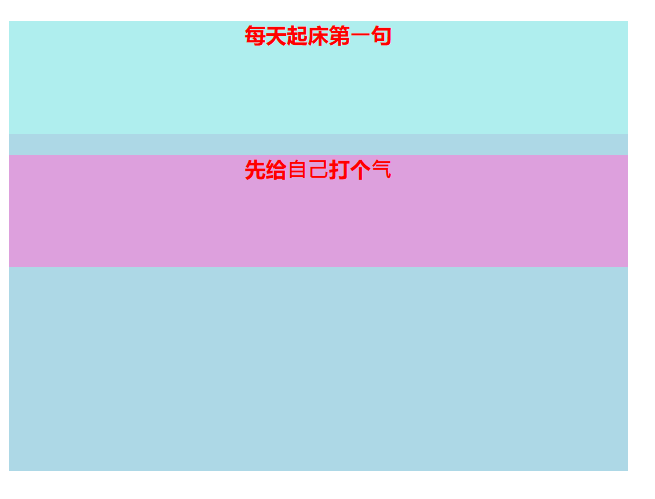
可以看到MyRight组件中的h3的样式受到了MyLeft中h3样式的影响。
可以给组件的style添加scoped属性,以解决样式污染/冲突问题。
2)scoped原理
- data-v-hash:在编译.vue单文件组件时,构建工具会自动为组件计算一个唯一的hash值。
- 此哈希值会被添加到组件所有 DOM 元素的 data-v-xxxxxx属性中
- 重写<style scoped>中的CSS选择器,附加data-v-xxxxxx属性,可以指定当前样式仅作用于当前组件当前选中的元素下
2. 父子组件通信
1)组件通信:
**概念:**vue组件之间数据传递和交互的方式。
**为什么要组件通信:**由于vue采用组件化开发,每个组件都是一个独立实例,拥有自己的数据和方法。当需要不同组件之间传递数据或触发行为时,就需要通过特定的通信机制实现。
组件间的关系:
① 父子关系:谁被使用,谁就是子组件。使用别人的组件就是父组件。
② 非父子关系
通信方案:
① 父子关系:props, emit
② 非父子关系:provide & inject, eventbus
③ 通用解决方案:Pinia(适合复杂业务场景)
2)父传子
什么时候需要父传子? => 当子组件的数据不确定时
步骤:
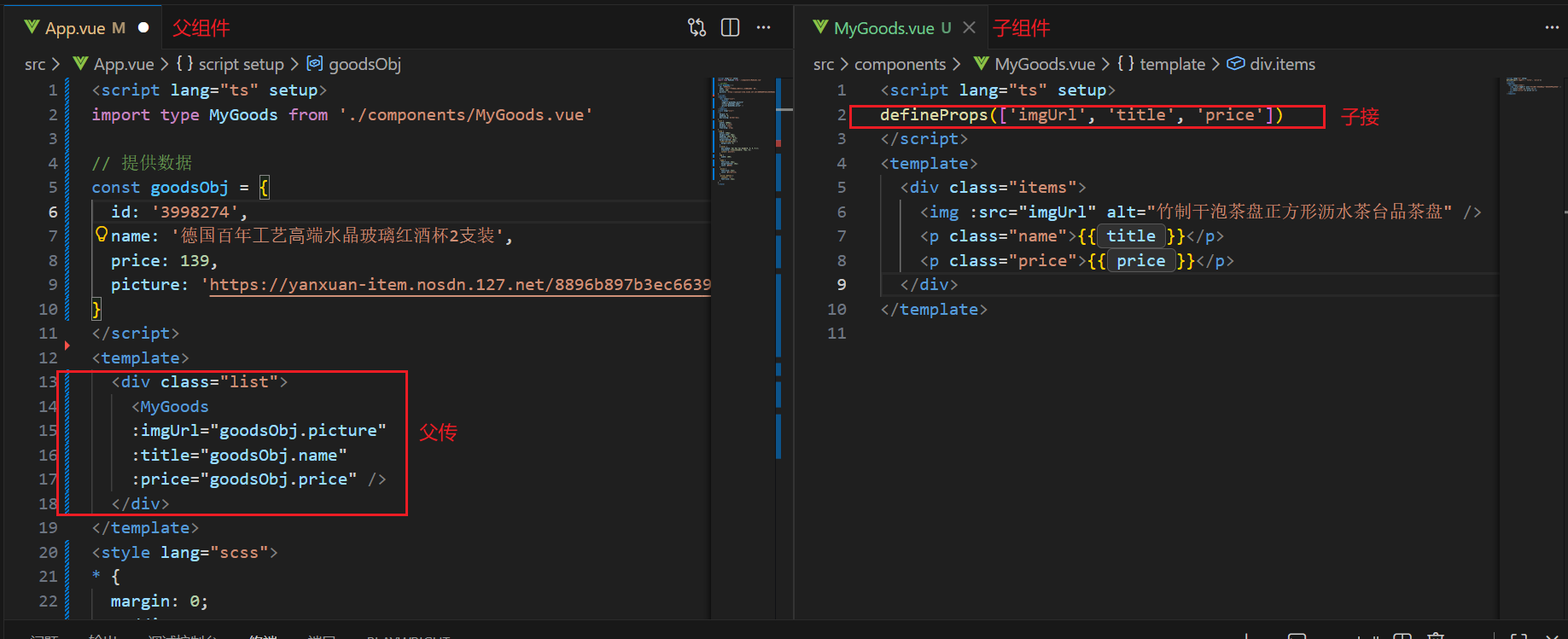
① 子接:子组件通过defineProps接收数据。
defineProps() 支持数组和对象两种写法
- 数组写法
javascript
defineProps(['title', 'count', 'isActive'])- 对象写法 (可指定类型、默认值、添加验证规则)
javascript
    required: true,
    default: '默认标题'
  },

  // 数字类型
  count: {
    type: Number,
    default: 0,
    validator: (value) => value >= 0  // 自定义验证
  },

  // 布尔类型
  isActive: {
    type: Boolean,
    default: false
  },

  // 数组类型
  items: {
    type: Array,
    default: () => []  // 注意:数组/对象默认值要用工厂函数
  },

  // 对象类型
  config: {
    type: Object,
    default: () => ({})  // 对象也要用工厂函数
  },

  // 多类型支持
  value: {
    type: [String, Number],
    default: ''
  },

  // 函数类型
  onClick: {
    type: Function,
    default: () => {}
  }
});
② 父传:父组件通过自定义属性传递数据
传递的数据写在子组件的标签里
下面是一个父传子的完整示例(子接、父传):
下面是一个配合循环独立传值示例:
App.vue文件:
html
<script lang="ts" setup>
import MyGoods from './components/MyGoods.vue'

// 提供数据
const goodsList = [
  {
    id: '4001172',
    name: '称⼼如意⼿摇咖啡磨⾖机咖啡⾖研磨机',
    price: 289,
    picture: 'https://yanxuan-item.nosdn.127.net/84a59ff9c58a77032564e61f716846d6.jpg',
  },
  {
    id: '4001594',
    name: '⽇式⿊陶功夫茶组双侧把茶具礼盒装',
    price: 288,
    picture: 'https://yanxuan-item.nosdn.127.net/3346b7b92f9563c7a7e24c7ead883f18.jpg',
  },
  {
    id: '4001009',
    name: '⽵制⼲泡茶盘正⽅形沥⽔茶台品茶盘',
    price: 109,
    picture: 'https://yanxuan-item.nosdn.127.net/2d942d6bc94f1e230763e1a5a3b379e1.png',
  },
  {
    id: '4001874',
    name: '古法温酒汝瓷酒具套装⽩酒杯莲花温酒器',
    price: 488,
    picture: 'https://yanxuan-item.nosdn.127.net/44e51622800e4fceb6bee8e616da85fd.png',
  },
  {
    id: '4001649',
    name: '⼤师监制⻰泉⻘瓷茶叶罐',
    price: 139,
    picture: 'https://yanxuan-item.nosdn.127.net/4356c9fc150753775fe56b465314f1eb.png',
  },
  {
    id: '3997185',
    name: '与众不同的⼝感汝瓷⽩酒杯套组1壶4杯',
    price: 108,
    picture: 'https://yanxuan-item.nosdn.127.net/8e21c794dfd3a4e8573273ddae50bce2.jpg',
  },
  {
    id: '3997403',
    name: '⼿⼯吹制更厚实⽩酒杯壶套装6壶6杯',
    price: 100,
    picture: 'https://yanxuan-item.nosdn.127.net/af2371a65f60bce152a61fc22745ff3f.jpg',
  },
  {
    id: '3998274',
    name: '德国百年⼯艺⾼端⽔晶玻璃红酒杯2⽀装',
    price: 139,
    picture: 'https://yanxuan-item.nosdn.127.net/8896b897b3ec6639bbd1134d66b9715c.jpg',
  },
]
</script>
<template>
  <div class="list">
    <MyGoods
      v-for="good in goodsList"
      :key="good.id"
      :imgUrl="good.picture"
      :title="good.name"
      :price="good.price"
    />
  </div>
</template>
<style lang="scss">
* {
  margin: 0;
  padding: 0;
  box-sizing: border-box;
}
.list {
  width: 1000px;
  margin: 0 auto;
  display: flex;
  flex-wrap: wrap;
}

</style>
MyGoods组件:
html
<script lang="ts" setup>
defineProps(['imgUrl', 'title', 'price'])
</script>
<template>
  <div class="item">
    <img :src="imgUrl" :alt="title" />
    <p class="name">{{ title }}</p>
    <p class="price">{{ price }}</p>
  </div>
</template>
<style>
.item {
  width: 240px;
  margin-left: 10px;
  padding: 20px 30px;
  transition: all 0.5s;
  margin-bottom: 20px;
  .item:nth-child(4n) {
    margin-left: 0;
  }
}
&:hover {
  box-shadow: 0px 0px 5px rgba(0, 0, 0, 0.2);
  transform: translate3d(0, -4px, 0);
  cursor: pointer;
}
img {
  width: 25%;
}
.name {
  font-size: 18px;
  margin-bottom: 10px;
  color: #666;
}
.price {
  font-size: 22px;
  color: firebrick;
  display: flex;
  height: 36px;
  align-items: center;
}
.price::before {
  content: '¥';
  font-size: 22px;
}
</style>
3)子传父
经过父传子的学习和观察,我们发现子组件不能修改父组件传递的数据,因为props是只读的。
所以我们构思出初步的解决方案:
① 父组件提供修改数据的方法/函数
② 子组件在合适时机,通知父组件,让父组件调用其修改数据的方法/函数
具体步骤:
① 父组件内,在 子组件上 绑定自定义事件
@自定义事件="父修改数据的函数"
② 子组件在合适实际,触发父组件的自定义事件
emit('自定义事件',携带的参数...)
下面是一个子传父的示例:
App.vue文件:
html
<script lang="ts" setup>
import { ref } from 'vue'
import MyGoods from './components/MyGoods.vue'
const cutPrice = (i: number, price: number) => {
  goodsList.value[i].price -= price
}

// 提供数据
const goodsList = ref([
  {
    id: '4001172',
    name: '称⼼如意⼿摇咖啡磨⾖机咖啡⾖研磨机',
    price: 289,
    picture: 'https://yanxuan-item.nosdn.127.net/84a59ff9c58a77032564e61f716846d6.jpg',
  },
  {
    id: '4001594',
    name: '⽇式⿊陶功夫茶组双侧把茶具礼盒装',
    price: 288,
    picture: 'https://yanxuan-item.nosdn.127.net/3346b7b92f9563c7a7e24c7ead883f18.jpg',
  },
  {
    id: '4001009',
    name: '⽵制⼲泡茶盘正⽅形沥⽔茶台品茶盘',
    price: 109,
    picture: 'https://yanxuan-item.nosdn.127.net/2d942d6bc94f1e230763e1a5a3b379e1.png',
  },
  {
    id: '4001874',
    name: '古法温酒汝瓷酒具套装⽩酒杯莲花温酒器',
    price: 488,
    picture: 'https://yanxuan-item.nosdn.127.net/44e51622800e4fceb6bee8e616da85fd.png',
  },
  {
    id: '4001649',
    name: '⼤师监制⻰泉⻘瓷茶叶罐',
    price: 139,
    picture: 'https://yanxuan-item.nosdn.127.net/4356c9fc150753775fe56b465314f1eb.png',
  },
  {
    id: '3997185',
    name: '与众不同的⼝感汝瓷⽩酒杯套组1壶4杯',
    price: 108,
    picture: 'https://yanxuan-item.nosdn.127.net/8e21c794dfd3a4e8573273ddae50bce2.jpg',
  },
  {
    id: '3997403',
    name: '⼿⼯吹制更厚实⽩酒杯壶套装6壶6杯',
    price: 100,
    picture: 'https://yanxuan-item.nosdn.127.net/af2371a65f60bce152a61fc22745ff3f.jpg',
  },
  {
    id: '3998274',
    name: '德国百年⼯艺⾼端⽔晶玻璃红酒杯2⽀装',
    price: 139,
    picture: 'https://yanxuan-item.nosdn.127.net/8896b897b3ec6639bbd1134d66b9715c.jpg',
  },
])
</script>
<template>
  <div class="list">
    <MyGoods
      v-for="(item, index) in goodsList"
      :key="item.id"
      :imgUrl="item.picture"
      :title="item.name"
      :price="item.price"
      :idx="index"
      @ccc="cutPrice"
    />
    <!-- 自定义事件命名为ccc -->
  </div>
</template>
<style lang="scss">
* {
  margin: 0;
  padding: 0;
  box-sizing: border-box;
}
.list {
  width: 1000px;
  margin: 0 auto;
  display: flex;
  flex-wrap: wrap;
}
</style>
MyGoods组件:
html
<script lang="ts" setup>
import { ref } from 'vue'
const props = defineProps(['imgUrl', 'title', 'price', 'idx'])
const emit = defineEmits(['ccc']) //拿到触发自定义事件的函数emit

const x = ref(3) //每次减少的价格
const onCut = () => {
  emit('ccc', props.idx, x.value)
}
</script>
<template>
  <div class="item">
    <img :src="imgUrl" :alt="title" />
    <p class="name">{{ title }}</p>
    <p class="price">{{ price }}</p>
    <button @click="onCut">砍一刀</button>
  </div>
</template>
<style>
.item {
  width: 240px;
  margin-left: 10px;
  padding: 20px 30px;
  transition: all 0.5s;
  margin-bottom: 20px;
  .item:nth-child(4n) {
    margin-left: 0;
  }
}
&:hover {
  box-shadow: 0px 0px 5px rgba(0, 0, 0, 0.2);
  transform: translate3d(0, -4px, 0);
  cursor: pointer;
}
img {
  width: 25%;
}
.name {
  font-size: 18px;
  margin-bottom: 10px;
  color: #666;
}
.price {
  font-size: 22px;
  color: firebrick;
  display: flex;
  height: 36px;
  align-items: center;
}
.price::before {
  content: '¥';
  font-size: 22px;
}
</style>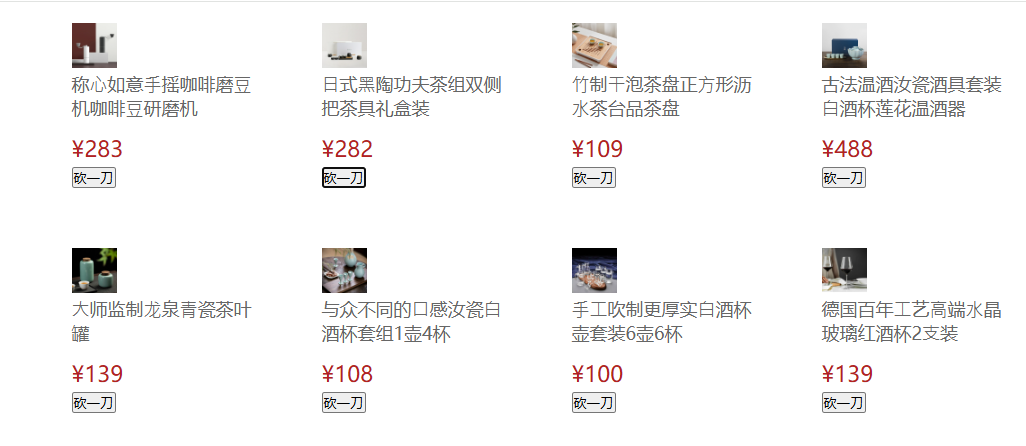
虽然子组件无法直接更改父组件的数据,但是通过在父组件中自定义砍价函数,并在子组件中通过emit触发父组件中的砍价函数,可以在子组件点击砍一刀的按钮时,父组件自行调用自己的砍价函数进行砍一刀操作。
**注意:**需要在defineEmit中写好需要触发的函数