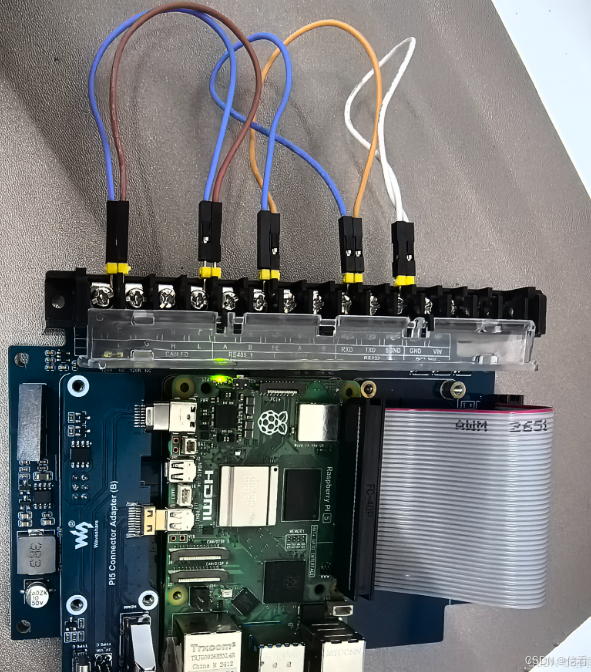
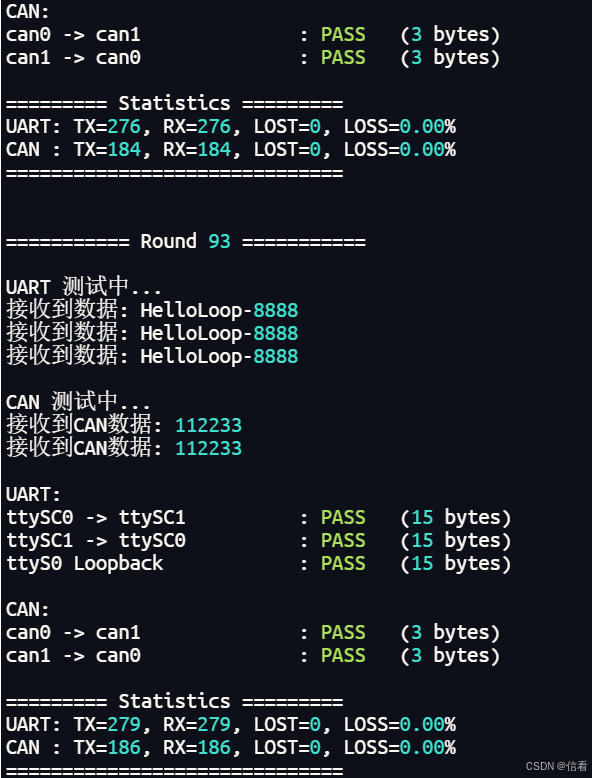
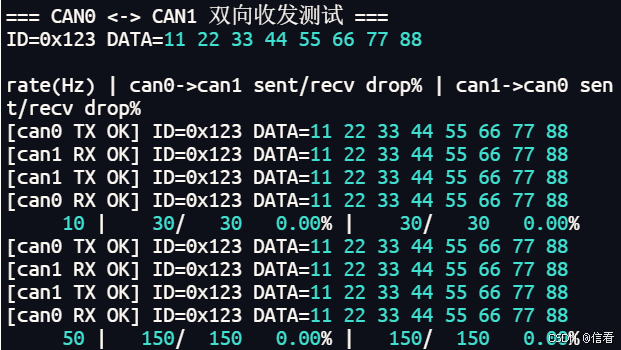
#!/usr/bin/env python3
# -*- coding: utf-8 -*-
"""
Enhanced UART + CAN loopback test (Python3)
- 彩色输出
- 每次发送 HelloLoop-8888(固定数字)
- 丢包率/数据长度统计
- 包含 ttySC0, ttySC1, ttyS0 和 can0, can1 测试
- 增加延时提高稳定性
- 自动配置CAN接口
"""

import os
import time
import serial
import can
import subprocess
import sys

# ANSI color
GREEN = "\033[92m"
RED   = "\033[91m"
YELLOW = "\033[93m"
BLUE = "\033[94m"
CYAN = "\033[96m"
RESET = "\033[0m"

BUF_SIZE = 256

# Statistics
uart_tx = uart_rx = 0
can_tx  = can_rx  = 0


def setup_can_interfaces():
    """设置和配置CAN接口"""
    print(f"{BLUE}开始配置CAN接口...{RESET}")

    # 执行您提供的CAN配置命令
    commands = [
        "sudo ifconfig can0 down",
        "sudo ifconfig can1 down",
        "sudo ip link set can0 up type can bitrate 1000000",
        "sudo ip link set can1 up type can bitrate 1000000",
        "sudo ifconfig can0 txqueuelen 65536",
        "sudo ifconfig can1 txqueuelen 65536"
    ]

    for cmd in commands:
        print(f"{CYAN}执行: {cmd}{RESET}")
        try:
            result = subprocess.run(
                cmd,
                shell=True,
                capture_output=True,
                text=True,
                timeout=5
            )
            if result.returncode != 0:
                print(f"{RED}执行失败: {result.stderr.strip()}{RESET}")
            else:
                print(f"{GREEN}成功{RESET}")
        except Exception as e:
            print(f"{RED}执行命令时出错: {e}{RESET}")

    # 验证配置结果
    print(f"\n{CYAN}验证CAN接口配置...{RESET}")
    try:
        # 检查can0状态
        result = subprocess.run(
            "ip link show can0",
            shell=True,
            capture_output=True,
            text=True
        )
        if "UP" in result.stdout:
            print(f"{GREEN}can0: 已启用{RESET}")
        else:
            print(f"{RED}can0: 未启用{RESET}")

        # 检查can1状态
        result = subprocess.run(
            "ip link show can1",
            shell=True,
            capture_output=True,
            text=True
        )
        if "UP" in result.stdout:
            print(f"{GREEN}can1: 已启用{RESET}")
        else:
            print(f"{RED}can1: 未启用{RESET}")

    except Exception as e:
        print(f"{RED}验证失败: {e}{RESET}")

    print(f"{GREEN}CAN接口配置完成!{RESET}\n")


def exists(path: str) -> bool:
    return os.path.exists(path)


def make_msg():
    """生成固定内容的消息"""
    return f"HelloLoop-8888\n".encode()


def test_serial_once(tx_dev: str, rx_dev: str, baud=9600):
    global uart_tx, uart_rx

    if not exists(tx_dev) or not exists(rx_dev):
        return -1, 0  # 设备不存在

    try:
        ser_tx = serial.Serial(tx_dev, baudrate=baud, timeout=0)
        time.sleep(0.1)  # 增加打开后的延时
        ser_rx = serial.Serial(rx_dev, baudrate=baud, timeout=0.1)
        time.sleep(0.1)  # 增加打开后的延时
    except Exception as e:
        print(f"打开串口失败: {e}")
        return 0, 0  # FAIL

    # 清空缓冲区
    ser_tx.reset_output_buffer()
    ser_tx.reset_input_buffer()
    ser_rx.reset_input_buffer()
    time.sleep(0.01)  # 清空缓冲区后的延时

    # 发送数据
    msg = make_msg()
    uart_tx += 1

    try:
        ser_tx.write(msg)
        ser_tx.flush()
        time.sleep(0.1)  # 增加发送后的延时,确保数据完全传输
    except Exception as e:
        print(f"发送数据失败: {e}")
        ser_tx.close()
        ser_rx.close()
        return 0, 0

    # 接收数据
    data = b''
    try:
        data = ser_rx.read(BUF_SIZE)
    except Exception as e:
        print(f"接收数据失败: {e}")

    ser_tx.close()
    ser_rx.close()

    if data:
        print(f"接收到数据: {data.decode('utf-8', errors='ignore').strip()}")
        uart_rx += 1
        return 1, len(data)
    else:
        print(f"未接收到数据 (发送了 {len(msg)} 字节)")
        return 0, 0


def open_can(ifname):
    """打开CAN接口"""
    try:
        return can.interface.Bus(channel=ifname, interface="socketcan")
    except Exception as e:
        print(f"打开CAN接口 {ifname} 失败: {e}")
        raise


def test_can_once(tx_iface: str, rx_iface: str):
    global can_tx, can_rx

    try:
        tx = open_can(tx_iface)
        time.sleep(0.1)  # CAN接口打开后的延时
        rx = open_can(rx_iface)
        time.sleep(0.1)  # CAN接口打开后的延时
    except:
        return -1, 0  # 接口不存在或 down

    # 固定CAN消息数据
    msg = can.Message(
        arbitration_id=0x123,
        data=[0x11, 0x22, 0x33],  # 固定3字节数据
        is_extended_id=False
    )

    try:
        tx.send(msg)
        can_tx += 1
        time.sleep(0.05)  # 发送后的延时
    except Exception as e:
        print(f"发送CAN消息失败: {e}")
        try:
            tx.shutdown()
            rx.shutdown()
        except:
            pass
        return 0, 0

    recv = None
    try:
        recv = rx.recv(0.3)  # 增加接收超时时间
    except Exception as e:
        print(f"接收CAN消息失败: {e}")

    try:
        tx.shutdown()
        rx.shutdown()
    except:
        pass

    if recv:
        can_rx += 1
        print(f"接收到CAN数据: {recv.data.hex()}")
        return 1, len(recv.data)
    else:
        print("未接收到CAN数据")
        return 0, 0


def color_print(label, result, size):
    if result == 1:
        print(f"{label:<25} : {GREEN}PASS{RESET}   ({size} bytes)")
    elif result == 0:
        print(f"{label:<25} : {RED}FAIL{RESET}")
    else:
        print(f"{label:<25} : {YELLOW}N/A{RESET}")


def print_stats():
    # UART stats
    uart_loss = uart_tx - uart_rx
    uart_loss_rate = (uart_loss / uart_tx * 100) if uart_tx else 0

    # CAN stats
    can_loss = can_tx - can_rx
    can_loss_rate = (can_loss / can_tx * 100) if can_tx else 0

    print("\n========= Statistics =========")
    print(f"UART: TX={uart_tx}, RX={uart_rx}, LOST={uart_loss}, LOSS={uart_loss_rate:.2f}%")
    print(f"CAN : TX={can_tx}, RX={can_rx}, LOST={can_loss}, LOSS={can_loss_rate:.2f}%")
    print("==============================\n")


def main():
    # 程序启动时直接配置CAN接口
    setup_can_interfaces()

    round_id = 1

    while True:
        print(f"\n=========== Round {round_id} ===========")
        round_id += 1

        # UART tests - 三个方向的测试
        print("\nUART 测试中...")
        s1, z1 = test_serial_once("/dev/ttySC0", "/dev/ttySC1")
        time.sleep(0.1)  # 测试之间的延时

        s2, z2 = test_serial_once("/dev/ttySC1", "/dev/ttySC0")
        time.sleep(0.1)  # 测试之间的延时

        s3, z3 = test_serial_once("/dev/ttyS0", "/dev/ttyS0")
        time.sleep(0.1)  # ttyS0自环测试后的延时

        # CAN tests - 两个方向的测试
        print("\nCAN 测试中...")
        c1, c1_size = test_can_once("can0", "can1")
        time.sleep(0.1)  # 测试之间的延时

        c2, c2_size = test_can_once("can1", "can0")
        time.sleep(0.1)  # CAN测试后的延时

        print("\nUART:")
        color_print("ttySC0 -> ttySC1", s1, z1)
        color_print("ttySC1 -> ttySC0", s2, z2)
        color_print("ttyS0 Loopback", s3, z3)

        print("\nCAN:")
        color_print("can0 -> can1", c1, c1_size)
        color_print("can1 -> can0", c2, c2_size)

        print_stats()
        time.sleep(1)  # 增加每轮测试之间的延时


if __name__ == "__main__":
    main()
#!/usr/bin/env python3
# -*- coding: utf-8 -*-

import os
import time
import socket
import struct
import select
import threading
import subprocess
import argparse

# ===== CAN 常量 =====
SOL_CAN_RAW = getattr(socket, "SOL_CAN_RAW", 101)
CAN_RAW_FILTER = getattr(socket, "CAN_RAW_FILTER", 1)
CAN_RAW_LOOPBACK = getattr(socket, "CAN_RAW_LOOPBACK", 3)
CAN_RAW_RECV_OWN_MSGS = getattr(socket, "CAN_RAW_RECV_OWN_MSGS", 4)

CAN_ECHO_FLAG = 0x20000000
STD_MASK = 0x7FF

CAN_ID = 0x123
PAYLOAD = bytes([0x11, 0x22, 0x33, 0x44, 0x55, 0x66, 0x77, 0x88])

CAN_FRAME_FMT = "=IB3x8s"  # can_id, dlc, pad, data


# ===== 工具函数 =====
def run(cmd):
    subprocess.run(cmd, shell=True, stdout=subprocess.DEVNULL, stderr=subprocess.DEVNULL)


def setup_can():
    run("sudo ifconfig can0 down")
    run("sudo ifconfig can1 down")
    run("sudo ip link set can0 up type can bitrate 1000000")
    run("sudo ip link set can1 up type can bitrate 1000000 dbitrate 1000000 restart-ms 1000 berr-reporting on fd on")
    run("sudo ifconfig can0 txqueuelen 65536")
    run("sudo ifconfig can1 txqueuelen 65536")


def open_can(iface, is_tx):
    s = socket.socket(socket.AF_CAN, socket.SOCK_RAW, socket.CAN_RAW)
    s.bind((iface,))

    flt = struct.pack("=II", CAN_ID, STD_MASK)
    s.setsockopt(SOL_CAN_RAW, CAN_RAW_FILTER, flt)

    if is_tx:
        s.setsockopt(SOL_CAN_RAW, CAN_RAW_LOOPBACK, 0)
    else:
        s.setsockopt(SOL_CAN_RAW, CAN_RAW_RECV_OWN_MSGS, 0)

    return s


def pack_frame():
    return struct.pack(CAN_FRAME_FMT, CAN_ID, 8, PAYLOAD)


def fmt_frame():
    return "ID=0x123 DATA=11 22 33 44 55 66 77 88"


# ===== 发送线程 =====
def send_loop(sock, rate, end_t, stat, key, tag):
    interval = 1.0 / rate
    next_t = time.perf_counter()
    frame = pack_frame()
    printed = False

    while time.perf_counter() < end_t:
        now = time.perf_counter()
        if now < next_t:
            time.sleep(min(0.0005, next_t - now))
            continue

        try:
            sock.send(frame)
            stat[key] += 1
            if not printed:
                print(f"[{tag} TX OK] {fmt_frame()}")
                printed = True
        except OSError:
            pass

        next_t += interval


# ===== 接收线程 =====
def recv_loop(sock, end_t, stat, key, tag):
    printed = False

    while time.perf_counter() < end_t:
        r, _, _ = select.select([sock], [], [], 0.05)
        if not r:
            continue

        frame = sock.recv(16)
        can_id, dlc, data = struct.unpack(CAN_FRAME_FMT, frame)

        if can_id & CAN_ECHO_FLAG:
            continue

        if (can_id & STD_MASK) == CAN_ID and data[:8] == PAYLOAD:
            stat[key] += 1
            if not printed:
                print(f"[{tag} RX OK] {fmt_frame()}")
                printed = True


# ===== 主程序 =====
def main():
    parser = argparse.ArgumentParser()
    parser.add_argument("--no-setup", action="store_true", help="跳过 can 配置")
    parser.add_argument("--duration", type=float, default=3.0, help="每档测试秒数")
    parser.add_argument("--rates", default="10,50,100,200,500,1000,2000,3000,4000,5000")
    args = parser.parse_args()

    if not args.no_setup:
        setup_can()

    tx0 = open_can("can0", True)
    tx1 = open_can("can1", True)
    rx0 = open_can("can0", False)
    rx1 = open_can("can1", False)

    rates = [int(x) for x in args.rates.split(",")]

    print("\n=== CAN0 <-> CAN1 双向收发测试 ===")
    print("ID=0x123 DATA=11 22 33 44 55 66 77 88\n")
    print("rate(Hz) | can0->can1 sent/recv drop% | can1->can0 sent/recv drop%")

    for rate in rates:
        stat = {
            "s0": 0, "r1": 0,
            "s1": 0, "r0": 0
        }

        start = time.perf_counter()
        send_end = start + args.duration
        recv_end = send_end + 0.5

        ts0 = threading.Thread(target=send_loop, args=(tx0, rate, send_end, stat, "s0", "can0"))
        ts1 = threading.Thread(target=send_loop, args=(tx1, rate, send_end, stat, "s1", "can1"))
        tr0 = threading.Thread(target=recv_loop, args=(rx0, recv_end, stat, "r0", "can0"))
        tr1 = threading.Thread(target=recv_loop, args=(rx1, recv_end, stat, "r1", "can1"))

        tr0.start(); tr1.start()
        ts0.start(); ts1.start()

        ts0.join(); ts1.join()
        tr0.join(); tr1.join()

        d01 = 0 if stat["s0"] == 0 else (stat["s0"] - stat["r1"]) / stat["s0"] * 100
        d10 = 0 if stat["s1"] == 0 else (stat["s1"] - stat["r0"]) / stat["s1"] * 100

        print(f"{rate:7d} | {stat['s0']:5d}/{stat['r1']:5d} {d01:6.2f}%"
              f" | {stat['s1']:5d}/{stat['r0']:5d} {d10:6.2f}%")

        if d01 > 1 or d10 > 1:
            print(">> 已明显开始丢包,再提速意义不大了")
            break

    print("\n=== 测试结束 ===")


if __name__ == "__main__":
    if os.geteuid() != 0:
        print("请 sudo 运行")
        exit(1)
    main()