一、SpringAI接入deepseek所需环境
- JDK17+(JDK8无法支持)
- SpringBoot 3.x
- maven 3.6+
官网地址
https://docs.spring.io/spring-ai/reference/api/chatclient.html
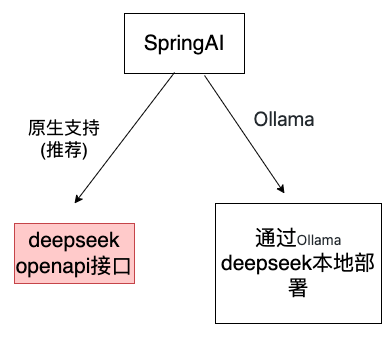
SpringAI接入deepseek方式有很多。 下面演示SpringAI原生方式接入deepseek.
二、pom依赖
1、 SpringBoot修改版本
<parent>
        <groupId>org.springframework.boot</groupId>
        <artifactId>spring-boot-starter-parent</artifactId>
        <version>3.4.5</version>
        <relativePath/> <!-- lookup parent from repository -->
    </parent>
2、SpringAI通过deepseek提供的openapi接入deepseek
<!--       springAI提供的openapi-->
        <dependency>
            <groupId>org.springframework.ai</groupId>
            <artifactId>spring-ai-openai-spring-boot-starter</artifactId>
            <version>1.0.0-M6</version>
        </dependency>
三、相关配置
spring.ai.openai.api-key=xxx(修改成自己的密匙)
spring.ai.openai.base-url=https://api.deepseek.com
spring.ai.openai.chat.options.model=deepseek-chat
四、代码
java
import org.springframework.ai.chat.client.ChatClient;
import org.springframework.context.annotation.Bean;
import org.springframework.context.annotation.Configuration;


@Configuration
public class SpringAIConfig {
    @Bean
    public ChatClient chatClient(ChatClient.Builder builder) {
        return builder.defaultSystem("你是一名资深开发工程师,你的名称叫siri").build();
    }
}
示例1:定义controller
java
package com.ai.controller;

import org.springframework.ai.chat.client.ChatClient;
import org.springframework.ai.model.Model;
import org.springframework.beans.factory.annotation.Autowired;
import org.springframework.web.bind.annotation.CrossOrigin;
import org.springframework.web.bind.annotation.GetMapping;
import org.springframework.web.bind.annotation.RequestMapping;
import org.springframework.web.bind.annotation.RestController;

@RestController
@RequestMapping(value = "/ChatController")
public class ChatController {
    private final ChatClient chatClient;

    ChatController(ChatClient.Builder chatClientBuilder) {
        this.chatClient = chatClientBuilder.build();
    }

    @GetMapping("/ai")
    String generation(String question) {
        return this.chatClient.prompt()
                .user(question)
                .call()
                .content();
    }


}运行结果:

访问:
运行结果:http://127.0.0.1:8886/ChatController/chattest?question=%E4%BD%A0%E6%98%AF%E8%B0%81

示例2:定义controller(流式输出)
java
package com.ai.controller;

import org.springframework.ai.chat.client.ChatClient;
import org.springframework.ai.chat.messages.Message;
import org.springframework.ai.chat.messages.UserMessage;
import org.springframework.ai.chat.model.ChatModel;
import org.springframework.ai.chat.model.Generation;
import org.springframework.ai.chat.prompt.Prompt;
import org.springframework.ai.chat.prompt.SystemPromptTemplate;
import org.springframework.beans.factory.annotation.Value;
import org.springframework.http.MediaType;
import org.springframework.web.bind.annotation.RestController;
import org.springframework.beans.factory.annotation.Autowired;
import org.springframework.web.bind.annotation.*;
import reactor.core.publisher.Flux;

import java.util.List;
import java.util.Map;
import java.util.stream.Collectors;

@RestController
@RequestMapping(value = "/SpringAIController")
public class SpringAIController {
    @Autowired
    private ChatClient chatClient;

//    private final ChatClient chatClient;
    //ChatClient底层是使用ChatModel作为属性的,在初始化ChatClient的时候可以指定ChatModel
    @Autowired
    private ChatModel chatModel;

    public SpringAIController(ChatClient.Builder chatClientBuilder) {
        this.chatClient = chatClientBuilder.defaultSystem("你是一个AI智能应用").build();

    }

    @GetMapping("/chat")
    public String chat(@RequestParam(value = "msg",defaultValue = "介绍一下杜甫")
                        String message) {
        //prompt:提示词
        return this.chatClient.prompt()
                //用户输入的信息
                .user(message)
                //请求大模型
                .call()
                //返回文本
                .content();
    }
   //流式响应
    @GetMapping(value = "/chatstream",produces="text/html;charset=UTF-8")
    public Flux<String> chatStream(@RequestParam(value = "message") String message) {
        return chatClient.prompt().user(message).stream().content();
    }
}
访问:


注意: 不使用流式输出时,访问http://127.0.0.1:8886/SpringAIController/chat?question=%E4%BD%A0%E6%98%AF%E8%B0%81
结果出现超时: TimeoutException: Total timeout 10000 ms elapsed