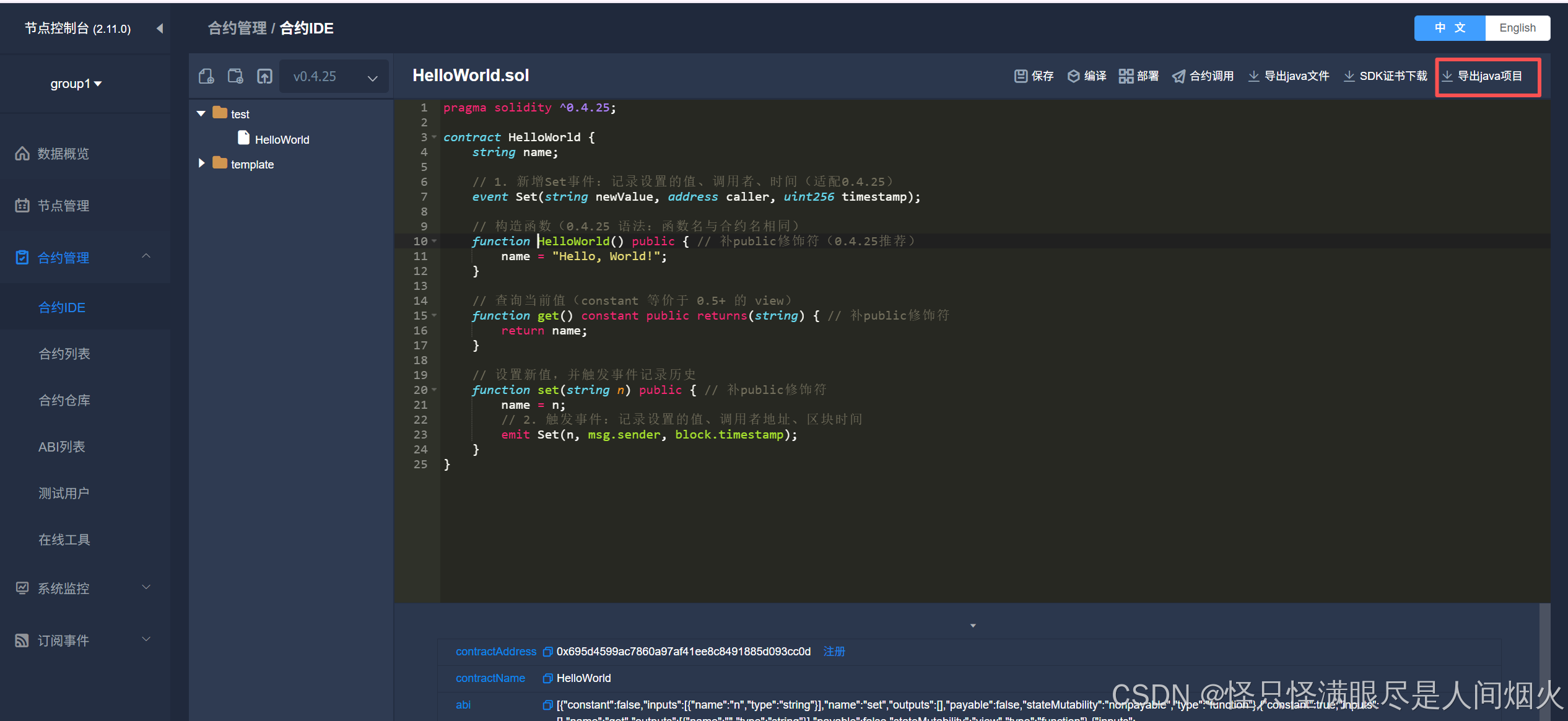
创建合约
bash
pragma solidity ^0.4.25;

contract HelloWorld {
    string name;

    // 1. 新增Set事件:记录设置的值、调用者、时间(适配0.4.25)
    event Set(string newValue, address caller, uint256 timestamp);

    // 构造函数(0.4.25 语法:函数名与合约名相同)
    function HelloWorld() public { // 补public修饰符(0.4.25推荐)
        name = "Hello, World!";
    }

    // 查询当前值(constant 等价于 0.5+ 的 view)
    function get() constant public returns(string) { // 补public修饰符
        return name;
    }

    // 设置新值,并触发事件记录历史
    function set(string n) public { // 补public修饰符
        name = n;
        // 2. 触发事件:记录设置的值、调用者地址、区块时间
        emit Set(n, msg.sender, block.timestamp);
    }
}
项目导入IDEA
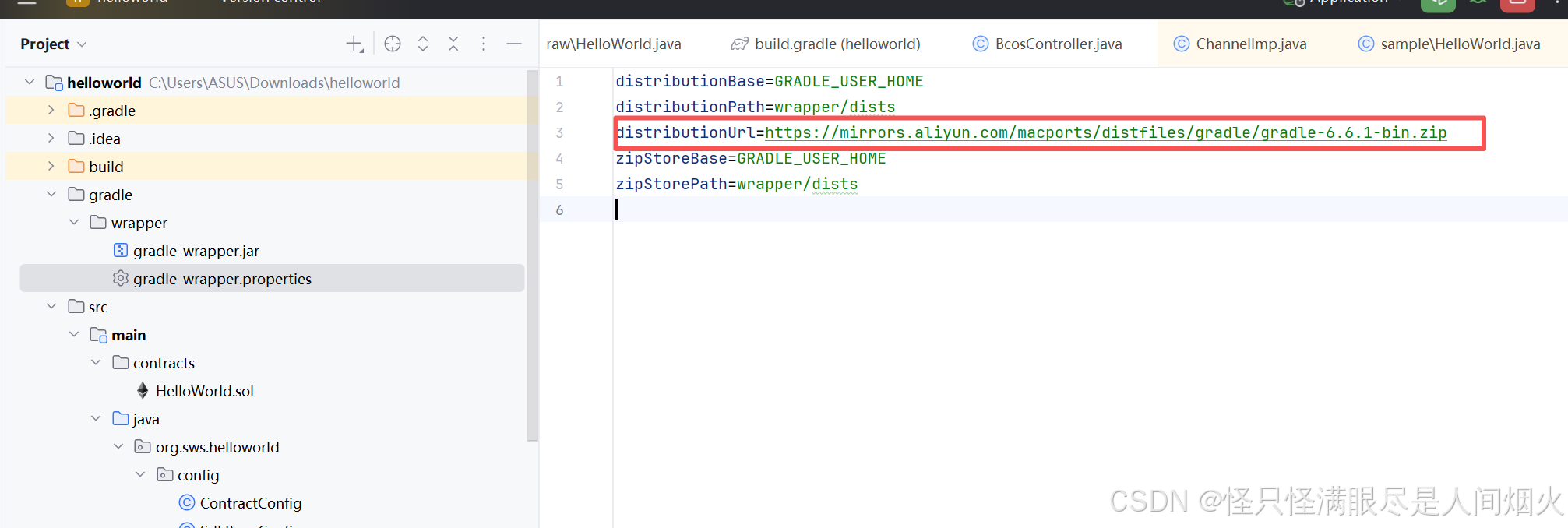
修改gradle-wrapper.properties
bash
https://mirrors.aliyun.com/macports/distfiles/gradle/gradle-6.6.1-bin.zip新建fisco-config.xml
bash
<?xml version="1.0" encoding="UTF-8" ?>

<beans xmlns="http://www.springframework.org/schema/beans"
       xmlns:xsi="http://www.w3.org/2001/XMLSchema-instance"
       xsi:schemaLocation="http://www.springframework.org/schema/beans
    http://www.springframework.org/schema/beans/spring-beans-4.0.xsd">
    <bean id="defaultConfigProperty" class="org.fisco.bcos.sdk.config.model.ConfigProperty">
        <property name="cryptoMaterial">
            <map>
                <entry key="certPath" value="conf" />
            </map>
        </property>
        <property name="network">
            <map>
                <entry key="peers">
                    <list>
                        <value>192.168.81.148:20200</value>
                        <value>192.168.81.148:20201</value>
                    </list>
                </entry>
            </map>
        </property>
        <property name="account">
            <map>
                <entry key="keyStoreDir" value="account" />
                <entry key="accountAddress" value="" />
                <entry key="accountFileFormat" value="pem" />
                <entry key="password" value="" />
                <entry key="accountFilePath" value="" />
            </map>
        </property>
        <property name="threadPool">
            <map>
                <entry key="channelProcessorThreadSize" value="16" />
                <entry key="receiptProcessorThreadSize" value="16" />
                <entry key="maxBlockingQueueSize" value="102400" />
            </map>
        </property>
    </bean>

    <bean id="defaultConfigOption" class="org.fisco.bcos.sdk.config.ConfigOption">
        <constructor-arg name="configProperty">
            <ref bean="defaultConfigProperty"/>
        </constructor-arg>
    </bean>

    <bean id="bcosSDK" class="org.fisco.bcos.sdk.BcosSDK">
        <constructor-arg name="configOption">
            <ref bean="defaultConfigOption"/>
        </constructor-arg>
    </bean>
</beans>
新建Controller
bash
package org.sws.helloworld.controller;

import org.fisco.bcos.sdk.BcosSDK;
import org.fisco.bcos.sdk.client.Client;
import org.fisco.bcos.sdk.client.protocol.response.BlockNumber;
import org.fisco.bcos.sdk.crypto.keypair.CryptoKeyPair;
import org.fisco.bcos.sdk.model.TransactionReceipt;
import org.fisco.bcos.sdk.transaction.model.exception.ContractException;
import org.springframework.beans.factory.annotation.Value;
import org.springframework.context.ApplicationContext;
import org.springframework.context.support.ClassPathXmlApplicationContext;
import org.springframework.web.bind.annotation.GetMapping;
import org.springframework.web.bind.annotation.PathVariable;
import org.springframework.web.bind.annotation.RestController;
import sample.HelloWorld;

import javax.annotation.PostConstruct;

@RestController
public class BcosController {


    // ====================== 从application.properties读取配置 ======================
    @Value("${system.groupId:1}") // 群组ID,默认1
    private int groupId;

    @Value("${system.hexPrivateKey:}") // 配置的私钥,为空则随机生成
    private String hexPrivateKey;

    @Value("${system.contract.helloWorldAddress:}") // HelloWorld合约地址
    private String helloWorldAddress;

    private BcosSDK bcosSDK;
    private Client client;
    private HelloWorld helloWorld;
    private CryptoKeyPair cryptoKeyPair;

    /**
     * 项目启动时初始化(仅执行一次,优先加载已有合约地址)
     */
    @PostConstruct
    private void initSDK() {
        try {
            System.out.println("------开始初始化BcosSDK------");

            // 1. 加载FISCO BCOS核心配置(fisco-config.xml,用于初始化SDK)
            ApplicationContext context = new ClassPathXmlApplicationContext("classpath:fisco-config.xml");
            bcosSDK = context.getBean(BcosSDK.class);

            // 2. 初始化指定群组的Client
            client = bcosSDK.getClient(groupId);
            System.out.println("------初始化群组" + groupId + "的Client成功------");

            // 3. 初始化密钥对(优先用配置的私钥,无则随机生成)
            if (hexPrivateKey != null && !hexPrivateKey.trim().isEmpty()) {
                cryptoKeyPair = client.getCryptoSuite().createKeyPair(hexPrivateKey);
                System.out.println("------加载配置的私钥成功,账户地址:" + cryptoKeyPair.getAddress() + "------");
            } else {
                cryptoKeyPair = client.getCryptoSuite().getCryptoKeyPair();
                System.out.println("------随机生成密钥对,账户地址:" + cryptoKeyPair.getAddress() + "------");
            }

            // 4. 加载/部署合约
            if (helloWorldAddress != null && !helloWorldAddress.trim().isEmpty() && helloWorldAddress.startsWith("0x")) {
                // 4.1 配置中有合约地址:直接加载已有合约
                helloWorld = HelloWorld.load(helloWorldAddress, client, cryptoKeyPair);
                System.out.println("------加载已有HelloWorld合约成功,地址:" + helloWorldAddress + "------");
            } else {
                // 4.2 配置中无合约地址:部署新合约并提示手动补充地址
                helloWorld = HelloWorld.deploy(client, cryptoKeyPair);
                helloWorldAddress = helloWorld.getContractAddress();
                System.out.println("======合约部署成功!请将以下地址补充到application.properties中======");
                System.out.println("system.contract.helloWorldAddress=" + helloWorldAddress);
                System.out.println("==============================================================");
            }

        } catch (ContractException e) {
            System.err.println("------合约部署/加载失败:" + e.getMessage() + "------");
            e.printStackTrace();
        } catch (Exception e) {
            System.err.println("------SDK初始化失败:" + e.getMessage() + "------");
            e.printStackTrace();
        } finally {
            // 初始化失败后置空,避免后续接口调用空指针
            if (helloWorld == null) {
                bcosSDK = null;
                client = null;
                cryptoKeyPair = null;
            }
        }
    }

    /**
     * 设置值接口:http://localhost:8080/set/testwwqq
     */
    @GetMapping("/set/{value}")
    public String set(@PathVariable String value) {
        // 校验初始化状态
        if (helloWorld == null) {
            return "-----SDK/合约初始化失败-----";
        }
        // 校验参数非空
        if (value == null || value.trim().isEmpty()) {
            return "-----设置的值不能为空-----";
        }

        try {
            // 调用合约set方法
            TransactionReceipt receipt = helloWorld.set(value);
            // 校验交易是否成功
            if (receipt.isStatusOK()) {
                return String.format("set成功 | HelloWorld get value: %s | 交易哈希:%s", value, receipt.getTransactionHash());
            } else {
                return String.format("set失败 | 状态码:%s | 错误信息:%s", receipt.getStatus(), receipt.getMessage());
            }
        } catch (Exception e) {
            return "set异常:" + e.getMessage();
        }
    }

    /**
     * 获取值接口:http://localhost:8080/get
     * 固定返回格式:HelloWorld get value: testwwqq
     */
    @GetMapping("/get")
    public String get() {
        // 校验初始化状态
        if (helloWorld == null) {
            return "-----SDK/合约初始化失败-----";
        }

        try {
            // 核心:调用合约的get()方法获取真实值
            String currentValue = helloWorld.get();
            // 按要求返回格式
            return "HelloWorld get value: " + currentValue;
        } catch (ContractException e) {
            return "调用get失败:" + e.getMessage();
        }
    }

    /**
     * 获取区块高度接口(验证节点连接)
     */
    @GetMapping("/block")
    public String getBlockNumber() {
        if (client == null) {
            return "-----client初始化失败-----";
        }
        try {
            BlockNumber blockNumber = client.getBlockNumber();
            return "当前区块高度:" + blockNumber.getBlockNumber().toString();
        } catch (Exception e) {
            return "获取区块高度失败:" + e.getMessage();
        }
    }
}
注意:HelloWorld 文件没有包名,导入包名即可。