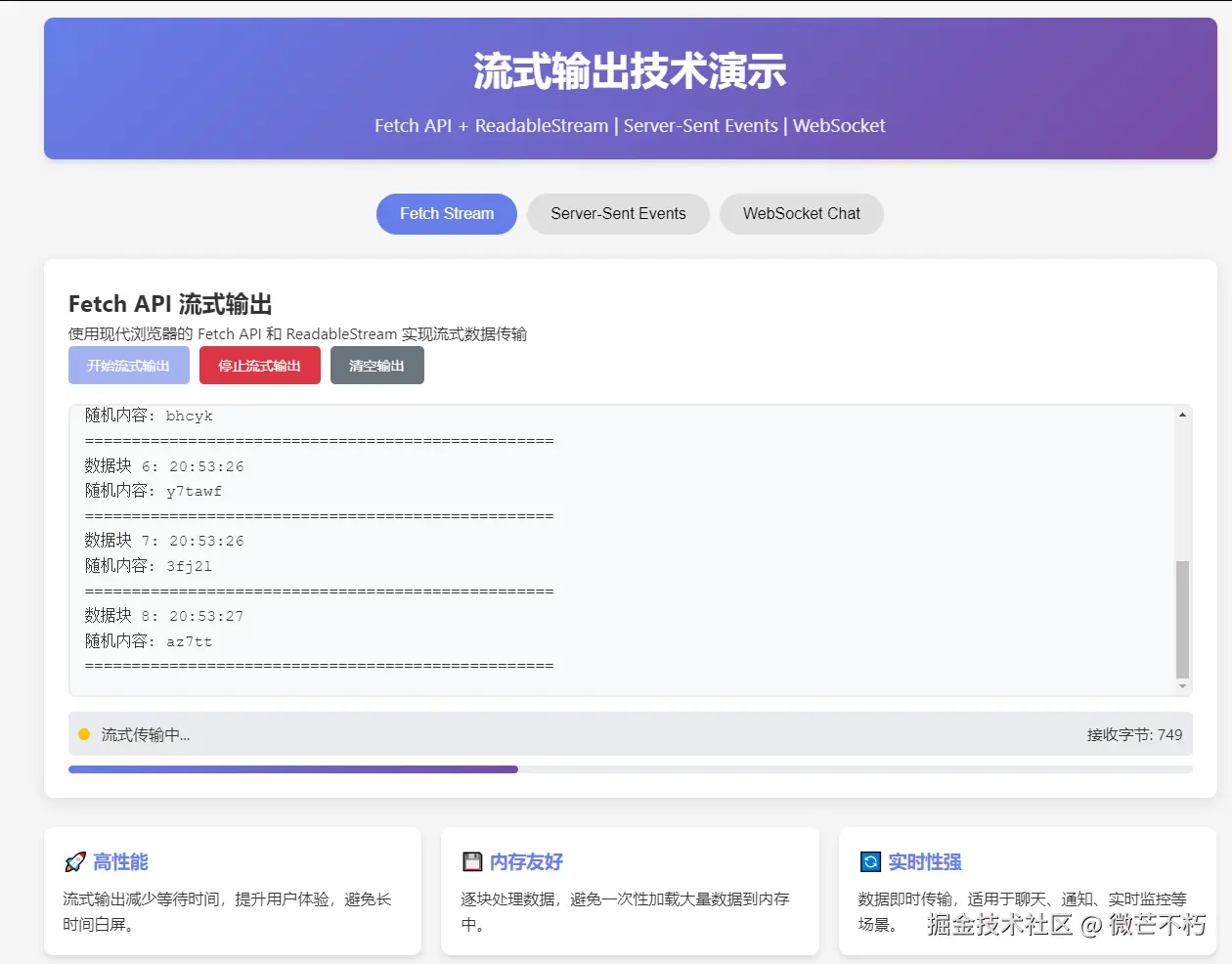
在现代Web应用中,流式输出(Streaming Output)是一种非常重要的技术,它能够实现实时数据传输和渐进式渲染,为用户提供更好的交互体验。本文将详细介绍流式输出的原理和多种实现方式。
什么是流式输出?
流式输出是指数据不是一次性返回给客户端,而是分批次、连续地发送给客户端。这种方式特别适用于:
- 实时聊天应用
- 大文件下载
- AI生成内容展示
- 日志实时监控
- 数据报表逐步加载
流式输出的优势
- 降低延迟:用户无需等待所有数据准备完成
- 节省内存:避免一次性加载大量数据到内存
- 提升用户体验:内容可以逐步显示,感知更快
- 提高性能:减少服务器压力,提高并发处理能力
前端实现方案
1. 使用 Fetch API + ReadableStream
这是现代浏览器中最推荐的方式:
javascript
// 基础流式请求示例
async function streamFetch(url) {
  const response = await fetch(url);
  const reader = response.body.getReader();
  const decoder = new TextDecoder();

  while (true) {
    const { done, value } = await reader.read();

    if (done) break;

    // 解码并处理接收到的数据块
    const chunk = decoder.decode(value, { stream: true });
    console.log('Received chunk:', chunk);

    // 更新UI或进行其他处理
    updateUI(chunk);
  }
}

function updateUI(content) {
  const outputElement = document.getElementById('output');
  outputElement.innerHTML += content;
}
2. Vue组件中的流式输出实现
创建一个支持流式输出的Vue组件:
vue
<template>
  <div class="stream-output">
    <div class="controls">
      <button @click="startStreaming" :disabled="isStreaming">
        开始流式输出
      </button>
      <button @click="stopStreaming" :disabled="!isStreaming">
        停止流式输出
      </button>
    </div>

    <div class="output-container">
      <pre ref="outputRef" class="output">{{ streamingContent }}</pre>
    </div>

    <div v-if="isLoading" class="loading">正在接收数据...</div>
  </div>
</template>

<script setup>
import { ref, onUnmounted } from 'vue'

const isStreaming = ref(false)
const streamingContent = ref('')
const isLoading = ref(false)
const abortController = ref(null)
const outputRef = ref(null)

// 模拟API端点
const API_ENDPOINT = '/api/stream-data'

async function startStreaming() {
  try {
    isStreaming.value = true
    streamingContent.value = ''
    isLoading.value = true

    // 创建AbortController用于取消请求
    abortController.value = new AbortController()

    const response = await fetch(API_ENDPOINT, {
      signal: abortController.value.signal
    })

    if (!response.ok) {
      throw new Error(`HTTP error! status: ${response.status}`)
    }

    const reader = response.body.getReader()
    const decoder = new TextDecoder('utf-8')

    // 逐块读取数据
    while (true) {
      const { done, value } = await reader.read()

      if (done) {
        break
      }

      // 解码数据块
      const chunk = decoder.decode(value, { stream: true })

      // 更新内容
      streamingContent.value += chunk

      // 自动滚动到底部
      scrollToBottom()
    }

  } catch (error) {
    if (error.name !== 'AbortError') {
      console.error('流式输出错误:', error)
    }
  } finally {
    isStreaming.value = false
    isLoading.value = false
  }
}

function stopStreaming() {
  if (abortController.value) {
    abortController.value.abort()
  }
  isStreaming.value = false
  isLoading.value = false
}

function scrollToBottom() {
  nextTick(() => {
    if (outputRef.value) {
      outputRef.value.scrollTop = outputRef.value.scrollHeight
    }
  })
}

onUnmounted(() => {
  stopStreaming()
})
</script>

<style scoped>
.stream-output {
  max-width: 800px;
  margin: 0 auto;
  padding: 20px;
}

.controls {
  margin-bottom: 20px;
}

.controls button {
  margin-right: 10px;
  padding: 8px 16px;
  background-color: #007bff;
  color: white;
  border: none;
  border-radius: 4px;
  cursor: pointer;
}

.controls button:disabled {
  background-color: #ccc;
  cursor: not-allowed;
}

.output-container {
  border: 1px solid #ddd;
  border-radius: 4px;
  height: 400px;
  overflow-y: auto;
  background-color: #f8f9fa;
}

.output {
  margin: 0;
  padding: 15px;
  font-family: 'Courier New', monospace;
  white-space: pre-wrap;
  word-wrap: break-word;
}

.loading {
  text-align: center;
  color: #666;
  margin-top: 10px;
}
</style>
3. Server-Sent Events (SSE) 实现
SSE是另一种常用的流式通信方式:
javascript
// SSE客户端实现
class StreamService {
  constructor() {
    this.eventSource = null
    this.listeners = []
  }

  connect(url) {
    if (this.eventSource) {
      this.disconnect()
    }

    this.eventSource = new EventSource(url)

    this.eventSource.onmessage = (event) => {
      this.notifyListeners(event.data)
    }

    this.eventSource.onerror = (error) => {
      console.error('SSE连接错误:', error)
    }

    this.eventSource.onopen = () => {
      console.log('SSE连接已建立')
    }
  }

  disconnect() {
    if (this.eventSource) {
      this.eventSource.close()
      this.eventSource = null
    }
  }

  addListener(callback) {
    this.listeners.push(callback)
  }

  removeListener(callback) {
    const index = this.listeners.indexOf(callback)
    if (index > -1) {
      this.listeners.splice(index, 1)
    }
  }

  notifyListeners(data) {
    this.listeners.forEach(callback => callback(data))
  }
}

// 在Vue组件中使用SSE
const streamService = new StreamService()

export default {
  data() {
    return {
      messages: [],
      isConnected: false
    }
  },

  mounted() {
    streamService.addListener(this.handleNewMessage)
  },

  beforeUnmount() {
    streamService.removeListener(this.handleNewMessage)
    streamService.disconnect()
  },

  methods: {
    connectToStream() {
      streamService.connect('/api/events')
      this.isConnected = true
    },

    disconnectFromStream() {
      streamService.disconnect()
      this.isConnected = false
    },

    handleNewMessage(data) {
      this.messages.push({
        id: Date.now(),
        content: data,
        timestamp: new Date().toLocaleTimeString()
      })
    }
  }
}
4. WebSocket 实现实时双向通信
对于需要双向通信的场景:
javascript
// WebSocket服务类
class WebSocketStream {
  constructor(url) {
    this.url = url
    this.websocket = null
    this.reconnectAttempts = 0
    this.maxReconnectAttempts = 5
    this.messageListeners = []
    this.statusListeners = []
  }

  connect() {
    this.websocket = new WebSocket(this.url)

    this.websocket.onopen = () => {
      console.log('WebSocket连接已建立')
      this.reconnectAttempts = 0
      this.notifyStatus('connected')
    }

    this.websocket.onmessage = (event) => {
      const data = JSON.parse(event.data)
      this.notifyMessage(data)
    }

    this.websocket.onclose = () => {
      console.log('WebSocket连接已关闭')
      this.notifyStatus('disconnected')
      this.attemptReconnect()
    }

    this.websocket.onerror = (error) => {
      console.error('WebSocket错误:', error)
      this.notifyStatus('error')
    }
  }

  sendMessage(message) {
    if (this.websocket && this.websocket.readyState === WebSocket.OPEN) {
      this.websocket.send(JSON.stringify(message))
    }
  }

  close() {
    if (this.websocket) {
      this.websocket.close()
    }
  }

  attemptReconnect() {
    if (this.reconnectAttempts < this.maxReconnectAttempts) {
      this.reconnectAttempts++
      setTimeout(() => {
        console.log(`尝试重连 (${this.reconnectAttempts}/${this.maxReconnectAttempts})`)
        this.connect()
      }, 1000 * this.reconnectAttempts)
    }
  }

  addMessageListener(callback) {
    this.messageListeners.push(callback)
  }

  addStatusListener(callback) {
    this.statusListeners.push(callback)
  }

  notifyMessage(data) {
    this.messageListeners.forEach(callback => callback(data))
  }

  notifyStatus(status) {
    this.statusListeners.forEach(callback => callback(status))
  }
}

// Vue组件中使用WebSocket
export default {
  data() {
    return {
      wsStream: null,
      messages: [],
      connectionStatus: 'disconnected'
    }
  },

  mounted() {
    this.wsStream = new WebSocketStream('ws://localhost:8080/ws')
    this.wsStream.addMessageListener(this.handleMessage)
    this.wsStream.addStatusListener(this.handleStatusChange)
    this.wsStream.connect()
  },

  beforeUnmount() {
    if (this.wsStream) {
      this.wsStream.close()
    }
  },

  methods: {
    handleMessage(data) {
      this.messages.push({
        ...data,
        receivedAt: new Date().toISOString()
      })
    },

    handleStatusChange(status) {
      this.connectionStatus = status
    },

    sendUserMessage(content) {
      this.wsStream.sendMessage({
        type: 'user_message',
        content: content,
        sentAt: new Date().toISOString()
      })
    }
  }
}
后端实现示例
Node.js Express 实现流式响应
javascript
const express = require('express')
const app = express()

// 模拟流式数据生成
app.get('/api/stream-data', (req, res) => {
  // 设置响应头以支持流式传输
  res.setHeader('Content-Type', 'text/plain; charset=utf-8')
  res.setHeader('Transfer-Encoding', 'chunked')

  // 发送初始数据
  res.write('开始流式传输...\n')

  let count = 0
  const interval = setInterval(() => {
    count++
    const data = `数据块 ${count}: ${new Date().toISOString()}\n`
    res.write(data)

    // 结束流式传输
    if (count >= 10) {
      clearInterval(interval)
      res.write('流式传输结束\n')
      res.end()
    }
  }, 1000)

  // 处理客户端断开连接
  req.on('close', () => {
    clearInterval(interval)
    console.log('客户端断开了连接')
  })
})

// SSE端点
app.get('/api/events', (req, res) => {
  res.writeHead(200, {
    'Content-Type': 'text/event-stream',
    'Cache-Control': 'no-cache',
    'Connection': 'keep-alive',
    'Access-Control-Allow-Origin': '*'
  })

  // 发送初始事件
  res.write('data: 连接已建立\n\n')

  let count = 0
  const interval = setInterval(() => {
    count++
    const data = `data: 事件 ${count} - ${new Date().toISOString()}\n\n`
    res.write(data)
  }, 2000)

  // 处理客户端断开连接
  req.on('close', () => {
    clearInterval(interval)
    res.end()
  })
})

app.listen(3000, () => {
  console.log('服务器运行在 http://localhost:3000')
})
性能优化建议
1. 内存管理
javascript
// 限制缓存大小
class LimitedBuffer {
  constructor(maxSize = 1000) {
    this.buffer = []
    this.maxSize = maxSize
  }

  add(item) {
    this.buffer.push(item)
    if (this.buffer.length > this.maxSize) {
      this.buffer.shift() // 移除最旧的项
    }
  }

  get() {
    return this.buffer
  }
}
2. 节流更新
javascript
// 节流函数防止频繁更新DOM
function throttle(func, limit) {
  let inThrottle
  return function() {
    const args = arguments
    const context = this
    if (!inThrottle) {
      func.apply(context, args)
      inThrottle = true
      setTimeout(() => inThrottle = false, limit)
    }
  }
}

// 在组件中使用
const throttledUpdate = throttle((content) => {
  streamingContent.value += content
}, 100) // 每100ms最多更新一次
3. 错误处理和重试机制
javascript
// 带重试机制的流式请求
async function streamWithRetry(url, maxRetries = 3) {
  for (let i = 0; i <= maxRetries; i++) {
    try {
      await streamFetch(url)
      return // 成功后退出
    } catch (error) {
      console.warn(`流式请求失败,第${i + 1}次重试`, error)

      if (i === maxRetries) {
        throw new Error('达到最大重试次数')
      }

      // 等待后重试
      await new Promise(resolve => setTimeout(resolve, 1000 * Math.pow(2, i)))
    }
  }
}
完整的示例
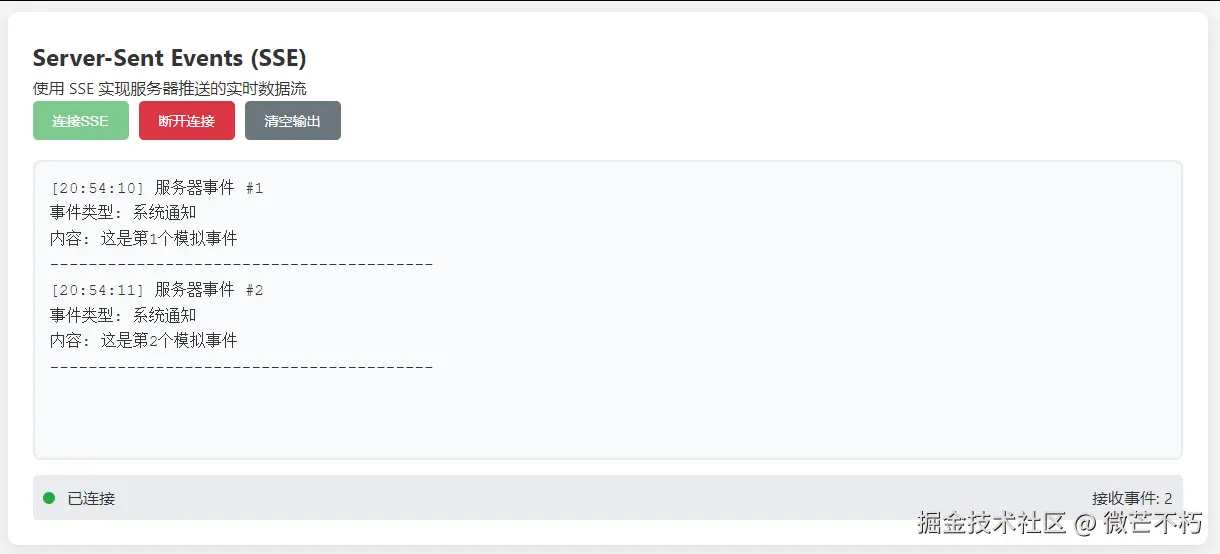
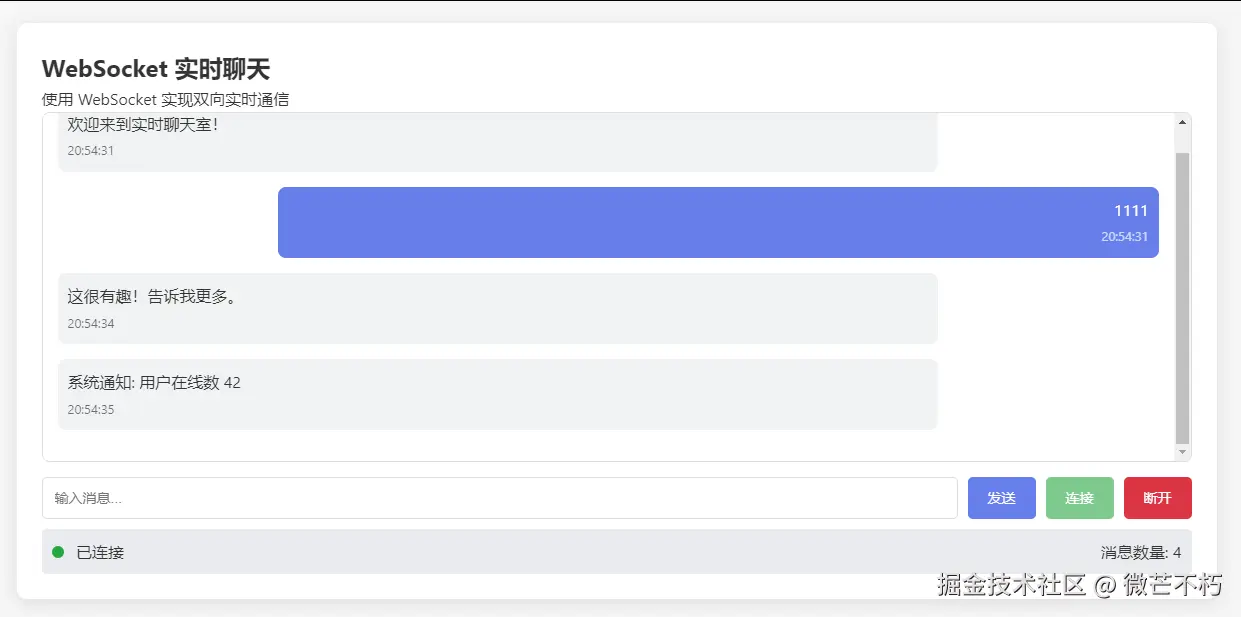
html
<!DOCTYPE html>
<html lang="zh-CN">
<head>
  <meta charset="UTF-8">
  <meta name="viewport" content="width=device-width, initial-scale=1.0">
  <title>流式输出示例</title>
  <style>
    * {
      margin: 0;
      padding: 0;
      box-sizing: border-box;
    }

    body {
      font-family: 'Segoe UI', Tahoma, Geneva, Verdana, sans-serif;
      line-height: 1.6;
      color: #333;
      background-color: #f5f5f5;
      padding: 20px;
    }

    .container {
      max-width: 1200px;
      margin: 0 auto;
    }

    header {
      text-align: center;
      margin-bottom: 30px;
      padding: 20px;
      background: linear-gradient(135deg, #667eea 0%, #764ba2 100%);
      color: white;
      border-radius: 10px;
      box-shadow: 0 4px 6px rgba(0, 0, 0, 0.1);
    }

    h1 {
      font-size: 2.5em;
      margin-bottom: 10px;
    }

    .subtitle {
      font-size: 1.2em;
      opacity: 0.9;
    }

    .tabs {
      display: flex;
      justify-content: center;
      margin-bottom: 20px;
      flex-wrap: wrap;
    }

    .tab-button {
      padding: 12px 24px;
      margin: 5px;
      background-color: #e0e0e0;
      border: none;
      border-radius: 25px;
      cursor: pointer;
      font-size: 16px;
      font-weight: 500;
      transition: all 0.3s ease;
    }

    .tab-button:hover {
      background-color: #d5d5d5;
    }

    .tab-button.active {
      background-color: #667eea;
      color: white;
    }

    .tab-content {
      display: none;
      background: white;
      border-radius: 10px;
      padding: 25px;
      box-shadow: 0 4px 15px rgba(0, 0, 0, 0.1);
      margin-bottom: 30px;
    }

    .tab-content.active {
      display: block;
      animation: fadeIn 0.5s ease;
    }

    @keyframes fadeIn {
      from { opacity: 0; transform: translateY(10px); }
      to { opacity: 1; transform: translateY(0); }
    }

    .controls {
      display: flex;
      gap: 10px;
      margin-bottom: 20px;
      flex-wrap: wrap;
    }

    .btn {
      padding: 10px 20px;
      border: none;
      border-radius: 5px;
      cursor: pointer;
      font-size: 14px;
      font-weight: 500;
      transition: all 0.3s ease;
    }

    .btn-primary {
      background-color: #667eea;
      color: white;
    }

    .btn-secondary {
      background-color: #6c757d;
      color: white;
    }

    .btn-success {
      background-color: #28a745;
      color: white;
    }

    .btn-danger {
      background-color: #dc3545;
      color: white;
    }

    .btn:disabled {
      opacity: 0.6;
      cursor: not-allowed;
    }

    .btn:hover:not(:disabled) {
      transform: translateY(-2px);
      box-shadow: 0 4px 8px rgba(0, 0, 0, 0.2);
    }

    .output-container {
      border: 2px solid #e9ecef;
      border-radius: 8px;
      height: 300px;
      overflow-y: auto;
      background-color: #f8f9fa;
      padding: 15px;
      margin-bottom: 15px;
      font-family: 'Courier New', monospace;
      white-space: pre-wrap;
      word-wrap: break-word;
    }

    .status-bar {
      display: flex;
      justify-content: space-between;
      align-items: center;
      padding: 10px;
      background-color: #e9ecef;
      border-radius: 5px;
      margin-top: 10px;
    }

    .status-indicator {
      display: inline-block;
      width: 12px;
      height: 12px;
      border-radius: 50%;
      margin-right: 8px;
    }

    .status-connected {
      background-color: #28a745;
    }

    .status-disconnected {
      background-color: #dc3545;
    }

    .status-loading {
      background-color: #ffc107;
    }

    .progress-bar {
      width: 100%;
      height: 8px;
      background-color: #e9ecef;
      border-radius: 4px;
      overflow: hidden;
      margin-top: 10px;
    }

    .progress-fill {
      height: 100%;
      background: linear-gradient(90deg, #667eea, #764ba2);
      border-radius: 4px;
      transition: width 0.3s ease;
    }

    .chat-messages {
      height: 350px;
      overflow-y: auto;
      border: 1px solid #ddd;
      border-radius: 8px;
      padding: 15px;
      margin-bottom: 15px;
      background-color: white;
    }

    .message {
      margin-bottom: 15px;
      padding: 10px;
      border-radius: 8px;
      max-width: 80%;
    }

    .message-user {
      background-color: #667eea;
      color: white;
      margin-left: auto;
      text-align: right;
    }

    .message-bot {
      background-color: #f1f3f4;
      color: #333;
    }

    .input-group {
      display: flex;
      gap: 10px;
    }

    .input-group input {
      flex: 1;
      padding: 12px;
      border: 1px solid #ddd;
      border-radius: 5px;
      font-size: 14px;
    }

    .features {
      display: grid;
      grid-template-columns: repeat(auto-fit, minmax(300px, 1fr));
      gap: 20px;
      margin-top: 30px;
    }

    .feature-card {
      background: white;
      border-radius: 10px;
      padding: 20px;
      box-shadow: 0 4px 6px rgba(0, 0, 0, 0.1);
      transition: transform 0.3s ease;
    }

    .feature-card:hover {
      transform: translateY(-5px);
    }

    .feature-card h3 {
      color: #667eea;
      margin-bottom: 10px;
    }

    footer {
      text-align: center;
      margin-top: 40px;
      padding: 20px;
      color: #6c757d;
      font-size: 0.9em;
    }

    @media (max-width: 768px) {
      .container {
        padding: 10px;
      }

      h1 {
        font-size: 2em;
      }

      .controls {
        flex-direction: column;
      }

      .btn {
        width: 100%;
      }
    }
  </style>
</head>
<body>
  <div class="container">
    <header>
      <h1>流式输出技术演示</h1>
      <p class="subtitle">Fetch API + ReadableStream | Server-Sent Events | WebSocket</p>
    </header>

    <div class="tabs">
      <button class="tab-button active" onclick="switchTab('fetch')">Fetch Stream</button>
      <button class="tab-button" onclick="switchTab('sse')">Server-Sent Events</button>
      <button class="tab-button" onclick="switchTab('websocket')">WebSocket Chat</button>
    </div>

    <!-- Fetch Stream Tab -->
    <div id="fetch" class="tab-content active">
      <h2>Fetch API 流式输出</h2>
      <p>使用现代浏览器的 Fetch API 和 ReadableStream 实现流式数据传输</p>

      <div class="controls">
        <button id="startFetchBtn" class="btn btn-primary" onclick="startFetchStream()">
          开始流式输出
        </button>
        <button id="stopFetchBtn" class="btn btn-danger" onclick="stopFetchStream()" disabled>
          停止流式输出
        </button>
        <button class="btn btn-secondary" onclick="clearFetchOutput()">
          清空输出
        </button>
      </div>

      <div id="fetchOutput" class="output-container"></div>

      <div class="status-bar">
        <div>
          <span class="status-indicator" id="fetchStatusIndicator"></span>
          <span id="fetchStatusText">未开始</span>
        </div>
        <div>接收字节: <span id="fetchByteCount">0</span></div>
      </div>

      <div class="progress-bar">
        <div class="progress-fill" id="fetchProgress" style="width: 0%"></div>
      </div>
    </div>

    <!-- SSE Tab -->
    <div id="sse" class="tab-content">
      <h2>Server-Sent Events (SSE)</h2>
      <p>使用 SSE 实现服务器推送的实时数据流</p>

      <div class="controls">
        <button id="connectSSEBtn" class="btn btn-success" onclick="connectSSE()">
          连接SSE
        </button>
        <button id="disconnectSSEBtn" class="btn btn-danger" onclick="disconnectSSE()" disabled>
          断开连接
        </button>
        <button class="btn btn-secondary" onclick="clearSSEOutput()">
          清空输出
        </button>
      </div>

      <div id="sseOutput" class="output-container"></div>

      <div class="status-bar">
        <div>
          <span class="status-indicator" id="sseStatusIndicator"></span>
          <span id="sseStatusText">未连接</span>
        </div>
        <div>接收事件: <span id="sseEventCount">0</span></div>
      </div>
    </div>

    <!-- WebSocket Tab -->
    <div id="websocket" class="tab-content">
      <h2>WebSocket 实时聊天</h2>
      <p>使用 WebSocket 实现双向实时通信</p>

      <div class="chat-messages" id="chatMessages"></div>

      <div class="input-group">
        <input type="text" id="messageInput" placeholder="输入消息..." onkeypress="handleKeyPress(event)">
        <button id="sendBtn" class="btn btn-primary" onclick="sendMessage()" disabled>
          发送
        </button>
        <button id="connectWSBtn" class="btn btn-success" onclick="connectWebSocket()">
          连接
        </button>
        <button id="disconnectWSBtn" class="btn btn-danger" onclick="disconnectWebSocket()" disabled>
          断开
        </button>
      </div>

      <div class="status-bar">
        <div>
          <span class="status-indicator" id="wsStatusIndicator"></span>
          <span id="wsStatusText">未连接</span>
        </div>
        <div>消息数量: <span id="messageCount">0</span></div>
      </div>
    </div>

    <div class="features">
      <div class="feature-card">
        <h3>🚀 高性能</h3>
        <p>流式输出减少等待时间,提升用户体验,避免长时间白屏。</p>
      </div>
      <div class="feature-card">
        <h3>💾 内存友好</h3>
        <p>逐块处理数据,避免一次性加载大量数据到内存中。</p>
      </div>
      <div class="feature-card">
        <h3>🔄 实时性强</h3>
        <p>数据即时传输,适用于聊天、通知、实时监控等场景。</p>
      </div>
    </div>

    <footer>
      <p>流式输出技术演示 | 基于现代Web标准实现</p>
    </footer>
  </div>

  <script>
    // 全局变量
    let fetchController = null;
    let sseConnection = null;
    let wsConnection = null;
    let fetchByteCount = 0;
    let sseEventCount = 0;
    let messageCount = 0;

    // 标签页切换
    function switchTab(tabId) {
      // 隐藏所有标签内容
      document.querySelectorAll('.tab-content').forEach(tab => {
        tab.classList.remove('active');
      });

      // 移除所有激活按钮样式
      document.querySelectorAll('.tab-button').forEach(btn => {
        btn.classList.remove('active');
      });

      // 显示选中的标签内容
      document.getElementById(tabId).classList.add('active');

      // 激活对应的按钮
      event.target.classList.add('active');

      // 停止所有正在进行的操作
      stopFetchStream();
      disconnectSSE();
      disconnectWebSocket();
    }

    // ==================== Fetch Stream Implementation ====================

    async function startFetchStream() {
      const output = document.getElementById('fetchOutput');
      const startBtn = document.getElementById('startFetchBtn');
      const stopBtn = document.getElementById('stopFetchBtn');
      const statusIndicator = document.getElementById('fetchStatusIndicator');
      const statusText = document.getElementById('fetchStatusText');
      const byteCount = document.getElementById('fetchByteCount');
      const progressBar = document.getElementById('fetchProgress');

      // 重置状态
      output.innerHTML = '';
      fetchByteCount = 0;
      byteCount.textContent = '0';
      progressBar.style.width = '0%';

      // 更新UI状态
      startBtn.disabled = true;
      stopBtn.disabled = false;
      statusIndicator.className = 'status-indicator status-loading';
      statusText.textContent = '流式传输中...';

      try {
        // 创建AbortController用于取消请求
        fetchController = new AbortController();

        // 模拟流式响应 - 在实际应用中这会是一个真实的API端点
        const response = await simulateFetchStream(fetchController.signal);

        const reader = response.body.getReader();
        const decoder = new TextDecoder('utf-8');

        let progress = 0;
        const totalChunks = 20; // 模拟总块数

        while (true) {
          const { done, value } = await reader.read();

          if (done) {
            break;
          }

          // 解码数据块
          const chunk = decoder.decode(value, { stream: true });

          // 更新输出
          output.innerHTML += chunk;
          output.scrollTop = output.scrollHeight;

          // 更新统计信息
          fetchByteCount += value.byteLength;
          byteCount.textContent = fetchByteCount;

          // 更新进度条
          progress = Math.min(progress + 1, totalChunks);
          const percentage = (progress / totalChunks) * 100;
          progressBar.style.width = percentage + '%';
        }

        // 完成后更新状态
        statusIndicator.className = 'status-indicator status-connected';
        statusText.textContent = '传输完成';

      } catch (error) {
        if (error.name !== 'AbortError') {
          console.error('Fetch流式错误:', error);
          statusIndicator.className = 'status-indicator status-disconnected';
          statusText.textContent = '传输错误: ' + error.message;
        } else {
          statusText.textContent = '传输已停止';
        }
      } finally {
        startBtn.disabled = false;
        stopBtn.disabled = true;
        if (progressBar.style.width !== '100%') {
          progressBar.style.width = '100%';
        }
      }
    }

    function stopFetchStream() {
      if (fetchController) {
        fetchController.abort();
        fetchController = null;
      }

      const startBtn = document.getElementById('startFetchBtn');
      const stopBtn = document.getElementById('stopFetchBtn');
      const statusIndicator = document.getElementById('fetchStatusIndicator');
      const statusText = document.getElementById('fetchStatusText');

      startBtn.disabled = false;
      stopBtn.disabled = true;
      statusIndicator.className = 'status-indicator status-disconnected';
      statusText.textContent = '传输已停止';
    }

    function clearFetchOutput() {
      document.getElementById('fetchOutput').innerHTML = '';
      document.getElementById('fetchByteCount').textContent = '0';
      document.getElementById('fetchProgress').style.width = '0%';
    }

    // 模拟Fetch流式响应
    function simulateFetchStream(signal) {
      return new Promise((resolve) => {
        // 创建一个ReadableStream来模拟服务器响应
        const stream = new ReadableStream({
          start(controller) {
            let count = 0;
            const maxChunks = 20;

            const sendChunk = () => {
              if (count >= maxChunks || signal.aborted) {
                controller.close();
                return;
              }

              count++;
              const chunkData = `数据块 ${count}: ${new Date().toLocaleTimeString()}\n` +
                               `随机内容: ${Math.random().toString(36).substring(7)}\n` +
                               `${'='.repeat(50)}\n`;

              controller.enqueue(new TextEncoder().encode(chunkData));

              // 随机间隔发送下一个块
              setTimeout(sendChunk, Math.random() * 800 + 200);
            };

            sendChunk();
          }
        });

        // 模拟响应对象
        resolve({
          body: stream
        });
      });
    }

    // ==================== SSE Implementation ====================

    function connectSSE() {
      const output = document.getElementById('sseOutput');
      const connectBtn = document.getElementById('connectSSEBtn');
      const disconnectBtn = document.getElementById('disconnectSSEBtn');
      const statusIndicator = document.getElementById('sseStatusIndicator');
      const statusText = document.getElementById('sseStatusText');
      const eventCount = document.getElementById('sseEventCount');

      // 重置状态
      output.innerHTML = '';
      sseEventCount = 0;
      eventCount.textContent = '0';

      // 更新UI状态
      connectBtn.disabled = true;
      disconnectBtn.disabled = false;
      statusIndicator.className = 'status-indicator status-loading';
      statusText.textContent = '连接中...';

      // 模拟SSE连接
      simulateSSEConnection();
    }

    function disconnectSSE() {
      if (sseConnection) {
        clearInterval(sseConnection);
        sseConnection = null;
      }

      const connectBtn = document.getElementById('connectSSEBtn');
      const disconnectBtn = document.getElementById('disconnectSSEBtn');
      const statusIndicator = document.getElementById('sseStatusIndicator');
      const statusText = document.getElementById('sseStatusText');

      connectBtn.disabled = false;
      disconnectBtn.disabled = true;
      statusIndicator.className = 'status-indicator status-disconnected';
      statusText.textContent = '连接已断开';
    }

    function clearSSEOutput() {
      document.getElementById('sseOutput').innerHTML = '';
      document.getElementById('sseEventCount').textContent = '0';
    }

    // 模拟SSE连接
    function simulateSSEConnection() {
      const output = document.getElementById('sseOutput');
      const statusIndicator = document.getElementById('sseStatusIndicator');
      const statusText = document.getElementById('sseStatusText');
      const eventCount = document.getElementById('sseEventCount');

      statusIndicator.className = 'status-indicator status-connected';
      statusText.textContent = '已连接';

      let count = 0;
      sseConnection = setInterval(() => {
        count++;
        sseEventCount++;
        eventCount.textContent = sseEventCount;

        const eventData = `[${new Date().toLocaleTimeString()}] 服务器事件 #${count}\n` +
                         `事件类型: 系统通知\n` +
                         `内容: 这是第${count}个模拟事件\n` +
                         `${'-'.repeat(40)}\n`;

        output.innerHTML += eventData;
        output.scrollTop = output.scrollHeight;

        // 模拟连接断开
        if (count === 15) {
          clearInterval(sseConnection);
          sseConnection = null;
          const statusIndicator = document.getElementById('sseStatusIndicator');
          const statusText = document.getElementById('sseStatusText');
          statusIndicator.className = 'status-indicator status-disconnected';
          statusText.textContent = '连接已断开';
          document.getElementById('connectSSEBtn').disabled = false;
          document.getElementById('disconnectSSEBtn').disabled = true;
        }
      }, 1000);
    }

    // ==================== WebSocket Implementation ====================

    function connectWebSocket() {
      const connectBtn = document.getElementById('connectWSBtn');
      const disconnectBtn = document.getElementById('disconnectWSBtn');
      const sendBtn = document.getElementById('sendBtn');
      const statusIndicator = document.getElementById('wsStatusIndicator');
      const statusText = document.getElementById('wsStatusText');
      const chatMessages = document.getElementById('chatMessages');

      // 重置状态
      chatMessages.innerHTML = '';
      messageCount = 0;
      document.getElementById('messageCount').textContent = '0';

      // 更新UI状态
      connectBtn.disabled = true;
      disconnectBtn.disabled = false;
      sendBtn.disabled = false;
      statusIndicator.className = 'status-indicator status-loading';
      statusText.textContent = '连接中...';

      // 模拟WebSocket连接
      simulateWebSocketConnection();
    }

    function disconnectWebSocket() {
      if (wsConnection) {
        clearInterval(wsConnection);
        wsConnection = null;
      }

      const connectBtn = document.getElementById('connectWSBtn');
      const disconnectBtn = document.getElementById('disconnectWSBtn');
      const sendBtn = document.getElementById('sendBtn');
      const statusIndicator = document.getElementById('wsStatusIndicator');
      const statusText = document.getElementById('wsStatusText');

      connectBtn.disabled = false;
      disconnectBtn.disabled = true;
      sendBtn.disabled = true;
      statusIndicator.className = 'status-indicator status-disconnected';
      statusText.textContent = '连接已断开';
    }

    function sendMessage() {
      const input = document.getElementById('messageInput');
      const message = input.value.trim();

      if (message) {
        addMessage(message, 'user');
        input.value = '';

        // 模拟机器人回复
        setTimeout(() => {
          const replies = [
            '你好!我收到了你的消息。',
            '这是一个很好的问题!',
            '让我想想如何回答...',
            '感谢你的分享!',
            '我理解你的观点。',
            '这很有趣!告诉我更多。'
          ];
          const randomReply = replies[Math.floor(Math.random() * replies.length)];
          addMessage(randomReply, 'bot');
        }, 1000 + Math.random() * 2000);
      }
    }

    function handleKeyPress(event) {
      if (event.key === 'Enter') {
        sendMessage();
      }
    }

    function addMessage(content, sender) {
      const chatMessages = document.getElementById('chatMessages');
      const messageCountEl = document.getElementById('messageCount');

      const messageDiv = document.createElement('div');
      messageDiv.className = `message message-${sender}`;

      const timeString = new Date().toLocaleTimeString();
      messageDiv.innerHTML = `
        <div>${content}</div>
        <small style="opacity: 0.7; font-size: 0.8em;">${timeString}</small>
      `;

      chatMessages.appendChild(messageDiv);
      chatMessages.scrollTop = chatMessages.scrollHeight;

      messageCount++;
      messageCountEl.textContent = messageCount;
    }

    // 模拟WebSocket连接
    function simulateWebSocketConnection() {
      const statusIndicator = document.getElementById('wsStatusIndicator');
      const statusText = document.getElementById('wsStatusText');

      statusIndicator.className = 'status-indicator status-connected';
      statusText.textContent = '已连接';

      // 模拟系统消息
      setTimeout(() => {
        addMessage('欢迎来到实时聊天室!', 'bot');
      }, 500);

      // 模拟定期系统通知
      let notificationCount = 0;
      wsConnection = setInterval(() => {
        notificationCount++;
        if (notificationCount <= 5) {
          addMessage(`系统通知: 用户在线数 ${Math.floor(Math.random() * 100)}`, 'bot');
        }
      }, 5000);
    }

    // 初始化
    document.addEventListener('DOMContentLoaded', function() {
      // 设置初始状态指示器
      document.getElementById('fetchStatusIndicator').className = 'status-indicator status-disconnected';
      document.getElementById('sseStatusIndicator').className = 'status-indicator status-disconnected';
      document.getElementById('wsStatusIndicator').className = 'status-indicator status-disconnected';
    });
  </script>
</body>
</html>
最佳实践总结
-
选择合适的传输协议:
- 单向流式输出:Fetch + ReadableStream 或 SSE
- 双向实时通信:WebSocket
-
合理设置缓冲区大小:避免内存溢出
-
实现优雅降级:当流式不支持时提供备选方案
-
添加适当的错误处理:网络中断、解析错误等
-
考虑用户体验:加载状态提示、自动滚动等
-
性能监控:记录传输速度、错误率等指标
通过以上实现方式和最佳实践,你可以轻松在项目中集成流式输出功能,为用户提供更加流畅和实时的交互体验。记住根据具体需求选择最适合的技术方案!