一 前言
个人第一次开发小程序,主体功能是ai的对话功能。对期间涉及到的问题做一次简单总结与记录。开发过程中虽然借助大量的ai与博客文章,但是在移动端还是反复存在问题。目前感觉初步完成功能实现,针对底部输入框触发软键盘时的功能做一次初步的记录。希望有看到的大佬做出指点。(个人总觉得出发点就存在一些问题,尤其是布局方面,应该有更好的布局写法?希望有看到的大佬指明一下。)
二 主要问题
- 页面会被软键盘整体上顶,期望结果是压缩中间的聊天区域,并且保持scroll-view中始终是最后一条数据显示。
- 键盘会遮挡页面或者和页面之间存在一个间隙。
- 唤起键盘的瞬间,底部输入框会短暂的消失几秒,希望做到跟随键盘上升的效果。(属于优化方面)
三 成果展示
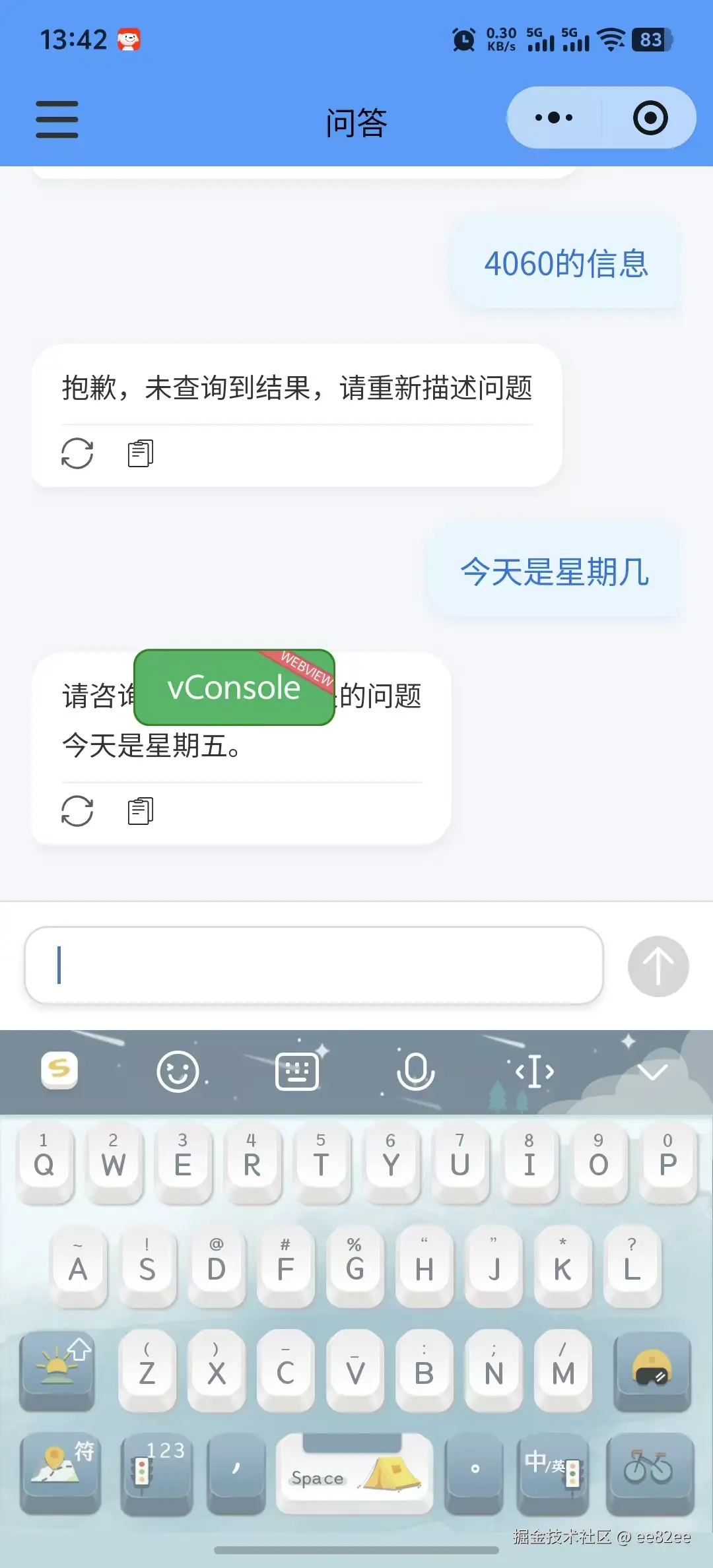
四 代码模块
- pages.json中的配置
"style": { "navigationBarTitleText": "问答", "navigationStyle": "custom", "app-plus": { "softinputMode": "adjustResize" }, "mp-weixin": { "disableScroll": true }, }
- html 部分 , 这里主要在实现一个功能,给scroll-view滚动区域,以及底部的 sender 区域增加一个paddingBottom 或者是 bottom ,让他留出键盘的区域,这里尝试使用过flex布局,但是最终因为莫名其妙的bug,还行选择了让sender区域浮动起来? 这里是我非常困惑的 ,sender使用哪个布局才是更加优秀的解决方法。
js
		// 消息滚动区域
                <scroll-view
			v-if="!needNewDialog"
			class="chater"
			scroll-y
			:scroll-top="scrollTop"
			@scroll="onScroll"
			:style="{
				paddingBottom: (senderHeight + heightVal) + 'px',
				overflowAnchor: 'none'
			}">
                // sender区域
                <view
			class="sender"
			:class="{ 'keyboard-shown': isKeyboardShown }"
			:style="{
				bottom: heightVal + 'px',
				transition: 'bottom 0.3s ease'
			}"
			v-if="!needNewDialog">
                        			<view class="ipt">
				<input v-model="inputValue" class="IPT" type="text" confirm-type="send" @confirm="send" maxlength="500"
					:adjust-position="false" :cursor-spacing="0" @keyboardheightchange="keyboardheightchange"
					@blur="handleInputBlur" />
			</view>
			<view :class="['btn', { 'btn-disabled': !inputValue.trim() || isSending }]" @click="send">
				<uni-icons type="arrow-up" color="#ffffff" size="28"></uni-icons>
			</view>
</view>- script部分, 这里根据我的设计场景, 我必须要让用户点击一次我要对话的按钮,开会打开chat对话页面,在此之前sender区域处于被隐藏的状态,导致了我不能在onLoad生命周期中直接获取到输入口高度。给了一个140rpx的安全距离。
js
data() {
		return {
			....
			heightVal: 0, // 键盘高度
			bottomSafeHeight: 0, // 底部安全区域高度
			senderHeight: 140, // 动态sender高度,默认140px,动态计算完成前界面布局不会出现明显问题
			isKeyboardShown: false,
			keyboardHeight: 0
		};
	},
        	onLoad() {
		const info = uni.getSystemInfoSync();
		const safeBottom = info.screenHeight - info.windowHeight;
		this.bottomSafeHeight = safeBottom > 0 ? safeBottom : 0;
		// 页面加载完成后获取sender高度
		this.$nextTick(() => {
			this.updateSenderHeight(); // 获取sender区域高度
		});
	},
        	onShow() {
		// #ifdef MP-WEIXIN
		uni.onKeyboardHeightChange(this.handleGlobalKeyboardHeightChange);
		// #endif
		this.updateSenderHeight();
	},
        	onHide() {
		// 移除全局键盘监听器
		// #ifdef MP-WEIXIN
		uni.offKeyboardHeightChange(this.handleGlobalKeyboardHeightChange);
		// #endif
	},
        methods: {
        		updateSenderHeight() {
			// 只有在需要显示sender时才计算高度
			if (this.needNewDialog) return;

                            const query = uni.createSelectorQuery().in(this);
                            query.select('.sender').boundingClientRect(data => {
				// console.log('监听到的data是', data);
				if (data) {
					this.senderHeight = data.height;
				}
                            }).exec();
		        },
                	keyboardheightchange(e) {
                            let keyboardHeight = 0;
                            if (e.detail && e.detail.height !== undefined) {
                                    keyboardHeight = e.detail.height;
                            } else if (e.height !== undefined) {
                                    keyboardHeight = e.height;
                            }

                            // 存储键盘高度
                            this.keyboardHeight = keyboardHeight;
                            this.isKeyboardShown = keyboardHeight > 0;

                            if (keyboardHeight > 0) {
                                    const realHeight = keyboardHeight - this.bottomSafeHeight;
                                    this.heightVal = realHeight > 0 ? realHeight : 0;
                            } else {
                                    this.heightVal = 0;
                            }
                            // 等样式更新后再滚动,避免不生效
                            this.$nextTick(() => {
                                    this.scrollToBottom();
                            });
                      },
                      // 添加全局键盘高度变化处理函数
                     handleGlobalKeyboardHeightChange(res) {
                            // 复用现有的keyboardheightchange逻辑
                            this.keyboardheightchange({ detail: { height: res.height } });
                    },
                    scrollToBottom() {
			this.$nextTick(() => {
				this.scrollSeq += 1;
				this.scrollTop = this.scrollSeq * 1000;
			});
		   },
}- css 部分
js
	/* 发送区域 - fixed定位 */
	.sender {
		position: fixed;
		left: 0;
		right: 0;
		bottom: 0;
		padding: 12px;
		display: flex;
		align-items: flex-end;
		gap: 12px;
		background: white;
		border-top: 1px solid #e0e0e0;
		width: 100%;
		box-sizing: border-box;
		transition: transform 0.25s ease;
		z-index: 100; /* 确保输入框在最上层 */

		/* 键盘显示时的样式优化 */
		&.keyboard-shown {
			transform: translateY(0);
		}

		.ipt {
			flex: 1;
			min-width: 0;
			display: flex;
			align-items: center;

			.IPT {
				flex: 1;
				width: 100%;
				max-width: 100%;
				min-height: 40px;
				max-height: 90px;
				border-radius: 12px;
				border: 1px solid #d9d9d9;
				box-shadow: 0 2px 4px rgba(0, 0, 0, 0.1);
				padding: 8px 16px;
				font-size: 16px;
				box-sizing: border-box;
				line-height: 1.4;
				resize: none;
				overflow-y: auto;
				transition: all 0.25s ease;
			}
		}

		.btn {
			display: flex;
			width: 65rpx;
			height: 65rpx;
			background-color: #007fff;
			border-radius: 50px;
			justify-content: center;
			align-items: center;
			margin-bottom: 10rpx;
		}

		.btn-disabled {
			background-color: #c9cdcf;
			opacity: 0.8;

			uni-icons {
				color: #f0f0f0 !important;
			}
		}
	}
等待优化的功能点
关于 scroll-view 聊天中应该使用倒序渲染,可以解决 scrollToBottom 中固定写死 次数 * 1000 , 以及对话内容如果过多产生的问题