1. Kubernetes数据存储架构
// Kubernetes如何使用etcd
type KubernetesStorage struct {
    // 1. API Server存储接口
    StorageInterface storage.Interface

    // 2. 资源存储位置
    ResourcePaths: map[string]string{
        "pods":             "/registry/pods/",
        "services":         "/registry/services/",
        "deployments":      "/registry/deployments/",
        "configmaps":       "/registry/configmaps/",
        "secrets":          "/registry/secrets/",
        "nodes":            "/registry/minions/",  // 早期版本
        "events":           "/registry/events/",
        "namespaces":       "/registry/namespaces/",
    }

    // 3. 存储配置
    Config: struct {
        Prefix:        "/registry"
        CompactionInterval: time.Hour
        CountLimit:    10000
    }
}
2. 核心数据存储示例
(1) Pod数据存储结构
# etcd中的Pod数据示例
key: "/registry/pods/default/my-pod"
value: {
  "apiVersion": "v1",
  "kind": "Pod",
  "metadata": {
    "name": "my-pod",
    "namespace": "default",
    "uid": "123e4567-e89b-12d3-a456-426614174000",
    "resourceVersion": "12345",
    "creationTimestamp": "2023-10-01T12:00:00Z",
    "labels": {
      "app": "my-app"
    }
  },
  "spec": {
    "containers": [{
      "name": "nginx",
      "image": "nginx:1.21",
      "ports": [{"containerPort": 80}]
    }]
  },
  "status": {
    "phase": "Running",
    "podIP": "10.244.1.3",
    "hostIP": "192.168.1.100"
  }
}
(2) 资源版本机制
// Kubernetes资源版本与etcd修订版本映射
func ConvertResourceVersion(resourceVersion string) (int64, error) {
    // Kubernetes资源版本格式
    // 格式1: "12345" (老版本)
    // 格式2: "12345/67890" (etcd v3,主版本/子版本)

    if strings.Contains(resourceVersion, "/") {
        parts := strings.Split(resourceVersion, "/")
        main, err := strconv.ParseInt(parts[0], 10, 64)
        if err != nil {
            return 0, err
        }
        return main, nil
    }

    // 老版本直接解析
    return strconv.ParseInt(resourceVersion, 10, 64)
}

// 示例:从Pod获取资源版本
pod := &v1.Pod{}
resourceVersion := pod.ResourceVersion
etcdRevision, _ := ConvertResourceVersion(resourceVersion)
3. Kubernetes组件与etcd交互
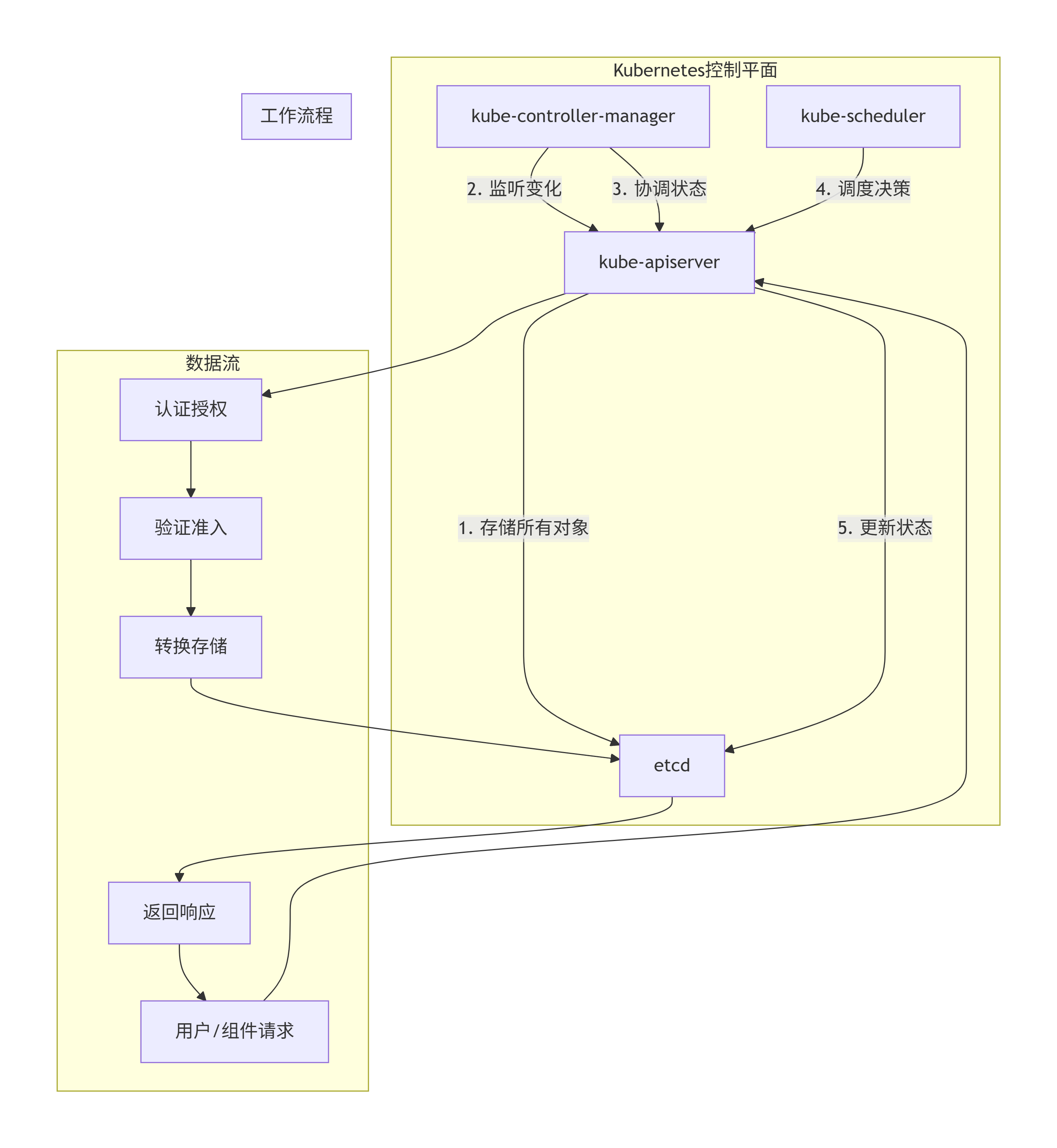
4. etcd在Kubernetes中的关键用途
(1) 服务发现
// Kubernetes服务发现机制
type ServiceDiscovery struct {
    // 1. Endpoints存储
    etcdKey: "/registry/services/endpoints/default/my-service"

    // 2. 服务发现流程
    func DiscoverService(serviceName string) []Endpoint {
        // kube-proxy监听Endpoints变化
        watchCh := etcdClient.Watch(
            context.Background(),
            "/registry/services/endpoints/default/"+serviceName,
            etcd.WithPrefix(),
        )

        for resp := range watchCh {
            for _, ev := range resp.Events {
                switch ev.Type {
                case etcd.EventTypePut:
                    // 解析Endpoints
                    endpoints := parseEndpoints(ev.Kv.Value)
                    updateIPTables(endpoints)
                case etcd.EventTypeDelete:
                    removeService(serviceName)
                }
            }
        }
    }
}
(2) 配置存储
# ConfigMap在etcd中的存储
key: "/registry/configmaps/default/app-config"
value: {
  "apiVersion": "v1",
  "kind": "ConfigMap",
  "metadata": {
    "name": "app-config",
    "namespace": "default",
    "uid": "456e7890-f12a-34b5-c678-901234567890"
  },
  "data": {
    "database.host": "db.example.com",
    "database.port": "5432",
    "app.mode": "production",
    "log.level": "info"
  },
  "binaryData": {
    "config.bin": "base64encodedbinarydata"
  }
}
(3) 领导者选举
// Kubernetes控制器领导者选举
type LeaderElection struct {
    // 使用etcd的分布式锁
    lockKey: "/controllers/kube-controller-manager/leader"

    func RunAsLeader() {
        // 1. 创建租约
        lease := etcdClient.Lease.Grant(context.Background(), 15)

        // 2. 尝试获取锁
        txn := etcdClient.Txn(context.Background())
        txn.If(clientv3.Compare(
            clientv3.CreateRevision(lockKey), "=", 0,
        )).Then(clientv3.OpPut(
            lockKey, currentPodIP,
            clientv3.WithLease(lease.ID),
        )).Else(clientv3.OpGet(lockKey))

        // 3. 如果成为领导者
        if txnResp.Succeeded {
            // 作为领导者运行
            runControllerLoop()

            // 定期续约
            go keepAliveLease(lease.ID)
        } else {
            // 作为跟随者,等待
            waitForLeaderChange()
        }
    }
}
5. 性能优化实践
(1) 存储优化配置
# etcd性能优化配置
apiVersion: v1
kind: Pod
metadata:
  name: etcd
  namespace: kube-system
spec:
  containers:
  - name: etcd
    image: k8s.gcr.io/etcd:3.5.0
    command:
    - etcd
    - --name=etcd-0
    - --data-dir=/var/lib/etcd
    - --quota-backend-bytes=8589934592  # 8GB存储配额
    - --snapshot-count=10000            # 快照触发条件
    - --max-request-bytes=1572864       # 1.5MB最大请求大小
    - --max-txn-ops=128                 # 事务最大操作数
    - --heartbeat-interval=100          # 心跳间隔(ms)
    - --election-timeout=1000           # 选举超时(ms)
    - --auto-compaction-retention=1h    # 自动压缩保留期
    - --auto-compaction-mode=periodic   # 压缩模式
    - --enable-v2=false                 # 禁用v2 API
    - --max-wals=0                      # 不限制WAL数量
    resources:
      requests:
        memory: "4Gi"
        cpu: "2"
      limits:
        memory: "8Gi"
        cpu: "4"
    volumeMounts:
    - mountPath: /var/lib/etcd
      name: etcd-data
  volumes:
  - name: etcd-data
    hostPath:
      path: /var/lib/etcd
      type: DirectoryOrCreate
(2) 客户端连接池优化
// Kubernetes API Server的etcd客户端配置
type EtcdClientConfig struct {
    Endpoints: []string{
        "https://etcd-0:2379",
        "https://etcd-1:2379",
        "https://etcd-2:2379",
    },

    // 连接配置
    DialTimeout:          2 * time.Second,
    DialKeepAliveTime:    30 * time.Second,
    DialKeepAliveTimeout: 10 * time.Second,

    // 安全配置
    TLS: &tls.Config{
        Certificates: []tls.Certificate{cert},
        RootCAs:      rootCAs,
    },

    // 重试策略
    RetryPolicy: retry.Config{
        MaxRetries: 3,
        Backoff:    retry.BackoffLinear(100 * time.Millisecond),
    },

    // 连接池
    MaxCallSendMsgSize:     10 * 1024 * 1024, // 10MB
    MaxCallRecvMsgSize:     10 * 1024 * 1024,
    RejectOldCluster:       true,
    PermitWithoutStream:    true,

    // 负载均衡
    BalancerName:           "round_robin",
}
6. 高可用与容灾
(1) 集群部署架构
# 生产环境etcd集群配置
apiVersion: etcd.database.coreos.com/v1beta2
kind: EtcdCluster
metadata:
  name: k8s-etcd
  namespace: kube-system
spec:
  size: 3
  version: 3.5.0

  # Pod配置
  pod:
    resources:
      requests:
        cpu: 2000m
        memory: 4Gi
      limits:
        cpu: 4000m
        memory: 8Gi
    affinity:
      podAntiAffinity:
        requiredDuringSchedulingIgnoredDuringExecution:
        - labelSelector:
            matchLabels:
              app: etcd
          topologyKey: kubernetes.io/hostname

  # 存储配置
  storageType: PersistentVolume
  volumeClaimTemplate:
    spec:
      accessModes: [ "ReadWriteOnce" ]
      resources:
        requests:
          storage: 20Gi
      storageClassName: ssd-fast

  # TLS配置
  tls:
    static:
      member:
        peerSecret: etcd-peer-tls
        serverSecret: etcd-server-tls
      operatorSecret: etcd-client-tls

  # 备份配置
  backup:
    backupIntervalInSecond: 1800  # 30分钟
    maxBackups: 5
    storageType: S3
    s3:
      path: s3://my-bucket/etcd-backups
      awsSecret: aws-credentials
(2) 备份与恢复
#!/bin/bash
# etcd备份脚本

# 环境变量
ENDPOINTS="https://etcd-0:2379,https://etcd-1:2379,https://etcd-2:2379"
CACERT="/etc/kubernetes/pki/etcd/ca.crt"
CERT="/etc/kubernetes/pki/etcd/server.crt"
KEY="/etc/kubernetes/pki/etcd/server.key"
BACKUP_DIR="/backup/etcd"
DATE=$(date +%Y%m%d-%H%M%S)

# 创建快照
echo "Creating etcd snapshot..."
ETCDCTL_API=3 etcdctl \
  --endpoints=$ENDPOINTS \
  --cacert=$CACERT \
  --cert=$CERT \
  --key=$KEY \
  snapshot save $BACKUP_DIR/snapshot-$DATE.db

# 检查快照状态
echo "Verifying snapshot..."
ETCDCTL_API=3 etcdctl \
  --write-out=table \
  snapshot status $BACKUP_DIR/snapshot-$DATE.db

# 压缩旧备份(保留最近7天)
find $BACKUP_DIR -name "snapshot-*.db" -mtime +7 -delete

# 上传到云存储(可选)
if [ -n "$S3_BUCKET" ]; then
  aws s3 cp $BACKUP_DIR/snapshot-$DATE.db s3://$S3_BUCKET/etcd/
fi#!/bin/bash
# etcd恢复脚本
# 环境变量
BACKUP_FILE="/backup/etcd/snapshot-latest.db"
DATA_DIR="/var/lib/etcd"
CLUSTER_TOKEN="k8s-etcd-cluster"
INITIAL_CLUSTER="etcd-0=https://10.0.1.10:2380,etcd-1=https://10.0.1.11:2380,etcd-2=https://10.0.1.12:2380"
# 停止所有etcd实例
systemctl stop etcd
# 备份现有数据
mv $DATA_DIR $DATA_DIR.backup.$(date +%s)
# 从快照恢复
echo "Restoring etcd from snapshot..."
ETCDCTL_API=3 etcdctl \
snapshot restore $BACKUP_FILE \
--data-dir=$DATA_DIR \
--name=etcd-0 \
--initial-cluster=$INITIAL_CLUSTER \
--initial-cluster-token=$CLUSTER_TOKEN \
--initial-advertise-peer-urls=https://10.0.1.10:2380
# 设置权限
chown -R etcd:etcd $DATA_DIR
# 启动etcd
systemctl start etcd
# 验证恢复
ETCDCTL_API=3 etcdctl \
--endpoints=https://10.0.1.10:2379 \
--cacert=/etc/kubernetes/pki/etcd/ca.crt \
--cert=/etc/kubernetes/pki/etcd/server.crt \
--key=/etc/kubernetes/pki/etcd/server.key \
endpoint health三、故障诊断与性能调优
1. 常见性能指标
// etcd性能监控指标
type EtcdMetrics struct {
    // 存储指标
    StorageSize        int64    `json:"storage_size"`        // 存储大小
    DBSize             int64    `json:"db_size"`            // 数据库大小
    DBTotal            int64    `json:"db_total"`           // 数据库总大小

    // 请求指标
    WriteRequests      float64  `json:"write_requests"`     // 写请求/秒
    ReadRequests       float64  `json:"read_requests"`      // 读请求/秒
    ProposalCommitTime float64  `json:"proposal_commit_time"` // 提案提交时间

    // Raft指标
    RaftTerm           int64    `json:"raft_term"`          // 当前任期
    RaftIndex          int64    `json:"raft_index"`         // Raft索引
    IsLeader           int      `json:"is_leader"`          // 是否为领导者

    // 延迟指标
    P99Latency         float64  `json:"p99_latency"`        // 99百分位延迟
    AvgLatency         float64  `json:"avg_latency"`        // 平均延迟

    // 节点状态
    Healthy            bool     `json:"healthy"`            // 健康状态
    LeaderID           string   `json:"leader_id"`          // 领导者ID
}
2. 监控命令示例
# 1. 检查etcd健康状态
etcdctl endpoint health --endpoints=https://etcd-0:2379,https://etcd-1:2379,https://etcd-2:2379

# 2. 检查集群成员
etcdctl member list --write-out=table

# 3. 检查领导者
etcdctl endpoint status --write-out=table

# 4. 检查存储使用
etcdctl endpoint status --write-out=json | jq '.[] | {endpoint:.Endpoint, dbSize:.Status.dbSize}'

# 5. 监控性能指标
# 使用Prometheus查询
# 写延迟
histogram_quantile(0.99, rate(etcd_disk_wal_fsync_duration_seconds_bucket[5m]))

# 读延迟
histogram_quantile(0.99, rate(etcd_network_peer_round_trip_time_seconds_bucket[5m]))

# 存储大小
etcd_mvcc_db_total_size_in_bytes

# 提案速率
rate(etcd_server_proposals_applied_total[5m])
3. 常见问题诊断
(1) 高延迟问题
# 诊断步骤:
# 1. 检查磁盘IO
iostat -x 1

# 2. 检查网络延迟
ping etcd-peer

# 3. 检查CPU使用
top -p $(pgrep etcd)

# 4. 检查内存使用
free -h

# 5. 检查etcd指标
etcdctl check perf --load="s" --endpoints=https://etcd-0:2379
(2) 内存泄漏诊断
// 使用pprof分析内存使用
import _ "net/http/pprof"

// 在etcd启动参数中添加
// --debug=true

// 然后可以访问
// http://etcd-ip:2379/debug/pprof/heap
// 使用go tool pprof分析
四、etcd在云原生生态中的演进
1. 未来发展方向
(1) 多租户支持
# 未来的多租户etcd
apiVersion: etcd.io/v1
kind: Tenant
metadata:
  name: team-a
spec:
  quota:
    storage: 10Gi
    requestsPerSecond: 1000
  isolation:
    network: true
    storage: true
  backup:
    enabled: true
    schedule: "0 2 * * *"
(2) 分层存储
// 冷热数据分离
type HierarchicalStorage struct {
    HotStorage struct {
        Type:     "Memory"      // 内存存储热数据
        Size:     "16GB"
        Policy:   "LRU"
    }

    WarmStorage struct {
        Type:     "SSD"         // SSD存储温数据
        Size:     "100GB"
        Compression: "lz4"
    }

    ColdStorage struct {
        Type:     "HDD/Object"  // HDD/对象存储冷数据
        Size:     "1TB"
        Archival: true
    }
}
(3) 与Service Mesh集成
# etcd作为服务网格配置中心
apiVersion: networking.istio.io/v1beta1
kind: ConfigSource
metadata:
  name: etcd-config
spec:
  address: etcd.kube-system.svc.cluster.local:2379
  tlsSettings:
    mode: MUTUAL
    clientCertificate: /etc/certs/client.crt
    privateKey: /etc/certs/client.key
    caCertificates: /etc/certs/ca.crt
  refreshDelay: 1s
五、总结
etcd在Kubernetes中的核心作用总结:
-
集群状态存储:Kubernetes所有API对象的唯一真实来源
-
分布式协调:通过Raft算法保证集群状态的一致性
-
服务发现:存储服务端点信息,支持动态服务发现
-
配置管理:集中存储ConfigMap和Secret等配置数据
-
领导者选举:支持控制平面组件的高可用
-
事件存储:记录集群事件,支持审计和调试
-
资源版本控制:通过MVCC实现乐观并发控制
最佳实践建议:
-
生产环境部署至少3节点:确保高可用性
-
使用SSD存储:保证IO性能
-
定期备份:确保数据安全
-
监控关键指标:提前发现潜在问题
-
版本升级:保持etcd与Kubernetes版本兼容
-
安全配置:启用TLS和认证授权