场景,我们写了很多页面,但是一个一个人工智能去匹配不太可能。
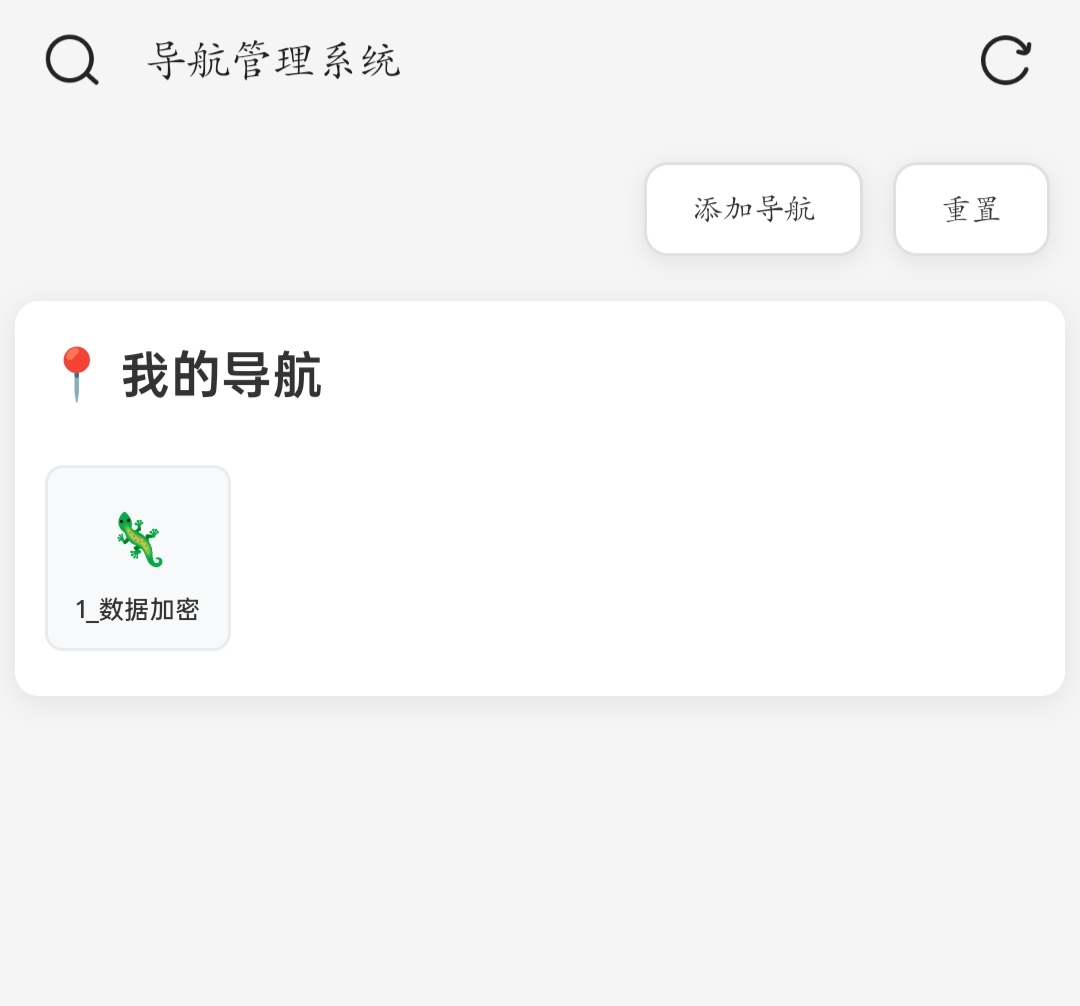
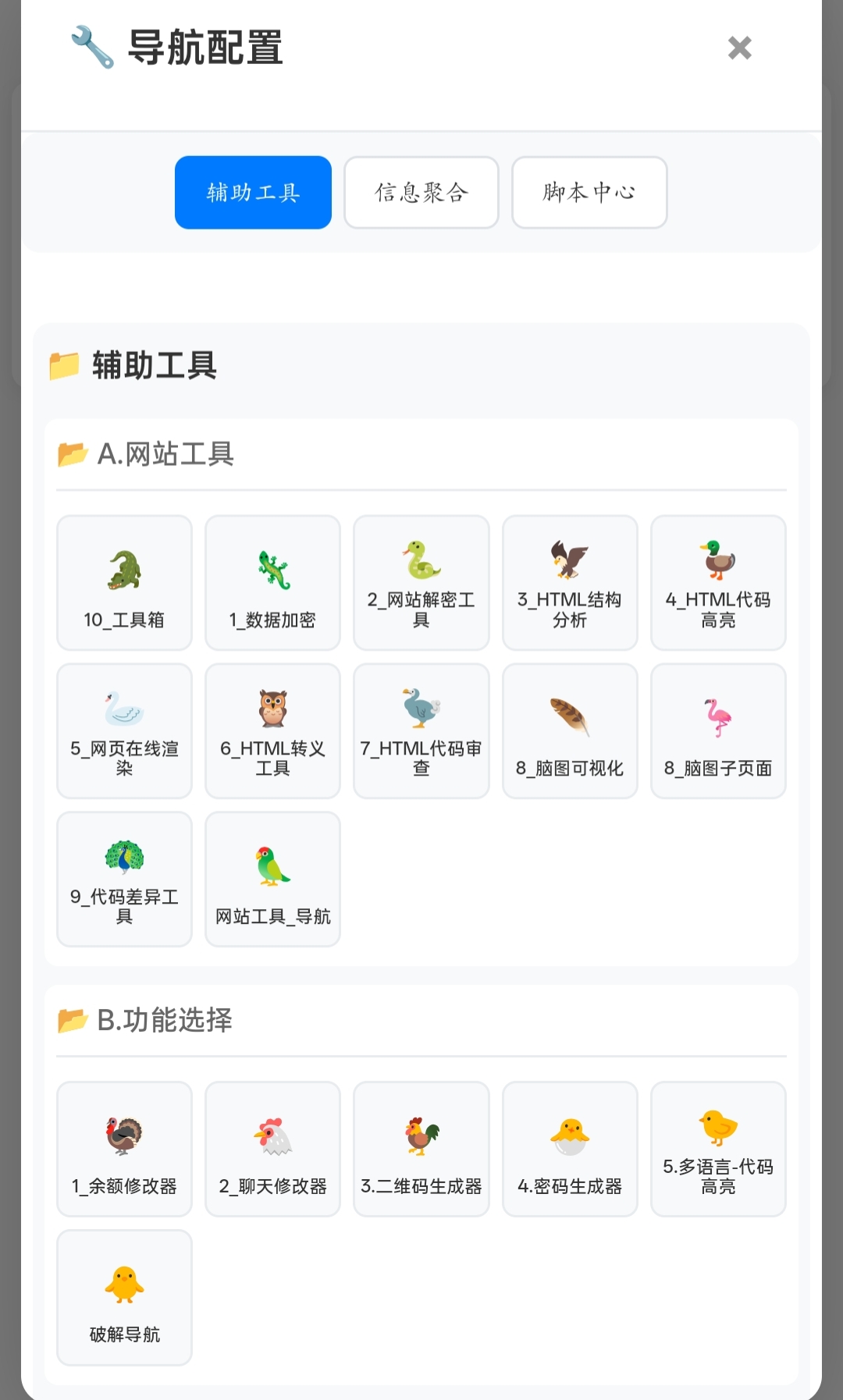
功能,运行Python脚本,自动生成主页面引入的配置.js ,这样主页面和脚本不用动,每次实时生成配置文件。
一共三个文件。主文件+配置文件,+脚本
python
#!/data/data/com.termux/files/usr/bin/python3
# -*- coding: utf-8 -*-
"""
Termux 专用:完全递归,目录即分类,文件进对应分类,描述无空格
300图标库随机分配,前300不重复,后续可重复
仅扫描HTML文件(.html, .htm),忽略JS文件
"""

from pathlib import Path
import json
import random

ROOT_DIR    = Path("/storage/emulated/0/Download/OnePlus Share/05_APP/苏沫V/B..导航逻辑")
CONFIG_FILE = ROOT_DIR / "1_nav.config.js"

# 1. 创建300个图标库(包含各种主题:动物、植物、物品、符号等)
ICON_LIBRARY = [
    # 动物类 (1-50)
    "🦕", "🦖", "🐉", "🦎", "🐍", "🦕", "🦖", "🐊", "🦎", "🐍",
    "🦅", "🦆", "🦢", "🦉", "🦤", "🪶", "🦩", "🦚", "🦜", "🦃",
    "🐔", "🐓", "🐣", "🐤", "🐥", "🐦", "🐧", "🕊️", "🦇", "🦋",
    "🐌", "🐛", "🐜", "🐝", "🪲", "🐞", "🦗", "🪳", "🦟", "🦗",
    "🕷️", "🕸️", "🦂", "🦀", "🦞", "🦐", "🦑", "🐙", "🦪", "🐚",

    # 植物类 (51-100)
    "🌳", "🌲", "🌴", "🌵", "🌾", "🌿", "☘️", "🍀", "🍁", "🍂",
    "🍃", "🌱", "🌼", "🌻", "🌺", "🌸", "🌷", "🌹", "🥀", "🌾",
    "🌵", "🎄", "🌲", "🌳", "🌴", "🌿", "🍀", "🌺", "🌻", "🌹",
    "🌸", "🌷", "🌼", "🌱", "🌾", "🍃", "🍁", "🍂", "🌵", "🎋",
    "🎍", "🪴", "🪹", "🪺", "🌾", "🌿", "☘️", "🍀", "🌿", "🌱",

    # 食物类 (101-150)
    "🍎", "🍊", "🍋", "🍌", "🍉", "🍇", "🍓", "🫐", "🍈", "🍒",
    "🍑", "🥭", "🍍", "🥥", "🥝", "🍅", "🍆", "🥑", "🥦", "🥬",
    "🥒", "🌶️", "🫑", "🌽", "🥕", "🫒", "🧄", "🧅", "🥔", "🍠",
    "🥐", "🥯", "🍞", "🥖", "🥨", "🧀", "🥚", "🍳", "🧈", "🥞",
    "🧇", "🥓", "🥩", "🍗", "🍖", "🦴", "🌭", "🍔", "🍟", "🍕",

    # 物品类 (151-200)
    "💎", "💍", "📱", "💻", "⌨️", "🖥️", "🖨️", "🖱️", "🎮", "🕹️",
    "📷", "📸", "📹", "🎥", "📼", "📞", "☎️", "📟", "📠", "📺",
    "📻", "🎚️", "🎛️", "🧭", "⏱️", "⏲️", "⏰", "🕰️", "⌚", "⏳",
    "⌛", "🔓", "🔒", "🔏", "🔐", "🔑", "🗝️", "🔨", "⛏️", "⚒️",
    "🛠️", "🗡️", "⚔️", "🔫", "🏹", "🪓", "🔧", "🔩", "⚙️", "🗜️",

    # 符号类 (201-250)
    "⭐", "🌟", "✨", "💫", "☄️", "🌙", "🌛", "🌜", "🌚", "🌝",
    "🌞", "🪐", "💥", "🔥", "❄️", "💧", "🌊", "🎆", "🎇", "✨",
    "🎈", "🎉", "🎊", "🎋", "🎍", "🎎", "🎏", "🎐", "🎑", "🧧",
    "🎁", "🎀", "🎗️", "🎟️", "🎫", "🎖️", "🏆", "🏅", "🥇", "🥈",
    "🥉", "⚽", "🏀", "🏈", "⚾", "🥎", "🎾", "🏐", "🏉", "🥏",

    # 特殊类 (251-300)
    "🎯", "🪀", "🪁", "🎱", "🔮", "🪄", "🧿", "🎭", "🎪", "🎨",
    "🎬", "🎤", "🎧", "🎼", "🎹", "🥁", "🪘", "🎷", "🎺", "🎸",
    "🪕", "🎻", "🎲", "♟️", "🃏", "🀄", "🎴", "🎰", "🧩", "🪬",
    "🪩", "🪪", "🔰", "🏧", "🚮", "🚰", "♿", "🚹", "🚺", "🚻",
    "🚼", "🚾", "🛂", "🛃", "🛄", "🛅", "⚠️", "🚸", "⛔", "🚫"
]

def scan(root: Path):
    """2. 返回 {分类名: 文件对象, ..., ...} 与总文件数"""
    cats = {}
    total = 0
    icon_index = 0  # 用于追踪图标分配

    def dfs(base: Path):
        nonlocal total, icon_index
        rel = str(base.relative_to(root)).replace('\\', '/')
        key = '' if rel == '.' else rel        # 根目录文件用空字符串当 key
        files = []

        for p in sorted(base.iterdir()):
            if p.is_file():
                # 添加文件扩展名过滤:只处理HTML文件
                if p.suffix.lower() in ['.html', '.htm']:
                    # 3. 图标分配逻辑:前300个不重复,之后可重复
                    if icon_index < len(ICON_LIBRARY):
                        icon = ICON_LIBRARY[icon_index]
                    else:
                        icon = random.choice(ICON_LIBRARY)

                    files.append({
                        "name": p.stem,
                        "file": f"/B..导航逻辑/{rel}/{p.name}" if rel else f"/B..导航逻辑/{p.name}",
                        "icon": icon,
                        "description": f"{p.stem}页面"      # ← 无空格
                    })
                    total += 1
                    icon_index += 1
                # 忽略非HTML文件(包括JS文件)
            else:
                dfs(p)                             # 递归子目录

        if files:
            cats[key] = files

    dfs(root)
    return cats, total

def generate_js(cats, total):
    """4. 生成JavaScript配置文件"""
    lines = ['(function(){']
    lines.append('console.log("正在加载导航配置...");')
    lines.append(f'window.__fileCount = {total};')
    lines.append('window.navConfig = {')

    for cat, arr in cats.items():
        k = cat or '根目录'          # 根目录文件给个中文 key
        lines.append(f'  "{k}": [')
        for i, obj in enumerate(arr):
            comma = ',' if i < len(arr) - 1 else ''
            lines.append(f'    {json.dumps(obj, ensure_ascii=False)}{comma}')
        lines.append('  ],')

    # 移除最后一个逗号
    if lines[-1].endswith(','):
        lines[-1] = lines[-1][:-1]

    lines.append('};')
    lines.append('})();')

    return '\n'.join(lines)

def main():
    """5. 主函数:扫描目录并生成配置"""
    if not ROOT_DIR.exists():
        print("目录不存在:", ROOT_DIR)
        exit(1)

    cats, total = scan(ROOT_DIR)
    js_content = generate_js(cats, total)

    CONFIG_FILE.write_text(js_content, encoding='utf-8')
    print('✅ 配置已生成:', CONFIG_FILE)
    print('📁 总HTML文件数:', total)
    print('🎨 图标库大小:', len(ICON_LIBRARY))
    if total > len(ICON_LIBRARY):
        print('⚠️  文件数超过图标库,部分图标将重复使用')

if __name__ == '__main__':
    main()
html
<!DOCTYPE html>
<html lang="zh-CN">
<head>
<meta charset="UTF-8">
<meta name="viewport" content="width=device-width, initial-scale=1.0">
<title>导航管理系统</title>
<style>
* {
margin: 0;
padding: 0;
box-sizing: border-box;
}
body {
font-family: -apple-system, BlinkMacSystemFont, "Segoe UI", Roboto, sans-serif;
background: #f5f5f5;
min-height: 100vh;
color: #333;
width: 100vw;
overflow-x: hidden;
}
.container {
width: 100vw;
min-height: 100vh;
padding: 10px;
}
header {
display: flex;
justify-content: flex-end;
align-items: center;
padding: 10px;
gap: 10px;
}
.header-btn {
padding: 10px 20px;
border-radius: 8px;
background: white;
border: 1px solid #e0e0e0;
font-size: 14px;
cursor: pointer;
box-shadow: 0 2px 8px rgba(0, 0, 0, 0.08);
transition: all 0.3s ease;
color: #333;
font-weight: 500;
}
.header-btn:hover {
transform: translateY(-2px);
box-shadow: 0 4px 12px rgba(0, 0, 0, 0.15);
background: #f8f8f8;
}
main {
padding: 10px 0;
}
.saved-navs {
background: white;
border-radius: 12px;
padding: 20px;
box-shadow: 0 2px 10px rgba(0, 0, 0, 0.08);
width: 100%;
}
.saved-navs h2 {
color: #333;
margin-bottom: 20px;
font-size: 20px;
font-weight: 600;
}
.nav-grid {
display: grid;
grid-template-columns: repeat(auto-fill, minmax(80px, 1fr));
gap: 10px;
margin-top: 15px;
width: 100%;
}
/* 手机竖屏适配 */
@media (max-width: 768px) and (orientation: portrait) {
.container {
padding: 5px;
}
.nav-grid {
grid-template-columns: repeat(5, 1fr);
gap: 5px;
}
.nav-item {
padding: 8px 2px !important;
border-radius: 6px !important;
}
.nav-item .icon {
font-size: 20px !important;
margin-bottom: 2px !important;
}
.nav-item .name {
font-size: 10px !important;
line-height: 1.1 !important;
}
.saved-navs {
padding: 15px 10px;
border-radius: 8px;
}
header {
padding: 5px;
}
.header-btn {
padding: 8px 15px;
font-size: 12px;
}
}
.nav-item {
background: #f8f9fa;
border: 1px solid #e9ecef;
border-radius: 8px;
padding: 12px 4px;
cursor: pointer;
text-align: center;
aspect-ratio: 1;
display: flex;
flex-direction: column;
align-items: center;
justify-content: center;
transition: all 0.3s ease;
width: 100%;
height: 100%;
}
.nav-item:hover {
transform: translateY(-2px);
box-shadow: 0 4px 12px rgba(0, 0, 0, 0.1);
background: #fff;
border-color: #007bff;
}
.nav-item .icon {
font-size: 28px;
margin-bottom: 6px;
flex: 1;
display: flex;
align-items: center;
justify-content: center;
width: 100%;
color: #007bff;
}
.nav-item .name {
color: #333;
font-size: 11px;
font-weight: 500;
line-height: 1.2;
width: 100%;
text-align: center;
word-break: break-all;
overflow: hidden;
display: -webkit-box;
-webkit-line-clamp: 2;
-webkit-box-orient: vertical;
}
.empty-state {
text-align: center;
padding: 60px 20px;
color: #999;
}
.empty-state h3 {
font-size: 18px;
margin-bottom: 10px;
}
.modal {
display: none;
position: fixed;
z-index: 1000;
left: 0;
top: 0;
width: 100%;
height: 100%;
background-color: rgba(0, 0, 0, 0.5);
}
.modal-content {
background-color: white;
margin: 2% auto;
padding: 0;
border-radius: 12px;
width: 95%;
max-width: 1200px;
max-height: 96vh;
overflow: hidden;
box-shadow: 0 10px 40px rgba(0, 0, 0, 0.2);
}
.modal-header {
background: white;
color: #333;
padding: 20px;
display: flex;
justify-content: space-between;
align-items: center;
border-bottom: 1px solid #e9ecef;
}
.modal-header h2 {
font-size: 20px;
font-weight: 600;
}
.close {
color: #999;
font-size: 24px;
font-weight: bold;
cursor: pointer;
transition: all 0.3s ease;
width: 30px;
height: 30px;
display: flex;
align-items: center;
justify-content: center;
border-radius: 50%;
}
.close:hover {
background: #f5f5f5;
color: #333;
}
.modal-body {
padding: 20px;
max-height: calc(96vh - 140px);
overflow-y: auto;
width: 100%;
}
.config-page-nav {
display: flex;
justify-content: center;
gap: 10px;
margin-bottom: 20px;
padding: 15px;
background: #f8f9fa;
border-radius: 8px;
}
.config-page-btn {
padding: 10px 20px;
background: white;
color: #333;
border: 1px solid #dee2e6;
border-radius: 6px;
cursor: pointer;
font-size: 14px;
font-weight: 500;
transition: all 0.3s ease;
}
.config-page-btn:hover {
background: #007bff;
color: white;
border-color: #007bff;
}
.config-page-btn.active {
background: #007bff;
color: white;
border-color: #007bff;
}
.category-section {
margin-bottom: 20px;
background: #f8f9fa;
border-radius: 8px;
padding: 15px;
}
.category-title {
font-size: 16px;
font-weight: 600;
color: #333;
margin-bottom: 15px;
display: flex;
align-items: center;
}
.subcategory-section {
margin-bottom: 15px;
background: white;
border-radius: 6px;
padding: 12px;
}
.subcategory-title {
font-size: 14px;
font-weight: 500;
color: #666;
margin-bottom: 10px;
padding-bottom: 8px;
border-bottom: 1px solid #e9ecef;
}
.config-grid {
display: grid;
grid-template-columns: repeat(auto-fill, minmax(80px, 1fr));
gap: 10px;
width: 100%;
}
/* 手机竖屏配置网格适配 */
@media (max-width: 768px) and (orientation: portrait) {
.config-grid {
grid-template-columns: repeat(5, 1fr);
gap: 5px;
}
.config-item {
padding: 8px 2px !important;
border-radius: 6px !important;
}
.config-item .icon {
font-size: 18px !important;
margin-bottom: 2px !important;
}
.config-item .name {
font-size: 9px !important;
line-height: 1.1 !important;
}
.config-page-nav {
padding: 10px 5px;
gap: 5px;
}
.config-page-btn {
padding: 8px 12px;
font-size: 12px;
}
.category-section {
padding: 10px 5px;
margin-bottom: 10px;
}
.subcategory-section {
padding: 8px 5px;
margin-bottom: 8px;
}
.modal-body {
padding: 10px 5px;
}
}
.config-item {
background: #f8f9fa;
border: 1px solid #e9ecef;
border-radius: 8px;
padding: 12px 4px;
cursor: pointer;
text-align: center;
aspect-ratio: 1;
display: flex;
flex-direction: column;
align-items: center;
justify-content: center;
transition: all 0.3s ease;
width: 100%;
height: 100%;
position: relative;
}
.config-item:hover {
transform: translateY(-2px);
box-shadow: 0 4px 12px rgba(0, 0, 0, 0.1);
background: #fff;
border-color: #28a745;
}
.config-item .icon {
font-size: 24px;
margin-bottom: 6px;
flex: 1;
display: flex;
align-items: center;
justify-content: center;
width: 100%;
color: #28a745;
}
.config-item .name {
color: #333;
font-size: 10px;
font-weight: 500;
line-height: 1.2;
width: 100%;
text-align: center;
word-break: break-all;
overflow: hidden;
display: -webkit-box;
-webkit-line-clamp: 2;
-webkit-box-orient: vertical;
}
.toast {
position: fixed;
bottom: 30px;
left: 50%;
transform: translateX(-50%);
background: #28a745;
color: white;
padding: 12px 24px;
border-radius: 50px;
box-shadow: 0 4px 12px rgba(0, 0, 0, 0.15);
opacity: 0;
transition: opacity 0.3s ease;
z-index: 2000;
font-size: 14px;
font-weight: 500;
}
.toast.show {
opacity: 1;
}
.toast.warning {
background: #ffc107;
color: #333;
}
</style>
</head>
<body>
<div class="container">
<header>
<button class="header-btn" id="addBtn">添加导航</button>
<button class="header-btn" id="resetBtn">重置</button>
</header>
<main>
<section class="saved-navs">
<h2>📍 我的导航</h2>
<div id="savedNavsContainer" class="nav-grid">
<!-- 动态生成已保存的导航项 -->
</div>
<div id="emptyState" class="empty-state" style="display: none;">
<h3>暂无保存的导航</h3>
<p>点击右上角"添加导航"按钮添加导航</p>
</div>
</section>
</main>
</div>
<!-- 配置弹窗 -->
<div id="configModal" class="modal">
<div class="modal-content">
<div class="modal-header">
<h2>🔧 导航配置</h2>
<span class="close">×</span>
</div>
<!-- 控制面板分页导航 -->
<div class="config-page-nav" id="configPageNav">
<button class="config-page-btn active" data-page="0">辅助工具</button>
<button class="config-page-btn" data-page="1">信息聚合</button>
<button class="config-page-btn" data-page="2">脚本中心</button>
</div>
<div class="modal-body" id="configList">
<!-- 动态生成分类配置 -->
</div>
</div>
</div>
<!-- Toast 提示 -->
<div id="toast" class="toast"></div>
<script>
let navConfig = {};
let categorizedConfig = {};
let savedNavs = [];
let currentConfigPage = 0;
const mainCategories = ["1.辅助工具", "2.信息聚合", "3.脚本中心"];
function loadConfig() {
const script = document.createElement('script');
script.src = './1_nav.config.js';
script.onload = function() {
navConfig = window.navConfig;
categorizeConfig();
loadSavedNavs();
renderSavedNavs();
renderConfigList();
};
document.head.appendChild(script);
}
function categorizeConfig() {
categorizedConfig = {};
for (const key in navConfig) {
if (Array.isArray(navConfig[key])) {
const pathParts = key.split('/');
const mainCategory = pathParts[0];
const subCategory = pathParts[1] || '默认';
if (!categorizedConfig[mainCategory]) {
categorizedConfig[mainCategory] = {};
}
if (!categorizedConfig[mainCategory][subCategory]) {
categorizedConfig[mainCategory][subCategory] = [];
}
navConfig[key].forEach(item => {
categorizedConfig[mainCategory][subCategory].push(item);
});
}
}
}
function loadSavedNavs() {
const saved = localStorage.getItem('savedNavs');
if (saved) {
savedNavs = JSON.parse(saved);
}
}
function saveNav(item) {
if (savedNavs.some(nav => nav.file === item.file)) {
showToast('该导航已存在!', 'warning');
return;
}
savedNavs.push(item);
localStorage.setItem('savedNavs', JSON.stringify(savedNavs));
showToast(`已保存:${item.name}`);
renderSavedNavs();
}
function resetNavs() {
if (confirm('确定要重置所有导航吗?此操作不可恢复!')) {
localStorage.removeItem('savedNavs');
savedNavs = [];
renderSavedNavs();
showToast('导航已重置!');
}
}
function renderSavedNavs() {
const container = document.getElementById('savedNavsContainer');
const emptyState = document.getElementById('emptyState');
if (savedNavs.length === 0) {
container.style.display = 'none';
emptyState.style.display = 'block';
return;
}
container.style.display = 'grid';
emptyState.style.display = 'none';
container.innerHTML = savedNavs.map(item => `
<div class="nav-item" onclick="window.open('${item.file}', '_blank')">
<div class="icon">${item.icon}</div>
<div class="name">${item.name}</div>
</div>
`).join('');
}
function renderConfigList() {
const configList = document.getElementById('configList');
const currentCategory = mainCategories[currentConfigPage];
let html = '';
if (categorizedConfig[currentCategory]) {
html += `
<div class="category-section">
<div class="category-title">📁 ${currentCategory.substring(2)}</div>
`;
for (const subCategory in categorizedConfig[currentCategory]) {
const items = categorizedConfig[currentCategory][subCategory];
html += `
<div class="subcategory-section">
<div class="subcategory-title">📂 ${subCategory}</div>
<div class="config-grid">
`;
items.forEach(item => {
html += `
<div class="config-item" onclick="saveNav(${JSON.stringify(item).replace(/"/g, '"')})">
<div class="icon">${item.icon}</div>
<div class="name">${item.name}</div>
</div>
`;
});
html += `
</div>
</div>
`;
}
html += `</div>`;
}
configList.innerHTML = html;
}
function switchConfigPage(pageIndex) {
currentConfigPage = pageIndex;
const pageButtons = document.querySelectorAll('.config-page-btn');
// 更新按钮状态
pageButtons.forEach((btn, index) => {
if (index === pageIndex) {
btn.classList.add('active');
} else {
btn.classList.remove('active');
}
});
// 重新渲染配置列表
renderConfigList();
}
function showToast(message, type = 'success') {
const toast = document.getElementById('toast');
toast.textContent = message;
toast.className = 'toast show';
if (type === 'warning') {
toast.classList.add('warning');
}
setTimeout(() => {
toast.classList.remove('show');
}, 3000);
}
function initEvents() {
// 添加导航按钮事件 - 跳转到控制面板
document.getElementById('addBtn').addEventListener('click', function() {
document.getElementById('configModal').style.display = 'block';
});
// 重置按钮事件
document.getElementById('resetBtn').addEventListener('click', resetNavs);
// 关闭弹窗
document.querySelector('.close').addEventListener('click', function() {
document.getElementById('configModal').style.display = 'none';
});
// 点击弹窗外部关闭
window.addEventListener('click', function(event) {
const modal = document.getElementById('configModal');
if (event.target === modal) {
modal.style.display = 'none';
}
});
// 配置面板分页按钮事件
document.querySelectorAll('.config-page-btn').forEach((btn, index) => {
btn.addEventListener('click', function() {
switchConfigPage(index);
});
});
}
document.addEventListener('DOMContentLoaded', function() {
initEvents();
loadConfig();
});
</script>
</body>
</html>