博主介绍 :黄菊华老师《Vue.js入门与商城开发实战》《微信小程序商城开发》图书作者,CSDN博客专家,在线教育专家,CSDN钻石讲师;专注网站制作、小程序开发、软件开发和大学生毕业设计教育、辅导。
最近致力于区块链的研究,涉及metamask钱包、ganache、web3、支持多链的钱包应用、去中心化应用(DApp)、去中心化交易所(DEX)、DeFi协议前端、智能合约部署和管理工具、区块和交易查询系统等!!!
如果需要联系我,可以在CSDN网站查询黄菊华老师的,在文章末尾可以获取联系方式
效果图
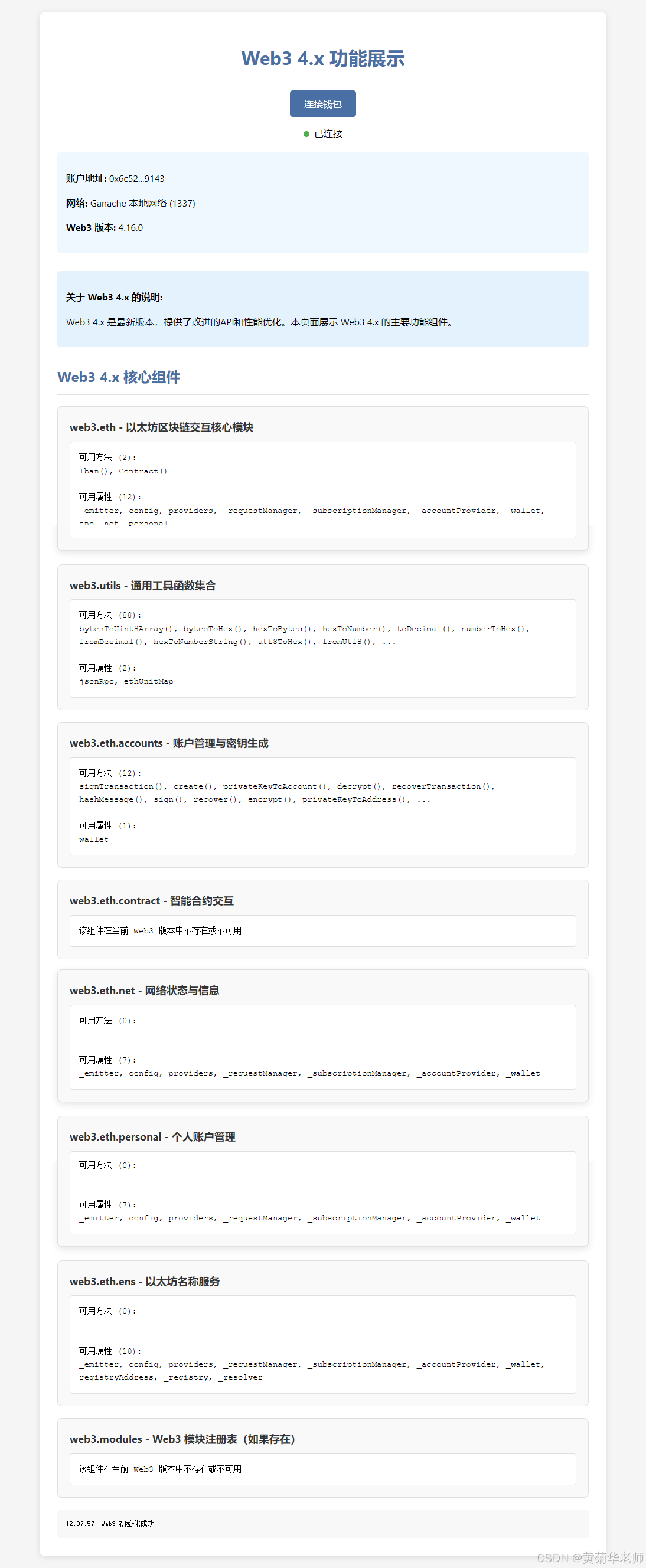
页面功能说明
这个页面提供了以下功能:
- 钱包连接:允许用户连接 MetaMask 钱包
- 自动检测:自动检测已连接的钱包账户
- Web3.modules 展示:以卡片形式展示 Web3 的各个核心模块
- 响应式设计:适配不同屏幕大小
- 实时更新:监听账户和网络变化,自动更新模块信息
- 用户友好:包含加载动画、状态指示器和错误提示
如何使用
-
使用HTTP 服务器方法启动服务:在浏览器中访问
http://localhost:端口/02.html -
点击 "连接钱包" 按钮,授权 MetaMask 连接
-
连接成功后,页面将显示 Web3 的各个核心模块及其详细信息
注意事项
- 确保已安装并启用 MetaMask 浏览器插件
- 必须在 HTTP 服务器环境下运行)才能正常使用 MetaMask
- 页面会自动适应不同的以太坊网络
- 如果遇到问题,可以查看浏览器控制台获取详细错误信息
代码
html
<!DOCTYPE html>
<html lang="zh-CN">
<head>
<meta charset="UTF-8">
<meta name="viewport" content="width=device-width, initial-scale=1.0">
<title>Web3 4.x 功能展示</title>
<!-- 使用最新的Web3 4.x版本 -->
<script src="https://cdn.jsdelivr.net/npm/web3@latest/dist/web3.min.js"></script>
<style>
body { font-family: 'Segoe UI', Tahoma, Geneva, Verdana, sans-serif; background-color: #f5f5f5; margin: 0; padding: 20px; line-height: 1.6; }
.container { max-width: 900px; margin: 0 auto; background-color: #fff; padding: 30px; border-radius: 10px; box-shadow: 0 2px 10px rgba(0, 0, 0, 0.1); }
h1 { color: #4a6fa5; text-align: center; margin-bottom: 30px; }
.wallet-section { text-align: center; margin-bottom: 30px; }
.connect-btn { background-color: #4a6fa5; color: white; border: none; padding: 12px 24px; font-size: 16px; border-radius: 5px; cursor: pointer; transition: background-color 0.3s ease; }
.connect-btn:hover { background-color: #3a5886; }
.wallet-info { margin-top: 20px; padding: 15px; background-color: #f0f8ff; border-radius: 5px; text-align: left; }
.modules-section { margin-top: 30px; }
h2 { color: #4a6fa5; border-bottom: 2px solid #e0e0e0; padding-bottom: 10px; }
.module-card { background-color: #f9f9f9; border: 1px solid #e0e0e0; border-radius: 8px; padding: 20px; margin-bottom: 20px; transition: transform 0.2s ease, box-shadow 0.2s ease; }
.module-card:hover { transform: translateY(-3px); box-shadow: 0 4px 12px rgba(0, 0, 0, 0.1); }
.module-name { font-weight: bold; font-size: 18px; color: #333; margin-bottom: 10px; }
.module-details { background-color: #fff; padding: 15px; border-radius: 5px; border: 1px solid #e0e0e0; white-space: pre-wrap; font-family: 'Courier New', Courier, monospace; font-size: 14px; max-height: 300px; overflow-y: auto; }
.error-message { color: #d32f2f; background-color: #ffebee; padding: 10px; border-radius: 5px; margin-top: 10px; }
.status-indicator { display: inline-block; width: 10px; height: 10px; border-radius: 50%; margin-right: 8px; }
.status-connected { background-color: #4caf50; }
.status-disconnected { background-color: #f44336; }
.loading { display: inline-block; width: 20px; height: 20px; border: 3px solid #f3f3f3; border-top: 3px solid #4a6fa5; border-radius: 50%; animation: spin 1s linear infinite; }
@keyframes spin { 0% { transform: rotate(0deg); } 100% { transform: rotate(360deg); } }
.info-box { background-color: #e3f2fd; padding: 15px; border-radius: 5px; margin: 15px 0; }
</style>
</head>
<body>
<div class="container">
<h1>Web3 4.x 功能展示</h1>
<!-- 钱包连接区域 -->
<div class="wallet-section">
<button id="connectWalletBtn" class="connect-btn">连接钱包</button>
<div id="walletStatus" style="margin-top: 15px;">
<span class="status-indicator status-disconnected"></span>未连接钱包
</div>
<div id="walletInfo" class="wallet-info" style="display: none;">
<p><strong>账户地址:</strong> <span id="accountAddress"></span></p>
<p><strong>网络:</strong> <span id="networkName"></span> (<span id="networkId"></span>)</p>
<p><strong>Web3 版本:</strong> <span id="web3Version">加载中...</span></p>
</div>
</div>
<div class="info-box">
<p><strong>关于 Web3 4.x 的说明:</strong></p>
<p>Web3 4.x 是最新版本,提供了改进的API和性能优化。本页面展示 Web3 4.x 的主要功能组件。</p>
</div>
<!-- Web3 核心组件展示区域 -->
<div class="modules-section">
<h2>Web3 4.x 核心组件</h2>
<div id="modulesContainer" style="display: none;">
<!-- 组件信息将在这里动态生成 -->
</div>
<div id="loadingIndicator" style="text-align: center; margin: 20px 0; display: none;">
<div class="loading"></div>
<p>正在加载 Web3 组件信息...</p>
</div>
<div id="noModulesMessage" class="error-message" style="display: none;">
请先连接钱包以查看 Web3 组件信息。
</div>
<div id="debugInfo" style="margin-top: 20px; padding: 15px; background-color: #f8f8f8; border-radius: 5px; font-family: monospace; font-size: 12px; display: none;"></div>
</div>
<!-- 错误信息展示区域 -->
<div id="errorContainer" class="error-message" style="display: none;"></div>
</div>
<script>
let web3 = null;
let currentAccount = null;
// 初始化页面
window.addEventListener('load', async () => {
// 检查 MetaMask 是否安装
if (typeof window.ethereum !== 'undefined') {
console.log('MetaMask 已安装');
document.getElementById('connectWalletBtn').addEventListener('click', connectWallet);
// 显示 Web3 版本信息
try {
if (window.Web3 && window.Web3.version) {
document.getElementById('web3Version').textContent = window.Web3.version;
} else {
// 尝试直接从web3实例获取版本
if (typeof Web3 !== 'undefined') {
const tempWeb3 = new Web3();
if (tempWeb3.version && tempWeb3.version.api) {
document.getElementById('web3Version').textContent = tempWeb3.version.api;
} else {
document.getElementById('web3Version').textContent = '4.x (版本信息获取失败)';
}
} else {
document.getElementById('web3Version').textContent = '未知版本';
}
}
} catch (e) {
document.getElementById('web3Version').textContent = '无法获取版本';
}
// 自动检测已连接的钱包
try {
const accounts = await ethereum.request({ method: 'eth_accounts' });
if (accounts.length > 0) {
currentAccount = accounts[0];
initWeb3();
updateWalletInfo();
showWeb3Components();
} else {
document.getElementById('noModulesMessage').style.display = 'block';
}
} catch (error) {
console.error('自动检测钱包失败:', error);
showDebugInfo('自动检测钱包失败: ' + error.message);
}
} else {
showError('未检测到 MetaMask 钱包。请安装 MetaMask 浏览器插件后刷新页面。');
document.getElementById('connectWalletBtn').disabled = true;
}
});
// 连接钱包
async function connectWallet() {
try {
document.getElementById('loadingIndicator').style.display = 'block';
const accounts = await ethereum.request({ method: 'eth_requestAccounts' });
currentAccount = accounts[0];
initWeb3();
updateWalletInfo();
showWeb3Components();
} catch (error) {
console.error('连接钱包失败:', error);
showError('连接钱包失败: ' + error.message);
showDebugInfo('连接钱包错误: ' + error.message);
} finally {
document.getElementById('loadingIndicator').style.display = 'none';
}
}
// 初始化 Web3
function initWeb3() {
try {
if (window.ethereum) {
// Web3 4.x 的初始化方式
web3 = new Web3(window.ethereum);
showDebugInfo('Web3 初始化成功');
// 监听账户变化 - Web3 4.x 的事件监听方式
ethereum.on('accountsChanged', (accounts) => {
if (accounts.length > 0) {
currentAccount = accounts[0];
updateWalletInfo();
showWeb3Components();
} else {
currentAccount = null;
updateWalletInfo();
document.getElementById('modulesContainer').style.display = 'none';
document.getElementById('noModulesMessage').style.display = 'block';
}
});
// 监听网络变化
ethereum.on('chainChanged', (chainId) => {
updateWalletInfo();
showWeb3Components();
});
}
} catch (error) {
console.error('Web3 初始化失败:', error);
showError('Web3 初始化失败: ' + error.message);
showDebugInfo('Web3 初始化错误: ' + error.message);
}
}
// 更新钱包信息
async function updateWalletInfo() {
if (currentAccount && web3) {
try {
// Web3 4.x 可能使用 web3.eth.getChainId()
let networkId;
try {
networkId = await web3.eth.getChainId();
} catch {
// 降级方案
networkId = await web3.eth.net.getId();
}
const networkName = getNetworkName(networkId);
document.getElementById('walletStatus').innerHTML =
'<span class="status-indicator status-connected"></span>已连接';
document.getElementById('accountAddress').textContent = formatAddress(currentAccount);
document.getElementById('networkId').textContent = networkId;
document.getElementById('networkName').textContent = networkName;
document.getElementById('walletInfo').style.display = 'block';
} catch (error) {
console.error('更新钱包信息失败:', error);
showDebugInfo('更新钱包信息错误: ' + error.message);
}
} else {
document.getElementById('walletStatus').innerHTML =
'<span class="status-indicator status-disconnected"></span>未连接钱包';
document.getElementById('walletInfo').style.display = 'none';
}
}
// 显示 Web3 核心组件
function showWeb3Components() {
// 清空之前的内容
const container = document.getElementById('modulesContainer');
container.innerHTML = '';
if (!web3) {
document.getElementById('modulesContainer').style.display = 'none';
document.getElementById('noModulesMessage').style.display = 'block';
showDebugInfo('Web3 实例未初始化');
return;
}
try {
document.getElementById('loadingIndicator').style.display = 'block';
document.getElementById('noModulesMessage').style.display = 'none';
// Web3 4.x 的核心组件
const coreComponents = [
{ name: 'web3.eth', desc: '以太坊区块链交互核心模块' },
{ name: 'web3.utils', desc: '通用工具函数集合' },
{ name: 'web3.eth.accounts', desc: '账户管理与密钥生成' },
{ name: 'web3.eth.contract', desc: '智能合约交互' },
{ name: 'web3.eth.net', desc: '网络状态与信息' },
{ name: 'web3.eth.personal', desc: '个人账户管理' },
{ name: 'web3.eth.ens', desc: '以太坊名称服务' },
// Web3 4.x 可能新增的组件
{ name: 'web3.modules', desc: 'Web3 模块注册表(如果存在)' }
];
// 遍历并显示每个核心组件
coreComponents.forEach((component) => {
try {
const moduleCard = document.createElement('div');
moduleCard.className = 'module-card';
const moduleNameEl = document.createElement('div');
moduleNameEl.className = 'module-name';
moduleNameEl.textContent = `${component.name} - ${component.desc}`;
const moduleDetailsEl = document.createElement('div');
moduleDetailsEl.className = 'module-details';
// 尝试获取组件的详细信息
try {
let componentInfo = '';
// 根据组件名称获取实际对象
let componentObj = null;
if (component.name.includes('.')) {
const parts = component.name.split('.');
componentObj = web3;
for (let i = 1; i < parts.length; i++) {
if (componentObj && typeof componentObj[parts[i]] !== 'undefined') {
componentObj = componentObj[parts[i]];
} else {
componentObj = null;
break;
}
}
}
if (componentObj === null || componentObj === undefined) {
componentInfo = '该组件在当前 Web3 版本中不存在或不可用';
} else if (typeof componentObj === 'object') {
try {
// 显示对象的主要方法和属性
const keys = Object.keys(componentObj);
const methods = [];
const props = [];
keys.forEach(key => {
if (typeof componentObj[key] === 'function') {
methods.push(key + '()');
} else {
props.push(key);
}
});
componentInfo = `可用方法 (${methods.length}):\n${methods.slice(0, 10).join(', ')}${methods.length > 10 ? ', ...' : ''}\n\n可用属性 (${props.length}):\n${props.slice(0, 10).join(', ')}${props.length > 10 ? ', ...' : ''}`;
} catch (e) {
componentInfo = '对象信息获取错误: ' + e.message;
}
} else if (typeof componentObj === 'function') {
componentInfo = componentObj.toString().substring(0, 300) + '...';
} else {
componentInfo = String(componentObj);
}
moduleDetailsEl.textContent = componentInfo;
} catch (e) {
moduleDetailsEl.textContent = '无法获取组件详细信息: ' + e.message;
}
moduleCard.appendChild(moduleNameEl);
moduleCard.appendChild(moduleDetailsEl);
container.appendChild(moduleCard);
} catch (e) {
console.error(`处理组件 ${component.name} 时出错:`, e);
showDebugInfo(`处理组件 ${component.name} 时出错: ${e.message}`);
}
});
// 特别检查 web3.modules 是否存在
if (web3.modules) {
try {
const modulesCard = document.createElement('div');
modulesCard.className = 'module-card';
modulesCard.style.backgroundColor = '#e8f5e9'; // 突出显示
const modulesNameEl = document.createElement('div');
modulesNameEl.className = 'module-name';
modulesNameEl.textContent = 'web3.modules 存在!';
const modulesDetailsEl = document.createElement('div');
modulesDetailsEl.className = 'module-details';
try {
// 尝试显示 modules 内容
const modulesInfo = JSON.stringify(web3.modules, null, 2);
modulesDetailsEl.textContent = modulesInfo;
} catch (e) {
modulesDetailsEl.textContent = 'modules 对象序列化错误: ' + e.message;
}
modulesCard.appendChild(modulesNameEl);
modulesCard.appendChild(modulesDetailsEl);
container.insertBefore(modulesCard, container.firstChild);
} catch (e) {
console.error('显示 web3.modules 时出错:', e);
}
}
container.style.display = 'block';
} catch (error) {
console.error('显示 Web3 组件失败:', error);
showError('显示 Web3 组件失败: ' + error.message);
showDebugInfo('显示 Web3 组件错误: ' + error.message);
document.getElementById('noModulesMessage').style.display = 'block';
} finally {
document.getElementById('loadingIndicator').style.display = 'none';
}
}
// 显示调试信息
function showDebugInfo(message) {
const debugEl = document.getElementById('debugInfo');
debugEl.style.display = 'block';
debugEl.textContent += new Date().toLocaleTimeString() + ': ' + message + '\n';
// 自动滚动到底部
debugEl.scrollTop = debugEl.scrollHeight;
}
// 辅助函数:获取网络名称
function getNetworkName(networkId) {
const networks = {
1: '以太坊主网',
3: 'Ropsten 测试网',
4: 'Rinkeby 测试网',
5: 'Goerli 测试网',
42: 'Kovan 测试网',
1337: 'Ganache 本地网络',
11155111: 'Sepolia 测试网'
};
return networks[networkId] || '未知网络';
}
// 辅助函数:格式化地址显示
function formatAddress(address) {
return address.substring(0, 6) + '...' + address.substring(address.length - 4);
}
// 显示错误信息
function showError(message) {
const errorContainer = document.getElementById('errorContainer');
errorContainer.textContent = message;
errorContainer.style.display = 'block';
// 5秒后自动隐藏错误信息
setTimeout(() => {
errorContainer.style.display = 'none';
}, 5000);
}
</script>
</body>
</html>