华为设备配置练习(七)VRRP 配置
一、拓扑结构
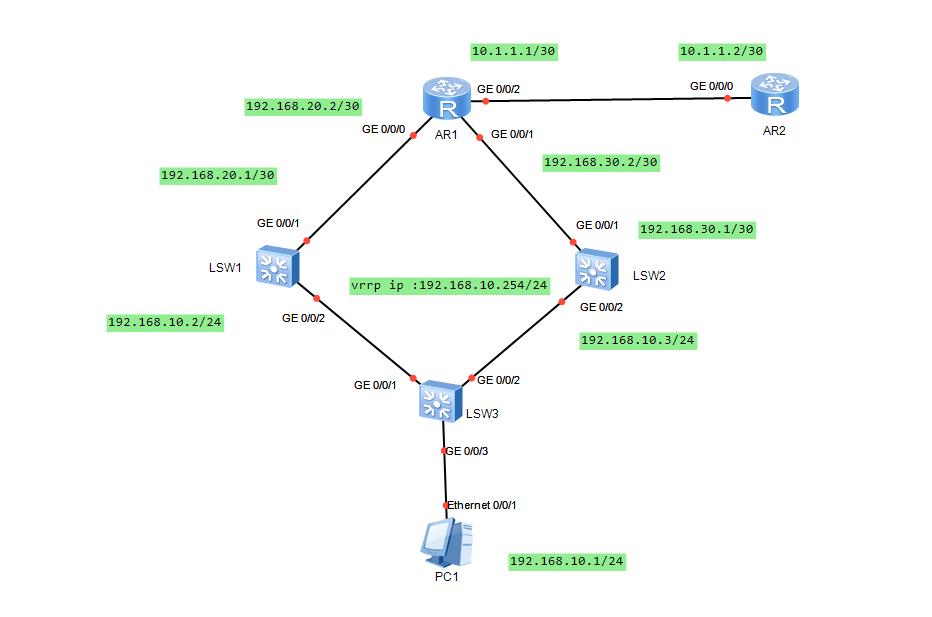
二、基础配置
1. PC配置
IP地址:192.168.10.1/24
网关:192.168.10.254
2. SW3 配置
<Huawei>system-view
[Huawei]sysname sw3
[sw3]vlan 10                                              #创建vlan
[sw3-vlan10]quit
[sw3]interface g0/0/3
[sw3-GigabitEthernet0/0/3]port link-type access                         #设置端口链路类型
[sw3-GigabitEthernet0/0/3]port default vlan 10
[sw3-GigabitEthernet0/0/3]quit

[sw3]interface g0/0/1
[sw3-GigabitEthernet0/0/1]port link-type trunk
[sw3-GigabitEthernet0/0/1]port trunk all
[sw3-GigabitEthernet0/0/1]port trunk allow-pass vlan all
[sw3-GigabitEthernet0/0/1]quit

[sw3]interface g0/0/2
[sw3-GigabitEthernet0/0/2]port link-type trunk
[sw3-GigabitEthernet0/0/2]port trunk all
[sw3-GigabitEthernet0/0/2]port trunk allow-pass vlan all
[sw3-GigabitEthernet0/0/2]quit
3. SW1 配置
<Huawei>system-view
[Huawei]sysname sw1
[sw1]vlan batch 10 20
[sw1]interface vlan 10
[sw1-Vlanif10]ip address 192.168.10.2 24                                #配置vlanif IP地址
[sw1-Vlanif10]quit

[sw1]interface vlan 20
[sw1-Vlanif20]ip address 192.168.20.1 30
[sw1-Vlanif20]quit

[sw1]interface g0/0/2
[sw1-GigabitEthernet0/0/2]port link-type trunk
[sw1-GigabitEthernet0/0/2]port trunk all
[sw1-GigabitEthernet0/0/2]port trunk allow-pass vlan all
[sw1-GigabitEthernet0/0/2]quit

[sw1]interface g0/0/1
[sw1-GigabitEthernet0/0/1]port link-type access
[sw1-GigabitEthernet0/0/1]port default vlan 20
[sw1-GigabitEthernet0/0/1]quit
4. SW2 配置
<Huawei>system-view
[Huawei]sysname sw2
[sw2]vlan batch 10 30

[sw2]interface vlan 10
[sw2-Vlanif10]ip address 192.168.10.3 24
[sw2-Vlanif10]quit

[sw2]interface vlan 30
[sw2-Vlanif30]ip add
[sw2-Vlanif30]ip address 192.168.30.1 30
[sw2-Vlanif30]quit

[sw2]interface g0/0/1
[sw2-GigabitEthernet0/0/1]port link-type access
[sw2-GigabitEthernet0/0/1]port default vlan 30
[sw2-GigabitEthernet0/0/1]quit

[sw2]interface g0/0/2
[sw2-GigabitEthernet0/0/2]port link-type trunk
[sw2-GigabitEthernet0/0/2]port trunk all
[sw2-GigabitEthernet0/0/2]port trunk allow-pass vlan all
[sw2-GigabitEthernet0/0/2]quit
5. 路由器 AR1 配置
<Huawei>system-view
[Huawei]sysname AR1

[AR1]interface g0/0/0
[AR1-GigabitEthernet0/0/0]ip add
[AR1-GigabitEthernet0/0/0]ip address 192.168.20.2 30
[AR1-GigabitEthernet0/0/0]quit

[AR1]interface g0/0/1
[AR1-GigabitEthernet0/0/1]ip address 192.168.30.2 30
[AR1-GigabitEthernet0/0/1]quit

[AR1]interface g0/0/2
[AR1-GigabitEthernet0/0/2]ip add
[AR1-GigabitEthernet0/0/2]ip address 10.1.1.1 30
[AR1-GigabitEthernet0/0/2]quit
6. 路由器 AR2 配置
<Huawei>system-view
[Huawei]sysname AR2
[AR2]interface g0/0/0
[AR2-GigabitEthernet0/0/0]ip address 10.1.1.2 30
[AR2-GigabitEthernet0/0/0]quit
三、路由配置
1. SW1 路由配置
[sw1]ip route-static 0.0.0.0 0.0.0.0 192.168.20.2 2. SW2 路由配置
[sw2]ip route-static 0.0.0.0 0.0.0.0 192.168.30.23. AR1 路由配置
[AR1]ip route-static 0.0.0.0 0.0.0.0 10.1.1.2

[AR1]ip route-static 192.168.10.0 255.255.255.0 192.168.20.1

[AR1]ip route-static 192.168.10.0 255.255.255.0 192.168.30.1
4. AR2 路由配置
[AR2]ip route-static 192.168.0.0 255.255.0.0 10.1.1.1四、VRRP 配置
1. SW1 VRRP 配置
[sw1]interface vlan 10
[sw1-Vlanif10]vrrp vrid 10 virtual-ip 192.168.10.254          #配置虚拟IP地址
[sw1-Vlanif10]vrrp vrid 10 priority 120                       #配置优先级
[sw1-Vlanif10]vrrp vrid 10 preempt-mode timer delay 20        #配置先占模式

[sw1]display vrrp brief                                #查看 VRRP
VRID  State        Interface                Type     Virtual IP
----------------------------------------------------------------
10    Master       Vlanif10                 Normal   192.168.10.254
----------------------------------------------------------------
Total:1     Master:1     Backup:0     Non-active:0
2. SW2 VRRP 配置
[sw2]interface vlan 10
[sw2-Vlanif10]vrrp vrid 10 virtual-ip 192.168.10.254
[sw2-Vlanif10]quit

[sw2]dis vrrp brief
VRID  State        Interface                Type     Virtual IP
----------------------------------------------------------------
10    Backup       Vlanif10                 Normal   192.168.10.254
----------------------------------------------------------------
Total:1     Master:0     Backup:1     Non-active:0
五、配置测试
1. 配置测试
PC>tracert 10.1.1.2

traceroute to 10.1.1.2, 8 hops max
(ICMP), press Ctrl+C to stop
 1  192.168.10.2   47 ms  47 ms  31 ms
 2  192.168.20.2   110 ms  78 ms  62 ms
 3  10.1.1.2   63 ms  62 ms  63 ms
2. 修改优先级测试
[sw2]interface vlan 10
[sw2-Vlanif10]vrrp vrid 10 priority 200
[sw2-Vlanif10]quit
[sw2]display vrrp brief
VRID  State        Interface                Type     Virtual IP
----------------------------------------------------------------
10    Master       Vlanif10                 Normal   192.168.10.254
----------------------------------------------------------------
Total:1     Master:1     Backup:0     Non-active:0

PC>tracert 10.1.1.2

traceroute to 10.1.1.2, 8 hops max
(ICMP), press Ctrl+C to stop
 1  192.168.10.3   31 ms  16 ms  47 ms
 2  192.168.30.2   78 ms  62 ms  79 ms
 3  10.1.1.2   62 ms  94 ms  62 ms