Qt 手写 HTTP 登录服务实战:从 0 到 1 实现前后端认证闭环
关键词 :Qt、QTcpServer、HTTP Server、登录认证、前后端分离
适用环境 :Qt 4.8+ / Qt 5、VS2010、Win7、IE
特点:无第三方库、纯 Qt、稳定可控
一、背景说明
本文将完整讲解:
- 如何使用
QTcpServer实现 HTTP 服务 - 如何处理
GET静态页面 +POST登录认证 - 如何与前端 HTML 完整打通
- 如何让 认证结果完全由后端控制
二、整体架构设计
1️⃣ 效果展示
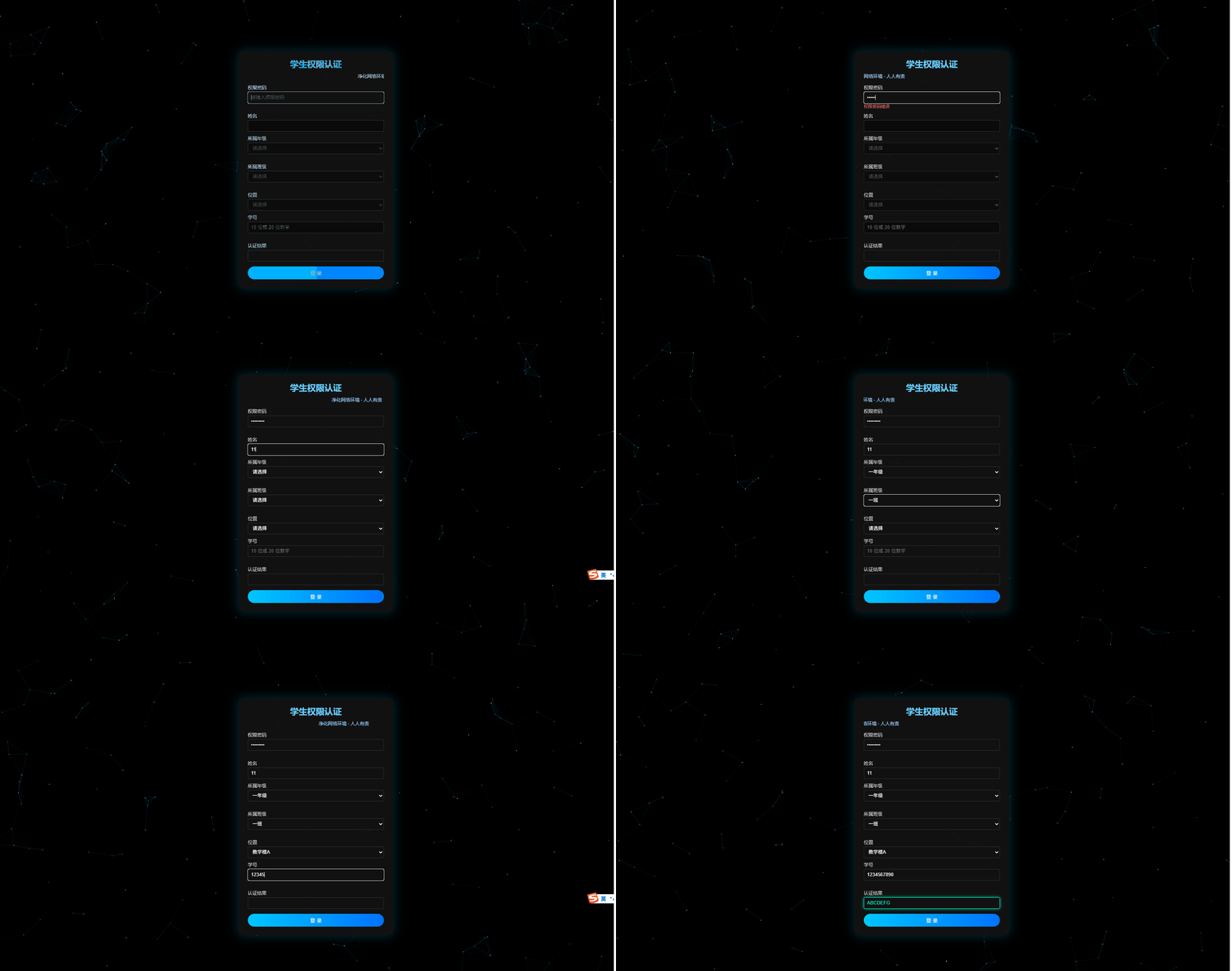
2️⃣ 功能拆分
| 功能 | 实现方式 |
|---|---|
| HTTP Server | QTcpServer |
| 静态页面 | GET /index.html |
| 登录认证 | POST /login |
| 数据格式 | x-www-form-urlencoded |
| 返回结果 | JSON |
三、Qt 手写 HTTP Server 实现
1️⃣ 继承 QTcpServer
设计原则:
- 前端只负责展示
- 后端完全控制认证逻辑
- HTTP 短连接,简单可靠
四、HttpServer 类设计(头文件)
HttpServer.h
cpp
#ifndef HTTPSERVER_H
#define HTTPSERVER_H

#include <QTcpServer>
#include <QTcpSocket>

/**
 * @brief HttpServer
 * @author yangyang
 *
 * @details
 * 一个基于 QTcpServer 的极简 HTTP 服务器实现,主要用于:
 *
 * 1️⃣ 提供静态网页访问(如 index.html)
 * 2️⃣ 接收浏览器发起的 POST /login 请求
 * 3️⃣ 解析 HTTP 报文并返回 JSON 格式的认证结果
 *
 * 【适用场景】
 * - 内嵌式 Web 管理页面
 * - 本地配置工具(Qt + HTML)
 * - BS 架构 Demo / 教学示例
 *
 * 【设计说明】
 * - 不依赖 QtWebEngine / CEF
 * - 手动解析 HTTP 请求头和 Body
 * - 单连接、短连接模型(请求完成即断开)
 * - 适合轻量级、低并发场景
 *
 * 【兼容性】
 * - Qt 4.8 及以上
 * - Windows / Linux
 */
class HttpServer : public QTcpServer
{
    Q_OBJECT
public:
    /**
     * @brief 构造函数
     * @param parent QObject 父对象,用于 Qt 对象树管理
     *
     * 仅完成基础初始化,不启动监听
     */
    explicit HttpServer(QObject *parent = 0);

    /**
     * @brief 启动 HTTP 服务
     * @param port 监听端口号
     * @return true  启动成功
     * @return false 启动失败(端口被占用等)
     *
     * 内部调用 QTcpServer::listen()
     */
    bool start(quint16 port);

protected:
    /**
     * @brief 新客户端连接回调
     * @param socketDescriptor 系统层 socket 描述符
     *
     * Qt 在有新 TCP 连接时自动调用该函数
     *
     * 常规处理流程:
     * 1️⃣ 创建 QTcpSocket
     * 2️⃣ setSocketDescriptor(socketDescriptor)
     * 3️⃣ 绑定 readyRead / disconnected 信号
     * 4️⃣ 等待客户端发送 HTTP 请求
     */
    void incomingConnection(qintptr socketDescriptor);

private slots:
    /**
     * @brief Socket 可读事件槽函数
     *
     * 当浏览器发送 HTTP 请求数据时触发:
     * - 读取完整 HTTP 请求
     * - 解析请求方法 / URL / Body
     * - 调用 handleRequest() 生成响应数据
     * - 通过 socket->write() 返回给客户端
     */
    void onReadyRead();

private:
    /**
     * @brief 处理 HTTP 请求核心函数
     * @param request 原始 HTTP 请求数据
     * @return 完整 HTTP 响应数据
     *
     * 主要逻辑:
     * - 解析请求行(GET / POST)
     * - 区分路径(/ 或 /login)
     * - GET  :返回 index.html
     * - POST :解析 JSON / 表单并返回认证结果
     */
    QByteArray handleRequest(const QByteArray &request);

    /**
     * @brief 生成标准 HTTP 响应报文
     * @param body 响应体内容(HTML / JSON)
     * @param type Content-Type 类型
     * @param code HTTP 状态码(默认 200)
     * @return 拼接好的 HTTP 响应
     *
     * 返回格式示例:
     * HTTP/1.1 200 OK
     * Content-Type: application/json
     * Content-Length: xxx
     *
     * { "result": 1 }
     */
    QByteArray makeResponse(const QByteArray &body,
                            const QByteArray &type,
                            int code = 200);

    /**
     * @brief 根据文件路径获取 MIME 类型
     * @param filePath 文件路径
     * @return 对应的 Content-Type
     *
     * 示例:
     * - .html -> text/html
     * - .css  -> text/css
     * - .js   -> application/javascript
     * - .json -> application/json
     */
    QByteArray contentType(const QString &filePath);
};

#endif // HTTPSERVER_H
HttpServer.cpp
cpp
#include "HttpServer.h"
#include <QFile>
#include <QUrlQuery>
#include <QDebug>
#include <QCoreApplication>

/**
 * @brief HttpServer 构造函数
 * @param parent 父对象
 *
 * 仅调用 QTcpServer 构造函数,
 * 不做任何网络监听操作
 */
HttpServer::HttpServer(QObject *parent)
    : QTcpServer(parent)
{
}

/**
 * @brief 启动 HTTP Server
 * @param port 监听端口
 * @return true 监听成功
 * @return false 监听失败(端口被占用等)
 *
 * 使用 Any 地址,允许本机及局域网访问
 */
bool HttpServer::start(quint16 port)
{
    return listen(QHostAddress::Any, port);
}

/**
 * @brief 新 TCP 客户端连接回调
 * @param socketDescriptor 系统 socket 描述符
 *
 * 当浏览器或客户端连接到服务器端口时,
 * Qt 框架会自动调用此函数
 *
 * 处理流程:
 * 1️⃣ 创建 QTcpSocket
 * 2️⃣ 将系统 socket 与 Qt socket 绑定
 * 3️⃣ 监听数据读取和断开连接信号
 */
void HttpServer::incomingConnection(qintptr socketDescriptor)
{
    QTcpSocket *socket = new QTcpSocket(this);

    // 将底层 socket 句柄绑定到 Qt 的 QTcpSocket
    socket->setSocketDescriptor(socketDescriptor);

    // 当有数据可读时,触发 onReadyRead()
    connect(socket, SIGNAL(readyRead()),
            this, SLOT(onReadyRead()));

    // 客户端断开后自动释放 socket
    connect(socket, SIGNAL(disconnected()),
            socket, SLOT(deleteLater()));
}

/**
 * @brief Socket 数据可读槽函数
 *
 * 浏览器发送完整 HTTP 请求后触发:
 * - 读取 HTTP 请求原始数据
 * - 交由 handleRequest() 处理
 * - 将响应写回客户端
 * - 主动断开连接(短连接)
 */
void HttpServer::onReadyRead()
{
    // 获取触发信号的 socket 对象
    QTcpSocket *socket = qobject_cast<QTcpSocket *>(sender());
    if (!socket) return;

    // 读取浏览器发送的完整 HTTP 请求
    QByteArray request = socket->readAll();

    // 打印原始 HTTP 请求,方便调试
    qDebug() << "\n----- REQUEST -----\n" << request;

    // 处理请求并生成响应
    QByteArray response = handleRequest(request);

    // 发送 HTTP 响应
    socket->write(response);

    // HTTP 短连接,发送完成后断开
    socket->disconnectFromHost();
}

/**
 * @brief HTTP 请求处理核心函数
 * @param req 原始 HTTP 请求数据
 * @return 完整 HTTP 响应
 *
 * 支持两类请求:
 * - POST /login   :处理登录认证
 * - GET  /xxx     :返回静态文件
 */
QByteArray HttpServer::handleRequest(const QByteArray &req)
{
    /* ================= POST /login ================= */
    if (req.startsWith("POST /login")) {

        // 找到 HTTP 头与 Body 的分隔位置
        int idx = req.indexOf("\r\n\r\n");

        // 提取 POST 请求体
        QByteArray body = req.mid(idx + 4);

        // 使用 QUrlQuery 解析表单数据
        QUrlQuery query;
        query.setQuery(body);

        // 获取表单字段
        QString pwd      = query.queryItemValue("password");
        QString name     = query.queryItemValue("name");
        QString grade    = query.queryItemValue("grade");
        QString cls      = query.queryItemValue("class");
        QString location = query.queryItemValue("location");
        QString sid      = query.queryItemValue("sid");

        // 输出认证信息,方便调试
        qDebug() << "AuthPwd:" << pwd
                 << "Name:" << name
                 << "Grade:" << grade
                 << "Class:" << cls
                 << "Location:" << location
                 << "SID:" << sid;

        int code = 0;      // 认证结果码
        QString msg;       // 返回信息

        // 简单权限密码校验
        if (pwd == "admin123") {
            code = 1;
            msg = QString::fromLocal8Bit("ABCDEFG");
        } else {
            msg = QString::fromLocal8Bit("认证失败,权限密码错误");
        }

        // 构造 JSON 返回结果
        QByteArray json =
            QString("{\"code\":%1,\"msg\":\"%2\"}")
            .arg(code)
            .arg(msg)
            .toUtf8();

        // 返回 JSON 响应
        return makeResponse(json,
            "application/json; charset=utf-8");
    }

    /* ================= GET 静态文件 ================= */
    if (req.startsWith("GET ")) {

        // 解析请求路径:GET /xxx HTTP/1.1
        int p1 = req.indexOf(' ');
        int p2 = req.indexOf(' ', p1 + 1);
        QByteArray path = req.mid(p1 + 1, p2 - p1 - 1);

        // 根路径默认返回 index.html
        if (path == "/")
            path = "/index.html";

        // 获取程序 EXE 所在目录
        QString baseDir =
            QCoreApplication::applicationDirPath();

        // 拼接静态文件完整路径
        QString filePath = baseDir + path;
        QFile file(filePath);

        // 文件不存在或打开失败
        if (!file.open(QIODevice::ReadOnly)) {
            return makeResponse(
                "404 Not Found",
                "text/plain", 404);
        }

        // 读取文件内容
        QByteArray data = file.readAll();
        file.close();

        // 返回文件数据
        return makeResponse(
            data,
            contentType(filePath));
    }

    // 未支持的请求类型
    return makeResponse("Bad Request",
                        "text/plain", 400);
}

/**
 * @brief 构造 HTTP 响应
 * @param body 响应体内容
 * @param type Content-Type
 * @param code HTTP 状态码
 * @return 完整 HTTP 响应数据
 *
 * 统一拼装 HTTP 响应头和 Body
 */
QByteArray HttpServer::makeResponse(
        const QByteArray &body,
        const QByteArray &type,
        int code)
{
    // 根据状态码生成状态行
    QByteArray status =
        (code == 200) ? "HTTP/1.1 200 OK\r\n"
                      : "HTTP/1.1 404 Not Found\r\n";

    return status +
        "Content-Type: " + type + "\r\n" +
        "Content-Length: " +
        QByteArray::number(body.size()) + "\r\n" +
        "Connection: close\r\n\r\n" +
        body;
}

/**
 * @brief 根据文件后缀返回 MIME 类型
 * @param filePath 文件路径
 * @return Content-Type 字符串
 *
 * 用于浏览器正确解析资源
 */
QByteArray HttpServer::contentType(const QString &filePath)
{
    if (filePath.endsWith(".html")) return "text/html; charset=utf-8";
    if (filePath.endsWith(".css"))  return "text/css";
    if (filePath.endsWith(".js"))   return "application/javascript";

    // 默认二进制流
    return "application/octet-stream";
}
main.cpp
cpp
#include <QCoreApplication>
#include "HttpServer.h"

/**
 * @brief 程序入口函数
 *
 * 本程序为一个基于 Qt 的控制台应用,
 * 用于启动一个轻量级 HTTP Server。
 *
 * 功能说明:
 * 1️⃣ 初始化 Qt 核心事件循环
 * 2️⃣ 创建 HttpServer 实例
 * 3️⃣ 监听指定端口(8085)
 * 4️⃣ 进入 Qt 事件循环,持续处理网络事件
 *
 * 适用场景:
 * - 本地配置 Web 服务
 * - Qt + HTML 内嵌管理页面
 * - 轻量级 BS 架构 Demo
 */
int main(int argc, char *argv[])
{
    /**
     * @brief Qt 核心应用对象
     *
     * QCoreApplication 提供:
     * - 事件循环
     * - 信号槽调度
     * - 网络事件分发
     *
     * 对于无界面的服务器程序,
     * 使用 QCoreApplication 即可
     */
    QCoreApplication a(argc, argv);

    /**
     * @brief 创建 HTTP Server 对象
     *
     * server 生命周期受 main 函数控制,
     * 程序退出时自动释放
     */
    HttpServer server;

    /**
     * @brief 启动服务器监听
     *
     * 监听端口:8085
     * - 可通过浏览器访问:http://localhost:8085
     *
     * 若端口被占用或权限不足,
     * 启动将失败
     */
    if (!server.start(8085)) {
        qDebug() << "Server start failed";
        return -1;
    }

    /**
     * @brief 进入 Qt 事件循环
     *
     * 程序将在此处阻塞运行,
     * 持续响应 HTTP 请求,
     * 直到调用 quit() 或程序退出
     */
    return a.exec();
}
pro文件
cpp
QT       += core gui network

greaterThan(QT_MAJOR_VERSION, 4): QT += widgets


CONFIG += c++11

# The following define makes your compiler emit warnings if you use
# any Qt feature that has been marked deprecated (the exact warnings
# depend on your compiler). Please consult the documentation of the
# deprecated API in order to know how to port your code away from it.
DEFINES += QT_DEPRECATED_WARNINGS

# You can also make your code fail to compile if it uses deprecated APIs.
# In order to do so, uncomment the following line.
# You can also select to disable deprecated APIs only up to a certain version of Qt.
#DEFINES += QT_DISABLE_DEPRECATED_BEFORE=0x060000    # disables all the APIs deprecated before Qt 6.0.0

SOURCES += \
    main.cpp \
    HttpServer.cpp

HEADERS += \
    HttpServer.h

# Default rules for deployment.
qnx: target.path = /tmp/$${TARGET}/bin
else: unix:!android: target.path = /opt/$${TARGET}/bin
!isEmpty(target.path): INSTALLS += target
---## 四、前端 HTML + JavaScript 实现详解
在本实战中,前端页面的职责非常明确:
✅ 负责数据采集与展示
❌ 不参与任何认证逻辑判断
所有认证结果,完全以服务端返回为准。
4.1 页面结构说明
前端页面主要由以下几部分组成:
| 模块 | 作用 |
|---|---|
| 粒子 Canvas | 提供动态背景效果 |
| 登录面板 | 输入权限密码、学生信息 |
| Tip 提示区 | 展示前端校验提示 |
| 认证结果区 | 展示后端返回的真实结果 |
4.2 认证结果输入框设计(只读)
html
<!DOCTYPE html>
<html lang="zh-CN">
<head>
<meta charset="UTF-8">

<!--
    页面标题
    浏览器标签页显示名称
-->
<title>学生权限认证系统</title>

<style>
/* =========================================================
 * 全局基础样式
 * ========================================================= */
html, body {
    margin: 0;
    padding: 0;
    width: 100%;
    height: 100%;
    overflow: hidden;            /* 禁止滚动条 */
    background: #000;            /* 黑色背景 */
    font-family: "Microsoft YaHei", Arial;
}

/* =========================================================
 * 粒子背景 Canvas
 * =========================================================
 * - fixed 固定全屏
 * - z-index:0 作为背景层
 */
canvas {
    position: fixed;
    left: 0;
    top: 0;
    display: block;
    z-index: 0;
}

/* =========================================================
 * 登录面板容器
 * ========================================================= */
.panel {
    position: absolute;
    left: 50%;
    top: 50%;
    width: 380px;
    padding: 20px 26px 24px;
    transform: translate(-50%, -50%);  /* 水平垂直居中 */
    background: rgba(20,20,20,0.85);   /* 半透明黑色 */
    border-radius: 10px;
    box-shadow: 0 0 30px rgba(0,200,255,0.25);
    color: #fff;
    z-index: 1;                        /* 位于粒子之上 */
}

/* 面板标题 */
.panel h2 {
    margin: 0 0 10px;
    text-align: center;
    color: #6cf;
}

/* 滚动提示信息 */
.marquee {
    font-size: 13px;
    color: #9cf;
    margin-bottom: 12px;
}

/* =========================================================
 * 表单元素
 * ========================================================= */
label {
    display: block;
    margin-top: 10px;
    font-size: 13px;
    color: #ccc;
}

/* 输入框 / 下拉框统一样式 */
input, select {
    width: 100%;
    height: 32px;
    margin-top: 4px;
    padding: 0 8px;
    box-sizing: border-box;
    background: #111;
    border: 1px solid #333;
    border-radius: 4px;
    color: #fff;
}

/* 禁用状态样式 */
input[disabled], select[disabled] {
    background: #0a0a0a;
    color: #777;
}

/* =========================================================
 * 提示信息
 * =========================================================
 * - 不可交互
 * - 不可选中
 */
.tip {
    height: 16px;
    font-size: 12px;
    color: #ff6666;
    pointer-events: none;
    user-select: none;
}

/* =========================================================
 * 认证结果样式
 * ========================================================= */
.result-ok {
    border-color: #00ffcc;
    color: #00ffcc;
    box-shadow: 0 0 8px rgba(0,255,204,0.8);
}

.result-fail {
    border-color: #ff4444;
    color: #ff4444;
    box-shadow: 0 0 8px rgba(255,68,68,0.8);
}

/* =========================================================
 * 登录按钮
 * ========================================================= */
button {
    width: 100%;
    height: 36px;
    margin-top: 14px;
    border: none;
    border-radius: 18px;
    background: linear-gradient(to right, #00c6ff, #0072ff);
    color: #fff;
    font-size: 14px;
    cursor: pointer;
}
</style>
</head>

<body>

<!-- =========================================================
     粒子背景 Canvas
     ========================================================= -->
<canvas id="canvas"></canvas>

<!-- =========================================================
     登录面板
     ========================================================= -->
<div class="panel">
    <h2>学生权限认证</h2>

    <!-- 滚动标语 -->
    <div class="marquee">
        <marquee>净化网络环境 · 人人有责</marquee>
    </div>

    <!-- 权限密码 -->
    <label>权限密码</label>
    <input id="pwd" type="password"
           placeholder="请输入权限密码"
           oninput="checkPwd()">
    <div id="pwdTip" class="tip"></div>

    <!-- 姓名 -->
    <label>姓名</label>
    <input id="name" disabled>

    <!-- 年级 -->
    <label>所属年级</label>
    <select id="grade" disabled onchange="clearTip('gradeTip')">
        <option value="">请选择</option>
        <option>一年级</option>
        <option>二年级</option>
        <option>三年级</option>
    </select>
    <div id="gradeTip" class="tip"></div>

    <!-- 班级 -->
    <label>所属班级</label>
    <select id="cls" disabled onchange="clearTip('clsTip')">
        <option value="">请选择</option>
        <option>一班</option>
        <option>二班</option>
        <option>三班</option>
    </select>
    <div id="clsTip" class="tip"></div>

    <!-- 位置 -->
    <label>位置</label>
    <select id="loc" disabled>
        <option value="">请选择</option>
        <option>教学楼A</option>
        <option>教学楼B</option>
        <option>实验楼</option>
    </select>

    <!-- 学号 -->
    <label>学号</label>
    <input id="sid" disabled
           placeholder="10 位或 20 位数字"
           oninput="clearTip('sidTip')">
    <div id="sidTip" class="tip"></div>

    <!-- 认证结果(只读) -->
    <label>认证结果</label>
    <input id="result" readonly tabindex="-1">

    <!-- 登录按钮 -->
    <button onclick="login()">登 录</button>
</div>

<script>
/* =========================================================
 * 粒子背景动画
 * =========================================================
 * - 使用 Canvas 绘制
 * - requestAnimationFrame 刷新
 */
(function () {
    var canvas = document.getElementById("canvas");
    var ctx = canvas.getContext("2d");

    /* 自适应窗口大小 */
    function resize() {
        canvas.width = document.documentElement.clientWidth;
        canvas.height = document.documentElement.clientHeight;
    }
    resize();
    window.onresize = resize;

    var DOT_COUNT = 160;   // 粒子数量
    var LINK_DIST = 90;    // 连线最大距离
    var dots = [];

    /* 粒子对象 */
    function Dot() {
        this.x = Math.random() * canvas.width;
        this.y = Math.random() * canvas.height;
        this.vx = (Math.random() - 0.5) * 0.6;
        this.vy = (Math.random() - 0.5) * 0.6;
        this.r  = Math.random() * 0.6 + 0.4;
    }

    Dot.prototype.move = function () {
        this.x += this.vx;
        this.y += this.vy;
        if (this.x < 0 || this.x > canvas.width) this.vx *= -1;
        if (this.y < 0 || this.y > canvas.height) this.vy *= -1;
    };

    Dot.prototype.draw = function () {
        ctx.beginPath();
        ctx.fillStyle = "rgba(255,255,255,0.8)";
        ctx.arc(this.x, this.y, this.r, 0, Math.PI * 2);
        ctx.fill();
    };

    /* 初始化粒子 */
    for (var i = 0; i < DOT_COUNT; i++) dots.push(new Dot());

    /* 动画主循环 */
    function draw() {
        ctx.clearRect(0, 0, canvas.width, canvas.height);

        for (var i = 0; i < dots.length; i++) {
            var d1 = dots[i];
            d1.move();

            /* 粒子连线 */
            for (var j = i + 1; j < dots.length; j++) {
                var d2 = dots[j];
                var dx = d1.x - d2.x;
                var dy = d1.y - d2.y;
                var dist = Math.sqrt(dx*dx + dy*dy);

                if (dist < LINK_DIST) {
                    ctx.strokeStyle =
                        "rgba(0,200,255," + (1 - dist / LINK_DIST) + ")";
                    ctx.lineWidth = 0.3;
                    ctx.beginPath();
                    ctx.moveTo(d1.x, d1.y);
                    ctx.lineTo(d2.x, d2.y);
                    ctx.stroke();
                }
            }
            d1.draw();
        }
        requestAnimationFrame(draw);
    }
    draw();
})();

/* =========================================================
 * 登录业务逻辑(与 Qt 后端强绑定)
 * ========================================================= */

/* 前端权限密码(仅用于交互控制) */
var AUTH_PWD = "admin123";

/* 控制表单是否可编辑 */
function setEditable(enable) {
    var ids = ["name","grade","cls","loc","sid"];
    for (var i = 0; i < ids.length; i++) {
        document.getElementById(ids[i]).disabled = !enable;
    }
}

/* 清空提示文本 */
function clearTip(id) {
    document.getElementById(id).innerText = "";
}

/* 权限密码输入检测 */
function checkPwd() {
    var pwd = document.getElementById("pwd").value;
    var tip = document.getElementById("pwdTip");
    tip.innerText = "";

    if (!pwd) {
        setEditable(false);
        tip.innerText = "请输入权限密码";
        return;
    }

    if (pwd === AUTH_PWD) {
        setEditable(true);
    } else {
        setEditable(false);
        tip.innerText = "权限密码错误";
    }
}

/* 表单合法性校验 */
function validateForm() {
    var ok = true;

    if (!document.getElementById("grade").value) {
        document.getElementById("gradeTip").innerText = "请选择所属年级";
        ok = false;
    }

    if (!document.getElementById("cls").value) {
        document.getElementById("clsTip").innerText = "请选择所属班级";
        ok = false;
    }

    var sid = document.getElementById("sid").value;
    if (!sid) {
        document.getElementById("sidTip").innerText = "学号不能为空";
        ok = false;
    } else if (!/^\d{10}$|^\d{20}$/.test(sid)) {
        document.getElementById("sidTip").innerText =
            "学号必须是 10 位或 20 位数字";
        ok = false;
    }
    return ok;
}

/* 登录提交 */
function login() {
    /* 权限密码不正确直接拦截 */
    if (document.getElementById("pwd").value !== AUTH_PWD) {
        document.getElementById("pwdTip").innerText =
            "权限密码错误,禁止登录";
        return;
    }

    /* 表单校验 */
    if (!validateForm()) return;

    /* AJAX 请求 Qt 后端 */
    var xhr = new XMLHttpRequest();
    xhr.open("POST", "/login", true);
    xhr.setRequestHeader(
        "Content-Type",
        "application/x-www-form-urlencoded");

    xhr.onreadystatechange = function () {
        if (xhr.readyState === 4 && xhr.status === 200) {
            var obj = JSON.parse(xhr.responseText);
            var result = document.getElementById("result");

            /* 认证结果完全由 Qt 后端返回 */
            result.value = obj.msg || "";

            /* 根据 code 高亮显示 */
            result.className =
                obj.code === 1
                ? "result-ok"
                : "result-fail";
        }
    };

    /* 与 Qt 后端字段完全一致 */
    var params =
        "password=" + encodeURIComponent(document.getElementById("pwd").value) +
        "&name="     + encodeURIComponent(document.getElementById("name").value) +
        "&grade="    + encodeURIComponent(document.getElementById("grade").value) +
        "&class="    + encodeURIComponent(document.getElementById("cls").value) +
        "&location=" + encodeURIComponent(document.getElementById("loc").value) +
        "&sid="      + encodeURIComponent(document.getElementById("sid").value);

    xhr.send(params);
}
</script>

</body>
</html>