==========为活动补充附加信息==========
八、利用资源文件配置字符串
1、Activity从strings.xml获取字符串,显示到TextView中
上下文Context类里有getString方法,就是从strings.xml中获取字符串的值。而Activity就是继承自Context
所以可以直接getString(id)
2、为什么把字符串放到strings.xml中
strings.xml是不需要编译的,而Java代码需要编译。配置文件可以随时改
3、例子
strings.xml
XML
<resources>
    <string name="app_name">chapter04</string>
    <string name="weather_str">晴天</string>
</resources>
ReadStringActivity.java
java
package com.example.chapter04;

import androidx.appcompat.app.AppCompatActivity;

import android.os.Bundle;
import android.widget.TextView;

public class ReadStringActivity extends AppCompatActivity {

    @Override
    protected void onCreate(Bundle savedInstanceState) {
        super.onCreate(savedInstanceState);
        setContentView(R.layout.activity_read_string);

        TextView tv_resource = findViewById(R.id.tv_resource);
        // 从strings.xml获取名叫weather_str的字符串值
        String value = getString(R.string.weather_str);
        tv_resource.setText(value);
    }
}
九、利用元数据传递配置信息
1、有的时候Activity配置信息不是放在strings.xml中,它会放到清单文件中
比如调用第三方的SDK
高德地图
友盟
微信登录
一般是把要验证的token值放在meta-data中
2、元数据是一种描述其它数据的数据,它相当于描述固定活动的参数信息
3、在Activity节点内部添加meta-data标签,通过属性name指定元数据的名称,通过属性value指定元数据的值
4、在代码中获取元数据
在Java代码中,获取元数据信息的步骤分为下列三步:
(1)调用getPackageManager方法获得当前应用的包管理器
(2)调用包管理器的getActivityInfo方法获得当前Activity的信息对象
(3)Activity信息对象的metaData是Bundle包裹类型,调用包裹对象的getString即可获得指定名称的参数值
5、例子
activity标签
XML
        <activity
            android:name=".MetaDataActivity"
            android:exported="true">
            <intent-filter>
                <action android:name="android.intent.action.MAIN" />

                <category android:name="android.intent.category.LAUNCHER" />
            </intent-filter>

            <meta-data android:name="weather" android:value="晴天"/>

        </activity>
MetaDataActivity.java
java
package com.example.chapter04;

import androidx.appcompat.app.AppCompatActivity;

import android.content.pm.ActivityInfo;
import android.content.pm.PackageManager;
import android.os.Bundle;
import android.widget.TextView;

public class MetaDataActivity extends AppCompatActivity {

    @Override
    protected void onCreate(Bundle savedInstanceState) {
        super.onCreate(savedInstanceState);
        setContentView(R.layout.activity_meta_data);

        TextView tv_meta = findViewById(R.id.tv_meta);
        // 获取应用包管理器
        PackageManager packageManager = getPackageManager();
        try {
            // 从应用包管理器中获取当前的活动信息
            ActivityInfo info = packageManager.getActivityInfo(getComponentName(), PackageManager.GET_META_DATA);
            // 获取活动附加的元数据信息
            Bundle bundle = info.metaData;
            String weather = bundle.getString("weather");
            tv_meta.setText(weather);
        } catch (PackageManager.NameNotFoundException e) {
            throw new RuntimeException(e);
        }

    }
}
十、给应用页面注册快捷方式
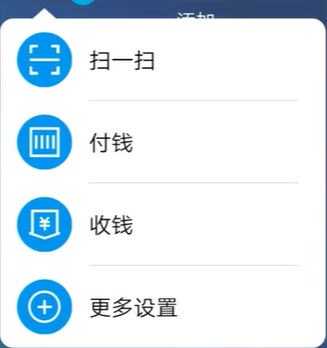
1、元数据不仅能传递简单的字符串参数,还能传送更复杂的资源数据,比如App的快捷方式菜单
2、添加文件,在res下新建xml文件夹,然后建立shortcuts.xml文件
XML
<?xml version="1.0" encoding="utf-8"?>
<shortcuts xmlns:android="http://schemas.android.com/apk/res/android">

    <shortcut
        android:shortcutId="first"
        android:enabled="true"
        android:icon="@mipmap/ic_launcher"
        android:shortcutShortLabel="@string/first_short"
        android:shortcutLongLabel="@string/first_long">

        <intent
            android:action="android.intent.action.VIEW"
            android:targetPackage="com.example.chapter04"
            android:targetClass="com.example.chapter04.ActStartActivity"/>
        <categories android:name="android.shortcut.conversation"/>

    </shortcut>

    <shortcut
        android:shortcutId="second"
        android:enabled="true"
        android:icon="@mipmap/ic_launcher"
        android:shortcutShortLabel="@string/second_short"
        android:shortcutLongLabel="@string/second_long">

        <intent
            android:action="android.intent.action.VIEW"
            android:targetPackage="com.example.chapter04"
            android:targetClass="com.example.chapter04.JumpFirstActivity"/>
        <categories android:name="android.shortcut.conversation"/>

    </shortcut>
</shortcuts>
给App添加两个快捷菜单,一个跳转到ActStartActivity,另一个跳转到JumpFirstActivity
3、在清单文件activity标签添加快捷方式元数据关联
<meta-data android:name="android.app.shortcuts" android:resource="@xml/shortcuts"/>
XML
        <activity
            android:name=".MetaDataActivity"
            android:exported="true">
            <intent-filter>
                <action android:name="android.intent.action.MAIN" />

                <category android:name="android.intent.category.LAUNCHER" />
            </intent-filter>

            <meta-data android:name="weather" android:value="晴天"/>
            <meta-data android:name="android.app.shortcuts" android:resource="@xml/shortcuts"/>

        </activity>
4、例子
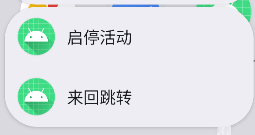
5、元数据的meta-data标签除了前面说到的name属性和value属性,还拥有resource属性,该属性可指定一个XML文件,表示元数据想要的复杂信息保存于XML数据之中
6、利用元数据配置快捷菜单的步骤如下
(1)在res/values/strings.xml添加各个菜单项名称的字符串配置
(2)创建res/xml/shortcuts.xml,在该文件中填入各组菜单项的快捷方式定义(每个菜单对应哪个活动页面)
(3)给activity节点注册元数据的快捷菜单配置