文章目录
- 相关教程
- 相关文献
- [MText 代码示例](#MText 代码示例)
- [MText 常见属性](#MText 常见属性)
-
- 一、内容与格式
- 二、几何与定位
- 三、段落与行距
- 四、背景与视觉效果
- 五、列(Columns)
- 六、注释性(Annotative)
- [七、通用实体属性(继承自 Entity/Object)](#七、通用实体属性(继承自 Entity/Object))
- 八、其他说明
- 总结建议
作者:小猪快跑
基础数学&计算数学,从事优化领域8年+,主要研究方向:MIP求解器、整数规划、随机规划、智能优化算法
笔者也是从零开始学习并使用 c# & Python 二次开发 AutoCad 2025。本系列教程会从最基础的项目构建开始,到最终完成复杂插件开发。
如有错误,欢迎指正。如有更好的算法,也欢迎交流!!!------@小猪快跑
相关教程
C#
- 【AutoCad 2025】【C#】零基础教程(一)------Rider 构建 HELLO 插件
- 【AutoCad 2025】【C#】零基础教程(二)------遍历 Entity 插件 =》 AutoCAD 核心对象层级结构
- 【AutoCad 2025】【C#】零基础教程(三)------获取选中的 Entity 插件 =》 Entity 结构层次(带中文注释)
- 【AutoCad 2025】【C#】零基础教程(四)------MText 常见属性
Python
ObjectARX
相关文献
- AutoCAD 2025 .NET Developer's Guide:
Help > Developer Documentationin AutoCAD - ObjectARX SDK for AutoCAD 2025:
https://www.autodesk.com/developer-network/platform-technologies/autocad/objectarx - AutoCAD API | Autodesk Platform Services (APS)
- My First AutoCAD Plug-in Overview
- AutoCAD样例文件
- AutoCAD ObjectARX SDK downloads | Autodesk Platform Services
MText 代码示例
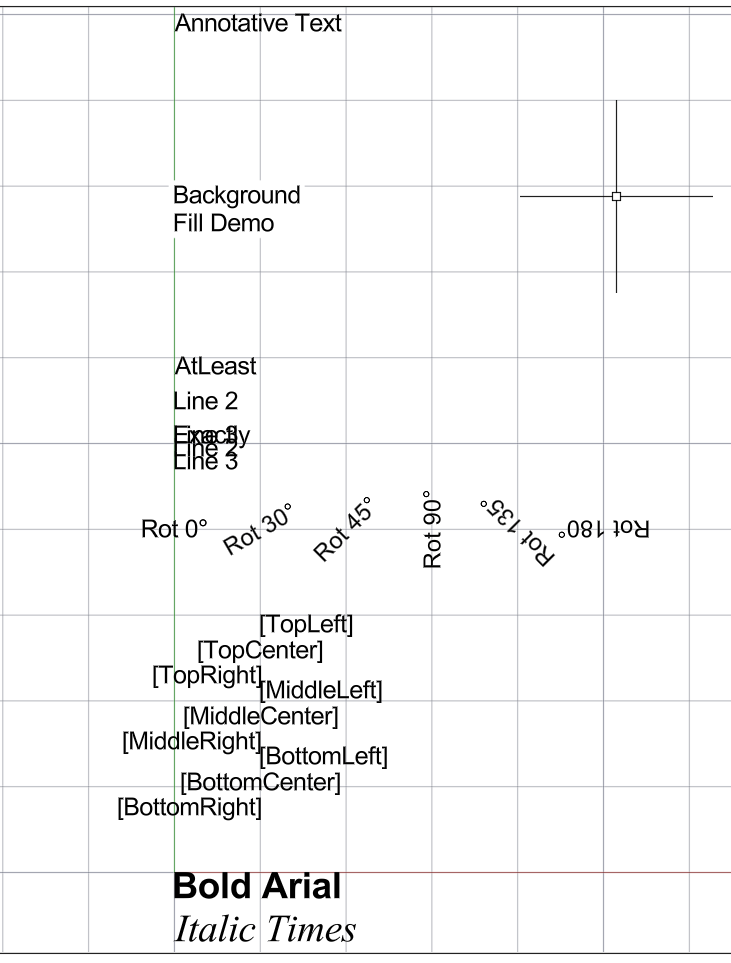
对于 MText 常用变换,本文给出了一个可运行的代码方便读者理解。
| 命令 | 功能 |
|---|---|
MTEXT_DEMO_1 |
字体与内容格式 |
MTEXT_DEMO_2 |
9 种对齐方式 |
MTEXT_DEMO_3 |
旋转角度 |
MTEXT_DEMO_4 |
行距(AtLeast vs Exactly) |
MTEXT_DEMO_5 |
背景填充 |
MTEXT_DEMO_6 |
注释性 |
csharp
using Autodesk.AutoCAD.DatabaseServices;
using Autodesk.AutoCAD.Geometry;
using Autodesk.AutoCAD.Runtime;
using Autodesk.AutoCAD.Colors;
using Application = Autodesk.AutoCAD.ApplicationServices.Core.Application;

[assembly: CommandClass(typeof(MyAutoCAD2025Plugin.Demo1ContentAndStyle))]
[assembly: CommandClass(typeof(MyAutoCAD2025Plugin.Demo2Attachment))]
[assembly: CommandClass(typeof(MyAutoCAD2025Plugin.Demo3Rotation))]
[assembly: CommandClass(typeof(MyAutoCAD2025Plugin.Demo4LineSpacing))]
[assembly: CommandClass(typeof(MyAutoCAD2025Plugin.Demo5Background))]
[assembly: CommandClass(typeof(MyAutoCAD2025Plugin.Demo6Annotative))]
[assembly: CommandClass(typeof(MyAutoCAD2025Plugin.MTextDemos))]

namespace MyAutoCAD2025Plugin;

internal static class MTextHelper
{
    public static MText CreateAndAddMText(Transaction tr, Point3d location, string contents = "Sample Text")
    {
        var db = HostApplicationServices.WorkingDatabase;

        // ✅ 正确获取 Model Space ObjectId(AutoCAD 2025 方式)
        var bt = (BlockTable)tr.GetObject(db.BlockTableId, OpenMode.ForRead);
        var msId = bt[BlockTableRecord.ModelSpace];
        var ms = (BlockTableRecord)tr.GetObject(msId, OpenMode.ForWrite);

        var mText = new MText
        {
            Contents = contents,
            TextHeight = 2.0,
            Location = location,
            Attachment = AttachmentPoint.TopLeft,
            Width = 0
        };

        ms.AppendEntity(mText);
        tr.AddNewlyCreatedDBObject(mText, true);
        return mText;
    }
}

// ===== 运行所有 Demo =====
public class MTextDemos
{
    [CommandMethod("MTEXT_DEMOS")]
    public static void Run()
    {
        Demo1ContentAndStyle.Run();
        Demo2Attachment.Run();
        Demo3Rotation.Run();
        Demo4LineSpacing.Run();
        Demo5Background.Run();
        Demo6Annotative.Run();
    }
}

// ===== 1. 内容与样式 =====
public class Demo1ContentAndStyle
{
    [CommandMethod("MTEXT_DEMO_1")]
    public static void Run()
    {
        var doc = Application.DocumentManager.MdiActiveDocument;
        var ed = doc.Editor;
        try
        {
            using var tr = doc.Database.TransactionManager.StartTransaction();
            var mText = MTextHelper.CreateAndAddMText(tr, new Point3d(0, 0, 0),
                @"{\fArial|b1;Bold Arial}\P{\fTimes New Roman|i1;Italic Times}");
            mText.TextHeight = 3.0;
            tr.Commit();
            ed.WriteMessage("\n✅ MTEXT_DEMO_1: 内容格式与字体");
        }
        catch (System.Exception ex)
        {
            ed.WriteMessage($"\n❌ Error: {ex.Message}");
        }
    }
}

// ===== 2. 对齐点 =====
public class Demo2Attachment
{
    [CommandMethod("MTEXT_DEMO_2")]
    public static void Run()
    {
        var doc = Application.DocumentManager.MdiActiveDocument;
        var ed = doc.Editor;
        try
        {
            using var tr = doc.Database.TransactionManager.StartTransaction();
            double y = 30;
            foreach (var att in new[]
                     {
                         AttachmentPoint.TopLeft, AttachmentPoint.TopCenter, AttachmentPoint.TopRight,
                         AttachmentPoint.MiddleLeft, AttachmentPoint.MiddleCenter, AttachmentPoint.MiddleRight,
                         AttachmentPoint.BottomLeft, AttachmentPoint.BottomCenter, AttachmentPoint.BottomRight
                     })
            {
                var mText = MTextHelper.CreateAndAddMText(tr, new Point3d(10, y, 0), $"[{att}]");
                mText.Attachment = att;
                mText.Width = 8;
                y -= 3;
            }

            tr.Commit();
            ed.WriteMessage("\n✅ MTEXT_DEMO_2: 9种对齐方式");
        }
        catch (System.Exception ex)
        {
            ed.WriteMessage($"\n❌ Error: {ex.Message}");
        }
    }
}

// ===== 3. 旋转 =====
public class Demo3Rotation
{
    [CommandMethod("MTEXT_DEMO_3")]
    public static void Run()
    {
        var doc = Application.DocumentManager.MdiActiveDocument;
        var ed = doc.Editor;
        try
        {
            using var tr = doc.Database.TransactionManager.StartTransaction();
            double x = 0;
            foreach (double deg in new[] { 0, 30, 45, 90, 135, 180 })
            {
                var mText = MTextHelper.CreateAndAddMText(tr, new Point3d(x, 40, 0), $"Rot {deg}°");
                mText.Rotation = deg * Math.PI / 180.0;
                mText.Attachment = AttachmentPoint.MiddleCenter;
                x += 10;
            }

            tr.Commit();
            ed.WriteMessage("\n✅ MTEXT_DEMO_3: 旋转效果");
        }
        catch (System.Exception ex)
        {
            ed.WriteMessage($"\n❌ Error: {ex.Message}");
        }
    }
}

// ===== 4. 行距 =====
public class Demo4LineSpacing
{
    [CommandMethod("MTEXT_DEMO_4")]
    public static void Run()
    {
        var doc = Application.DocumentManager.MdiActiveDocument;
        var ed = doc.Editor;
        try
        {
            using var tr = doc.Database.TransactionManager.StartTransaction();
            double y = 60;
            var m1 = MTextHelper.CreateAndAddMText(tr, new Point3d(0, y, 0), @"AtLeast\PLine 2\PLine 3");
            m1.Width = 10;
            m1.LineSpacingStyle = LineSpacingStyle.AtLeast;
            m1.LineSpaceDistance = 4.0;
            y -= 8;
            var m2 = MTextHelper.CreateAndAddMText(tr, new Point3d(0, y, 0), @"Exactly\PLine 2\PLine 3");
            m2.Width = 10;
            m2.LineSpacingStyle = LineSpacingStyle.Exactly;
            m2.LineSpaceDistance = 1.5;
            tr.Commit();
            ed.WriteMessage("\n✅ MTEXT_DEMO_4: 行距对比");
        }
        catch (System.Exception ex)
        {
            ed.WriteMessage($"\n❌ Error: {ex.Message}");
        }
    }
}

// ===== 5. 背景填充 =====
public class Demo5Background
{
    [CommandMethod("MTEXT_DEMO_5")]
    public static void Run()
    {
        var doc = Application.DocumentManager.MdiActiveDocument;
        var ed = doc.Editor;
        try
        {
            using var tr = doc.Database.TransactionManager.StartTransaction();
            var mText = MTextHelper.CreateAndAddMText(tr, new Point3d(0, 80, 0), "Background Fill Demo");
            mText.Width = 12;
            mText.BackgroundFill = true;
            mText.UseBackgroundColor = true;
            mText.BackgroundFillColor = Color.FromRgb(255, 255, 200);
            mText.BackgroundScaleFactor = 1.3;
            mText.BackgroundTransparency = new Transparency(64);
            tr.Commit();
            ed.WriteMessage("\n✅ MTEXT_DEMO_5: 背景填充");
        }
        catch (System.Exception ex)
        {
            ed.WriteMessage($"\n❌ Error: {ex.Message}");
        }
    }
}

// ===== 6. 注释性 =====
public class Demo6Annotative
{
    [CommandMethod("MTEXT_DEMO_6")]
    public static void Run()
    {
        var doc = Application.DocumentManager.MdiActiveDocument;
        var ed = doc.Editor;
        try
        {
            using var tr = doc.Database.TransactionManager.StartTransaction();
            var mText = MTextHelper.CreateAndAddMText(tr, new Point3d(0, 100, 0), "Annotative Text");
            mText.Annotative = AnnotativeStates.True;
            mText.ForceAnnoAllVisible = true;
            tr.Commit();
            ed.WriteMessage("\n✅ MTEXT_DEMO_7: 注释性文字");
        }
        catch (System.Exception ex)
        {
            ed.WriteMessage($"\n❌ Error: {ex.Message}");
        }
    }
}
MText 常见属性
AutoCAD 的 MText(多行文字)对象包含大量属性,用于控制其外观、位置、内容和行为。
一、内容与格式
| 属性 | 类型 | 说明 |
|---|---|---|
| Contents | string |
MText 的纯文本内容(不含 RTF 格式代码)。例如 "RS"。 |
| ContentsRTF | string |
包含 RTF(富文本格式)的内容字符串,可包含字体、颜色、段落等格式信息。 |
| Text | string |
同 Contents,通常为别名。 |
| TextStyleId / TextStyleName | ObjectId / string |
指定使用的文字样式(Text Style)的 ID 和名称。例如 "Arial-0.75"。 |
| TextHeight | double |
文字高度(以图形单位计)。注意:若文字样式中已固定高度,则此值可能被忽略。 |
二、几何与定位
| 属性 | 类型 | 说明 |
|---|---|---|
| Location | Point3d |
MText 的插入点(基准点),具体位置取决于 Attachment。 |
| Attachment | AttachmentPoint |
基准点相对于文字内容的位置。例如 MiddleLeft 表示插入点在文字左侧中间。常见值有 TopLeft、MiddleCenter、BottomRight 等。 |
| Rotation | double |
文字绕 Z 轴的旋转角度(弧度)。值 ≈ 2π(即 360°),相当于无旋转。 |
| Direction | Vector3d |
文字的书写方向向量(通常为 X 轴方向 (1,0,0))。若旋转了文字,该向量会变化。 |
| Normal | Vector3d |
文字所在平面的法向量,默认为 (0,0,1)(即 XY 平面)。 |
| Width | double |
MText 的指定宽度(用户设置的边界框宽度)。若设为 0,则自动换行关闭。 |
| Height | double |
MText 对象的整体高度(包括行间距等),由 AutoCAD 自动计算。 |
| ActualWidth / ActualHeight | double |
实际渲染后的包围盒宽高(可能小于或等于设定的 Width/Height)。 |
| Ascent / Descent | double |
字体的上伸(ascent)和下伸(descent)部分高度。Ascent + Descent ≈ TextHeight。 |
| Bounds / GeometricExtents | Extents3d |
包围盒(最小/最大坐标),用于显示、选择、打印等。 |
三、段落与行距
| 属性 | 类型 | 说明 |
|---|---|---|
| LineSpacingStyle | LineSpacingStyle |
行距类型: • AtLeast:至少为指定值 • Exactly:严格等于指定值 |
| LineSpaceDistance | double |
行距的绝对值(图形单位)。 |
| LineSpacingFactor | double |
行距因子(相对于文字高度的比例)。若使用的是 AtLeast,则实际行距取 max(0.6*TextHeight, LineSpaceDistance)。 |
⚠️ 注意:
LineSpaceDistance和LineSpacingFactor是互斥使用的,具体取决于LineSpacingStyle。
四、背景与视觉效果
| 属性 | 类型 | 说明 |
|---|---|---|
| BackgroundFill | bool |
是否启用文字背景填充(遮挡背后图形)。默认 false。 |
| UseBackgroundColor | bool |
若启用背景填充,是否使用自定义背景色(否则用绘图背景色)。 |
| BackgroundFillColor | Color |
背景色(仅当 UseBackgroundColor=true 时有效)。 ⚠️ 未启用背景填充时访问此属性会抛出异常。 |
| BackgroundScaleFactor | double |
背景框的缩放比例(默认 1.0)。同样,未启用时访问会报错。 |
| BackgroundTransparency | Transparency |
背景透明度(0=不透明,255=完全透明)。未启用时访问会异常。 |
✅ 建议 :访问这些属性前先检查
BackgroundFill == true,否则会触发异常。
五、列(Columns)
| 属性 | 类型 | 说明 |
|---|---|---|
| ColumnType | ColumnType |
列类型: • NoColumns(默认) • Static(固定列数) • Dynamic(自动分列) |
| ColumnCount , ColumnWidth , ColumnGutterWidth 等 | --- | 仅当 ColumnType != NoColumns 时有效。 |
六、注释性(Annotative)
| 属性 | 类型 | 说明 |
|---|---|---|
| Annotative | AnnotativeStates |
是否为注释性对象(随视图比例缩放)。 |
| ForceAnnoAllVisible | bool |
强制在所有比例下显示注释性文字(仅当 Annotative=True 时有意义)。 |
七、通用实体属性(继承自 Entity/Object)
| 属性 | 说明 |
|---|---|
| Layer | 所在图层 |
| Color / ColorIndex | 颜色(BYLAYER 表示跟随图层,索引 256 表示"ByLayer") |
| Linetype , LineWeight | 线型、线宽(对 MText 通常无影响,但继承自 Entity) |
| Visible | 是否可见 |
| IsErased | 是否已被删除(标记为擦除) |
| ObjectId , Handle | 对象唯一标识 |
| OwnerId | 所属块表记录(如 Model Space) |
| Database | 所属数据库 |
八、其他说明
- XData :扩展数据,可用于存储自定义信息(如你看到的
ACAD_MTEXT_DEFINED_HEIGHT_BEGIN/END)。 - HasFields:是否包含字段(如日期、文件名等动态内容)。
- PlotStyleName :打印样式(通常为
"ByLayer")。 - CastShadows / ReceiveShadows:用于三维视觉样式,对二维 MText 一般无影响。
总结建议
- 避免访问无效属性 :如
BackgroundFillColor、ColumnCount等,在未启用对应功能时会抛出异常。应先判断状态(如BackgroundFill是否为 true)。 - 核心属性重点关注 :
Contents,Location,Attachment,TextHeight,TextStyleName,Width,Rotation,LineSpacing*。 - 实际尺寸用
ActualWidth/Height或Bounds,而非Width/Height(后者是用户设定值)。