一、什么是cmake?
Cmake是一个跨平台的构建系统生成工具,它生成的是编译后的工程代码吗?不,它生成的是构建脚本,举个例子,编写好CMakefileLists.txt,CMake工具会为你生成晦涩难懂的makefile文件,然后再通过make构建工具进行代码编译、链接等操作。
那有人就要问了,既然我还得编写CMakefileLists.txt文件,那为什么不直接编写makefile文件呢?答案是CMakefileLists.txt的可读性非常强,需要写的代码量也比较少,就可以自动生成makefile文件了。
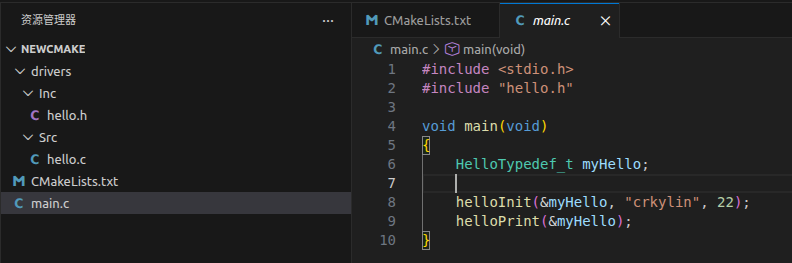
这里引入一个简单的CMake工程,main.c中main函数调用hello.c文件中的函数,二者位于不同文件夹目录下。
main.c
cpp
#include <stdio.h>
#include "hello.h"

void main(void)
{
    HelloTypedef_t myHello;

    helloInit(&myHello, "crkylin", 22);
    helloPrint(&myHello);
}
hello.c
cpp
#include "hello.h"

HelloTypedef_t myHello;

void helloInit(HelloTypedef_t* hello, const char* name, unsigned char age)
{
    strcpy(hello->name, name);
    hello->age = age;
}

void helloPrint(HelloTypedef_t* hello)
{
    printf("hello, my name is %s, age %d\r\n", hello->name, hello->age);
}
hello.o
cpp
#ifndef __HELLO_H
#define __HELLO_H

#include <string.h>

typedef struct hello_s
{
    /* data */
    const char name[12];
    unsigned char age;
} HelloTypedef_t;


void helloInit(HelloTypedef_t* hello, const char* name, unsigned char age);
void helloPrint(HelloTypedef_t* hello);

#endif
CMakeLists.txt
cpp
cmake_minimum_required(VERSION 3.10)

project(Hello)

file(GLOB SRC_FILES
    "${PROJECT_SOURCE_DIR}/drivers/Src/**"
    "${PROJECT_SOURCE_DIR}/**")

include_directories(
    ${CMAKE_CURRENT_SOURCE_DIR}/drivers/Inc
)

add_executable(${CMAKE_PROJECT_NAME} ${SRC_FILES})
Makefile文件
Go
# CMAKE generated file: DO NOT EDIT!
# Generated by "Unix Makefiles" Generator, CMake Version 3.22

# Default target executed when no arguments are given to make.
default_target: all
.PHONY : default_target

# Allow only one "make -f Makefile2" at a time, but pass parallelism.
.NOTPARALLEL:

#=============================================================================
# Special targets provided by cmake.

# Disable implicit rules so canonical targets will work.
.SUFFIXES:

# Disable VCS-based implicit rules.
% : %,v

# Disable VCS-based implicit rules.
% : RCS/%

# Disable VCS-based implicit rules.
% : RCS/%,v

# Disable VCS-based implicit rules.
% : SCCS/s.%

# Disable VCS-based implicit rules.
% : s.%

.SUFFIXES: .hpux_make_needs_suffix_list

# Command-line flag to silence nested $(MAKE).
$(VERBOSE)MAKESILENT = -s

#Suppress display of executed commands.
$(VERBOSE).SILENT:

# A target that is always out of date.
cmake_force:
.PHONY : cmake_force

#=============================================================================
# Set environment variables for the build.

# The shell in which to execute make rules.
SHELL = /bin/sh

# The CMake executable.
CMAKE_COMMAND = /usr/bin/cmake

# The command to remove a file.
RM = /usr/bin/cmake -E rm -f

# Escaping for special characters.
EQUALS = =

# The top-level source directory on which CMake was run.
CMAKE_SOURCE_DIR = /home/crkylin/linux/cmake

# The top-level build directory on which CMake was run.
CMAKE_BINARY_DIR = /home/crkylin/linux/cmake/build

#=============================================================================
# Targets provided globally by CMake.

# Special rule for the target edit_cache
edit_cache:
	@$(CMAKE_COMMAND) -E cmake_echo_color --switch=$(COLOR) --cyan "No interactive CMake dialog available..."
	/usr/bin/cmake -E echo No\ interactive\ CMake\ dialog\ available.
.PHONY : edit_cache

# Special rule for the target edit_cache
edit_cache/fast: edit_cache
.PHONY : edit_cache/fast

# Special rule for the target rebuild_cache
rebuild_cache:
	@$(CMAKE_COMMAND) -E cmake_echo_color --switch=$(COLOR) --cyan "Running CMake to regenerate build system..."
	/usr/bin/cmake --regenerate-during-build -S$(CMAKE_SOURCE_DIR) -B$(CMAKE_BINARY_DIR)
.PHONY : rebuild_cache

# Special rule for the target rebuild_cache
rebuild_cache/fast: rebuild_cache
.PHONY : rebuild_cache/fast

# The main all target
all: cmake_check_build_system
	$(CMAKE_COMMAND) -E cmake_progress_start /home/crkylin/linux/cmake/build/CMakeFiles /home/crkylin/linux/cmake/build//CMakeFiles/progress.marks
	$(MAKE) $(MAKESILENT) -f CMakeFiles/Makefile2 all
	$(CMAKE_COMMAND) -E cmake_progress_start /home/crkylin/linux/cmake/build/CMakeFiles 0
.PHONY : all

# The main clean target
clean:
	$(MAKE) $(MAKESILENT) -f CMakeFiles/Makefile2 clean
.PHONY : clean

# The main clean target
clean/fast: clean
.PHONY : clean/fast

# Prepare targets for installation.
preinstall: all
	$(MAKE) $(MAKESILENT) -f CMakeFiles/Makefile2 preinstall
.PHONY : preinstall

# Prepare targets for installation.
preinstall/fast:
	$(MAKE) $(MAKESILENT) -f CMakeFiles/Makefile2 preinstall
.PHONY : preinstall/fast

# clear depends
depend:
	$(CMAKE_COMMAND) -S$(CMAKE_SOURCE_DIR) -B$(CMAKE_BINARY_DIR) --check-build-system CMakeFiles/Makefile.cmake 1
.PHONY : depend

#=============================================================================
# Target rules for targets named Hello

# Build rule for target.
Hello: cmake_check_build_system
	$(MAKE) $(MAKESILENT) -f CMakeFiles/Makefile2 Hello
.PHONY : Hello

# fast build rule for target.
Hello/fast:
	$(MAKE) $(MAKESILENT) -f CMakeFiles/Hello.dir/build.make CMakeFiles/Hello.dir/build
.PHONY : Hello/fast

drivers/Src/hello.o: drivers/Src/hello.c.o
.PHONY : drivers/Src/hello.o

# target to build an object file
drivers/Src/hello.c.o:
	$(MAKE) $(MAKESILENT) -f CMakeFiles/Hello.dir/build.make CMakeFiles/Hello.dir/drivers/Src/hello.c.o
.PHONY : drivers/Src/hello.c.o

drivers/Src/hello.i: drivers/Src/hello.c.i
.PHONY : drivers/Src/hello.i

# target to preprocess a source file
drivers/Src/hello.c.i:
	$(MAKE) $(MAKESILENT) -f CMakeFiles/Hello.dir/build.make CMakeFiles/Hello.dir/drivers/Src/hello.c.i
.PHONY : drivers/Src/hello.c.i

drivers/Src/hello.s: drivers/Src/hello.c.s
.PHONY : drivers/Src/hello.s

# target to generate assembly for a file
drivers/Src/hello.c.s:
	$(MAKE) $(MAKESILENT) -f CMakeFiles/Hello.dir/build.make CMakeFiles/Hello.dir/drivers/Src/hello.c.s
.PHONY : drivers/Src/hello.c.s

main.o: main.c.o
.PHONY : main.o

# target to build an object file
main.c.o:
	$(MAKE) $(MAKESILENT) -f CMakeFiles/Hello.dir/build.make CMakeFiles/Hello.dir/main.c.o
.PHONY : main.c.o

main.i: main.c.i
.PHONY : main.i

# target to preprocess a source file
main.c.i:
	$(MAKE) $(MAKESILENT) -f CMakeFiles/Hello.dir/build.make CMakeFiles/Hello.dir/main.c.i
.PHONY : main.c.i

main.s: main.c.s
.PHONY : main.s

# target to generate assembly for a file
main.c.s:
	$(MAKE) $(MAKESILENT) -f CMakeFiles/Hello.dir/build.make CMakeFiles/Hello.dir/main.c.s
.PHONY : main.c.s

# Help Target
help:
	@echo "The following are some of the valid targets for this Makefile:"
	@echo "... all (the default if no target is provided)"
	@echo "... clean"
	@echo "... depend"
	@echo "... edit_cache"
	@echo "... rebuild_cache"
	@echo "... Hello"
	@echo "... drivers/Src/hello.o"
	@echo "... drivers/Src/hello.i"
	@echo "... drivers/Src/hello.s"
	@echo "... main.o"
	@echo "... main.i"
	@echo "... main.s"
.PHONY : help


#=============================================================================
# Special targets to cleanup operation of make.

# Special rule to run CMake to check the build system integrity.
# No rule that depends on this can have commands that come from listfiles
# because they might be regenerated.
cmake_check_build_system:
	$(CMAKE_COMMAND) -S$(CMAKE_SOURCE_DIR) -B$(CMAKE_BINARY_DIR) --check-build-system CMakeFiles/Makefile.cmake 0
.PHONY : cmake_check_build_system
十行左右的CMakeLists.txt文件生成了两百行CMakefile文件,帮助我们来构建项目代码。
极大提高了开发者构建工程的效率。
二、如何搭建CMake工程?
安装插件`C/C++`,`C/C++ Extension Pack`,`CMake Language Support`,`CMake Tools`,`Makefile Tools`
-
编写项目文件,如上述的main.c, hello.c, hello.h。为模拟实际项目,可以将源文件放在不同目录下。
-
编写CMakeLists.txt文件
cmake_minimum_required(VERSION 3.10) # 要求使用3.10版本以上CMake工具
project(Hello) # 项目名称为Hello
file(GLOB SRC_FILES # 添加全局源文件
"{PROJECT_SOURCE_DIR}/drivers/Src/**" # hello.c所在目录 "{PROJECT_SOURCE_DIR}/**") # main.c所在目录include_directories(
${CMAKE_CURRENT_SOURCE_DIR}/drivers/Inc # 添加头文件目录
)添加可执行文件,第一个参数是输出文件名,第二个参数是源文件
add_executable({CMAKE_PROJECT_NAME} {SRC_FILES})
-
使用CMake工具生成构建脚本
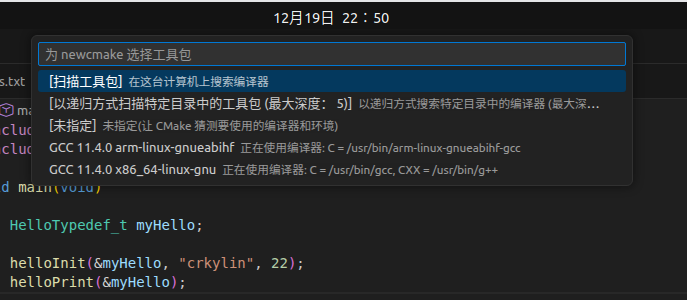
在vscode中按下F7,CMake工具会让我们选择使用的编译器,这里我们选GCC 11.4.0 x86_64-linux-gnu