一、多模态千问模型在SFT后进行GRPO训练报错--KeyError: 'language_model.embed_tokens.weight'
虽然查找model.safetensors.index.json可以发现此参数确实存在,但当我的模型进行GRPO训练时就是会爆这个错误。模型先进行了SFT训练,再进行的GRPO训练,直接进行GRPO训练没问题。
解决方法:
SFT之后,在模型的config.json文件中,多出了text.config参数,删除这个参数之后就可以运行了。
若不行,尝试将tansformers版本换为4.52.1或4.51.1
二、Megatron GRPO训练无限输出的问题
在使用InternVL3_5-4B进行megatron GRPO训练时,遇到模型无限输出到大于max_completions_length且增大max_completions_length也无效,截断率一直为0。
使用的指令:
python
NNODES=1 \
NODE_RANK=0 \
CUDA_VISIBLE_DEVICES=0,1,2,3,4,5,6,7 \
NPROC_PER_NODE=8 \
MAX_PIXELS=262144 \
MASTER_PORT=29600 \
megatron rlhf \
    --rlhf_type grpo \
    --model /data/model/megatron_output/InternVL3_5-4B/v30-20251205-201528-hf \
    --model_type internvl3_5 \
    --load_safetensors true \
    --save_safetensors true \
    --context_parallel_size 1 \
    --tensor_model_parallel_size 4 \
    --pipeline_model_parallel_size 1 \
    --dataset /data/RLdataset/process_coco_grounding_add_task.jsonl \
    --max_epochs 1 \
    --global_batch_size 64 \
    --micro_batch_size 2 \
    --steps_per_generation 4 \
    --num_generations 8 \
    --external_plugins /data/RLdataset/custom_plugin.py \
    --reward_funcs glm_math_reward visual_ciou_reward visual_confidence_reward livebench_table_join livebench_table_reformat livebench_zebra_puzzle format \
    --use_vllm true \
    --vllm_mode colocate \
    --vllm_gpu_memory_utilization 0.4 \
    --vllm_tensor_parallel_size 4 \
    --vllm_max_model_len 2048 \
    --repetition_penalty 1.1 \
    --max_length 2048 \
    --max_completion_length 512 \
    --train_type full \
    --lr 1e-6 \
    --bf16 true \
    --beta 0.001 \
    --importance_sampling_level token \
    --epsilon 0.2 \
    --epsilon_high 0.2 \
    --dynamic_sample false \
    --overlong_filter true \
    --loss_type grpo \
    --sleep_level 0 \
    --offload_model false \
    --offload_optimizer false \
    --offload_bridge false \
    --log_interval 1 \
    --recompute_granularity selective \
    --finetune \
    --num_workers 8 \
    --dataset_num_proc 8 \
    --no_save_optim \
    --no_save_rng \
    --attention_backend flash \
    --temperature 1.0 \
    --system "You are a helpful assistant." \
    --log_completions true \
    --train_iters 50 \
    --eval_interval 1000 \
    --load_from_cache_file false \
    --save_interval 4000 \
2>&1 | tee -a $LOG_DIR_WORKER解决办法:
- 在奖励函数中将模型的输出打印出来,发现模型在循环无限输出。类似下图:
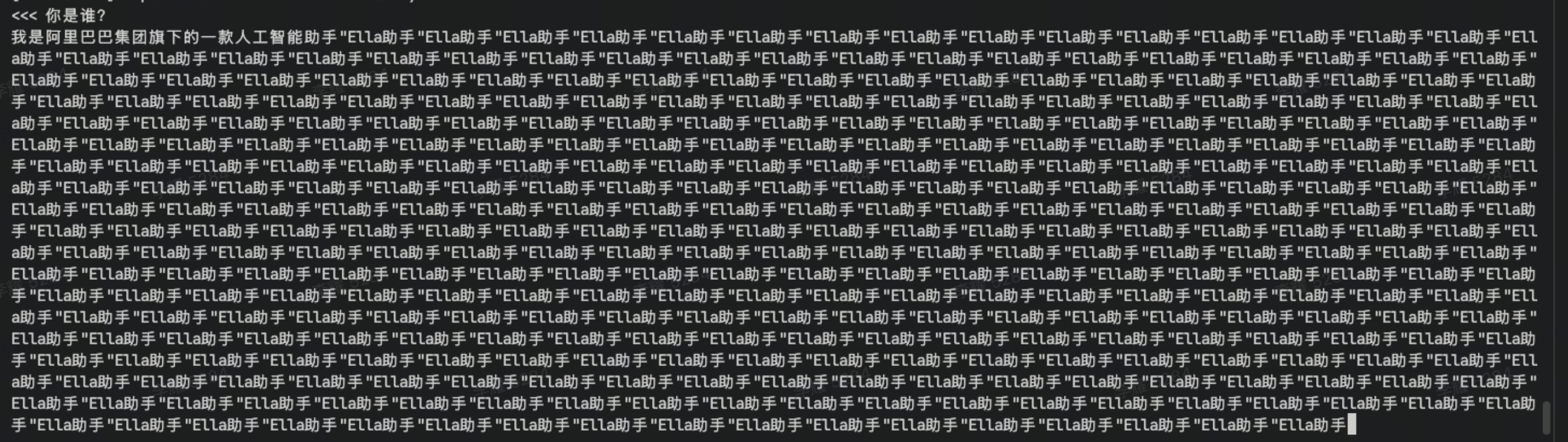
并且在进行推理时,模型输出完全正常。====>不是模型问题 - 在指令中加入
--repetition_penalty 1.1 \、增加模型问题,没有改善。 - 最后设置
--use_vllm false,模型输出完全正常。====>可能是vllm的问题 - 最后使用vllm进行推理加速,模型输出也无限循环如上。但不实用
--infer_backend vllm进行推理加速,模型输出完全正常。
python
CUDA_VISIBLE_DEVICES=0 \
swift infer \
    --model /data/model/InternVL3_5-4B \
    --stream true \
    --temperature 0 \
    --max_new_tokens 2048 \
--infer_backend vllm- 使用千问大语言模型进行尝试,使用
vllm加速,模型输出完全正常。===>InternVL3_5-4B在使用swift时,不适合使用vllm加速。 使用其他训练框架是否适合,这里没有实验。
补充一点,如果需要进行megatron训练的小伙伴可以参考如下环境配置:(建议下载vllm==0.8.5,transformers可以选择4.56.1或4.51.1)
- 安装flash-attn要确保transformers的版本适配,不然安装过程会卡住
bash
#先配置好cuda路径,使用nvcc --version 确保cuda已经配置好.(包含export CUDA_HOME、PATH、LD_LIBRARY_PATH)
#先配置好代理以便于git
git clone https://github.com/modelscope/ms-swift.git
cd ms-swift
#以下两个vllm到版本都是可行的,看你的cuda版本需求
#其中如果你下载的vllm是0.11.0,你可以将uninstall torch torchvision torchaudio
#重新下载:pip install torch==2.6.0 torchvision==0.21.0 torchaudio==2.6.0 -i https://pypi.tuna.tsinghua.edu.cn/simple --extra-index-url https://download.pytorch.org/whl/cu124

#vllm==0.8.5 -->torch==2.6.0+cu124|transformers==4.56.1--flash-attn==2.7.4.post1 (0.8.5安装的transformers可能也是最新版,需要卸载再重装pip uninstall transformers;pip install transformers==4.56.1;先安装transformers再安装flash-attn不然flash-attn的安装过程可能会卡死。)
#vllm==0.11.0 -->torch==2.8.0+cu128--transformers==4.57.3--flash-attn==2.8.3

pip install vllm==0.11.0 #这一条可以直接帮忙安装好2.8.0的12.8 cuda版本torch和最新transformers
pip install flash-attn==2.8.3 --no-build-isolation --no-cache-dir#训练所需
pip install -e .
pip install timm==0.9.10

pip install pybind11

pip install --no-build-isolation transformer_engine[pytorch] #配置好cudnn和nccl应该是不会有问题的,如果是网络问题就多运行几次就可以。 如果报错,你需要将cudnn和ncll的路径配置到环境变量中。

git clone https://github.com/NVIDIA/apex
cd apex
# 注意cuda版本和torch的cu版本一致
pip install -v --disable-pip-version-check --no-cache-dir --no-build-isolation --config-settings "--build-option=--cpp_ext" --config-settings "--build-option=--cuda_ext" ./

# megatron-core
pip install git+https://github.com/NVIDIA/Megatron-LM.git@core_r0.13.0

export MODELSCOPE_CACHE='/data/megatron/shared'
export MEGATRON_LM_PATH='/data/megatron/Megatron-LM'
source ~/.bashrc