1 概述
本人在使用Delphi开发过程中,需要通过服务进行不同系统间的数据传输,为保证对数据进行有效传输。在开发结果模拟测试中,本人发现所有汉字都是乱码,经过网上资料查询及本人实践测试,并汇总形成本文,供大家参考使用。
2 开发环境
开发环境:Delphi 2010
第三方组件:SuperObject
传输协议:TCP/IP
数据格式:JSON
服务控件:
CLIENT端:IDHTTP
SERVER端:IDHTTPSErver
3 写在开发前
为简化JSON数据的组合、解析工作,本人使用专为 Delphi 设计的开源JSON处理库SuperObject。所以,需要在文件头引用部分增加superobject的引用。
Server端接收服务信息是使用IDHTTPserver的onCommandGet事件中(代码请见第5部分B小节)。另,因为onCommandGet需要使用TidContext,所以在文件头引用部分增加IdContext的引用。
Client端引用:Uses superobject;
Server端引用:Uses superobject, IdContext;
4 CLIENT端开发
A 控件说明
A.1 接口服务控件:IDHTTP
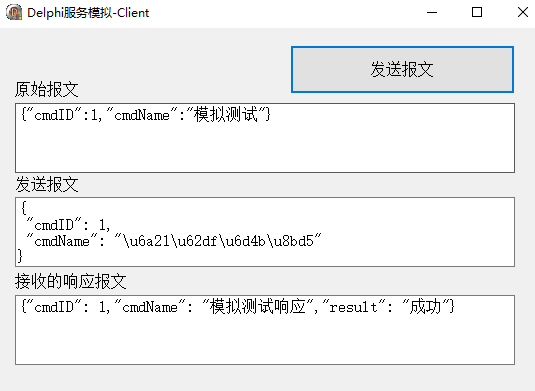
A.2 报文展示信息:包括3个memo控件,分别显示:发送的原始报文信息(memobaowen1)、经过编码处理的报文信息(memobaowen2),Server端发回的响应报文(memoinfo)
A.3 发送报文按钮:点击按钮则发送报文
B 源代码示例
procedure Tmainform.Button2Click(Sender: TObject);
var
serviceurl: string;
Sendmessage: TStringList; // 发送内容
Receivemessage: TStringStream; // 返回内容
jsonObj: ISuperObject;
jsonstring:string;
begin
// step 1:定义服务信息
serviceurl:='http://127.0.0.1:8031/simulator';
IdHTTP1.Request.ContentType := 'text/html';
IdHTTP1.Request.CharSet:= 'UTF-8';
// step 2:定义服务I/O
Sendmessage := TStringList.Create;
Receivemessage := TStringStream.Create('');
// step 3:生成报文信息
jsonObj := SO();
jsonObj.i'cmdID' := 1;
jsonObj.s'cmdName':= '模拟测试';
// step 4:显示原始报文
memobaowen1.text:=jsonobj.AsString;
// step 5:生成发送的报文编码
jsonString := jsonObj.AsJSON(true);
Sendmessage.Add(jsonString);
// step 6:发送报文并接收信息
IdHTTP1.Post(serviceurl, Sendmessage, Receivemessage);
// step 7:显示编码后的报文,及接收报文
Memobaowen2.text := Sendmessage.text;
Memoinfo.text :=Utf8ToAnsi(Receivemessage.DataString)
end;
5 Server端开发
A.1 接口服务控件:IDHTTPServer
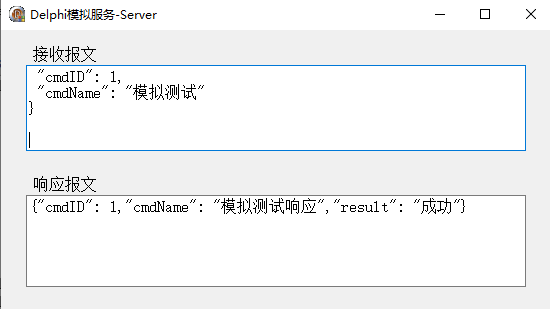
A.2 报文展示信息:包括2个memo控件,分别显示:接收到的报文(memoreceive)、返回的响应报文(memoresponse)
B 源代码示例
procedure Tmainform.south_serverCommandGet(AContext: TIdContext;
ARequestInfo: TIdHTTPRequestInfo; AResponseInfo: TIdHTTPResponseInfo);
var
jsonObj: ISuperObject;
begin
memoreceive.Lines.Clear;
memoresponse.Lines.Clear;
// step 1:定义编码格式
AResponseInfo.CharSet := 'UTF-8';
AResponseInfo.ContentType := 'application/json';
// step 2:接收报文
jsonObj := SO(ARequestInfo.Params.GetText);
// step 3:返回响应报文
AResponseInfo.ContentText:='{"cmdID": 1,"cmdName": "模拟测试响应","result": "成功"}';
// step 4:显示接收报文及相应报文
memoreceive.lines.Add(UnicodeToChinese(ARequestInfo.Params.GetText));
memoresponse.lines.Add(AResponseInfo.ContentText);
end;
C 附1:Sever端服务设置(本人是在页面创建时生成)
procedure Tmainform.FormCreate(Sender: TObject);
begin
// step 1:定义服务信息并启动
south_server.Bindings.Clear;
south_server.DefaultPort := 8031;
south_server.Bindings.Add.IP := '127.0.0.1';
// step 2:启动服务器
south_server.Active := true;
end;
D 附2:Unicode代码转换函数
function Tmainform.UnicodeToChinese(sStr: string): string;
var
i: Integer;
index: Integer;
temp, top, last: string;
begin
index := 1;
while index >= 0 do
begin
index := Pos('\u', sStr) - 1;
if index < 0 then //非 unicode编码不转换 ,自动过滤
begin
last := sStr;
Result := Result + last;
Exit;
end;
top := Copy(sStr, 1, index); // 取出 编码字符前的 非 unic 编码的字符,如数字
temp := Copy(sStr, index + 1, 6); // 取出编码,包括 \u,如\u4e3f
Delete(temp, 1, 2);
Delete(sStr, 1, index + 6);
Result := Result + top + WideChar(StrToInt('$' + temp));
end;
end;
6 模拟结果展示
A Client端页面
B Server端页面