Qt6 在 QFutureInterface 基础上进一步封装出了 QPromise 类,搭配 QFuture 使用,逻辑类似 std::promise + std::future,线程内使用 promise 设置进度和结果,外部通过关联的 future 判断状态和获取结果。
cpp
#include <future>

std::promise<T> p;
// 获取与 promise 关联的 future
std::future<T> f = p.get_future();

// 线程 A 中设置值
p.set_value(value);
// 线程 B 中阻塞获取 promise 设置的值
T result = f.get();
使用 QFuture 的优势在于,搭配 QFutureWatcher 使用时可以获取 started / finished 等相关信号,这是 QFutureInterface 内部生成的事件被 QFutureWatcher 接收后发出的。
当需要后台执行任务时,界面上一般会有相应的进度提示,借助 QPromise / QFuture 相关接口可以很容易的实现这个功能。在此基础上做一点小小的封装,就得到了一个简易的任务管理类。
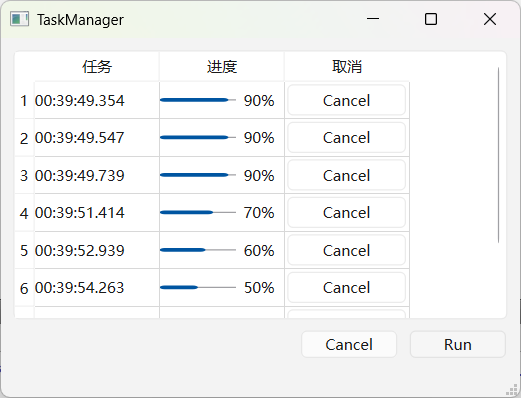
封装时一个麻烦的地方是,QFutureWatcher 需要在关联 QFuture 之前关联信号槽,这样我们的 run / start 开始任务接口就需要把所有的槽和槽接收者作为参数。不过这样写起来有点麻烦,就干脆拆成了两部分,先生成 QFutureWatcher,关联好信号槽后再开始任务。
另一个问题是 QPromise / QFuture 的模板类型参数我使用了 QObject*(懒得自定义基类),主要还是考虑到后续进行 QML 版封装用模板不方便,子类化任务返回类型实现起来更顺手一点。
后续扩展:如果要在 QML 中使用,任务接口和返回的 future 对象就需要封装。
TaskManager 实现代码:
cpp
#pragma once
#include <QThreadPool>
#include <QFuture>
#include <QFutureWatcher>
#include <QPromise>
#include <functional>
#include <list>

// 任务管理
class TaskManager : public QObject
{
    Q_OBJECT
    Q_DISABLE_COPY_MOVE(TaskManager)
private:
    explicit TaskManager(QObject *parent = nullptr);
public:
    ~TaskManager();
    static TaskManager *instance();
    // 任务结果暂时为QObject*,可以用一个自定义基类,包含type判断类型
    using TPromise = QPromise<QObject*>;
    using TWatcher = QFutureWatcher<QObject*>;

    // 创建任务future watcher
    // 如果将槽函数作为run参数传入,代码有点乱,拆分为两步,先创建watcher关联信号槽,再run任务
    auto create() -> std::shared_ptr<TWatcher>;
    // 执行任务,繁忙时任务排队
    void run(const std::function<void (TPromise &)> &task, std::shared_ptr<TWatcher> watcher);
    // 判断是否繁忙
    bool busy() const;
    // 取消所有任务
    void cancel();
    // 等待全部任务结束
    void wait();

signals:
    void taskStarted();
    void taskFinished();

private:
    // 任务线程池
    QThreadPool taskPool;
    // 内部管理任务列表
    std::list<std::shared_ptr<TWatcher>> taskList;
    // 任务列表锁
    std::mutex listMutex;
};

TaskManager::TaskManager(QObject *parent)
    : QObject{parent}
{
    // 线程池最大线程数
    taskPool.setMaxThreadCount(QThread::idealThreadCount());
    // 线程空闲时,销毁判定时间,单位ms,默认半分钟
    taskPool.setExpiryTimeout(1000 * 60);
}

TaskManager::~TaskManager()
{
    cancel();
    wait();
}

TaskManager *TaskManager::instance()
{
    static TaskManager manager;
    return &manager;
}

auto TaskManager::create() -> std::shared_ptr<TWatcher>
{
    return std::make_shared<TWatcher>();
}

void TaskManager::run(const std::function<void (TPromise &)> &task, std::shared_ptr<TWatcher> watcher)
{
    if (!task || !watcher)
        return;

    TPromise promise{};
    auto future = promise.future();

    watcher->setFuture(future);
    {
        // 添加到任务列表
        std::lock_guard<std::mutex> guard(listMutex); Q_UNUSED(guard)
        taskList.push_back(watcher);
        // qDebug() << "push task";
    }

    // 丢进线程池泡澡
    taskPool.start([this, task, watcher, promise = std::move(promise)]() mutable {
        promise.start();
        task(promise);
        promise.finish();
        {
            // 任务结束从列表移除
            std::lock_guard<std::mutex> guard(listMutex); Q_UNUSED(guard)
            taskList.remove(watcher);
            // qDebug() << "remove task";
        }
    });
}

bool TaskManager::busy() const
{
    // 活跃线程数达到上限
    return (taskPool.activeThreadCount() >= taskPool.maxThreadCount());
}

void TaskManager::cancel()
{
    // 移除未启动的任务
    taskPool.clear();
    // 取消所有任务
    std::lock_guard<std::mutex> guard(listMutex); Q_UNUSED(guard)
    for (auto &handle : taskList) {
        handle->cancel();
    }
}

void TaskManager::wait()
{
    // 等待最后一个线程开始
    taskPool.waitForDone(-1);
}
测试代码:
cpp
void MainWindow::onRun()
{
    // 先创建future watcher关联信号槽
    auto pwatcher = TaskManager::instance()->create();
    auto watcher = pwatcher.get();

    // 列表更新
    auto table = ui->tableWidget;
    int row = table->rowCount();
    table->insertRow(row);
    QString time = QTime::currentTime().toString("hh:mm:ss.zzz");
    auto title = new QLabel(time);
    table->setCellWidget(row, 0, title);
    auto bar = new QProgressBar();
    table->setCellWidget(row, 1, bar);
    auto btn = new QPushButton("Cancel");
    table->setCellWidget(row, 2, btn);
    connect(btn, &QPushButton::clicked, [pwatcher]{ pwatcher->cancel(); });
    // 测试对象释放
    connect(btn, &QPushButton::destroyed, this, [time]{ qDebug() << "free" << time; });

    // 状态更新
    connect(watcher, &TaskManager::TWatcher::progressTextChanged,
            this, [](const QString &text){
                // qDebug() << "progress text changed" << text;
            });
    connect(watcher, &TaskManager::TWatcher::progressRangeChanged,
            this, [this, bar](int min, int max){
                // qDebug() << "progress range changed" << min << max;
                bar->setRange(min, max);
                bar->setValue(min);
            });
    connect(watcher, &TaskManager::TWatcher::progressValueChanged,
            this, [this, bar](int value){
                // qDebug() << "progress changed" << value;
                bar->setValue(value);
            });
    connect(watcher, &TaskManager::TWatcher::started,
            this, [time](){
                qDebug() << "started" << time;
            });
    connect(watcher, &TaskManager::TWatcher::finished,
            this, [this, table, time, btn, pwatcher](){
                qDebug() << "finished" << time;
                int index = -1;
                for (int row = 0; row < table->rowCount(); ++row) {
                    QPushButton *item = static_cast<QPushButton *>(table->cellWidget(row, 2));
                    if (item && item == btn) {
                        index = row;
                        break;
                    }
                }
                if (index < 0) return;
                ui->tableWidget->removeRow(index);
            });
    connect(watcher, &TaskManager::TWatcher::canceled,
            this, [this, time](){
                qDebug() << "canceled" << time;
            });
    connect(watcher, &TaskManager::TWatcher::resultReadyAt,
            this, [this, time, pwatcher](int index){
                qDebug() << "result" << time << index << pwatcher->resultAt(index);
            });


    // 执行任务,并通过关联的future watcher更新ui
    auto task = [](TaskManager::TPromise &promise){
        promise.setProgressRange(0, 10);
        for (int i = 0; i < 10 && !promise.isCanceled(); ++i)
        {
            promise.setProgressValue(i);
            QThread::sleep(1);
        }
        if (promise.isCanceled())
            return;
        promise.setProgressValue(10);
        promise.addResult(nullptr);
    };
    TaskManager::instance()->run(task, pwatcher);
}

void MainWindow::onCancel()
{
    TaskManager::instance()->cancel();
}完整代码:https://github.com/gongjianbo/MyTestCode/tree/master/Qt6/TestQt_20251220_Future