VS Code 有和 IDEA 功能对应的自动补全快捷键,核心靠内置 IntelliSense 与插件配合,还能通过配置或插件复刻 IDEA 的补全体验,以下是具体方案与快捷键汇总。
一、核心补全快捷键(对应 IDEA 基础/智能补全)
| 功能 | IDEA 快捷键 | VS Code 默认快捷键 | 说明 |
|---|---|---|---|
| 基础代码补全 | Ctrl+Space | Windows/Linux: Ctrl+Space macOS: Ctrl+Space(或 Cmd+Space) | 手动触发所有补全建议,与 IDEA 一致 |
| 智能类型补全 | Ctrl+Shift+Space | Windows/Linux: Ctrl+Alt+Space macOS: Ctrl+Option+Space | 按类型过滤建议,对应 IDEA 智能补全 |
| 接受选中建议 | Enter / Tab | Tab(默认)、Enter(可配置) | 补全并插入最佳匹配,可去快捷键设置保留 Tab |
| 触发代码修复/生成 | Alt+Enter | Ctrl + . | 弹出 Source Action,生成 Getter/Setter、构造函数等 |
| 触发 AI 补全(如 Copilot) | - | Alt + \(手动触发)、Tab(接受) | 全行/整函数级补全,类似 IDEA AI 插件 |
二、让 VS Code 补全更像 IDEA 的关键配置与插件
1. 基础配置(提升补全精准度)
- 打开设置(Ctrl + ,),搜索以下选项并设置:
- Editor: Tab Completion → 设置为 on(启用所有建议的 Tab 补全)
- Editor: Suggest On Trigger Characters → 勾选(输入 .、(、: 等自动触发补全)
- Editor: Accept Suggestion On Enter → 设置为 smart(避免误触)
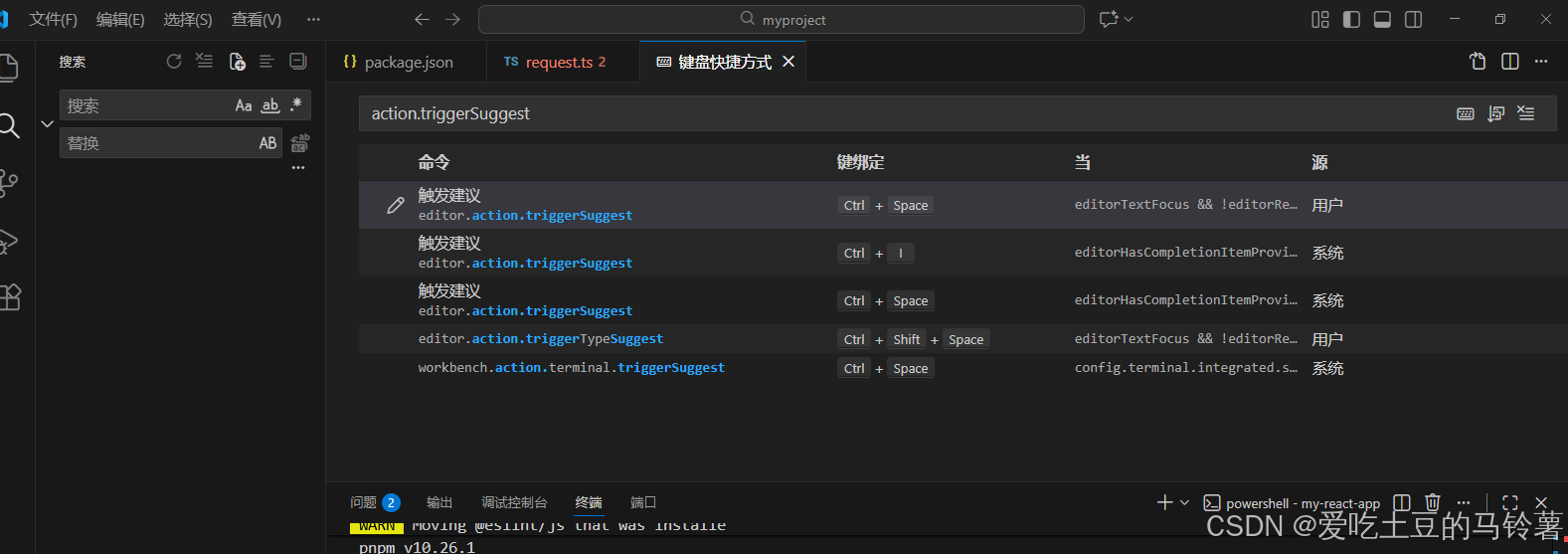
- 调整快捷键:按 Ctrl + K + S 打开快捷键面板,搜索 suggestion,按需修改:
- editor.action.triggerSuggest(触发建议):保持 Ctrl+Space 与 IDEA 一致
- acceptSelectedSuggestion(接受建议):保留 Tab,删除 Enter 绑定避免换行时误补全
2. 必备插件(复刻 IDEA 高级补全)
| 插件 | 功能 | 补全触发/接受方式 |
|---|---|---|
| IntelliJ IDEA Keybindings | 直接使用 IDEA 全套快捷键(含补全) | Ctrl+Space 触发,Enter/Tab 接受 |
| GitHub Copilot | AI 智能生成代码块、函数 | 自动触发,Alt+\ 手动唤出,Tab 接受 |
| Tabnine | 离线 AI 补全,适配多语言 | 自动触发,Ctrl+Space 手动触发 |
| JavaScript/TypeScript Nightly | 增强 TS/JS 类型补全 | 输入触发字符或 Ctrl+Space 触发 |
三、快速上手步骤(3 步复刻 IDEA 补全体验)
- 安装插件:Ctrl+Shift+X 搜索并安装 IntelliJ IDEA Keybindings、GitHub Copilot。
- 统一快捷键:Ctrl+K+S 打开快捷键设置,将 editor.action.triggerSuggest 绑定为 Ctrl+Space,保留 Tab 作为接受键。
- 开启自动触发:设置中打开 Editor: Suggest On Trigger Characters,输入 .、( 等自动弹出建议。
四、常见问题解决
- 问题 1:Ctrl+Space 被输入法占用 → 去系统输入法设置,将输入法切换快捷键改为其他(如 Ctrl+Shift),保留 Ctrl+Space 给 VS Code。
- 问题 2:补全建议少 → 安装对应语言插件(如 Python、Java 插件),确保项目有正确的类型定义(如 tsconfig.json、requirements.txt)。
这是一份 一键导入的 VS Code 快捷键配置 JSON,导入后补全相关按键会完全匹配 IDEA 习惯(核心补全、接受建议、代码修复等快捷键与 IDEA 一致),直接复制使用即可~
一、配置文件内容(直接复制)
json
[
  // 🔍 补全与修复(已配置基础上补充)
  { "key": "ctrl+space", "command": "editor.action.triggerSuggest", "when": "editorTextFocus && !editorReadonly && !editorSuggestWidgetVisible" },
  { "key": "ctrl+shift+space", "command": "editor.action.triggerTypeSuggest", "when": "editorTextFocus && !editorReadonly" },
  { "key": "alt+enter", "command": "editor.action.quickFix", "when": "editorTextFocus && !editorReadonly && (editorHasCodeActionsProvider || editorHasRefactorProvider)" },
  { "key": "tab", "command": "acceptSelectedSuggestion", "when": "editorTextFocus && editorSuggestWidgetVisible && editorSuggestWidgetHasFocusedItem" },
  { "key": "enter", "command": "-acceptSelectedSuggestion", "when": "editorTextFocus && editorSuggestWidgetVisible && editorSuggestWidgetHasFocusedItem" },
  { "key": "ctrl+space", "command": "-editor.action.inlineSuggest.accept", "when": "editorTextFocus && inlineSuggestionVisible" },

  // 📝 编辑操作(对齐 IDEA)
  { "key": "ctrl+d", "command": "editor.action.duplicateSelection", "when": "editorTextFocus && !editorReadonly" }, // 复制整行(IDEA Ctrl+D)
  { "key": "ctrl+y", "command": "editor.action.deleteLines", "when": "editorTextFocus && !editorReadonly" }, // 删除整行(IDEA Ctrl+Y)
  { "key": "ctrl+alt+l", "command": "editor.action.formatDocument", "when": "editorHasDocumentFormattingProvider && editorTextFocus && !editorReadonly" }, // 格式化代码(IDEA Ctrl+Alt+L)
  { "key": "shift+alt+a", "command": "-editor.action.blockComment", "when": "editorTextFocus && !editorReadonly" }, // 取消原块注释快捷键
  { "key": "ctrl+shift+/", "command": "editor.action.blockComment", "when": "editorTextFocus && !editorReadonly" }, // 块注释(IDEA Ctrl+Shift+/)

  // 🔧 重构操作(对齐 IDEA)
  { "key": "shift+f6", "command": "editor.action.rename", "when": "editorTextFocus && !editorReadonly" }, // 重命名(IDEA Shift+F6)
  { "key": "ctrl+b", "command": "editor.action.goToDeclaration", "when": "editorTextFocus" }, // 跳转到定义(IDEA Ctrl+B)
  { "key": "alt+f7", "command": "editor.action.findReferences", "when": "editorTextFocus" }, // 查看引用(IDEA Alt+F7)
  { "key": "ctrl+alt+v", "command": "editor.action.extractVariable", "when": "editorTextFocus && !editorReadonly" }, // 提取变量(IDEA Ctrl+Alt+V)
  { "key": "ctrl+alt+m", "command": "editor.action.extractMethod", "when": "editorTextFocus && !editorReadonly" }, // 提取函数(IDEA Ctrl+Alt+M)

  // 📂 文件与导航(对齐 IDEA)
  { "key": "ctrl+shift+n", "command": "workbench.action.quickOpen", "when": "noActiveEditor" }, // 快速搜索文件(IDEA Ctrl+Shift+N)
  { "key": "ctrl+f12", "command": "editor.action.outline", "when": "editorTextFocus" }, // 查看文件大纲(IDEA Ctrl+F12)
  { "key": "alt+left", "command": "workbench.action.navigateBack", "when": "canNavigateBack" }, // 后退(IDEA Alt+←)
  { "key": "alt+right", "command": "workbench.action.navigateForward", "when": "canNavigateForward" }, // 前进(IDEA Alt+→)
  { "key": "ctrl+f4", "command": "workbench.action.closeActiveEditor", "when": "activeEditorGroupEmpty && !isEditorsEmpty" }, // 关闭标签页(IDEA Ctrl+F4)

  // ▶️ 运行与调试(对齐 IDEA)
  { "key": "shift+f10", "command": "workbench.action.debug.run", "when": "!inDebugMode" }, // 运行程序(IDEA Shift+F10)
  { "key": "shift+f9", "command": "workbench.action.debug.start", "when": "!inDebugMode" }, // 调试程序(IDEA Shift+F9)
  { "key": "f8", "command": "debug.stepOver", "when": "inDebugMode" }, // 单步跳过(IDEA F8)
  { "key": "f7", "command": "debug.stepInto", "when": "inDebugMode" }, // 单步调试(IDEA F7)
  { "key": "shift+f8", "command": "debug.stepOut", "when": "inDebugMode" }, // 跳出函数(IDEA Shift+F8)
  { "key": "ctrl+f8", "command": "editor.action.toggleBreakpoint", "when": "editorTextFocus" }, // 添加/删除断点(IDEA Ctrl+F8)

  // 🎯 其他常用(对齐 IDEA)
  { "key": "ctrl+shift+a", "command": "workbench.action.showCommands", "when": "editorTextFocus" }, // 打开命令面板(IDEA Ctrl+Shift+A)
  { "key": "ctrl+shift+u", "command": "editor.action.transformToUppercase", "when": "editorTextFocus && !editorReadonly" }, // 大小写转换(IDEA Ctrl+Shift+U)
  { "key": "ctrl+shift+z", "command": "editor.action.redo", "when": "editorTextFocus && !editorReadonly" }, // 重做(IDEA Ctrl+Shift+Z)
  { "key": "ctrl+alt+left", "command": "editor.action.smartSelect.shrink", "when": "editorTextFocus" }, // 缩小选择范围(IDEA Ctrl+Alt+←)
  { "key": "ctrl+alt+right", "command": "editor.action.smartSelect.expand", "when": "editorTextFocus" }, // 扩大选择范围(IDEA Ctrl+Alt+→)
  { "key": "ctrl+f", "command": "actions.find", "when": "editorTextFocus" }, // 查找(IDEA Ctrl+F)
  { "key": "ctrl+r", "command": "editor.action.replace", "when": "editorTextFocus" }, // 替换(IDEA Ctrl+R)
  { "key": "ctrl+shift+f", "command": "workbench.action.findInFiles", "when": "!editorTextFocus" }, // 全局查找(IDEA Ctrl+Shift+F)
  { "key": "ctrl+shift+r", "command": "workbench.action.replaceInFiles", "when": "!editorTextFocus" } // 全局替换(IDEA Ctrl+Shift+R)
]
二、导入步骤(3步搞定)
- 打开 VS Code,按
Ctrl + K + S打开快捷键面板。 - 点击面板右上角的 打开键盘快捷方式(JSON) 图标(右上角「{}」图标,如图所示):
四、补充优化(可选,更贴近 IDEA)
如果想让补全体验更像 IDEA,可再做 2 个小设置:
- 打开设置(
Ctrl + ,),搜索「Suggest On Trigger Characters」,勾选该选项(输入.、(、:等自动触发补全,和 IDEA 一致)。 - 搜索「Tab Completion」,设置为「on」(所有补全建议都支持 Tab 触发)。