uniapp vue3 小程序中 手写模仿京东淘宝加入购物车红点曲线飞入样式效果 简化版代码
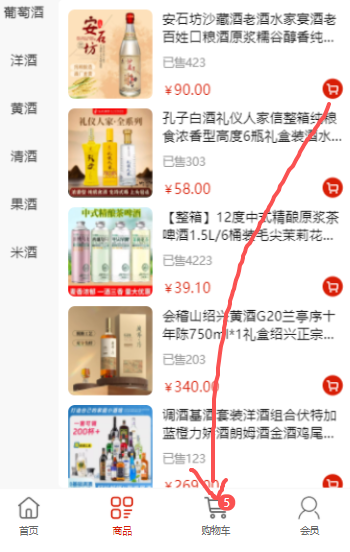
图片实例点击列表中的购物车按钮 红点飞到下方的购物车组件中
样式布局如下
javascript
//列表布局如下  :class="`cart-btn-${item.id}`"  这个是重点设置
<view class="goods-cell" v-for="(item,index) in goodsList" :key="index">
	<view class="img-box">
		<up-image mode="scaleToFill" width="100%" height="100%" :src="item.url" ></up-image>
	</view>
	<view class="cart-btn" :class="`cart-btn-${item.id}`" @click.stop="addCartFun(item)">
		<up-icon name="shopping-cart" color="#fff" size="18"></up-icon>
	</view>
</view>
//红点样式  我只做了红点 如果想加入图片 自己在view中添加
<view class="dot-box" :style="dotStyle"></view>

//css样式如下:
<style lang="scss" scoped>
.dot-box{
	position: absolute;
	top: 0;
	left: 0;
	z-index: 10;
	width: 25rpx;
	height: 25rpx;
	background-color: #f00;
	border-radius: 50%;
	//transition: transform 0.9s ease;//transition: transform 0.9s ease 0.1s; 是否等待0.1s执行
	transition: transform 0.9s cubic-bezier(0.35, -0.45, 0.58, 1);//0.1s  这个贝塞尔曲线 有个抛物的效果
}
</style>
//js如下
<script setup>
import { reactive, ref,watch,onMounted, onUnmounted } from 'vue';
// 商品列表信息
let goodsList = ref([
{id:12,ys:423,quantity:1,isCart:false,url:'http://img.alicdn.com/img/i4/5230503464/O1CN01W2h9No1bSZ1trp6po_!!4611686018427381288-0-saturn_solar.jpg',name:'安石坊沙藏酒老酒水家宴酒老百姓口粮酒原浆糯谷醇香纯粮酿造白酒',jg:90,xl:480},
{id:22,ys:303,quantity:1,isCart:false,url:'http://img.alicdn.com/img/i4/7962644201/O1CN01e1Y1PO1gu6yMIr7WZ_!!4611686018427383529-0-saturn_solar.jpg',name:'孔子白酒礼仪人家信整箱纯粮食浓香型高度6瓶礼盒装酒水送礼长辈',jg:58,xl:25480},
{id:32,ys:4223,quantity:1,isCart:false,url:'https://g-search2.alicdn.com/img/bao/uploaded/i4/i4/2216802875497/O1CN01SPyOZK1qTgEFjL6zY_!!2216802875497.jpg',name:'【整箱】12度中式精酿原浆茶啤酒1.5L/6桶装毛尖茉莉花茶西湖龙井',jg:39.1,xl:42480},
])
//初始化红点的位置信息
let dotStyle = ref({
	top:'-100rpx',//这是为了隐藏红点的位置 不显示在页面中
	left:'-100rpx',
	transform: `translate(${0}rpx, ${0}rpx)`
})

// 加入购物车
const sys = uni.getSystemInfoSync();//获取系统信息 屏幕高度和宽度
function addCartFun(e){
//根据点击的按钮判断是那个位置然后获取该位置的高度、偏移量等信息
uni.createSelectorQuery().select(`.cart-btn-${e.id}`).boundingClientRect(rect=>{
	//rect.left 和 rect.top 是相对于屏幕左上角的坐标
	//console.log(rect,sys)
	dotStyle.value.top = rect.top*2 +'rpx'//将红点的坐标位置移动到点击的按钮上
	dotStyle.value.left = rect.left*2 +'rpx'
	//设置红点曲线飞到的最终位置坐标信息
	//其中偏移宽度为 - sys.windowWidth/2 - 40(40 这个数值根据购物车按钮大小和具体位置调整)
	//偏移高度为(sys.windowHeight - rect.bottom)*2 + 50(50 是我页面设置的距离底部高度 可根据自己页面样式调整)
	//scale(0.5)  控制缩放样式
	dotStyle.value.transform = `translate(${- sys.windowWidth/2 - 40}rpx, ${(sys.windowHeight - rect.bottom)*2 + 50}rpx) scale(0.5) `
	//最后等待曲线执行完成 还原红点的位置信息
	setTimeout(()=>{
		dotStyle.value.top = '-100rpx'
		dotStyle.value.left = '-100rpx'
		dotStyle.value.transform = `translate(${0}rpx, ${0}rpx)`
	},900)//900 为上面红点过渡的时间 两方要同步设置 transition: transform 0.9s ease;
}).exec()

//下面是加入购物车逻辑
//uni.showToast({ title: '商品已加入购物车',icon:'none' })

}
以上就完成了加入购物车 红点曲线的简化版样式效果实现