在 CentOS 7 上安装 Python 3.10 需要源码编译(官方仓库无 3.10 包)。
核心步骤: 升级 OpenSSL → 安装编译依赖 → 源码编译 → 软链配置 → 修复 yum。
1. 升级系统并安装编译工具
shell
sudo yum update -y
sudo yum groupinstall -y "Development Tools"
sudo yum install -y zlib-devel bzip2-devel openssl-devel ncurses-devel \
readline-devel tk-devel gdbm-devel db4-devel libpcap-devel xz-devel \
libffi-devel expat-devel
2. 升级 OpenSSL(Python 3.10 要求 ≥1.1.1)
CentOS 7 默认 1.0.2,需并行安装新版(不破坏系统):
powershell
# 下载并编译 OpenSSL 1.1.1
wget https://www.openssl.org/source/openssl-1.1.1k.tar.gz
tar xf openssl-1.1.1k.tar.gz && cd openssl-1.1.1k
./config --prefix=/usr/local/openssl shared zlib
make -j$(nproc) && sudo make install
# 注册库路径
echo "/usr/local/openssl/lib" | sudo tee /etc/ld.so.conf.d/openssl-1.1.1.conf
sudo ldconfig
# 备用二进制(不覆盖系统)
sudo ln -s /usr/local/openssl/bin/openssl /usr/local/bin/openssl
验证版本:
shell
# 应显示 1.1.1k
openssl version
3. 源码编译 Python 3.10.12
这一步遇到了点编译问题。见后文。
powershell
# 下载源码
wget https://www.python.org/ftp/python/3.10.12/Python-3.10.12.tgz
tar xf Python-3.10.12.tgz && cd Python-3.10.12

# 配置(指定新版 OpenSSL + 优化)
./configure --prefix=/usr/local/python3.10 \
            --enable-optimizations \
            --with-openssl=/usr/local/openssl \
            --with-ssl-default-suites=openssl \
            LDFLAGS="-L/usr/local/openssl/lib" \
            CPPFLAGS="-I/usr/local/openssl/include"

# 编译安装(altinstall 避免覆盖系统 python2)
make -j$(nproc) && sudo make altinstall
在执行最后的make命令编译时,我遇到了下面的报错:
python
Could not import runpy module
Traceback (most recent call last):
  File "/root/zhb/Python-3.10.12/Lib/runpy.py", line 15, in <module>
    import importlib.util
  File "/root/zhb/Python-3.10.12/Lib/importlib/util.py", line 14, in <module>
    from contextlib import contextmanager
  File "/root/zhb/Python-3.10.12/Lib/contextlib.py", line 4, in <module>
    import _collections_abc
SystemError: <built-in function compile> returned NULL without setting an exception
generate-posix-vars failed
make[1]: *** [pybuilddir.txt] Error 1
上述错误发生在 Python 自举阶段(用已装好的解释器去编译标准库 .py → .pyc),99% 是因为 configure / make 阶段用了错误的 Python 可执行文件(往往是系统旧 Python 2.7 或虚拟环境里残缺的 Python),导致"用 A 版本的解释器去编译 B 版本的源码",AST/字节码不匹配,compile() 直接崩溃。
修复思路:
1、让 configure 明确使用 系统自带的 python2(CentOS 7 原生)做构建工具;
2、不要在 make 环境里残留任何 PYTHONPATH、PYTHONHOME 或 pyenv/conda 的 python;
3、如果之前 configure 写错了,彻底清理后重新跑。
实际操作命令(按顺序执行):
powershell
# 1. 退出所有虚拟环境 / conda / pyenv
conda deactivate 2>/dev/null || true
pyenv shell system 2>/dev/null || true

# 2. 清空之前失败的构建产物
cd /root/zhb/Python-3.10.12
make distclean   # 或 make clean && rm -f Makefile config.log pybuilddir.txt

# 3. 去掉可能污染的环境变量
unset PYTHONPATH PYTHONHOME PYTHON_CONF
export PATH=/usr/local/sbin:/usr/local/bin:/sbin:/bin:/usr/sbin:/usr/bin

# 4. 用系统 python2 显式做构建工具
./configure --prefix=/usr/local/python3.10 \
            --enable-optimizations \
            --with-openssl=/usr/local/openssl \
            LDFLAGS="-L/usr/local/openssl/lib" \
            CPPFLAGS="-I/usr/local/openssl/include" \
            PYTHON_FOR_BUILD=/usr/bin/python2 \
            PYTHON=/usr/bin/python2

# 5. 编译安装
make -j$(nproc) && make altinstall
这样就构建成功了。
附常见"踩坑"对照表:
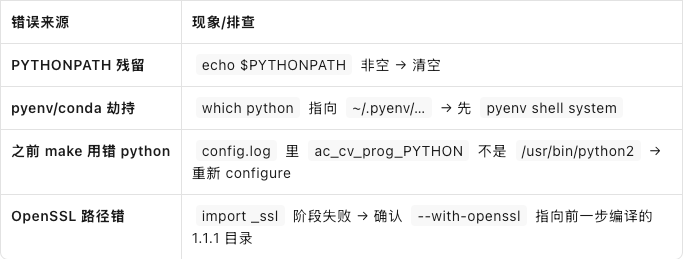
4. 设置全局软链与变量
powershell
sudo ln -s /usr/local/python3.10/bin/python3.10 /usr/bin/python3
sudo ln -s /usr/local/python3.10/bin/pip3.10 /usr/bin/pip3
echo 'export PATH=/usr/local/python3.10/bin:$PATH' | sudo tee -a /etc/profile
source /etc/profile
验证:
powershell
# Python 3.10.12
python3 -V
# 21.x+
pip3 -V
5. 修复 yum(CentOS 7 用 Python 2)
powershell
sudo sed -i 's|^#!/usr/bin/python$|#!/usr/bin/python2|' /usr/bin/yum
sudo sed -i 's|^#!/usr/bin/python$|#!/usr/bin/python2|' /usr/libexec/urlgrabber-ext-down
6. 国内 pip 源 & 更新
powershell
mkdir -p ~/.pip
cat > ~/.pip/pip.conf <<EOF
[global]
index-url = https://mirrors.aliyun.com/pypi/simple/
trusted-host = mirrors.aliyun.com
EOF
pip3 install -U pip setuptools