gpio
设备树

在/下新建节点,因为没有复用需求所以不需要pinctrl
bash
test{
			compatible = "rk,mytest";
			test-gpio = <&gpio1 RK_PA2 GPIO_ACTIVE_LOW>;
			status = "okay";
	};
驱动程序(mygpio.c)
cpp
#include <linux/types.h>
#include <linux/kernel.h>
#include <linux/delay.h>
#include <linux/init.h>
#include <linux/module.h>
#include <linux/errno.h>
#include <linux/gpio.h>
#include <linux/cdev.h>
#include <linux/device.h>
#include <asm/mach/map.h>
#include <asm/uaccess.h>
#include <asm/io.h>
#include <linux/of_address.h>
#include <linux/of_gpio.h>
#include <linux/of.h>

#define mygpio_CNT         1
#define mygpio_NAME        "mygpio"
#define LEDON               1
#define LEDOFF              0

struct mygpio_dev{
    dev_t devid;
    struct cdev cdev;
    struct class *class;
    struct device *device;
    int major;
    int minor;
    struct device_node  *nd;
    int gpio_id;
};

struct mygpio_dev mygpio;

static int mygpio_open(struct inode *inode, struct file *filp)
{
    filp->private_data = &mygpio;
    return 0;
}

static ssize_t mygpio_read(struct file *filp, char __user *buf, size_t cnt, loff_t *offt)
{
    return 0;
}

static ssize_t mygpio_write(struct file *filp, const char __user *buf, size_t cnt, loff_t *offt)
{
    int retvalue;
    unsigned char databuf[1];
    unsigned char gpiostat;
    struct mygpio_dev *dev = filp->private_data;

    retvalue = copy_from_user(databuf,buf,cnt);
    if(retvalue < 0){
        printk("kernel write failed!\r\n");
        return -EINVAL;
    }

    gpiostat = databuf[0];

    if(gpiostat == LEDON){
        gpio_set_value(dev->gpio_id,0);
    }else if(gpiostat == LEDOFF){
        gpio_set_value(dev->gpio_id,1);
    }
    return 0;
}

static int mygpio_release(struct inode *inode, struct file *filp)
{
    return 0;
}


static struct file_operations mygpio_fops = {
    .owner = THIS_MODULE,
    .open  = mygpio_open,
    .read  = mygpio_read,
    .write = mygpio_write,
    .release = mygpio_release,
};

static int __init helloworld_init(void) //驱动入口函数
{
    int ret = 0;
    const char *str;
    /*使用设备树获取gpio节点*/
    mygpio.nd = of_find_node_by_path("/test");
    if(mygpio.nd == NULL){
        printk("mygpio node not find!\r\n");
        return -EINVAL;
    }else{
        printk("mygpio node find!\r\n");
    }

    ret = of_property_read_string(mygpio.nd,"test-gpio",&str);
    if(ret<0)
        return -EINVAL;

    ret = of_property_read_string(mygpio.nd,"compatible",&str);
    if(strcmp(str,"rk,mytest")){
        printk("rkgpio:Compatible match failed\n");
        return -EINVAL;
    }

    mygpio.gpio_id = of_get_named_gpio(mygpio.nd,"test-gpio",0);
    if(mygpio.gpio_id <0){
        printk("can't get test-gpio\r\n");
        return -EINVAL;
    }
    printk("test-gpio num = %d\r\n",mygpio.gpio_id);

    ret = gpio_direction_output(mygpio.gpio_id,1);
    if(ret < 0){
        printk("can't set gpio!\r\n");
        return -EINVAL;
    }

    if(mygpio.major){
        mygpio.devid = MKDEV(mygpio.major,0);
        register_chrdev_region(mygpio.devid,mygpio_CNT,mygpio_NAME);
    }else{
        alloc_chrdev_region(&mygpio.devid,0,mygpio_CNT,mygpio_NAME);
        mygpio.major = MAJOR(mygpio.devid);
        mygpio.minor = MINOR(mygpio.devid);
    }
    printk("major = %d,minor = %d",mygpio.major,mygpio.minor);

    mygpio.cdev.owner = THIS_MODULE;
    cdev_init(&mygpio.cdev,&mygpio_fops);
    cdev_add(&mygpio.cdev,mygpio.devid,mygpio_CNT);

    mygpio.class = class_create(THIS_MODULE,mygpio_NAME);
    if(IS_ERR(mygpio.class)){
        return PTR_ERR(mygpio.class);
    }

    mygpio.device = device_create(mygpio.class,NULL,mygpio.devid,NULL,mygpio_NAME);
    if(IS_ERR(mygpio.device)){
        return PTR_ERR(mygpio.device);
    }
    return 0;

    printk("gpio_init\r\n");//注意: 内核打印用 printk 而不是 printf
    return 0;
}
static void __exit helloworld_exit(void) //驱动出口函数
{
    printk("helloworld_exit\r\n");
}


module_init(helloworld_init); //告诉linux模块入口函数,加载模块代码到操作系统
module_exit(helloworld_exit); //卸载
MODULE_LICENSE("GPL v2"); //同意 GPL 开源协议
MODULE_VERSION("1.0"); //驱动的版本
MODULE_DESCRIPTION("helloworld Driver");  //lsmod
测试用应用程序(mygpioApp.c)
cpp
#include "stdio.h"
#include "unistd.h"
#include "sys/types.h"
#include "sys/stat.h"
#include "fcntl.h"
#include "stdlib.h"
#include "string.h"


#define LEDOFF 	0
#define LEDON 	1

int main(int argc, char *argv[])
{
	int fd, retvalue;
	char *filename;
	unsigned char databuf[1];

	if(argc != 3){
		printf("Error Usage!\r\n");
		return -1;
	}

	filename = argv[1];

	/* 打开led驱动 */
	fd = open(filename, O_RDWR);
	if(fd < 0){
		printf("file %s open failed!\r\n", argv[1]);
		return -1;
	}

	databuf[0] = atoi(argv[2]);	/* 要执行的操作:打开或关闭 */

	/* 向/dev/led文件写入数据 */
	retvalue = write(fd, databuf, sizeof(databuf));
	if(retvalue < 0){
		printf("LED Control Failed!\r\n");
		close(fd);
		return -1;
	}

	retvalue = close(fd); /* 关闭文件 */
	if(retvalue < 0){
		printf("file %s close failed!\r\n", argv[1]);
		return -1;
	}
	return 0;
}
Makefile
bash
# 设置平台架构
export ARCH=arm
# 交叉编译器前缀(注意:原代码中=后有空格,这里修正为无空格,否则会报错)
export CROSS_COMPILE=/home/lubancat/rk3506/rk3506_linux6.1_bsp/prebuilts/gcc/linux-x86/arm/gcc-arm-10.3-2021.07-x86_64-arm-none-linux-gnueabihf/bin/arm-none-linux-gnueabihf-

# 驱动模块编译配置
obj-m := mygpio.o
# 内核源码目录
KDIR := /home/lubancat/rk3506/rk3506_linux6.1_bsp/build-iot_nand-evm/kernel
# 当前目录
PWD ?= $(shell pwd)

# 应用程序名称(可根据你的实际文件名修改)
APP_NAME := mygpioApp
# 应用程序源码文件(假设你的应用程序源码是 gpioApp.c,可根据实际修改)
APP_SRC := mygpioApp.c

# 核心目标:先编译驱动,再编译应用程序
all: modules app

# 编译驱动模块的规则
modules:
	make -C $(KDIR) M=$(PWD) modules

# 编译应用程序的规则
app:
	$(CROSS_COMPILE)gcc -o $(APP_NAME) $(APP_SRC) -Wall

# 清理规则:同时清理驱动和应用程序
clean:
	make -C $(KDIR) M=$(PWD) clean
	rm -rf $(APP_NAME)  # 删除编译出的应用程序可执行文件
移植到板子(/mnt)
1.将生成的.ko文件推送到设备:adb push hello.ko /mnt/hello.ko
-
设置文件权限:
chmod 777 /mnt/hello.ko -
加载模块:
insmod ``/mnt/``hello.ko -
查看已加载模块:
lsmod
platfrom
设备树
驱动程序
测试用应用程序
Makefile
irq
设备树
驱动程序
测试用应用程序
Makefile
iic
设备树
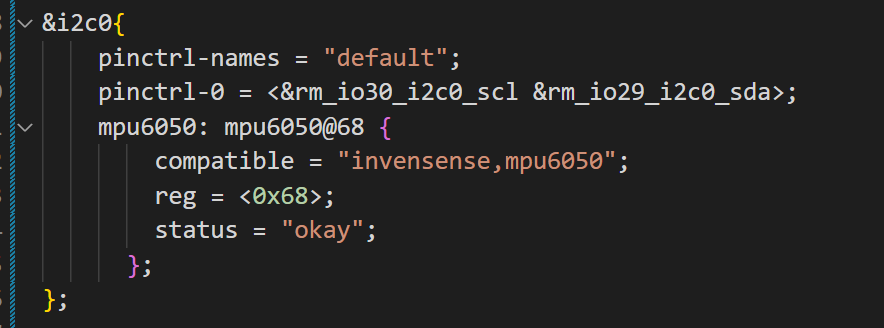
在编写设备树和映射设备树文件之后发现原先dtsi的引脚在我的板子上没有因此我们需要在dts里面重新写上pintcrl来实现硬件信息的覆盖