在React Native中开发一个组件来查找最长回文子串,你可以遵循以下步骤。这个过程涉及到编写一个React Native组件,并在其中实现最长回文子串的算法。这里,我们将使用中心扩展法(Center Expansion Algorithm)来实现这个功能。
步骤 1: 创建React Native项目
如果你还没有创建React Native项目,可以使用以下命令来创建一个:
bash
npx react-native init LongestPalindromeApp
cd LongestPalindromeApp
步骤 2: 创建组件
在项目中创建一个新的组件,例如LongestPalindrome.js。
javascript
import React, { useState } from 'react';
import { View, TextInput, Text, Button } from 'react-native';

const LongestPalindrome = () => {
    const [inputText, setInputText] = useState('');
    const [longestPalindrome, setLongestPalindrome] = useState('');

    const findLongestPalindrome = () => {
        if (!inputText) return;
        let start = 0, maxLength = 0;
        const expandAroundCenter = (left, right) => {
            while (left >= 0 && right < inputText.length && inputText[left] === inputText[right]) {
                if (right - left + 1 > maxLength) {
                    maxLength = right - left + 1;
                    start = left;
                }
                left--;
                right++;
            }
        };

        for (let i = 0; i < inputText.length; i++) {
            expandAroundCenter(i, i); // Odd length palindromes
            expandAroundCenter(i, i + 1); // Even length palindromes
        }
        setLongestPalindrome(inputText.substring(start, start + maxLength));
    };

    return (
        <View>
            <TextInput
                placeholder="Enter text"
                value={inputText}
                onChangeText={setInputText}
            />
            <Button title="Find Longest Palindrome" onPress={findLongestPalindrome} />
            <Text>Longest Palindrome: {longestPalindrome}</Text>
        </View>
    );
};

export default LongestPalindrome;
步骤 3: 在App中使用组件
在App.js中引入并使用这个组件:
javascript
import React from 'react';
import { View } from 'react-native';
import LongestPalindrome from './LongestPalindrome'; // 确保路径正确

const App = () => {
  return (
    <View style={{ flex: 1, justifyContent: 'center', alignItems: 'center' }}>
      <LongestPalindrome />
    </View>
  );
};

export default App;
步骤 4: 运行应用
确保你的环境设置正确,然后运行应用:
bash
npx react-native run-Harmony 或者 npx react-native run-Harmony,取决于你的平台。解释:
- 中心扩展法:这是一种有效的方法来找到最长回文子串。它通过选择字符串中的每个字符作为中心,尝试向两边扩展直到不能再扩展为止。这种方法既可以用于寻找奇数长度的回文,也可以用于寻找偶数长度的回文。
- React Native组件:我们在组件中使用了
TextInput来输入字符串,并使用Button触发查找最长回文子串的函数。结果显示在Text组件中。
这样,你就可以在React Native应用中实现并使用最长回文子串的算法了。
真实案例场景演示风格:
js
// app.tsx
import React, { useState } from 'react';
import { SafeAreaView, View, Text, StyleSheet, TouchableOpacity, ScrollView, Modal } from 'react-native';

// Base64 图标库(使用React Native兼容的格式)
const ICONS = {
  play: 'PHN2ZyB4bWxucz0iaHR0cDovL3d3dy53My5vcmcvMjAwMC9zdmciIHZpZXdCb3g9IjAgMCAyNCAyNCIgZmlsbD0id2hpdGUiPjxwYXRoIGQ9Ik04IDV2MTRsMTEtN3oiLz48L3N2Zz4=',
  refresh: 'PHN2ZyB4bWxucz0iaHR0cDovL3d3dy53My5vcmcvMjAwMC9zdmciIHZpZXdCb3g9IjAgMCAyNCAyNCIgZmlsbD0id2hpdGUiPjxwYXRoIGQ9Ik0xNy42NSA2LjM1QzE2LjIgNC45IDE0LjIxIDQgMTIgNEM3LjU4IDQgNCA3LjU4IDQgMTJzMy41OCA4IDEyIDggOC0zLjU4IDgtM2MwLTIuMjEtLjg5LTQuMjEtMi4zNS01LjY1em0tMy41NCA5LjI5bC0xLjQyLTEuNDJDNy4wOSAxMy45NSA0LjUgMTEuNzUgNC41IDEyYzAtMy4zMSAyLjY5LTYgNi02czYgMi42OSA2IDZjMCAuMjUtLjA1LjQ5LS4xNC43M2wtMS40Mi0xLjQyQzE0LjUzIDEwLjk0IDEzLjI4IDEwLjI1IDEyIDEwLjI1Yy0xLjI4IDAtMi41My42OS0zLjE0IDEuNjdsLTEuNDItMS40MkM4LjUgOC45NyAxMC4xNCA4IDEyIDhzMy41IDEuOTcgNC41NiAzLjV6Ii8+PC9zdmc+',
  info: 'PHN2ZyB4bWxucz0iaHR0cDovL3d3dy53My5vcmcvMjAwMC9zdmciIHZpZXdCb3g9IjAgMCAyNCAyNCIgZmlsbD0id2hpdGUiPjxwYXRoIGQ9Ik0xMiAyQzYuNDcgMiAyIDYuNDcgMiAxMnM0LjQ3IDEwIDEwIDEwIDEwLTQuNDcgMTAtMTBTMTcuNTMgMiAxMiAyem0xIDE1aC0ydjJoMnYtMnptMC02aC0ydjVoMnYtNXoiLz48L3N2Zz4=',
  chart: 'PHN2ZyB4bWxucz0iaHR0cDovL3d3dy53My5vcmcvMjAwMC9zdmciIHZpZXdCb3g9IjAgMCAyNCAyNCIgZmlsbD0id2hpdGUiPjxwYXRoIGQ9Ik0zIDEzdi0yYzAtLjU1LjQ1LTEgMS0xaDZjLjU1IDAgMSAuNDUgMSAxdjJjMCAuNTUtLjQ1IDEtMSAxaC02Yy0uNTUgMC0xLS40NS0xLTF6bTEyIDB2LTJjMC0uNTUuNDUtMSAxLTFoNmMuNTUgMCAxIC40NSAxIDF2MmMwIC41NS0uNDUgMS0xIDFoLTZjLS41NSAwLTEtLjQ1LTEtMXptLTYtN3YyYzAgLjU1LS40NSAxLTEgMWgtNmMtLjU1IDAtMS0uNDUtMS0xVjZjMC0uNTUuNDUtMSAxLTFoNmMuNTUgMCAxIC40NSAxIDF6Ii8+PC9zdmc+',
  close: 'PHN2ZyB4bWxucz0iaHR0cDovL3d3dy53My5vcmcvMjAwMC9zdmciIHZpZXdCb3g9IjAgMCAyNCAyNCIgZmlsbD0id2hpdGUiPjxwYXRoIGQ9Ik0xOSA2LjQxTDE3LjU5IDUgMTIgMTAuNTkgNi40MSA1IDUgNi40MSAxMC41OSAxMiA1IDE3LjU5IDYuNDEgMTkgMTIgMTMuNDEgMTcuNTkgMTkgMTkgMTcuNTkgMTMuNDEgMTJ6Ii8+PC9zdmc+'
};

// 默认测试数据
const DEFAULT_STRINGS = [
  { id: 1, name: '示例字符串 1', data: 'babad' },
  { id: 2, name: '示例字符串 2', data: 'cbbd' },
  { id: 3, name: '示例字符串 3', data: 'racecar' },
  { id: 4, name: '示例字符串 4', data: 'abcdef' }
];

// 最长回文子串算法实现
const palindromeAlgorithms = {
  // 中心扩展法 O(n²)
  expandAroundCenter: (s: string): { length: number; substring: string } => {
    if (!s || s.length < 1) return { length: 0, substring: '' };

    let start = 0;
    let maxLength = 0;

    for (let i = 0; i < s.length; i++) {
      // 奇数长度回文
      const len1 = expandFromCenter(s, i, i);
      // 偶数长度回文
      const len2 = expandFromCenter(s, i, i + 1);
      const len = Math.max(len1, len2);

      if (len > maxLength) {
        maxLength = len;
        start = i - Math.floor((len - 1) / 2);
      }
    }

    return {
      length: maxLength,
      substring: s.substring(start, start + maxLength)
    };
  },

  // Manacher算法 O(n)
  manacher: (s: string): { length: number; substring: string } => {
    if (!s || s.length < 1) return { length: 0, substring: '' };

    // 预处理字符串
    const processed = '#';
    for (let i = 0; i < s.length; i++) {
      processed += s[i] + '#';
    }

    const n = processed.length;
    const p: number[] = new Array(n).fill(0);
    let center = 0;
    let right = 0;

    for (let i = 0; i < n; i++) {
      const mirror = 2 * center - i;

      if (i < right) {
        p[i] = Math.min(right - i, p[mirror]);
      }

      // 尝试扩展回文
      let a = i + (1 + p[i]);
      let b = i - (1 + p[i]);

      while (a < n && b >= 0 && processed[a] === processed[b]) {
        p[i]++;
        a++;
        b--;
      }

      if (i + p[i] > right) {
        center = i;
        right = i + p[i];
      }
    }

    // 找到最长回文
    let maxLen = 0;
    let centerIndex = 0;
    for (let i = 0; i < n; i++) {
      if (p[i] > maxLen) {
        maxLen = p[i];
        centerIndex = i;
      }
    }

    const start = Math.floor((centerIndex - maxLen) / 2);
    return {
      length: maxLen,
      substring: s.substring(start, start + maxLen)
    };
  }
};

// 辅助函数:从中心扩展
const expandFromCenter = (s: string, left: number, right: number): number => {
  while (left >= 0 && right < s.length && s[left] === s[right]) {
    left--;
    right++;
  }
  return right - left - 1;
};

// Base64 解码函数(React Native 兼容)
const decodeBase64 = (str: string): string => {
  // 使用 React Native 提供的 Buffer 或其他库
  try {
    // 在 React Native 中,可以使用 Buffer
    if (typeof Buffer !== 'undefined') {
      return Buffer.from(str, 'base64').toString('utf-8');
    }
    // 如果 Buffer 不可用,尝试使用原生 atob(在某些 React Native 环境中可能可用)
    if (typeof atob !== 'undefined') {
      return atob(str);
    }
  } catch (e) {
    console.warn('Base64 解码失败:', e);
  }
  return '';
};

const PalindromeComparison: React.FC = () => {
  const [strings] = useState(DEFAULT_STRINGS);
  const [selectedString, setSelectedString] = useState<any>(null);
  const [results, setResults] = useState<any>(null);
  const [modalVisible, setModalVisible] = useState(false);
  const [infoModalVisible, setInfoModalVisible] = useState(false);

  // 运行算法对比
  const runComparison = (stringData: any) => {
    setSelectedString(stringData);

    const expandResult = palindromeAlgorithms.expandAroundCenter(stringData.data);
    const manacherResult = palindromeAlgorithms.manacher(stringData.data);

    setResults({
      expand: expandResult,
      manacher: manacherResult
    });

    setModalVisible(true);
  };

  // 渲染图标(使用文本替代SVG)
  const renderIcon = (iconName: string, style: any) => {
    // 为每个图标返回一个文本表示
    const iconMap: { [key: string]: string } = {
      play: '▶',
      refresh: '🔄',
      info: 'ℹ',
      chart: '📊',
      close: '✕'
    };

    return (
      <Text style={[styles.iconText, style]}>
        {iconMap[iconName] || '□'}
      </Text>
    );
  };

  return (
    <SafeAreaView style={styles.container}>
      <View style={styles.header}>
        <Text style={styles.title}>🔄 最长回文子串算法对比</Text>
        <Text style={styles.subtitle}>Longest Palindromic Substring 算法分析</Text>

        <TouchableOpacity
          style={styles.infoButton}
          onPress={() => setInfoModalVisible(true)}
        >
          {renderIcon('info', styles.infoIcon)}
        </TouchableOpacity>
      </View>

      <ScrollView contentContainerStyle={styles.content}>
        <View style={styles.stringList}>
          {strings.map((stringData) => (
            <View key={stringData.id} style={styles.stringCard}>
              <View style={styles.stringHeader}>
                <Text style={styles.stringName}>{stringData.name}</Text>
                <Text style={styles.stringLength}>长度: {stringData.data.length}</Text>
              </View>

              <View style={styles.stringData}>
                <Text style={styles.stringText}>
                  "{stringData.data}"
                </Text>
              </View>

              <TouchableOpacity
                style={styles.runButton}
                onPress={() => runComparison(stringData)}
              >
                {renderIcon('play', styles.playIcon)}
                <Text style={styles.runButtonText}>运行对比</Text>
              </TouchableOpacity>
            </View>
          ))}
        </View>
      </ScrollView>

      {/* 算法对比结果模态框 */}
      <Modal
        animationType="slide"
        transparent={true}
        visible={modalVisible}
        onRequestClose={() => setModalVisible(false)}
      >
        <View style={styles.modalOverlay}>
          <View style={styles.modalContent}>
            <View style={styles.modalHeader}>
              <Text style={styles.modalTitle}>算法对比结果</Text>
              <TouchableOpacity onPress={() => setModalVisible(false)}>
                <Text style={styles.closeButton}>✕</Text>
              </TouchableOpacity>
            </View>

            {selectedString && results && (
              <ScrollView style={styles.modalBody}>
                <View style={styles.resultSection}>
                  <Text style={styles.sectionTitle}>原始字符串</Text>
                  <View style={styles.stringDisplay}>
                    <Text style={styles.stringDisplayText}>
                      "{selectedString.data}"
                    </Text>
                  </View>
                </View>

                <View style={styles.algorithmComparison}>
                  <View style={styles.algorithmCard}>
                    <Text style={styles.algorithmTitle}>中心扩展法</Text>
                    <Text style={styles.algorithmComplexity}>时间复杂度: O(n²)</Text>
                    <View style={styles.resultRow}>
                      <Text style={styles.resultLabel}>最长回文:</Text>
                      <Text style={styles.resultValue}>"{results.expand.substring}"</Text>
                    </View>
                    <View style={styles.resultRow}>
                      <Text style={styles.resultLabel}>长度:</Text>
                      <Text style={styles.resultValue}>{results.expand.length}</Text>
                    </View>
                  </View>

                  <View style={styles.algorithmCard}>
                    <Text style={styles.algorithmTitle}>Manacher算法</Text>
                    <Text style={styles.algorithmComplexity}>时间复杂度: O(n)</Text>
                    <View style={styles.resultRow}>
                      <Text style={styles.resultLabel}>最长回文:</Text>
                      <Text style={styles.resultValue}>"{results.manacher.substring}"</Text>
                    </View>
                    <View style={styles.resultRow}>
                      <Text style={styles.resultLabel}>长度:</Text>
                      <Text style={styles.resultValue}>{results.manacher.length}</Text>
                    </View>
                  </View>
                </View>

                <View style={styles.conclusionSection}>
                  <Text style={styles.conclusionTitle}>结论</Text>
                  <Text style={styles.conclusionText}>
                    两种算法得出的最长回文子串长度相同,均为 {results.expand.length}。
                    Manacher算法在大数据集上性能更优。
                  </Text>
                </View>
              </ScrollView>
            )}
          </View>
        </View>
      </Modal>

      {/* 算法说明模态框 */}
      <Modal
        animationType="slide"
        transparent={true}
        visible={infoModalVisible}
        onRequestClose={() => setInfoModalVisible(false)}
      >
        <View style={styles.modalOverlay}>
          <View style={styles.infoModalContent}>
            <View style={styles.modalHeader}>
              <Text style={styles.modalTitle}>算法说明</Text>
              <TouchableOpacity onPress={() => setInfoModalVisible(false)}>
                <Text style={styles.closeButton}>✕</Text>
              </TouchableOpacity>
            </View>

            <ScrollView style={styles.infoModalBody}>
              <Text style={styles.infoTitle}>最长回文子串问题</Text>
              <Text style={styles.infoText}>
                寻找一个字符串中最长的回文子串。
                回文是指正读和反读都相同的字符串,如 "racecar"。
              </Text>

              <Text style={styles.infoSubtitle}>中心扩展法</Text>
              <Text style={styles.infoText}>
                • 时间复杂度: O(n²){'\n'}
                • 空间复杂度: O(1){'\n'}
                • 以每个字符为中心向两边扩展
              </Text>

              <Text style={styles.infoSubtitle}>Manacher算法</Text>
              <Text style={styles.infoText}>
                • 时间复杂度: O(n){'\n'}
                • 空间复杂度: O(n){'\n'}
                • 预处理字符串后一次遍历
              </Text>

              <Text style={styles.infoSubtitle}>应用场景</Text>
              <Text style={styles.infoText}>
                • DNA序列分析{'\n'}
                • 文本处理{'\n'}
                • 字符串匹配{'\n'}
                • 算法竞赛
              </Text>
            </ScrollView>
          </View>
        </View>
      </Modal>
    </SafeAreaView>
  );
};

const styles = StyleSheet.create({
  container: {
    flex: 1,
    backgroundColor: '#f3e8ff',
  },
  header: {
    paddingTop: 30,
    paddingBottom: 20,
    paddingHorizontal: 20,
    backgroundColor: '#ffffff',
    borderBottomWidth: 1,
    borderBottomColor: '#e9d5ff',
    flexDirection: 'row',
    justifyContent: 'space-between',
    alignItems: 'center',
  },
  title: {
    fontSize: 22,
    fontWeight: 'bold',
    color: '#7e22ce',
  },
  subtitle: {
    fontSize: 13,
    color: '#8b5cf6',
    marginTop: 4,
  },
  infoButton: {
    width: 36,
    height: 36,
    borderRadius: 18,
    backgroundColor: '#e9d5ff',
    alignItems: 'center',
    justifyContent: 'center',
  },
  infoIcon: {
    fontSize: 20,
    color: '#8b5cf6',
  },
  iconText: {
    fontSize: 20,
  },
  content: {
    padding: 16,
  },
  stringList: {
    // String list styles
  },
  stringCard: {
    backgroundColor: '#ffffff',
    borderRadius: 16,
    padding: 20,
    marginBottom: 16,
    elevation: 4,
    shadowColor: '#000',
    shadowOffset: { width: 0, height: 2 },
    shadowOpacity: 0.1,
    shadowRadius: 8,
  },
  stringHeader: {
    flexDirection: 'row',
    justifyContent: 'space-between',
    alignItems: 'center',
    marginBottom: 15,
  },
  stringName: {
    fontSize: 18,
    fontWeight: 'bold',
    color: '#7e22ce',
  },
  stringLength: {
    fontSize: 14,
    color: '#8b5cf6',
  },
  stringData: {
    backgroundColor: '#f3e8ff',
    borderRadius: 10,
    padding: 12,
    marginBottom: 15,
  },
  stringText: {
    fontSize: 14,
    color: '#9333ea',
    textAlign: 'center',
  },
  runButton: {
    flexDirection: 'row',
    alignItems: 'center',
    justifyContent: 'center',
    backgroundColor: '#a855f7',
    paddingVertical: 12,
    borderRadius: 12,
  },
  playIcon: {
    fontSize: 18,
    color: '#ffffff',
    marginRight: 8,
  },
  runButtonText: {
    fontSize: 16,
    fontWeight: 'bold',
    color: '#ffffff',
  },
  modalOverlay: {
    flex: 1,
    backgroundColor: 'rgba(0, 0, 0, 0.5)',
    justifyContent: 'center',
    alignItems: 'center',
  },
  modalContent: {
    backgroundColor: '#ffffff',
    width: '90%',
    height: '80%',
    borderRadius: 20,
    overflow: 'hidden',
  },
  infoModalContent: {
    backgroundColor: '#ffffff',
    width: '90%',
    height: '70%',
    borderRadius: 20,
    overflow: 'hidden',
  },
  modalHeader: {
    flexDirection: 'row',
    justifyContent: 'space-between',
    alignItems: 'center',
    padding: 20,
    borderBottomWidth: 1,
    borderBottomColor: '#e9d5ff',
    backgroundColor: '#f3e8ff',
  },
  modalTitle: {
    fontSize: 20,
    fontWeight: 'bold',
    color: '#7e22ce',
  },
  closeButton: {
    fontSize: 30,
    color: '#d8b4fe',
    fontWeight: '200',
  },
  modalBody: {
    flex: 1,
    padding: 20,
  },
  infoModalBody: {
    flex: 1,
    padding: 20,
  },
  resultSection: {
    marginBottom: 20,
  },
  sectionTitle: {
    fontSize: 18,
    fontWeight: 'bold',
    color: '#7e22ce',
    marginBottom: 10,
  },
  stringDisplay: {
    backgroundColor: '#f3e8ff',
    borderRadius: 10,
    padding: 15,
  },
  stringDisplayText: {
    fontSize: 16,
    color: '#9333ea',
    textAlign: 'center',
  },
  algorithmComparison: {
    flexDirection: 'row',
    justifyContent: 'space-between',
    marginBottom: 20,
  },
  algorithmCard: {
    width: '48%',
    backgroundColor: '#f3e8ff',
    borderRadius: 12,
    padding: 15,
  },
  algorithmTitle: {
    fontSize: 16,
    fontWeight: 'bold',
    color: '#7e22ce',
    marginBottom: 5,
  },
  algorithmComplexity: {
    fontSize: 12,
    color: '#8b5cf6',
    marginBottom: 10,
  },
  resultRow: {
    marginBottom: 8,
  },
  resultLabel: {
    fontSize: 14,
    color: '#8b5cf6',
    fontWeight: '600',
  },
  resultValue: {
    fontSize: 14,
    color: '#9333ea',
    fontWeight: 'bold',
  },
  conclusionSection: {
    backgroundColor: '#e9d5ff',
    borderRadius: 12,
    padding: 15,
  },
  conclusionTitle: {
    fontSize: 16,
    fontWeight: 'bold',
    color: '#7e22ce',
    marginBottom: 8,
  },
  conclusionText: {
    fontSize: 14,
    color: '#8b5cf6',
    lineHeight: 20,
  },
  infoTitle: {
    fontSize: 20,
    fontWeight: 'bold',
    color: '#7e22ce',
    marginBottom: 15,
    textAlign: 'center',
  },
  infoText: {
    fontSize: 15,
    color: '#8b5cf6',
    lineHeight: 22,
    marginBottom: 15,
  },
  infoSubtitle: {
    fontSize: 17,
    fontWeight: 'bold',
    color: '#7e22ce',
    marginBottom: 10,
  },
});

export default PalindromeComparison;
这段代码实现了一个用于对比两种最长回文子串算法(中心扩展法和Manacher算法)的React Native组件。它提供了直观的界面来展示不同算法在处理相同输入时的性能和结果差异,同时考虑到了移动端的兼容性。
在鸿蒙系统环境下,虽然此代码是为React Native设计的,但其核心算法逻辑完全适用于鸿蒙ArkTS开发环境。鸿蒙系统支持类React语法的ArkTS框架,因此算法部分可以直接迁移。需要注意的是,鸿蒙环境下Base64解码可能需要调用@ohos.buffer模块,而React Native的Buffer或atob函数需要替换为鸿蒙对应的API。
中心扩展法通过遍历字符串的每个字符作为回文中心,分别处理奇数和偶数长度的回文情况,时间复杂度为O(n²)。Manacher算法则通过预处理字符串并利用回文的对称性质,将时间复杂度优化至O(n),是目前最优的回文子串算法之一。
在鸿蒙开发中,这种算法对比工具可以作为性能分析模块集成到文本处理应用中。鸿蒙系统的分布式能力还可以让算法运行在不同的设备上,充分利用多设备的计算资源。此外,鸿蒙的声明式UI框架能够提供更流畅的动画效果和更优的渲染性能,使算法执行过程的可视化展示更加生动。
这段代码实现了一个用于对比两种最长回文子串算法(中心扩展法和Manacher算法)的React Native组件。它提供了直观的界面来展示不同算法在处理相同输入时的性能和结果差异,同时考虑到了移动端的兼容性。
在鸿蒙系统环境下,虽然此代码是为React Native设计的,但其核心算法逻辑完全适用于鸿蒙ArkTS开发环境。鸿蒙系统支持类React语法的ArkTS框架,因此算法部分可以直接迁移。需要注意的是,鸿蒙环境下Base64解码可能需要调用@ohos.buffer模块,而React Native的Buffer或atob函数需要替换为鸿蒙对应的API。
打包
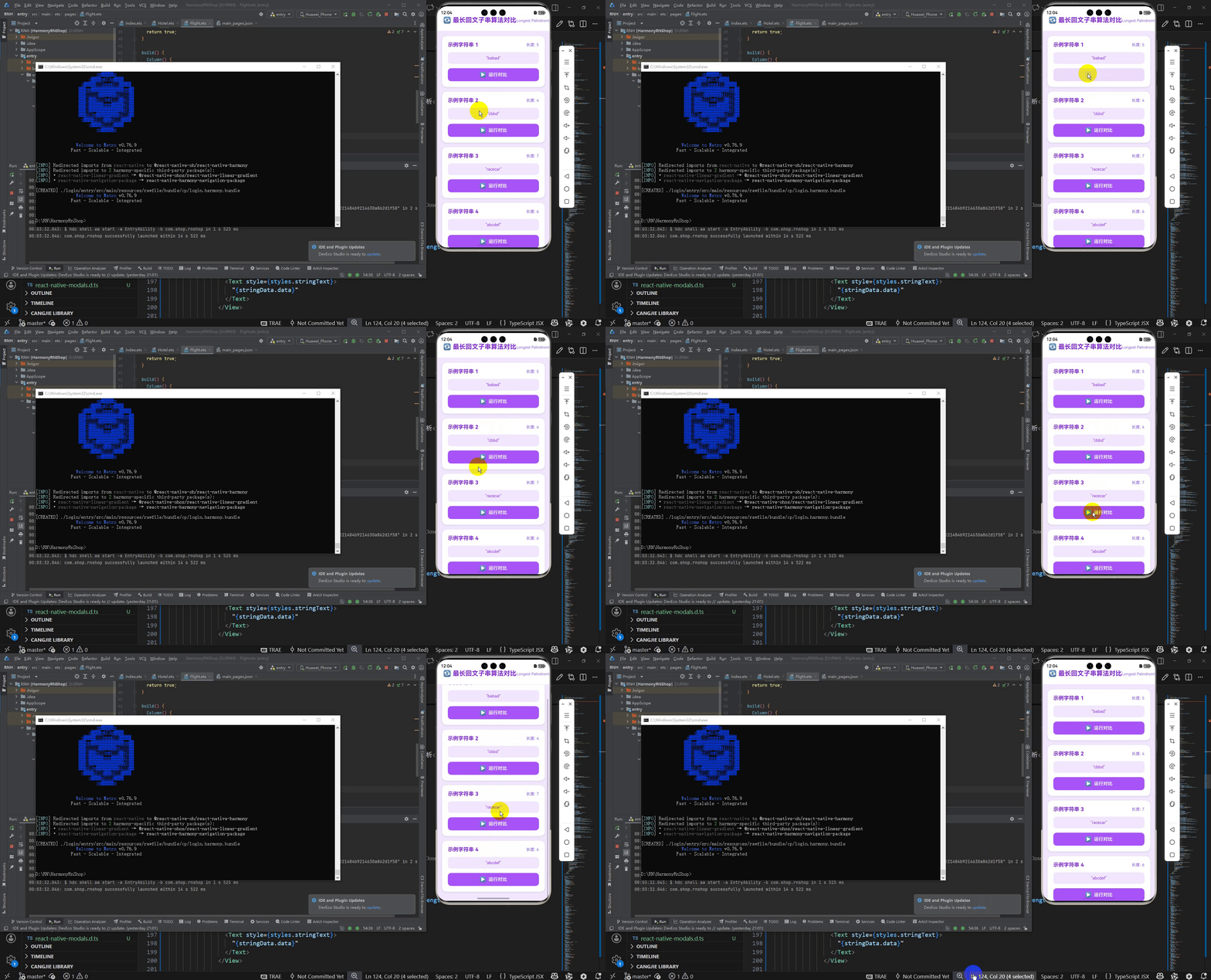
接下来通过打包命令npn run harmony将reactNative的代码打包成为bundle,这样可以进行在开源鸿蒙OpenHarmony中进行使用。

打包之后再将打包后的鸿蒙OpenHarmony文件拷贝到鸿蒙的DevEco-Studio工程目录去:

最后运行效果图如下显示: